
We have all been there. You open ChatGPT, you feel lazy, and you type: “Write an email to my boss about the project.” The AI generates a generic, robotic, and boring email. You sigh, rewrite the prompt, get another bad result, and waste 10 minutes iterating.
The problem isn’t the AI. The problem is your prompt.
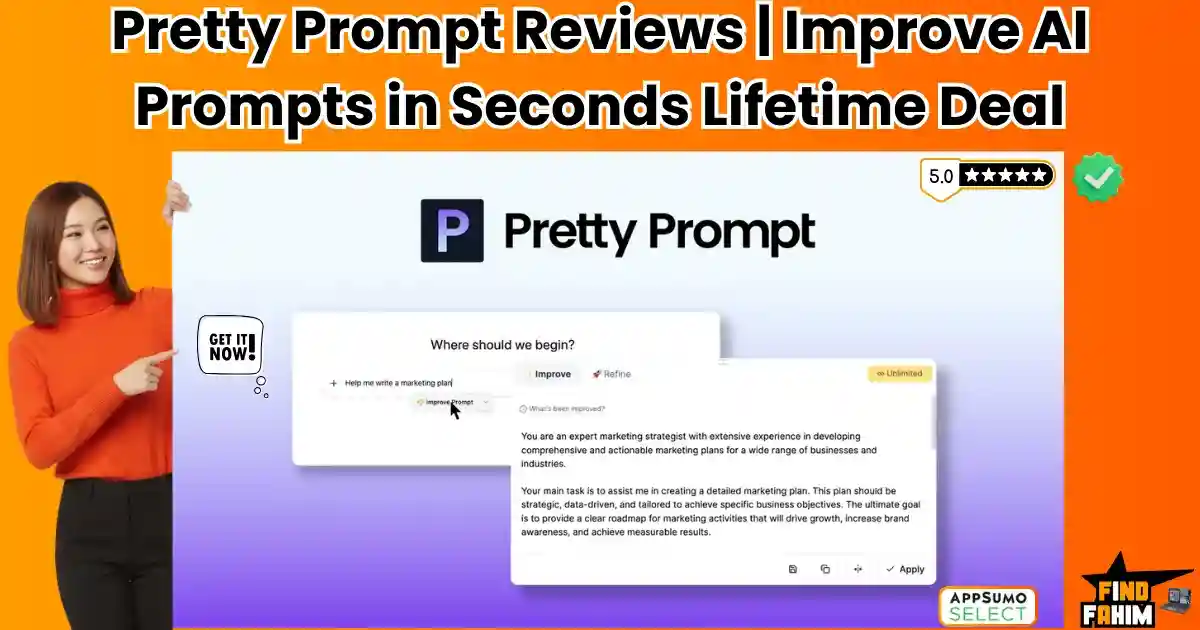
Pretty Prompt lifetime deal is the solution to “Lazy Prompting.” It is a Chrome extension that lives inside your ChatGPT, Claude, and Gemini chat boxes. You type your lazy idea, click one button, and it instantly transforms it into a structured, context-rich “Mega-Prompt” that gets perfect results on the first try.
With a strong 4.8-star rating on AppSumo, this tool claims to be the “spellcheck for AI logic.” In this in-depth Pretty Prompt review, we are testing if this $34 lifetime deal is a must-have productivity hack or just a gimmick.
My Quick Take (TL;DR)
I think you’re here because you know your prompts could be better, but you don’t want to spend 20 minutes “engineering” them. You want a shortcut. Here is my direct take.
- What is it? Pretty Prompt is a browser extension that acts as a “Prompt Editor.” It automatically rewrites your raw text into optimized instructions.
- Why is it a Game-Changer? The “Refine” feature. Instead of just guessing, it interviews you. It asks: “Who is the audience? What is the tone?” and then builds the prompt based on your answers.
- Who is it for? Marketers, Content Creators, Vibe Coders, and anyone who uses AI daily but isn’t a “Prompt Engineer.”
- The AppSumo Deal: This is a lifetime deal starting at $34. It is available in 4 Tiers.
- My Verdict: If you use ChatGPT professionally, this pays for itself in one hour. It turns “Average” users into “Power” users instantly. Tier 1 ($34) is a no-brainer entry point.
Check the Pretty Prompt Lifetime Deal on AppSumo Now!
What is Pretty Prompt?
The best way to describe this tool is as “Grammarly for Prompts.”
Just as Grammarly fixes your spelling before you send an email, Pretty Prompt fixes your logic before you send it to ChatGPT.
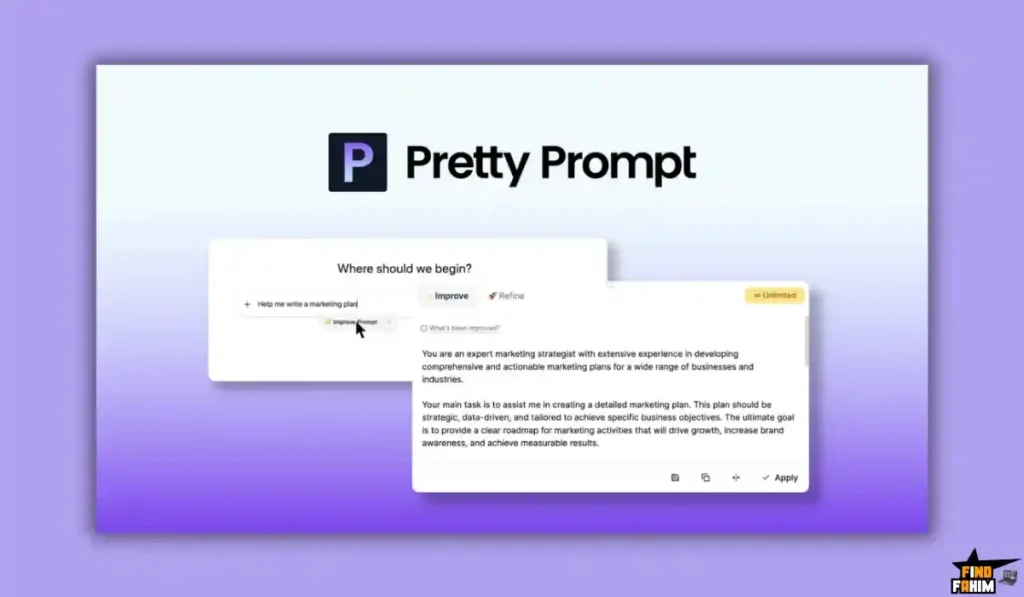
It works on a simple 3-step philosophy:
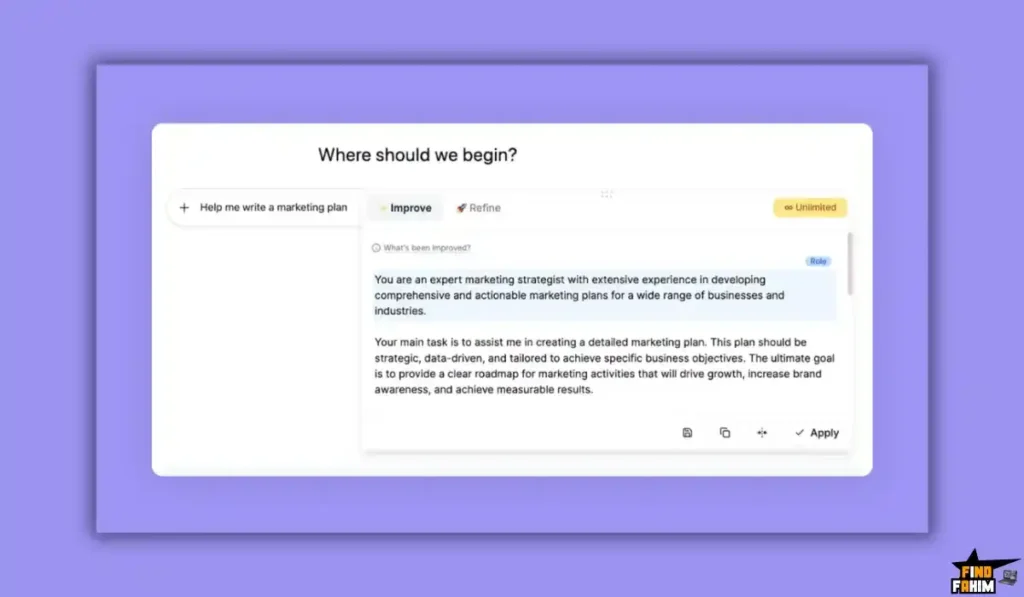
- The “One-Click” Fix: You type “Plan a marketing strategy.” You click the Pretty Prompt icon. It rewrites it to: “Act as a Senior Marketing Strategist. Create a comprehensive marketing plan for [Product] targeting [Audience]. Include channels, KPIs, and a timeline…”
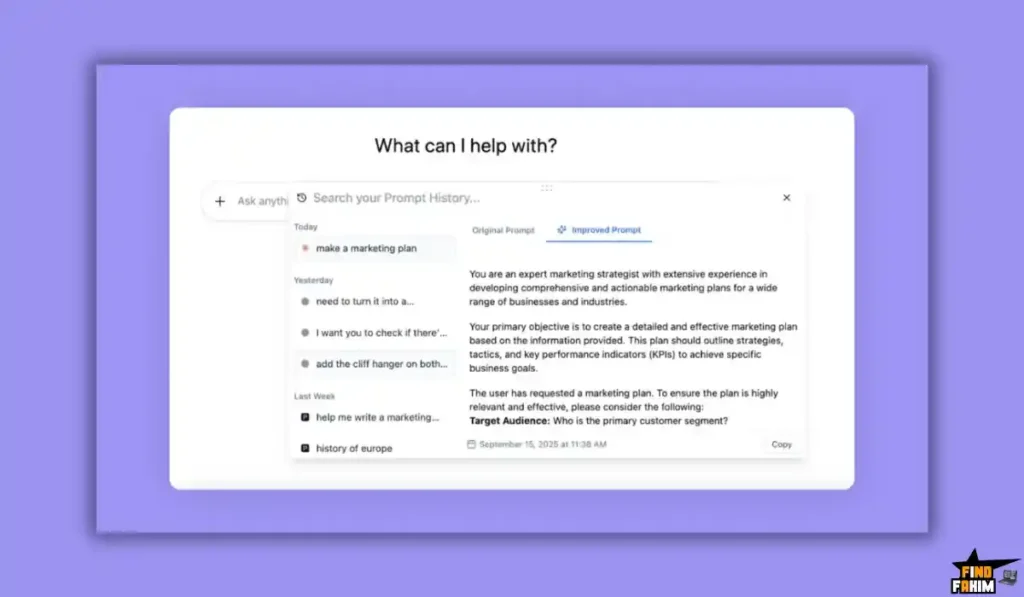
- The “Refine” Interview: This is the magic. If your prompt is too vague, the tool pops up and asks you 3 specific questions (e.g., “What is the tone?”). It forces you to clarify your thoughts, ensuring the AI understands exactly what you want.
- The Seamless Integration: You don’t have to log into a separate dashboard. It adds a button directly inside the ChatGPT, Claude, and Gemini interface. It feels native.
Quick Look: What’s Inside the Deal?
If you are in a rush, here is the breakdown of the value. You pay once ($34), and you get a tool that permanently upgrades your AI output.
| Feature | Best For… | The “Killer” Value | Normal Cost | Deal Status |
| One-Click Improve | Speed | Instantly fixes vague prompts | $10/mo | ✅ Included |
| Refine Mode | Accuracy | Asks questions to clarify intent | Priceless | ✅ Included |
| Prompt Library | Teams | Save & reuse best prompts | $15/mo | ✅ Included |
| Multi-Platform | Flexibility | Works on GPT, Claude, Gemini | N/A | ✅ Included |
| Team Users | Agencies | Add team members (Tier 2+) | $10/user | ✅ Included |
| TOTAL VALUE | AI Mastery | Perfect Outputs Every Time | ~$180/yr | $34 (Lifetime) |
| Grab the Pretty Prompt Lifetime Deal on AppSumo Now! | ||||
Why You Should Stop Writing Raw Prompts
The biggest mistake AI users make is thinking, “The AI is smart, it will figure it out.”
No, it won’t.
If you give GPT-4o a generic instruction (“Write a blog post”), it reverts to the average of the internet, which is mediocre.
Pretty Prompt fixes this by automating the “Context Injection.”
- Built-in Personas: It assigns the AI a role (e.g., “Expert Copywriter”).
- Built-in Formatting: It forces the AI to use bullet points, tables, or code blocks.
- Built-in Constraints: It tells the AI what not to do.
It turns you from a “Casual Chatter” into a “Prompt Engineer” without you needing to learn the skills.
Why This 4.8-Star Deal is an “AppSumo Legend.”
Pretty Prompt has quickly gathered 89 reviews with a 4.8-star average.
Users are loving the simplicity.
- “Understand exactly what I want”: User “Olmocha” (5 deals bought) says: “It analyzes what I’m asking for really quickly… and gives me a complete prompt that directly asks for exactly what I want to say but can’t quite express.”
- “Magic Refinement”: User “Cara75” notes: “The magic comes in the ‘refine’ a prompt… It is dissected, and you have to answer questions… The refined prompt is comprehensive, and on testing, so far, it has enhanced all the outputs.”
- “Daily Driver”: User “mrt” (199 deals bought!) says: “I now use Pretty Prompt daily and highly recommend it… The ‘Improve Prompt’ function turns a raw idea into a very good basic prompt.”
The founders, Ilai and Charlie, are active in the community. They recently released a massive update supporting “Vibe Coding” (using natural language to write code), which makes this tool essential for anyone using AI to build apps.
A Look Inside the Platform: Key Features & Benefits
This lifetime package replaces the need for expensive “Prompt Marketplaces” or prompt engineering courses.
1. The “Improve” Button
- What it is: A small button that appears next to the “Send” icon in ChatGPT.
- Why it matters: It removes ambiguity. It adds structure (Role, Task, Constraint) instantly. It turns a 5-word sentence into a 50-word instruction manual for the AI.
2. The “Refine” Workflow
- What it is: A guided wizard. It asks you: “What is the goal? Who is the target audience? What tone should be used?”
- Why it matters: As user “Cara75” mentioned, this forces you to think about things you missed. “Oh, I didn’t think about the tone.” By answering the questions, you feed the AI the context it needs to be brilliant.
3. The Prompt Library
- What it is: A sidebar where you can save your “Golden Prompts.”
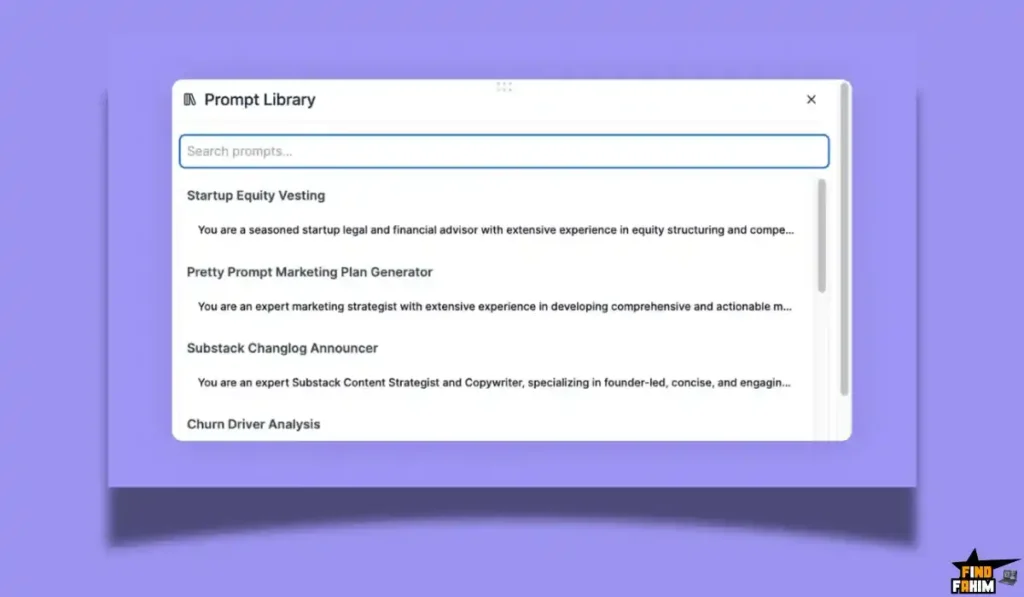
- Why it matters: Once you nail a prompt (e.g., “Perfect SEO Article Structure”), save it. Next time, you don’t have to reinvent the wheel. Just click and run. This is massive for teams.
4. Native Language Support
- What it is: It works in multiple languages.
- Why it matters: User “Olmocha” confirmed: “I use it mostly in Spanish, and it’s perfect.” It respects the language of your input and improves it in that same language.
The Standout Feature
Most AI tools just rewrite your text. Pretty Prompt actually interviews you. This is the “Killer Feature” that justifies the price tag.
How It Works: When you type a vague command like “Write a landing page,” the Refine mode interrupts you. It pops up a sidebar asking:
-
“What is the product’s unique selling point?”
-
“Who is the target audience (e.g., Seniors, Gen Z)?”
-
“What is the desired action (e.g., Sign up, Buy now)?”
The Result: Instead of guessing, the AI builds a prompt based on your specific answers. It feels like having a senior consultant sitting next to you, forcing you to clarify your strategy before you waste tokens on a bad output.
The Pretty Prompt AppSumo Deal Pricing
This is a highly stackable lifetime deal, available in 4 Tiers. The tiers scale based on Monthly Prompts and Users.
| Feature | Tier 1 (Starter) | Tier 2 (Team) | Tier 3 (Agency) | Tier 4 (Enterprise) |
| One-Time Price | $34 | $99 | $229 | $439 |
| Prompts/Month | 200 | 1,000 | 5,000 | 15,000 |
| Users Included | 1 User | 4 Users | 10 Users | 20 Users |
| All Features | ✅ Yes | ✅ Yes | ✅ Yes | ✅ Yes |
| Prompt Library | ✅ Yes | ✅ Shared | ✅ Shared | ✅ Shared |
| Best For… | Solopreneur | Small Team | Content Agency | Large Org |
Click Here to See All Deal Plans & Get Lifetime Access!
Which Plan Should You Get? My Recommendation
- Tier 1 ($34): The “Personal” plan. 200 prompts/month is roughly 6-7 improved prompts per day. If you are a casual user or just want it for specific tasks, this is a steal.
- Tier 2 ($99): The “Power User” plan. 1,000 prompts/month gives you ~33 per day. This is the safe bet for heavy ChatGPT users. Plus, you get 4 User Seats, so you can share them with your VA or co-founder.
- Tier 3 ($229): The “Agency” plan. 5,000 prompts are massive. If you have a content team churning out articles all day, this ensures they never hit a limit.
- Tier 4 ($439): Only for large organizations with 20+ staff members.
Important Note: The limits are for improving prompts. You can use the improved prompt unlimited times inside ChatGPT. The limit only burns when you click the “Improve” button.
How Does Pretty Prompt Work?
It is designed to be “invisible” until you need it. Here is the workflow:
-
Step 1: Install & Pin. Add the Chrome Extension and pin it to your browser bar. Enter your AppSumo code to unlock Pro features.
-
Step 2: Open ChatGPT. Go to your normal chat interface (or Claude/Gemini). You will see a new “Pretty Prompt” wand icon inside the text box.
-
Step 3: Type Lazy. Type your raw thought: “Fix this code.”
-
Step 4: Click the Wand. The tool instantly expands your text into: “Act as a Senior Python Developer. Review the following code for syntax errors and optimization opportunities…”
-
Step 5: Send. Hit enter and get a perfect result on the first try.
Pros & Cons of This Lifetime Package
With a 4.8-star rating, this is a polished tool. Here is my honest, balanced breakdown.
The Pros
- Zero Friction: You don’t have to leave ChatGPT. You don’t have to copy-paste from another tab. It is right there.
- Educational: It teaches you how to prompt. After seeing how it rewrites your text 50 times, you start naturally writing better prompts yourself.
- Platform Agnostic: It works on the Big 3 (OpenAI, Anthropic, Google). If you switch from ChatGPT to Claude tomorrow, the tool comes with you.
- Privacy: It runs locally in the browser. It doesn’t store your chat history unless you save it to the library.
The Cons
- Chrome Only: It is a browser extension. It does not work on the ChatGPT mobile app or desktop apps yet. You must be in a browser (Chrome/Edge/Brave).
- Prompt Credits: The Tier 1 limit (200) might feel tight if you are “addicted” to the improve button. You have to be mindful of your usage or buy Tier 2.
- UI Customization: Some users mentioned they want more control over where the button sits (though “Drag and Drop” button positioning is listed as a feature).
Best Use Cases for the Platform
- Content Creators: Turn “Write a post about dogs” into a viral LinkedIn hook with one click.
- Vibe Coding (New!): If you are using AI to write code (Vibe Coding), precision is everything. Pretty Prompt adds the necessary technical constraints to ensure the code actually runs.
- Email Marketers: Ensure your “Cold Outreach” prompts include tone instructions so the AI doesn’t sound like a robot.
- Non-Native Speakers: If English isn’t your first language, Pretty Prompt ensures your instructions to the AI are grammatically perfect and structurally sound.
For other amazing tools to build your business, don’t forget to check out my hand-picked list of the best AppSumo lifetime deals!
Get Your Pretty Prompt Lifetime Deal Now!
Pretty Prompt Alternatives
This is the most important part of the review. Pretty Prompt isn’t just competing with other Chrome extensions; it is competing with the “Do It Yourself” mindset and the massive, bloated tools that try to do everything.
Most users try to manage their AI workflow by maintaining a messy Google Doc of prompts or installing heavy extensions that slow down their browser. Here is why that usually ends in frustration, and how this tool compares to the big names.
Pretty Prompt vs AIPRM
AIPRM is the giant in the room. It’s a massive community library of prompt templates that took the world by storm when ChatGPT first launched.
Where AIPRM Takes the Lead
Pre-Built Templates. AIPRM has thousands of community-generated prompts like “Human Written SEO Article” or “Midjourney Prompt Generator.” If you want to browse a menu of other people’s ideas and just click “Go,” it is a fantastic resource. It turns ChatGPT into a vending machine of templates.
Why The Lifetime Deal is the “Clarity” Winner
The “Bloatware” Factor. AIPRM completely takes over your ChatGPT interface. It adds banners, upgrade buttons, search bars, and clutter to your screen. It feels like browsing a billboard.
Pretty Prompt is invisible until you need it. It doesn’t force you to use someone else’s generic template; it improves your unique idea. If you want to write original content rather than generic “template content,” Pretty Prompt is the superior tool. Plus, AIPRM’s premium features cost $20/month (recurring), whereas Pretty Prompt is $34 one-time.
Pretty Prompt vs ChatGPT
Superpower ChatGPT is a “Swiss Army Knife” extension that adds folders, search, history management, and a hundred other features.
Where Superpower Takes the Lead
Chat Management. If your main problem is “I can’t find that chat from 3 weeks ago,” Superpower wins hands down. It allows you to create folders, pin chats, export data, and search your history extensively. It is an organizational tool first and foremost.
Why This Tool Wins on “Output Quality”
Organization vs. Optimization. Superpower organizes your chats, but it doesn’t necessarily make the AI smarter. It manages the mess; it doesn’t prevent it.
Pretty Prompt focuses 100% on the Input. It ensures the prompt is perfect before you hit send. While Superpower helps you find old bad answers, Pretty Prompt ensures you get a good answer the first time. For creators who care about the quality of the text, Pretty Prompt is the sharper tool.
Pretty Prompt vs Prompt Perfect
Prompt Perfect is a powerful standalone tool designed for optimizing prompts across different models (GPT-4 vs Claude vs Llama).
Where Prompt Perfect Takes the Lead
Cross-Model Testing. It allows you to test how a single prompt performs on multiple AI models side-by-side. It creates a “Lab Environment” where you can tweak variables and see the output change. It is a tool for serious prompt engineers and developers building apps.
Why This Deal Wins on “Workflow”
The “Tab Switching” Tax. To use Prompt Perfect, you usually have to leave ChatGPT, open a new tab, log in, paste your prompt, optimize it, copy it, go back to ChatGPT, and paste it.
Pretty Prompt lives inside the chat box. You never leave your workflow. The friction is zero. For daily use—writing emails, posts, or code—speed wins every time. You will use Pretty Prompt 50 times a day; you will use Prompt Perfect once a week.
Pretty Prompt vs Harpa AI
Harpa AI is a browser automation agent that sits in your sidebar and can read web pages.
Where Harpa AI Takes the Lead
Web Awareness. Harpa can “see” the website you are currently looking at. If you want to summarize a news article or track a price on Amazon, Harpa is the tool. It brings AI to other websites.
Why This Deal Wins on “Focus”
Context Switching. Harpa sits in a sidebar, which cramps your screen real estate. It creates a separate chat stream from your main ChatGPT history.
Pretty Prompt enhances the native interface. It doesn’t try to reinvent the browser; it just makes the tool you already use (ChatGPT/Claude) better. If you prefer the full-screen experience of ChatGPT, Pretty Prompt respects that space.
All Competitors Matrix
| Tool | Key Strength | Pricing Model | Best For |
| Pretty Prompt | In-Browser Rewriting | Lifetime Deal (Starts at $34) | Daily Users & Creators |
| AIPRM | Community Templates | Freemium + Sub ($20/mo) | SEOs & Template Users |
| Superpower GPT | Chat Organization | Freemium + Sub ($10/mo) | Power Users with Messy History |
| Prompt Perfect | Model Testing | Credit Based | Developers & Engineers |
| Harpa AI | Web Automation | Freemium + Sub | Research & Summarization |
| Manual Editing | Free | Your Time ($$$) | Hobbyists |
Is This a Smart Business Investment?
Let’s look at the Tier 1 ($34) plan, which gives you 200 prompt improvements per month.
Scenario: You are a content marketer writing LinkedIn posts.
- Cost: $34 (One-time).
- The Problem: You spend 15 minutes iterating with ChatGPT to get the tone right. You type, “Make it funnier,” then “No, too funny, make it professional,” then “Add bullet points.”
- The Solution: You type “Write a LinkedIn post about sales resilience, witty tone.” Click Pretty Prompt. It rewrites it into a detailed persona prompt with tone constraints. ChatGPT nails it on the first try.
- Time Saved: 10 minutes per post.
The Break-Even Math:
- If your time is worth $50/hour, saving 10 minutes saves you $8.33.
- You only need to use this tool 4 times to pay back the entire $34 investment forever.
The “Vibe Coding” ROI:
If you use AI to write code (Vibe Coding), a bad prompt gives you buggy code that takes 30 minutes to debug. A refined prompt from this tool gives you clean code instantly. In this scenario, the tool pays for itself in one single usage.
This isn’t a software expense; it’s a productivity multiplier. You are buying back your own time for the price of a takeout dinner.
How to Redeem the Deal
- Go to the official Pretty Prompt AppSumo deal page.
- Choose your Tier. (I strongly recommend Tier 1 for solo users or Tier 2 for heavy users/teams).
- Click “Buy Now” and complete the checkout.
- You will receive a redemption code.
- Install the Pretty Prompt Chrome Extension from the web store.
- Pro Tip: Click the extension icon in your browser toolbar and enter your AppSumo code immediately. This unlocks the “Refine” mode and removes the free tier limits.
Final Verdict: Is This 4.8-Star Deal Legit?
After testing the extension on ChatGPT, Claude, and Gemini, my final verdict is a resounding 5-Star YES.
This is a “Quality of Life” Upgrade.
- It’s Invisible: It doesn’t clutter your interface like AIPRM.
- It’s Effective: The “Refine” mode asks the questions you should be asking yourself, but are too lazy to do.
- It’s Cheap: $34 for a lifetime license is negligible compared to the time saved.
If you use AI tools more than once a day, this extension effectively pays for itself by lunchtime. Stop fighting with the AI and start commanding it.
Grab the Pretty Prompt Lifetime Deal Before It Sells Out!
About the Author: Why I Care About This So Much
I write thousands of words per week using AI assistance. I used to keep a “Prompt Cheat Sheet” in Notion that I had to copy-paste every time I started a new chat. It was annoying and slow.
Pretty Prompt eliminated that friction. It puts the “Cheat Sheet” logic directly inside the chat box. I write these reviews to help you find tools that actually save time, rather than just adding another subscription to your bill.
FAQ: Your Pretty Prompt Questions, Answered
What is Pretty Prompt?
Pretty Prompt is a Chrome extension that integrates directly into AI chat tools like ChatGPT, Claude, and Gemini to automatically rewrite and optimize your prompts for clearer, more accurate AI responses.
Does Pretty Prompt work on the free version of ChatGPT?
Yes, Pretty Prompt works on both free and paid versions of ChatGPT, as well as free versions of Claude and Gemini, making it fully model-agnostic.
Do I need an OpenAI API key to use Pretty Prompt?
No, Pretty Prompt does not require an OpenAI API key. It works as a smart prompt editor layer inside your existing AI chat interface.
Is my data safe when using Pretty Prompt?
Yes, all processing happens locally in your browser. Pretty Prompt does not store or transmit your chat data unless you manually save prompts to your library.
Which browsers support Pretty Prompt?
Pretty Prompt supports all Chromium-based browsers, including Google Chrome, Microsoft Edge, Brave, and Opera. Safari and Firefox are not currently supported.
Can I save and reuse optimized prompts?
Yes, the Prompt Library lets you save your best prompts and reuse them instantly, which is ideal for recurring tasks like reports, emails, or coding workflows.
What is the difference between Improve and Refine modes?
Improve instantly rewrites your prompt using best practices, while Refine asks clarifying questions such as role, tone, and format to build highly specific prompts.
Does Pretty Prompt work on mobile devices?
No, since it is a Chrome extension, Pretty Prompt currently works only on desktop browsers and not on mobile apps.
Can I share prompts with my team?
Yes, Tier 2 and higher plans include team sharing, allowing multiple users to access a shared prompt library for consistent results.
Is Pretty Prompt a monthly subscription?
No, the AppSumo deal offers a lifetime license with one-time payment and includes future updates to the Pro plan.
What is Vibe Coding and how does Pretty Prompt help?
Vibe Coding means writing code using natural language prompts. Pretty Prompt enhances these prompts with technical constraints so AI-generated code works correctly.
Can Pretty Prompt help with SEO content creation?
Yes, you can instruct the AI to act as an SEO expert, include keywords, headings, and meta descriptions using the Refine mode.
Is Pretty Prompt better than buying prompt packs?
Yes, unlike static prompt packs, Pretty Prompt dynamically generates optimized prompts in real time based on your exact needs.
Does Pretty Prompt work for AI image generation prompts?
Yes, it can expand simple image ideas into detailed descriptions that work well with tools like DALL·E and other image models.
Why should I pay for Pretty Prompt instead of prompting manually?
Pretty Prompt saves time and ensures consistency by generating high-quality prompts in seconds instead of minutes, making it ideal for professionals.

Hi, I’m Fahim — a SaaS tools reviewer and digital marketing expert with hands-on experience helping businesses grow using the right software. I research, test, and personally use a wide range of AI, business, productivity, marketing, and email tools for my agency, clients, and projects. I create honest, in-depth reviews and guides to help entrepreneurs, freelancers, startups, and digital agencies choose the best tools to save time, boost results, and scale smarter. If I recommend it, I’ve used it — and I only share what truly works.