
Are you losing potential clients because your website’s contact form is broken or looks unprofessional?
Relying on basic form builders means missing out on vital integrations, dynamic data, and custom branding. FormDesigner is a robust online form builder that allows you to create highly complex surveys, payment portals, and calculators without touching code.
Note: This article contains affiliate links. Opinions are my own, independent research and analysis.
My Quick Take (TL;DR)
If you need to collect leads, process client payments, or build interactive calculators on your website, here is the direct summary of this AppSumo offer.
- What is it? A drag-and-drop web form builder offering over 40 distinct field types, advanced logical branching, and custom formula calculations.
- Why is it Special? The Formula Editor. You can easily build dynamic pricing calculators and complex quizzes that adapt based on the user’s specific answers.
- Who is it for? Digital marketing agencies, freelancers, event organizers, and web developers.
- The Deal: A single lifetime tier for $59 on AppSumo.
- My Verdict: A highly capable replacement for expensive form tools. While the user interface looks dated, the backend power and webhook integrations are unmatched for the price.
Here to Get the FormDesigner Lifetime Deal on AppSumo
What is FormDesigner?
Originally launched in 2012 by founder Ivan. FormDesigner is a mature online web form builder. Most free plugins only capture basic names and email addresses. FormDesigner operates as a complete data collection hub.
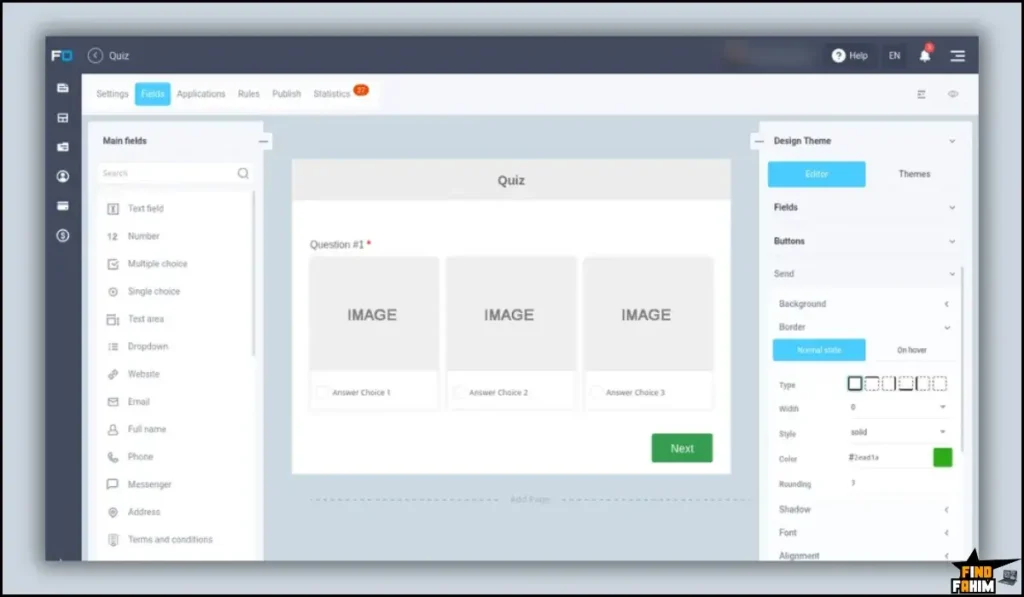
It allows you to build multi-page surveys, interactive quizzes, online booking forms, and dynamic payment portals using a simple drag-and-drop interface. You can customize the logic so that fields only appear based on previous answers.
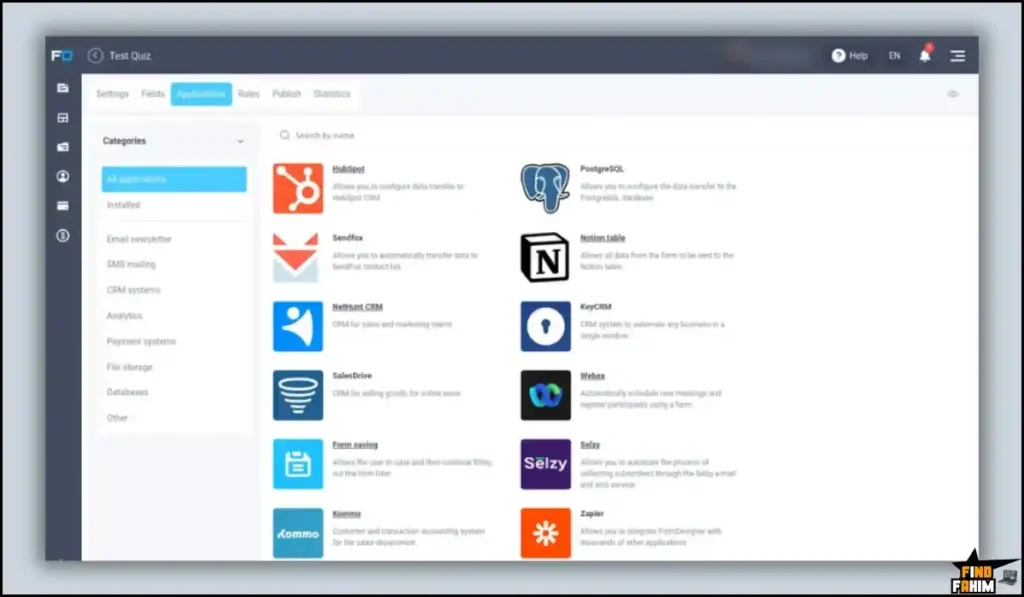
It also features a massive library of native integrations, allowing you to send lead data directly to Google Sheets, Telegram, Mailchimp, or Trello instantly.
Quick Look: FormDesigner vs Manual Workflow
If you are currently paying a developer to build custom calculators or paying monthly fees for premium WordPress plugins, here is what this tool replaces.
| Feature | Replaces… | The Real Value | Normal Cost | Deal Status |
| Logic Branching | Basic Contact Forms | High-converting smart forms | ~$35/mo | ✅ Included |
| Formula Editor | Custom Web Devs | Build interactive calculators | High Labor | ✅ Included |
| Payment Gateways | Separate Invoices | Accept Stripe/PayPal on the form | ~$20/mo | ✅ Included |
| Dynamic Loading | Manual Updates | Pull live data from Sheets | Custom Dev | ✅ Included |
| Total Value | Premium Subscriptions | Massive Monthly Savings | ~$600+/yr | $59 (Lifetime) |
Why Basic Form Builders Are Failing
You might assume a free Google Form is enough to run your business. This is a massive misconception.
Free tools lack professional branding and critical workflow integrations. If a client fills out a free form, you have to manually copy that data into your CRM. You cannot accept payments or conditionally route answers.
Why Advanced Web Forms Are Trending in 2026
Lead generation strategies have completely changed. Modern buyers do not want to fill out boring, static questionnaires.
Marketers now rely on interactive calculators, personalized quizzes, and conditional logic to capture attention. If a prospect can instantly calculate their potential project costs on your site, they are significantly more likely to submit their email address.
A Look Inside FormDesigner: Key Features
Here is exactly what you get when you move your data collection operations over to this dedicated platform.
Drag-and-Drop Appearance Editor
You do not need to be a designer. The platform includes over 40 different types of form fields that you simply drag onto your canvas.
You can use ready-made design themes or customize the CSS to match your exact corporate branding. The builder ensures your forms remain highly responsive on mobile devices.
Advanced Logical Branching
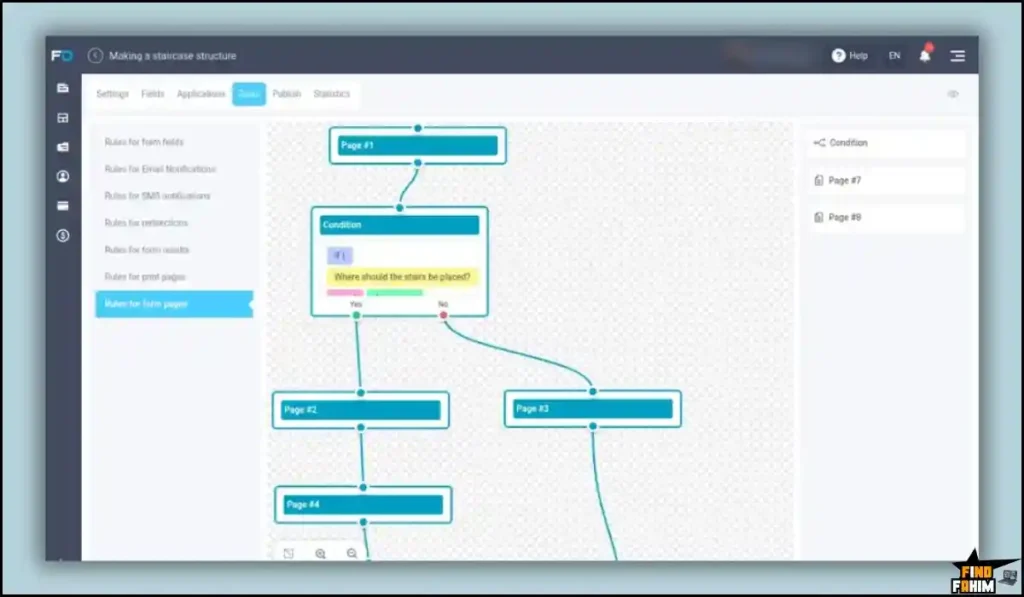
Never force a user to answer questions that do not apply to them. FormDesigner allows you to set up strict logical rules.
If a user selects “Yes,” the form can instantly reveal follow-up questions. If they select “No,” it skips to the payment page. You can customize rules for fields, specific results, and URL redirects.
Dynamic Data Sources
This is an incredibly rare feature for a budget-friendly tool. You can connect external data sources directly to your web forms.
You can load a dropdown menu dynamically from a Google Sheet, Notion database, or MySQL server. When you update the Google Sheet, the dropdown options on your live website form update automatically.
Payment Processing and Subdomains
If you sell digital products or consulting hours, you can collect money directly on the form. The software natively connects to Stripe and PayPal.
You can also publish your forms on a customized subdomain. The system automatically generates a secure SSL certificate, ensuring your customers feel safe submitting payment information.
The Standout Feature: The Formula Editor
Building an interactive calculator usually requires hiring a web developer to write custom JavaScript. FormDesigner changes this entirely.
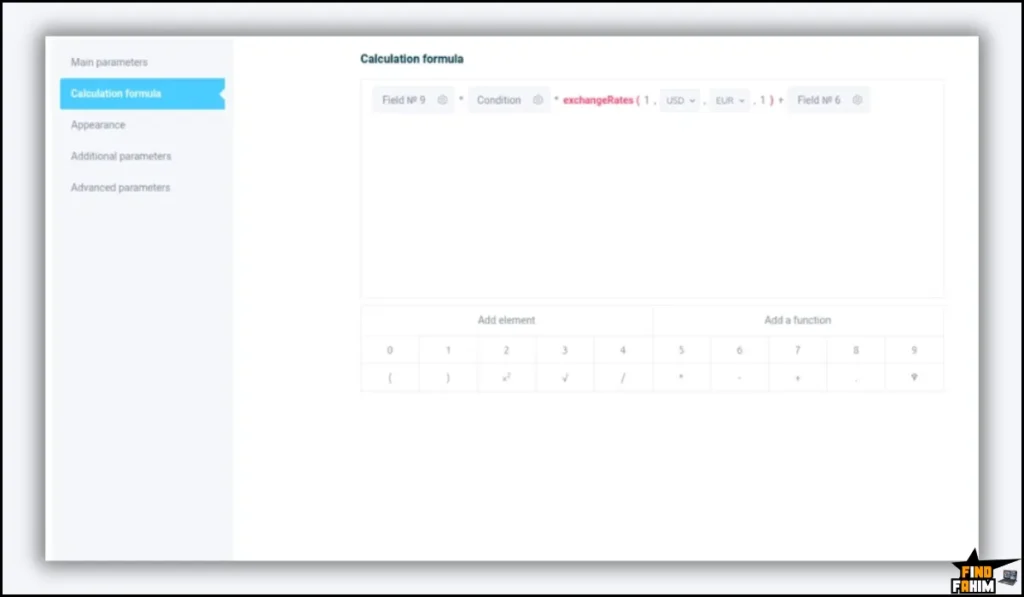
You can create complex online calculators without writing a single line of code. Everything is customizable inside a highly visual formula editor. You can perform several math calculations at once, link them to user answers, and display a dynamic price quote instantly.
Recent 2026 Platform Updates
The development team actively listens to the AppSumo community. In recent months, they have shipped several highly requested updates:
- Increased Limits: They implemented a system inside the dashboard allowing users to purchase increased monthly submission limits if needed.
- English Localization: The team heavily polished the English version of the dashboard and support documentation.
- Webhook Enhancements: Improved stability for connecting forms directly to advanced automation platforms like Boost. Space and Make.
FormDesigner Pricing & AppSumo Deal Details
Unlike highly complex enterprise tools, this lifetime deal is beautifully simple. It is structured strictly as a single license tier.
| Feature | Lifetime Tier 1 |
| Price (One-Time) | $59 |
| Forms | Unlimited |
| Fields Per Form | Unlimited |
| Monthly Submissions | 1,000 / month |
| Upload Storage | 500 MB |
| Custom Subdomain | ✅ Included |
Understanding the Deal Limits
This deal is not stackable, meaning you can only buy one code. The $59 purchase gives you unlimited forms and unlimited fields, which is incredibly generous.
However, you must be aware of the 1,000 submissions per month limit. For freelancers and standard agency websites, this is completely sufficient. If you run high-volume viral quizzes, you will eventually hit this cap.
My Purchase Recommendation
Because there is only one tier, the decision is easy. For $59, this is a mandatory purchase for any web developer, agency owner, or freelancer.
Even if you only use it to build one complex pricing calculator for your own portfolio website, the tool pays for itself immediately. If your traffic grows, you can easily pay a small fee inside your account to increase the submission cap.
Secure Your FormDesigner Lifetime Plan on AppSumo
Pros & Cons of This Lifetime Package
With an impressive 4.9-star rating from early buyers, the community loves the raw technical power. However, we must look at the operational realities.
✅ Complex Scenarios: The ability to handle webhooks, Google Scripts, and custom CSS makes it a powerhouse for web developers.
✅ Formula Editor: Building dynamic calculators without coding saves hundreds of dollars in freelance development fees.
✅ Responsive Support: Buyers consistently praise founder Ivan for his rapid, thoughtful email support.
❌ Dated User Interface: Multiple users noted that the backend dashboard has a “90s look” and requires a slight learning curve.
❌ Hard Submission Limits: Being locked at 1,000 submissions per month on a non-stackable deal restricts high-volume marketers from scaling solely on this purchase.
Who Should NOT Buy FormDesigner?
Skip this purchase if you run a massive enterprise brand that generates thousands of customer service tickets daily. The 1,000 monthly submission limit will bottleneck your operations.
Furthermore, if you are looking for an ultra-modern, minimalist interface with aggressive, flashy animations, this might disappoint you. The backend is built for raw data power, not necessarily for winning modern UI design awards.
How Does FormDesigner Work?
Here is exactly how fast you can launch a new data collection campaign.
- Create a Project: Open the dashboard and start a new form from scratch or choose a pre-built template.
- Drag and Drop: Pull your desired fields onto the canvas, such as text boxes or file upload buttons.
- Set the Logic: Use the rules tab to hide specific questions unless the user provides a certain answer.
- Connect Integrations: Paste your Mailchimp API key or set up a webhook to route the data to your CRM.
- Publish: Grab the generated embed code and paste it directly into your website.
Best Use Cases for FormDesigner
Who actually extracts the highest return on investment from this specific setup?
- The Digital Marketing Agency: You build websites for local businesses. You build highly complex lead capture forms for your clients, routing the data directly into their HubSpot accounts via webhooks.
- The Event Organizer: You manage local conferences. You build a multi-page registration form that uses conditional logic to ask dietary questions only if the attendee selects the VIP ticket, and processes the payment via Stripe.
- The Freelance Consultant: You build an interactive pricing calculator on your website. Prospects select their project requirements, see a dynamic price estimate, and pay a deposit immediately.
Stop Losing Leads. Build Your Smart Form Today.
FormDesigner Alternatives
Is this the best tool for the job, or should you use an established heavyweight? Let’s compare it directly against the top players in the market.
FormDesigner vs Typeform
Typeform is the massive king of conversational form design.
Where Typeform Wins: The User Experience. It features beautiful animations and feels like a friendly conversation, yielding high completion rates.
Where FormDesigner Wins: Price and Flexibility. Typeform often costs over $400 annually. FormDesigner provides massive backend power, complex calculators, and a single lifetime price tag.
FormDesigner vs Gravity Forms
Gravity Forms is the premium, industry-standard plugin built strictly for WordPress.
Where Gravity Forms Wins: The WordPress Ecosystem. It has hundreds of third-party add-ons and fits perfectly into complex WordPress membership sites.
Where FormDesigner Wins: Platform Independence. FormDesigner is completely agnostic. You can embed its forms on Webflow, Wix, or any custom HTML website.
FormDesigner vs SurveyMonkey
SurveyMonkey is the powerhouse for corporate data collection and employee sentiment tracking.
Where SurveyMonkey Wins: Data Analysis. It automatically generates beautiful pie charts and sentiment analysis reports from thousands of survey responses.
Where FormDesigner Wins: Lead Generation. Its robust integrations, payment gateways, and custom autoresponders make it a far better tool for capturing and converting sales leads.
FormDesigner vs Google Forms
Google Forms is the free tool included in every Google Workspace account.
Where Google Forms Wins: Absolute Simplicity. It is completely free and drops data perfectly into a Google Sheet with zero setup required.
Where FormDesigner Wins: Professional Branding. Google Forms looks incredibly basic. FormDesigner allows you to strip away third-party branding, collect Stripe payments, and use complex webhooks.
FormDesigner vs Microsoft Forms
Microsoft Forms is the default survey tool included in most Microsoft Office 365 plans.
Where MS Forms Wins: Free Corporate Access. If your company pays for Microsoft 365, it integrates perfectly with your internal Exchange server.
Where FormDesigner Wins: Customization. Microsoft Forms feels incredibly rigid and corporate. FormDesigner gives you total control over the CSS to match your exact website aesthetic.
The Competitor Matrix Table
| Platform | Pricing Model | Key Strength | Best For… |
| FormDesigner | Lifetime ($59) | Calculators & Logic | Agencies & Devs |
| Typeform | Sub ($35+/mo) | Conversational UX | High-End Brands |
| Gravity Forms | Sub ($59+/yr) | WP Integration | WordPress Users |
| SurveyMonkey | Sub ($39+/mo) | Data Analysis | Corporate Research |
| Google Forms | Free | Absolute Simplicity | Students & Casuals |
| MS Forms | Included in O365 | Enterprise Security | Internal Corporate Use |
Ready to Upgrade Your Lead Capture? Grab FormDesigner Now
Is This Lifetime Deal a Smart Business Investment?
If you want to know exactly how fast this tool pays for itself, let’s break down the real-world math.
Here is the exact cost of choosing this deal to build your company’s calculators versus paying for a premium conversational form builder:
- Cost of Typeform Basic (1 Year): $35 per month, totaling $420 per year.
- Cost of FormDesigner: $59 paid exactly once.
The ROI Math:
- You break even financially in less than two months of use.
- Over a standard three-year business cycle, choosing this software saves your company $1,201 in recurring subscription fees.
- More importantly, the ability to build custom calculators replaces the need to hire freelance web developers, saving hundreds of dollars per project.
How to Redeem the FormDesigner Deal
Ready to secure your data collection workflow? Follow these quick steps.
- Buy: Click the AppSumo link below to secure your single activation code.
- Redeem: You will instantly receive a unique code in your email inbox.
- Activate: Follow the instructions to create your account and apply the code within sixty days.
- Verify: Test the webhook integrations and formula editor risk-free with the 60-day money-back guarantee.
Final Verdict: Is This AppSumo Deal Worth It?
After analyzing the advanced webhooks, the dynamic data loading, and the robust formula editor, my final verdict is a highly confident 4.8-Star YES.
It is an absolute powerhouse for web developers and marketers. It gives you the technical infrastructure to build highly complex, logic-driven calculators without writing code, eliminating expensive monthly subscriptions.
While the backend user interface lacks modern polish and the 1,000 monthly submission limit requires monitoring, the core product delivers massive value. If you need total control over your lead generation funnels, grab this lifetime code before it leaves the store.
Secure Your FormDesigner Lifetime License Before It Ends
About the Author
I spend my time researching and analyzing SaaS products, digital tools, and lifetime deals to help smart entrepreneurs stop overpaying for software. We all know the extreme frustration of getting trapped in endless monthly subscriptions for basic website plugins.
I do the heavy lifting of checking these offers—digging into the specific submission limits, the webhook capabilities, and the integration lists—so you know exactly what you are getting. To see how you can save even more money on your software stack, check out my breakdown: AppSumo Deals Ending Soon.
FAQ: Your FormDesigner Questions, Answered
FormDesigner is an online form builder that allows users to create surveys, quizzes, calculators, and booking forms using a drag-and-drop interface.
No. FormDesigner is designed for non-technical users, although advanced users can add custom CSS or code if needed.
The formula editor allows you to create interactive calculators by assigning values to inputs and generating real-time results such as pricing estimates.
Yes. FormDesigner integrates with payment gateways like Stripe and PayPal to collect payments directly through forms.
You can create unlimited forms and include unlimited fields within each form under the lifetime deal.
An online form builder is a tool that allows users to create forms for data collection, surveys, registrations, or payments without coding.
Yes. Many modern form builders integrate with payment gateways to allow users to collect payments securely.
Form submissions refer to the number of responses or entries collected through a form within a specific period.
Online forms help businesses collect customer data, generate leads, process orders, and automate workflows efficiently.
Yes. Most form builders integrate with email marketing platforms to automatically send leads and contacts into mailing lists. What is FormDesigner?
Do I need coding skills to use FormDesigner?
What is the formula editor in FormDesigner?
Can FormDesigner accept payments?
How many forms can I create with FormDesigner?
What is an online form builder?
Can form builders be used for payments?
What are form submissions?
Why are online forms important for businesses?
Can forms connect to email marketing tools?

Hi, I’m Fahim — a SaaS tools reviewer and digital marketing expert with hands-on experience helping businesses grow using the right software. I research, test, and personally use a wide range of AI, business, productivity, marketing, and email tools for my agency, clients, and projects. I create honest, in-depth reviews and guides to help entrepreneurs, freelancers, startups, and digital agencies choose the best tools to save time, boost results, and scale smarter. If I recommend it, I’ve used it — and I only share what truly works.