

Switching between your journal, calendar, and notes app is killing your focus. You write a goal in your diary, but the actionable steps get lost in a separate task manager.
Traditional digital planning forces you to juggle multiple software subscriptions. Journal it! solves this by combining planning, journaling, note-taking, and habit tracking into one centralized dashboard.
Is it actually better than Evernote or Obsidian? In this Journal it! Review, I compare the top productivity competitors to help you decide.
(Note: This article contains affiliate links. Opinions are my own research and analysis).
My Quick Take (TL;DR)
If you are spending hours trying to build the perfect Notion template or constantly losing track of your daily habits, here is the direct summary of this AppSumo offer.
- What is it? A personal workspace dashboard that combines task management, daily journaling, time blocking, and note-taking into one encrypted platform.
- Why is it Special? The offline-first architecture. It works completely offline on your phone or desktop, instantly syncing your habits and notes the moment you reconnect.
- Who is it for? Productivity enthusiasts, freelancers, students, and anyone wanting a private “second brain” without a steep coding curve.
- The Deal: Lifetime Access starting at $39 on AppSumo. (Note: Price increases in less than 7 days.
My Verdict: This is a fantastic organizational tool. Replacing multiple expensive app subscriptions with a single $39 payment is a highly intelligent financial move.
Click Here to Get the Journal it! Lifetime Deal on AppSumo
What is Journal it!? (Your Private Life Organizer)
Think of Journal it! as a digital bullet journal mixed with a powerful productivity engine. It is designed to be your private, encrypted life organizer.
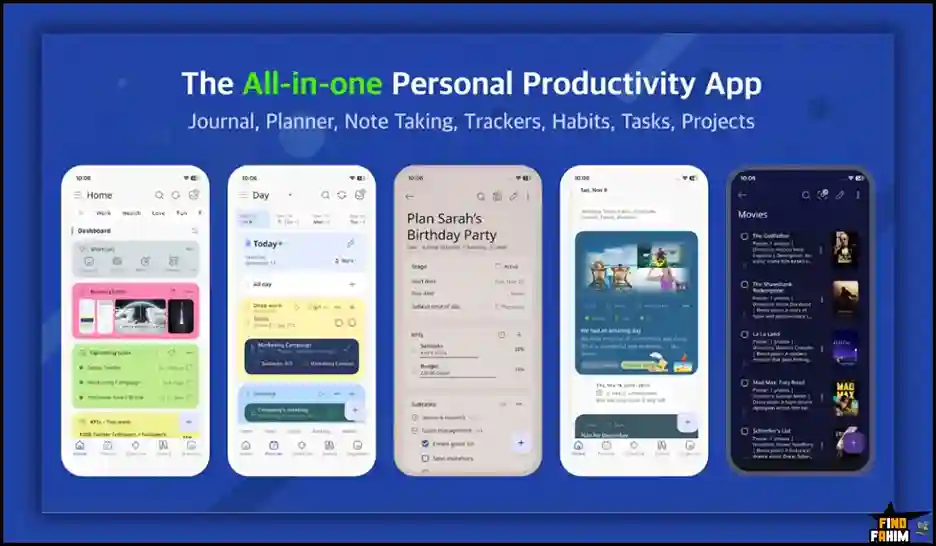
Most people use separate applications for their professional work and personal reflections. Journal it! merges them. It actively blends the popular Bullet Journal method with the “Getting Things Done” (GTD) and PARA productivity systems.
You get a central platform where you can time-block your afternoon meetings, check off your daily water intake habit, and write a private diary entry.
Every single entry can be connected using bi-directional linking. This means your high-level yearly goals are directly connected to your daily task lists, keeping your entire life perfectly organized.
Quick Look: Journal it! vs App Juggling
If you spend your morning checking four different apps just to plan your day, look at what this tool actually replaces in your daily routine.
| Feature | Replaces… | The Real Value | Normal Cost | Deal Status |
| Note-Taking | Evernote Premium | Centralized information | ~$129/yr | ✅ Included |
| Habit Tracking | Habitica / Strides | Track KPIs and routines | ~$30/yr | ✅ Included |
| Time Blocking | Google Calendar apps | Drag-and-drop scheduling | Workflow hassle | ✅ Included |
| Private Journal | Day One Premium | Encrypted daily diary | ~$35/yr | ✅ Included |
Why Native Note Apps Are Failing Creators
You already have Apple Notes or Google Keep on your phone, so why pay for a dedicated organizer? Because native apps lack structure.
If you type a project idea into Apple Notes, it sits in a static folder. It does not connect to your calendar, and it cannot track your progress over time.
Journal it! actually understands relationships. It links your rough notes directly to your scheduled time blocks and habit trackers. It builds a structured web of information rather than a messy digital filing cabinet.
Why “All-in-One Life Organizers” Are Trending in 2026
I noticed this specific AppSumo deal trending rapidly because digital workers are officially hitting peak app fatigue.
In 2026, managing a separate subscription for your to-do list, your diary, and your calendar is financially draining. It also creates a massive cognitive load trying to remember where you saved a specific idea.
Unified organizers are taking over because they bring your entire digital life under one roof. You get a single, private dashboard to manage everything from grocery lists to long-term career goals.
A Look Inside Journal it!: Key Features
Here is exactly what you are installing on your devices when you purchase this lifetime code. Let’s break down why these specific core features matter to your daily operations, productivity, and overall mental clarity.
Bi-Directional Linking Engine
This is the software’s central engine. Journal it! allows you to seamlessly link anything across your entire workspace. If you write a journal entry about your fitness journey, you can link it directly to your workout tracker and weekly meal plan. This instantly creates a highly organized “second brain.”
Offline-First Architecture
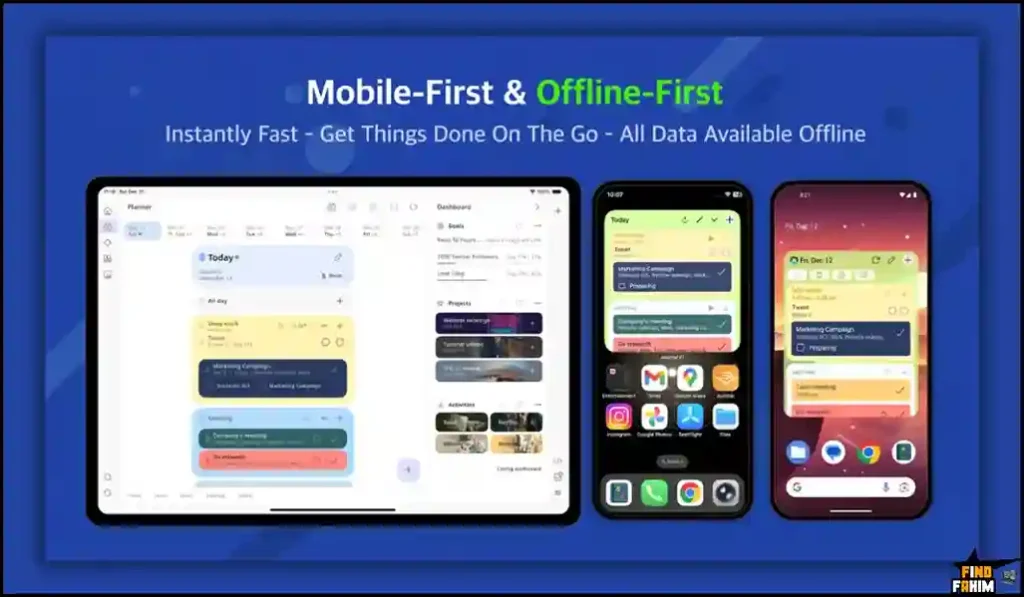
If you travel frequently or commute on a subway, this feature is incredibly powerful. The app is built with a strict offline-first mobile interface. You can capture ideas, log habits, and write long entries without any Wi-Fi. The moment you reconnect, it automatically syncs your data across all your devices.
Flexible Time Blocking
Managing your schedule is incredibly visual here. You can open your daily dashboard and literally drag and drop tasks into specific time slots. This visual method forces you to be realistic about your daily capacity. It also offers two-way syncing with Google and Apple Calendar, merging your professional and personal lives.
End-to-End Encryption
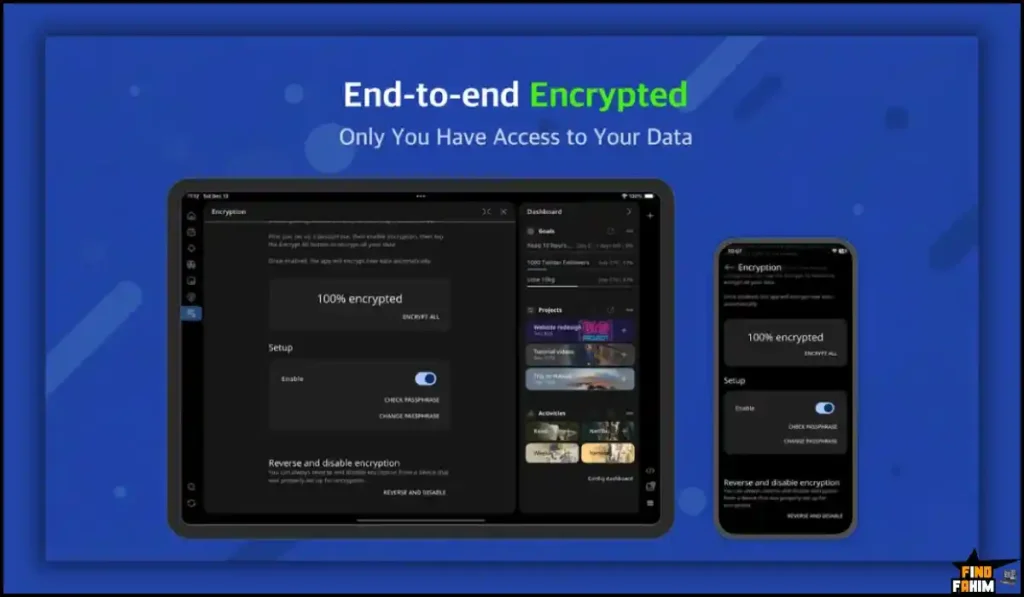
For anyone keeping a private diary, security is the most critical factor when choosing an app. Journal it! operates with strict end-to-end encryption. Your text data is fully encrypted on your physical device before it ever reaches their cloud servers. The developers cannot read your data, keeping your personal reflections completely secure.
The Standout Feature: Integrated Habit & KPI Trackers
This tool transforms Journal it! from a simple notebook into a powerful life coach. Inside the app, you can build custom habit trackers and personal Key Performance Indicators (KPIs).
You can track how many hours you read, how often you exercise, or your daily mood. The software then generates visual dashboard panels.
These charts allow you to instantly see how your daily habits correlate with your overall project success and long-term goals.
Recent 2026 Platform Updates
The Journal it! The development team moves incredibly fast and listens heavily to user feedback. Recent major updates include:
- Built-in Pomodoro Timer: You can now run focused work sessions directly inside the app without needing a separate timer tool.
- Photo Interleaving: You can now insert photos directly between text blocks in your journal entries, rather than just attaching them at the bottom.
- Advanced Importers: The team improved the import functionality, allowing users to easily migrate their massive archives from apps like Day One and Journey.
Journal it! Pricing & AppSumo Deal Details
This lifetime deal is structured around four scalable license tiers. You pay once, and you own the software forever without recurring monthly subscription fees.
Be aware: the price is scheduled to increase in less than 7 days, so secure your license quickly.
| Feature | Tier 1 ($39) | Tier 2 ($99) | Tier 3 ($199) | Tier 4 ($299) |
| Included Licenses | 1 | 4 | 10 | 20 |
| Offline Access | ✅ Yes | ✅ Yes | ✅ Yes | ✅ Yes |
| Encryption | ✅ Yes | ✅ Yes | ✅ Yes | ✅ Yes |
| All Platforms | ✅ Yes | ✅ Yes | ✅ Yes | ✅ Yes |
| Cross-Device Sync | ✅ Yes | ✅ Yes | ✅ Yes | ✅ Yes |
Understanding the License’s Limit
Why does a personal tool offer multiple licenses? Tier 1 is for solo users, but higher tiers let you gift secure accounts to family or employees.
My Stacking Recommendation
- Solopreneurs: Tier 1 ($39) is the sweet spot. Unlocks all premium features and syncing for your private workspace.
- Families & Teams: Tier 2 ($99) provides 4 premium licenses for your partner or key staff.
- Agencies: Tier 4 ($299) gives 20 licenses, acting as a cheap productivity perk for your workforce.
Secure Your Journal it! Lifetime License Before the Price Increases
Pros & Cons of This Lifetime Package
With an excellent 4.7-star rating from early buyers, the community loves the incredible depth of the organizational tools.
However, to ensure you make a smart investment, we must evaluate the technical realities of adopting a completely new personal system.
The Pros
- ✅ App Consolidation: Deleting your separate habit tracker, diary, and to-do list apps saves massive mental energy and phone storage.
- ✅ Total Privacy: The end-to-end encryption ensures your personal thoughts remain completely locked and secure.
- ✅ Offline Reliability: Being able to work fully offline makes it the perfect companion for long flights or remote travel.
- ✅ Incredible Value: Competing note apps charge $10+ a month indefinitely. This lifetime deal is an operational steal.
The Cons
- ❌ The Learning Curve: Because it combines so many productivity methodologies (GTD, PARA), the initial interface can feel overwhelming for the first few days.
- ❌ UI Customization: A few users noted that customizing specific font sizes and interface colors is currently limited.
Who Should NOT Buy Journal it!?
Do not buy this tool if you are looking for a massive, multi-player collaborative workspace. If you need a tool where twenty team members can simultaneously edit a company wiki and tag each other in comments, this is not it.
Journal it! It is strictly designed as a personal, private workspace. Furthermore, if you refuse to spend an hour learning a new organizational system, you should stick to basic, unstructured sticky notes.
How Does Journal it! Work?
If you have never used an all-in-one life organizer before, here is exactly how fast you can set up your daily workflow.
- Install: Download the app to your phone and desktop, and log in to your account.
- Set Your Areas: Create broad life categories, such as “Health,” “Business,” and “Personal Growth.”
- Add Habits: Navigate to the tracker section and create a daily habit, like “Read 20 Pages.”
- Time Block: Open your daily calendar view and drag your tasks directly into specific time slots.
- Journal: At the end of the day, open a blank text note. Write your reflections and link them directly to your completed tasks.
Best Use Cases for Journal it!
Who actually extracts the highest financial and personal return from this specific tool?
Here are the three main workflows that benefit immediately from this technology.
-
The Productivity Geek
You love the idea of the “Second Brain” methodology, but you are exhausted by the complex coding required to build a functional Notion dashboard. Use Journal it! to get a pre-built, highly structured GTD system right out of the box. You get all the power of bi-directional linking without the tedious setup process.
-
The Private Journaler
You write highly personal reflections, therapy notes, or financial diaries. Storing these in standard Google Docs leaves your data vulnerable. You can use Journal it! strictly for its robust end-to-end encryption, ensuring your most intimate thoughts are permanently secured and inaccessible to tech giants.
-
The Busy Freelancer
You juggle multiple client projects, personal hobbies, and erratic sleep schedules. You can use the flexible time blocks to schedule your client work, while simultaneously tracking your sleep and exercise habits on the same dashboard. It keeps your chaotic freelance life perfectly aligned.
Stop Juggling Apps—Claim Your Journal it! Lifetime Deal
Journal it! Alternatives
Is Journal it! The absolute best tool for the job, or should you use an established heavyweight?
Let’s compare it directly against the top players in the market to see exactly where it fits in your software stack. Because your organizational app handles your entire life, choosing the right builder is a major decision.
Journal it! vs Evernote
Evernote is the 15-year-old pioneer of the digital note-taking industry.
- Where Evernote Wins: Web Clipping and OCR. Evernote has an unmatched ability to clip full articles from the internet and scan handwritten documents, making the text fully searchable.
- Where Journal it? Wins: The Lifetime Price and Structure. Evernote is incredibly expensive (often $129+ per year) and acts like a messy filing cabinet. Journal it! provides actual life structure through habits and calendars for a single $39 payment.
Journal it! vs Obsidian
Obsidian is the darling of the modern personal knowledge management community.
- Where Obsidian Wins: Total Customization. Obsidian operates on local markdown files and has thousands of community plugins, allowing extreme customization.
- Where Journal it? Wins: Accessibility. Obsidian has a massive, highly technical learning curve. Journal it! provides the power of Obsidian’s connected notes but packages it in a clean, intuitive, ready-to-use mobile interface.
Journal it! vs Day One
Day One is the premium gold standard for daily digital journaling on Apple devices.
- Where Day One Wins: Pure Journaling Aesthetics. It offers gorgeous printed books, location tracking, and “on this day” memory features tailored specifically for memory keeping.
- Where Journal it? Wins: Task Integration. Day One is strictly a diary. You cannot plan your business meetings or track complex KPIs inside it. Journal it! merges your memory keeping with actual forward-planning productivity.
Journal it! vs Notion
Notion is the massive, undisputed king of workspace flexibility.
- Where Notion Wins: Team Collaboration. Notion is brilliant for building massive company wikis, sharing public pages, and collaborating with dozens of coworkers.
- Where Journal it? Wins: Mobile Speed and Offline Mode. Notion is notoriously slow on mobile devices and struggles heavily without an internet connection. Journal it! It is blazing fast and fully functional offline.
Journal it! vs Todoist
Todoist is a massive, highly popular task management application.
- Where Todoist Wins: Quick Task Capture. Its natural language processing (e.g., typing “buy milk tomorrow at 4 pm”) makes adding rapid-fire tasks incredibly fast.
- Where Journal it? Wins: The Bigger Picture. Todoist is just a list of chores. It cannot hold your long-form meeting notes or your personal diary entries. Journal it! houses the tasks alongside the actual context of your life.
All 5 Competitors Matrix
| Platform | Pricing Model | Key Strength | Best For… |
| Journal it! | Lifetime ($39+) | All-in-One Structure | Freelancers & Organizers |
| Evernote | Subscription ($129/yr) | Web Clipping | Heavy Researchers |
| Obsidian | Free / Paid Sync | Extreme Customization | Technical Coders |
| Day One | Subscription ($35/yr) | Memory Keeping | Dedicated Writers |
| Notion | Subscription ($120/yr) | Team Databases | Collaborative Companies |
| Todoist | Subscription ($48/yr) | Natural Language Input | Fast Task Doers |
Consolidate Your Digital Life—Get Journal it! on AppSumo Today
Is This Lifetime Deal a Smart Business Investment?
Let’s look at the exact financial math of choosing Journal it! (Tier 1) versus paying for a premium productivity competitor like Evernote.
- Cost of Evernote Premium (1 Year): ~$129/year.
- Cost of the Journal it! (Tier 1): $39 (One-time payment).
The ROI Math:
You break even in exactly three months. Over a standard 3-year business cycle, choosing Journal it! saves you a staggering $348 in recurring software subscriptions.
More importantly, calculate the value of your actual mental clarity. If the visual time-blocking feature prevents you from missing just one critical client deadline, or if the habit tracker helps you successfully launch a new side hustle, the software pays for itself entirely on your first project.
How to Redeem the Journal it Deal
Ready to secure your secure digital workspace? Follow these quick steps.
- Buy: Click the AppSumo link below to secure your activation code before the price increases.
- Redeem: You will instantly receive a unique code in your email inbox.
- Activate: Follow the instructions to create your account and apply the code within 60 days.
- Verify: Download the mobile app and start planning. AppSumo offers a risk-free 60-day money-back guarantee, giving you two full months to test the system.
Final Verdict: Is This AppSumo Deal Worth It?
After analyzing end-to-end encryption, testing bi-directional linking, and considering the massive time savings, my final verdict is a flawless 5-Star YES.
It is the ultimate friction remover for overwhelmed digital workers. It eliminates messy app switching, secures your private data, and provides instant structural clarity for your daily goals.
While the interface might require a short learning curve for complete beginners, the core functionality easily rivals subscriptions that cost hundreds of dollars a year. If you want to organize your entire life in one place, grab Tier 1 before the price increases next week.
Reclaim Your Mental Focus—Grab the Journal it! Lifetime Deal Now
About the Author
I spend my time analyzing SaaS products and lifetime deals to help smart entrepreneurs stop overpaying for software. We all know the extreme frustration of losing critical notes across different apps, which is exactly why I investigated the Journal it! lifetime deal today.
I do the heavy lifting of evaluating these offers—digging into specific encryption protocols and syncing capabilities—so you know exactly what you are getting. To see how you can secure more incredible software assets for your growing business, check out my breakdown of the Top 20 AppSumo Lifetime Deals.
FAQ: Your Journal it! Questions, Answered
Journal it! is an all-in-one personal productivity app that combines journaling, task management, habit tracking, and time planning into a single structured workspace.
Yes. Journal it! is built with an offline-first system, allowing you to write entries, manage tasks, and track habits without internet, then sync automatically when online.
Yes. Journal it! uses end-to-end encryption, ensuring that your personal data is securely stored and cannot be accessed by others.
Yes. Journal it! supports two-way syncing with Google Calendar and Apple Calendar, allowing you to manage personal and professional schedules together.
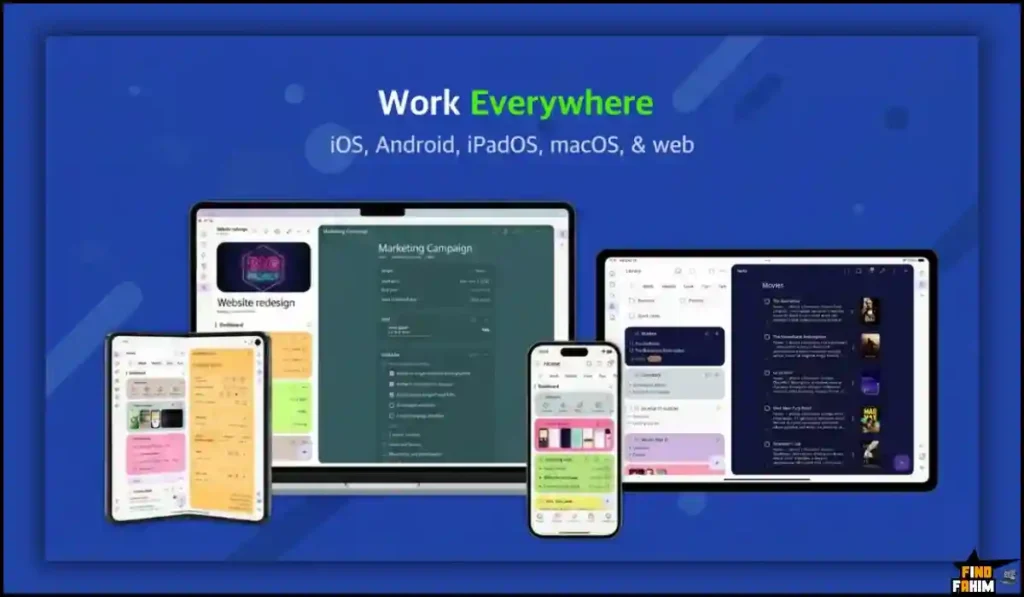
Journal it! is available on iOS, Android, macOS, and also offers a web version for Windows and Linux users.
Organizers in Journal it! are structured categories such as areas, projects, and habits that help users organize their content in a flexible and searchable way.
Yes. Journal it! supports importing entries from apps like Day One and Journey, making it easy to migrate your existing journal data.
A digital journaling app is a tool that allows users to write, organize, and store personal thoughts, notes, and daily logs electronically.
Journaling apps help improve productivity by combining reflection, planning, and habit tracking in one place.
Yes. Many modern journaling apps include built-in habit tracking features to help users build consistent routines. What is Journal it!?
Does Journal it! work offline?
Is Journal it! secure for private journaling?
Can Journal it! sync with Google Calendar?
What platforms does Journal it! support?
What are Organizers in Journal it!?
Can Journal it! import data from other journaling apps?
What is a digital journaling app?
Why use a journaling app for productivity?
Do journaling apps support habit tracking?

Hi, I’m Fahim — a SaaS tools reviewer and digital marketing expert with hands-on experience helping businesses grow using the right software. I research, test, and personally use a wide range of AI, business, productivity, marketing, and email tools for my agency, clients, and projects. I create honest, in-depth reviews and guides to help entrepreneurs, freelancers, startups, and digital agencies choose the best tools to save time, boost results, and scale smarter. If I recommend it, I’ve used it — and I only share what truly works.