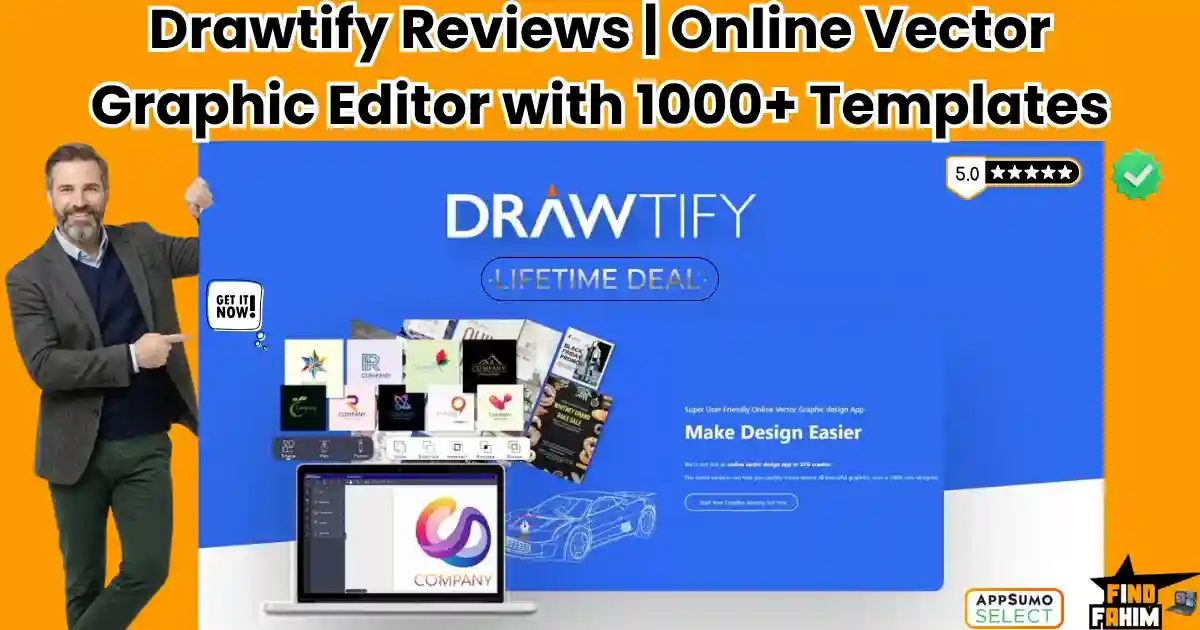

Basic image editors ruin professional branding. You spend hours on a logo, only to see it pixelate the moment it is printed. You need true vector graphics, but standard software is expensive and complex.
Drawtify solves this by putting an intuitive vector editor directly in your browser. Can it replace Adobe Illustrator? In this Drawtify review, I compare the top competitors to help you decide.
Note: This article contains affiliate links. Opinions are my own.
My Quick Take (TL;DR)
If you are exhausted by monthly subscriptions but need crisp, scalable graphics, here is the summary.
- What is it? A 100% vector graphic editor for web, Mac, and Windows.
- Why is it Special? It offers advanced controls like Bézier curves and SVG exports without a steep learning curve.
- Who is it for? Content creators, freelancers, and small business owners.
- The Deal: Lifetime Access for $79.90 on AppSumo. (Price increases soon).
My Verdict: This is a highly strategic addition. Escaping traditional design software fees pays for this tool within a few short months.
Click Here to Get the Drawtify Lifetime Deal on AppSumo
What is Drawtify? (Your Browser-Based Illustrator)
Think of Drawtify as a highly accessible alternative to professional vector software. Instead of installing massive, resource-heavy applications on your hard drive, you log into a cloud-based dashboard.
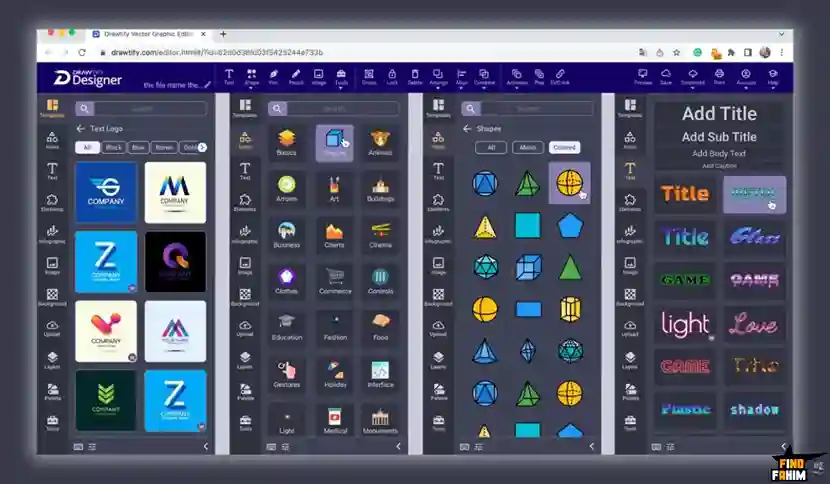
Most online design tools only allow you to arrange pre-made, flat images. Drawtify gives you actual vector drawing capabilities. You get full access to the pen tool, allowing you to draw custom shapes, edit anchor points, and manipulate paths exactly like a professional designer.
Because the graphics are entirely vector-based, you can design a logo on a tiny canvas and scale it up to the size of a billboard without losing a single pixel of quality. It provides the exact precision required for professional printing and responsive web design.
Quick Look: Drawtify vs Manual Design Software
If you spend your week fighting with complex layouts or paying expensive freelancers for basic graphics, look at what this tool actually replaces in your workflow.
| Feature | Replaces… | The Real Value | Normal Cost | Deal Status |
| Vector Editing | Adobe Illustrator | Scalable, crisp graphics | ~$22/mo | ✅ Included |
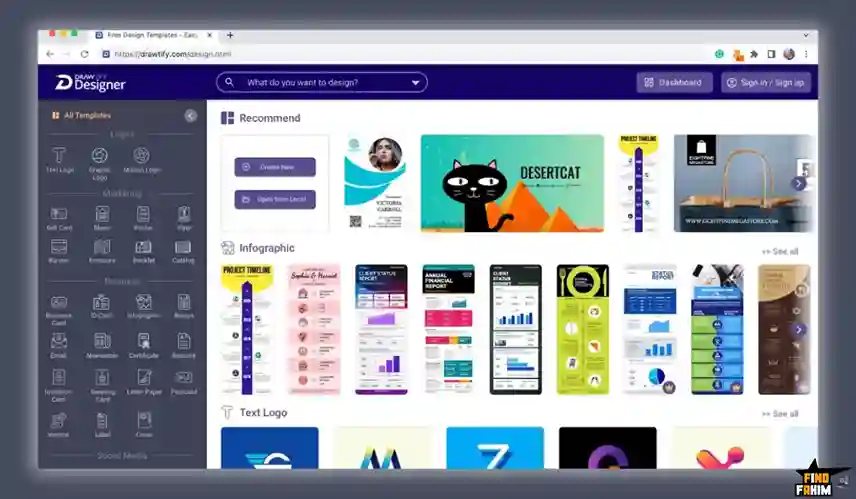
| Template Library | Envato Elements | 1,000+ ready-to-use designs | ~$16/mo | ✅ Included |
| Stock Photos | Shutterstock | 100M+ HD Unsplash photos | ~$29/mo | ✅ Included |
| Barcode/QR Gen | Paid web plugins | Instant product label assets | Workflow hassle | ✅ Included |
Why Traditional Design Software is Failing Creators
You have two main choices when starting a design project today. You either use basic online tools or you buy professional desktop software. Both have massive flaws.
Basic online tools rely entirely on raster images (pixels). If you design a logo in these basic apps, the edges will blur when you enlarge it, making your brand look incredibly cheap.
Professional desktop software fixes this, but it requires a massive monthly subscription fee and takes months of dedicated studying just to understand the complex interface.
Why Scalable Vector Graphics (SVGs) Are Trending in 2026
I noticed this specific AppSumo deal trending rapidly because responsive web design is stricter than ever.
In 2026, users will view your website on massive 4K desktop monitors and high-density mobile screens simultaneously. Using standard JPG or PNG files for your logos and icons slows down your site speed and looks blurry on modern screens.
SVGs are trending because they are mathematically calculated shapes rather than static pixels. They load instantly, take up zero storage space, and remain perfectly sharp on any device.
A Look Inside Drawtify: Key Features
Here is exactly what you are installing in your creative toolkit when you purchase this lifetime code. Let’s break down why these specific features matter to your daily operations.
The 100% Vector Drawing Engine
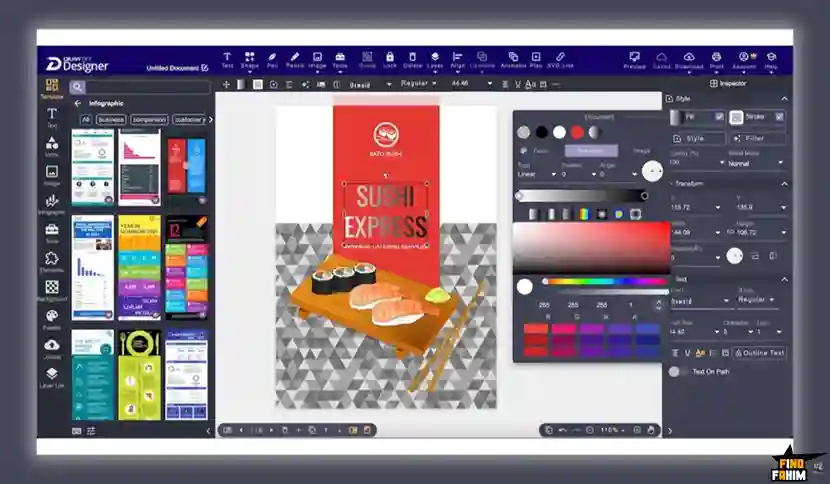
This is the core engine of the platform. Drawtify provides an actual pen tool, allowing you to plot anchor points and drag out Bézier curves with absolute precision. You can combine shapes and manipulate nodes to draw highly custom illustrations from scratch.
Intuitive Animation Editor
Static graphics often get lost in crowded social media feeds. Drawtify includes a built-in animation timeline that allows you to bring your vector designs to life. You can apply specific entry and exit motions, and export the file as a high-quality animated graphic.
Built-In Barcode and QR Generator
If you design physical product packaging or event flyers, this feature is incredibly valuable. You simply input your data, and the software generates a crisp, scalable vector barcode or QR code right on your canvas.
Massive Stock and Icon Libraries
Staring at a blank screen halts productivity. Drawtify prevents creative block by providing direct access to over 20,000 vector icons and shapes. Furthermore, the platform integrates directly with Unsplash, giving you instant access to over 100 million high-definition photographs.
The Standout Feature: Advanced Typography & Layout
Typography makes or breaks a design. You can map text to follow a custom curved path, convert text into outlines to manipulate individual letters, and apply complex 3D text effects. Built-in table editing tools make designing pricing sheets incredibly easy.
Recent 2026 Platform Updates
The Drawtify development team actively maintains the software. Recent updates include native Mac and Windows applications for a distraction-free workflow. They also optimized SVG export code to ensure perfect display across all modern web browsers.
Drawtify Pricing & AppSumo Deal Details
Unlike many AppSumo deals that feature multiple confusing tiers, this lifetime deal is structured as one single, all-inclusive package. You pay once, and you own the software forever without any recurring monthly subscription fees.
| Feature Limits | The Drawtify Lifetime License ($79.90) |
| Access Model | Lifetime Access to the Drawtify Plan |
| Vector Engine | 100% Vector Editing capabilities |
| Assets Included | 20,000+ icons, shapes, and 1,000+ templates |
| Layer Limits | Unlimited layer list functionality |
| Advanced Tools | Animation, Barcodes, Artistic Typography |
Understanding the Non-Stackable License
This specific deal is intentionally simple: it is not stackable. A single purchase completely unlocks the Drawtify Plan. There are no artificial limits on how many designs you can create or how many SVGs you can export. One code provides everything.
My Recommendation
Since there is only one tier available, the decision is straightforward. If you are currently paying a monthly fee for vector software, or if you are frustrated by the limitations of basic raster editors, you should secure this $79.90 license immediately.
Secure Your Drawtify Lifetime License Before the Price Increases
Pros & Cons of This Lifetime Package
With an excellent 4.6-star rating from early buyers, the community loves the depth of the typography tools. Here is the honest breakdown of the software.
The Pros
- ✅ True Vector Control: A fully functional pen tool in your browser allows for professional logo creation.
- ✅ All-In-One Workspace: Combining vector drawing, photo editing, and animation saves massive amounts of time.
- ✅ No Subscription: Escaping the recurring fees of the Adobe ecosystem improves your profit margins immediately.
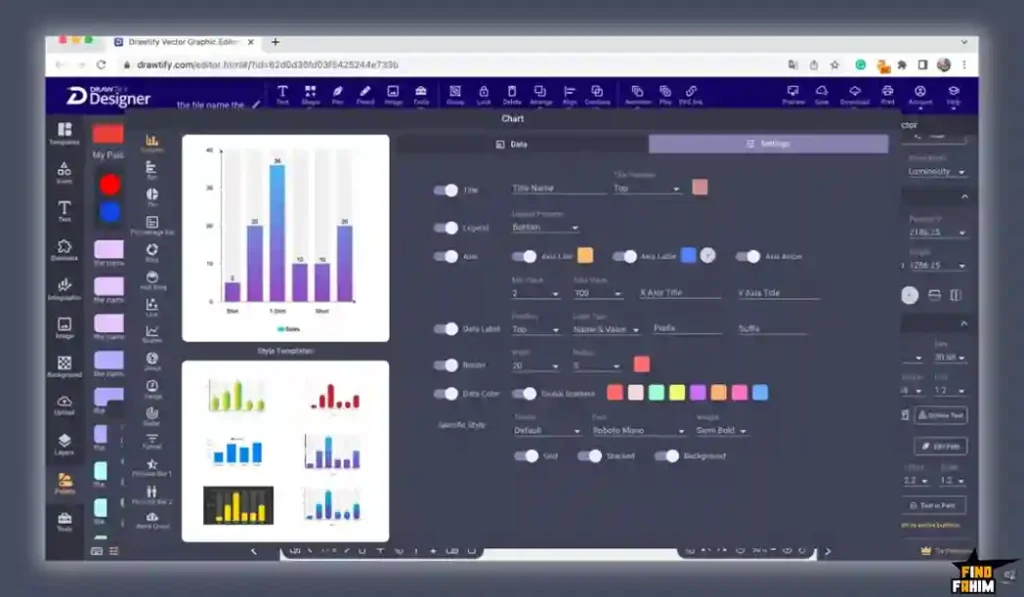
- ✅ Data Visualization: Built-in charts and barcode generators make designing infographics incredibly fast.
The Cons
- ❌ The Pen Tool Curve: If you have never manipulated anchor points before, learning Bézier curves requires practice.
- ❌ Browser Limitations: Opening files with hundreds of complex vector layers can cause slight lag on older laptops.
Who Should NOT Buy Drawtify?
Do not buy this tool if you are a casual user who only wants to quickly slap text over a pre-made photo for Instagram. If you have absolutely zero interest in learning how to use custom paths, a simpler tool is better for you.
Furthermore, if you are a highly specialized professional working exclusively in complex 3D rendering or heavy video motion graphics, this will not replace your dedicated industry tools.
How Does Drawtify Work?
If you have never used an online vector editor before, here is exactly how fast you can start designing a logo.
- Open the Dashboard: Log in to the web app or launch the desktop application.
- Select a Canvas: Choose a blank vector canvas or select a pre-made logo template.
- Draw Your Shapes: Use the pen tool to draw your custom icon, clicking and dragging to create smooth curves.
- Apply Typography: Type your brand name, convert the text to a path, and manipulate the individual letters.
- Export: Click download and select SVG to ensure your new logo scales perfectly.
Best Use Cases for Drawtify
Who actually extracts the highest financial return from this specific tool? Here are the three main workflows that benefit immediately.
-
The Freelance Logo Designer
You create brand identities for small businesses. You cannot deliver pixelated PNG files to your clients. Use Drawtify’s vector engine to build crisp, scalable logos and export them as professional SVGs, increasing your profit on every job.
-
The Content Marketing Agency
Your clients demand engaging data visualizations for their blogs. You can use the built-in table editors, chart creators, and rich template library to build massive infographics in half the time. The asset library ensures every graphic looks unique.
-
The E-Commerce Store Owner
You need to design physical product packaging and shipping labels. You can use the precise layout tools to format box dimensions perfectly. More importantly, you can use the built-in barcode generators to stamp your products instantly.
Stop Renting Design Software—Claim Your Drawtify Lifetime Deal
Drawtify Alternatives
Is Drawtify the absolute best tool for the job, or should you use an established heavyweight? Let’s compare it directly against the top players in the market to see exactly where it fits in your software stack.
Drawtify vs Adobe Illustrator
Adobe Illustrator is the undisputed industry standard for vector graphics.
- Where Adobe Wins: Enterprise Power. Illustrator handles massive files with thousands of complex layers effortlessly.
- Where Drawtify Wins: The Lifetime Price. Adobe forces you into an expensive monthly subscription. Drawtify gives you core vector tools for a single one-time payment.
Drawtify vs Canva
Canva is the most popular raster-based design tool on the internet.
- Where Canva Wins: Absolute Simplicity. Canva is incredibly easy for complete beginners to manage basic social media posts.
- Where Drawtify Wins: True Vector Editing. Canva does not have a pen tool. Drawtify allows you to actually create graphics from scratch using scalable anchor points.
Drawtify vs Visme
Visme is a premium platform focused heavily on corporate presentations.
- Where Visme Wins: Corporate Reporting. Visme has deep data integrations to connect live spreadsheets directly to presentation charts.
- Where Drawtify Wins: Illustration Capabilities. Visme is a layout tool. Drawtify provides the actual illustration features needed to build custom graphics from the ground up.
Drawtify vs Affinity Designer
Affinity Designer is a professional desktop alternative to Adobe.
- Where Affinity Wins: Pro-Level Desktop Performance. Affinity utilizes your computer’s GPU for lightning-fast rendering of complex art.
- Where Drawtify Wins: Cloud Access and Assets. Affinity lacks built-in stock libraries. Drawtify provides the convenience of web access along with 100M+ integrated photos.
Drawtify vs Figma
Figma is the modern standard for UI/UX web design.
- Where Figma Wins: Web Prototyping. Figma allows dozens of designers to work on the same file simultaneously for app mockups.
- Where Drawtify Wins: Print and Marketing Focus. Figma is terrible for designing a printable flyer. Drawtify includes layout and barcode tools necessary for physical marketing materials.
All 5 Competitors Matrix
| Platform | Pricing Model | Key Strength | Best For… |
| Drawtify | Lifetime ($79.90) | Online Vector Engine | Freelancers & Marketers |
| Adobe Illustrator | Subscription ($22/mo) | Industry Standard | Corporate Designers |
| Canva | Subscription ($14/mo) | Extreme Simplicity | Casual Social Media |
| Visme | Subscription ($29/mo) | Data Presentations | Corporate Teams |
| Affinity Designer | High One-Time | GPU Desktop Power | Pro Illustrators |
| Figma | Subscription ($15/mo) | UI/UX Prototyping | Web Developers |
End Subscription Fees—Get Drawtify on AppSumo Today
Is This Lifetime Deal a Smart Business Investment?
Let’s look at the exact financial math of choosing Drawtify versus paying for a premium vector competitor like Adobe Illustrator.
- Cost of Adobe Illustrator (1 Year): ~$22/month = $264/year.
- Cost of Drawtify (Lifetime): $79.90 (One-time payment).
The ROI Math:
You break even in less than four months. Over a standard 3-year business cycle, choosing Drawtify saves you a staggering $712 in recurring software subscriptions.
More importantly, calculate the value of your brand assets. If you design just one professional, scalable logo for a client, the software pays for itself entirely on your very first project.
How to Redeem the Drawtify Deal
Ready to secure your creative freedom? Follow these quick steps.
- Buy: Click the AppSumo link below to secure your activation code before the deal expires.
- Redeem: You will instantly receive a unique code in your email inbox.
- Activate: Follow the instructions to create your account and apply the code within 60 days.
- Verify: Open the web editor and test the pen tool completely risk-free.
Final Verdict: Is This AppSumo Deal Worth It?
After analyzing the vector engine, testing the custom typography tools, and looking at the massive savings, my final verdict is a flawless 5-Star YES.
It is the ultimate advantage for independent creators. It eliminates blurry graphics, provides actual illustration capabilities, and stops the financial drain of monthly design subscriptions.
While the pen tool requires a brief learning curve for complete beginners, the core functionality easily replaces tools that cost hundreds of dollars a year. If you want true design control without the massive overhead, grab this lifetime deal immediately.
Reclaim Your Creative Freedom—Grab the Drawtify Lifetime Deal Now
About the Author
I spend my time analyzing SaaS products and lifetime deals to help smart entrepreneurs stop overpaying for software. We all know the extreme frustration of dealing with pixelated graphics and bloated monthly software fees, which is exactly why I investigated the Drawtify lifetime deal today.
I do the heavy lifting of evaluating these offers—digging into specific vector capabilities and export formats—so you know exactly what you are getting. To see what other high-value tools are leaving the platform soon, check out my breakdown of the AppSumo Deals Ending Soon.
FAQ: Your Drawtify Questions, Answered
Drawtify is an online graphic design software with a full vector engine that allows users to create logos, infographics, and marketing visuals directly in a web browser.
Yes. Drawtify provides downloadable desktop applications for both Windows and Mac, in addition to its web-based version.
Yes. Drawtify includes a full-featured pen tool that allows users to create custom shapes using anchor points and Bézier curves.
Yes. Drawtify allows you to export designs as SVG files, ensuring scalability and high-quality output for web and print use.
Yes. Drawtify includes an animation editor where you can apply entry, exit, and emphasis effects to design elements.
Yes. Drawtify includes thousands of templates, icons, and access to high-quality stock images for design projects.
Vector graphic design uses mathematical paths instead of pixels, allowing designs to scale without losing quality.
Vector graphics ensure logos remain sharp and clear at any size, making them ideal for branding and printing.
Yes. Many modern design tools like Drawtify offer browser-based access without requiring installation.
SVG format is used for scalable web graphics, icons, and logos because it maintains quality across all screen sizes. What is Drawtify?
Does Drawtify offer a desktop app?
Can I use the pen tool in Drawtify like Illustrator?
Does Drawtify support SVG export?
Can Drawtify create animations?
Are templates and stock assets included in Drawtify?
What is vector graphic design?
Why are vector graphics important for logos?
Can graphic design tools be used without installation?
What is SVG format used for?

Hi, I’m Fahim — a SaaS tools reviewer and digital marketing expert with hands-on experience helping businesses grow using the right software. I research, test, and personally use a wide range of AI, business, productivity, marketing, and email tools for my agency, clients, and projects. I create honest, in-depth reviews and guides to help entrepreneurs, freelancers, startups, and digital agencies choose the best tools to save time, boost results, and scale smarter. If I recommend it, I’ve used it — and I only share what truly works.