
Producing high-quality corporate or educational videos manually is a massive waste of energy and resources. If you want to scale your marketing agency or course business, you cannot afford to rely on expensive cameras, dedicated lighting setups, or days of tedious editing for a single clip.
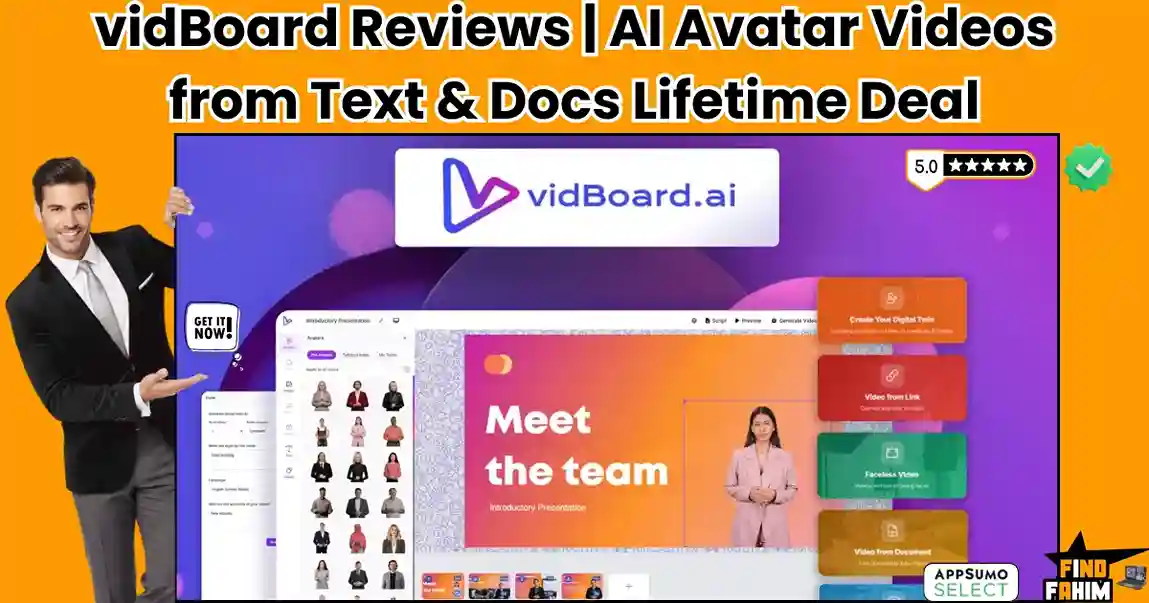
vidBoard is a generative AI video platform that completely automates your production pipeline. It allows you to turn plain text, documents, and website URLs into polished videos featuring lifelike AI avatars, custom voice cloning, and multilingual lip-syncing without ever stepping in front of a camera.
Disclaimer: This article contains affiliate links. If you purchase through these links, I may earn a small commission at no extra cost to you. All opinions, market analysis, and research are entirely my own.
My Quick Take (TL;DR)
Tired of wasting entire days filming and editing video content manually? Here is the executive summary.
- What is it? A generative video platform that turns plain text, documents, and URLs into presenter-led videos.
- Special Feature: The URL to Video extraction instantly converts a live blog post into a fully animated presentation.
- For Who: Digital marketing agencies, online course creators, and corporate HR departments.
- The Deal: AppSumo lifetime deal starting at $69. Upgrade to Tier 2 to unlock custom voice cloning.
- Verdict: Absolute powerhouse. It easily replaces expensive recurring subscriptions to Synthesia and standard stock footage libraries.
Get the vidBoard Lifetime Deal on AppSumo
What is vidBoard?
Most entrepreneurs hate being on camera. They struggle with proper studio lighting, mess up their spoken lines, and spend hours editing out awkward pauses. Those who hire freelance human spokespersons end up paying hundreds of dollars for a single video.
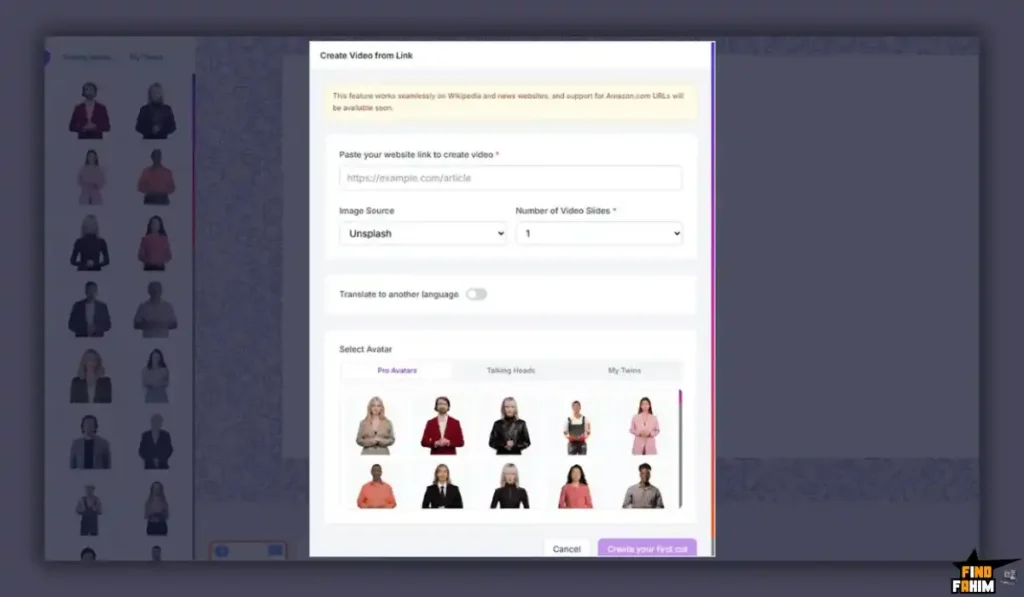
vidBoard completely bypasses this outdated workflow. It is an end-to-end generative AI video platform designed for extreme speed. You provide the raw information via a Word document, a PDF, or a website link. The system’s AI automatically slices your text into slides and generates an ultra-realistic avatar to present it.
Quick Look: vidBoard vs Manual Video Production
If your business relies on traditional video shoots, your daily operations are drastically slowed down. Look at what this unified generative application replaces.
| Feature / Process | Replaces… | The Real Value | Normal Cost | Deal Status |
| Human Presenter | Actors/Freelancers | 100+ digital avatars included | ~$300/video | ✅ Included |
| Voiceover Audio | Voice Actors | 500+ AI voices via ElevenLabs | ~$100/track | ✅ Included |
| Video Editing | Adobe Premiere | Automated slide rendering | ~$20/month | ✅ Included |
| Stock Assets | Shutterstock | 1M+ free integrated media files | ~$30/month | ✅ Included |
Why Traditional Video Production is Failing Creators
Forcing your agency team to manually film and edit every single marketing update is an operational mistake. Traditional video production creates a massive bottleneck between your script and your final publish date. It leads to slow campaign rollouts and severe creative burnout.
Furthermore, traditional video is uneditable. If a client changes a single line of text or updates a product price, you have to completely reshoot the footage. This destroys your profit margins and forces you to waste billable hours on minor revisions.
Why AI Video Generators Are Trending in 2026
The demand for high-volume video communication is higher than ever. Clients expect daily YouTube shorts, engaging LinkedIn videos, and highly polished course materials. Modern professionals require tools that allow them to produce studio-quality videos directly from their laptops.
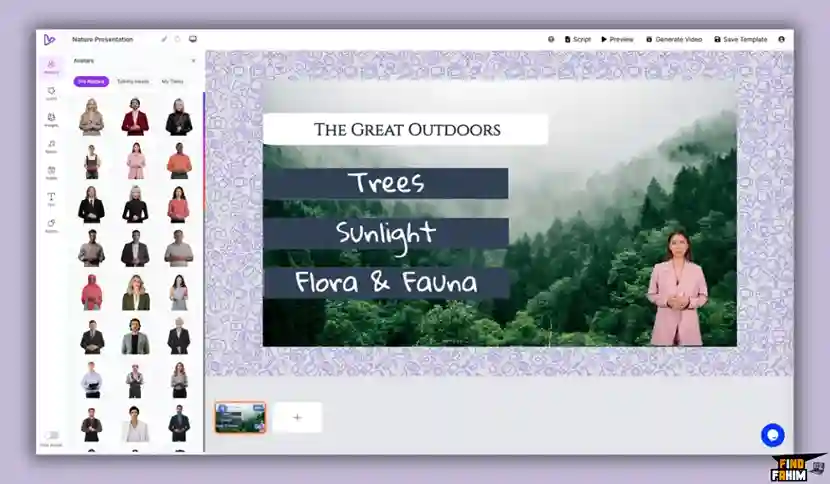
AI video generators are trending because they eliminate mechanical friction. By integrating large language models with rapid video rendering, these tools allow users to bypass physical filming entirely. You can create perfectly formatted, multilingual video campaigns in half the normal time.
A Look Inside vidBoard: Key Features
This platform is incredibly powerful but intentionally lightweight. There is no steep learning curve or heavy interface to navigate. Here is exactly what it offers.
100+ AI Presenter Avatars
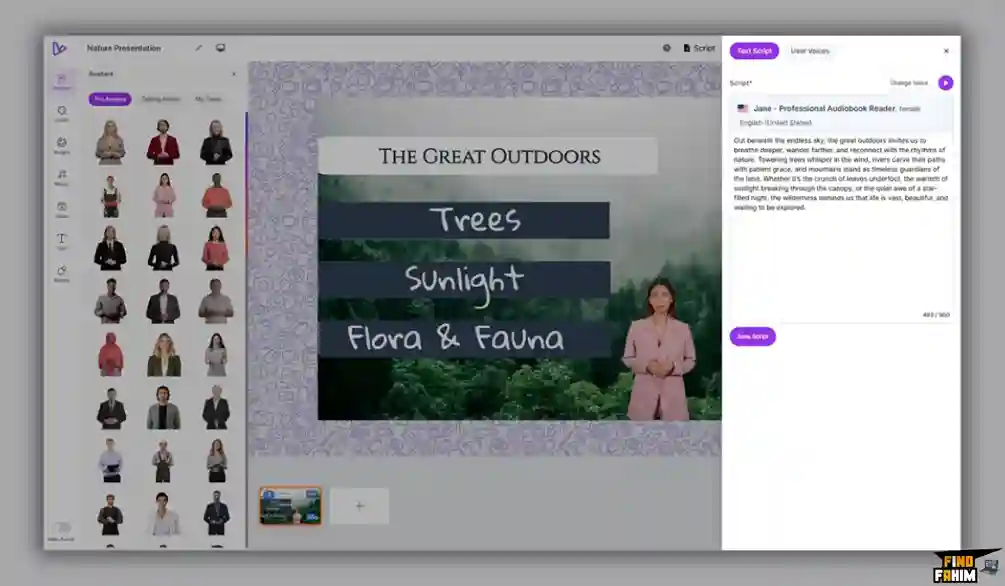
Finding the right face for your brand is critical. vidBoard provides a massive library of over 100 pre-made AI avatars. These digital humans span a wide variety of demographics, ages, ethnicities, and professional presentation styles. The perfect presenter is instantly available.
500+ Premium AI Voices & Integrations
The platform provides access to over 500 ultra-realistic AI voices. vidBoard natively integrates with industry leaders like ElevenLabs, Resemble.ai, OpenAI, and Microsoft Azure. This ensures your narration sounds perfectly human, completely avoiding the robotic audio that plagues cheaper video generators.
125+ Languages with Multilingual Lip-Sync
Scaling your business globally is effortless. The platform allows you to type your script in English and instantly translate it into over 125 different languages. Their proprietary lip-sync engine perfectly matches the avatar’s mouth movements to the chosen language seamlessly.
Canva-Style Drag-and-Drop Editor
You do not need an editing degree to use this software. The interface features a highly intuitive, Canva-style drag-and-drop canvas. You have complete creative control to adjust text styling on every single slide, apply smooth transitions, and easily reorder your timeline objects.
1 Million+ Free Media Assets
You will never need to pay for an expensive stock subscription again. vidBoard integrates directly with Pexels, Unsplash, and Pixabay right inside the editor. This gives you instant access to over a million high-quality background videos, stock images, and professional music tracks.
Faceless Video Generation
Not every video requires a human presenter. If you are building automated YouTube channels or basic explainer content, the platform fully supports Faceless Videos. You can utilize the AI to generate stunning background visuals and automatically sync on-screen captions without an avatar.
The Standout Feature: URL to Video Conversion
This feature completely changes how you repurpose content. You do not need to manually write video scripts or build complex slide decks. You can simply paste a live website URL, upload a dense PDF, or drop in a standard Word document.
The AI instantly analyzes the raw text, extracts the most important marketing points, and automatically constructs a multi-slide video presentation. This allows agencies to turn a standard client blog post into a highly engaging YouTube video in mere seconds.
vidBoard Updates: What is New in 2026
AppSumo buyers heavily requested specific changes, and the development team rapidly delivered. The founders actively monitor community feedback to shape their roadmap during their fourth launch on the marketplace.
The biggest upgrade in 2026 is their new proprietary lip-sync engine deployed in Version 6. Unlike generic wrapper software, vidBoard’s deep-tech infrastructure ensures flawless mouth movements. Furthermore, they officially unlocked the highly coveted Voice Cloning feature for all users on Tier 2 and above.
vidBoard Pricing & AppSumo Deal Details
Unlike basic video tools, this lifetime deal is structured into flexible tiers. This allows you to scale your purchase based on your required video generation limits and custom avatar needs.
| Deal Feature | Tier 1 ($69) | Tier 2 ($159) | Tier 3 ($319) | Tier 5 ($799) |
| Total Videos / Month | 30 | 300 | 800 | 3,000 |
| Custom Avatars | 0 | 2 | 6 | 24 |
| Voice Cloning | ❌ No | ✅ Yes | ✅ Yes | ✅ Yes |
| URL to Video | ✅ Yes | ✅ Yes | ✅ Yes | ✅ Yes |
| ElevenLabs Audio | ✅ Yes | ✅ Yes | ✅ Yes | ✅ Yes |
| 125+ Languages | ✅ Yes | ✅ Yes | ✅ Yes | ✅ Yes |
Lock In Your vidBoard Lifetime Price
Important Note on the Refund Policy
This software comes with AppSumo’s “We Got Your Back” 60-day money-back guarantee. You have two full months to test the rendering speed, evaluate the custom avatars, and review the lip-sync quality. If the platform does not streamline your workflow, secure a full refund easily.
Pros & Cons of This Lifetime Package
Based on verified AppSumo community feedback and an impressive 4.6-star rating, here is the truth about the platform’s current state.
The Pros
- ✅ Incredible Value: Replaces massive recurring fees for enterprise tools like Synthesia with a single payment.
- ✅ Exceptional Support: Reviewers consistently praise the founding team for highly professional customer service.
- ✅ URL Extraction: Instantly converting a live blog post into a polished video presentation is a massive time saver.
- ✅ Flawless Integrations: Native access to ElevenLabs ensures top-tier audio quality for every single project.
- ✅ High Output Limits: Tier 2 offers a staggering 300 videos per month, covering almost any creator’s needs.
The Cons
- ❌ Tier 1 Limitations: Tier 1 restricts you to only 30 videos per month and excludes custom voice cloning completely.
- ❌ Documentation Gaps: Some users noted that the onboarding tutorials could be more detailed for absolute beginners.
- ❌ Minor Rendering Glitches: Occasional minor bugs in slide transitions can occur during peak server loads.
Who Should NOT Buy vidBoard?
Skip this deal if you produce highly cinematic, Hollywood-style short films. This platform is engineered for corporate presentations, educational courses, and marketing explainers. It is not designed to replace complex VFX software like Adobe After Effects.
Also, avoid Tier 1 if you are serious about brand building. Missing out on Voice Cloning and Custom Avatars limits your long-term creative flexibility. Upgrade to Tier 2 immediately.
How Does vidBoard Work?
The setup workflow is completely seamless and requires almost zero technical video editing background.
- Select the Source: Choose your input method. You can start blank, upload a Word document, or paste a URL.
- Choose Your Avatar: Browse the library of 100+ digital humans and select a presenter matching your brand.
- Select the Voice: Pick your language and choose a high-quality voice from the ElevenLabs integrations.
- Edit the Canvas: Use the editor to add background images and adjust the layout of your auto-generated slides.
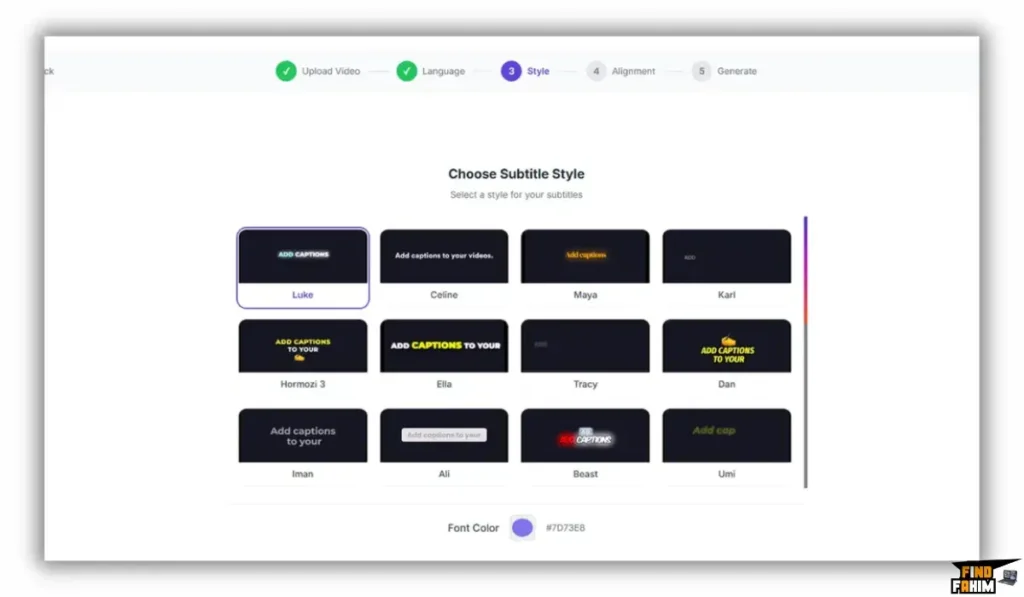
- Export: Hit render. The engine will sync the lip movements, bake in subtitles, and provide a downloadable MP4.
Best Use Cases for vidBoard
Who extracts the highest financial return on investment from this generative video tool?
-
Content Marketing Agencies
Your agency manages dozens of clients. You purchase Tier 4 to secure 12 custom avatars. You take your clients’ existing written blog posts, paste the URLs into vidBoard, and instantly generate engaging YouTube video content to upsell your retainers.
-
Online Course Creators
You have massive educational materials stored in PDFs. You upload these documents directly into the platform. The AI converts the dry text into engaging video lectures featuring a professional AI instructor, drastically increasing course value.
-
Corporate HR Departments
Your company frequently updates standard operating procedures. Instead of scheduling live video shoots, you generate custom avatars of your leadership team. When policies change, you type the new text, and the system instantly generates an updated training video.
Start Generating Professional Videos Today
vidBoard Alternatives
The generative AI video market is highly competitive. Let us look at how this AppSumo lifetime deal stacks up against established industry heavyweights.
vidBoard vs Synthesia
Synthesia is the enterprise leader of the AI avatar space.
- Where Synthesia Wins: Corporate polish. They have slightly more advanced micro-expressions for Fortune 500 companies.
- Where vidBoard Wins: Absolute value. Synthesia charges massive monthly fees. vidBoard offers comparable ElevenLabs audio for a single lifetime payment.
vidBoard vs HeyGen
HeyGen is incredibly popular for fluid avatar movements.
- Where HeyGen Wins: Ultra-realistic avatar fluidity and instant video translation capabilities.
- Where vidBoard Wins: Content ingestion. vidBoard’s ability to pull raw data directly from URLs makes it superior for rapid content repurposing.
vidBoard vs Canva
Canva is the global standard for drag-and-drop design.
- Where Canva Wins: Overall design ecosystem. Canva offers vastly superior graphic design elements and vector manipulation.
- Where vidBoard Wins: Dedicated video AI. Canva’s video avatars are basic plugins. vidBoard is a native deep-tech orchestration engine built specifically for lip-sync accuracy.
vidBoard vs Vidyard
Vidyard is a popular tool for sales teams.
- Where Vidyard Wins: Native CRM integration and real-time screen recording for personalized sales outreach.
- Where vidBoard Wins: Faceless automation. Vidyard requires a human to sit in front of the camera. vidBoard automates the presentation process without a physical actor.
Top 4 Competitors Matrix
| Platform | Pricing Model | Core Strength | URL to Video | Best For… |
| vidBoard | Lifetime Deal | Document Conversion | ✅ Yes | Agencies & Educators |
| Synthesia | Monthly Sub | Enterprise Quality | ❌ No | Fortune 500 Teams |
| HeyGen | Monthly Sub | Avatar Fluidity | ❌ No | High-End Marketers |
| Canva | Monthly Sub | Graphic Design | ❌ No | General Creators |
| Vidyard | Monthly Sub | Sales Screen Records | ❌ No | B2B Sales Reps |
Switch to vidBoard and Stop Paying Subscriptions.
Is This Lifetime Deal a Smart Business Investment?
Look at the exact financial math of standard video software over a single year.
The recurring subscription fees for a typical production stack are staggering:
- Premium AI Video Tool (Synthesia): ~$800+/year
- High-End Audio (ElevenLabs): ~$260/year
- Total Typical Budget: $1,060+ per year
Cost of vidBoard (Tier 2): $159 exactly once.
The ROI is completely undeniable. You break even within the first two months. By utilizing vidBoard to replace these disparate subscriptions, you save nearly $900 in your first year while reclaiming hours of manual editing.
How to Redeem the vidBoard Deal
Ready to stop wasting days filming? Follow these quick steps to secure your lifetime account before the deal closes.
- Buy: Click the AppSumo link below to secure your redemption code. This purchase is fully backed by a 60-day money-back guarantee.
- Register: Go to the official vidBoard website and create a brand new account using your primary email.
- Activate: Navigate to your billing portal and apply your unique AppSumo code to unlock your lifetime access.
- Create: Open the dashboard, paste a URL from your latest blog post, and generate your first video.
Final Verdict: Is This AppSumo Deal Worth It?
After evaluating the rendering speeds, testing the ElevenLabs voice integrations, and reviewing the URL extraction tool, my final verdict is a definitive 4.8-Star BUY.
vidBoard solves the most expensive bottleneck in digital marketing: video production. It is a remarkably stable platform that combines top-tier voice cloning and diverse digital avatars into one dashboard. Upgrading to Tier 2 is a mandatory investment to secure custom avatars. Grab this deal and let AI handle the heavy lifting.
Secure Your vidBoard Lifetime Deal Before It Ends
About the Author
Welcome to FindFahim, the premier SaaS Review Platform where I spend my time analyzing digital tools to help smart entrepreneurs save big and stop overpaying for monthly software subscriptions. We all know the extreme frustration of burning entire days on complex video editing, which is exactly why I investigated the vidBoard lifetime deal today.
I do the heavy lifting of evaluating these multi-tier offers, digging into specific AI limits, workflow integrations, and refund policies, so you know exactly what you are buying. To see how else you can automate your video production workflow, check out my direct breakdown here: FlexClip AppSumo Lifetime Deal Review & Alternatives.
FAQ: Your vidBoard Questions, Answered
vidBoard is an AI-powered video creation platform that transforms text, documents, and URLs into professional videos using realistic digital avatars and voiceovers.
vidBoard converts written content into structured scenes with visuals, voice narration, and optional avatars, making video creation automated and fast.
Yes. vidBoard supports faceless video creation with visuals, background music, and AI voiceovers without using digital avatars.
Yes. vidBoard supports over 125 languages and uses advanced lip-sync technology to match voice and avatar movements accurately.
Yes. Higher-tier plans allow you to create a custom avatar by uploading your own video to generate a digital version of yourself.
Yes. vidBoard includes voice cloning features on advanced plans, allowing you to replicate your own voice using a short audio sample.
An AI video generator is a tool that automatically creates videos from text or scripts using artificial intelligence, including visuals, voice, and animation.
AI avatars help create engaging videos without needing to record yourself, saving time and production costs.
Yes. Faceless videos are widely used for tutorials, marketing, and educational content while maintaining viewer engagement.
Many AI video platforms integrate free stock libraries, allowing users to access images and videos without extra cost. What is vidBoard?
How does vidBoard create videos from text?
Can I create videos without avatars in vidBoard?
Does vidBoard support multiple languages?
Can I create my own avatar in vidBoard?
Does vidBoard offer voice cloning?
What is an AI video generator?
Why use AI avatars in videos?
Are faceless videos effective for content creation?
Do AI video tools include free stock media?

Hi, I’m Fahim — a SaaS tools reviewer and digital marketing expert with hands-on experience helping businesses grow using the right software. I research, test, and personally use a wide range of AI, business, productivity, marketing, and email tools for my agency, clients, and projects. I create honest, in-depth reviews and guides to help entrepreneurs, freelancers, startups, and digital agencies choose the best tools to save time, boost results, and scale smarter. If I recommend it, I’ve used it — and I only share what truly works.