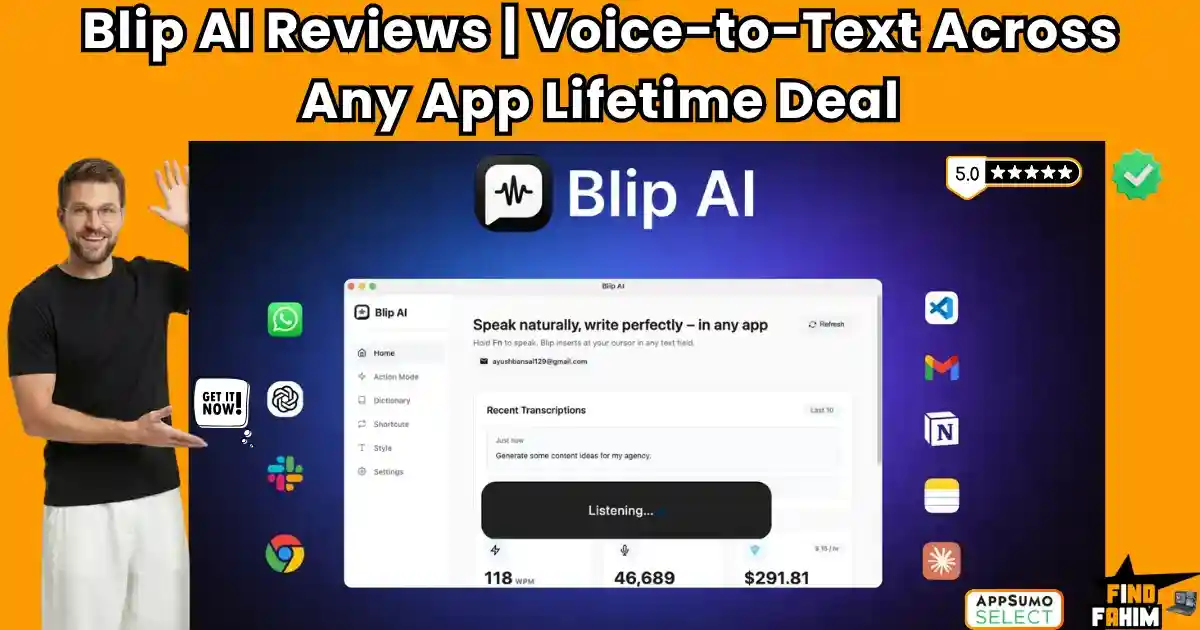

Typing every single email and Slack message manually is a massive bottleneck. No matter how fast your fingers move, traditional typing limits your daily output and constantly breaks your creative flow during complex tasks.
Blip AI is an advanced dictation tool that completely automates your keyboard. It converts your natural speech into clean, formatted text inside any application instantly, allowing you to draft emails, code, and chat entirely by voice.
Disclaimer: This article contains affiliate links. If you purchase through these links, I may earn a small commission at no extra cost to you. All opinions, market analysis, and research are entirely my own.
My Quick Take (TL;DR)
If you are tired of spending hours manually typing out client emails, here is the executive summary.
- What is it? A desktop dictation assistant that formats speech and executes AI text commands.
- Special Feature: Action Mode allows you to dictate complex prompts and receive fully written paragraphs.
- For Who: Content creators, marketing agencies, developers, and customer support teams.
- The Deal: AppSumo lifetime deal starting at $49. Upgrade to Tier 3 for 1.4 million monthly words.
- Verdict: Incredibly fast and highly accurate. It easily replaces expensive subscriptions to WisprFlow or standard dictation software.
Get the Blip AI Lifetime Deal on AppSumo Now
What is Blip AI?
To understand this platform, consider the daily friction in digital communication. Most professionals waste hours physically typing out meeting recaps or Slack updates. Built-in operating system dictation tools are usually terribly inaccurate, ignore punctuation, and require constant manual editing.
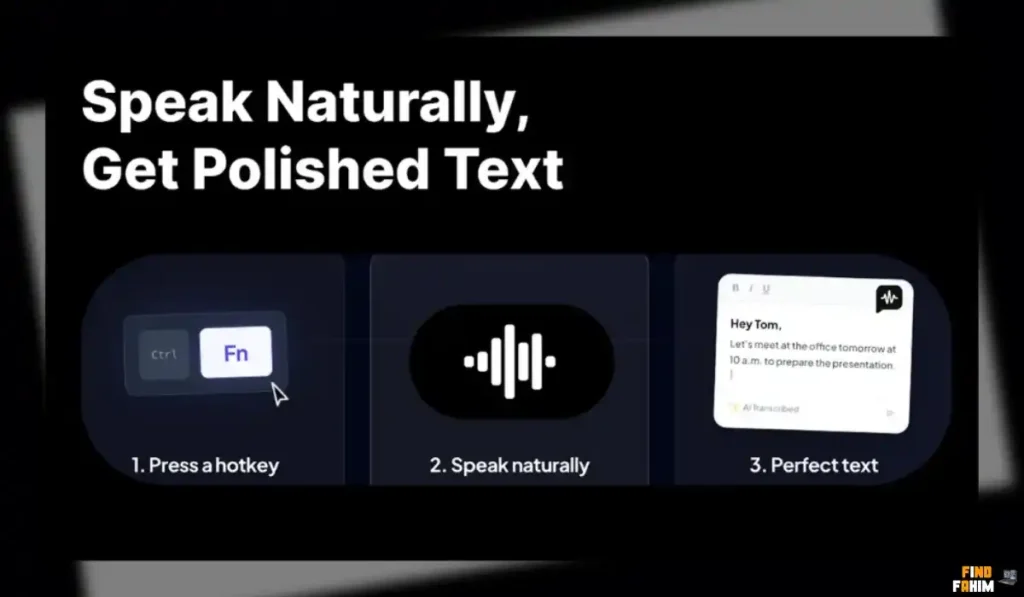
Blip AI replaces these basic tools as your intelligent desktop listening assistant. You press a single global hotkey and speak naturally. The AI instantly removes filler words like “um” and types perfectly formatted, punctuated sentences directly at your active cursor.
Quick Look: Blip AI vs Manual Typing
If your team relies on manual typing or basic Apple dictation, your daily operations are drastically slowed down. Look at what this unified voice application replaces.
| Feature / Process | Replaces… | The Real Value | Normal Cost | Deal Status |
| Smart Dictation | WisprFlow | Instantly formatted speech | ~$15/month | ✅ Included |
| Generative AI | ChatGPT Plus | In-app contextual replies | ~$20/month | ✅ Included |
| Text Expansion | TextExpander | Voice-triggered shortcuts | ~$40/year | ✅ Included |
| Translation | DeepL Pro | On-the-fly language shifts | ~$10/month | ✅ Included |
Why Manual Typing is Failing Creators
Forcing yourself to manually type hundreds of messages a day is an operational mistake. Physical typing creates a massive bottleneck between your brain and your screen. It leads to slower client response times, repetitive strain injuries, and severe creative burnout.
Furthermore, switching contexts destroys focus. If you have to leave Gmail, open ChatGPT, type a prompt, wait for the generation, and paste it back into your email, you have completely lost your workflow momentum.
Why Voice AI Tools Are Trending in 2026
The demand for high-volume communication is higher than ever. Clients expect immediate, highly detailed responses. Modern professionals require tools that live directly at their fingertips and process complex thoughts instantly without requiring a keyboard.
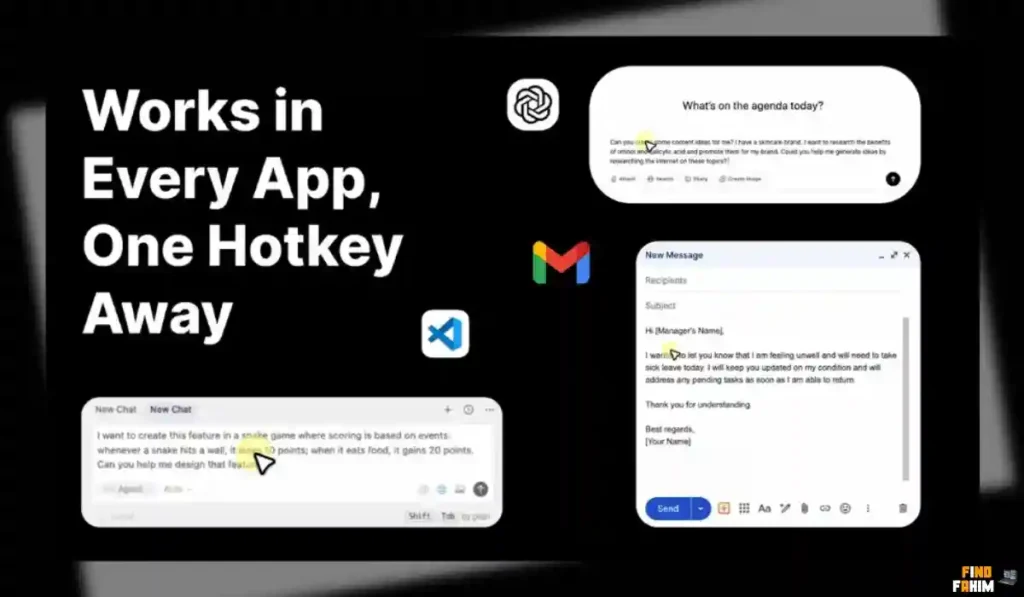
Voice AI tools are trending because they eliminate mechanical friction. By integrating large language models with rapid speech recognition, these tools allow users to bypass typing entirely. You can create perfectly formatted documents and emails in half the normal time.
A Look Inside Blip AI: Key Features
This platform is incredibly powerful but intentionally lightweight. There is no steep learning curve or heavy interface to navigate. It runs quietly in the background of your operating system. Here are the core features that provide the absolute highest value for modern digital professionals.
Cross-Platform Integration
Blip AI functions flawlessly across macOS, Windows, and Android environments. It does not force you to use a proprietary text editor or web dashboard. You can dictate directly into Gmail, VS Code, Notion, or Slack. The text drops exactly where your active cursor is blinking.
Smart Formatting & Filler Removal
Traditional dictation types every single mistake you make. Blip acts as your automatic editor. It listens to your natural speech, automatically strips out annoying filler words, and applies perfect punctuation and capitalization before the text ever hits your computer screen.
Custom Vocabulary & Shortcuts
Generic voice tools constantly struggle with specific industry jargon. Blip allows you to program custom words and acronyms to ensure perfect spelling for your niche. You can also map specific phrases to text snippets, like saying “my portfolio” to instantly drop your website URL.
The Dedicated Scratch Pad
Sometimes you do not want to dictate directly into an active client email or code editor. Blip AI includes a built-in Scratch Pad. You can quickly capture rapid thoughts, brainstorm marketing ideas, or outline entire documents by voice without opening a separate application first.
Multilingual Auto-Detection
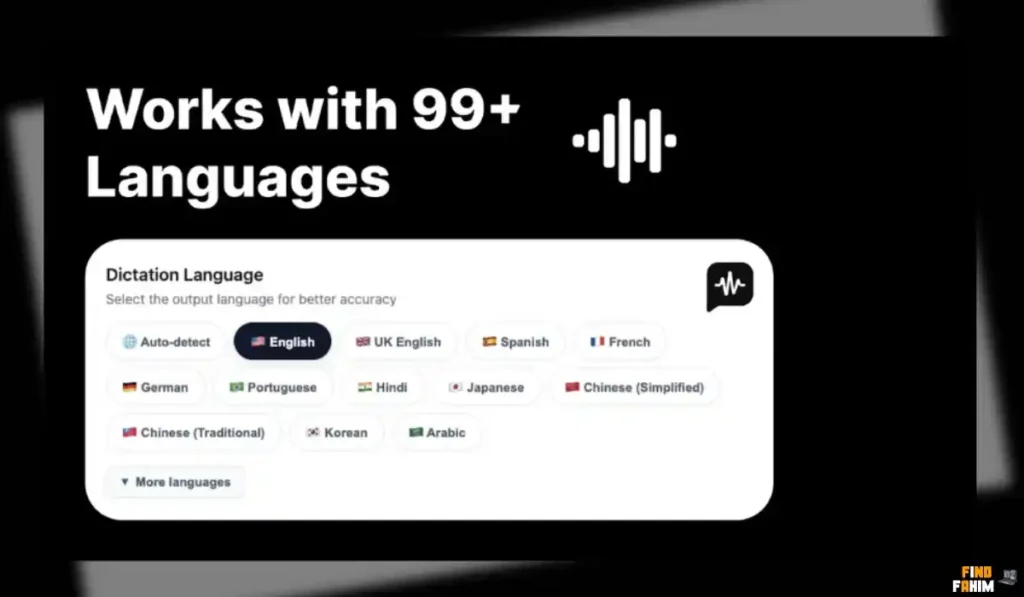
If you work with international clients, manually switching computer language settings is highly tedious. Blip AI automatically detects and supports over 99 different dictation languages. The AI will perfectly transcribe and format your speech seamlessly without requiring any constant, manual configuration changes.
Developer API Access
For advanced users and technical agencies, Blip AI provides full API access across all lifetime tiers. This allows you to integrate their powerful, high-speed speech recognition directly into your own custom applications or internal workflows for massive operational flexibility.
The Standout Feature: “Hey Blip” Action Mode
This feature completely changes how you interact with AI. Instead of just transcribing exactly what you say, the “Hey Blip” command allows you to give the AI contextual instructions directly through your microphone.
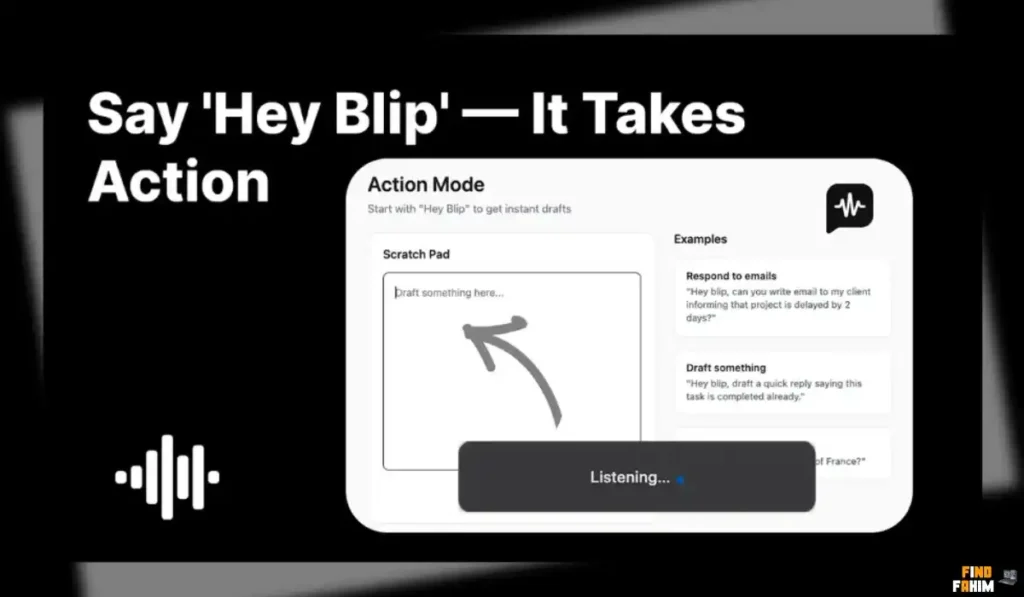
You can hold your global hotkey and say, “Hey Blip, draft a polite email thanking the client.” The AI will process the command and instantly type out a complete, professional email directly into your Gmail compose window.
Blip AI Updates: What is New in 2026
AppSumo buyers heavily requested specific changes, and the development team rapidly delivered. According to founder Ayush Bansal, the team actively monitors community feedback on Discord to shape their roadmap.
In early April 2026, they pushed a massive update increasing device limits across all tiers. Tier 1 was upgraded to support two devices, Tier 2 to five devices, and Tier 3 now covers ten devices. This allows users to sync their voice workflow perfectly across multiple laptops and phones.
Blip AI Pricing & AppSumo Deal Details
Unlike basic dictation tools, this lifetime deal is structured into three specific tiers. This allows you to scale your purchase based on your required word generation limits and hardware footprint.
| Deal Feature | Tier 1 ($49) | Tier 2 ($129) | Tier 3 ($249) |
| Monthly Words | 200,000 | 600,000 | 1,400,000 |
| Allowed Devices | 2 | 5 | 10 |
| AI Polishing | ✅ Included | ✅ Included | ✅ Included |
| Voice Commands | ✅ Included | ✅ Included | ✅ Included |
| Custom Vocabulary | ✅ Included | ✅ Included | ✅ Included |
| API Access | ✅ Included | ✅ Included | ✅ Included |
Lock In Your Blip AI Lifetime Price
Note: This software comes with AppSumo’s standard 60-day money-back guarantee. You have two full months to test the transcription speed, evaluate the AI polishing accuracy, and sync it across your devices.
Pros & Cons of This Lifetime Package
Based on verified AppSumo community feedback and an impressive 4.8-star rating, here is the truth about the platform’s current state.
The Pros
- ✅ Massive Time Savings: Instantly bypasses repetitive typing for client emails and code documentation.
- ✅ High Accuracy: Provides flawless transcriptions while automatically stripping out natural hesitations and filler words.
- ✅ Contextual Intelligence: The “Hey Blip” command acts as an integrated ChatGPT assistant wherever you are typing.
- ✅ Extensive Languages: Auto-detects and perfectly transcribes over 99 different languages.
- ✅ Responsive Founders: The development team is highly active on Discord, rapidly pushing bug fixes and limit upgrades.
The Cons
- ❌ No Official iOS App: The iPhone application is currently in beta testing and not yet fully released to the public.
- ❌ UI Intrusiveness: A few users noted that the listening user interface can sometimes feel slightly large on smaller screens.
Who Should NOT Buy Blip AI?
Skip this deal if you work in a highly crowded, noisy office where speaking out loud is unprofessional or impossible. It requires a relatively quiet environment and a decent microphone to achieve maximum accuracy.
Also, avoid this if you rely exclusively on an iPhone for mobile work. While the desktop and Android versions are flawless, the iOS mobile application is still in beta testing and not fully stable.
How Does Blip AI Work?
The setup workflow is completely seamless and requires almost zero technical background.
- Install and Sync: Download the application to your Windows, Mac, or Android device and log in.
- Map Hotkey: Assign a specific keyboard shortcut (like the ‘Fn’ key) to activate the listening mode globally.
- Speak Naturally: Click into any text field, hold your hotkey, and speak. The AI will type your perfectly formatted words instantly.
- Use Action Mode: Trigger the AI by saying “Hey Blip” followed by instructions to generate complex, original replies.
- Add Custom Words: Open the dashboard to input your specific industry jargon to ensure the AI never misspells vital terms.
Best Use Cases for Blip AI
Who extracts the highest financial return on investment from this desktop dictation tool?
- Freelance Content Creators
You write massive blog posts daily. Instead of stressing your wrists, you use Blip to dictate your initial drafts rapidly into Google Docs. The AI handles the punctuation and capitalization, cutting your drafting time in half.
- Software Developers
You constantly juggle complex coding environments. You use Blip inside VS Code or Cursor to dictate long, descriptive pull request notes or code comments without ever taking your hands off your primary keyboard shortcuts.
- Customer Support Managers
You manage a massive influx of daily tickets. Instead of copying templates, you use the “Hey Blip” command to instruct the AI to write highly personalized, polite responses to angry customers in seconds.
Start Dictating Your Emails Today
Blip AI Alternatives
The market for AI voice typing is highly competitive. Let’s look at how this AppSumo lifetime deal stacks up against the established industry heavyweights.
Blip AI vs WisprFlow
WisprFlow is currently the most famous dedicated AI dictation tool on the market.
- Where WisprFlow Wins: Established brand presence. It has a slightly more refined user interface, specifically optimized for native macOS users.
- Where Blip AI Wins: Value and speed. Blip matches WisprFlow’s transcription speed perfectly,y but is available for a single lifetime payment instead of an expensive recurring monthly subscription.
Blip AI vs VoiceDash
VoiceDash is another popular AI dictation competitor in the space.
- Where VoiceDash Wins: Deep integrations with specific enterprise CRM platforms.
- Where Blip AI Wins: Zero latency. Reviewers frequently note that VoiceDash has a noticeable half-second delay before recording. Blip triggers instantly, capturing your first word flawlessly.
Blip AI vs Mac/Windows Built-in Dictation
Native operating system dictation is the default, free starting point for most users.
- Where Native Wins: Completely free ecosystem integration. It is baked directly into your device without requiring third-party software installations.
- Where Blip AI Wins: Intelligence. Native tools type every “um” and “uh” while ignoring punctuation. Blip automatically formats your text and executes complex AI generation commands.
Blip AI vs VoiceInk
VoiceInk is a lightweight alternative focused on simple voice notes.
- Where VoiceInk Wins: Ultra-minimalist interface designed strictly for fast, unformatted note-taking.
- Where Blip AI Wins: Custom instructions. Blip’s ability to accept specific prompts like “translate this to English” makes it vastly superior for professional communication.
Top Competitors Matrix
| Platform | Pricing Model | Core Strength | Filler Word Removal | Best For… |
| Blip AI | Lifetime Deal | Fast AI Commands | ✅ Yes | Freelancers & Creators |
| WisprFlow | Monthly Sub | macOS Interface | ✅ Yes | Mac Power Users |
| VoiceDash | Monthly Sub | CRM Integrations | ✅ Yes | Sales Teams |
| Native OS | Free App | Basic Offline Voice | ❌ No | Casual Typing |
| VoiceInk | Monthly Sub | Fast Voice Notes | ✅ Yes | Minimalist Note-Taking |
Switch to Blip AI and Save Big
Is This Lifetime Deal a Smart Business Investment?
If you are debating this deal’s value, look at the exact financial math of standard dictation and AI software over a single year.
The recurring subscription fees for a typical productivity stack are staggering:
- AI Dictation (WisprFlow): ~$180/year
- Advanced AI Prompts (ChatGPT Plus): ~$240/year
- Total Typical Budget: $420+ per year
Cost of Blip AI (Tier 2): $129 exactly once.
The ROI is completely undeniable. You break even within the first four months. By utilizing Blip to replace these disparate subscriptions, you save nearly $300 in your first year while reclaiming hours of manual typing every single week. It is the ultimate low-cost productivity upgrade.
How to Redeem the Blip AI Deal
Ready to stop typing the same emails every day? Follow these quick steps to secure your lifetime account before the deal closes.
- Buy: Click the AppSumo link below to secure your redemption code. Remember, this purchase is fully backed by a 60-day money-back guarantee.
- Register: Go to the official Blip AI website and create a brand new account using your primary business email.
- Activate: Navigate to your account billing portal and apply your unique AppSumo code to unlock your lifetime access limits.
- Install: Download the desktop application, set up your global hotkey, and start speaking naturally.
Final Verdict: Is This AppSumo Deal Worth It?
After evaluating the speed of the desktop application, testing the accuracy of the AI text formatting, and reviewing the brilliant “Hey Blip” action mode, my final verdict is a definitive 4.9-Star BUY.
Blip AI solves one of the most annoying bottlenecks in digital work: manual data entry. It is a remarkably fast platform that completely outpaces native operating system dictation tools. If you type for a living, upgrading to Tier 2 or Tier 3 is a mandatory investment to secure enough monthly words and devices for your entire workflow. Grab this deal, automate your keyboard, and start speaking your tasks into existence.
Secure Your Blip AI Lifetime Deal Before It Ends
About the Author
Welcome to FindFahim, the premier SaaS Review Platform where I spend my time analyzing digital tools to help smart entrepreneurs save big and stop overpaying for monthly software subscriptions. We all know the extreme frustration of typing the same client responses day after day, which is exactly why I investigated the Blip AI lifetime deal today.
I do the heavy lifting of evaluating these multi-tier offers, digging into specific AI limits, workflow integrations, and refund policies, so you know exactly what you are buying. To see how else you can optimize your digital workflow, check out my direct breakdown here: VoiceDash – Turn speech into writing with AI.
FAQ: Your Blip AI Questions, Answered
Blip AI is a voice dictation tool that converts speech into clean, formatted text by removing filler words and automatically applying punctuation.
Blip AI works by activating a global hotkey, allowing users to speak naturally while the software converts speech into polished text in real time.
Blip AI is compatible with macOS, Windows, and Android, allowing users to use voice dictation across multiple devices.
Yes. Blip AI supports over 99 languages with automatic detection for accurate transcription.
Yes. Blip AI only activates when triggered by a hotkey, and voice data is not stored, ensuring user privacy.
Yes. Blip AI works system-wide, allowing users to dictate text inside tools like VS Code, Cursor, or other development environments.
Voice dictation software converts spoken words into written text, helping users write faster without typing.
Yes. Voice typing allows users to create content quickly, reducing the time spent on manual typing.
Yes. Advanced AI tools can detect and remove filler words like um or uh to produce cleaner text output.
Yes. Developers can use voice dictation to write comments, documentation, and notes more efficiently. What is Blip AI?
How does Blip AI work for voice typing?
Which platforms are supported by Blip AI?
Does Blip AI support multiple languages?
Is Blip AI secure to use?
Can Blip AI be used in code editors?
What is voice dictation software?
Can voice typing improve productivity?
Does AI remove filler words automatically?
Is voice dictation useful for developers?

Hi, I’m Fahim — a SaaS tools reviewer and digital marketing expert with hands-on experience helping businesses grow using the right software. I research, test, and personally use a wide range of AI, business, productivity, marketing, and email tools for my agency, clients, and projects. I create honest, in-depth reviews and guides to help entrepreneurs, freelancers, startups, and digital agencies choose the best tools to save time, boost results, and scale smarter. If I recommend it, I’ve used it — and I only share what truly works.