
We all know the struggle: You have one link in your Instagram bio, but you have 10 things to sell.
So, you sign up for Linktree. It looks okay, but then you want to remove their logo. Pay $10/month. You want to use your own domain (yourname.com) instead of linktr.ee/user123. Pay more. You want to track pixels? Pay more.
Suddenly, your “free” link page is costing you $100+ a year.
Linkero is the “One-and-Done” solution to this subscription fatigue.
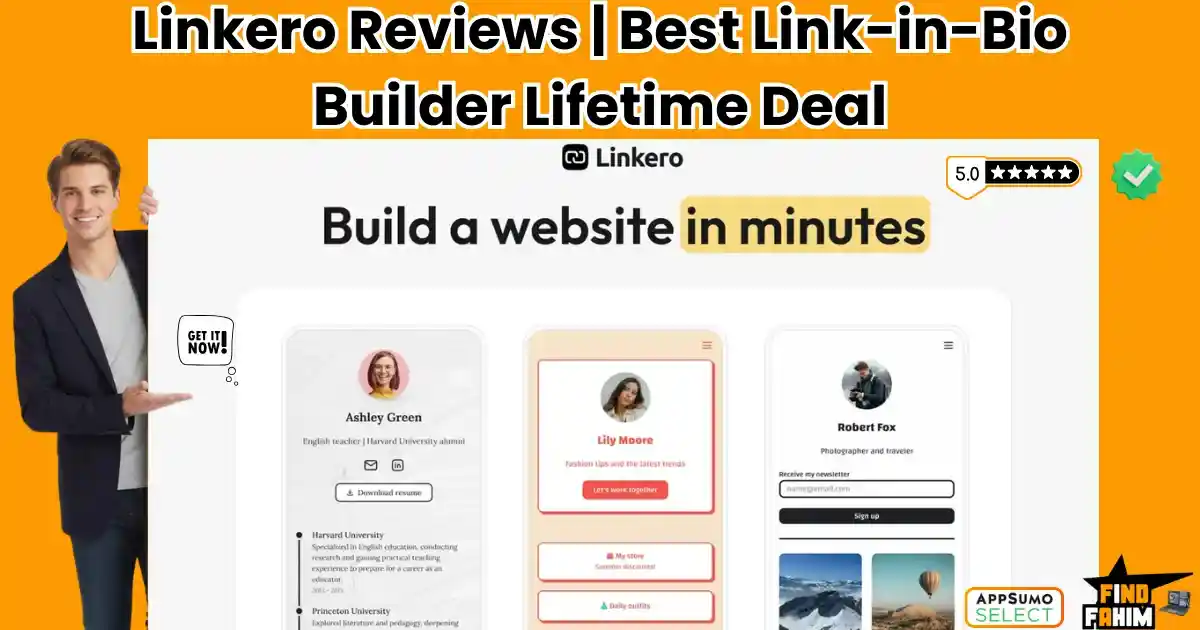
It is a drag-and-drop builder that lets you create stunning, fully customizable “Micro-Websites” for your social profiles. Unlike basic list-builders, Linkero focuses on Design and Analytics. It allows you to embed videos, collect emails, and use your own custom domain without the recurring monthly fees.
With a strong 4.7-star rating, users are praising its “sleek UI/UX” and the fact that it doesn’t try to be a complex website builder—it just does bio pages perfectly.
In this in-depth Linkero review, I am analyzing if this $59 lifetime deal is the professional upgrade your personal brand needs, or if you should stick to the free tools.
Note: This article contains affiliate links. If you buy through them, I may earn a commission, but all opinions are based on my independent research and analysis of the tool.
My Quick Take (TL;DR)
If you are an influencer, creator, or freelancer tired of renting your bio link, here is the summary.
What is it?
A no-code builder for “Link-in-Bio” pages and micro-websites. It centralizes your videos, links, and social profiles into one mobile-optimized hub.
Why is it Special?
The “No-Code” Polish. Most link builders look generic. Linkero’s templates feel like professionally designed websites. Plus, the Custom Domain feature (usually a premium upsell elsewhere) is included.
Who is it for?
Instagram Influencers, YouTubers, Freelancers, and Small Business Owners who want a professional landing page without building a full WordPress site.
The Deal: Lifetime Access for $59. You get 5 Custom Pages and Unlimited Visitors.
My Verdict: If you are paying for Linktree Pro, cancel it and buy this. You break even in 6 months. It is polished, fast, and gives you total brand control (no “Linkero” logos). However, with a 5-page limit and no stacking, this is strictly for individuals or very small teams, not large agencies.
Click Here to Get the Linkero Lifetime Deal
What is Linkero?
The best way to describe this platform is as “Linktree meets Carrd.”
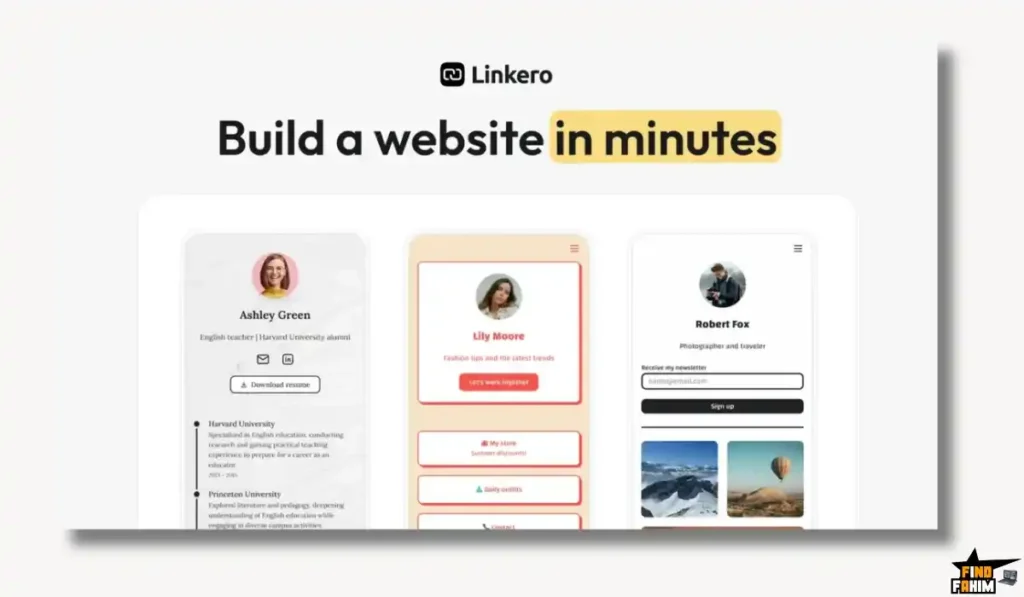
It combines the simplicity of a link list with the design flexibility of a website builder.
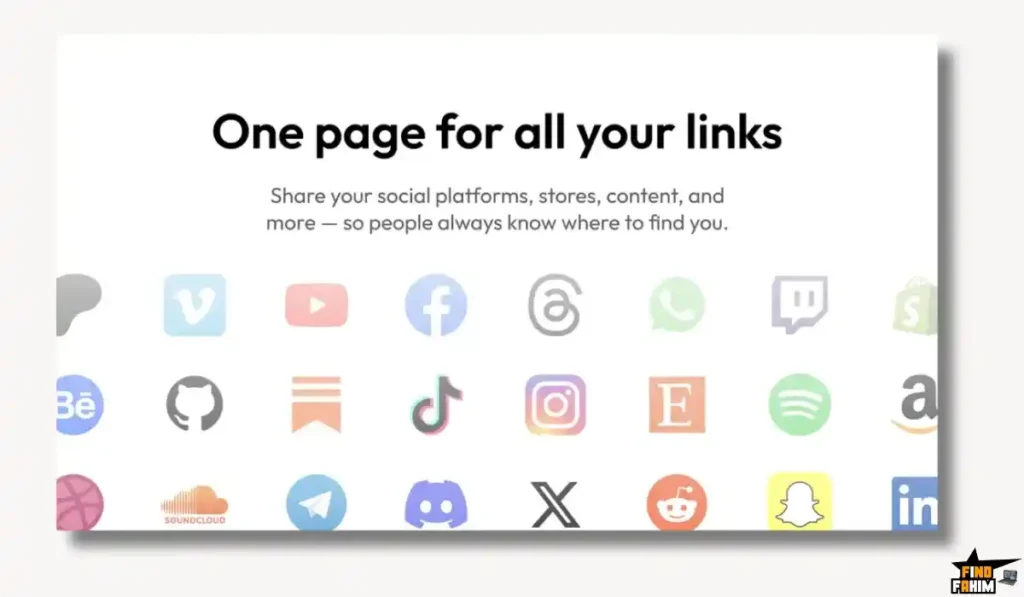
- Centralize: Pull in your YouTube videos, Spotify tracks, and Calendly booking links.
- Customize: Change backgrounds, button shapes, and fonts to match your exact brand identity.
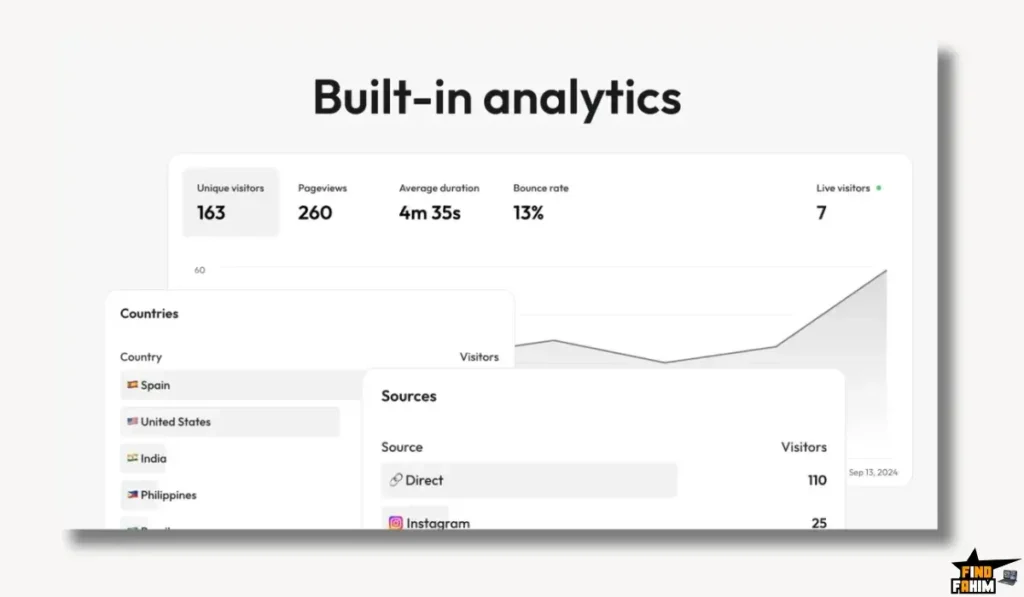
- Analyze: See exactly which links are getting clicked and where your traffic is coming from (Country, Device, Source).
It solves the “Traffic Leak” problem. Instead of sending users to a generic page, you keep them in your branded ecosystem.
Quick Look: What’s Inside the Deal?
If you are currently paying for Linktree, Beacons, or Shorby, look at this math.
| Feature | Replaces… | The “Killer” Value | Normal Cost | Deal Status |
| Custom Branding | Linktree Pro | No “Linkero” Logo | ~$10/mo | ✅ Included |
| Custom Domains | Generic Links | Use links.yourname.com | ~$15/mo | ✅ Included |
| Analytics | Bitly | Deep Traffic Insights | ~$5/mo | ✅ Included |
| Pixel Tracking | Third-Party Tools | FB Pixel & Google Analytics | Premium Only | ✅ Included |
| SEO Settings | Carrd | Metadata Control | Essential | ✅ Included |
| Total Value | Your Bio Stack | Brand Ownership | ~$120/yr | $59 (Lifetime) |
Why You Need More Than Just “Linktree”
In 2026, a generic link page signals “Amateur.”
The “Trust” Factor
When a user clicks a link and sees a branded URL (e.g., bio.fahim.com) and a page that matches your website’s colors, trust increases. They are more likely to buy or book. Linkero gives you this “White Label” feel on the frontend, making you look like an established business.
The “Data” Control
Free tools hold your data hostage. Linkero allows you to add your own Facebook Pixel and Google Analytics ID. This means you can retarget people who visited your bio link with ads later. This feature alone is worth the price for marketers.
Why “Micro-Websites” Are Trending in 2026
I noticed Linkero trending because the “Creator Economy” is shifting away from rented land.
The “Link-in-Bio Fatigue”
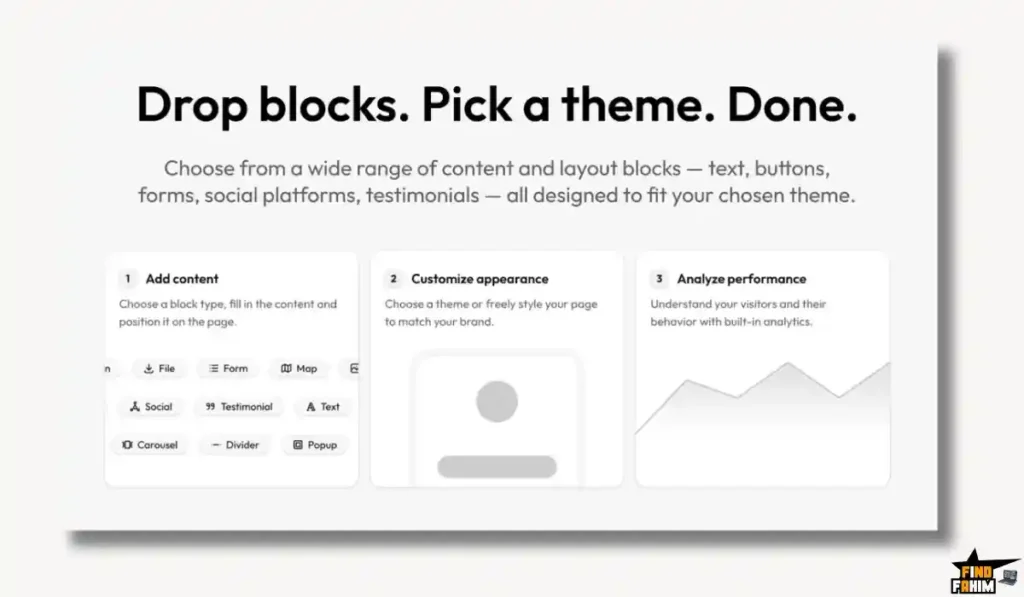
For years, everyone just used a simple list of links. But in 2026, audiences are bored. They want visual experiences. They want to watch your YouTube video inside Instagram, not click away to another app. Linkero’s ability to embed rich media (videos, music, forms) directly on the page turns a boring list into an interactive mini-app.
The Rise of “Digital Sovereignty”
Creators are realizing that platforms like TikTok or Instagram can ban them at any moment. Smart creators are using tools like Linkero to build a “Owned Destination”—a place where they control the data, the pixel tracking, and the email collection. It’s no longer just a signpost; it’s your digital home base.
A Look Inside Linkero: Key Features & Benefits
This isn’t just a list of buttons. It’s a conversion tool.
1. Drag-and-Drop Editor
What it is: A visual builder.
Why it matters: Speed.
Real-World Scenario: You just launched a new YouTube video. You drag the “Video” block to the top of your Linkero page, paste the URL, and boom—it plays directly on the page. No coding required.
2. Built-in Analytics
What it is: A dashboard for traffic stats.
Why it matters: Optimization.
Real-World Scenario: You see that 80% of your clicks are coming from Twitter, but only 5% from Instagram. You realize your Instagram CTA is weak. You adjust your strategy based on real numbers, not guesses.
3. Custom Domains
What it is: Connecting your own web address.
Why it matters: Professionalism.
Real-World Scenario: Instead of having linkero.com/u/john_doe, you connect links.johndoe.com. It looks seamless. It builds your SEO authority, not the platform’s.
4. Smart Integrations
What it is: Connecting to other tools.
Why it matters: Automation.
Real-World Scenario: You can collect emails directly on the page (Newsletter signups) or track conversions via pixels. This turns your bio link into a lead magnet funnel.
5. SEO Configuration
What it is: Controlling how you look in Google.
Why it matters: Discoverability.
Real-World Scenario: You can set the Meta Title and Description for your page. When someone Googles your name, your Linkero page can rank alongside your main website, dominating the search results.
The Standout Feature: “Sleek UI/UX”
User Dabella called it the “Best UI/UX I’ve tried here.”
This is critical. Many lifetime deal tools feel clunky or “beta.” Linkero feels polished. The editor is smooth, the templates are modern, and the final result looks expensive. It passes the “Vibe Check” for designers.
How Does Linkero Work?
It is designed to be set up in under 10 minutes.
- Step 1: Choose a Template. Pick a starting point that matches your vibe (Dark Mode, Minimalist, Colorful).
- Step 2: Add Blocks. Drag in buttons for your “Latest Video,” “Book a Call,” or “My Portfolio.”
- Step 3: Style. Change the background to your brand color. Upload your photo.
- Step 4: Connect Domain. Add a CNAME record in your DNS (e.g., Cloudflare) to point bio.yoursite.com to Linkero.
- Step 5: Publish. Hit save. Your professional micro-site is live.
Linkero Pricing & AppSumo Deal Details
This is a single-tier deal. Simplicity is key here.
| Feature | Linkero Lifetime Deal |
| Price | $59 (One-Time) |
| Pages | 5 Pages |
| Visitors | Unlimited |
| Content | Unlimited Blocks |
| Branding | Removable (No Linkero Logo) |
| Domains | Custom Domain Included |
| Analytics | Full Access |
ROI Anchor Logic: The “Hidden Math”
Linktree Pro: Costs $9/month.
Linkero: Costs $59 (One-time).
The Reality: You break even in 6.5 months.
After that, you are essentially making a profit of $100+ every year by not paying a subscription.
The Limitation: You get 5 Pages. This means you can create bio pages for 5 different brands or projects. For a solopreneur, this is plenty. For an agency, it’s tight (since the deal is not stackable).
My Recommendation:
- Creators/Freelancers: Buy it. 5 pages are enough for your Personal Brand, your Podcast, and your Side Hustle.
- Agencies: Skip (unless you only have 5 clients). The non-stackable limit makes this hard to scale for client work.
Check the Linkero Deal Plan & Features
Pros & Cons of This Lifetime Package
The user feedback is highly positive (4.7 stars), but there are nuances.
The Pros
- ✅ Design Quality: User MarcLaFord noted: “The templates look modern and polished.” It doesn’t look like a cheap knockoff.
- ✅ Support is Real: Multiple reviews mention the founder, Marcel, helping personally with DNS setup. That level of care is rare.
- ✅ Fast Loading: The pages are lightweight and load instantly on mobile, which is crucial for social traffic.
- ✅ SEO Friendly: Unlike many link tools that block Google, Linkero lets you optimize for search.
The Pivot
- Limitation 1: Vertical Spacing. User Dabella mentioned wanting more control over spacing between blocks. Pivot: The founder confirmed this is on the roadmap. For now, the default spacing is clean and mobile-optimized, ensuring you don’t “break” the design.
- Limitation 2: Not White Label Platform. Some users were confused. You can remove Linkero’s branding from the page (User-facing), but you cannot resell the dashboard as your own SaaS. Pivot: This is standard for a $59 deal. If you want a full White Label agency platform, you’d usually pay $300+. For personal use, removing the branding on the page is all you need.
Best Use Cases for Linkero
Who actually needs this platform?
The Instagram Influencer
You have partnerships with 3 different brands.
- The Benefit: You create a “Links” page where you can feature all 3 promo codes with logos. You track which brand gets the most clicks to negotiate better rates.
The Freelance Writer
You want a portfolio but hate WordPress.
- The Benefit: You use Linkero to build a one-page “Work with Me” site. You embed your best articles, add a “Book Call” button, and connect your custom domain (portfolio.writer.com).
The Podcaster
You need to link to Spotify, Apple, and Patreon.
- The Benefit: You create a hub that auto-updates with your latest episode link (if using smart embeds) and drives traffic to your support page.
Get Lifetime Access to Linkero Today
Linkero Alternatives
You are probably wondering: “Why not just use the free version of Linktree?” or “Can’t I just build this in Canva?”
Let’s compare Linkero against the Top 5 Players in the Link-in-Bio space.
Linkero vs Linktree
Linktree is the Coke of this industry. Everyone knows it.
The Cost of Fame
- Where Linktree Wins: Integrations. Linktree has massive partnerships (e.g., direct integration with TikTok or Shopify). If you need deep e-commerce syncing, Linktree is slightly ahead.
- Where Linkero Wins: Price & Branding. Linktree Free forces you to have their logo. Linktree Pro costs ~$100/year. Linkero is $59 once and removes the branding entirely. For a personal brand, owning the aesthetic without a monthly bill is the smarter play.
- Verdict: Linktree for Enterprise; Linkero for Smart Creators.
Linkero vs Carrd
Carrd is a simple one-page website builder.
Flexibility vs. Speed
- Where Carrd Wins: Total Design Freedom. Carrd lets you move elements anywhere. You can build complex landing pages.
- Where Linkero Wins: Ease of Use. Carrd has a learning curve. You have to understand containers and padding. Linkero is strictly “Link-in-Bio.” You drag a block, and it works. It is faster to set up and optimized specifically for mobile clicks.
- Verdict: Carrd for Designers; Linkero for Non-Techies.
Linkero vs Bento.me
Bento is the trendy, grid-based link tool.
The Aesthetic Battle
- Where Bento Wins: The “Grid” Look. Bento uses a bento-box grid style, which is very popular with designers right now.
- Where Linkero Wins: Business Features. Bento is very “aesthetic-focused” but lacks some of the robust pixel tracking and deep analytics that Linkero offers for marketers. Linkero is more utilitarian for driving conversions.
- Verdict: Bento for Visual Artists; Linkero for Marketers.
Linkero vs Bitly
Bitly creates link pages now, too.
Shortener vs. Builder
- Where Bitly Wins: Link Shortening. If you need to shorten 1,000 links a day, Bitly is the tool.
- Where Linkero Wins: Visuals. Bitly’s link pages are very basic. They are functional lists. Linkero allows for video embeds, image carousels, and rich media. It creates a destination, not just a list.
- Verdict: Bitly for Links; Linkero for Landing Pages.
Linkero vs Shorby
Shorby is a popular agency tool.
The Agency Price Tag
- Where Shorby Wins: Agency Features. Shorby allows for team management and retargeting pools.
- Where Linkero Wins: Cost. Shorby starts at $15/month. Linkero is $59 lifetime. The feature set is 90% similar for 10% of the long-term cost. Unless you are a massive agency, Shorby is overkill.
- Verdict: Shorby for Big Teams; Linkero for Solopreneurs.
All Competitors Matrix
| Tool | Pricing Model | Best For… | Remove Branding? | Custom Domain? |
| Linkero | Lifetime ($59) | Creators / ROI | ✅ Yes | ✅ Yes |
| Linktree | Sub ($10/mo) | General Use | ❌ Pay Monthly | ❌ Pay Monthly |
| Carrd | Sub ($19/yr) | Web Designers | ✅ Yes | ✅ Yes |
| Bento | Free / Sub | Designers | ⚠️ Subtle | ❌ Limited |
| Shorby | Sub ($15/mo) | Agencies | ✅ Yes | ✅ Yes |
| Beacons | Freemium | Influencers | ❌ Pay Monthly | ✅ Pay Monthly |
Is This Lifetime Deal a Smart Business Investment?
Let’s do the financial math for the $59 Deal.
Scenario: You are a Freelancer with a portfolio, a booking link, and a LinkedIn profile.
- Option A (Linktree Pro): You pay $9/month. Over 3 years, that is $324.
- Option B (Linkero): You pay $59 (One-time).
The ROI Math:
- You save $265 in the first 3 years.
- Brand Value: You get to use contact.yourname.com immediately, making you look more professional than competitors using free tools.
- Risk: Extremely low. With a 60-day refund window, you can build your page, test the analytics, and if you don’t like the “vibe,” get your money back.
How to Redeem the Linkero Deal
- Buy: Purchase the code on AppSumo.
- Constraint: Remember, you can create 5 pages. You cannot stack codes for more pages. This is a one-code-per-account deal.
- Account: Create your account at Linke. ro.
- Redeem: Enter your code in the billing settings.
- Setup: Go to your domain registrar (GoDaddy/Namecheap) and create a CNAME record pointing to Linkero.
- Design: Spend 15 minutes adding your photo and links. You are live!
Final Verdict: Is This Cost-Friendly Deal Worth It?
After reviewing the UI smoothness, the analytics depth, and the customization options, my final verdict is a solid 4.8-Star BUY.
It is the “Personal Branding Essential.”
- It kills the Monthly Subscription.
- It kills the “Free Tool” Ugly Branding.
- It gives you Data Ownership via pixels and analytics.
If you have a social media presence and want to look professional without a monthly bill, Linkero is a no-brainer.
Secure Your Linkero License Before The Timer Runs Out
(Note: Since this deal is not stackable, make sure 5 pages are enough for you. For 99% of creators, it is plenty.)
About the Author
FindFahim is where I break down AppSumo Lifetime Deals, SaaS tools, and Hosting solutions so you don’t have to test them yourself. My goal isn’t just to review software—it’s to help you stop wasting money on tools you don’t need.
For this Linkero review, I focused on the “Design vs. Cost” balance because I know creators hate wasting budget on simple tools. My verdict? It’s the best Linktree alternative on the market right now.
Want more amazing deal? Check out my full library of AppSumo Deal Reviews.
FAQ: Your Linkero Questions, Answered
What is Linkero?
Linkero is a link-in-bio page builder that lets you create branded micro-sites to share multiple links, videos, and offers from a single bio URL.
Can I use my own domain with Linkero?
Yes, you can connect a custom domain such as links.yoursite.com or even a root domain, and SSL certificates are handled automatically.
Is white label included in the Linkero deal?
Yes, you can remove the Linkero branding badge from your pages, but you cannot resell the platform or dashboard as your own software under this deal.
How many pages can I create with Linkero?
The deal allows you to build up to 5 separate link-in-bio pages, which is enough for most personal brands or small businesses.
Can I stack codes to unlock more pages?
No, this AppSumo deal is not stackable, so you cannot combine codes to increase the page limit.
Does Linkero provide analytics?
Yes, it tracks views, clicks, CTR, devices, countries, and referrers, and also supports Facebook Pixel and Google Analytics integration.
Is Linkero mobile responsive?
Yes, Linkero is built with a mobile-first approach and includes live mobile preview to ensure your page looks perfect on smartphones.
Can I embed videos on my bio page?
Yes, you can embed YouTube, Vimeo, Twitch, and TikTok videos that play directly inside your link page.
Can I collect emails using Linkero?
Yes, you can add newsletter or form blocks to collect emails and connect them with tools like Mailchimp or other integrations.
Is there a money-back guarantee?
Yes, the AppSumo deal includes a 60-day money-back guarantee so you can try Linkero risk-free.
How good is Linkero customer support?
Customer reviews consistently highlight fast and helpful support, especially for technical setup questions like domain configuration.
Can I generate a QR code for my Linkero page?
Yes, the deal includes QR code generation so you can share your bio link on printed materials like business cards or flyers.
Is Linkero good for portfolios?
Yes, with image grids and video embeds, it works well as a lightweight portfolio for creators like photographers, designers, and writers.
Does Linkero support dark mode themes?
Yes, themes are fully customizable, allowing dark mode, light mode, and custom color gradients.
Is a link-in-bio tool better than a full website for social media?
For social media traffic, a focused link-in-bio page is often more effective than a full website because it reduces distractions and improves click-through rates.

Hi, I’m Fahim — a SaaS tools reviewer and digital marketing expert with hands-on experience helping businesses grow using the right software. I research, test, and personally use a wide range of AI, business, productivity, marketing, and email tools for my agency, clients, and projects. I create honest, in-depth reviews and guides to help entrepreneurs, freelancers, startups, and digital agencies choose the best tools to save time, boost results, and scale smarter. If I recommend it, I’ve used it — and I only share what truly works.