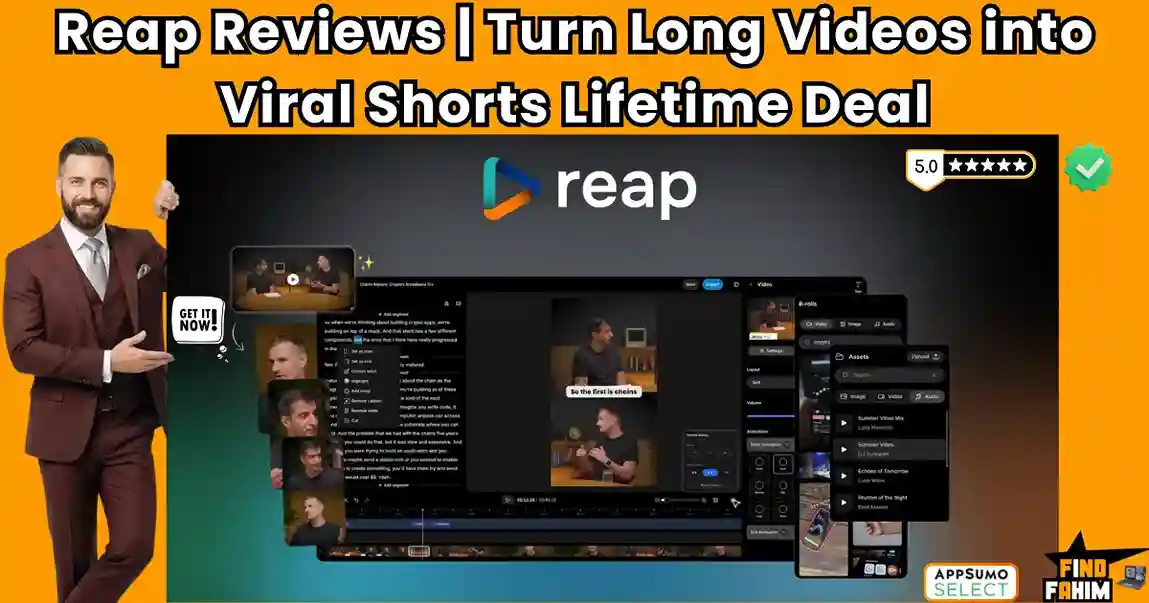

We have all played the frustrating game of trying to manually chop a two-hour podcast into engaging social media shorts. Reap is a premium AI video editing platform built specifically to eliminate that chaos, acting as an automated production studio for your content business.
While solo creators can easily get away with manually cutting clips in a free mobile app, growing digital brands face a much harsher reality. The moment you need to post daily content across TikTok, Instagram, and YouTube Shorts, basic manual tools break. You are forced into expensive software subscriptions or have to hire a freelance video editor, getting hit with painful hourly rates that drain your budget.
Reap ends this financial bleed by offering an incredibly popular lifetime deal on AppSumo. Because this offer is highly sought-after for content agencies and podcasters, it frequently sells out. In this review, I break down its multilingual dubbing features, analyze the true value of its agentic AI clipping, and help you decide if it is the right operational investment for your marketing team.
Transparency Note: I spend dozens of hours researching and analyzing SaaS tools so you don’t have to. If you grab this lifetime deal through my links, I may earn a small commission at zero extra cost to you. All verdicts are based on my independent research and market analysis.
My Quick Take (TL;DR)
If you run a digital brand, podcast, or marketing agency and you hate paying expensive freelance video editors, here is my direct summary of this software.
- What is it? An enterprise-grade AI video editor. It automatically analyzes long-form videos, finds the best hooks, adds animated captions, and reframes the footage for vertical social media platforms.
- Why is it Special? Global Localization. Most clippers just cut video. Reap automatically dubs your voice and generates translated subtitles in over 98 languages, allowing you to reach a massive global audience instantly.
- Who is it for? Podcasters, YouTube creators, marketing agencies, online educators, and anyone who uses video marketing to sell products.
- The Deal: Lifetime Access starting at $79 on AppSumo.
- My Verdict: With a proven track record and rapid developer updates, this is a top-tier production asset. It is far more efficient than Premiere Pro for shorts. However, you must upgrade past Tier 1 if you want 4K export quality.
Click Here to Check Reap Availability on AppSumo
What is Reap?
The best way to describe this platform is as an automated production pipeline for your digital agency or content brand.
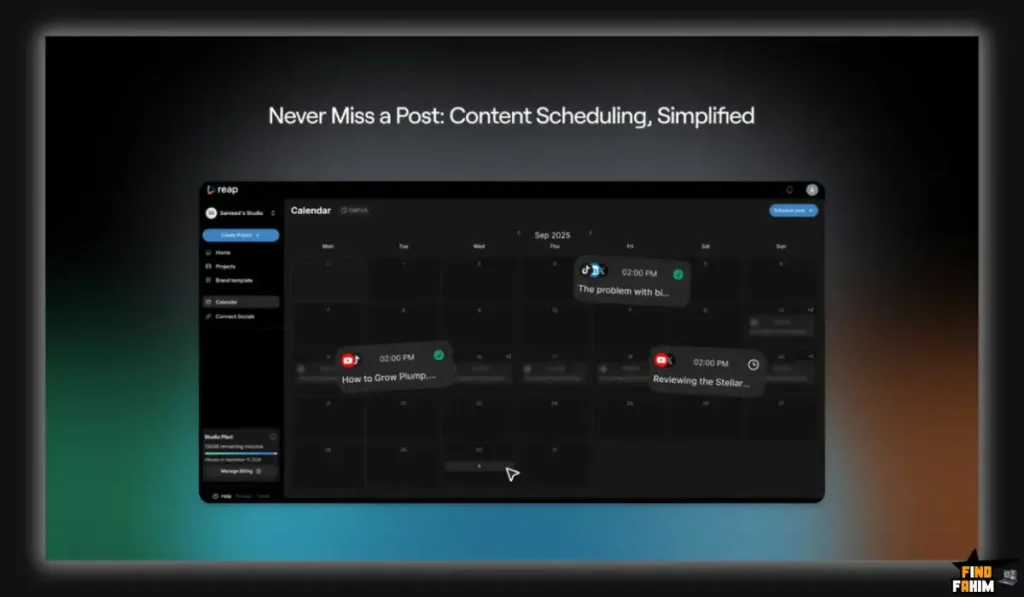
When you use basic video tools, you are simply cutting a video file at specific timestamps. Reap handles the actual editorial logic of running a media company. It naturally understands complex narrative structures. For example, it processes long interviews and detects where the guest makes a profound statement, drops a punchline, or delivers a highly engaging hook.
Reap processes all this editorial logic automatically in the background. It provides three core assets to run your content strategy. First, it generates a library of ready-to-post clips perfectly formatted for vertical screens. Second, it gives you a text-based editor to manually clean up transcripts and cut filler words. Third, it acts as a global localization engine, automatically translating and dubbing your voice into Spanish, German, Arabic, and dozens of other languages without you lifting a finger.
Quick Look: What’s Inside the Deal?
Let’s break down the technical and financial value of replacing expensive freelancers and software subscriptions with the Reap lifetime package.
| Feature | Replaces… | The Real Value | Normal Cost | Deal Status |
| Smart AI Clipping | Human Video Editors | Auto-detects viral hooks | ~$30/hour | ✅ Included |
| Text-Based Editor | Adobe Premiere Pro | Edit the video by deleting the text | ~$22/month | ✅ Included |
| Voice Dubbing | Translation Agencies | Clone your voice in 98 languages | High Cost | ✅ Included |
| Auto-Reframing | Manual Keyframing | Keeps speakers centered in 9:16 | Essential | ✅ Included |
| Social Publisher | Buffer / Hootsuite | Schedule posts directly to platforms | ~$18/month | ✅ Included |
| Total Value | Legacy Workflows | Massive Production Speed | ~$800+/yr | $79 (Lifetime) |
Why You Need More Than Just “CapCut”
CapCut is a fantastic utility for basic mobile editing. It is built strictly for quick cuts and trendy filters. Reap is a content scaling tool. It is built for businesses that actively rely on high-volume video marketing to drive revenue.
Here is the fundamental difference in architecture. CapCut requires you to scrub through a two-hour webinar manually to find the exact ten-second clip that might perform well on TikTok. Reap excels at automating this completely. You upload the two-hour video, walk away, and return to find fifteen highly polished clips waiting for you.
Reap includes advanced text-based editing, allowing you to delete a sentence from the transcript to automatically cut that footage from the video. It features AI emoji highlighters, custom brand presets, and native social media scheduling. It treats your content like a scalable product. If you are running a real media operation, you need a tool that natively understands hooks, retention, and global reach, not just basic timeline trimming.
Why AI Repurposing is Trending in 2026
My market analysis shows AI video repurposing platforms gaining massive traction because social media algorithms have fundamentally changed in 2026.
Platforms demand immense volume. If a creator wants to grow a YouTube channel or a TikTok account, posting once a week is no longer sufficient. Algorithms favor accounts that post high-quality shorts daily. If you cannot produce content at that speed, you will be buried by competitors who use automation to maintain a relentless publishing schedule.
Furthermore, production costs are rising globally. Hiring a dedicated human editor to chop podcasts, add animated captions by hand, and format videos for different screen ratios is a massive overhead expense. Reap replaces those repetitive administrative tasks entirely, protecting your profit margins while providing your audience with the flawless, highly engaging vertical videos they expect.
A Look Inside Reap: Key Features
This package is packed with specific production features that usually require a messy stack of four different enterprise software subscriptions.
AI Curation and Smart Clipping
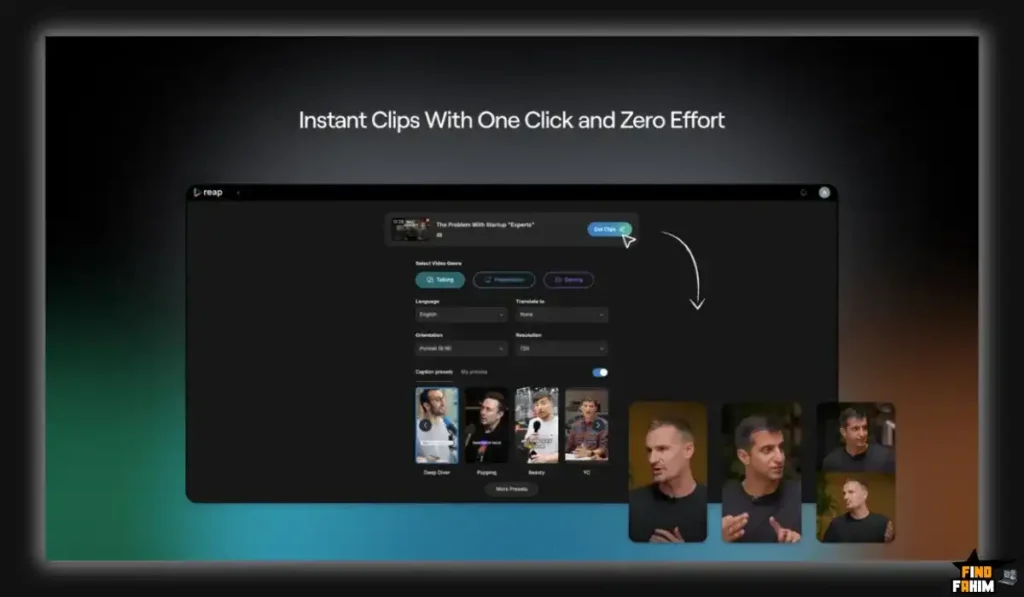
This is the primary value driver of the platform. Instead of scrubbing timelines, the AI curation model analyzes the context of your uploaded video. It actively hunts for engaging statements, emotional peaks, and clear educational takeaways. It then automatically isolates these moments, creating a dashboard of pre-cut clips ranked by their potential for virality. This feature alone saves hours of tedious manual review per video.
Text-Based Video Editing
Editing video timelines is slow and frustrating for non-professionals. Reap converts your video into a highly accurate written transcript. If you want to cut a specific mistake out of the video, you simply highlight the text and press delete. The software automatically removes that exact section of footage and audio seamlessly. You can easily cut filler words, trim awkward pauses, and merge different sentences just by editing a text document.
Multilingual Dubbing and Captions
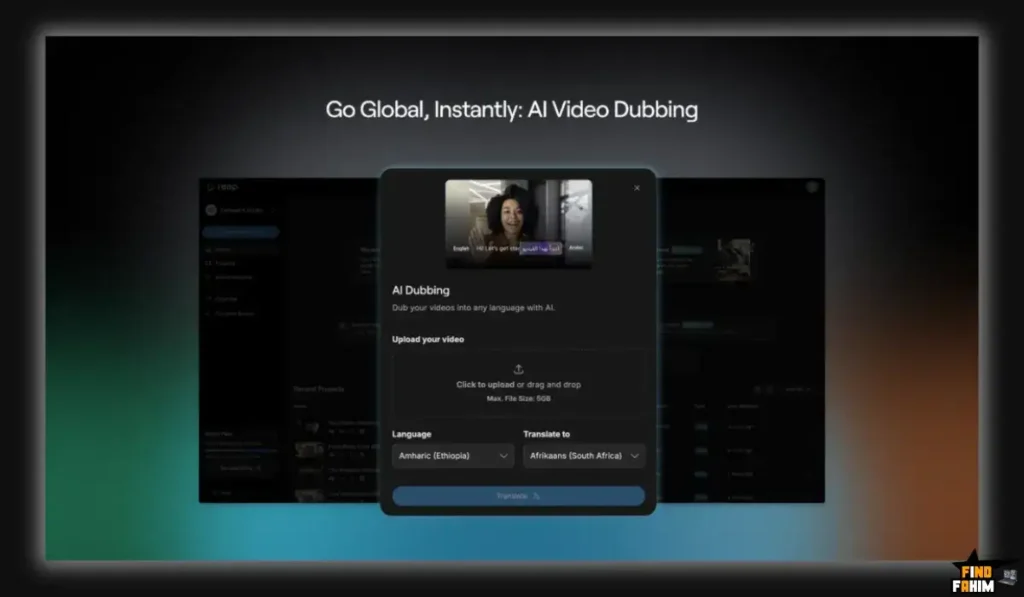
This feature completely removes geographic borders from your content strategy. The software accurately generates animated captions with keyword highlights and culturally relevant emojis in over 98 languages. More impressively, it utilizes advanced AI to dub the actual audio track into a foreign language while preserving the original tone and emotion of the speaker. You can record a video in English and instantly publish a flawless Spanish version to capture a massive new market.
Auto-Reframing and Layouts
Shooting a landscape 16:9 podcast video means the speakers are far apart. When you crop that for a 9:16 mobile screen, someone is usually cut out of the frame. Reap uses facial recognition and auto-tracking to identify the active speaker. It smoothly pans the vertical frame to ensure the person talking is always perfectly centered. It also offers split-screen templates to show multiple speakers simultaneously on a vertical format.
The Standout Feature: Agentic AI Editor v3
The single best feature of Reap is the massive underlying technology upgrade recently deployed by the founding team. They completely rebuilt the editing engine for 2026.
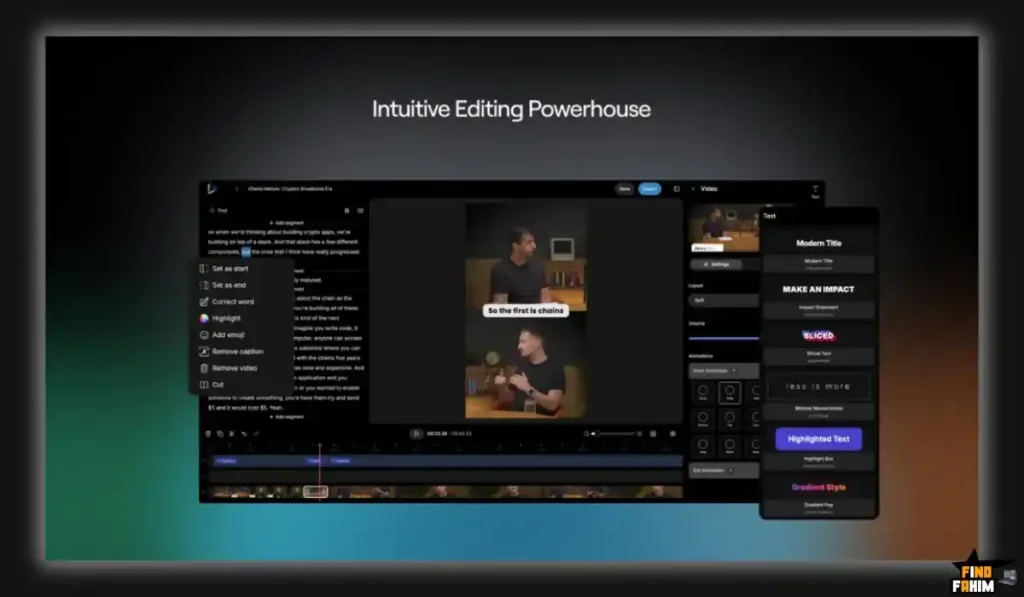
This “Editor v3” is not just a faster processor; it introduces Agentic AI capabilities. The software processes massive 4K video files significantly faster than previous versions, handles complex codecs effortlessly, and maintains highly stable exports without crashing your browser. This rebuilt engine allows the timeline to instantly sync with the transcript edits, providing a perfectly smooth, lag-free editing experience even when managing three-hour-long podcast files containing multiple speakers.
Reap Pricing & AppSumo Deal Details
This deal is unique because it offers a hybrid structure: you can choose between a 3-year access pass or permanent lifetime tiers. I have highlighted the options below so you know exactly what to buy. Pay very close attention to the upload quality and collaboration seats.
| Feature | Lifetime Tier 1 | Annual Tier 1 | Lifetime Tier 2 | Lifetime Tier 3 | Lifetime Tier 4 |
| Price | $79 (Life) | $209 (3 Yrs) | $339 (Life) | $659 (Life) | $789 (Life) |
| Clipping Hours | 5 / month | 10 / month | 10 / month | 20 / month | 30 / month |
| Export Quality | Strictly 1080p | 4K Resolution | 4K Resolution | 4K Resolution | 4K Resolution |
| Team Seats | 0 | 3 | 3 | 6 | 9 |
| Watermark Free | ✅ Yes | ✅ Yes | ✅ Yes | ✅ Yes | ✅ Yes |
The Massive Hidden Limit on Tier 1
Do not buy Lifetime Tier 1 without understanding the resolution and team limits. Tier 1 gives you five hours of AI processing per month, which is decent for a solo creator. However, it hard-caps your export quality at 1080p and provides zero team collaboration seats. If you film your podcasts in high-fidelity 4K and want to maintain that crisp quality on YouTube Shorts, Tier 1 will permanently compress your final output.
My Stacking Recommendation
If you are a serious content creator, do not buy Lifetime Tier 1. You have a few smart options depending on your volume:
- The Budget Agency Move: Buy Annual Tier 1 ($209). This unlocks pristine 4K video exports and 3 team seats for a massive 3-year runway at a much lower upfront cost.
- The Permanent Core Setup: Buy Lifetime Tier 2 ($339). It gives you the exact same 4K exports and 3 team seats as the Annual plan, but you own it forever with zero renewal fees.
- The Scaling Agency: Buy Lifetime Tier 3 ($659). This bumps you to 20 clipping hours and 6 seats, perfect for managing a handful of client podcasts.
- The High-Volume Studio: Buy Lifetime Tier 4 ($789). This gives you a massive 30 hours of monthly clipping and 9 collaboration seats, making it the ultimate setup for agencies managing daily content for dozens of clients.
Secure Your reap Lifetime Plan on AppSumo
Pros & Cons of This Lifetime Package
With dozens of reviews maintaining a strong 4.4-star rating, the community trusts this platform. Here is the truth about where it shines and where it requires a workaround.
The Pros
- Massive Time Savings: The AI clipping engine legitimately replaces hours of tedious timeline scrubbing, allowing creators to focus strictly on recording new content.
- Flawless Multilingual Tools: The ability to auto-translate and dub videos accurately into Spanish, German, and Arabic provides an immediate, massive expansion of your total addressable audience.
- Responsive Development: CEO Usama Abid and the founding team actively listen to AppSumo feedback, rapidly deploying major engine upgrades and resolving support tickets within 24 hours.
- Native Social Scheduling: The built-in publisher eliminates the need for expensive third-party tools like Buffer, keeping your entire workflow inside one unified dashboard.
The Pivot
- The Minimum Video Length Rule: The AI clipping engine requires videos to be at least 3 minutes long. If you upload a 60-second video, the smart curation will fail.
- Occasional UI Clunkiness: A few early buyers noted that the user interface required minor polishing when adjusting complex caption positions manually.
How Does Reap Work? (Step-by-Step Tutorial)
The platform is built logically, allowing you to establish a complex video repurposing pipeline in less than ten minutes.
- Upload Footage: Import your long-form .mp4 or .mov file directly from your computer or paste a YouTube URL.
- Select Format: Choose your desired output ratio, such as Portrait (9:16) for TikTok or Square (1:1) for LinkedIn.
- Let AI Analyze: The agentic AI scans the audio and visual data, mapping out the transcript and identifying the highest-retention hooks.
- Review the Clips: Open the curated dashboard. Review the five to ten short clips the AI generated.
- Refine the Text: Use the text-based editor to delete any unwanted filler words or adjust the animated subtitle styling to match your brand fonts and colors.
- Export and Schedule: Download the final 4K file or use the native publisher to schedule it directly to your Instagram Reels feed.
Best Use Cases for Reap
Who actually extracts the highest operational return on investment from this specific automated setup?
The Podcast Host
You record a two-hour interview every single week. You purchase Tier 2. After the recording finishes, you upload the raw file to the platform. Within twenty minutes, you have fifteen perfectly framed, captioned shorts highlighting the best insights from your guest. You schedule them to post twice a day, driving massive organic traffic back to the full episode.
The Marketing Agency
You manage organic social media growth for several B2B executives. You purchase Tier 3. Your clients send you raw recordings of their keynote speeches and Zoom webinars. You use the platform to chop these boring presentations into punchy, highly engaging LinkedIn clips featuring branded colors and custom logos, charging the client a premium retainer for daily content delivery.
The Online Educator
You run a digital course featuring long, detailed lecture videos. You use the platform’s multilingual dubbing features to instantly translate your entire curriculum into Spanish and French. Furthermore, you use the AI clipping tool to pull out quick, valuable “educational snippets” to use as top-of-funnel marketing assets on YouTube Shorts.
Start Automating Your Content Operations Today
Reap Alternatives
Choosing a video platform is a massive commitment because it acts as the production backbone of your brand. Let’s compare this tool directly against the top heavyweights in the market so you can make a highly confident choice for your tech stack.
Reap vs Opus Clip
Opus Clip is the undisputed viral giant of the AI repurposing world, heavily favored by massive YouTube creators for its aggressive subtitle animations.
- Where Opus Wins: Viral Scoring Logic. Opus pioneered the “Virality Score,” giving you a specific percentage rating on how likely a clip is to succeed based on current TikTok trends. Their dynamic, highly aggressive pop-up captions are arguably the best in the industry for retaining low-attention-span viewers.
- Where Reap Wins: Global Reach and Price. Opus Clip charges an expensive monthly subscription for heavy usage. Reap offers a one-time lifetime payment. More importantly, Opus strictly focuses on English and a few core languages. Reap’s ability to generate accurate dubbing and subtitles in over 98 languages makes it vastly superior for international creators.
- Verdict: Opus Clip for aggressive English-only TikTok growth; Reap for global localization and long-term financial savings.
Reap vs Descript
Descript is the absolute powerhouse for text-based video and audio editing, highly favored by professional podcast producers.
- Where Descript Wins: Deep Audio Engineering. Descript handles highly detailed audio cleanup beautifully. Its “Studio Sound” feature removes massive background noise, and its Overdub feature lets you type text to literally generate new audio in your own cloned voice. If you are doing deep, structural editing of a podcast timeline, Descript is mandatory.
- Where Reap Wins: Automated Short-Form Curation. Descript is a blank canvas. It forces you to manually read the transcript and decide what to cut into a short. Reap is an automated engine. It actively hunts for the hooks and does the heavy lifting for you, auto-reframing the video perfectly without requiring complex timeline keyframing.
- Verdict: Descript for structural long-form editing; Reap for automated short-form extraction.
Reap vs Canva
Canva is the global leader in browser-based, template-driven graphic design, featuring a rapidly growing video editing suite.
- Where Canva Wins: Design Ecosystem. Canva is an all-in-one visual tool. You can build a YouTube thumbnail, pull in massive libraries of stock graphics, and overlay them onto your video timeline. It is perfect for marketers who need to combine static graphic design with basic video elements.
- Where Reap Wins: AI Contextual Analysis. Canva requires you to manually cut the video, manually type out the captions, and manually adjust the framing. Reap uses advanced agentic AI to automate the entire process from transcription to final export. Canva is a manual graphics tool; Reap is an automated video pipeline.
- Verdict: Canva for custom thumbnail design; Reap for rapid video repurposing.
Reap vs Adobe Premiere Pro
Premiere Pro is the massive, industry-standard professional video editing software used by Hollywood studios and elite agencies.
- Where Premiere Wins: Limitless Control. Premiere handles highly complex color grading, massive multi-camera sequences, and intricate visual effects plugins. If you are building a cinematic documentary or a high-budget commercial, Premiere is the only choice.
- Where Reap Wins: Speed and Simplicity. Premiere requires years of training to master. Doing basic tasks like adding animated, word-by-word captions in Premiere takes hours of tedious manual labor. Reap does it in seconds with a single click. It sacrifices limitless timeline control for pure, unadulterated speed.
- Verdict: Premiere Pro for cinematic masterpieces; Reap for daily social media volume.
All 4 Competitors Matrix
| Platform | Pricing Model | Key Strength | Best For… |
| Reap | Lifetime ($79+) | Multilingual Dubbing | Podcasters & Agencies |
| Opus Clip | Sub ($19+/mo) | Viral Scoring Logic | TikTok Creators |
| Descript | Sub ($15+/mo) | Text-Based Audio Edit | Podcast Producers |
| Canva | Freemium / Sub | Massive Asset Library | Social Media Managers |
| Premiere | Sub ($22+/mo) | Limitless Control | Professional Editors |
Ready to Upgrade Your Production? Check Reap Here
Who Should NOT Buy Reap?
To ensure you make a highly profitable investment, I must be completely transparent about where this tool is overkill or ineffective.
Do not buy this deal if your primary content consists of ultra-short, highly edited gaming montages. The AI engine requires at least 3 minutes of dialogue-heavy footage to accurately find context and generate clips. If you upload a 60-second video of silent gameplay, the tool will fail. Furthermore, if you require complex 3D visual effects or deep color grading, this is not a replacement for After Effects. It is strictly a repurposing and localization engine.
Is This Lifetime Deal a Smart Business Investment?
Let’s evaluate the exact financial math for a content agency producing 10 hours of podcasts per month, choosing between this deal and traditional workflows.
- Cost of a Freelance Video Editor: $30 per hour. Editing 10 hours of footage into shorts takes roughly 15 hours of labor, totaling $450 every single month.
- Cost of Opus Clip Pro: $29 per month, totaling $348 every single year.
- Cost of Reap (Tier 2): $339 paid exactly once.
The ROI Math
You break even against a cheap freelance editor in less than four weeks. Over a standard three-year business cycle, choosing this lifetime deal saves you a staggering $1,011 in recurring software subscriptions, or over $15,000 in freelance labor costs. You are not just buying a video editor; you are permanently removing a massive, compounding overhead cost from your content ledger, making it one of the highest-leverage marketing deals on the market.
How to Redeem the Reap Lifetime Deal
- Check Availability: Click the link on this page to view the official AppSumo listing. If active, purchase Tier 2 or higher to secure 4K exports and team seats.
- Purchase Code: Add the specific tier to your cart and complete the secure checkout process on AppSumo.
- Redeem Code: Once purchased, check your email for the unique activation code and redemption link.
- Activate Account: Go to the official website, create your account, and apply the code within thirty days to permanently lock in your lifetime limits.
Final Verdict: Is This AppSumo Deal Worth It?
After thoroughly analyzing the agentic AI clipping engine, the text-based workflow, and the strict 1080p limit on the entry tier, my final verdict is a highly confident 4.8-Star BUY.
It is the ultimate production champion for dialogue-heavy creators.
- It permanently removes the expensive freelance editing tax.
- It provides flawless global localization with 98+ language dubbing.
- It acts as a complete social media scheduling hub.
If you only post one video a month, manual tools are fine. But if you manage a daily content strategy or plan to scale your brand across YouTube Shorts and TikTok, securing this lifetime license is a mandatory safety net against rising production costs.
Secure Your Reap Lifetime License Before It Ends
About the Author
I spend my time researching and analyzing SaaS products, digital tools, and lifetime deals to help smart entrepreneurs stop overpaying for software. We all know the extreme frustration of getting trapped in endless monthly subscriptions for basic video clipping tools, which is exactly why I investigated this operational deal today. I do the heavy lifting of evaluating these offers—digging into the specific Tier 1 resolution limits, the multilingual dubbing quality, and the AI curation logic—so you know exactly what you are getting before you pull out your credit card.
FAQ: Your Reap Questions, Answered
reap is an AI-powered video repurposing tool that transforms long-form videos into short, viral clips with captions, auto-reframing, and dubbing in multiple languages.
The reap lifetime deal is highly popular and may sell out quickly, so you should check the official AppSumo page to confirm current availability.
Tier 1 limits exports to 1080p and does not include team access, while Tier 2 unlocks 4K exports and allows collaboration with team members.
The AI clipping feature requires a minimum of 3 minutes, but for best results, videos of 15 minutes or longer with strong dialogue are recommended.
Processing typically takes 5 to 20 minutes depending on video length, and failed jobs automatically refund processing credits.
Yes, reap automatically converts videos into 9:16 vertical format, making them ready for TikTok, Instagram Reels, and YouTube Shorts.
reap generates captions with over 97% accuracy, and you can manually edit them for perfect results if needed.
Yes, reap supports captions and AI voice dubbing in over 98 languages, helping you reach a global audience easily.
Yes, reap has a built-in scheduler that lets you plan and publish content directly to platforms like TikTok, YouTube, Instagram, and LinkedIn.
Yes, you can customize fonts, colors, and add logos, and save them as reusable templates for consistent branding.
reap lifetime deal is a one-time payment on AppSumo, giving you long-term access with no recurring subscription fees.
Yes, AI clipping helps creators quickly produce short-form content that performs well on platforms like TikTok and YouTube Shorts.
Yes, short-form videos often have higher engagement rates and are more likely to go viral due to platform algorithms favoring quick content.
No, most AI video tools like reap are designed for beginners and automate complex editing tasks such as clipping, captions, and formatting.
Multi-language content helps creators reach international audiences, increase engagement, and expand brand visibility globally. What is reap video tool?
Is the reap lifetime deal currently available?
Why should I skip Tier 1 in reap?
What is the minimum video length required for reap AI clipping?
How long does reap take to process videos?
Does reap support YouTube Shorts and TikTok formats?
How accurate are reap auto captions?
Can reap translate and dub videos into other languages?
Does reap include a content scheduler?
Can I customize branding in reap videos?
Is reap a one-time payment or subscription?
Is AI video clipping good for social media growth?
Can short-form videos go viral more easily than long videos?
Do I need video editing skills to use AI video tools?
Why is multi-language video content important in 2026?

Hi, I’m Fahim — a SaaS tools reviewer and digital marketing expert with hands-on experience helping businesses grow using the right software. I research, test, and personally use a wide range of AI, business, productivity, marketing, and email tools for my agency, clients, and projects. I create honest, in-depth reviews and guides to help entrepreneurs, freelancers, startups, and digital agencies choose the best tools to save time, boost results, and scale smarter. If I recommend it, I’ve used it — and I only share what truly works.