
Typing the same email ten times a day drains your energy. To scale your agency, you cannot afford to manually type follow-ups or copy and paste identical messages repeatedly.
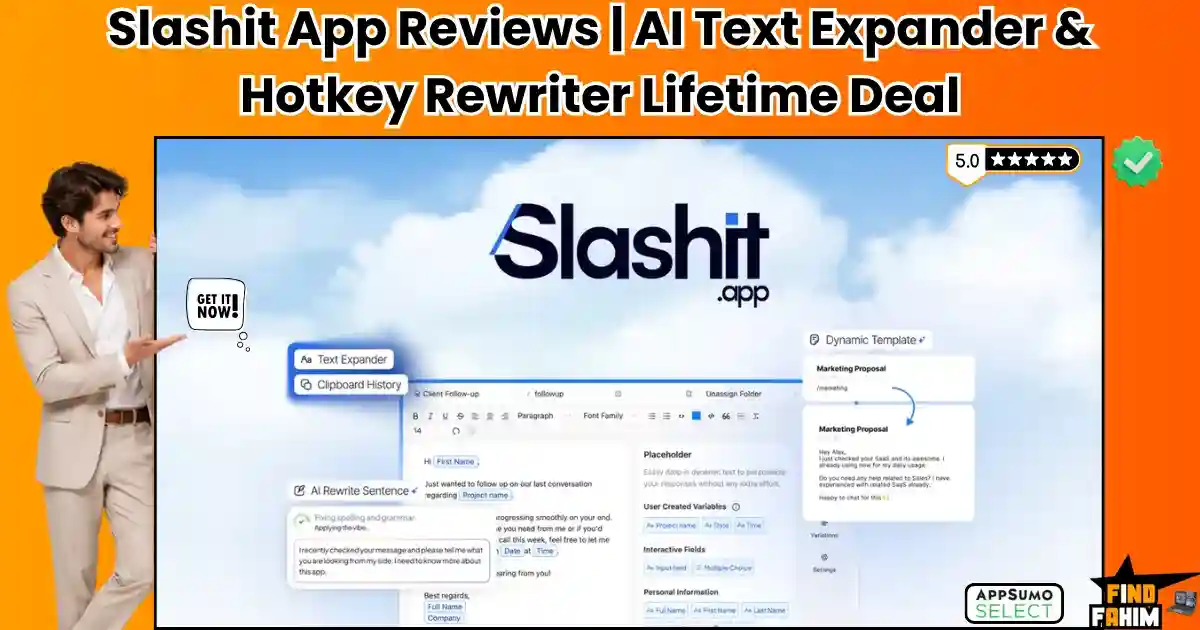
Slashit App is a text expansion tool that automates your keyboard. It triggers templates with slash commands, rewrites text using AI, and manages your clipboard history securely.
(Disclaimer: This article contains affiliate links. If you purchase through these links, I earn a small commission. All research & analysis is my own.)
My Quick Take (TL;DR)
- What is it? A typing assistant combining text expansion, AI rewriting, and clipboard history.
- Special Feature: The One-Hotkey Rewriter summarizes, fixes tone, or translates selected text.
- For Who: Freelancers, marketing agencies, developers, and customer support teams.
- The Deal: A single $39 payment secures the lifetime deal on Tier 1.
- Verdict: Replaces recurring subscriptions to TextExpander and basic grammar tools efficiently.
Click Here to Get the Slashit App Lifetime Deal
What is the Slashit App?
Most professionals rely on messy Google Docs to store important links. Searching for this information breaks your workflow.
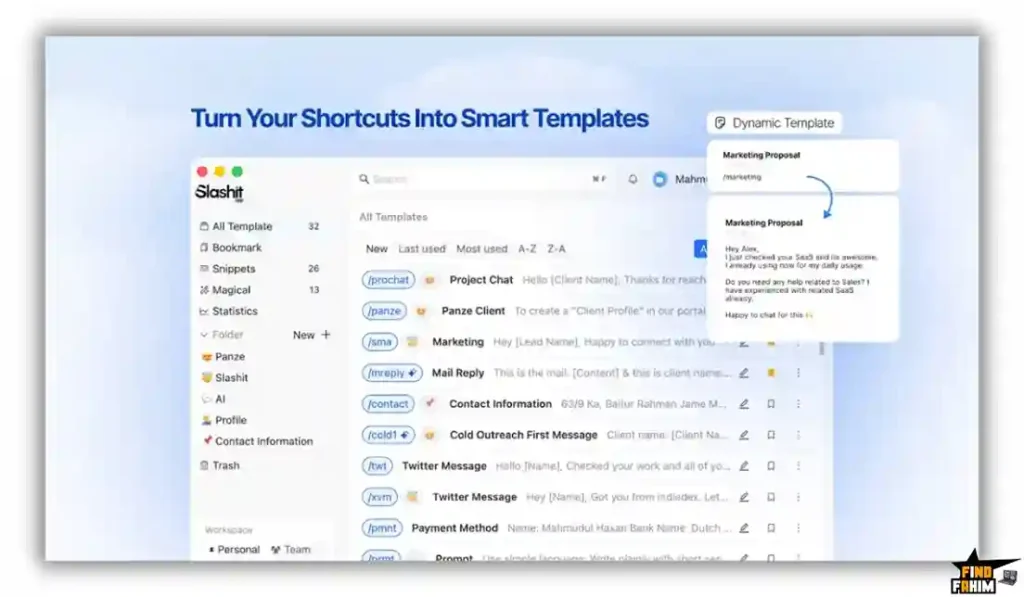
Slashit App replaces this fragmented process. It acts as your centralized typing assistant across every application. You type a short keyword, and the software expands it into a formatted response.
Beyond basic text expansion, it integrates OpenAI directly into your cursor. You can generate custom replies and translate text. Everything processes in the background, keeping you focused on billable work.
Quick Look: Slashit App vs Manual Typing
If your team relies on manual typing or copying text from secondary documents, your daily operations are drastically slowed down. Look at what this unified text application replaces.
| Feature / Process | Replaces… | The Real Value | Normal Cost | Deal Status |
| Text Expansion | TextExpander | Instant shortcode typing | ~$40/year | ✅ Included |
| AI Rewriting | Grammarly Pro | Hotkey tone adjustments | ~$144/year | ✅ Included |
| Generative Replies | ChatGPT Plus | In-app contextual replies | ~$240/year | ✅ Included |
| Clipboard History | Pastebot | Unlimited copied history | ~$13/once | ✅ Included |
Why Repetitive Typing is Destroying Productivity
Forcing your agency team to manually type out complex project proposals or standard operating procedures is an operational mistake. Repetitive manual typing leads to inconsistent brand messaging and extreme creative burnout.
Furthermore, switching contexts destroys focus. If you have to leave Gmail, open a new tab, log into ChatGPT, copy an AI prompt, wait for the generation, and paste it back into your email, you have lost your momentum entirely.
Why AI Text Expanders Are Trending in 2026
The demand for high-volume, personalized communication is higher than ever. Clients expect rapid, highly detailed responses. You no longer have the luxury of spending twenty minutes drafting a single update.
Modern professionals require tools that live directly at their fingertips. Text expanders that integrate AI processing allow users to inject complex data, format it perfectly, and adjust the emotional tone without ever touching their mouse. It is mandatory to have modern infrastructure.
A Look Inside the Slashit App: Key Features
This platform is intentionally lightweight. There is no steep learning curve or heavy interface. It runs quietly in the background. Here is exactly what it offers.
Dynamic Template Expansion
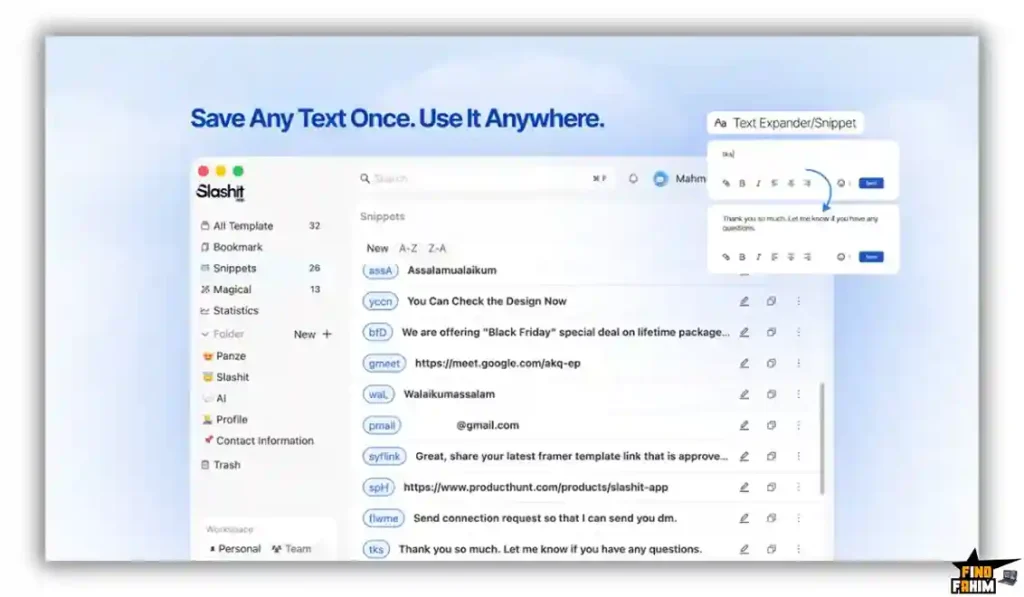
The core engine of Slashit is its template system. You create your most-used messages, such as onboarding emails, and assign them a short slash command.
Typing that command drops the full text into any text box. This eliminates copying and pasting from external documents when replying to clients.
Smart Placeholders
A static template is obvious to the reader. Slashit allows you to add placeholders to your snippets to maintain a personal touch in your outreach.
When you trigger a template, the app prompts you to fill in specific details like client names. This ensures every message feels customized without heavy editing.
Contextual Prompting
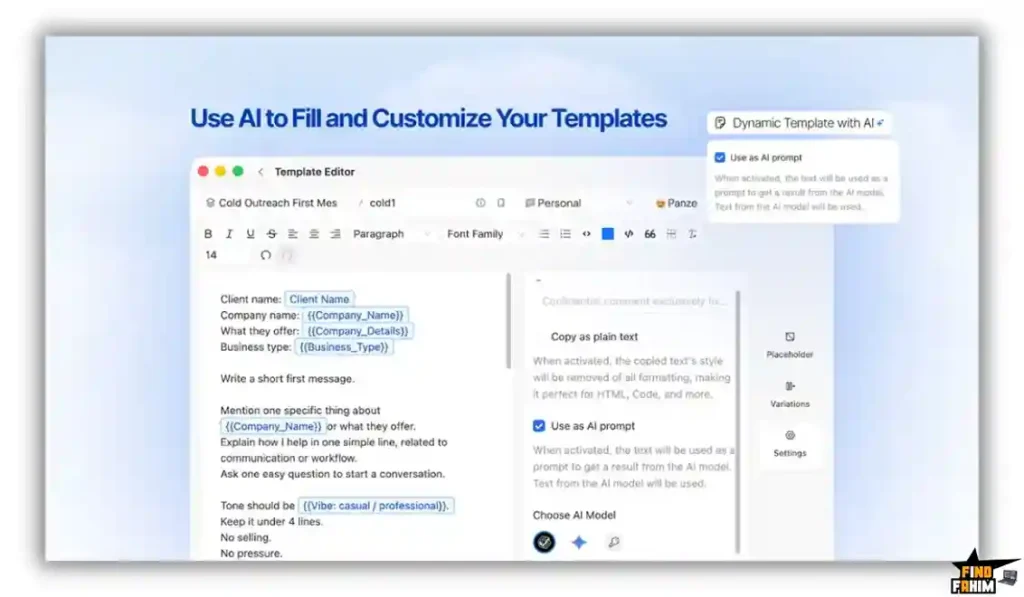
Slashit brings generative models directly to your cursor. You can toggle any template to act as a prompt, allowing the system to read context before drafting.
Highlight a negative client review and type your shortcut. The software reads the text and generates a polite, customized response directly inside your browser window.
Advanced Clipboard History
Searching for a link you copied an hour ago is frustrating. Slashit features a reliable clipboard manager that silently saves your best replies and recent URLs.
You can pull up your history and drop previously copied data into your current window. This prevents you from constantly switching tabs during the workday.
Standout Feature: The One-Hotkey Rewriter
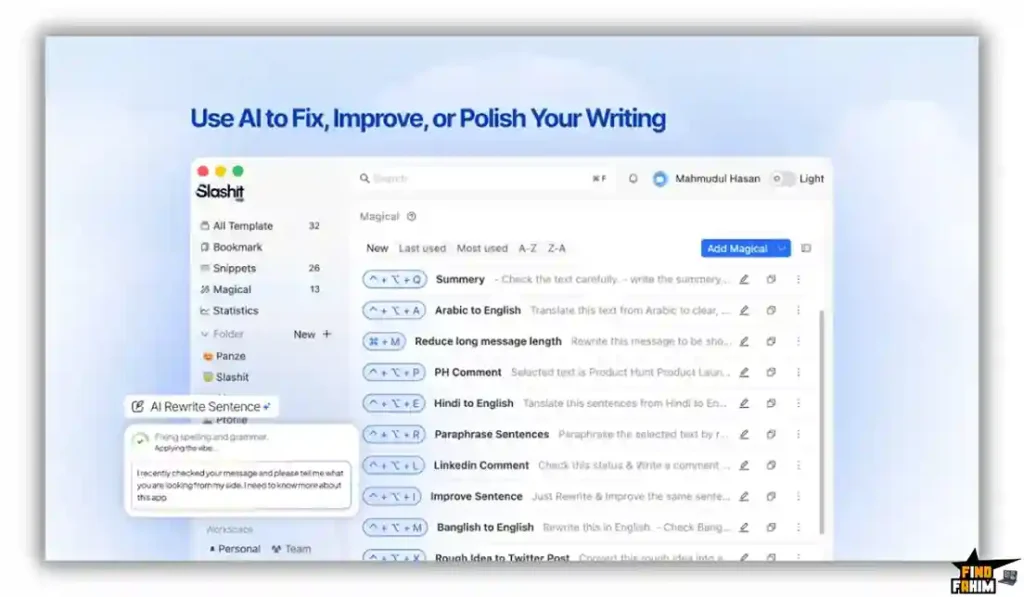
This feature changes how you edit client communication. If you write a rough draft, you simply highlight the text and press your designated keyboard hotkey.
The system rewrites the paragraph to sound professional, fixes grammatical errors, or summarizes data into bullet points. This guarantees rapid communication without leaving your active tab.
Slashit App Updates: What is New in 2026
AppSumo buyers heavily requested specific changes, and the development team delivered. According to co-founder Mahmudul Hasan Manik, the team actively monitors community feedback to shape their roadmap.
The biggest update is the addition of the BYOK (Bring Your Own Key) feature to Tier 2. Originally restricted to the highest tier, the founders listened to user feedback and unlocked it for mid-level buyers. They also deployed Version 1.0.18, which drastically improved snippet expansion speed and fixed magical text formatting across Windows applications.
Slashit App Pricing & AppSumo Deal Details
Unlike basic text tools, this lifetime deal is structured into three specific tiers. This allows you to scale your purchase based on your required AI generation limits and team size.
| Deal Feature | Tier 1 ($39) | Tier 2 ($99) | Tier 3 ($199) |
| User Seats | 1 | 5 | 50 |
| AI Credits / Month | 200 | 600 | 3,000 |
| Dynamic Templates | Unlimited | Unlimited | Unlimited |
| Snippets & History | Unlimited | Unlimited | Unlimited |
| Dual Device Sync | ✅ Included | ✅ Included | ✅ Included |
| BYOK (Own API) | ❌ No | ✅ Included | ✅ Included |
Lock In Your Slashit App Lifetime Price
Important Note on the Refund Policy
This software comes with AppSumo’s standard 60-day money-back guarantee. You have two full months to test the snippet expansion speed, evaluate the AI rewrite accuracy, and sync it across your devices. If the platform does not streamline your workflow, you can secure a full refund easily.
Pros & Cons of This Lifetime Package
Based on verified AppSumo community feedback and an impressive 4.9-star rating, here is the truth about the platform’s current state.
The Pros
- ✅ Massive Time Savings: Instantly bypasses repetitive typing for client emails, coding, and software license inputs.
- ✅ Seamless Integration: Operates flawlessly inside Gmail, Notion, Slack, and standard web browsers without friction.
- ✅ High-Quality AI: Powered by the latest OpenAI and Gemini models for incredibly accurate tone adjustments.
- ✅ Founder Responsiveness: Mahmudul Hasan Manik is highly active, quickly pushing bug fixes and honoring feature requests like BYOK.
- ✅ Team Consistency: Tier 2 and Tier 3 allow agencies to share standardized messaging templates across entire departments.
The Cons
- ❌ Tier 1 Restrictions: Tier 1 does not include the Bring Your Own Key (BYOK) feature, limiting you to the strict 200 monthly AI credits.
- ❌ No Mobile App: Currently built for desktop operating systems; it does not support mobile keyboard expansion for iOS or Android.
Who Should NOT Buy the Slashit App?
Skip this deal if your workflow is entirely mobile-based. Since there is no iOS or Android companion app, phone-heavy users will not benefit. Also, avoid Tier 1 if you rely heavily on AI generation. 200 credits run out fast, so you must upgrade to Tier 2 for BYOK.
How Does the Slashit App Work?
The setup workflow is completely seamless and requires almost zero technical background.
- Install and Sync: Download the application to your Windows or Mac device and log in to sync your cloud profile.
- Build Snippets: Create your first text expansions. Paste in your standard email signatures, bank details, or Zoom links, and assign them a shortcode like “/bank”.
- Add Placeholders: Upgrade your templates by adding dynamic fields like [Customer Name] to force personalized inputs upon activation.
- Deploy AI Hotkeys: Map a custom keyboard shortcut to the AI rewrite function so you can fix grammar instantly.
- Type Anywhere: Open any app, type your slash command, fill in the placeholder popup, and watch the full text populate instantly.
Best Use Cases for the Slashit App
Who Extracts the Highest ROI from Slashit?
- Customer Support Managers: Managing daily tickets requires speed. You share standard troubleshooting templates with your team. For unique issues, agents use the AI hotkey to generate polite responses without leaving the helpdesk.
- Freelance Web Developers: You juggle technical data constantly. Save software license keys, server IPs, and CSS boilerplates as shortcodes. You can recall and paste complex code blocks directly into your active development environment.
- Digital Marketing Agencies: Managing multiple Google Business Profiles takes time. When a customer leaves a review, highlight the text and trigger your AI prompt. The software writes a relevant response directly in your browser.
Start Automating Your Keyboard Today
Slashit App Alternatives
The market for text expansion and AI writing is highly competitive. Let’s look at how this AppSumo lifetime deal stacks up against the established industry heavyweights.
Slashit App vs TextExpander
TextExpander is the undisputed legacy champion of the shortcut typing industry.
- Where TextExpander Wins: Enterprise team management. It has incredibly deep permissions and analytics for massive corporate teams to track exactly how much time is saved.
- Where Slashit Wins: AI Integration and Cost. TextExpander is strictly static text and charges an expensive recurring monthly fee. Slashit features generative AI and is available for a single lifetime payment.
Slashit App vs Magical
Magical is a highly popular, free Chrome extension for text expansion.
- Where Magical Wins: Pure browser integration. It is incredibly fast to install and pull data directly from open browser tabs like LinkedIn.
- Where Slashit Wins: Desktop autonomy. Magical only works inside your web browser. Slashit operates at the operating system level, meaning it works inside desktop apps like Slack, Word, and native email clients.
Slashit App vs GrammarlyGO
Grammarly is the dominant force in spell-checking and tone adjustment.
- Where Grammarly Wins: Passive spelling correction. Grammarly constantly underlines your mistakes in real-time without needing a hotkey trigger.
- Where Slashit Wins: Workflow automation. Grammarly will fix your grammar, but it will not instantly generate a five-paragraph proposal from a two-letter shortcode. Slashit handles the heavy lifting of generation.
Slashit App vs Pastebot (Mac)
Pastebot is a highly respected, dedicated clipboard manager for Apple users.
- Where Pastebot Wins: Deep clipboard filtering. It allows you to create complex filters to strip formatting or change cases automatically when pasting.
- Where Slashit Wins: Cross-platform all-in-one utility. Pastebot is Mac-only and lacks AI. Slashit works across multiple OS environments and combines the clipboard with intelligent writing tools.
Top Competitors Matrix
| Platform | Pricing Model | Core Strength | Works Outside Browser | Best For… |
| Slashit App | Lifetime Deal | All-in-One AI Typing | ✅ Yes | Freelancers & Agencies |
| TextExpander | Monthly Sub | Static Team Snippets | ✅ Yes | Corporate Teams |
| Magical | Freemium | Tab Data Extraction | ❌ No | SDRs & Sales |
| Grammarly Pro | Monthly Sub | Real-Time Spelling | ✅ Yes | Writers & Editors |
Switch to the Slashit App and Save Big
Is This Lifetime Deal a Smart Business Investment?
If you are debating this deal’s value, look at the exact financial math of standard, fragmented productivity software over a single year.
The recurring subscription fees for a typical software stack are staggering:
- Text Expansion (TextExpander): ~$48/year
- AI Writing Tool (Grammarly Pro): ~$144/year
- Advanced AI Prompts (ChatGPT Plus): ~$240/year
- Total Typical Budget: $432+ per year
Cost of Slashit App (Tier 2): $99 exactly once.
The ROI is completely undeniable. You break even within the first three months. By utilizing Slashit to replace these disparate subscriptions, you save over $300 in your first year while reclaiming hours of manual typing every single week. It is the ultimate low-cost productivity upgrade.
How to Redeem the Slashit App Deal
Ready to stop typing the same emails every day? Follow these quick steps to secure your lifetime account before the deal closes.
- Buy: Click the AppSumo link below to secure your redemption code. Remember, this purchase is fully backed by a 60-day money-back guarantee.
- Register: Go to the official Slashit App website and create a brand new account using your primary business email.
- Activate: Navigate to your account billing portal and paste your unique AppSumo code to unlock your lifetime access limits.
- Install: Download the desktop application, sync your account, and create your very first dynamic template.
Final Verdict: Is This AppSumo Deal Worth It?
After evaluating the speed of the desktop application, testing the accuracy of the AI rewrite hotkeys, and reviewing the seamless clipboard history manager, my final verdict is a definitive 4.9-Star BUY.
Slashit App solves one of the most annoying bottlenecks in digital work: repetitive data entry. It is a remarkably stable platform that combines the best features of TextExpander and AI assistants into a single, affordable dashboard. While Tier 1 is great for casual users, upgrading to Tier 2 unlocks the BYOK feature, turning this into an unlimited AI powerhouse. Grab this deal, automate your keyboard, and never type the same message twice.
Secure Your Slashit App Lifetime Deal Before It Ends
About the Author
Welcome to FindFahim, the premier SaaS Review Platform where I spend my time analyzing digital tools to help smart entrepreneurs save big and stop overpaying for monthly software subscriptions. We all know the extreme frustration of typing the same client onboarding email a hundred times, which is exactly why I investigated the Slashit App lifetime deal today.
I do the heavy lifting of evaluating these multi-tier offers, digging into specific AI limits, workflow integrations, and refund policies, so you know exactly what you are buying. To see how else you can optimize your digital workflow, check out my breakdown here: Top 20 AppSumo Lifetime Deals.
FAQ: Your Slashit App Questions, Answered
Slashit App is a desktop productivity tool that combines text expansion, dynamic templates, clipboard history, and AI writing features to reduce repetitive typing across applications.
Slashit App is designed for freelancers, agencies, developers, customer support teams, and professionals who frequently reuse messages, emails, or code snippets.
Yes. Slashit App offers dedicated desktop applications for both Windows and macOS, allowing users to access its features across their computer.
Yes. Because it operates at the system level, Slashit App works inside applications such as Gmail, Slack, Notion, WhatsApp Desktop, web browsers, and many other desktop programs.
Dynamic templates are reusable text snippets with placeholders that prompt you to enter details like names, dates, or project information before inserting the completed text.
Yes. Higher-tier plans support Bring Your Own Key (BYOK), allowing you to connect your own AI API key for expanded usage.
A text expander is a productivity tool that replaces short shortcuts with longer predefined text, helping users save time and reduce repetitive typing.
AI writing assistants help users rewrite, summarize, correct grammar, and adjust writing tone, making everyday communication faster and more efficient.
Clipboard history stores previously copied text or content, allowing users to quickly access and reuse multiple copied items instead of only the latest one.
Yes. Text expansion tools help customer support teams respond faster with consistent, accurate replies while reducing repetitive typing. What is Slashit App?
Who should use Slashit App?
Does Slashit App work on Windows and Mac?
Can Slashit App work inside any application?
What are dynamic templates in Slashit App?
Can I use my own AI API key with Slashit App?
What is a text expander?
How do AI writing assistants improve productivity?
What is clipboard history?
Are text expansion tools useful for customer support teams?

Hi, I’m Fahim — a SaaS tools reviewer and digital marketing expert with hands-on experience helping businesses grow using the right software. I research, test, and personally use a wide range of AI, business, productivity, marketing, and email tools for my agency, clients, and projects. I create honest, in-depth reviews and guides to help entrepreneurs, freelancers, startups, and digital agencies choose the best tools to save time, boost results, and scale smarter. If I recommend it, I’ve used it — and I only share what truly works.