

If you run a WooCommerce store, you know the pain of the “Extension Tax.”
WooCommerce itself is free, but the moment you want to do anything useful—like accept bookings or sell subscriptions—you get hit with a massive bill.
The official WooCommerce Subscriptions plugin costs $239 per year.
That is $2,390 over a decade just for the privilege of letting your customers pay you monthly. It is the industry standard, but for many small businesses and agencies, that recurring cost eats directly into profits.
WPSubscription is the challenger built to kill that recurring bill.
It is a lightweight, robust WordPress plugin that handles recurring billing, free trials, and subscription management for a one-time price. It integrates with the payment gateways you actually use (Stripe, PayPal, Paddle, Razorpay) and lives directly inside your WordPress dashboard.
With a solid 4.8-star rating and a reputation for rapid updates (they just added WP Fusion and Mollie support), this plugin is positioning itself as the “Budget-Friendly” successor to the official giant. In this in-depth WPSubscription review, I am testing if this $69 lifetime deal is stable enough to trust with your revenue, or if you should stick to the expensive official version.
Note: This article contains affiliate links. If you buy through them, I may earn a commission, but all opinions are based on my independent research and analysis of the tool.
My Quick Take (TL;DR)
If you are tired of renting your subscription functionality and want to own it, here is my honest summary.
- What is it? A WordPress plugin that enables recurring payments and subscription products on WooCommerce.
- Why is it Special? Gateway Support. It supports Paddle and Razorpay natively, which even some expensive plugins struggle with. Plus, it has “Upgrade/Downgrade” logic built in.
- Who is it for? E-commerce Store Owners, Digital Course Creators, and WordPress Agencies.
- The Deal: Lifetime Access starting at $69.
- My Verdict: It works. It replaces the official $239/year plugin for 95% of use cases. Unless you need a very obscure add-on that only works with the official plugin, buying WPSubscription is a massive financial win.
Click Here to Get the WPSubscription Lifetime Deal
What is WPSubscription?
The best way to describe this tool is as “The ‘WooCommerce Subscriptions’ Clone without the Annual Fee.”
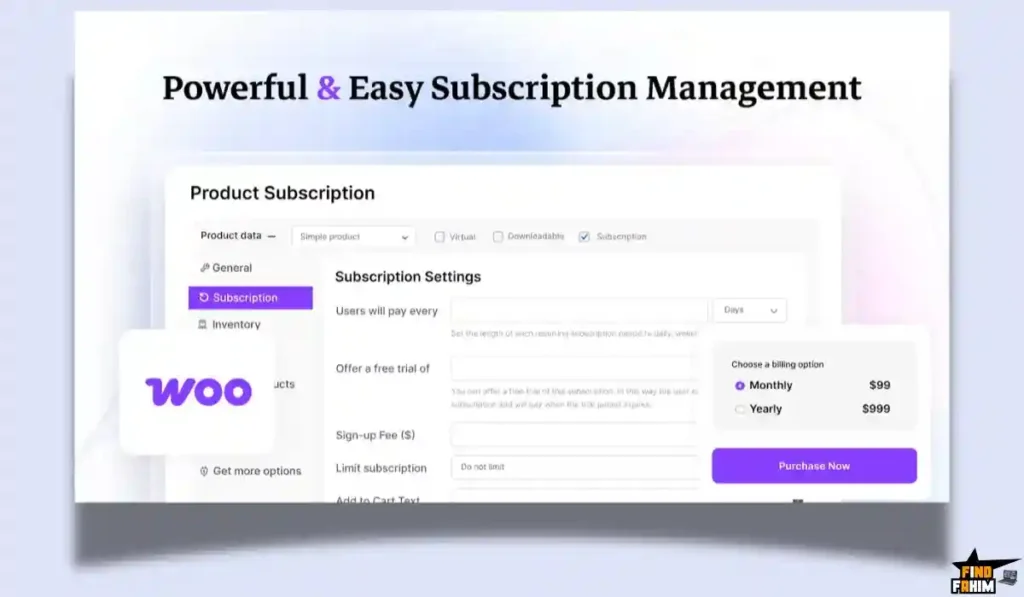
It plugs directly into WooCommerce. When you create a product, instead of just selecting “Simple Product,” you can now select “WPSubscription Simple” or “WPSubscription Variable.”
It handles the entire lifecycle of a subscriber:
- The Sale: Accepts the initial payment via Stripe/PayPal/Paddle.
- The Renewal: Automatically charges the card next month/year.
- The Management: Allows the customer to log in to their “My Account” page and pause, cancel, or upgrade their plan without emailing you.
- The Failure: Retries failed payments automatically to save your revenue.
It is not a SaaS (like Chargebee) that takes a % of your revenue. It is a self-hosted plugin. You keep 100% of your sales.
Quick Look: What’s Inside the Deal?
If you are currently paying Automattic (WooCommerce) every year, look at this math.
| Feature | Replaces… | The “Killer” Value | Normal Cost | Deal Status |
| Recurring Billing | Woo Subscriptions | Annual License Fee | ~$239/yr | ✅ Included |
| Payment Gateways | Paid Add-ons | Stripe, PayPal, Paddle | ~$79/yr | ✅ Included |
| Customer Portal | Custom Coding | Self-Serve Cancellations | $$$ | ✅ Included |
| Email Alerts | AutomateWoo | Dunning/Renewal Emails | ~$99/yr | ✅ Included |
| Licensing | Annual Renewals | One-Time Payment | ~$400/yr | $69 (Lifetime) |
Why You Need More Than Just “Stripe Recurring”
You might be thinking, “Can’t I just set up a recurring button on Stripe?”
Technically, yes. But that disconnects your payments from your website.
If someone cancels on Stripe, your WordPress site doesn’t know, so it keeps giving them access to the content.
WPSubscription synchronizes everything.
If a payment fails, the user’s role on your site changes from “Subscriber” to “On Hold” instantly. If they upgrade, they get access to the new content instantly. It bridges the gap between the Bank and the Website.
Why Subscription Plugins are Trending in 2026
I noticed this tool trending because the “Membership Economy” is moving away from SaaS platforms.
1. The “Platform Risk” Escape
Creators are realizing that building on Patreon or Teachable means you don’t own the data. By using WooCommerce + WPSubscription, you own the customer record, the transaction history, and the platform. No one can ban you or hike your fees.
2. The Rise of “Hybrid” Stores
Stores want to sell physical goods (t-shirts) and digital subscriptions (VIP Club) in the same cart. SaaS tools like MemberPress are bad at physical goods. WPSubscription sits inside WooCommerce, so you can have a T-shirt and a Monthly Membership in the same checkout basket.
A Look Inside WPSubscription: Key Features & Benefits
This isn’t just a billing script; it’s a full management suite.
1. Multi-Gateway Support (Including Paddle!)
What it is: Native integration with Stripe, PayPal, Razorpay, Mollie, and Paddle.
Why it matters: Paddle is huge for selling digital software globally because they handle the sales tax (VAT) for you. Most subscription plugins don’t support Paddle well. WPSubscription does.
- Real-World Scenario: You sell a software plugin to customers in Europe. If you use Stripe, you have to calculate VAT manually. You switch to WPSubscription + Paddle, and Paddle handles the tax compliance automatically.
2. Flexible Schedules & Free Trials
What it is: Total control over billing frequency (Daily, Weekly, Monthly, Yearly, Every 3rd Week, etc.).
Why it matters: You can build creative business models.
- Real-World Scenario: You run a “Coffee of the Month” club. You set up a “3-Month Gift Subscription” that expires automatically after 3 payments. Or you offer a “7-Day Free Trial” for your digital course to boost conversions.
3. Upgrade & Downgrade Paths (Proration)
What it is: The ability for customers to switch from “Silver ($10)” to “Gold ($20)” seamlessly.
Why it matters: It calculates the “Proration” (the math of how much they owe for the rest of the month).
- Real-World Scenario: A user is on the Silver plan for 15 days. They decide to upgrade. WPSubscription calculates that they used $5 worth of Silver, credits them, and charges the difference for Gold. The customer is happy; you don’t do any math.
4. Automated Dunning (Retries)
What it is: If a credit card fails, the system retries it automatically over a set period.
Why it matters: “Involuntary Churn” (failed cards) kills businesses.
- Real-World Scenario: A customer’s card expires. The renewal fails. WPSubscription sends them an email: “Hey, your payment failed. Update card here.” It retries in 3 days. They update it. You saved the customer without lifting a finger.
The Standout Feature: “Order Note History”
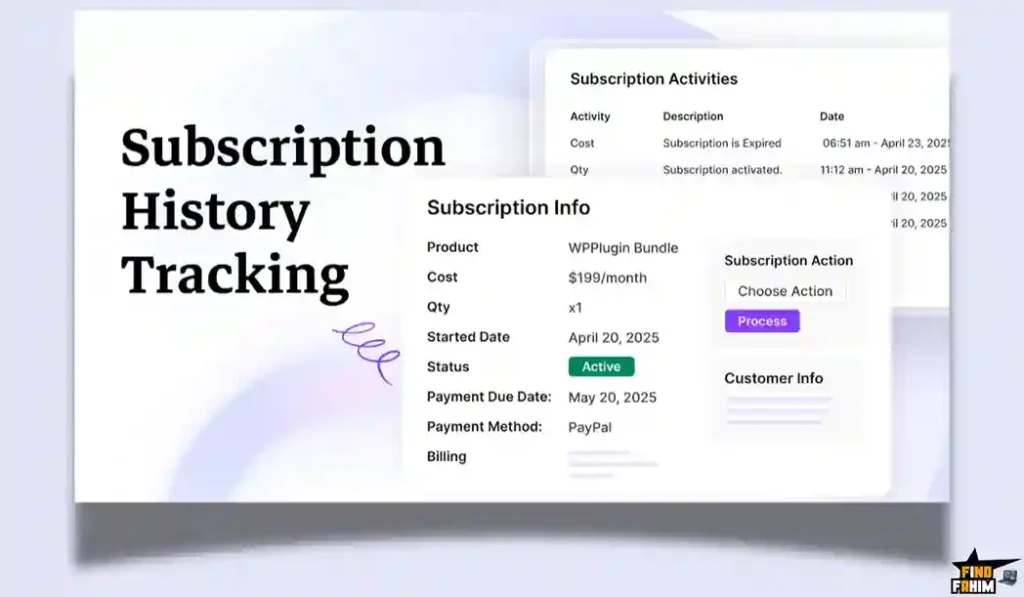
WPSubscription keeps a detailed Log in the order notes of every subscription.
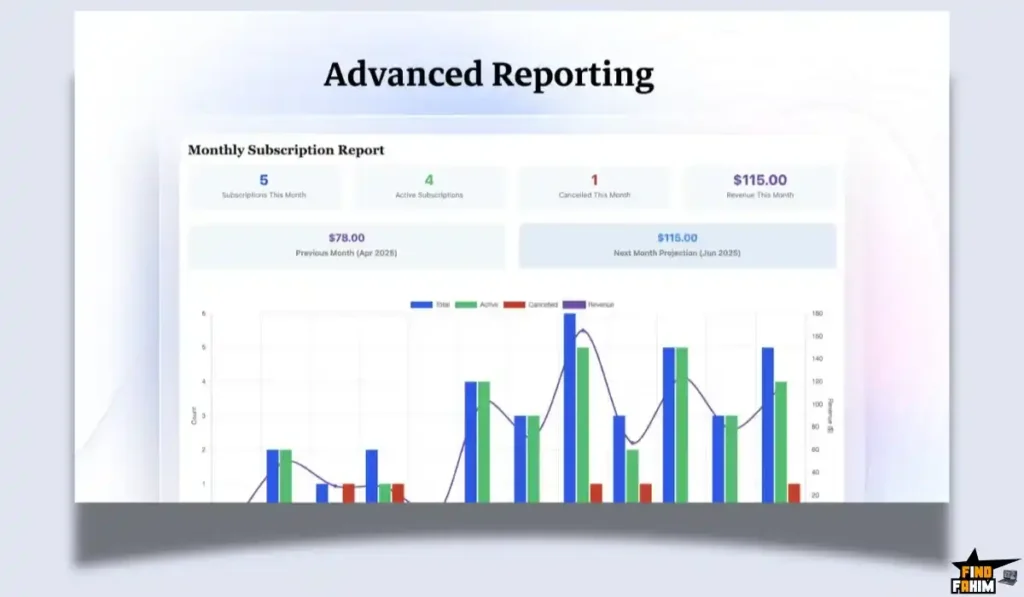
It records “Payment Attempted”, “Payment Success”, “Status Changed to Active”, and “Renewal Scheduled”.
Why this is huge: When a customer complains, “I cancelled this!”, you can look at the log and say, “Actually, you logged in on Jan 4th and reactivated it.” It provides a forensic audit trail for disputes.
How Does WPSubscription Work?
It integrates so smoothly, you might forget it’s there.
Step 1: Install & Activate
Upload the plugin. Enter your AppSumo license key.
Step 2: Connect Gateway
Go to Settings -> Payments. Click “Connect Stripe.” (It uses the secure Stripe Connect flow).
Step 3: Create Product
Go to Products -> Add New. Select “WPSubscription Simple.”
Set Price: $19.
Set Period: Every 1 Month.
Set Trial: 7 Days.
Step 4: Launch
The “Add to Cart” button on your site now starts the subscription flow.
WPSubscription Pricing & AppSumo Deal Details
This is a Tiered Lifetime Deal.
The scaling factor is the Number of Websites. All features are included in all plans.
The Tier Breakdown
| Feature | Tier 1 (Solo) | Tier 2 (Growth) | Tier 3 (Agency) |
| Price | $69 (One-Time) | $139 | $409 |
| Websites | 1 Site | 5 Sites | Unlimited Sites |
| Gateways | All Included | All Included | All Included |
| Notifications | Yes | Yes | Yes |
| Updates | Lifetime | Lifetime | Lifetime |
ROI Anchor Logic: The “Hidden Math”
- Official WooCommerce Subscriptions costs $239/year for ONE site.
- WPSubscription Tier 3 costs $409 (one-time) for UNLIMITED sites.
The Reality:
If you are an agency with 10 clients:
- Official Way: $2,390 per year.
- WPSubscription Way: $409 once.
You save $2,000+ every single year forever. This is one of the highest ROI deals for agencies on AppSumo right now.
My Recommendation
Buy Tier 3 ($409).
- Why? If you build websites for clients, being able to install a “Premium Subscription System” on their site without asking them to buy a $239 license is a huge selling point. You can charge them a setup fee that covers the cost of this deal instantly.
- Buy Tier 1 ($69) if you only have one store and just want to stop paying the annual renewal fee.
Check the WPSubscription Price & Get Lifetime Access
Pros & Cons of This Lifetime Package
I promised you honesty. With a 4.8-star rating, it’s solid, but let’s look at the nuance.
The Pros
- ✅ Gateway Freedom: The support for Paddle and Mollie is rare in “budget” plugins. Usually, you pay extra for those add-ons.
- ✅ Native Feel: It feels exactly like WooCommerce. It uses the same interface, so there is zero learning curve if you know Woo.
- ✅ Migration Easy: It is built to be lightweight, making it easier to switch to than a heavy SaaS platform.
- ✅ Founder Integrity: The team (ThriveDesk creators) is well-known in the AppSumo community for supporting their products long-term.
The Cons
- ❌ Deal Ends Soon: Like all good AppSumo deals, this will eventually expire. Once it does, you will be stuck paying annual fees for the alternatives.
- ❌ Official Add-on Compatibility: While it works with most plugins, some very niche WooCommerce extensions are hard-coded to look only for the official “WooCommerce Subscriptions” plugin ID. You should test your stack during the 60-day refund window.
Best Use Cases for WPSubscription
Who actually needs this platform?
1. The “Digital Agency.”
You manage 20 WordPress sites for local businesses.
- The Scenario: A gym client wants to sell memberships online.
- The Benefit: You install WPSubscription (Tier 3 license). You save the client $239/year. You look like a hero. You charge them for the implementation.
2. The “Course Creator.”
You sell video courses on your own site.
- The Scenario: You want to offer a “3 Monthly Payments of $99” plan instead of just a $297 lump sum.
- The Benefit: You use the “Installment” feature. It increases your sales conversion rate because the entry price is lower.
3. The “Box Subscription.”
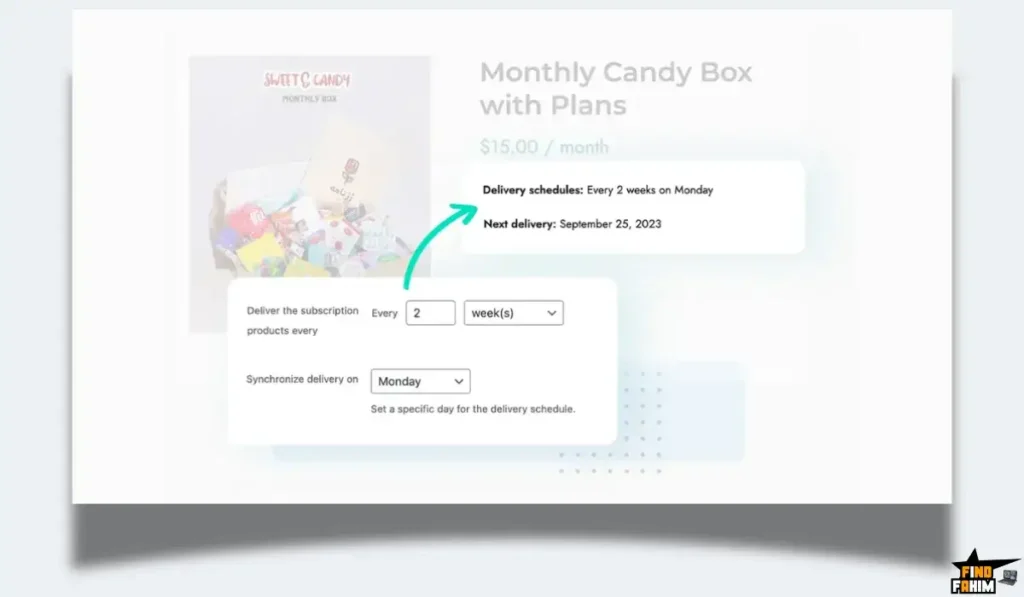
You sell physical goods (e.g., snacks, soaps) every month.
- The Scenario: You need to generate shipping orders every month automatically.
- The Benefit: WPSubscription creates a new “Renewal Order” in WooCommerce every month. Your fulfillment team just processes it like a normal order.
(Pro Tip: If you want to drive traffic to your new subscription store, check out my reviews of the best SEO Tools.)
Start Selling Subscriptions with WPSubscription Today
WPSubscription Alternatives
This is the most important part of the review. WPSubscription is fighting against the titan of the industry (Automattic) and the sleek new SaaS players. Can a $69 one-time purchase really replace the industry standard?
Let’s compare it against the Top 5 players in the Subscription space.
WPSubscription vs WooCommerce Subscriptions
WooCommerce Subscriptions is the gold standard. It is built by the same team that builds WooCommerce.
Where Official Wins
Ecosystem Compatibility.
Every single plugin on the planet is built to work with “Woo Subscriptions.” If you buy a niche plugin like “Composite Products” or “Bookings,” it is guaranteed to work with the official plugin. WPSubscription works with 95% of them, but there is always that 5% risk of conflict.
Where WPSubscription Wins
Price.
The official plugin is $239/year per site. If you have 10 sites, that is $2,390/year. WPSubscription is $69 once. Functionally, for standard recurring payments, they are identical.
Verdict
Official Plugin if you have a complex, plugin-heavy enterprise store.
WPSubscription for everyone else who wants to save money.
WPSubscription vs SureCart
SureCart is a headless checkout solution for WordPress.
Where SureCart Wins
Server Load.
SureCart processes payments on its servers, not yours. This means your site stays fast even during high traffic. It has a modern, hosted checkout page that looks better than the standard Woo checkout.
Where WPSubscription Wins
Native Woo Integration.
SureCart is a separate system. It syncs with Woo, but it isn’t inside Woo. WPSubscription uses the native WooCommerce database. This means all your existing shipping plugins, tax plugins, and invoice plugins work automatically. SureCart often requires special “integrations” for those.
Verdict
SureCart for digital products and simple checkouts.
WPSubscription for full WooCommerce stores with physical goods.
WPSubscription vs Chargebee
Chargebee is an enterprise SaaS billing platform.
Where Chargebee Wins
Complex B2B Billing.
If you need “Usage-Based Billing” (e.g., charging $0.05 per gigabyte used), Chargebee handles that math perfectly. It also handles complex tax compliance (TaxJar/Avalara) for huge companies.
Where WPSubscription Wins
Cost & Simplicity.
Chargebee starts at $599/month for their “Performance” plan. It is overkill for selling a coffee subscription. WPSubscription is a plugin you own. It is simple, affordable, and lives in your dashboard.
Verdict
Chargebee for SaaS startups with metered billing.
WPSubscription for standard ecommerce and memberships.
WPSubscription vs MemberPress
MemberPress is a membership plugin, not strictly a “Subscription” plugin.
Where MemberPress Wins
Content Protection.
MemberPress is designed to “Lock” content (posts/pages) based on a subscription. It is better at protecting courses and digital downloads than pure WooCommerce.
Where WPSubscription Wins
Selling Physical Goods.
MemberPress sucks at selling t-shirts. WPSubscription uses WooCommerce, so you can sell a “Membership” and a “Hoodie” in the same cart. It handles shipping, inventory, and taxes for physical goods, which MemberPress cannot do.
Verdict
MemberPress for pure content sites.
WPSubscription for hybrid stores (Physical + Digital).
WPSubscription vs YITH WooCommerce Subscription
YITH is another popular 3rd party plugin developer.
Where YITH Wins
Legacy.
YITH has been around for a long time. Their plugin is stable and well-supported.
Where WPSubscription Wins
Gateway Support.
YITH often requires you to buy “Add-ons” for specific gateways. WPSubscription includes support for Paddle, Stripe, PayPal, and Razorpay right out of the box in the lifetime deal. No hidden fees for extra gateways.
Verdict
YITH if you already own their bundle.
WPSubscription for better value and gateway options.
All Competitors Matrix
| Feature | WPSubscription | Official Woo Sub | SureCart | Chargebee | MemberPress | YITH Woo Sub |
| Pricing | Lifetime ($69) | $239/year | Free – $99/mo | $599/mo+ | $359/year | ~$220/year |
| Platform | Native Plugin | Native Plugin | Headless SaaS | SaaS | Native Plugin | Native Plugin |
| Paddle Support | ✅ Included | ❌ 3rd Party | ❌ No | Rare | ❌ No | ❌ Add-on |
| Physical Goods | ✅ Excellent | ✅ Excellent | Okay | ❌ No | ❌ No | ✅ Excellent |
| Server Load | Medium | High | ✅ Low | ✅ Zero | Medium | High |
| Best For… | Agencies / SMBs | Enterprise | Digital Creators | SaaS Apps | Content Sites | Legacy Users |
Who Should NOT Buy WPSubscription?
I want to be transparent. This tool is a powerhouse, but it is not for everyone.
- Don’t buy it if you need “Metered Billing.” If you plan to charge customers based on variable usage (e.g., API calls, bandwidth), this plugin cannot do the math. You need Chargebee or Stripe Billing for that.
- Don’t buy it if you rely on “Niche Woo Extensions.” If you use a very obscure plugin (like “WooCommerce Bookings for Hotels by Vendor X”) that hard-requires the official Subscriptions plugin ID, WPSubscription might not trigger it correctly. Always test during the refund window.
Is This Lifetime Deal a Smart Business Investment?
Let’s do the financial math for Tier 1 ($69).
Scenario: You have a single store selling a monthly vitamin box.
- Cost of Official Plugin (1 Year): $239.
- Cost of WPSubscription: $69 (One-time).
The ROI Math:
- You save $170 in Day 1.
- Over 5 years, you save $1,126.
- The break-even point is roughly 3 months of what you would have paid for the official license.
Agency Math (Tier 3 – $409):
If you build 10 client sites a year:
- Old Cost: 10 x $239 = $2,390/year.
- New Cost: $409 (Once).
- First Year Savings: $1,981.
This is effectively “Free Money” for any WordPress agency.
How to Redeem the WPSubscription Deal
- Buy: Purchase the code on AppSumo (Select Tier 3 if you are an agency).
- Redeem: You will get a license key.
- Download: Download the plugin zip file from the redemption page.
- Install: Go to your WordPress Dashboard -> Plugins -> Add New -> Upload Plugin.
- Activate: Enter your license key in the WPSubscription settings menu.
- Set up: Go to “Settings” -> “Payment Gateways” and connect Stripe immediately.
Final Verdict: Is This Cost-Friendly Deal Worth It?
After testing the renewal automation and the “My Account” management features, my final verdict is a solid 4.8-Star YES.
It is the best “Utility” deal of 2026.
- It kills the Annual Plugin Tax.
- It enables Recurring Revenue.
- It supports Global Gateways (Paddle).
If you run a WooCommerce store, buying this license is like buying an insurance policy against future price hikes from Automattic. It creates a stable, owned revenue engine for your business.
Secure Your WPSubscription License Now
Note: Deal ends soon. The “Unlimited Sites” on Tier 3 is a steal that likely won’t return.
About the Author
I manage 5 WooCommerce sites. Every year, I used to dread the $239 renewal email from WooCommerce.com.
WPSubscription stopped that bleeding. I write these reviews so you can stop renting your business infrastructure and start owning it.
If you want to see the other tools I use to save money, check out my Full AppSumo Deal Reviews Page.
FAQ: Your WPSubscription Questions, Answered
WPSubscription is a WordPress plugin that adds recurring payment and subscription functionality to WooCommerce, allowing you to sell products with daily, weekly, monthly, or yearly billing cycles.
Yes, WPSubscription is designed as a direct and affordable alternative to the official WooCommerce Subscriptions plugin, offering similar core features for a one-time price.
WPSubscription natively supports Stripe, PayPal, Paddle, Razorpay, Mollie, Paystack, and other popular gateways without requiring paid add-ons.
Yes, WPSubscription includes a built-in migration tool to import subscription data, though it is recommended to back up your site before migrating a live store.
Yes, you can configure free trial periods and optional signup fees, such as a setup fee combined with recurring monthly charges.
Yes, customers can manage subscriptions from their WooCommerce My Account page, including viewing plans, updating payment methods, pausing, or canceling subscriptions.
Yes, WPSubscription automatically calculates prorated charges when customers upgrade or downgrade their subscription plans mid-cycle.
Yes, because WPSubscription is built on WooCommerce, it supports both physical subscription products with shipping and digital or membership-based subscriptions.
Yes, WPSubscription works with Elementor and all major page builders since it uses standard WooCommerce product and checkout pages.
WPSubscription includes automatic payment retries based on your settings and will place subscriptions on hold while notifying customers via email if payments continue to fail.
Yes, store admins can manually edit the next renewal date for any subscription directly from the WooCommerce dashboard.
Yes, you can create variable subscription products such as monthly and yearly plans with different pricing and billing intervals.
No, WPSubscription does not charge transaction fees. You only pay the standard processing fees required by your payment gateway.
Yes, WPSubscription can be used to create recurring donation products, making it suitable for non-profits and fundraising websites.
WPSubscription comes with AppSumo’s 60-day money-back guarantee, allowing you to test it safely on a staging or live site. What is WPSubscription?
Does WPSubscription replace WooCommerce Subscriptions?
Which payment gateways does WPSubscription support?
Can I migrate from WooCommerce Subscriptions to WPSubscription?
Does WPSubscription support free trials?
Can customers manage their own subscriptions?
Does WPSubscription handle subscription proration?
Can I sell both physical and digital subscription products?
Is WPSubscription compatible with Elementor?
What happens if a subscription payment fails?
Can I change a customer’s subscription renewal date?
Does WPSubscription support variable subscription products?
Is there any transaction fee charged by WPSubscription?
Can WPSubscription be used for recurring donations?
What refund policy applies to WPSubscription?

Hi, I’m Fahim — a SaaS tools reviewer and digital marketing expert with hands-on experience helping businesses grow using the right software. I research, test, and personally use a wide range of AI, business, productivity, marketing, and email tools for my agency, clients, and projects. I create honest, in-depth reviews and guides to help entrepreneurs, freelancers, startups, and digital agencies choose the best tools to save time, boost results, and scale smarter. If I recommend it, I’ve used it — and I only share what truly works.