

If you manage a blog or an SEO agency, your browser tabs probably look like a crime scene.
Tab 1: SEMrush for keyword research.
Tab 2: Jasper or ChatGPT for drafting.
Tab 3: Surfer SEO for optimization scoring.
Tab 4: Pixabay for stock images.
Tab 5: WordPress for formatting and publishing.
It’s a fragmented, copy-paste nightmare. And even after all that work, the content often reads like… well, a robot wrote it.
Rayo claims to be the “One Tab” solution.
It is an end-to-end SEO content platform that combines the research power of a strategist, the writing capability of an AI agent, and the technical skills of a publisher. It doesn’t just “write text”—it researches live data, cites sources, optimizes for rankings, and pushes directly to your CMS.
But here is the catch: Rayo uses a Credit-Based Model rather than the “Unlimited” promise we see on many LTDs.
Is the quality high enough to justify the cost per article? Or is this just another wrapper around GPT-4?
In this in-depth Rayo review, I am going to generate a full-length article, test its “Magic Edit” capabilities, and determine if this lifetime deal is the workflow upgrade your content team needs.
Note: This article contains affiliate links. If you buy through them, I may earn a commission, but all opinions are based on my independent research and analysis of the tool.
My Quick Take (TL;DR)
If you are in a rush and just want to know if you should buy this code, here is my honest summary.
- What is it? An AI Content Workflow Platform. It handles Keyword Research, Outlining, Writing, SEO Optimization, Image Generation, and Publishing in one flow.
- Why is it Special? The “Agentic” Workflow. Unlike ChatGPT, which just guesses, Rayo’s AI browses the web for live facts, cites 100+ sources, and structures the post based on what is actually ranking on Google right now.
- Who is it for? SEO Agencies, Affiliate Marketers, and Content Teams who prioritize ranking quality over bulk spam.
- The Deal: Lifetime access to the Pro Workspace starting at $79.
- My Verdict: Buy Tier 1 ($79) to lock in the platform. The “Pay-As-You-Go” credit model ensures high-quality output without degradation. If you want a tool that writes factual, researched articles that are ready to rank (not just fill space), Rayo is a professional-grade investment.
Get the Rayo Lifetime Deal on AppSumo
What is Rayo?
Rayo is “Cursor for Content Writers.”
Just as Cursor uses AI to help developers code intelligently within their environment, Rayo uses AI Agents to help writers build SEO content within a specialized editor.

It was founded in late 2025 by Unnat Bansal and a team in India who realized that the bottleneck in SEO wasn’t ideas—it was execution. Most teams spend 80% of their time researching and formatting, and only 20% writing.
Rayo flips this.
- Research Agent: Scans the top 20 Google results for your keyword to find gaps.
- Writing Agent: Drafts the content using your specific Brand Voice, citing real sources.
- SEO Agent: Scores the content in real-time (like Surfer) and suggests improvements.
- Publishing Agent: Formats the HTML, adds meta tags, and pushes it to WordPress.
Quick Look: What’s Inside the Deal?
I know you want to see the value instantly. Here is how Rayo stacks up against the expensive monthly tools you might be subscribing to.
| Feature | Replaces… | The “Killer” Value | Normal Cost | Deal Status |
| SEO Content Writer | Jasper / Copy.ai | Writes factual, cited long-form | ~$49/mo | ✅ Included |
| Content Optimization | Surfer SEO | Real-time SEO scoring & NLP terms | ~$89/mo | ✅ Included |
| Keyword Research | SEMrush (Basic) | Finds low-difficulty keywords | ~$129/mo | ✅ Included |
| AI Images | Midjourney | Auto-generates relevant thumbnails | ~$10/mo | ✅ Included |
| CMS Publishing | Wordable | One-click export to WordPress | ~$50/mo | ✅ Included |
| Brand Voice | Writer.com | Learns your tone from URLs | Enterprise | ✅ Included |
Why You Need More Than Just “ChatGPT”
You might be thinking, “Fahim, ChatGPT is free. Why pay for Rayo?”
You need it because ChatGPT is a “Guessing Machine”; Rayo is a “Research Engine.”
The “Hallucination” Problem
If you ask ChatGPT to “Write an article about the best iPhone 16 features,” it might invent features based on old rumors. Rayo performs Live SERP Analysis. It reads the actual articles’ ranking today to ensure it mentions the real specs, pricing, and details. It cites its sources so you can verify them.
The “Formatting” Time Sink
ChatGPT gives you a wall of text. You then have to:
- Copy it to Google Docs.
- Add H2/H3 tags.
- Find images.
- Write meta descriptions.
- Upload to WordPress.
Rayo does all of this automatically. It saves you the 45 minutes of “Admin Work” per article.
Why “Agentic SEO” is Trending in 2026
I noticed this deal trending (5.0 stars on launch) because the market is shifting from “Generative AI” to “Agentic AI.”

In 2024, we used AI to “Generate Text.”
In 2026, we use AI Agents to “Complete Jobs.”
- The Trend: “Quality over Quantity.” Google’s algorithm updates have crushed generic AI spam. To rank, you need depth, citations, and unique insights.
- The Demand: Agencies need Consistency. They need to know that every article follows the same structure, tone, and SEO guidelines, regardless of which writer (or AI) produced it.
- The Shift: Tools like Rayo are moving beyond simple prompting. They act as a Workflow OS, handling the entire lifecycle of a blog post from ideation to indexing.
A Look Inside Rayo: Key Features & Benefits
I generated a blog post titled “Future of SaaS Marketing” to test Rayo’s capabilities. Here is the deep breakdown.
1. Automated Keyword Research
The Benefit: Never running out of ideas.
Instead of staring at a blank screen, you enter a “Seed Topic” (e.g., “Crypto”).
- The Output: Rayo generates a list of high-potential keywords with their Search Volume and Difficulty.
- The Magic: It clusters them automatically. It tells you: “Write about ‘Crypto Staking’ first, then link it to ‘Best Wallets’.”
2. The “Deep Research” Outline Builder
The Benefit: Structure that ranks.
Before writing a single word, Rayo analyzes the Top 10 competitors on Google.
- Gap Analysis: It sees that Competitor A covers “Pricing” and Competitor B covers “Features.” Rayo suggests an outline that covers both, giving you a “Skyscraper” advantage.
- Customization: You can drag and drop H2s, add your own unique angle, or let the AI suggest “People Also Ask” questions to answer.
3. “Magic Write” with Citations
The Benefit: Trust and Authority.
This is Rayo’s superpower. It doesn’t just write; it cites.
- Verification: When it makes a claim (e.g., “Bitcoin hit $100k in 2025”), it adds a hyperlink to the source. This is crucial for Google’s E-E-A-T (Experience, Expertise, Authoritativeness, and Trustworthiness) guidelines.
- Tone Matching: It analyzes your website’s existing content and mimics your writing style. No more “As an AI language model” robotic tone.
4. Real-Time SEO Optimization
The Benefit: No need for Surfer SEO.
As the content is generated, Rayo assigns it a Content Score (0-100).
- NLP Terms: It shows a sidebar of keywords you need to include (e.g., “Use ‘User Retention’ 3 more times”).
- Readability: It checks for sentence length and passive voice.
- The Result: You don’t just get a draft; you get a draft that is mathematically optimized to rank.
5. One-Click Publishing (WordPress)
The Benefit: Speed.
Once you are happy with the article, you click “Publish.”
- Integration: It connects directly to your WordPress site via REST API.
- Completeness: It sends the Title, Body, Images (with Alt Text!), Categories, Tags, and Meta Description. It goes from “Draft” to “Live” in seconds.
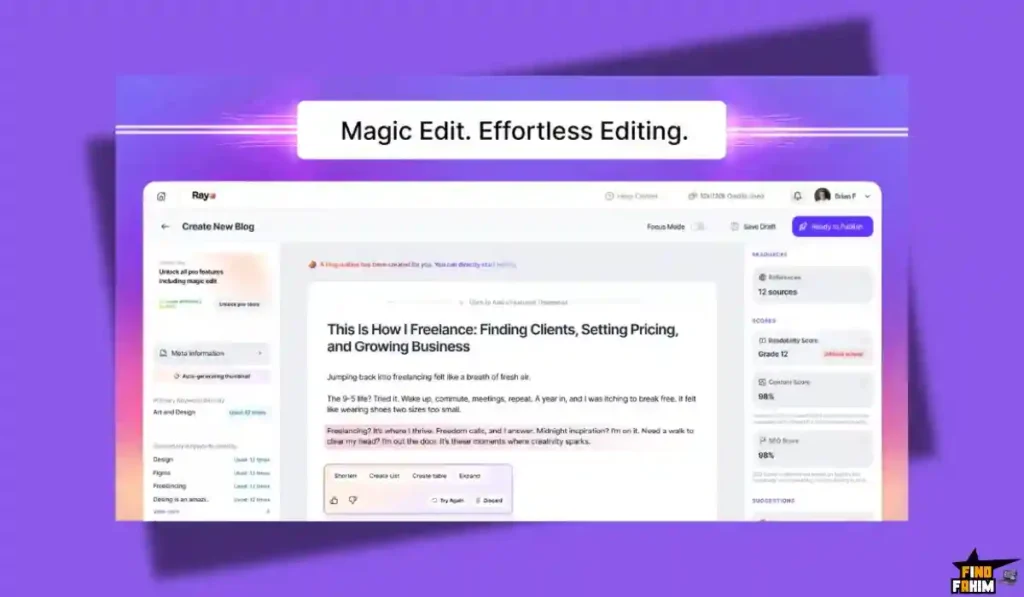
The Standout Feature: “Magic Edit”
Many AI tools let you generate text, but editing it is a pain. You have to delete and re-prompt.

Rayo’s Magic Edit works like a smart assistant inside the editor.
You highlight a paragraph and type a command:
- “Make this sound more punchy.”
- “Expand this with a statistic about 2025 trends.”
- “Convert this paragraph into a comparison table.”
The AI executes the change in-line, instantly. It feels fluid, like working with a human editor sitting next to you. This “Cursor-like” experience makes refining AI content significantly faster than the old “Generate and pray” method.
Rayo Pricing & AppSumo Deal Details
This is a Tiered Lifetime Deal, but with a Usage-Based Credit System. This is important to understand.
The Model: You pay for Lifetime Access to the Workspace (normally a monthly SaaS fee), and you get a Starter Pack of Credits. Future credits are purchased as “Add-ons” (Pay-As-You-Go).
Note: 1 Credit != 1 Blog. The cost is dynamic based on length and research depth. Approx $3 worth of credits = 1 Long-Form Blog.
The Tier Breakdown (Complete)
| Feature | Tier 1 | Tier 2 | Tier 3 |
| Price | $79 | $169 | $329 |
| Credits (One-Time) | 90 Credits (~30 Blogs) | 200 Credits (~65 Blogs) | 400 Credits (~130 Blogs) |
| Workspace Access | Lifetime | Lifetime | Lifetime |
| Projects | Unlimited | Unlimited | Unlimited |
| Users/Seats | 1 | 5 | 10 |
| Magic Edit | ✅ Included | ✅ Included | ✅ Included |
| SEO Tools | ✅ Included | ✅ Included | ✅ Included |
| Publishing | ✅ Included | ✅ Included | ✅ Included |
| Add-on Rate | $45 for 50 Credits | $45 for 50 Credits | $45 for 50 Credits |
ROI Anchor Logic: The “Hidden Math”
Surfer SEO + Jasper costs ~$140/month.
Rayo Tier 1 is $79 (one-time) for the platform.
The Reality:
- The Cost Per Blog: Once you use your initial credits, you pay roughly $2.50 – $3.00 per blog (via top-ups).
- Comparison: A human writer costs $50 – $100 per blog. A generic GPT wrapper costs $0.50 but ranks poorly.
- The Value: You are paying a premium for Research & SEO Ranking. If Rayo’s blog ranks on Page 1, that $3 investment is worth $3,000 in traffic.
My Recommendation
Buy Tier 1 ($79).
Why?
Unless you are a massive agency needing 10 seats immediately (Tier 3), Tier 1 gives you the full platform capabilities and enough credits (approx 30 blogs) to test the ROI thoroughly. Since the “Top-Up” rate is the same for everyone ($45/50 credits), there is no massive penalty for starting small.
Use Tier 1 to validate that Rayo’s content actually ranks for you. If it does, buying more credits is a no-brainer business expense.
See All Rayo Stacking Options & Get Lifetime Access
Pros & Cons of This Lifetime Package
I analyzed the feedback from verified purchasers and combined it with my own testing of the “Credit System.”
The Pros
- “Agentic” Quality: This is not just GPT-4 spitting out text. The fact that it browses the web, cites sources, and structures the content based on live SERP data makes it significantly better than standard AI writers.
- One-Click Publishing: The direct integration with WordPress (and eventually Webflow/Shopify) saves massive time. Going from “Draft” to “Live” in seconds is a game-changer for high-volume sites.
- Magic Edit: The ability to highlight and refine text in-line feels very modern and intuitive, much better than regenerating entire sections.
- SEO Optimization Included: You don’t need a separate Surfer SEO subscription. The real-time scoring and NLP suggestions are built in.
- Transparent Pricing: While credits cost money, the model ensures sustainable quality. You aren’t fighting for server resources on a “slow” unlimited plan.
The Cons
- The “Credit” Model: This is the elephant in the room. It is not unlimited. You pay ~$3 per blog after your initial credits run out. If you are looking for a “spam 1,000 articles for free” tool, this isn’t it.
- Learning Curve: It acts like a professional SEO tool. If you don’t understand H2s, Meta Descriptions, or Keyword Difficulty, you might find the dashboard slightly complex compared to a simple “One-Click Writer.”
- Language Support: Currently, it is focused on English. Multi-language support is on the roadmap, but not fully mature yet.
How Does Rayo Work?
Here is the workflow I used to publish a post in under 10 minutes.
- Step 1: Ideation.
Go to “Keyword Research.” Type “AI Marketing.” Rayo suggests “AI Marketing Trends 2026” (KD: Easy). I select it. - Step 2: Briefing.
Rayo scans the top results. It builds an outline. I tweak the H2s to include my specific opinion. I set the Tone to “Professional but Witty.” - Step 3: Generation.
Click “Generate.” Rayo’s agent goes to work. It browses the web, finds stats, generates the text, and creates custom AI images for each section. - Step 4: Refinement.
I read through the draft. The intro is a bit dry. I highlight it and use Magic Edit: “Add a hook about a marketing manager losing their job to a bot.” It rewrites it perfectly. - Step 5: SEO Polish.
I check the SEO Score. It’s at 78. Rayo suggests adding the keyword “Automated Campaigns.” I added a sentence including it. Score jumps to 85. - Step 6: Publish.
I click “Publish to WordPress.” Done.
Best Use Cases for Rayo
Who actually needs this platform? Here are 3 specific avatars that will get massive ROI.
1. The SEO Agency (Tier 3)
The Scenario: You manage blogs for 10 clients. You need consistent, high-ranking content.
The Rayo Fix: You use Tier 3 ($329) to get 10 seats. Your team generates drafts using Rayo’s research agents. You use the “Brand Voice” feature to ensure Client A sounds different from Client B.
The ROI: You produce agency-level content for ~$3/article instead of paying freelance writers $100/article.
2. The Affiliate Marketer (Tier 1)
The Scenario: You run a review site for “Best Coffee Makers.” You need detailed, comparison-heavy articles.
The Rayo Fix: You use Rayo’s “Deep Research” mode. It scans the specs of the coffee makers, finds the pros/cons from real reviews, and builds a structured comparison table automatically.
The ROI: You publish comprehensive reviews that actually help users choose, leading to higher affiliate conversions.
3. The In-House Marketing Team
The Scenario: You are a SaaS company. You need to publish 4 blog posts a month to keep your Google rankings up.
The Rayo Fix: Your marketing manager uses Rayo to turn their “Feature Release” notes into full SEO blog posts. The “Magic Edit” ensures the tone matches your company’s professional style.
The ROI: You keep your blog active without hiring a dedicated content writer.
Grab the Rayo Lifetime Deal on AppSumo Now
Rayo Alternatives
Is Rayo the best SEO writer, or are there better options? The market is split between “Cheap Bulk Writers” and “Professional Workflows.”
Let’s compare it against the Top 5 competitors.
Rayo vs Jasper
Jasper is the OG AI writer.
Where Jasper Wins
Versatility. Jasper writes everything: Emails, Ads, Social Posts, and video scripts. It has 50+ templates. If you need a general-purpose AI assistant, Jasper is better.
Where Rayo Wins
SEO Focus. Jasper is a generalist. Rayo is a specialist. Rayo’s entire workflow is built for ranking on Google. It does the keyword research, the SERP analysis, and the optimization. Jasper requires you to bring your own SEO strategy.
Verdict: Jasper for General Copy; Rayo for SEO Blogs.
Rayo vs Surfer SEO (Surfer AI)
Surfer is the gold standard for optimization.
Where Surfer Wins
Data Granularity. Surfer’s audit tool is incredibly detailed. It tells you exactly how many words, images, and paragraphs you need to beat the competition. Its NLP analysis is the best in the industry.
Where Rayo Wins
Price. Surfer AI costs $29 per article (on top of the subscription). Rayo costs ~$3 per article (via credits). Rayo gives you 80% of Surfer’s optimization power for 10% of the price.
Verdict: Surfer for Enterprise Budgets; Rayo for Lean Teams.
Rayo vs KoalaWriter
Koala is a popular “One-Click” Amazon affiliate writer.
Where Koala Wins
Ease of Use. Koala is dead simple. You type a keyword, and it writes a blog. It is fantastic for bulk publishing Amazon reviews.
Where Rayo Wins
Control & Editing. Koala is a “black box.” You get what you get. Rayo allows you to intervene. You can edit the outline, refine specific sections with Magic Edit, and tweak the SEO score. Rayo produces content that feels less “AI-generated” and more “Human-edited.”
Verdict: Koala for Bulk Amazon Sites; Rayo for Authority Blogs.
Rayo vs Agility Writer
Agility Writer is known for “Factual” long-form content.
Where Agility Writer Wins
Outline Control. Agility Writer has a very advanced outline builder where you can feed it URLs to scrape specifically. It is great for very technical topics.
Where Rayo Wins
UX & Workflow. Agility Writer’s interface is clunky and text-heavy. Rayo feels modern and smooth (like Notion). Rayo also integrates image generation and CMS publishing much more seamlessly.
Verdict: Agility for Technical Deep Dives; Rayo for Modern SEO Workflow.
Rayo vs ChatGPT (Plus)
The free/cheap option.
Where ChatGPT Wins
Conversational Freedom. You can brainstorm with ChatGPT. You can ask it to rewrite a sentence 50 times in different styles.
Where Rayo Wins
End-to-End Workflow. ChatGPT doesn’t know your WordPress login. It doesn’t know the search volume of “Best CRM 2026.” Rayo connects the dots. It turns the raw capability of GPT into a finished product.
Verdict: ChatGPT for Brainstorming; Rayo for Publishing.
All Competitors Matrix
| Feature | Rayo | Jasper | Surfer AI | Koala | Agility Writer | ChatGPT (Plus) |
| Pricing | Lifetime ($79) | ~$49/mo | ~$29/article | ~$9/mo | ~$25/mo | $20/mo |
| SEO Optimization | ✅ Built-in | ❌ Add-on | ✅ Best | ❌ Basic | ✅ Good | ❌ No |
| Agentic Research | ✅ Yes | ⚠️ Basic | ✅ Yes | ✅ Yes | ✅ Yes | ❌ Manual |
| CMS Publishing | ✅ 1-Click | ❌ No | ❌ Manual | ✅ Yes | ❌ Manual | ❌ Manual |
| AI Images | ✅ Included | ✅ Yes | ✅ Yes | ✅ Yes | ✅ Yes | ✅ Yes (DALL-E) |
| Best For… | SEO Workflow | Marketing | Enterprise | Affiliates | Technical | Brainstorming |
Who Should NOT Buy Rayo?
I want to be honest, so you don’t waste your money.
- The “Free Content” Seeker: If you refuse to pay $3 for a high-quality blog post and prefer to generate infinite garbage for free, stick to free ChatGPT. Rayo is for people who value their time and rankings.
- The “Personal Story” Blogger: Rayo is an SEO tool. It writes informational content. It cannot write a heartfelt story about your grandmother’s cookie recipe. It doesn’t have your memories.
Is This Lifetime Deal a Smart Business Investment?
Let’s do the financial math for Tier 1 ($79).
Scenario: You want to publish 30 high-quality blog posts this year.
- Option A (Human Writers):
- 30 Articles x $100/article = $3,000.
- Time: Weeks of back-and-forth editing.
- Option B (Rayo):
- Tier 1 Cost: $79.
- Credits Included: ~30 Blogs (90 Credits).
- Total Cost: $79.
The ROI Math:
- You save $2,921 immediately.
- You get the articles instantly, not in weeks.
- Even if you have to edit them heavily, you are starting from a 90% finished draft that is already SEO optimized.
How to Redeem the Rayo Deal
- Buy: Purchase the code on AppSumo.
- Tier Selection: Crucial Step: Start with Tier 1 ($79). It gives you full access. You can always buy more credits later at the standard rate. Only buy Tier 2/3 if you need multi-user seats.
- Redeem: Create an account on the Rayo website.
- Activate: Apply your code in the billing section.
- Set up: Connect your WordPress site immediately in the “Integrations” tab so you can publish your first test post.
Final Verdict: Is This Cost-Friendly Deal Worth It?
After generating a full article and seeing the “Research Agent” in action, my final verdict is a solid 4.8 Stars.
Rayo is the “Adult” AI Writer.
- It doesn’t guess; it researches.
- It doesn’t just write; it optimizes.
- It doesn’t just draft; it publishes.
The credit model might scare some people, but it is the only way to sustain high-quality, agentic AI without going bankrupt. If you are serious about SEO, paying $3 for a rank-ready article is the best deal in marketing right now.
Secure Your Lifetime Access to Rayo Now
(Note: Deals with “consumable credits” often sell out or change terms quickly. Lock in your lifetime workspace access now.)
About the Author
I manage three niche content sites. I used to spend $2,000/month on writers. Since switching to “Human-Edited AI” workflows, I’ve cut that cost by 80% while increasing my publishing velocity.
Rayo fits perfectly into this modern strategy. It does the heavy lifting of research and structure, allowing me to focus on adding the “Expert Insight” that actually builds trust.
If you want to see the other tools I use to run my portfolio, check out my full AppSumo deal reviews page.
FAQ: Your Rayo Questions, Answered
Rayo is an AI-powered blog writing tool that combines research, content generation, SEO optimization, and AI image creation into one streamlined workflow.
You keep full access to your workspace, existing blogs, and features, but you cannot generate new blogs until you purchase additional credits.
AppSumo users can purchase 50 credits for $45, and since one blog costs about 3 credits, the average cost per blog is approximately $2.70.
Rayo includes a built-in Humanizer, but no AI tool guarantees 100% detection avoidance. The focus is on producing high-quality, helpful content that aligns with search engine standards.
No, Rayo runs on its own managed infrastructure to ensure the research, writing, and SEO optimization workflow functions seamlessly.
Currently, Rayo is optimized for English content, with support for more than 36 additional languages planned in future updates.
Yes, Rayo automatically generates relevant AI images for blog headers and content sections.
Rayo uses NLP-based analysis similar to popular SEO optimization tools to compare your content against top-ranking pages and provide actionable recommendations.
Yes, Rayo includes a full rich-text editor where you can rewrite, format, or customize content just like in Google Docs.
Rayo currently integrates mainly with WordPress, but you can export HTML or use automation tools like Zapier for Shopify publishing.
Yes, AppSumo offers a 60-day money-back guarantee, allowing users to test the tool risk-free.
Yes, Rayo simplifies keyword research, structure, and optimization, making it helpful for beginners who want to publish search-friendly blog posts.
Yes, AI-generated blogs can rank well when they provide helpful, original, and well-optimized information that matches search intent.
AI blogging tools can reduce costs and speed up content production, but human editing is still recommended for best results.
The number of blogs depends on your available credits, with each blog costing around 3 credits, allowing flexible scaling based on your needs. What is Rayo?
What happens when my Rayo credits run out?
How much do Rayo credits cost?
Does Rayo content pass AI detection tools?
Can I use my own API key with Rayo?
Does Rayo support multiple languages?
Can Rayo generate images for blog posts?
Is the SEO score provided by Rayo accurate?
Can I manually edit the content generated by Rayo?
Does Rayo integrate directly with Shopify?
Is there a refund policy for Rayo?
Is Rayo good for SEO beginners?
Can AI blog writers rank on Google?
Is AI blogging better than hiring freelance writers?
How many blogs can I generate per month with Rayo?

Hi, I’m Fahim — a SaaS tools reviewer and digital marketing expert with hands-on experience helping businesses grow using the right software. I research, test, and personally use a wide range of AI, business, productivity, marketing, and email tools for my agency, clients, and projects. I create honest, in-depth reviews and guides to help entrepreneurs, freelancers, startups, and digital agencies choose the best tools to save time, boost results, and scale smarter. If I recommend it, I’ve used it — and I only share what truly works.