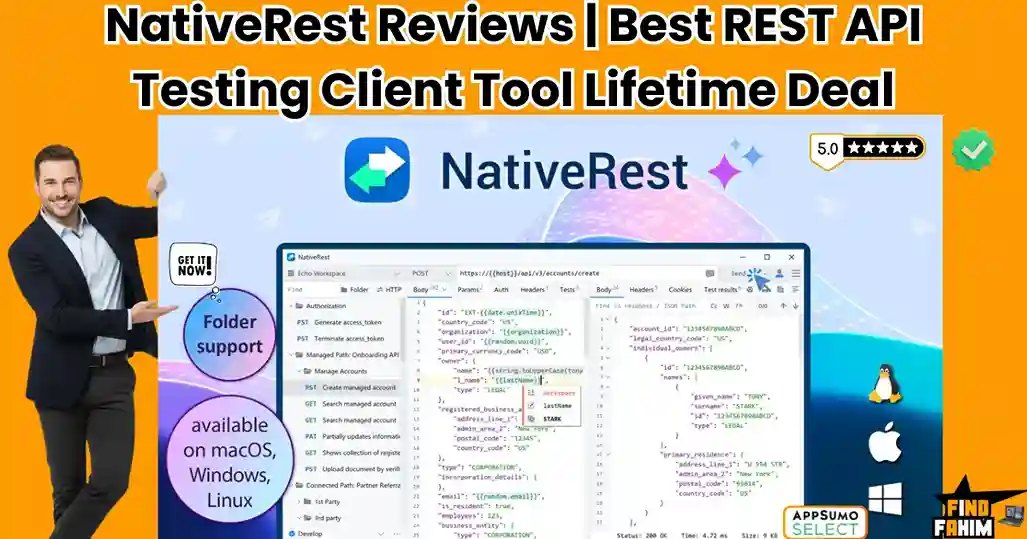

If you have spent any time building or debugging software recently, you know the frustration of opening your API testing tool, only to watch it consume a massive chunk of your RAM before you even send your first GET request.
The industry-standard tools have become bloated. They force you to create cloud accounts, they push mandatory updates, and they sync your sensitive API keys to corporate servers. For developers working on secure client projects, enterprise intranets, or air-gapped systems, this forced “cloud-first” approach is a massive security risk.
NativeRest is the aggressive rebellion against this bloated software trend.
Built as a 100% native desktop application for Windows, macOS, and Linux, NativeRest strips away the web-wrapper bloat. It is a high-performance, offline-first REST API client that starts instantly, uses barely any CPU, and keeps all your workspace data strictly local.
Currently offering an AppSumo lifetime deal starting at just $19, NativeRest is positioning itself as the ultimate lightweight alternative for privacy-conscious developers. In this comprehensive review, I analyze its architecture, evaluate its local file system capabilities, compare it against the biggest names in the industry, and determine if this tool has the firepower to replace your current API stack.
Transparency Note: I spend dozens of hours researching and analyzing SaaS tools so you don’t have to. If you grab this lifetime deal through my links, I may earn a small commission at zero extra cost to you. All verdicts are based on my independent research and market analysis.
My Quick Take (TL;DR)
If you are tired of your API client lagging, demanding logins, and eating up your computer’s memory, here is the executive summary.
- What is it? A blazingly fast, cross-platform REST API client built entirely with native code (no Electron) for creating, debugging, and testing APIs.
- Why is it Special? Offline-First Data Sovereignty. You do not need an account or an internet connection to use it. Your collections, environments, and bearer tokens stay entirely on your local hard drive.
- Who is it for? Backend developers, QA engineers, freelance coders, and cybersecurity professionals who demand high performance and strict data privacy.
- The Deal: A $19 Lifetime Deal on AppSumo (normally $199). Tier 1 gives you unlimited local workspaces. Stacking codes unlocks cloud sync, team collaboration, and unlimited devices.
- My Verdict: At $19, this is an absolute steal. The native performance alone saves daily frustration, and the additions of local file system reading and OS environment variables make it a powerhouse for dynamic testing.
Get the NativeRest Lifetime Deal on AppSumo
What is NativeRest?
At its core, NativeRest is a desktop software application used to send HTTP requests to web servers and analyze the responses.
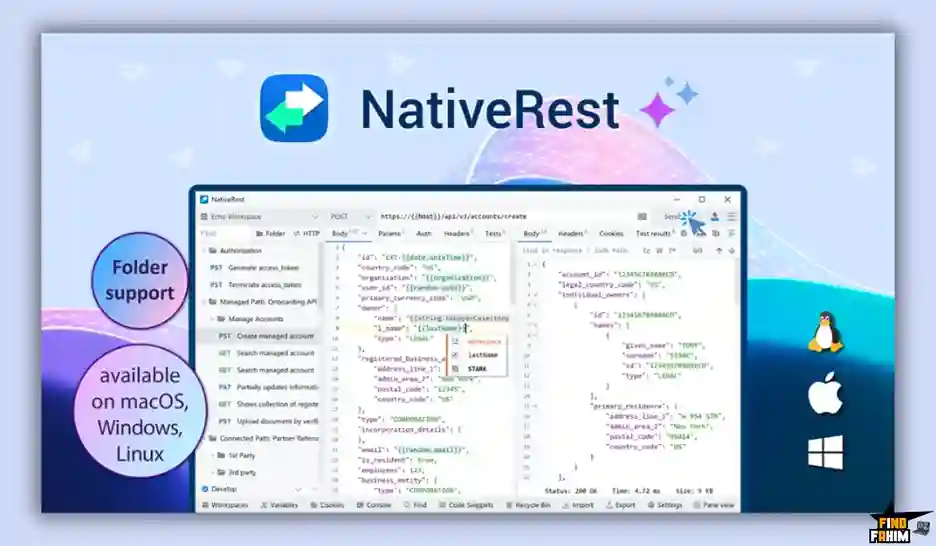
For years, Postman and Insomnia have dominated this space. However, those tools are built using Electron—a framework that essentially runs a Chromium web browser inside a desktop window. This makes them incredibly resource-heavy.
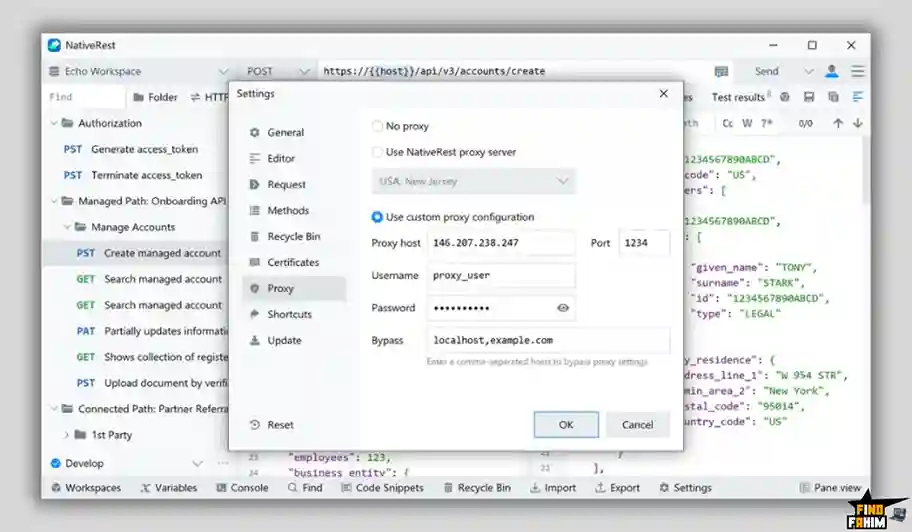
NativeRest is written in native code. It interfaces directly with your operating system. This architectural difference means it launches in milliseconds, consumes a fraction of the system memory, and responds to your clicks instantly without the micro-stutters associated with web-based desktop apps. It includes environment variables, one-line assertions for testing, code snippet generation in 15+ languages, and a built-in proxy server for advanced debugging.
Quick Look: What’s Inside the Deal?
Let’s break down the technical and financial value of replacing your current subscription-based API client with NativeRest’s lifetime offer.
| Feature | Replaces… | The “Killer” Value | Normal Cost | Deal Status |
| Native Architecture | Electron Apps | Near-zero RAM usage and instant startup | Priceless | ✅ Included |
| Offline-First Storage | Forced Cloud Sync | 100% data privacy for sensitive API keys | Premium Tier | ✅ Included |
| Cloud Sync & Teams | Insomnia Sync | Seamless collaboration across devices | ~$12/mo | ✅ Included (Tier 2+) |
| Portable Version | Installed Software | Run directly from a USB drive | N/A | ✅ Included |
| One-Line Assertions | Complex JS Testing | Validate response bodies instantly | Time Saver | ✅ Included |
| Total Value | Enterprise API Clients | Speed & Security | ~$150+/yr | $19 (Lifetime) |
Why You Need More Than Just “Postman”
If you learned to code anytime in the last ten years, you likely learned how to test APIs using Postman.
But things have changed radically, and the old methods are no longer serving developers well.
The “Forced Cloud” Backlash
Recently, major API clients made a controversial pivot: they started deprecating offline “Scratch Pads” and forcing users to log into cloud accounts to save their collections. For independent developers, this is annoying. For enterprise developers handling strict NDAs, healthcare data, or banking APIs, this is a massive security violation. You cannot legally sync a production database API key to a third-party server you do not control.
The Electron Bloat
Modern development machines are powerful, but developers run heavy stacks. When you open an Electron-based API client, it spins up multiple background processes, immediately eating 500MB to 1GB of RAM. If you leave it open for days, memory leaks cause your entire system to lag. NativeRest solves the bloated memory crisis entirely by acting as a lightweight utility tool.
Why “Local-First Development” is Trending in 2026
My market analysis shows NativeRest gaining massive traction because it aligns perfectly with the biggest software engineering trend of 2026: The Return to Local-First.
For the last half-decade, the industry was obsessed with pushing everything to the cloud. But in 2026, the pendulum is swinging back. Cloud bills have become astronomically expensive, and internet outages halt team productivity completely. Developers are demanding tools that work perfectly offline. They want to spin up a local server, test it with a local API client, and commit the code without ever needing an internet connection. NativeRest champions this methodology.
A Look Inside NativeRest: Key Features
This platform strips away the bloat but retains the raw technical power required for complex API orchestration.
1. Granular Variable Scoping and Generation
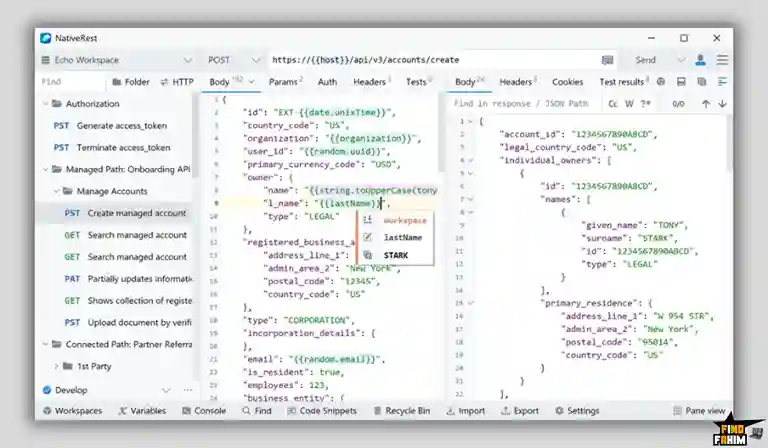
Hardcoding values in your API requests is a terrible practice. NativeRest allows you to use System, Global, Workspace, and Environment variables. You can define a variable {{baseUrl}} and switch between “Local” and “Production” environments with one click. Furthermore, NativeRest includes built-in functions like {{md5(your_text)}} allowing you to create dynamic, randomized test payloads effortlessly.
2. Concise One-Line Assertions (Tests Tab)
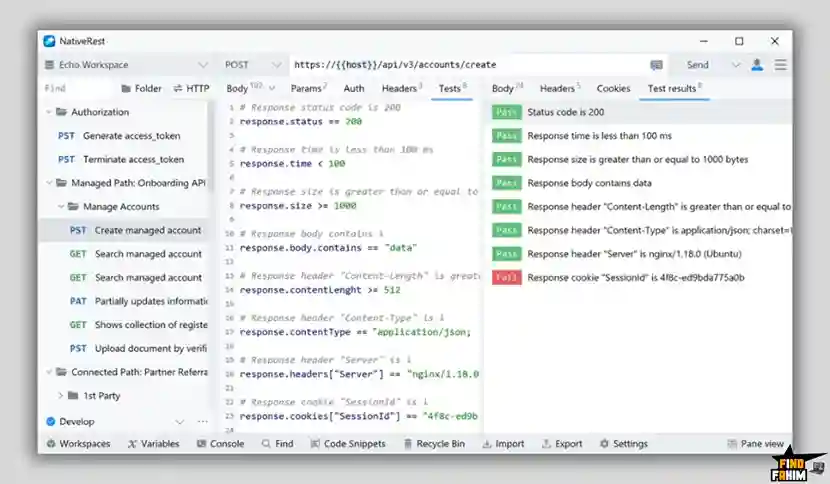
Writing tests in other clients usually requires writing multi-line JavaScript blocks using specific syntax libraries. NativeRest allows you to write clean, mathematical one-liners. You want to ensure an endpoint returns a successful status and the user’s age is an adult? You just write:
response.status == 200
response.body.user.age >= 18
It drastically speeds up Quality Assurance (QA) workflows.
3. Advanced File System Functions
This is a massive update recently pushed by the founder. You can now use functions like file.readJson(path, field_name) directly in your request body. If you are testing a massive data upload, you don’t need to paste a 10,000-line JSON string into the request body. You simply point NativeRest to a local .json file on your hard drive, and it reads the data dynamically upon execution.
4. Seamless Importer and Code Snippet Generator
Switching tools is usually painful because of vendor lock-in. NativeRest allows you to import your massive JSON collections directly from Postman, Insomnia, or an OpenAPI (Swagger) specification without losing your folders or variables. Additionally, you can generate the exact code to execute it in Python, Go, Node.js, cURL, or Swift to paste directly into your actual application codebase.
5. Multi-Language and Theming Support
Developers stare at these tools for hours. NativeRest supports complete Dark Mode and Light Mode, and natively supports 10 languages (including Spanish, German, Japanese, and Chinese), making it highly accessible for international engineering teams.
The Standout Feature: OS Environment Variables & Security
While the “native speed” is the main selling point, the true standout feature for senior engineers is the addition of OS Environment Variable Access (os.getEnv(name)).
When you are working with highly sensitive credentials (like an AWS Secret Key), storing them directly inside an API client’s workspace can be risky. NativeRest allows you to pull variables directly from your computer’s deeply hidden system environment variables. You set your key in your system settings. In NativeRest, you simply type {{os.getEnv(SECRET_KEY)}}. The key is never stored in the database, never saved in a workspace, and never synced to the cloud. This represents an enterprise-grade approach to credential security.
NativeRest Pricing & AppSumo Deal Details
The AppSumo lifetime deal is broken into a highly stackable tier system. It is incredibly affordable, making it accessible to solo freelancers while scaling up for enterprise teams.
| Feature | Tier 1 (1 Code) | Tier 2 (2 Codes) | Tier 3 (3 Codes) |
| Price (One-Time) | $19 | $38 | $57 |
| Users | 1 User | 1 User | 3 Users |
| Devices | 1 Device | 3 Devices | Unlimited |
| Local Workspaces | Unlimited | Unlimited | Unlimited |
| Cloud Sync | ❌ No | ✅ Yes | ✅ Yes |
| Proxy Server | ❌ No | ✅ Yes | ✅ Yes |
| Team Collaboration | ❌ No | ❌ No | ✅ Yes (Shared) |
Note: You can stack up to 20 codes. Each code after 3 adds 1 additional user. Higher tiers include 90-day data recovery and high-priority support.
Secure Your NativeRest Lifetime License Here
Pros & Cons of This Lifetime Package
Based on technical market analysis and verified user feedback, here is the honest truth about where NativeRest shines.
The Pros
- ✅ Blistering Performance: Written without Electron, it opens instantly and uses negligible RAM.
- ✅ True Offline Capability: It never forces you to log in to access your local data.
- ✅ Rapid Development Cycle: Updates like v3.2.0 (File System functions) are pushed regularly based directly on user requests.
- ✅ Portable Version: You can download a single executable file that requires no installation for secure offline environments.
The Pivot
- Limitation 1: Cloud Sync Delays. When using the Cloud Workspaces (Tier 2+), the synchronization between two different devices isn’t always instantaneous and lacks a clear status indicator.
- Pivot: The developer has publicly acknowledged this feedback and stated that improving cloud sync reliability is a top priority. For now, the core focus remains on its flawless offline execution.
- Limitation 2: Advanced CI/CD Integration. It currently lacks some of the massive enterprise pipeline integrations (like running automated collections in Jenkins) that behemoth tools offer.
- Pivot: NativeRest is actively designed as a client for manual debugging and local development. It is meant to be the developer’s daily driver on their local machine, rather than the final automated step in an enterprise server deployment pipeline.
How Does NativeRest Work? (Step-by-Step Tutorial)
The transition from your old tool to NativeRest is designed to be frictionless.
- Step 1: Install and Launch. Download the native installer for Windows, macOS, or Linux.
- Step 2: Import Your Old Data. Click the “Import Data” window. Select your exported Postman JSON file. NativeRest instantly reconstructs your folders and requests.
- Step 3: Define an Environment. Go to the Variables panel. Create a new environment called “Staging.” Add a variable {{api_token}} and paste your bearer token.
- Step 4: Craft the Request. Open a new tab. Select your HTTP method (POST). Type your URL. In the Headers tab, add Authorization: Bearer {{api_token}}.
- Step 5: Write a Quick Test. In the Tests tab, type response.status == 200 to ensure the endpoint succeeds.
- Step 6: Execute. Hit “Send.” The native engine executes the request, formats the JSON response instantly, and displays a green checkmark indicating your test passed.
Best Use Cases for NativeRest
Who specifically gets the most value out of a native, lightweight REST client?
The Freelance Backend Developer
You build custom APIs for various small business clients.
- The Benefit: You can use the Tier 1 ($19) plan to maintain unlimited local workspaces. You can separate Client A’s endpoints from Client B’s endpoints completely locally, without ever paying a monthly subscription or worrying about cross-contamination of API keys.
The Quality Assurance (QA) Engineer
Your job is to relentlessly hit a staging server with different data payloads to find bugs.
- The Benefit: The new File System Functions are a game-changer. You can store 50 different JSON configuration files on your desktop and use file.readJson() in your request body to rapidly cycle through test scenarios without manually copy-pasting code.
The Cybersecurity Analyst
You are conducting penetration testing or auditing APIs on a highly secure, air-gapped corporate intranet.
- The Benefit: You cannot install cloud-connected software on these machines. You can drop the Portable Version of NativeRest onto a flash drive, plug it into the secure terminal, and conduct your advanced HTTP testing entirely offline.
Start Testing Your APIs with NativeRest Today
NativeRest Alternatives
The REST API client market is highly competitive. Let’s look at how this lightweight native tool stacks up against the established giants and the new open-source challengers.
NativeRest vs Postman
Postman is the absolute behemoth of the industry. It is the tool almost everyone starts with.
- Where Postman Wins: Enterprise Ecosystem. Postman has massive API networks, mock servers, and deep collaboration tools for teams of 500+ developers.
- Where NativeRest Wins: Performance and Privacy. Postman relies heavily on Electron, taking massive amounts of RAM, and aggressively pushes users to sync data to their cloud. NativeRest uses native code, minimal RAM, and respects your right to keep your workspaces 100% local.
- Verdict: Postman for massive enterprise orchestration; NativeRest for developers who want speed and data sovereignty.
NativeRest vs Insomnia
Insomnia (by Kong) was traditionally the “lightweight” alternative to Postman, favored by GraphQL developers.
- Where Insomnia Wins: GraphQL Support. Insomnia historically has incredible native support for deep GraphQL schema fetching and advanced protocol testing.
- Where NativeRest Wins: Staying True to Offline. Insomnia recently faced community backlash when an update unexpectedly required users to log into a cloud account to access their previously local data. NativeRest guarantees an offline-first experience without forced account creation.
- Verdict: Insomnia for deep GraphQL needs; NativeRest for guaranteed offline reliability.
NativeRest vs Hoppscotch
Hoppscotch is a wildly popular, open-source API development ecosystem.
- Where Hoppscotch Wins: Zero Installation. Hoppscotch is primarily a Progressive Web App (PWA). You go to their website and start sending requests immediately from your browser.
- Where NativeRest Wins: Local Network Access. Because Hoppscotch runs in a browser, it struggles with CORS (Cross-Origin Resource Sharing) errors when trying to hit localhost, requiring you to install a browser extension to fix it. NativeRest, being a desktop app, hits any local IP instantly without CORS restrictions.
- Verdict: Hoppscotch for quick cloud API checks; NativeRest for local backend development.
NativeRest vs Bruno
Bruno is a rising star in the open-source community, taking a radically different approach to API testing.
- Where Bruno Wins: Git-Native Storage. Bruno stores collections directly as plain text .bru files in a folder on your computer. You commit these files directly to your Git repository alongside your code.
- Where NativeRest Wins: Traditional UI Familiarity. Bruno forces you to adopt a totally new workflow and file structure. NativeRest provides the exact, familiar UI-driven workspace management that former Postman users are already comfortable with, minimizing the learning curve to zero.
- Verdict: Bruno for Git purists; NativeRest for UI-focused developers seeking speed.
NativeRest vs Paw (RapidAPI)
Paw is a legendary, native Mac-only API client that was acquired by RapidAPI.
- Where Paw Wins: macOS Integration. Paw was built exclusively for Mac, meaning its UI perfectly matches Apple guidelines and integrates deeply with Mac-specific tools.
- Where NativeRest Wins: Cross-Platform Parity. If you use a Mac at home but your corporate office forces you to use a Windows machine, Paw is useless to you at work. NativeRest provides the exact same high-performance native experience across Windows, macOS, and Linux.
- Verdict: Paw for Mac-only loyalists; NativeRest for cross-platform developers.
All 5 Competitors Matrix
| API Client | Architecture | Offline First? | RAM Usage | Best For… |
| NativeRest | Native (C++/Qt) | ✅ Yes (Guaranteed) | Very Low | Speed & Local Devs |
| Postman | Electron / Web | ❌ Forced Cloud | Very High | Large Enterprises |
| Insomnia | Electron | ❌ Account Required | High | GraphQL Testers |
| Hoppscotch | PWA (Browser) | ⚠️ Browser Limits | Medium | Quick Web Testing |
| Bruno | Electron / Text | ✅ Yes (Git) | Medium | Git-Flow Purists |
| Paw | Native (Mac Only) | ✅ Yes | Low | Mac Exclusives |
Ditch the Electron Bloat – Get NativeRest Here
Who Should NOT Buy NativeRest?
While NativeRest is a massive upgrade over bloated tools, it is not the right fit for everyone. Do not buy this deal if:
- You require deep, automated CI/CD pipeline integration: If your entire company relies on executing massive test collections directly inside GitHub Actions as a mandatory step before merging code, NativeRest does not yet have the command-line pipeline runner ecosystem to replace that specific workflow.
- You exclusively test complex GraphQL or WebSockets: While NativeRest excels at standard REST API endpoints, if your job relies heavily on real-time WebSocket connections or exploring complex GraphQL schemas, other specialized tools might offer deeper native tooling.
- You want a totally free open-source tool: NativeRest is an affordable, proprietary lifetime deal. If you absolutely refuse to pay for software and demand open-source code you can audit yourself, you should look into tools like Bruno or Hoppscotch.
Is This Lifetime Deal a Smart Business Investment?
Let’s look at the financial sum of the $38 Tier 2 Plan, which is the sweet spot for a professional developer because it unlocks Cloud Sync and multi-device usage.
Scenario: You are a senior developer who works on a desktop iMac at the office and a Windows laptop while traveling.
- Option A (Premium Cloud Client): You upgrade your existing client to get secure cloud sync across your devices. You pay $12/month. Over 3 years, that costs $432.
- Option B (NativeRest Tier 2): You pay $38 exactly once.
The ROI Math:
- You break even financially in exactly 3.1 months.
- The Productivity ROI: How much time do you lose waiting for a bloated Electron app to load, or dealing with your computer lagging because you ran out of RAM? If NativeRest saves you just 5 minutes of frustration a week, it pays for its $38 price tag in billable hours rapidly.
- Backed by AppSumo’s 60-day refund policy, you can import your entire Postman workspace, use it for two months, and if the native speed doesn’t impress you, you can get a full refund.
How to Redeem the NativeRest Deal
- Purchase: Secure your Tier 1, 2, or 3 code(s) on the AppSumo deal page.
- Create Account: Go to the NativeRest website (nativesoft.com) and create your account.
- Redeem Code: Navigate to your account dashboard and paste your AppSumo redemption code to permanently upgrade your account to the Lifetime tier.
- Download: Download the native installer for your specific operating system (Windows, macOS, or Linux).
- Log In (Optional): If you purchased Tier 2 or higher, log into the desktop app to enable Cloud Workspaces. If you purchased Tier 1, simply start using the app completely offline!
Final Verdict: Is This Cost-Friendly Deal Worth It?
After analyzing the architectural differences between native code and Electron, reviewing the granular variable scoping, and evaluating the shift in developer sentiment regarding data privacy, my final verdict is a definitive 4.9-Star BUY.
It solves the two most annoying problems in modern backend development: Software Bloat and Forced Cloud Syncing.
- It gives you back your computer’s RAM and CPU performance.
- It protects your sensitive API keys with guaranteed Local Offline Workspaces.
- It modernizes your testing with simple One-Line Assertions and File System Integrations.
If you write, debug, or test APIs for a living, stop paying monthly subscriptions for software that slows your machine down. Grab this lifetime deal, import your collections, and experience how fast software is actually supposed to run.
Secure Your NativeRest Lifetime Deal Before The Timer Runs Out
About the Author
FindFahim is where I break down AppSumo Lifetime Deals, SaaS tools, and Development software so you don’t have to spend hours doing the research yourself. My goal isn’t just to list software features—it’s to analyze the technical architecture, compare the market alternatives, and help you aggressively invest in tools that actually improve your workflow.
For this NativeRest review, I focused heavily on the technical shift away from memory-heavy Electron applications toward native desktop performance, and the growing developer demand for true offline capabilities. My independent market analysis indicates that this is a highly strategic tool for performance-minded engineering teams.
Want more deep-dive analyses? Check out my full library of Lifetime Deal Reviews.
FAQ: Your NativeRest Questions, Answered
NativeRest is a 100% native desktop API client that allows developers to test, debug, and manage API requests with fast performance and offline-first privacy.
Yes, NativeRest is built as a fully native desktop application instead of using Electron, which results in faster startup times and significantly lower memory and CPU usage.
Yes, NativeRest is designed as an offline-first API client, allowing you to create local workspaces, manage variables, and send requests without needing to log into an account.
Yes, you can export collections and environments from Postman, Insomnia, or OpenAPI as JSON files and import them directly into NativeRest while keeping folders and variables intact.
NativeRest provides native executable versions for Windows, macOS, and Linux, and one license allows usage across these supported platforms.
The portable version is a single executable file that runs without installation, allowing you to launch NativeRest from a USB drive without administrator privileges.
Yes, cloud workspace syncing is available starting from Tier 2 plans, allowing developers to sync collections securely across multiple devices.
NativeRest allows developers to read data from local files using functions like file.readJson, which helps inject large request payloads dynamically into API requests.
Yes, NativeRest can retrieve system environment variables using the os.getEnv function so sensitive credentials remain outside the workspace files.
Yes, collaborative workspaces are available on Tier 3 plans, allowing teams to share API collections, manage permissions, and sync changes.
Yes, AppSumo offers a 60-day money-back guarantee so users can test the software with their API collections and request a full refund if it does not meet expectations.
An API client is a developer tool used to send requests to APIs, test endpoints, debug responses, and manage authentication during software development.
Native API clients generally perform faster and consume fewer system resources compared to Electron-based tools because they communicate directly with the operating system.
Yes, developers can test REST APIs locally by sending requests to localhost servers using API clients designed for debugging and endpoint validation.
A good API testing tool should include request collections, environment variables, authentication support, collaboration features, and fast response debugging tools. What is NativeRest?
Is NativeRest built without Electron?
Can I use NativeRest completely offline?
Does NativeRest support importing Postman collections?
Which operating systems support NativeRest?
What is the NativeRest portable version?
Can I sync NativeRest data across multiple devices?
How do the NativeRest file system functions work?
Can NativeRest access system environment variables securely?
Does NativeRest support team collaboration?
Is there a refund policy for NativeRest?
What is an API client used for?
Is a native API client faster than Electron-based tools?
Can developers test REST APIs locally?
What features should a good API testing tool include?

Hi, I’m Fahim — a SaaS tools reviewer and digital marketing expert with hands-on experience helping businesses grow using the right software. I research, test, and personally use a wide range of AI, business, productivity, marketing, and email tools for my agency, clients, and projects. I create honest, in-depth reviews and guides to help entrepreneurs, freelancers, startups, and digital agencies choose the best tools to save time, boost results, and scale smarter. If I recommend it, I’ve used it — and I only share what truly works.