
We pay a hidden “tax” every time we use AI: the “Alt-Tab Tax.” You are working in a Word doc, you need an idea, so you switch tabs to ChatGPT, paste your text, wait, copy the result, switch back, and paste it. It breaks your flow and kills your momentum.
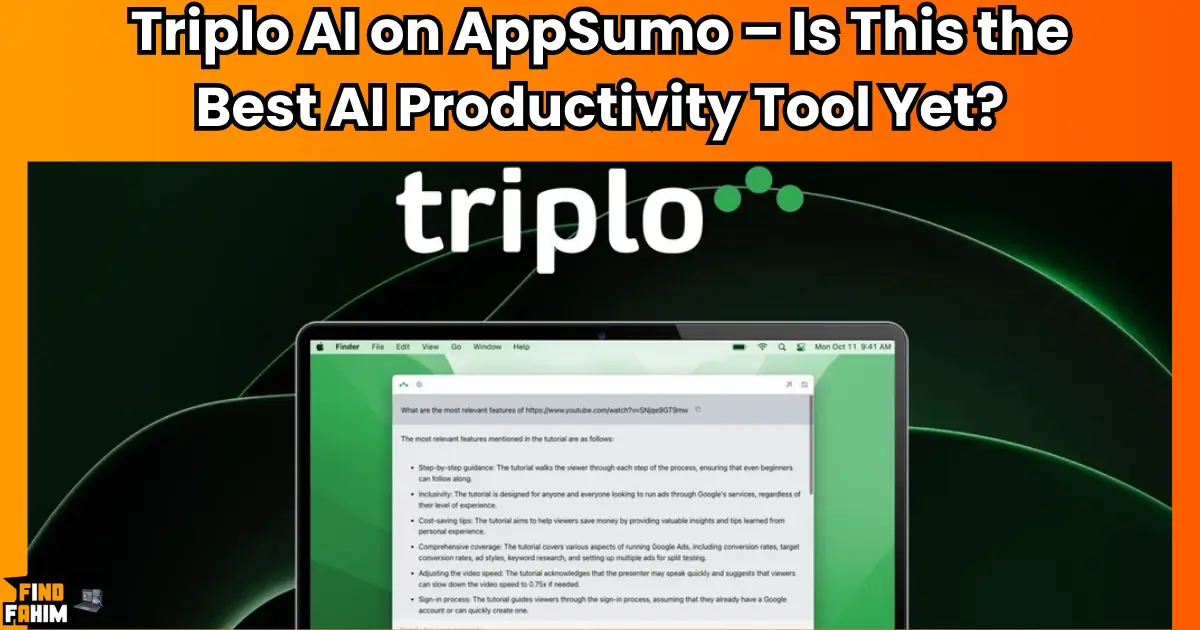
Triplo AI is the 4.9-star-rated “invisible” assistant that fixes this. It brings the smartest AI models (GPT-4, Claude, and even Local LLMs) directly into any text field on your computer or phone. In these in-depth Triplo AI reviews, we’re testing this “AppSumo favorite” to see if it’s the ultimate productivity hack for power users.
My Quick Take (TL;DR)
I think you’re here because you’re a developer, writer, or heavy AI user. You love the power of ChatGPT, but you hate the friction of the browser interface. You want AI that lives where you work, not in a separate tab. Here’s my direct take.
- What is it? Triplo AI is a cross-platform AI assistant (Windows, Mac, Linux, iOS, Android). It runs in the background and lets you trigger AI prompts in any application using a simple hotkey or shortcode.
- Why is it a Game-Changer? It supports “Bring Your Own Key” (BYOK) and Local LLMs (Ollama/LM Studio). This means you can run uncensored, private, and free AI models directly on your device without sending data to the cloud.
- Who is it for? Developers, copywriters, support agents, and anyone who wants to automate repetitive typing tasks with AI intelligence.
- The AppSumo Deal: This is a lifetime deal starting at $69. It is stackable up to 5 codes (Tier 5 unlocks massive token limits).
- My Verdict: With a stunning 4.9-star rating from 116 reviews, this is a “Hidden Gem.” It is faster than Raycast AI and more flexible than TextExpander. If you want to weave AI into your operating system, this is a “must-buy.”
Check the Triplo AI Lifetime Deal on AppSumo Now!
Now, let’s talk about “Flow State.” When you are deep in a coding session or writing a sales letter, your brain is running at high speed. Every time you have to stop, open a browser, log in to ChatGPT, and copy-paste context, you lose that focus.
This is the exact problem Triplo AI was built to solve.
It is an “AI wrapper” that sits on top of your operating system. It doesn’t care if you are in Slack, Notion, VS Code, or Excel. You just highlight text, hit a hotkey, and the AI does the work right there.
- Need to translate an email in Outlook? Triplo does it inline.
- Need to fix a bug in your code editor? Triplo fixes it in place.
- Need to reply to a LinkedIn comment? Triplo drafts it in the comment box.
It removes the “interface” so you can focus on the “intelligence.”
What is Triplo AI? (Your “Everywhere” Intelligence)
The best way to describe Triplo AI is as a “Universal AI Text Controller.”
It’s not a destination; it’s a utility. It allows you to interact with over 100+ AI models (from OpenAI, Anthropic, Mistral, Google, and Meta) without leaving your current window.
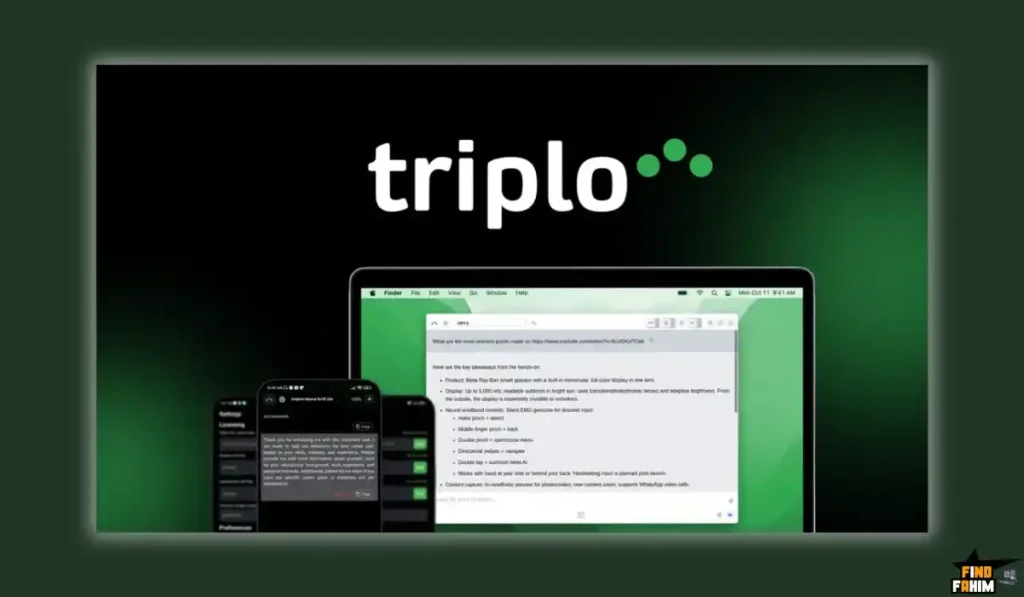
You can use it in three main ways:
- The Triplo Bar: A spotlight-style search bar (like Raycast or Alfred) that pops up anywhere. You type your prompt, and it gives you the answer.
- The “ooo” Trigger: You can type ooo followed by a command (e.g., ooo fix grammar) directly in a text field, and it will magically replace your text with the AI’s output.
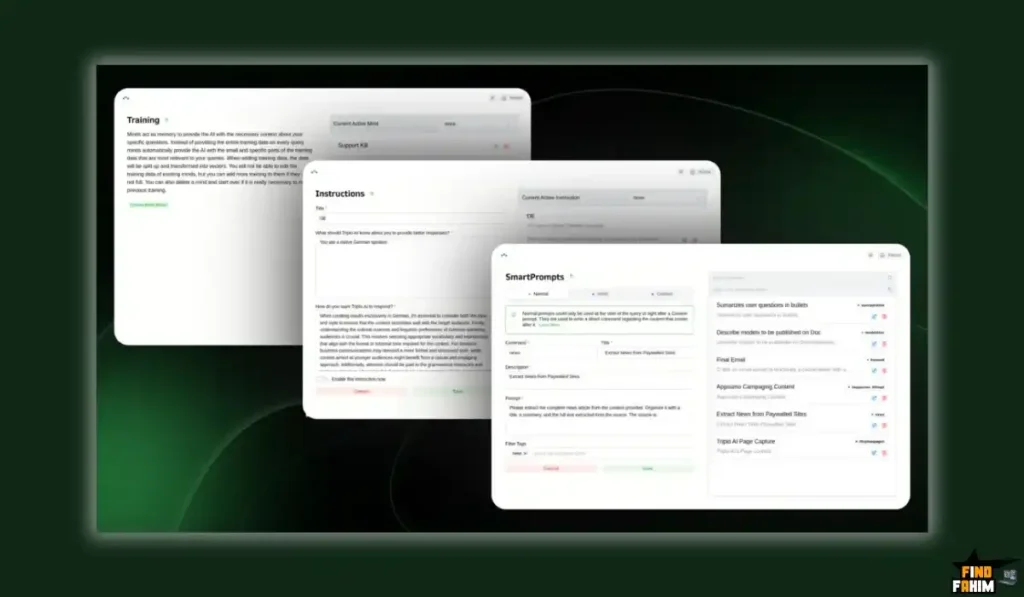
- SmartPrompts: These are pre-saved prompts (like “Fix Grammar” or “Translate to Spanish”) that you can fire off with a single click on any selected text.
It works on Desktop (Mac, Windows, Linux) and Mobile (iOS, Android), making it one of the only AI tools that truly follows you everywhere.
Why You Need More Than Just “ChatGPT in a Tab”
Most people treat AI like a “Google Search”—they go to it when they need an answer.
Triplo AI treats AI like a “Keyboard Shortcut.”
- Context Awareness: Triplo can “see” what you are doing. If you highlight text on a webpage and invoke Triplo, it knows that text is the context. You don’t have to copy-paste it.
- Scraping: You can type a URL into Triplo, and it will scrape the content (or YouTube subtitles) and use it in your prompt.
- Privacy: Unlike the web version of ChatGPT, which trains on your data, Triplo AI offers a secure, encrypted tunnel. Or, you can use Local Models for 100% offline privacy.
This is not just about convenience; it’s about integration. It makes AI a part of your muscle memory.
Why This 4.9-Star Deal is a “Productivity Gem.”
Triplo AI has quietly become one of the highest-rated tools on AppSumo, boasting a 4.9-star rating from 116 reviews.
The reviews reveal a passionate user base:
- “Excellent Product”: User “dw4” says, “This is really an excellent product with steady improvements and great communications from Felipe! Can fully recommend!”
- “Works Anywhere”: User “psycho2” (155 deals bought) loves that “it is a non-browser version, I can use it everywhere.”
- “Saves Tons of Time”: User “Avinash.Katta” says, “I checked out other AI tools like Jasper… they cost a LOT more… Triplo AI is seriously fast!”
The founder, Felipe, is a key part of this success. He is constantly in the comments, releasing updates (like the recent mobile app), and building features based on user requests. This is a safe, supported, and evolving product.
A Look Inside Triplo AI: Key Features & Benefits
This lifetime package is packed with features for power users and developers.
The “Triplo Bar” & Hotkeys
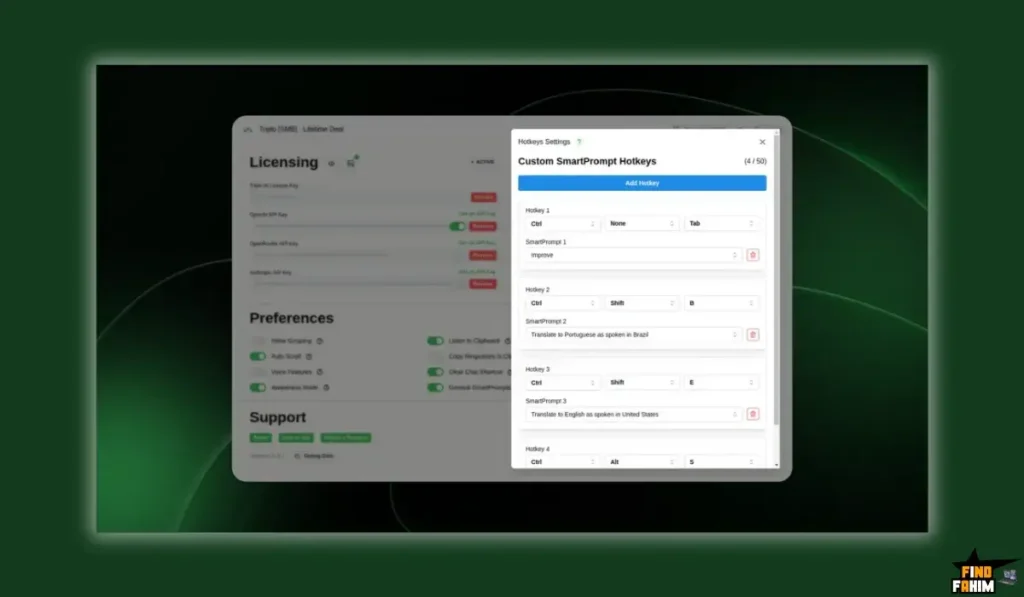
- What it is: A floating command bar (triggered by a hotkey like Ctrl + Space) that lets you chat with AI or run commands on selected text.
- Why it matters: It’s fast. You never touch your mouse. Highlight text -> Hit Hotkey -> Select “Summarize” -> Done.
BYOK & Included Tokens
- What it is: Triplo AI is generous. Even Tier 1 includes 2 Million Monthly Tokens (enough for millions of words).
- Why it matters: But the real power is “Bring Your Own Key” (BYOK). You can plug in your own OpenAI or Anthropic API key. This gives you access to the absolute newest models (like GPT-4o or Claude 3.5 Sonnet) the second they are released, without waiting for Triplo to update. You pay wholesale prices for AI, which is dirt cheap.
“Awareness” & Context Injection
- What it is: Triplo has smart commands like //context//, //selection//, and //clip//.
- Why it matters: You can build complex prompts. For example: “Use the text in my clipboard (//clip//) as a style guide, and rewrite the selected text (//selection//) to match it.” This allows for advanced, context-aware writing workflows.
Unlimited Web & YouTube Scraping
- What it is: You can include a URL in your prompt, and Triplo will fetch the readable content.
- Why it matters: You can summarize a long article or a YouTube video without visiting the page. Just type: “Summarize this video: [URL]” and Triplo does the rest.
Automations (Webhooks)
- What it is: A desktop-exclusive feature that lets you connect Triplo to Zapier, Pabbly, or Webhooks.
- Why it matters: You can trigger complex workflows from your desktop. Type a command, and Triplo can send data to your CRM, create a Trello card, or update a Google Sheet.
The Standout Feature: “Local AI” Privacy & Speed
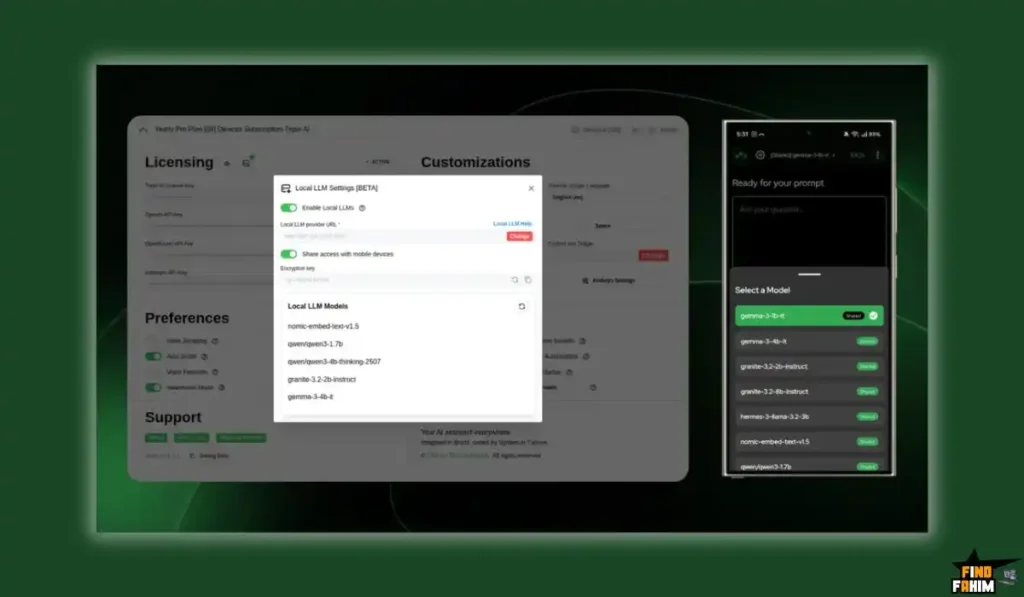
The single standout feature that makes Triplo AI unique on AppSumo is its support for Local LLMs (Ollama / LM Studio).
Most AI tools force you to send your data to OpenAI’s servers.
Triplo AI lets you connect to an AI model running locally on your own computer.
- Privacy: Your data never leaves your machine. This is critical for lawyers, doctors, or developers working with proprietary code.
- Cost: It is 100% free. You aren’t paying for API credits.
- Freedom: You can use uncensored or specialized open-source models (like Llama 3 or Mistral) that aren’t available in ChatGPT.
This turns Triplo AI into a privacy-first powerhouse that no subscription tool can match.
How Does Triplo AI Work? (A Quick Look)
The setup is designed to be “install and forget.”
- Install: Download the app for Mac, Windows, or Linux.
- Choose Model: Select your preferred AI (e.g., GPT-4o Mini for speed, or Claude 3.5 for writing).
- Work: Go to any app (e.g., Slack).
- Trigger: Highlight your messy draft message. Press your hotkey. Select “Fix Grammar.”
- Result: Triplo AI instantly replaces your draft with the polished version.
The Triplo AI AppSumo Deal Details
This is a highly stackable lifetime deal, available up to 5 codes. The tiers scale based on Devices and Monthly AI Tokens.
| Feature | Tier 1 | Tier 2 | Tier 3 (Sweet Spot) | Tier 4 | Tier 5 (Max) |
| One-Time Price | $69 | $149 | $339 | $589 | $729 |
| Devices | 1 | 3 | 10 | 20 | 30 |
| Monthly AI Tokens | 2 Million | 6 Million | 20 Million | 40 Million | 60 Million |
| SmartPrompts | 50 | 150 | 500 | 1,000 | 1,500 |
| AI Training (Minds) | 0 | 0 | 100 | 200 | 300 |
| Automations | 0 | 0 | 100 | 200 | 300 |
| BYOK (Unlimited) | ✅ Yes | ✅ Yes | ✅ Yes | ✅ Yes | ✅ Yes |
| Local Models | ✅ Yes | ✅ Yes | ✅ Yes | ✅ Yes | ✅ Yes |
| All Features | ✅ Yes | ✅ Yes | ✅ Yes | ✅ Yes | ✅ Yes |
| See All Triplo AI Appsumo Deal Plans! | |||||
Which Plan Should You Get? My Recommendation
This is a critical decision based on how you work.
- Tier 1 ($59): This is a great “Personal” plan. 1 device and 2M tokens are plenty for a solo user. However, it lacks “AI Training” and “Automations.”
- Tier 3 ($299) – The “Power User” Plan: This is the Plan I recommend. It unlocks 10 Devices (share with your team or family) and, crucially, 100 AI Training “Minds”. This allows you to upload your own docs and train the AI on your specific business context. If you want a “smart” assistant, you need Tier 3.
Pros & Cons of This Lifetime Package
With a 4.9-star rating, this is a beloved tool. Here is my honest, balanced breakdown.
The Pros (What I Love)
- It’s Truly “Everywhere”: It works in Slack, Word, Excel, Chrome, and even system dialogs. It feels native to the OS.
- The “BYOK” Advantage: You are never locked into a “credit limit.” You can always use your own API key for unlimited, cheap access to the best models.
- Local AI Support: This is a rare, future-proof feature that ensures privacy and free usage forever.
- Mobile App: The new iOS/Android app syncs your prompts, so you have your AI brain in your pocket.
- Insane Speed: Users consistently praise how fast it is compared to opening a browser tab.
The Cons (The “Honest Nuance”)
- Learning Curve: It’s a “power tool.” You need to learn the hotkeys and how to set up SmartPrompts to get the full value. It’s not as simple as a basic chatbot.
- Tokens Reset: The monthly tokens (2M – 60M) do not roll over. This is standard for LTDs, but worth noting.
- Tier 1 Limits: Tier 1 does not include the “AI Training” (RAG) feature. You can’t upload documents to chat with them unless you upgrade to Tier 3.
Best Use Cases for Triplo AI
Here are just a few real-world scenarios where Triplo AI is a productivity superpower:
- For Support Agents: Create SmartPrompts for your top 50 common replies. When a ticket comes in, type ooo refund and Triplo writes a personalized refund email instantly.
- For Developers: Use Local AI (CodeLlama). Highlight a block of code in VS Code, hit the hotkey, and ask, “Explain this function.” The code never leaves your computer.
- For Writers: Use the “Awareness” feature. Highlight your rough notes, hit the hotkey, and select “Draft Blog Post.” Triplo writes the post directly in your Google Doc.
- For International Business: Highlight an incoming email in a foreign language. Hit the hotkey. Triplo translates it instantly in place. Reply in English, and have Triplo translate your reply back before sending.
For other amazing tools to build your business, don’t forget to check out my hand-picked list of the best AppSumo lifetime deals!
Get Your Triplo AI Lifetime Deal Now!
Triplo AI vs The Competition
This is the most important part of the review. Triplo AI is a “System-Wide” AI assistant. It competes with three very different types of tools:
- Snippet Tools (TextExpander): Which are static and “dumb.”
- Browser Extensions (Voila, Harpa): Which are powerful but trapped in Chrome.
- Launchers (Raycast): Which are amazing but often Mac-only.
Triplo AI’s strategy is to be the “Universal Layer” that works on every OS and in every app, for a single lifetime price.
Triplo AI vs TextExpander
TextExpander is the “Old Guard” of productivity. It made “text expansion” (typing; email to get your email address) famous.
Where TextExpander Takes the Lead
TextExpander is rock-solid for static text. If you have a library of 500 standard legal clauses or medical codes that must never change, TextExpander is the industry standard. It is enterprise-ready and has deep team sharing features for standardized responses.
Why Triplo AI is the “Smart” Upgrade
TextExpander is “dumb.” It only pastes what you typed before.
Triplo AI is “smart.” It generates new text.
- TextExpander: Pastes a generic “Sorry for the delay” template.
- Triplo AI: Reads the customer’s angry email and writes a custom, empathetic apology in seconds.
Plus, TextExpander is a subscription ($3.33/month+). Triplo AI gives you text expansion plus AI generation for a one-time $59.
Triplo AI vs Raycast (Pro)
Raycast is the “Cool Kid” on the block. It’s a Mac-only launcher that replaces Spotlight and includes a powerful AI assistant.
Where Raycast Takes the Lead
If you are a Mac user, Raycast is a masterpiece. It controls your music, finds files, moves windows, and runs scripts. Its AI interface is beautiful and feels like a native part of macOS. It’s the best “launcher” in the world.
Why Triplo AI Wins on “Cross-Platform” & Price
Raycast is Mac-only. If you use Windows or Linux at work, you can’t use it.
Triplo AI works on Windows, Mac, Linux, iOS, and Android. It gives you a consistent AI brain across all your devices.
Also, Raycast AI is a subscription ($8/month or $96/year). Triplo AI is $59 once. If you just want the AI features without the monthly bill, Triplo is the clear financial winner.
Triplo AI vs Voila (and Harpa AI)
Voila and Harpa are fantastic “Browser Copilots.” They live in Chrome and help you write emails or summarize pages.
Where Voila Takes the Lead
Voila is excellent inside the browser. It can read the webpage you are on perfectly. Its UI is polished and feels very native to Chrome. If 100% of your work happens in a web browser, Voila is a top-tier choice.
Why Triplo AI is the “Everywhere” Tool
The problem with Voila/Harpa is that they die when you leave Chrome. They can’t help you in Slack. They can’t help you in Microsoft Word. They can’t help you in VS Code.
Triplo AI works everywhere. You can use it to write a report in Word, fix code in your IDE, or chat in Discord. It is a “System-Level” tool, not a “Browser-Level” tool. That flexibility is massive for power users.
Triplo AI vs Typedesk
Typedesk is another popular “canned response” tool that has added some AI features.
Where Typedesk Takes the Lead
Typedesk focuses heavily on Customer Support teams. It has great features for organizing “folders” of canned responses and sharing them with a team. If your main goal is ensuring your support agents stick to a script, it’s a great choice.
Why Triplo AI Wins on “BYOK”
Typedesk’s AI features are often limited by credits or require a higher tier.
Triplo AI offers the “Bring Your Own Key” (BYOK) model on all tiers. This means you are never limited by the software developer. You can plug in your own OpenAI key and use GPT-4o or Claude 3.5 Sonnet as much as you want, paying only the dirt-cheap API costs. This gives you “Enterprise-Grade” intelligence for a “Freelancer” price.
All Competitors Table
| Tool | Key Strength | Pricing Model | Best For |
| Triplo AI | Everywhere AI + Local LLM | Lifetime Deal (Starts at $59) | Power Users & Devs |
| TextExpander | Static Snippets | Subscription ($40+/yr) | Legal/Medical Teams |
| Raycast | Mac Productivity | Subscription ($96+/yr for AI) | Mac Power Users |
| Voila | Browser Integration | Subscription ($96/yr) | Marketers (Browser-Only) |
| Typedesk | Team Canned Responses | Subscription | Support Teams |
| Harpa AI | Web Automation | Freemium/Subscription | Web Scrapers |
Is This a Smart Business Investment?
Let’s do the simple, powerful math.
- Raycast AI: $8/month = $96 per year.
- TextExpander: $3.33/month = $40 per year.
- ChatGPT Plus: $20/month = $240 per year.
To get a stack that gives you snippets, AI assistance, and quick access, you are paying $136 – $300+ per year in subscriptions.
The Triplo AI Lifetime Deal (Tier 1) gives you 2 Million AI Tokens/month and the ability to use them on any app for a one-time payment of $59.
This cost-friendly deal pays for itself in less than 3 months compared to ChatGPT Plus.
But the real ROI is in “Local AI.” By using Ollama (free local models) with Triplo, your AI cost becomes $0 forever. You stop paying OpenAI completely. For a heavy user, this saves thousands of dollars over a few years. It is the ultimate “inflation-proof” software investment.
How to Redeem the Triplo AI Deal
- Go to the official AppSumo deal page.
- Choose the License Tier. (I recommend Tier 1 for solo users, or Tier 3 if you want to share with your team/family and use “AI Training”).
- Click “Buy Now” and complete your purchase.
- AppSumo will send you a unique code. You have 60 days to redeem it on the Triplo AI website.
- Step 1: Download the desktop app and set your “Global Hotkey” immediately.
Final Verdict: Is This Cost-Friendly Deal Worth It?
After this deep dive into the Triplo AI reviews and its unique “Everywhere AI” features, my final verdict is an absolute 5-star YES.
This is a “Productivity Superpower.”
- It’s Unique: No other tool works seamlessly across Windows, Mac, Linux, and Mobile like this.
- It’s Private: The Local LLM support is a game-changer for privacy-conscious users.
- It’s Fast: It eliminates the “Alt-Tab” friction that slows you down.
If you are a developer, writer, or anyone who types for a living, Triplo AI will save you hours every single week. It puts the power of GPT-4 (or Llama 3) under your fingertips, in every single text box you use.
Grab the Triplo AI Lifetime Deal Before It Ends!
Note: The founder confirmed that this deal is back specifically for Black Friday. Once the event ends, this “Unlimited BYOK” access will likely disappear. Lock it in now.
About the Author: Why I Care About This So Much
I’m a “power user.” I live in VS Code, Slack, and Google Docs. I hate leaving my keyboard to use a mouse, and I hate switching tabs to ask a quick question.
Triplo AI fits my brain. It’s not a tool I “go to”; it’s a tool that is “just there.” It feels like an upgrade to my operating system, not another app. The ability to use Local LLMs on my laptop when I have no internet (on a plane) was the moment I fell in love with it. It’s a tool that respects your workflow.
If you want to see the other productivity tools I swear by, check out my full AppSumo deal reviews page.
FAQ: Your Triplo AI Questions, Answered
What is Triplo AI?
Triplo AI is a desktop and mobile application that lets you use AI like ChatGPT inside any app using a hotkey or text shortcut, without switching tabs.
Does Triplo AI work on Windows?
Yes, Triplo AI works smoothly on Windows, macOS, and Linux, making it a strong cross-platform alternative to Mac-only productivity tools.
What does BYOK mean in Triplo AI?
BYOK stands for Bring Your Own Key, allowing you to connect your own OpenAI, Anthropic, or OpenRouter API key to use the latest AI models at cost price.
Can I use Triplo AI for free with local models?
Yes, Triplo AI supports local LLMs through Ollama or LM Studio, enabling free usage, offline processing, and complete data privacy.
Is there a Triplo AI mobile app?
Yes, Triplo AI offers iOS and Android apps, allowing you to access SmartPrompts and AI chat on mobile devices.
What are SmartPrompts in Triplo AI?
SmartPrompts are reusable saved prompts that let you perform actions like translating, summarizing, or rewriting text instantly with one click.
Does Triplo AI have monthly usage limits?
The lifetime deal includes monthly Triplo Tokens, but usage becomes unlimited when using BYOK or local LLMs.
Can Triplo AI read websites or YouTube videos?
Yes, you can include a URL in your prompt and Triplo AI will extract website content or YouTube transcripts for contextual AI responses.
Is Triplo AI secure to use?
Yes, Triplo AI is privacy-friendly. Local LLM usage keeps data fully on-device, and API-based usage follows standard AI provider privacy policies.
What is the ooo shortcut in Triplo AI?
The ooo trigger is a text expansion shortcut that lets you generate AI content directly inside any text field without opening a separate window.
Does Triplo AI work in Google Docs and Notion?
Yes, Triplo AI works in Google Docs, Notion, Slack, Discord, Outlook, and virtually any app where text input is available.
Is Triplo AI good for productivity and daily work?
Yes, Triplo AI helps users write emails, summarize documents, translate text, and automate repetitive writing tasks without leaving their workflow.
Can Triplo AI replace tools like ChatGPT tabs or Raycast?
For many users, yes. Triplo AI removes the need to switch tabs by embedding AI directly into everyday apps across all operating systems.
Is Triplo AI useful for developers and technical users?
Absolutely. Developers use Triplo AI for code explanations, refactoring, documentation, and local LLM workflows with full privacy control.
Which Triplo AI plan is best for most users?
Tier 1 is ideal for solo users using BYOK, while Tier 3 is best for power users needing AI training, multiple devices, and team usage.

Hi, I’m Fahim — a SaaS tools reviewer and digital marketing expert with hands-on experience helping businesses grow using the right software. I research, test, and personally use a wide range of AI, business, productivity, marketing, and email tools for my agency, clients, and projects. I create honest, in-depth reviews and guides to help entrepreneurs, freelancers, startups, and digital agencies choose the best tools to save time, boost results, and scale smarter. If I recommend it, I’ve used it — and I only share what truly works.