

If you rely on standard AI models for serious research, you are playing a dangerous game.
Ask a generic AI to write a research paper or a technical article, and it will give you a beautifully written, highly convincing wall of text. The problem? Half of the citations are completely fabricated. It will invent authors, fake journal titles, and hallucinate data.
If you are a student, an academic, or a content creator writing for a highly technical B2B niche, submitting fake citations destroys your credibility instantly.
Paperguide claims to solve the “AI Hallucination” problem.
It is an AI-powered research assistant connected directly to a database of over 200 million verified scientific papers. Instead of guessing, it reads the actual literature, extracts the exact data you need, and builds your content with perfectly formatted, real-world citations.
But does it actually work better than simply uploading a PDF to ChatGPT? Is the reference manager robust enough to replace legacy tools like Zotero or Mendeley?
In this in-depth review, we look at the Paperguide AppSumo lifetime deal, test its “Deep Research” capabilities, and determine if this tool is worth the investment for your workflow.
Note: This article contains affiliate links. If you buy through them, I may earn a commission, but all opinions are based on independent research and analysis of the tool.
My Quick Take (TL;DR)
If you are short on time and just want to know if this deal is worth grabbing before the timer runs out, here is the summary.
- What is it? An AI-driven research assistant and reference manager. It searches 200M+ real academic papers, extracts data, and helps you write fully cited articles.
- Why is it Special? Verifiable Data. It grounds its answers in real literature. You can view the source document side-by-side with your writing to verify every single claim.
- Who is it for? University students, academics, technical bloggers, and market researchers who need factual accuracy over creative writing.
- The Deal: Lifetime access starts at $79.
- My Verdict: Buy it if accuracy is your top priority. It effectively combines the power of Perplexity, Zotero, and a dedicated AI writer into one dashboard. It is a massive time-saver for literature reviews.
Get Lifetime Access to Paperguide Here
What is Paperguide?
Paperguide is a specialized search engine, document analyzer, and writing platform built specifically for academic and technical research.
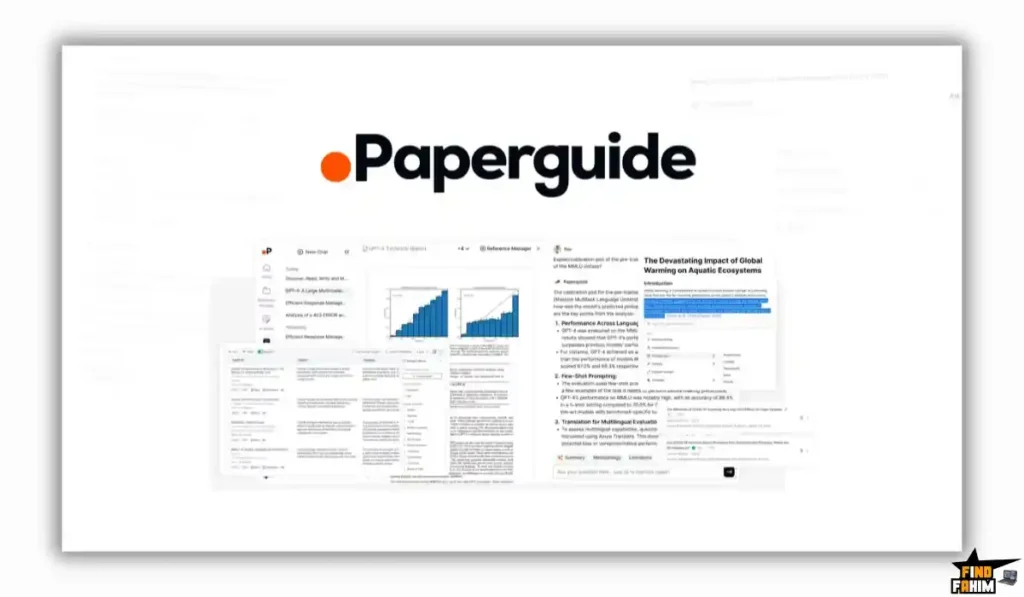
While tools like Jasper or Copy.ai are built for marketers writing sales copy, Paperguide is built for people who need to prove their claims. Founded by Mallik Gaddam and Roop, the platform was created to cut through the noise of unverified online content.
It operates on a few core pillars:
- The Database: Direct access to the Semantic Scholar database (200+ million papers).
- The Reference Manager: A cloud storage system to organize your own PDFs, tag them, and generate citations in 1,000+ styles (APA, MLA, etc.).
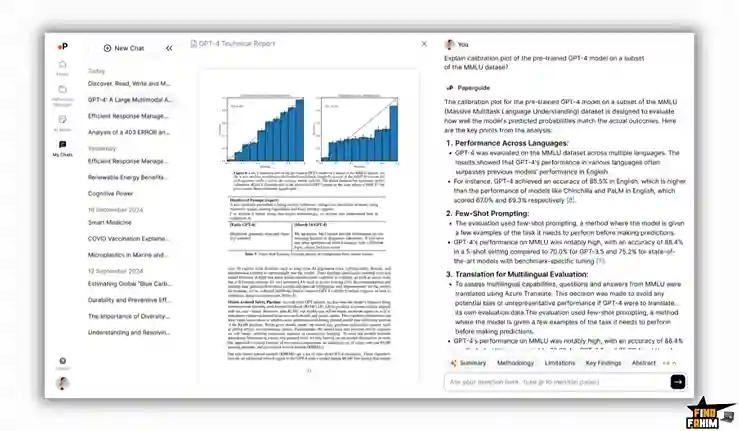
- The Analyzer: An AI that can read up to 100 uploaded documents at once and extract specific data points into a clean table.
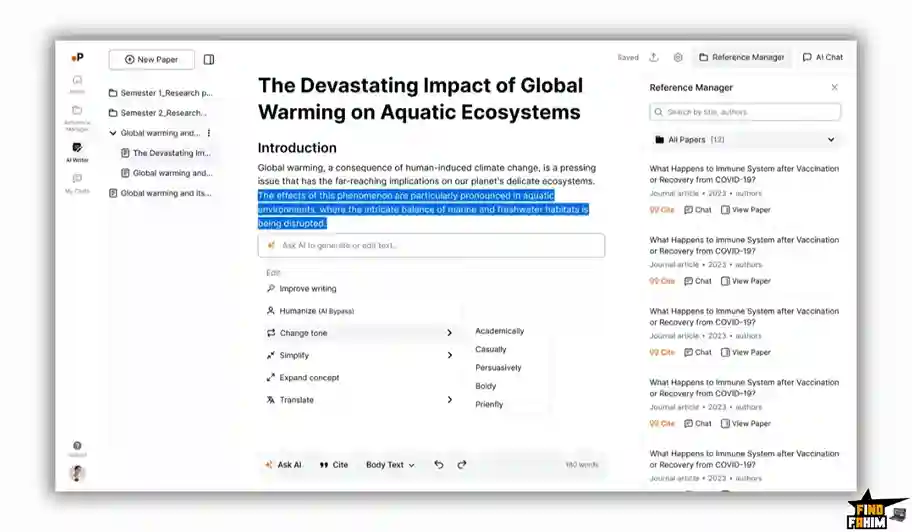
- The Writer: An AI text generator that writes drafts using only the facts found in your selected sources.
Quick Look: What’s Inside the Deal?
Here is a quick breakdown of the value you get with this lifetime offer compared to standard subscription costs.
| Feature | Replaces… | The “Killer” Value | Normal Cost | Deal Status |
| Academic Search | Google Scholar | Chat directly with 200M+ papers | ~$20/mo | ✅ Included |
| Reference Manager | Zotero / Mendeley | Cloud storage & auto-citations | ~$120/yr | ✅ Included |
| Document Chat | ChatPDF / Afforai | Query up to 100 PDFs at once | ~$15/mo | ✅ Included |
| AI Writer | Katteb / Copy.ai | Writes with verifiable in-line citations | ~$49/mo | ✅ Included |
| Data Extraction | Manual Excel Entry | Auto-builds literature review tables | Hours of work | ✅ Included |
Why You Need More Than Just Google Scholar
If you do heavy research, your current workflow is likely a massive bottleneck.
The “Old Method” usually involves searching Google Scholar, downloading 30 different PDFs, and storing them in a messy desktop folder. Then, you spend hours skimming each 20-page document just to find one specific statistic. When it is time to write, you have to manually format the citations, which is tedious and prone to errors.
Using standard ChatGPT is not a viable alternative because it cannot access private databases reliably and has a severe tendency to make up sources.
You need a system that does the heavy lifting of reading and organizing, without sacrificing factual integrity.
Why AI-Assisted Research is Trending in 2026
The AI landscape has shifted dramatically over the last two years.
From 2023 to 2024, the focus was entirely on “Generative AI”—creating text out of thin air. In 2026, the trend has aggressively shifted toward “Grounded AI” or “Retrieval-Augmented Generation (RAG).”
Users are exhausted by AI hallucinations. The market no longer wants an AI that just talks; it wants an AI that can prove what it is saying. We are seeing a massive rise in specialized AI agents that prioritize accuracy, transparency, and data citation over creative freedom. Paperguide sits perfectly inside this new wave of productivity tools.
A Look Inside Paperguide: Key Features & Benefits
I looked closely at the core modules inside the Paperguide dashboard to see how they handle heavy data loads.
1. The Semantic Scholar Integration
The Benefit: Instant access to global knowledge.
You do not need to bring your own documents to get value out of this tool. You can simply type a query like, “What is the impact of microplastics on marine life?”
Paperguide searches its 200 million-paper database, reads the relevant abstracts and findings, and gives you a synthesized answer, complete with footnote links to the original published papers.
2. Deep Research Data Extraction
The Benefit: Building literature reviews in minutes, not weeks.
If you are writing a systematic review, you normally have to read dozens of papers and log their methodology, sample size, and results into an Excel sheet.
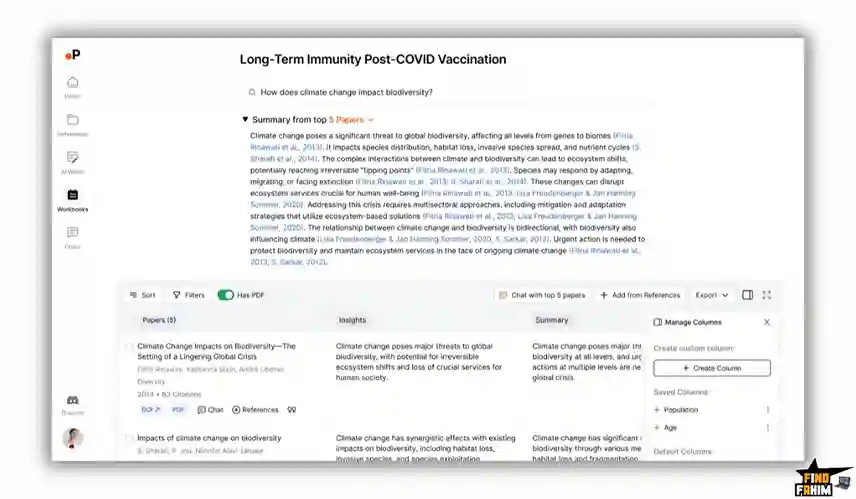
With Paperguide, you select your papers, define the columns you want (e.g., “Sample Size,” “Primary Finding,” “Limitations”), and the AI extracts that exact data from all the documents simultaneously, presenting it in a clean, exportable table.
3. The Reference Manager
The Benefit: Total organization.
This acts as your personal library. You can upload PDFs, DOCX files, or even import URLs. You can organize them into folders, add tags, and highlight text directly within the app. When you are ready to publish, it automatically generates your bibliography in APA, MLA, Chicago, or over 1,000 other formatting styles.
4. The AI Writer (Side-by-Side Mode)
The Benefit: Frictionless drafting.
The editor allows you to have your document open on one side of the screen and the writing canvas on the other. You can ask the AI to draft a section based only on the document you are currently viewing. It inserts in-line citations automatically as it writes, ensuring every claim is backed up by your source material.
The Standout Feature: Agentic Workflows 2.0
Paperguide recently updated its system to include what they call “Agentic Workflows.”
Instead of just answering a single prompt, the AI can now execute a multi-step research process. If you ask it to generate a Deep Research Report, it does not just do one search. It will run multiple variants of your research question, scan the database comprehensively, screen the papers for relevance, and output a highly detailed, structured report based on up to 50 different sources. It essentially acts as a junior research assistant working in the background.
Paperguide Pricing & AppSumo Deal Details
This lifetime deal is structured in Tiers. The primary differences between the tiers are the monthly rate limits, the number of documents you can analyze at once, and team seats.
The Tier Breakdown
| Feature | Tier 1 | Tier 2 | Tier 3 | Tier 4 |
| Price | $79 | $159 | $329 | $489 |
| Seats | 1 | 1 | 3 | 5 |
| Storage | 20 GB | 60 GB | 100 GB | 100 GB |
| Rate Limit | 20 calls / 3 hrs | 50 calls / 3 hrs | 50 calls / 3 hrs | 50 calls / 3 hrs |
| Extraction Limit | 25 docs/extraction | 100 docs/extraction | 100 docs/extraction | 100 docs/extraction |
| Columns Limit | 8 columns | 50 columns | 50 columns | 50 columns |
| AI Writer | Unlimited | Unlimited | Unlimited | Unlimited |
Lock In Your Paperguide Pricing Tier Here
Pros & Cons of This Lifetime Package
After reviewing user feedback and the platform’s capabilities, here is the truth about the software.
The Pros
- No Hallucinations: The strict reliance on actual uploaded documents and the Semantic Scholar database makes the output highly trustworthy.
- Massive Extraction Limits: Being able to extract specific data from 100 different PDFs simultaneously (on Tier 2+) is a feature that usually costs hundreds of dollars a month on enterprise platforms.
- Unlimited AI Writer: The fact that the AI writing module does not have a strict monthly word count limit is highly generous for a lifetime deal.
- Responsive Founders: The team is very active in the community, constantly shipping updates based on user requests (like the new Deep Research Reports).
The Cons
- AI Detection: As noted by current users, the AI writer prioritizes factual accuracy over “human-like” variance. Content generated heavily by the AI will likely trigger AI detectors like GPTZero. You will need to edit it manually if that is a concern for your publication.
- Rate Limits: The “calls per 3 hours” limit (20 on Tier 1, 50 on Tier 2+) is a strict cap to prevent server abuse. Heavy power users might hit this ceiling during intense, multi-hour research sprints.
How Does Paperguide Work?
Getting started with a research project is incredibly straightforward.
- Step 1: Build Your Library.
Log in to the dashboard and go to the Reference Manager. Upload your existing PDFs or use the search bar to find and save papers from the 200M+ database. - Step 2: Run a Deep Research Query.
Select the papers you want to analyze. Ask the AI a specific question, such as “Compare the methodologies used in these 5 papers.” - Step 3: Extract the Data.
Use the Table Extraction tool. Create columns for “Author,” “Year,” “Methodology,” and “Conclusion.” The AI will read the papers and fill out the table automatically. - Step 4: Draft the Paper.
Open the AI Writer. Instruct the AI to write the introduction or literature review section based on the data you just extracted. - Step 5: Export.
Review the draft, ensure the automatic in-line citations are correct, format your bibliography to your required style (e.g., APA), and export the document.
Best Use Cases for Paperguide
Who actually gets the most ROI out of this specific tool?
1. University Students and PhD Candidates
The Scenario: You are writing a massive thesis and have 150 PDFs sitting in a folder. You are losing track of which paper said what.
The Fix: You upload everything into the Reference Manager. You use the chat feature to ask, “Which paper discussed the limitations of the control group?” It points you to the exact paragraph instantly.
2. Medical and Scientific Writers
The Scenario: You need to write an article summarizing the latest clinical trials for a specific medication.
The Fix: You use the Semantic Scholar search to pull the latest 2025/2026 papers. You use the data extraction tool to build a table of the trial results, then use the AI writer to draft a highly technical, perfectly cited summary.
3. B2B Content Marketers and Analysts
The Scenario: You are creating a “State of the Industry” whitepaper and need hard statistics to back up your marketing claims.
The Fix: You upload industry reports from McKinsey, Gartner, and Forrester. You ask Paperguide to synthesize the common trends across all the reports and generate a cited draft for your whitepaper, boosting your brand’s authority.
Start Researching Smarter with Paperguide
Paperguide Alternatives
Is Paperguide the only tool doing this, or are there better options? The market for AI research assistants is exploding, splitting between “General PDF Chatters” and “Dedicated Academic Writers.”
Let’s compare Paperguide against the Top 5 competitors in the space.
Paperguide vs ChatPDF
ChatPDF was one of the first tools to let you “talk” to a document.
Where ChatPDF Wins
Simplicity. If you literally just have one PDF (like a camera manual or a single short essay) and need a quick summary, ChatPDF is incredibly fast and requires almost zero onboarding.
Where Paperguide Wins
Scale and Original Research. ChatPDF cannot search the web or academic databases; it only knows what you upload. Furthermore, it struggles if you need to cross-reference 50 different papers at once. Paperguide allows you to query up to 100 documents simultaneously and connects directly to 200M+ published papers.
Verdict: ChatPDF for single documents; Paperguide for massive literature reviews.
Paperguide vs Afforai
Afforai is another highly popular AI research tool that previously launched on AppSumo.
Where Afforai Wins
Document Translation and General Research. Afforai has a very strong translation engine and is excellent for legal, historical, and general business document analysis. Its UI is heavily optimized for comparing documents side-by-side.
Where Paperguide Wins
The Academic Database & AI Writer. Paperguide has a native integration with the Semantic Scholar database. You don’t have to leave the app to find papers; you search within it. Additionally, Paperguide includes an “Unlimited Words” AI writer in this deal, whereas Afforai functions more strictly as a research/chat assistant rather than a full document generator.
Verdict: Afforai for legal/business docs; Paperguide for scientific/academic writing.
Paperguide vs Zotero
Zotero is the industry-standard, free reference manager used by millions of academics.
Where Zotero Wins
Ecosystem & Price. It is free, open-source, and has plugins for almost every word processor on the planet (Word, LibreOffice, Google Docs). It is the absolute gold standard for pure citation management.
Where Paperguide Wins
Artificial Intelligence. Zotero is a digital filing cabinet; it just holds your PDFs. It cannot read them, extract data into tables, or write a draft for you. Paperguide does the filing and the reading.
Verdict: Zotero for pure reference storage; Paperguide for active AI research.
Paperguide vs Jenni AI
Jenni AI is one of the most popular AI writers, specifically built for students and academics.
Where Jenni AI Wins
The Writing Experience. Jenni AI has a fantastic “auto-complete” style editor. You write a sentence, and it suggests the next one, instantly citing it. It feels very fluid for creative academic writing.
Where Paperguide Wins
Price and Data Extraction. Jenni AI charges a recurring monthly subscription (roughly $20/month for unlimited). Paperguide is a one-time payment of $79. Furthermore, Paperguide’s ability to extract 50 columns of data from 100 papers into a structured table is a heavy-duty research feature that Jenni lacks.
Verdict: Jenni AI for writing flow; Paperguide for lifetime value and data extraction.
Paperguide vs ChatGPT (Plus)
The default AI tool for most people.
Where ChatGPT Wins
General Intelligence. ChatGPT is better at coding, brainstorming, writing poetry, and general conversational tasks. It is the ultimate generalist.
Where Paperguide Wins
Factual Accuracy and Citations. If you ask ChatGPT to write a literature review with citations, it will confidently hallucinate fake authors and non-existent DOI links. Paperguide forces the AI to only use the text provided in the verified PDFs, eliminating the hallucination risk that ruins academic and technical writing.
Verdict: ChatGPT for brainstorming; Paperguide for verifiable facts.
All 5 Competitors Matrix
| Feature | Paperguide | ChatPDF | Afforai | Zotero | Jenni AI | ChatGPT Plus |
| Pricing | Lifetime ($79) | ~$5/mo | Lifetime (Varies) | Free | ~$20/mo | $20/mo |
| Native 200M+ Database | ✅ Yes | ❌ No | ❌ No | ❌ No | ✅ Yes | ❌ No |
| Max Docs per Chat | 100 (Tier 2+) | 1 to a few | 100+ | N/A | Limited | Limited |
| Data Extraction Tables | ✅ Yes | ❌ No | ❌ No | ❌ No | ❌ No | ⚠️ Manual |
| Prevents Hallucinations | ✅ High | ✅ High | ✅ High | N/A | ✅ High | ❌ Low |
| Best For… | Academic AI | Single PDFs | General Docs | Storage | Writing Flow | Brainstorming |
Compare Features and Secure Your Paperguide Deal
Who Should NOT Buy Paperguide?
I want to be completely transparent so you do not waste your money on a tool that does not fit your workflow.
- The Fiction Writer: If you are writing novels, short stories, or highly creative marketing copy, this tool will feel rigid. It is built for facts, data, and citations, not creative storytelling.
- The Casual User: If you only need to summarize a PDF once every six months, just use the free version of ChatGPT or ChatPDF. You do not need a dedicated reference manager.
Is This Lifetime Deal a Smart Business Investment?
Let’s do the standard ROI math for Tier 2 ($159), which is the recommended tier for serious researchers due to the 100-document extraction limit.
Scenario: You are a PhD student or an agency researcher.
- Option A (Subscription Stack):
- Jenni AI (Writing): $240/year
- ChatPDF Plus (Reading): $60/year
- Total Yearly Cost: $300/year.
- Option B (Paperguide Tier 2):
- Total Cost: $159 (One-time payment).
The ROI Math:
- You save $141 in the very first year.
- By year two, you are saving $300 annually.
- Because the AI Writer includes “Unlimited Words,” you never have to worry about buying more credits mid-project just to finish drafting your paper.
How to Redeem the Paperguide Deal
- Buy: Purchase your preferred code on AppSumo. (I highly recommend Tier 2 if you handle large volumes of documents.
- Redeem: Go to the Paperguide redemption URL provided in your AppSumo account.
- Activate: Create your account and apply the code to unlock your Lifetime limits.
- Test the System: Immediately upload 5 related PDFs, go to the “Extract Data” tool, and ask it to build a table comparing their methodologies. You will see the value instantly.
Final Verdict: Is This Cost-Friendly Deal Worth It?
After testing the database integration and the data extraction tables, my final verdict is a highly confident 4.7 Stars.
Paperguide solves the biggest problem in modern AI: Trust.
- It stops you from relying on hallucinations.
- It organizes the chaos of desktop PDF folders.
- It turns hours of manual Excel data entry into a 30-second AI extraction task.
The $79 entry price is excellent, but the $159 Tier 2 is the real steal here because of the sheer volume of documents you can process at once. If you write whitepapers, academic essays, or technical blogs, this will become your most-used tool.
Get Lifetime Access to Paperguide Before the Timer Ends
About the Author
I spend hundreds of hours researching software, reading technical documentation, and comparing features to write accurate reviews. Managing source material is the most tedious part of my job. Tools that bridge the gap between “reading raw data” and “writing the final draft” are the most valuable assets in my workflow. Paperguide’s ability to maintain factual integrity while generating text makes it a standout platform in the current AI landscape.
You can view my other workflow optimizations and tool recommendations on my full AppSumo deal reviews page.
FAQ: Your Paperguide Questions, Answered
Paperguide is an AI-powered academic research assistant that helps users search scholarly papers, extract data, manage references, and generate properly cited research content.
Paperguide does not include a built-in plagiarism checker like Turnitin. However, it provides inline citations for claims, helping users properly attribute sources and reduce accidental plagiarism.
No. Paperguide focuses on research accuracy and citation quality rather than bypassing AI detection tools. Users should edit and refine AI-generated text in their own voice.
Paperguide supports over 1,000 citation styles, including APA, MLA, Chicago, Harvard, and IEEE. Citation styles can be changed in profile settings.
Yes. The Deep Research feature allows users to export extracted comparison tables as CSV files for use in Excel or Google Sheets.
No. The AppSumo lifetime deal tiers include unlimited word generation for the AI writing feature.
Paperguide searches Open Access papers by default. For paywalled papers, users must upload the PDF manually if they have institutional access.
Paperguide supports document uploads in over 50 languages and allows users to generate summaries or responses in their preferred language.
If the rate limit is reached, such as 50 calls within 3 hours on certain tiers, Paperguide temporarily pauses new AI requests until the rolling window resets.
Yes. Paperguide allows users to share reference folders, annotations, and research notes for collaborative academic projects.
Yes. Paperguide includes AppSumo’s standard 60-day money-back guarantee for risk-free testing.
An AI research assistant is a tool that helps users search academic databases, summarize studies, extract data, and generate properly cited research content.
AI tools can automatically format references, generate inline citations, and organize bibliographies according to selected citation styles.
Citation styles ensure academic consistency and proper attribution of sources, helping maintain credibility and avoid plagiarism.
Data extraction is the process of collecting structured information from multiple studies to compare findings, methods, or results in a clear format. What is Paperguide?
Does Paperguide check for plagiarism?
Can Paperguide bypass AI detectors like GPTZero?
What citation styles does Paperguide support?
Can Paperguide export data extraction tables?
Does Paperguide have a word limit for the AI writer?
Can Paperguide analyze paywalled research papers?
What languages does Paperguide support?
What happens if I hit the Paperguide rate limit?
Can I collaborate with my team using Paperguide?
Is there a money-back guarantee for Paperguide?
What is an AI research assistant?
How does AI help with academic citations?
Why are citation styles important in research?
What is data extraction in academic research?

Hi, I’m Fahim — a SaaS tools reviewer and digital marketing expert with hands-on experience helping businesses grow using the right software. I research, test, and personally use a wide range of AI, business, productivity, marketing, and email tools for my agency, clients, and projects. I create honest, in-depth reviews and guides to help entrepreneurs, freelancers, startups, and digital agencies choose the best tools to save time, boost results, and scale smarter. If I recommend it, I’ve used it — and I only share what truly works.