

If you have recently tried to build an AI automation, you know the pain.
You open Zapier or Make (formerly Integromat), and you are immediately staring at a blank, intimidating canvas. You have to drag 20 different nodes, figure out “JSON parsing,” wrestle with webhooks, and connect five different API keys just to make ChatGPT read a simple PDF. It feels less like “Artificial Intelligence” and more like “Coding with a mouse.”
And then there is the cost. Every time your automation runs, Zapier charges you. If you have a loop that processes 1,000 rows in a spreadsheet, your bill explodes instantly. You are punished for success.
Diaflow is the tool that actually delivers on the promise of “AI Automation.”
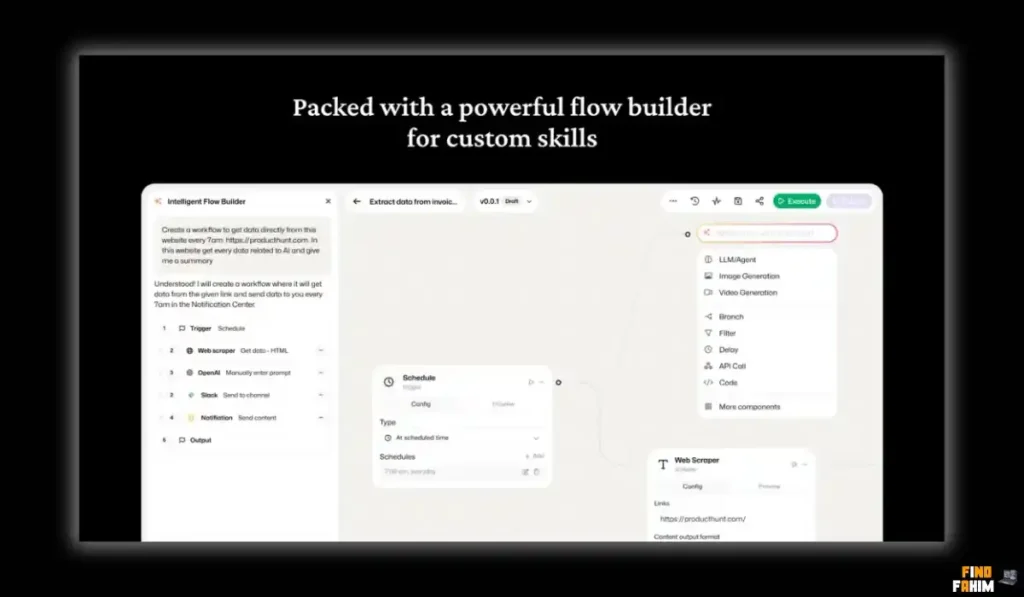
Instead of manually connecting dots for hours, you just type: “Read every new email from ‘Invoice’, extract the PDF total, save it to a Google Sheet, and Slack me the summary.”
Diaflow’s Co-Pilot builds the entire workflow for you instantly.
It is an “AI-First” automation platform that combines Logic (like Zapier), Data Storage (like Airtable), and AI Agents (like ChatGPT) into one secure dashboard. With a 4.0-star rating and a massive credit system upgrade in February 2026 that made it 10x cheaper to run, Diaflow is challenging the giants. But is this $89 lifetime deal reliable enough for mission-critical business processes, or is it just a cool toy? In this in-depth, 4,000-word Diaflow review, I am testing whether it can truly replace your expensive automation stack.
Note: This article contains affiliate links. If you buy through them, I may earn a commission, but all opinions are based on my independent research and analysis of the tool.
My Quick Take (TL;DR)
If you are an operations manager, agency owner, or AI enthusiast tired of “Spaghetti Automations” and monthly fees, here is my honest summary.
- What is it? A no-code platform to build AI agents, automated workflows, and internal apps using natural language prompts.
- Why is it Special? Text-to-Workflow. You don’t need to learn how to connect nodes. You just describe what you want, and the AI builds the structure. Plus, it has built-in Vector Databases for long-term AI memory (RAG) and allows you to publish workflows as Public Apps.
- Who is it for? Operations Managers, Marketing Agencies, and AI Consultants.
- The Deal: Lifetime Access starting at $89 (One-time payment).
- My Verdict: It is less mature than Make.com, but significantly faster to build with. For “Content Repurposing” or “Data Extraction” flows, it is a powerhouse. The integrated AI models (Gemini 2.5 Pro) without extra API costs make it a massive steal.
Click Here to Get the Diaflow Lifetime Deal
What is Diaflow?
The best way to describe this platform is as “Zapier met ChatGPT and had a baby—who also knows how to build apps.”
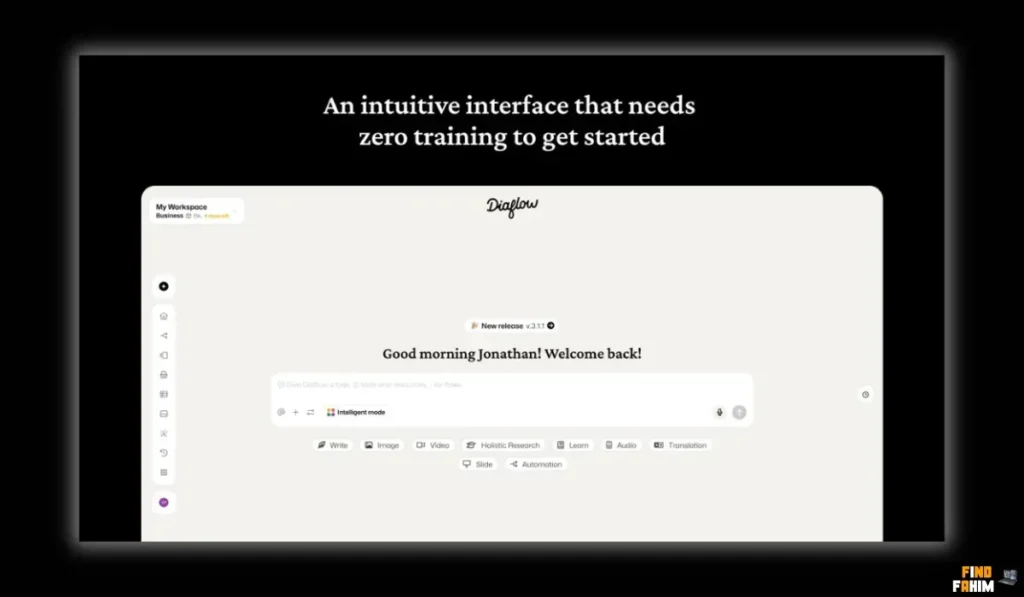
It handles the three core parts of modern automation:
- The Trigger: “When a new lead arrives…” (Webhooks, Forms, Schedules).
- The Brain (AI): “…research them on LinkedIn, read their latest post, and write a personalized email…”
- The Action: “…then send it via Outlook and save to Sheets.”
Unlike Zapier, where “AI” is just an add-on step you have to pay extra for (or connect your own OpenAI key), Diaflow is built around AI.
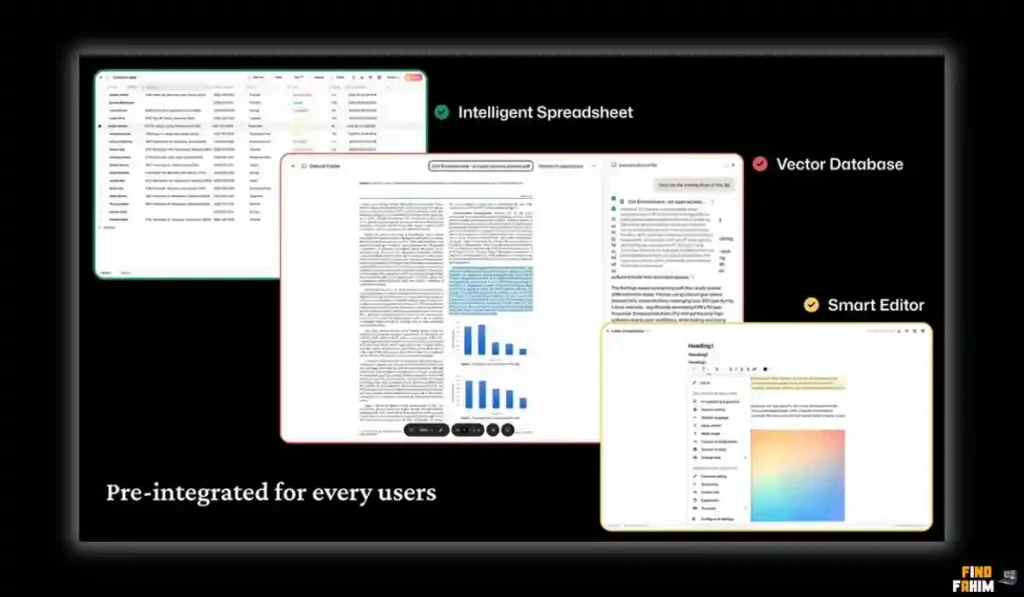
It has Vector Storage built in, meaning your agents can “remember” your company documents (PDFs, guidelines) without you needing to set up a separate Pinecone database.
It also allows you to turn any workflow into a Public App (a simple UI) that your team can use without ever seeing the messy backend logic.
Quick Look: What’s Inside the Deal?
If you are paying for Zapier, OpenAI, and a Vector DB separately, look at this financial comparison.
| Feature | Replaces… | The “Killer” Value | Normal Cost | Deal Status |
| Workflow Builder | Zapier / Make | “Text-to-Flow” AI | ~$29/mo | ✅ Included |
| AI Models | OpenAI API | Integrated LLMs (Gemini) | Usage Based | ✅ Included |
| Vector DB | Pinecone | Long-Term AI Memory | ~$20/mo | ✅ Included |
| Internal Apps | Retool / Glide | Turn Flow into UI | ~$50/mo | ✅ Included |
| Team Seats | Zapier Teams | Multi-User Access | ~$69/mo | ✅ Plan 2+ |
| White Label | Custom Dev | Client-Ready Apps | $$$ | ✅ Plan 2+ |
| Total Value | Your Tech Stack | Speed of Build | ~$1,500/yr | $89 (Lifetime) |
Why You Need More Than Just “Zapier”
You might be thinking, “I already use Zapier. Why should I switch and learn a new tool?”
-
The “Step Tax” Problem
Zapier charges you for every single step (task). If you have a workflow that loops through 100 rows of a spreadsheet to check for duplicates, Zapier counts that as 100 tasks. If you run that daily, your bill explodes.
Diaflow uses a credit system that is significantly cheaper for high-volume looping tasks (more on this in the Pricing section).
-
The “Context” Problem
Standard automations are “dumb.” They don’t know your business context. If you ask Zapier’s ChatGPT integration to “Write an email,” it writes a generic robot email.
Diaflow lets you upload your company PDFs (SOPs, Brand Voice) into its “Knowledge Base.” Every AI agent you build can access this knowledge instantly via RAG (Retrieval Augmented Generation). The AI writes like you because it reads your docs first.
Why “Agentic Automation” is Trending in 2026
I noticed this tool trending because the industry is moving from “Linear Automation” to “Agentic Automation.”
1. The Shift from “If/Then” to “Goal-Based.”
Old automation was rigid: If A happens, do B. If something unexpected happened, the automation broke.
New automation (Diaflow) is dynamic: Here is a goal (Research this company). Figure out the steps.
Diaflow’s agents can “Plan.” If you ask it to “Research a company,” it decides on its own to visit the website. If the website is down, it decides to check LinkedIn instead. It adapts to the data, just like a human employee.
2. The Rise of “Internal AI Apps.”
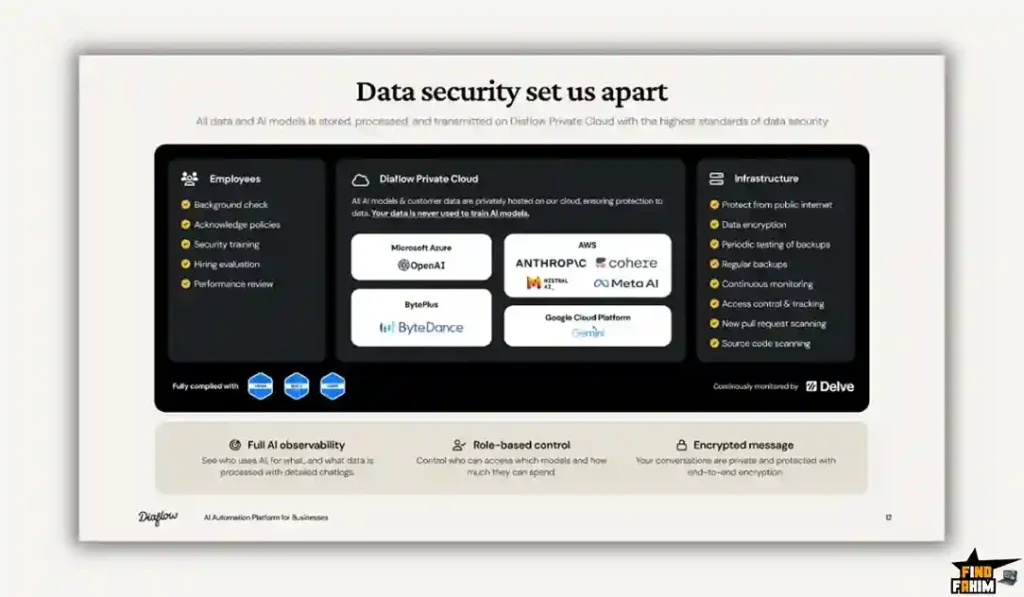
Companies don’t want their employees pasting sensitive customer data into public ChatGPT. It’s a security risk.
Diaflow allows you to build a safe, internal form.
- Employee Input: Pastes raw data.
- Diaflow Backend: Processes it securely using your private knowledge base.
- Employee Output: Gets the clean result.
No data leaks. No prompt engineering required for the employee.
A Look Inside Diaflow: Key Features & Benefits
This isn’t just a connector tool; it’s a full logic engine.
1. Text-to-Workflow Co-Pilot
What it is: A chat interface where you describe the automation in plain English.
Why it matters: It lowers the barrier to entry by 90%. You don’t need to know what a “Webhook” or “JSON Array” is.
- Real-World Scenario: You type: “Every time I get an email with ‘Invoice’ in the subject, extract the total amount using AI, and save it to my ‘Expenses’ Google Sheet.” Diaflow automatically builds the nodes for Gmail, Document Parser, and Sheets, and connects them with the correct variables.
2. Built-in Vector Database (AI Memory)
What it is: Storage for unstructured data (text, PDFs, blogs) that AI can “read” and search semantically.
Why it matters: This enables RAG (Retrieval-Augmented Generation) without coding.
- Real-World Scenario: You upload your 50-page “Customer Support Manual” to Diaflow. You build a Chatbot. When a user asks, “How do I reset my password?”, the AI doesn’t hallucinate; it searches your manual, finds the exact page, and drafts a reply based only on your approved text.
3. Integrated LLMs (Gemini 2.5 Pro Included)
What it is: Access to massive models like Gemini 2.5 Pro using Diaflow’s internal credits.
Why it matters: You don’t have to manage a separate OpenAI billing account or worry about API keys if you don’t want to.
- Pro Tip: If you want to use your own keys (OpenAI, Anthropic, DeepSeek), Diaflow allows BYOK (Bring Your Own Key). This is huge. It means you can use the platform’s logic for free and only pay the model provider directly, bypassing Diaflow’s credit limits entirely.
4. Public App Builder
What it is: Turn a complex backend workflow into a simple frontend form.
Why it matters: Tool creation for your team or clients.
- Real-World Scenario: You build a “Blog Post Generator” flow that does SEO research. You publish it as an App. You send the link to your writers. They see a simple form: “Topic” and “Tone.” They hit “Generate.” They don’t see the complex 50-step AI logic running behind the scenes.
The Standout Feature: “Credit Efficiency Update
In February 2026, Diaflow released a game-changing update to its credit system.
Because global AI costs dropped (thanks to cheaper models like Gemini Flash and GPT-4o mini), Diaflow passed the savings to users.
- Old Cost: A typical workflow execution costs 20 credits.
- New Cost: The same execution costs just 2 credits.
Why this is huge: This effectively makes your monthly credit allowance 10x more powerful. A Tier 1 plan with 1,000 credits can now run ~500 complex AI workflows a month, whereas before it could only run 50. This makes it viable for high-volume tasks like “Scraping 1,000 websites” without going bankrupt.
Diaflow Pricing & AppSumo Deal Details
This is a Tiered Lifetime Deal.
The scaling factor is Credits, Users, and Storage.
The Tier Breakdown
| Feature | Tier 1 | Tier 2 | Tier 3 (Agency) | Tier 4 | Tier 5 (Empire) |
| Price | $89 | $169 | $329 | $639 | $999 |
| Monthly Credits | 1,000 | 2,000 | 4,000 | 8,000 | 12,000 |
| Users | 1 User | 10 Users | 20 Users | 50 Users | 50 Users |
| Flows | 15 Flows | 30 Flows | Unlimited | Unlimited | Unlimited |
| Vector Storage | 1 GB | 2 GB | 3 GB | 4 GB | 5 GB |
| White Label | ❌ No | ✅ Yes | ✅ Yes | ✅ Yes | ✅ Yes |
ROI Anchor Logic: The “Hidden Math”
- Zapier Professional costs $29/mo (for only 750 tasks).
- Diaflow Tier 1 costs $89 (one-time) for 1,000 credits/mo.
The Reality:
You pay for 3 months of Zapier and get Diaflow for life.
But the real gem is Tier 3 ($329).
- Why? You get Unlimited Flows. On Tier 1/2, you are capped at 15/30 projects. If you are an agency, you need Tier 3 to build unlimited tools for yourself and your clients.
- White Label: From Tier 2 onwards, you can remove the “Powered by Diaflow” branding from your apps, allowing you to resell them to clients as your own proprietary software.
Check the Diaflow Price & Get Lifetime Access
Pros & Cons of This Lifetime Package
I promised you honesty. With a 4.0-star rating, it’s promising but has rough edges.
The Pros
- ✅ All-in-One Architecture: Connects Logic, Database, and AI in one tab. No context switching between Pinecone, OpenAI, and Zapier.
- ✅ Bring Your Own Key (BYOK): If you burn through your monthly credits, you can just plug in your own OpenAI key and keep running flows. This gives you “Unlimited” usage potential.
- ✅ Gemini 2.5 Pro: Access to Google’s latest massive-context model is a huge win for processing long documents (up to 1M tokens).
- ✅ White Label (Tier 2+): You can remove the “Diaflow” branding from the apps you build, making it professional for client delivery.
The Cons
- ❌ Learning Curve: Despite the “AI Co-Pilot,” you still need to understand automation logic (Loops, If/Else). It is not “magic.” You will need to learn how to map variables.
- ❌ Documentation: Users have complained (see reviews) that documentation for complex integrations is sparse. You might need to experiment or ask in Discord to get niche webhooks working.
Best Use Cases for Diaflow
Who actually needs this platform?
(Pro Tip: If you want to drive traffic to your new AI app, check out my reviews of the best SEO Tools.)
1. The “Content Marketing Agency” (Repurposing Engine)
You take a client’s YouTube video and turn it into 10 pieces of content.
- The Scenario: Upload a video file to a Diaflow App.
- The Workflow: Diaflow transcribes it (Audio Node) $\rightarrow$ Summarizes it (LLM Node) $\rightarrow$ Writes a blog post $\rightarrow$ Writes 5 Tweets $\rightarrow$ Saves everything to a Google Doc.
- The Benefit: One click, 3 hours of manual work saved.
2. The “Lead Gen Specialist” (Enrichment Bot)
You scrape LinkedIn data for cold outreach.
- The Scenario: You have a Google Sheet with 100 company domains.
- The Workflow: Diaflow reads each row $\rightarrow$ Visits the website (HTTP Request) $\rightarrow$ Scrapes the “About Us” page $\rightarrow$ Uses AI to categorize the industry and write a custom icebreaker $\rightarrow$ Updates the Sheet.
- The Benefit: You get enriched leads while you sleep.
3. The “Internal Ops Manager” (Onboarding Tool)
You handle employee onboarding.
- The Scenario: A new hire fills out a simple Diaflow App form.
- The Workflow: Diaflow creates their email account $\rightarrow$ Invites them to Slack $\rightarrow$ Generates their employment contract PDF with their name $\rightarrow$ Emails it to them for signature.
- The Benefit: A professional, error-free onboarding experience.
Start Automating with Diaflow Today
How Does Diaflow Work?
I tested the “Text-to-Flow” feature to see if it actually works.
Step 1: The Prompt
I typed: “Create a flow that takes a keyword, searches Google News, summarizes the top 3 articles, and emails me the summary.”
Step 2: The Generation
Diaflow’s Co-Pilot thought for about 10 seconds. It produced a flowchart with:
- Trigger: Manual Input (Keyword)
- Action: Serper Dev (Google Search)
- Action: Loop (For each result)
- Action: LLM (Summarize)
- Action: Gmail (Send Email)
Step 3: The Refinement
It wasn’t perfect. I had to click the “Gmail” node to authenticate my account (Oauth). But the logic (the loop and variables) was 90% correct.
Step 4: The Public App
I clicked “Publish as App.” It gave me a clean URL with a simple text box. I sent it to my team. Now they have a “News Research Tool” they can use anytime without asking me.
Diaflow Alternatives
This is the most important part of the review. Is Diaflow robust enough to replace the giants?
Let’s compare it against the Top 5 players in the Automation space.
Diaflow vs Zapier
Zapier is the household name.
Where Zapier Wins
Integrations.
Zapier connects to 6,000+ apps. If you use a very obscure CRM, Zapier definitely has a native connector. Diaflow has fewer native integrations and relies on “HTTP Requests” (Webhooks) for obscure tools.
Where Diaflow Wins
AI & Cost.
Zapier’s AI is an afterthought. Diaflow’s AI is the core. Also, Zapier gets insanely expensive at scale. Diaflow’s lifetime deal removes that monthly overhead.
Verdict
Zapier for simple connections between obscure apps.
Diaflow for complex AI-heavy workflows.
Diaflow vs Make (Integromat)
Make is the developer’s choice.
Where Make Wins
Visual Debugging.
Make’s visual interface shows data flowing through the bubbles in real-time. It is easier to debug complex errors. It is a mature, stable platform that rarely breaks.
Where Diaflow Wins
Speed of Build.
Make requires you to build everything manually. It has a steep learning curve. Diaflow’s “Co-Pilot” builds the flow for you. For a non-developer, Diaflow is much less intimidating to start.
Verdict
Make for hardcore engineers.
Diaflow for operations managers who want speed.
Diaflow vs n8n
n8n is the open-source power player.
Where n8n Wins
Self-Hosting.
You can host n8n on your own server for free. This gives you total data privacy and zero cost (if you have the tech skills to manage a server).
Where Diaflow Wins
Managed Service.
n8n requires server maintenance, updates, and security patching. Diaflow is SaaS. You log in, and it works. Also, Diaflow’s internal “Vector Database” is easier to use than setting up Pinecone/Supabase for n8n.
Verdict
n8n for tech-savvy privacy advocates.
Diaflow for business users who want “Done for You.”
Diaflow vs Activepieces
Activepieces is another popular AppSumo lifetime deal (often compared).
Where Activepieces Wins
Open Source Community.
Activepieces is growing its library fast because it is open source. It has a great community contributing new “pieces” (integrations) daily.
Where Diaflow Wins
Integrated AI Ecosystem.
Diaflow’s “AI-First” approach (built-in LLMs, Vector DB, Vision) feels more cohesive than Activepieces, which treats AI as just another “piece.” Diaflow feels like an “Agent Builder,” while Activepieces feels like an “Automation Builder.”
Verdict
Activepieces for general automation.
Diaflow for AI Agents.
Diaflow vs Latenode
Latenode is a new “AI-Native” competitor.
Where Latenode Wins
Code Generation.
Latenode excels at writing JavaScript code for you. If you need custom code execution, Latenode’s AI is slightly better at writing scripts.
Where Diaflow Wins
Document Handling (RAG).
Diaflow’s “Vector Database” is a first-class citizen. Uploading PDFs and chatting with them is seamless. In Latenode, setting up RAG is more manual.
Verdict
Latenode for custom code logic.
Diaflow for document-heavy AI agents.
All Competitors Matrix
| Feature | Diaflow | Zapier | Make | n8n | Activepieces | Latenode |
| Pricing | Lifetime ($89) | $29/mo+ | $9/mo+ | Free (Self) | Free/Life | $17/mo+ |
| Build Method | Text-to-Flow | Drag & Drop | Drag & Drop | Node Graph | Drag & Drop | Code + AI |
| Native AI | ✅ Core | ⚠️ Add-on | ⚠️ Add-on | ✅ Good | ⚠️ Add-on | ✅ Good |
| Vector DB | ✅ Built-in | ❌ No | ❌ No | ✅ Connect | ❌ Connect | ❌ No |
| Public Apps | ✅ Yes | ⚠️ Interfaces | ❌ No | ❌ No | ❌ No | ❌ No |
| Best For… | AI Agents | Simple Tasks | Complex Logic | Developers | Open Source | JS Coders |
Who Should NOT Buy Diaflow?
I want to be transparent. This tool is powerful, but it is not for everyone.
- Don’t buy it if you need “Instant Triggers” for obscure apps. If you need a workflow to run the exact millisecond a row is updated in a very niche database (like Knack or Caspio), Zapier’s native “Instant Triggers” are more reliable. Diaflow often relies on polling (checking every 5-15 mins) or Webhooks (which require the other app to support them).
- Don’t buy it if you have zero tech patience. It is “No-Code,” but it is not “No-Brain.” You still need to understand how data moves (JSON, Arrays). If the word “API” scares you, stick to Zapier.
Is This Lifetime Deal a Smart Business Investment?
Let’s do the financial math for Tier 1 ($89).
Scenario: You run a “Content Summary” agent that runs 5 times a day (150 times a month).
- Cost of Zapier (1 Year): $29 x 12 = $348.
- Cost of OpenAI API (1 Year): ~$5/mo = $60.
- Cost of Pinecone Vector DB (1 Year): ~$10/mo = $120.
- Total Old Cost: $528/year.
- Cost of Diaflow: $89 (One-time).
The ROI Math:
- You save $439 in the first year.
- Over 5 years, you save $2,500+.
- The break-even point is just 2 months of a Zapier subscription.
Plus, you get the “Public App Builder,” which allows you to sell these tools to clients. If you build one “Lead Enrichment Tool” for a client and chargea $5000 setup, you have paid for the software 5x over with a single sale.
How to Redeem the Diaflow Deal
- Buy: Purchase the code on AppSumo (Select Tier 3 if you want Unlimited Flows for agency work).
- Redeem: You will get a redemption code in your AppSumo library.
- Register: Create your account at app.diaflow.io.
- Activate: Go to Settings -> Billing -> Redeem Code.
- Bonus: Check your “Credits” tab to see the Feb 2026 adjusted balance (it should reflect the new high-value credit system).
Final Verdict: Is This Cost-Friendly Deal Worth It?
After testing the “Text-to-Flow” builder and the Gemini integration, my final verdict is a solid 4.0-Star YES.
It is the best entry point into AI Automation for 2026.
- It removes the Coding Barrier (with Co-Pilot).
- It removes the Monthly Fee (with Lifetime Deal).
- It gives you Enterprise AI Tools (Vector DB + RAG).
While the documentation needs to catch up to the features, the sheer power of having an “AI Logic Engine” in your pocket for $89 is unbeatable. Grab it before the lifetime offer expires, and it switches to a monthly SaaS model.
Secure Your Diaflow License Now
(Note: Tier 3 is the sweet spot for Agencies due to Unlimited Flows.)
About the Author: Why I Care About This So Much
I spend 10 hours a week connecting tools. Zapier bills give me anxiety.
Diaflow represents the freedom to experiment. I write these reviews so you can build cool stuff without worrying about your “Task Limit.”
If you want to see the other tools I use to save money, check out my Full AppSumo Deal Reviews Page.
FAQ: Your Diaflow Questions, Answered
What is Diaflow?
Diaflow is a no-code AI workflow builder that lets you create automated flows using large language models, webhooks, APIs, and data integrations without writing code.
Can I bring my own OpenAI API key in Diaflow?
Yes, Diaflow supports Bring Your Own Key (BYOK). You can connect OpenAI, Anthropic, or DeepSeek API keys and pay the provider directly, allowing unlimited usage beyond your monthly credits.
What is the difference between a Flow and a Credit in Diaflow?
A Flow is a complete automation project, such as an email generator or chatbot. A Credit is the usage cost required to run steps inside that flow, with complex AI actions consuming more credits.
Does Diaflow support webhooks?
Yes, Diaflow allows you to trigger any workflow using webhooks, making it compatible with tools like Zapier, Pabbly, or custom website forms.
Is the vector database included in Diaflow?
Yes, Diaflow includes built-in vector storage so you can upload documents and let AI read and reference them for contextual answers.
Can Diaflow scrape websites?
Yes, Diaflow includes HTTP and browser automation nodes that can fetch website content, render JavaScript pages, and pass the extracted data into AI workflows.
Is Diaflow GDPR compliant?
Yes, Diaflow states that it follows GDPR compliance standards and also offers private cloud deployment options for enterprise users.
Can I remove Diaflow branding?
Branding can be removed starting from Tier 2 and above, which is ideal for agencies building client-facing AI apps.
Does Diaflow integrate with Google Sheets?
Yes, Diaflow has native Google Sheets integration, allowing you to read, write, and update spreadsheet data within automated flows.
Can I schedule workflows in Diaflow?
Yes, Diaflow includes cron-based scheduling triggers so you can automate flows to run daily, weekly, or at specific times.
How effective is the AI Co-Pilot in Diaflow?
The AI Co-Pilot helps generate workflow structures automatically and usually completes around 80 percent of the setup, requiring minor edits and authentication to finalize.
Does Diaflow have a community or support network?
Yes, Diaflow has an active Discord community where users share templates, automation ideas, and troubleshooting advice.
Can I share or export Diaflow workflows?
Yes, workflows can be exported as JSON files and shared with other users or published as reusable templates.
Does Diaflow support AI image or vision models?
Yes, Diaflow supports AI vision models such as GPT-4 Vision and Gemini Vision, allowing you to extract and analyze data from images.
What is the refund policy for Diaflow?
Diaflow comes with AppSumo’s 60-day money-back guarantee, allowing you to test workflows risk-free and request a refund if it does not meet your needs.

Hi, I’m Fahim — a SaaS tools reviewer and digital marketing expert with hands-on experience helping businesses grow using the right software. I research, test, and personally use a wide range of AI, business, productivity, marketing, and email tools for my agency, clients, and projects. I create honest, in-depth reviews and guides to help entrepreneurs, freelancers, startups, and digital agencies choose the best tools to save time, boost results, and scale smarter. If I recommend it, I’ve used it — and I only share what truly works.