
If you run a web design agency, a marketing firm, or manage digital products, you already know the most painful part of your job. It is not coding. It is not designed.
It is Client Feedback.
You send a beautiful, fully coded staging website to a client. Two days later, you receive a Google Doc with 47 bullet points.
- “Can you make the blue box slightly more to the left?” (Which box?)
- “The image on the homepage looks weird on my screen.” (What screen? What browser?)
- “Change the text in the middle section.” (Which text?)
This creates a chaotic, endless loop of clarification emails, Zoom calls, and frustrated developers. Agencies lose thousands of dollars in unbillable hours simply trying to decipher what their clients actually want.
BugSmash is the tool that permanently eliminates this chaos.
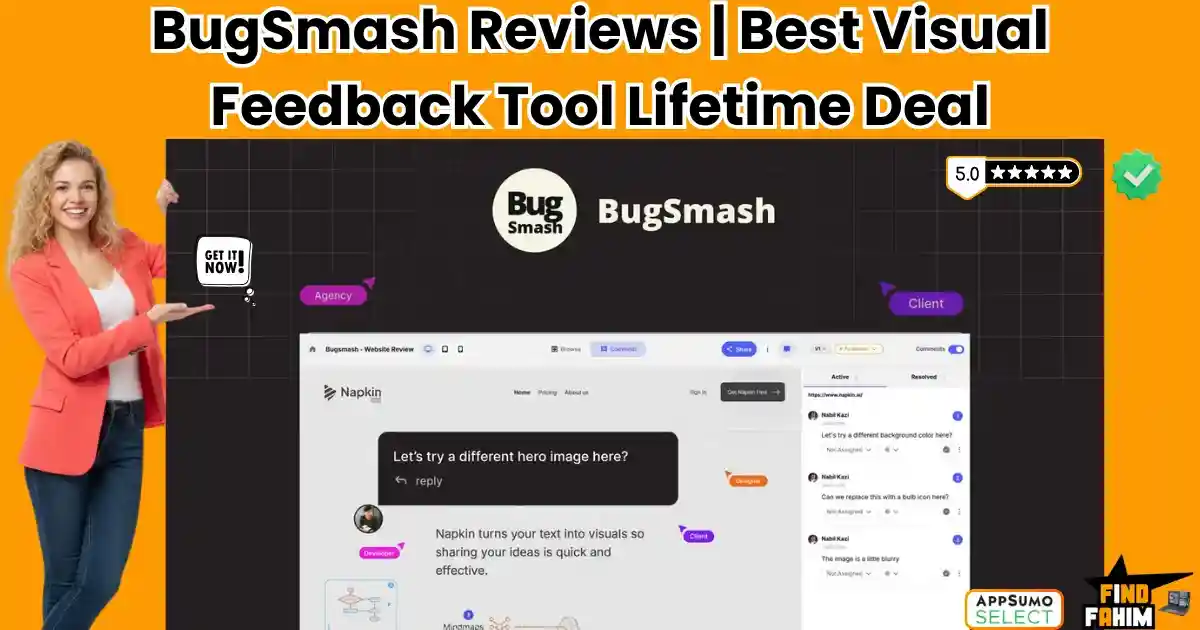
It serves as a universal, visual feedback layer that sits directly on top of your live websites, PDFs, videos, and images. Instead of writing long emails, your clients simply point, click, and type their comments directly onto the screen. It works exactly like leaving a sticky note on a physical piece of paper, but for digital assets.
With a near-perfect 4.9-star rating on AppSumo and a massive February 2026 update that introduced native Asana integration and multi-language support, BugSmash is positioning itself as the ultimate agency collaboration hub. But is this $79 lifetime deal robust enough to handle complex, dynamic websites, or is it just another clunky Chrome extension? In this comprehensive BugSmash review, I dive deep into its proxy-rendering engine and workflow integrations to see if it can truly replace expensive monthly subscriptions like Pastel or Atarim.
My Quick Take (TL;DR)
If you are tired of deciphering cryptic client feedback and managing endless revision cycles, here is my honest, unfiltered summary.
- What is it? A visual feedback and annotation platform for live websites, web apps, mobile interfaces, videos, PDFs, and images.
- Why is it Special? Zero Friction. Clients do not need to create an account, download a plugin, or install an app. You send them a link; they open it in their browser and start clicking and commenting immediately.
- Who is it for? Web Design Agencies, Marketing Teams, Video Editors, and Product Managers.
- The Deal: Lifetime Access starting at $79 (One-time payment).
- My Verdict: It is an absolute must-buy for service-based agencies. The ability to collect contextual feedback (with automatic screen resolution and browser data attached) saves hours of debugging. The Tier 3 unlimited plan is a rare asset you should secure before it moves to a monthly SaaS model.
Click Here to Get the BugSmash Lifetime Deal
What is BugSmash?
The best way to describe this platform is as “A transparent, interactive sticky-note layer for the entire internet.”
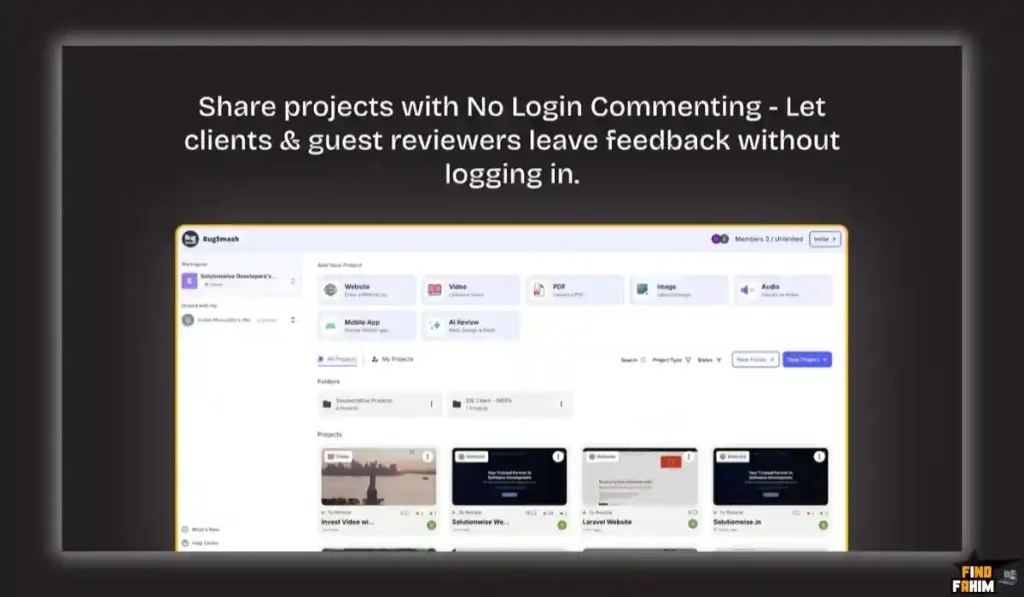
It is a centralized hub for managing creative approvals and quality assurance (QA). When you finish a digital project—whether that is a newly coded WordPress website, a 30-second promotional video, a UI/UX wireframe, or a 50-page PDF brochure—you need stakeholders to review it.
Instead of sending them the raw file or a standard URL, you put that asset into BugSmash. BugSmash generates a unique, secure sharing link. When the client opens that link, they see your work exactly as intended, but with a floating toolbar.
If they see a typo, they click on the typo and type: “Change this to ‘Our Services’.”
If they don’t like a video transition, they pause the video at 0:14 seconds, click the screen, and type: “Make this fade slower.”
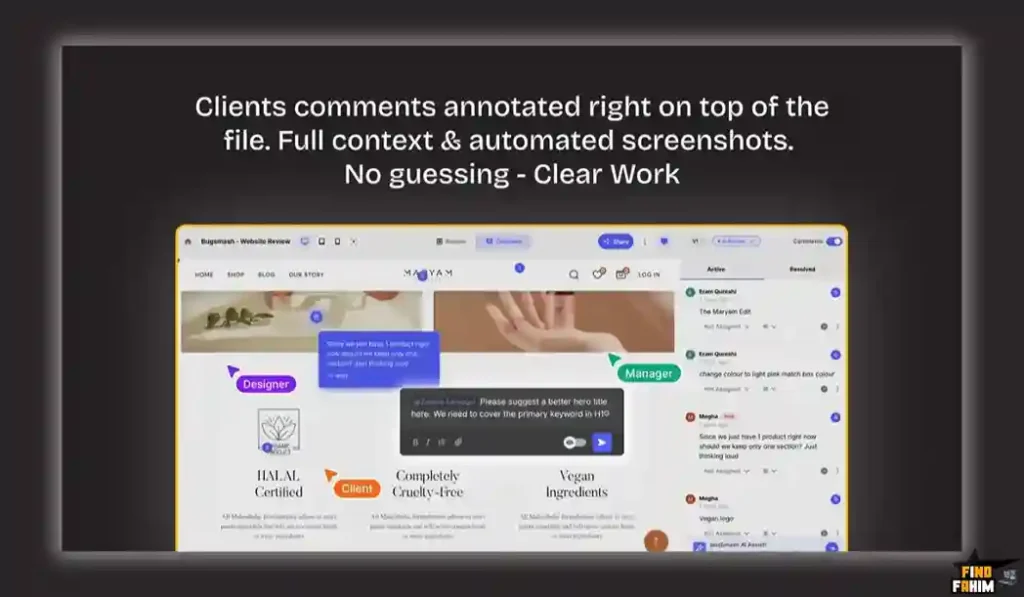
BugSmash takes that comment, attaches the exact coordinates of where they clicked, captures their browser information, OS, and screen size, and sends it directly into your project management tool (like ClickUp, Jira, or Slack). It turns vague opinions into precise, actionable, developer-ready tasks.
Quick Look: What’s Inside the Deal?
If you are currently paying monthly for a fragmented tech stack to handle QA and approvals, look at this financial comparison.
| Feature | Replaces… | The “Killer” Value | Normal Cost | Deal Status |
| Website Annotation | Pastel / Atarim | Click-to-comment on live sites | ~$50/mo | ✅ Included |
| Video & Audio Review | Frame.io | Frame-accurate timestamps | ~$25/mo | ✅ Included |
| PDF & Image Proofing | Adobe Acrobat Pro | Centralized document markup | ~$20/mo | ✅ Included |
| No-Login Guest Access | Forced Account Creation | Zero friction for clients | N/A | ✅ Included |
| Task Integrations | Zapier Tasks | Native Slack/ClickUp/Jira sync | $$$ | ✅ Included |
| Total Value | Your Tech Stack | Faster Approval Cycles | ~$1,140/yr | $79 (Lifetime) |
Why You Need More Than Just “Emails and Spreadsheets”
You might be thinking, “I have been using emails and spreadsheets for years. Why fix what isn’t broken?”
Because it actually is broken, and it is costing you profit.
The Context Disconnect
When a client emails you saying, “The header image looks pixelated,” they are leaving out critical context. Are they looking at it on a 4K desktop monitor or an iPhone 12 Mini? Are they using Chrome or Safari? BugSmash automatically captures this metadata behind the scenes with every single comment. Your developers never have to ask “What device are you using?” ever again.
The Asynchronous Nightmare
If you have three different stakeholders reviewing a project, you usually get three different email chains. Stakeholder A wants the button green. Stakeholder B emails you separately asking for the button to be red.
With BugSmash, all stakeholders view the same annotated project. If Stakeholder A leaves a comment, Stakeholder B sees it and can reply to that specific thread. They resolve their internal disputes on the canvas, delivering you one unified directive.
Why “Visual Collaboration” is Trending in 2026
I noticed this tool trending aggressively on AppSumo because the nature of digital work has fundamentally shifted.
1. The Global, Remote Workflow
Agencies are no longer sitting in a boardroom with clients projecting a website onto a wall. Clients are in New York, the project manager is in London, and the developers are in India. “Synchronous” meetings (Zoom calls) are nearly impossible to schedule across time zones. BugSmash enables true “Asynchronous” collaboration. A client reviews the site at 10 PM their time, and the developer wakes up to perfectly mapped tasks.
2. The Demand for Multimodal Support
In the past, you needed Marker.io for websites, Frame.io for video, and Filestage for PDFs. Managing three subscriptions is financially draining, and training clients to use three different tools causes frustration. The 2026 trend is “Consolidation.” BugSmash is winning because it acts as a single, unified interface for all file types. Whether your agency produces code, pixels, or video, the feedback mechanism remains identical.
A Look Inside BugSmash: Key Features & Benefits
This is not just a screenshot tool; it is a comprehensive QA infrastructure.
1. Live Website Proxy Rendering
What it is: BugSmash uses an advanced proxy layer to render live websites inside its commenting frame.
Why it matters: Unlike basic Chrome extensions that just take a static, flat screenshot of a webpage, It allows the client to actually interact with the site. They can click on dropdown menus, navigate to the “About Us” page, and trigger hover animations, leaving comments on dynamic elements. It supports complex builds on WordPress, Wix, Joomla, and custom Azure apps.
2. Deep Native Integrations
What it is: Direct connections to project management software.
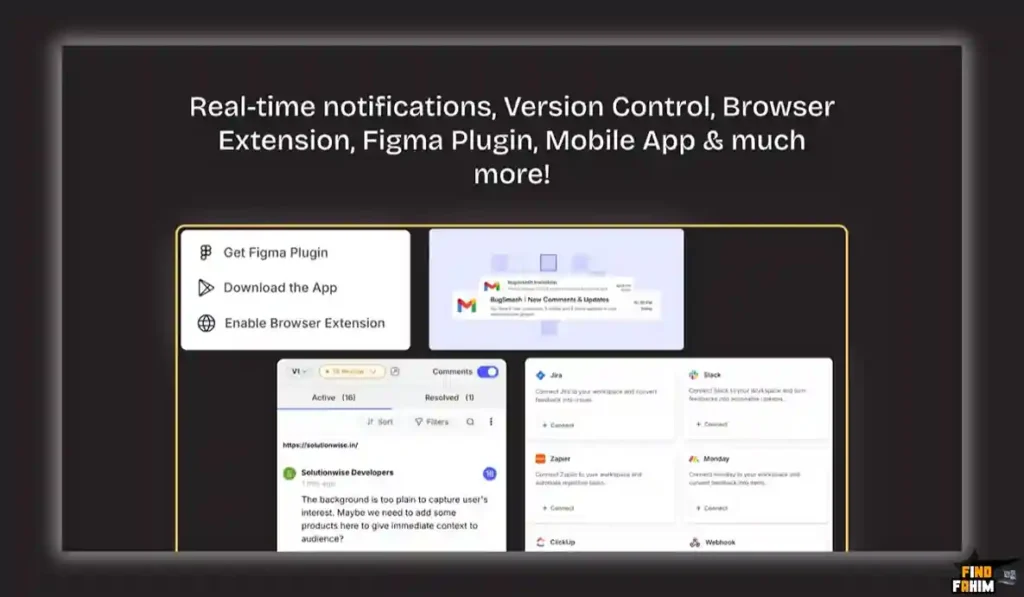
Why it matters: Feedback is useless if it stays trapped in the feedback tool. BugSmash integrates natively with ClickUp, Slack, Asana, Jira, Trello, and GitHub.
- Real-World Scenario: A client comments on a typo. BugSmash automatically creates a task in your “To-Do” column in Asana, complete with a screenshot, the client’s text, and a direct link back to the exact spot on the website. Your developer fixes it and closes the task in Asana, which automatically updates the status.
3. Version Control and History
What it is: The ability to stack revisions.
Why it matters: “Version 1,” “Version 2_Final,” “Version 3_Actually_Final.” We all know the file-naming nightmare. In BugSmash, when you make the requested changes to a PDF or video, you simply upload the new version on top of the old one. The client can easily toggle between “Version 1” and “Version 2” to verify that their specific feedback was implemented perfectly.
4. Multi-Language Project Support (Feb 2026 Update)
What it is: The ability to change the BugSmash UI language on a per-project basis.
Why it matters: If your agency is in the US but you are building a site for a client in Spain, sending them an English feedback tool adds friction. You can now set that specific project’s UI to Spanish. The client feels respected, and the cognitive load of using the tool drops to zero.
The Standout Feature: “Zero-Friction Guest Access”
This is the feature that separates BugSmash from the enterprise giants.
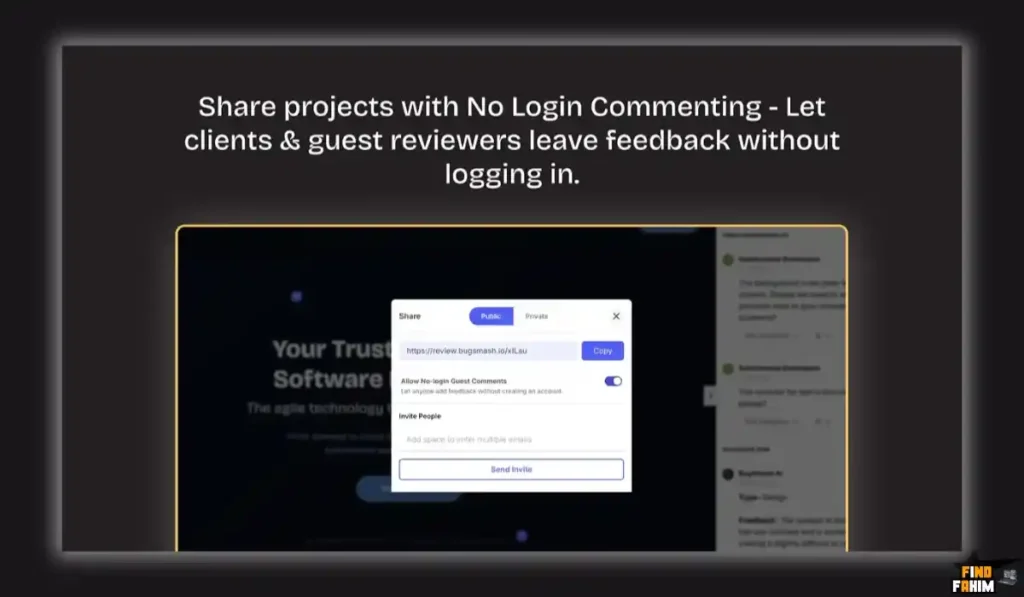
If you force a CEO or a busy marketing director to “Create an Account,” “Verify Email,” and “Create a Password” just to tell you they don’t like a font, they will refuse to use the software. They will immediately revert to sending you an angry email.
BugSmash requires zero login for guests.
You generate a link. You email it. They click it. They are instantly in the feedback environment. They type their name once, so you know who is commenting, and that is it. It is the most respectful, lowest-barrier entry point for client collaboration on the market today.
BugSmash Pricing & AppSumo Deal Details
This is a Tiered Lifetime Deal.
The scaling factors are Projects/Files, Internal Team Members, and Storage Capacity. Crucially, Guest Reviewers are Unlimited on all tiers, which is the most important metric for an agency.
The Complete Pricing Tier Breakdown
| Feature | Tier 1 | Tier 2 | Tier 3 (Agency Scale) |
| Price | $79 | $199 | $299 |
| Projects/Files | 75 | 250 | Unlimited |
| Team Members | 2 | 10 | Unlimited |
| Storage | 20 GB | 50 GB | 250 GB (Max 1GB File) |
| AI Reviews | 5 | 20 | 100 |
| Guest Reviewers | Unlimited | Unlimited | Unlimited |
| Custom Branding | ✅ Yes | ✅ Yes | ✅ Yes |
| Integrations | ✅ Yes | ✅ Yes | ✅ Yes |
ROI Anchor Logic: The “Agency Math”
- Pastel (Competitor) costs $50/month (for a basic plan with limited premium features).
- BugSmash Tier 3 is $299 (one-time) for Unlimited Projects and Unlimited Members.
The Reality:
If you run an agency with 5 designers and manage 20 active client projects, SaaS competitors will easily charge you $1,000+ per year.
You pay for roughly 6 months of a standard SaaS subscription and get BugSmash Tier 3 for life.
My Recommendation
Buy Tier 3 ($299).
- Why? The jump to Tier 3 is the only way to secure Unlimited Projects and Unlimited Team Members. If you buy Tier 1 (75 files), you will hit that cap surprisingly fast if you are uploading multiple versions of images, short-form videos, and website pages. Tier 3 guarantees you never have to think about deleting old projects just to make room for new ones.
Secure Your BugSmash Lifetime License Now
Pros & Cons of This Lifetime Package
I promised you an honest review. With a 4.9-star rating from power users, it is highly polished, but we must look at the technical nuances.
The Pros
- ✅ All-in-One Format Support: The fact that it handles live URLs, MP4 videos, MP3 audio, PNGs, and complex PDFs in a single dashboard eliminates the need for multiple specialized tools.
- ✅ Metadata Capture: Automatically capturing browser type, OS, and screen resolution with every web comment is a literal lifesaver for frontend developers debugging responsive design issues.
- ✅ Responsive Founders: The AppSumo reviews consistently highlight the founders (Nabil and Hussain) actively fixing edge-case bugs (like Azure hosting conflicts) within 24 hours.
- ✅ Custom Branding: Included on all tiers. You can put your agency’s logo on the feedback portal, ensuring your clients see your brand, not BugSmash’s.
The Cons
- ❌ Proxy Rendering Limitations: While their proxy engine is excellent, highly complex web apps that sit behind strict firewalls or use aggressive anti-framing scripts (X-Frame-Options) might occasionally fail to load. In these rare cases, you have to rely on their Browser Extension instead of the pure URL link.
- ❌ Storage Caps: Even on the highest tier (Tier 3), storage is capped at 250 GB. If you are a heavy video production agency uploading massive, uncompressed 4K video files daily, you will need to manage your storage actively.
How Does BugSmash Work?
I tested the workflow to see how fast an agency can deploy this to a client. It is remarkably frictionless.
Step 1: Create a Project
Log in to your BugSmash dashboard and click “New Project.” Name it after your client (e.g., “TechCorp Website Redesign”).
Step 2: Add Your Asset
You have options. You can paste a live URL (like https://staging-techcorp.com), upload a PDF wireframe, or upload a video file. I pasted a live URL.
Step 3: Connect Integrations (Optional but Recommended)
Navigate to the project settings. I clicked “Integrations” and connected my Asana account. I mapped the project to my “TechCorp Dev Board” in Asana.
Step 4: Generate the Share Link
Click the “Share” button. You can adjust permissions (e.g., hide the share button from clients so they can’t invite random people). Copy the URL.
Step 5: The Client Experience
I opened the link in an incognito window to simulate the client. The live website loaded perfectly. I clicked on a hero image, typed “Swap this for a picture of a team meeting,” and hit enter.
Step 6: The Resolution
Instantly, a task appeared in my Asana board with a screenshot of the hero image and the client’s exact text. I marked the task “Complete” in Asana, and the comment automatically resolved inside BugSmash. The entire loop took under 3 minutes to set up.
Best Use Cases for BugSmash
Who actually needs this level of visual infrastructure?
1. The “Web Design Agency” (QA & Approvals)
You build WordPress or Webflow sites.
- The Scenario: You finish the build. You need the client to approve the copy and check for visual bugs.
- The Benefit: Instead of a confusing spreadsheet, the client clicks around the live site and leaves visual markers. Your developer fixes them systematically. You cut your QA phase from 2 weeks to 3 days.
2. The “Video Marketing Team” (Frame-Accurate Edits)
You produce short-form content for TikTok and YouTube.
- The Scenario: The client wants to change a specific B-roll clip.
- The Benefit: The client pauses the video at exactly 0:04s, clicks the frame, and types “Change this B-roll to a wider shot.” The editor knows the exact millisecond to edit without guessing.
3. The “Product Manager” (Bug Tracking)
You are building a SaaS application.
- The Scenario: Your internal QA tester finds a bug where a modal won’t close on Firefox.
- The Benefit: The tester uses the BugSmash browser extension. It captures a screen recording of the bug, grabs the console logs and browser data, and shoots it directly into your Jira backlog for the engineering team.
Stop the Email Madness. Get BugSmash Today.
BugSmash Alternatives
This is the critical evaluation phase. Is BugSmash robust enough to replace the industry heavyweights, or is it just a lightweight clone? Let’s compare it against the Top 5 players in the visual feedback space.
BugSmash vs Marker.io
Marker.io is a highly technical bug-reporting tool favored by software developers.
Where Marker.io Wins
Deep Developer Tooling.
Marker.io allows users to capture advanced network requests, console logs, and deep metadata. It is built for hardcore engineering teams who need highly technical bug reports pushed into Jira or GitHub.
Where BugSmash Wins
Client Friendliness & Formats.
Marker.io is intimidating for non-technical clients. BugSmash is vastly more intuitive for a CEO to use. Furthermore, Marker.io is strictly for websites and web apps. It handles websites, videos, PDFs, and images all in one unified dashboard.
Verdict
Marker.io for internal SaaS engineering teams.
BugSmash for client-facing agencies.
BugSmash vs Pastel
Pastel is the incumbent favorite for marketing agencies reviewing websites.
Where Pastel Wins
Ecosystem Maturity.
Pastel has been around longer and has an incredibly smooth, highly polished UI. Its proxy rendering engine for complex React apps is slightly more battle-tested due to its age.
Where BugSmash Wins
Pricing & Versatility.
Pastel charges a hefty monthly subscription (often $50 to $100+, depending on features). But this tool offers a lifetime deal. Also, Pastel focuses heavily on live websites and images, whereas BugSmash’s addition of Video and Audio feedback makes it a more comprehensive tool.
Verdict
Pastel for agencies with massive SaaS budgets.
BugSmash for pragmatic agencies seeking high ROI.
BugSmash vs Atarim
Atarim is deeply integrated into the WordPress ecosystem.
Where Atarim Wins
WordPress Management.
Atarim isn’t just a feedback tool; it is a full agency management dashboard. It includes time tracking, client portals, and deep WordPress plugin integrations that let you manage updates from a central hub.
Where BugSmash Wins
Lightweight Speed.
Atarim can feel heavy and bloated if you only want to collect feedback. BugSmash is lightweight, agnostic (works on any CMS, not just WordPress), and doesn’t require installing heavy plugins on your client’s server to function.
Verdict
Atarim for agencies that exclusively build on WordPress.
BugSmash for agile, multi-platform design teams.
BugSmash vs MarkUp.io
MarkUp.io is a massive player backed by Getty Images.
Where MarkUp.io Wins
Enterprise Scale.
MarkUp is built for massive enterprises. It handles massive file sizes effortlessly and has a very slick, modern interface.
Where BugSmash Wins
Cost Predictability.
MarkUp.io recently changed its pricing model, heavily restricting the free tier and pushing users toward expensive per-user enterprise pricing. BugSmash’s Tier 3 lifetime deal gives you unlimited users and projects, shielding you from arbitrary price hikes.
Verdict
MarkUp.io for Fortune 500 companies.
BugSmash for growing SMBs and independent agencies.
BugSmash vs ProjectHuddle
ProjectHuddle is a self-hosted WordPress plugin.
Where ProjectHuddle Wins
Data Ownership.
Because it is a plugin you install on your own WordPress server, you own 100% of the data. There is no third-party SaaS company hosting your client’s comments.
Where BugSmash Wins
Zero Maintenance.
Self-hosting means you have to deal with server limits, plugin conflicts, and database bloat. BugSmash is a managed SaaS. You don’t have to update it, maintain it, or worry about it breaking your site’s codebase. It just works.
Verdict
ProjectHuddle for strict data-privacy purists.
BugSmash for teams who want zero technical maintenance.
All 5 Competitors Matrix
| Feature | BugSmash | Marker.io | Pastel | Atarim | MarkUp.io | ProjectHuddle |
| Pricing | Lifetime ($79) | $39/mo+ | $50/mo+ | $40/mo+ | $25/mo+ | $109/yr+ |
| Live Websites | ✅ Yes | ✅ Yes | ✅ Yes | ✅ Yes | ✅ Yes | ✅ Yes |
| Video/Audio | ✅ Yes | ❌ No | ❌ No | ❌ No | ✅ Yes | ❌ No |
| PDFs/Images | ✅ Yes | ❌ Basic | ✅ Yes | ✅ Yes | ✅ Yes | ✅ Yes |
| No-Login Guest | ✅ Yes | ⚠️ Varies | ✅ Yes | ⚠️ Varies | ✅ Yes | ⚠️ Varies |
| Architecture | SaaS Proxy | Extension | SaaS Proxy | WP Plugin | SaaS Proxy | WP Plugin |
| Best For… | Agencies | Dev Teams | Marketers | WP Agencies | Enterprise | Self-Hosters |
Ditch the Monthly Fees! Grab the BugSmash Lifetime Deal.
Who Should NOT Buy BugSmash?
To ensure you make the right investment, I must be transparent about the tool’s limitations.
- Do not buy it if you are a “Solo Copywriter.” If you only write text in Google Docs or Microsoft Word, BugSmash is overkill. Stick to the native comment features inside Google Docs. This tool is built for visual design, video, and coded environments.
- Do not buy it if you work on “Highly Secure Intranets.” If you are building internal tools for banks or hospitals that block all external proxy traffic, It’s live URL feature will be blocked by their firewalls. You would have to rely heavily on screen recordings or the browser extension rather than the core proxy engine.
Is This Lifetime Deal a Smart Business Investment?
Let’s do the cold, hard financial math for Tier 3 ($299), which is the ultimate agency package.
Scenario: You are a mid-sized web design agency with 8 team members. You handle 15 web builds and 10 video projects a month.
- Cost of Pastel (Websites): ~$50/month = $600/year.
- Cost of Frame.io (Video): ~$25/month = $300/year.
- Total Old Cost: $900/year (and rising as you add team members).
- Cost of BugSmash (Tier 3): $299 (One-time).
The ROI Math:
- You save $601 in the very first year.
- Over a standard 5-year business cycle, you save $4,200+.
- The financial break-even point is just 4 months.
More importantly, consider the Time ROI. If BugSmash saves your project manager just 2 hours a week of deciphering messy client emails, that is 104 hours saved per year. At an agency rate of $100/hr, this tool effectively generates $10,400 in recovered billable time annually. It is a mathematical no-brainer.
How to Redeem the BugSmash Deal
- Buy: Purchase the activation code securely on AppSumo. (I highly recommend selecting Tier 3 to secure the “Unlimited Projects” feature.
- Redeem: You will instantly receive a redemption code in your AppSumo digital library.
- Register: Navigate to the specific AppSumo redemption URL provided in your instructions and create your BugSmash admin account.
- Activate: Apply the code. Ensure your dashboard reflects the correct limits (e.g., 250 GB storage for Tier 3).
- Deploy: Upload your agency logo in the settings, connect your Slack or Asana workspace, and send your first feedback link to a client today.
Final Verdict: Is This Cost-Friendly Deal Worth It?
After testing the proxy rendering on a live site, uploading a video file for frame-accurate commenting, and routing the tasks into Asana, my final verdict is an overwhelming 4.9-Star YES.
It is the definitive “Client Friction Killer.”
- It removes the Technical Barrier for non-tech-savvy clients.
- It removes the Fragmented Tool Stack (replacing 3 different apps).
- It removes the Monthly Overhead that slowly drains agency profitability.
If you produce digital assets for other human beings, you need a streamlined way to get their approval. BugSmash turns a frustrating, disorganized process into a clean, professional, and rapid workflow. Grab the unlimited tier before this lifetime deal vanishes forever.
Secure Your Unlimited BugSmash License Before It’s Gone
About the Author
I have spent the last decade running digital operations, managing hundreds of web builds, and fighting through thousands of messy client email threads. I know firsthand the financial cost of a “misunderstood revision.” Tools like BugSmash represent the modern standard of agency operations. I write these deep-dive reviews to help founders and operators build lean, highly profitable tech stacks without getting trapped in endless monthly SaaS subscriptions. Don’t forget to checkout my other deal review here!
FAQ: Your BugSmash Questions, Answered
BugSmash is a visual website and design feedback tool that allows clients to leave comments directly on live websites, images, PDFs, or videos without creating an account.
No, clients can access a secure link and start commenting immediately as a guest without creating an account or using a password.
Yes, you can use the BugSmash browser extension to collect feedback on password-protected sites, local development servers, or staging environments behind firewalls.
Yes, every comment automatically records the reviewer’s operating system, browser type, and screen resolution to help developers reproduce issues accurately.
Yes, you can upload MP4 videos and clients can leave comments attached to specific timestamps for precise feedback.
When connected to Asana or ClickUp, each new BugSmash comment automatically creates a task or card in your selected board, including screenshots, text, and metadata.
Yes, clients can view shared comments to avoid duplicate or conflicting feedback, while your agency team can add private internal comments that remain hidden from clients.
Yes, all AppSumo tiers include custom branding, allowing you to upload your agency logo so the platform appears as your own tool to clients.
No, all AppSumo tiers include unlimited guest reviewers, so you can invite as many stakeholders as needed.
BugSmash includes version control, allowing you to upload updated versions while keeping previous ones accessible for comparison and feedback tracking.
No, this deal does not support code stacking. You simply choose the tier that matches your storage and feature requirements.
In most cases, no. The proxy handles JavaScript and CSS animations effectively. For highly complex single-page applications with strict security headers, the browser extension ensures accurate rendering.
Yes, you can upload mobile UI mockups as images or use mobile-responsive URLs to review how designs appear on phone screens.
Yes, the AI Review tool scans websites for common UX and accessibility issues, helping you catch basic mistakes before sending work to clients.
If you reach the storage limit of your tier, you will need to delete older completed projects to free up space. Most agencies find the included storage sufficient for long-term use. What is BugSmash?
Does my client need to create an account to leave feedback?
Can I use BugSmash on a staging site behind a password?
Does BugSmash capture device and browser information?
Can I upload videos and collect timestamped comments?
How does the Asana or ClickUp integration work?
Can clients see each other's comments?
Can I customize the BugSmash branding?
Is there a limit on the number of guest reviewers?
What happens when I upload a new version of a design?
Do the AppSumo tiers stack?
Does proxy rendering break complex animations?
Can I use BugSmash for mobile app design feedback?
Are the AI Reviews feature helpful?
What happens if I exceed the storage limit?

Hi, I’m Fahim — a SaaS tools reviewer and digital marketing expert with hands-on experience helping businesses grow using the right software. I research, test, and personally use a wide range of AI, business, productivity, marketing, and email tools for my agency, clients, and projects. I create honest, in-depth reviews and guides to help entrepreneurs, freelancers, startups, and digital agencies choose the best tools to save time, boost results, and scale smarter. If I recommend it, I’ve used it — and I only share what truly works.