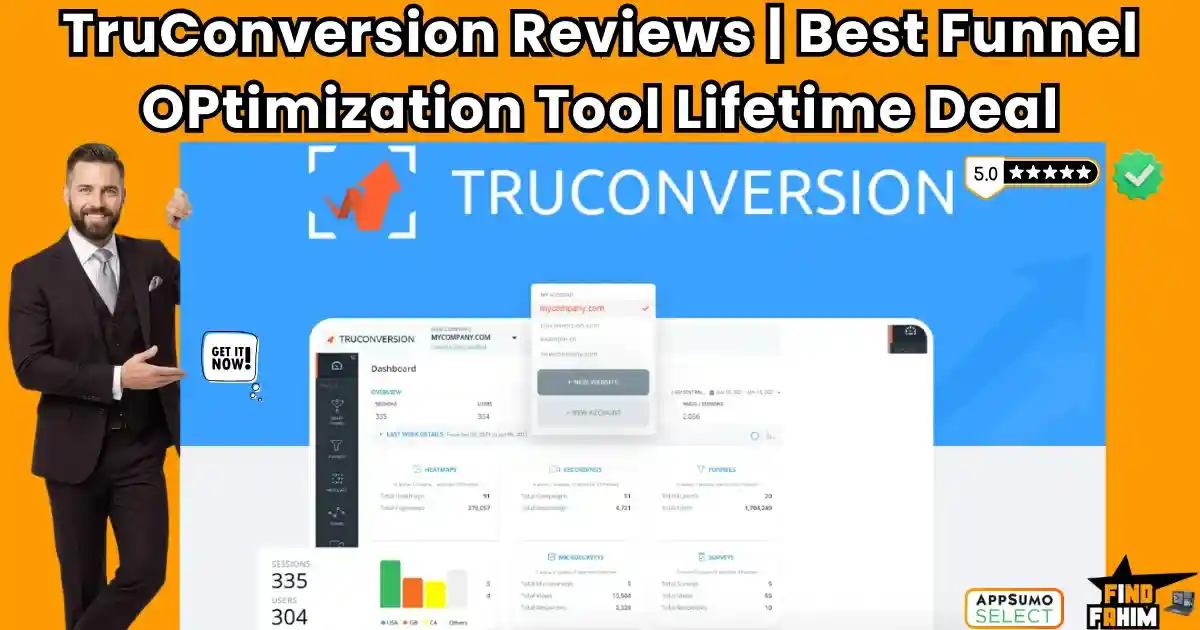

Are your website visitors leaving without buying? TruConversion is the all-in-one funnel tracking and heatmap dashboard built to fix that exact financial bleed.
As digital marketers, we spend a fortune on ads to drive traffic. But relying purely on Google Analytics is frustrating. You see that 500 users clicked your ad and bounced, but you have absolutely no idea why. Without visual data, you are just blindly changing headlines, hoping something fixes the conversion rate.
Created by founder Hammad Akbar, TruConversion replaces this expensive guesswork with undeniable visual evidence. It brings interactive heatmaps, live session recordings, form analytics, and micro-surveys into one unified dashboard.
But with strict pageview limits on the lower tiers and the requirement to be an AppSumo Plus member, is it actually better than Microsoft Clarity or an established giant like Hotjar?
In this comprehensive review, I break down its smart funnel mapping, analyze its pricing tiers, and compare it to top competitors so you can protect your ad spend.
Note: This article contains affiliate links. If you buy through them, I may earn a commission. This deal is an AppSumo Plus Exclusive.
My Quick Take (TL;DR)
If you are bleeding ad spend and need to know exactly where your website’s user experience (UX) is failing, here is the direct summary of this AppSumo offer.
- What is it? An enterprise-grade behavioral analytics ecosystem. It records visitor screens, tracks mouse clicks via heatmaps, and analyzes exactly which form fields cause users to abandon your site.
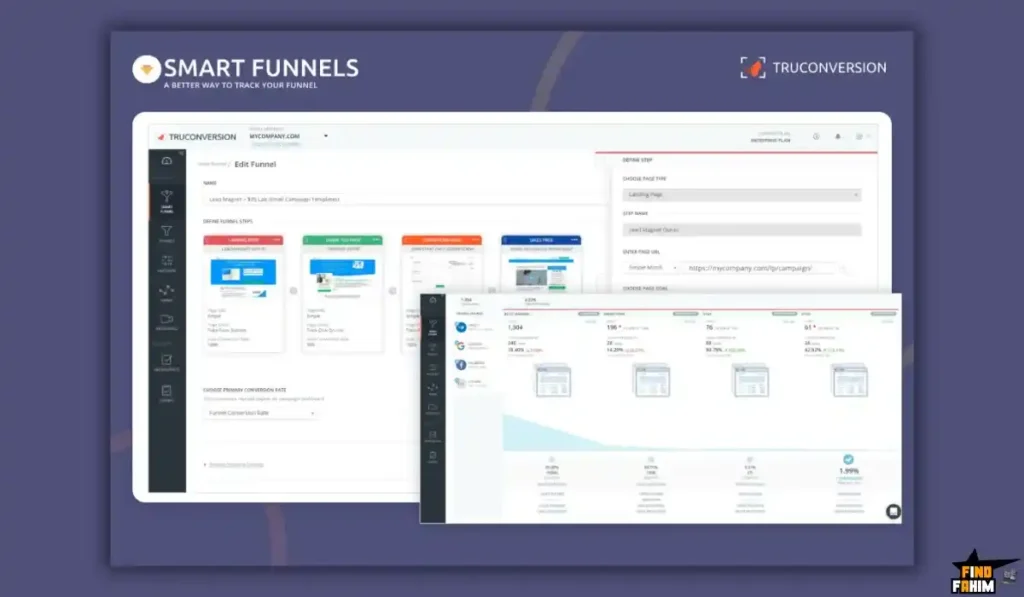
- Why is it Special? Smart Funnels & Consolidation. It doesn’t just record random screens; it actively maps your specific sales funnels (e.g., Homepage ➔ Product Page ➔ Checkout) and shows you the exact percentage drop-off at each step.
- Who is it for? E-commerce brands, SaaS founders, UX/UI designers, and marketing agencies are driving high-volume paid traffic.
- The Deal: Lifetime Access starting at $79 (Requires an active AppSumo Plus Membership).
- My Verdict: A phenomenal, top-tier Hotjar replacement. If finding one hidden broken button on your checkout page saves you just one lost high-ticket sale, the $79 Tier 1 investment pays for itself instantly.
Get the TruConversion Lifetime Deal on AppSumo
What is TruConversion? (Your Behavioral X-Ray)
When you manage a digital storefront, standard analytics tools only give you the raw numbers. It is purely quantitative data. It tells you “what” happened. TruConversion provides the qualitative data—the actual human behavior. It tells you “why” it happened.
You install a single, lightweight line of tracking code on your website, and TruConversion acts like an X-ray for your user experience.
It records a video of the user’s mouse moving across the screen, tracking their hesitations and “rage clicks.” It builds a color-coded thermal heatmap showing you exactly how far down the page people scroll before they lose interest. It watches your lead capture forms and tells you, “80% of your users abandon the form the exact second you ask for their Phone Number.” It removes the emotional guesswork from web design and replaces it with cold, hard visual evidence.
Quick Look: TruConversion vs Traditional Analytics
If you are currently running a website blind and relying on basic traffic counters, look at this operational breakdown of what this tool replaces in your tech stack.
| Feature | Replaces… | The Real Value | Normal Cost | Deal Status |
| Session Replays | Guessing UI bugs | Watch users click broken links | ~$32/mo | ✅ Included |
| Heatmaps | Blind redesigns | Know exactly what gets read | ~$39/mo | ✅ Included |
| Form Analytics | Low conversion rates | See which field causes bounces | ~$20/mo | ✅ Included |
| Micro-Surveys | Typeform | Ask users why they didn’t buy | ~$25/mo | ✅ Included |
| Total Value | Your Ad Spend | Data-Driven Redesigns | ~$116+/mo | $79 (Lifetime) |
Why Google Analytics Is Failing Founders
You might be reading this and thinking, “I already have GA4 installed on my WordPress site for free. Why do I need to pay for a tracking dashboard?”
Because GA4 is famously difficult to navigate for non-developers, and it entirely lacks visual context. If your bounce rate is 80% on a new landing page, GA4 cannot tell you if the user bounced because your copywriting was boring, because a massive email pop-up blocked their mobile screen, or because the “Buy Now” button was literally broken and unclickable on Safari browsers.
TruConversion steps in exactly where GA4 stops. It allows you to actually watch the user’s frustration happen on screen. When you see a video replay of a user furiously clicking an image that they think is a button, you instantly know exactly what to fix. You don’t have to hire a data scientist to read a spreadsheet; you just watch the tape.
Why “Smart Funnels” are Trending in 2026
I noticed this specific AppSumo deal trending rapidly because marketers are exhausted by disconnected data.
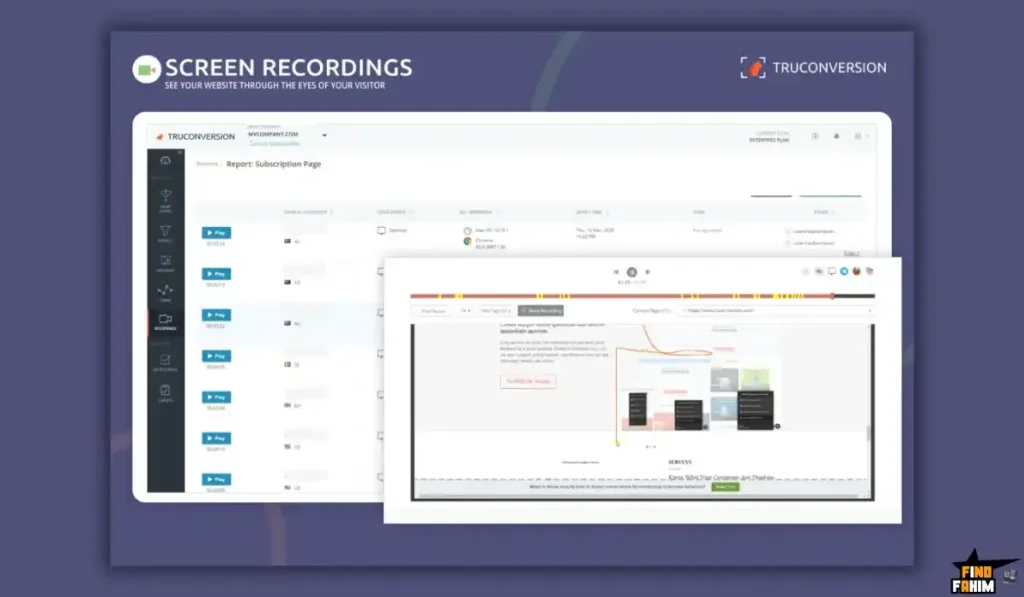
In 2026, it will no longer be enough to just have a generic heatmap tool. You need that heatmap connected to a specific stage of your buyer’s journey. If you run an e-commerce store, a heatmap of your homepage is interesting, but a heatmap of your checkout page is critical. TruConversion’s ability to map out a “Smart Funnel” and isolate the data—allowing you to trigger session recordings only for the people who abandoned their shopping carts—is exactly why over 10,000 AppSumo buyers have switched to this platform over the years.
A Look Inside TruConversion: Key Features
Here is exactly what you get when you install the TruConversion tracking script on your domain.
Smart Funnels (Visual Flow)
Map your conversion path by plugging in your URLs (e.g., /product ➔ /cart ➔ /checkout). TruConversion tracks exactly how many people survive each step. If you see a massive 60% drop-off at “Shipping Details,” you can instantly watch the screen recordings of only the users who abandoned their carts right at that exact moment.
Interactive Heatmaps
Analyze your layout with three distinct visual maps:
- Click Maps: See exactly where people click (even if it isn’t a link).
- Move Maps: Track mouse hovers to see where their eyes are reading.
- Scroll Maps: See how far down users scroll. If 70% bounce before seeing your pricing table, you have absolute proof to move it higher up.
Form Field Analytics
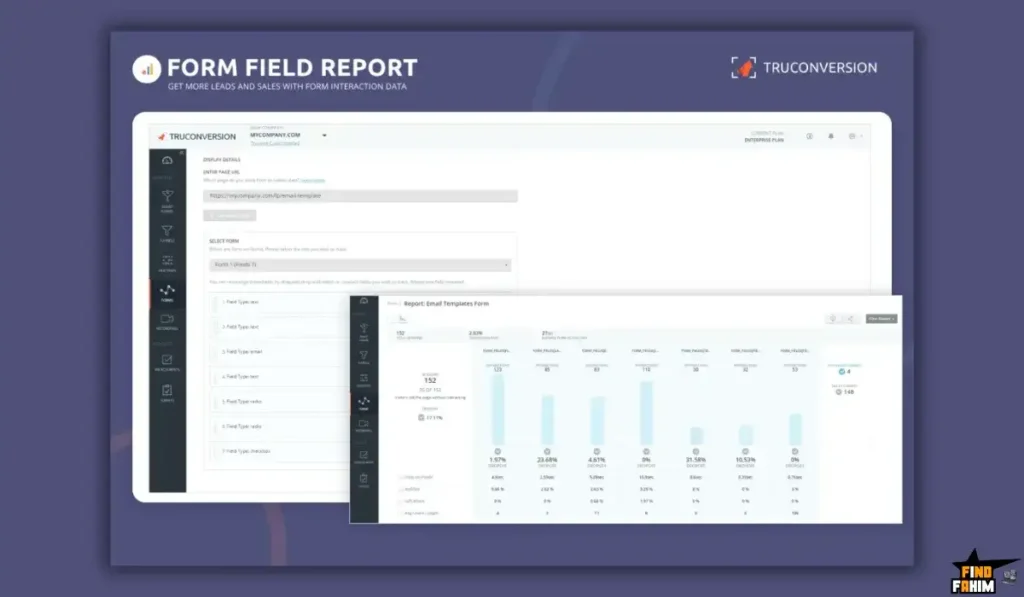
A goldmine for lead generation. It tracks micro-interaction time for individual fields. If users breeze through “Name” but abandon the page after hesitating on the “Annual Revenue” dropdown, you can delete that high-friction field and watch conversions spike.
Micro-Surveys
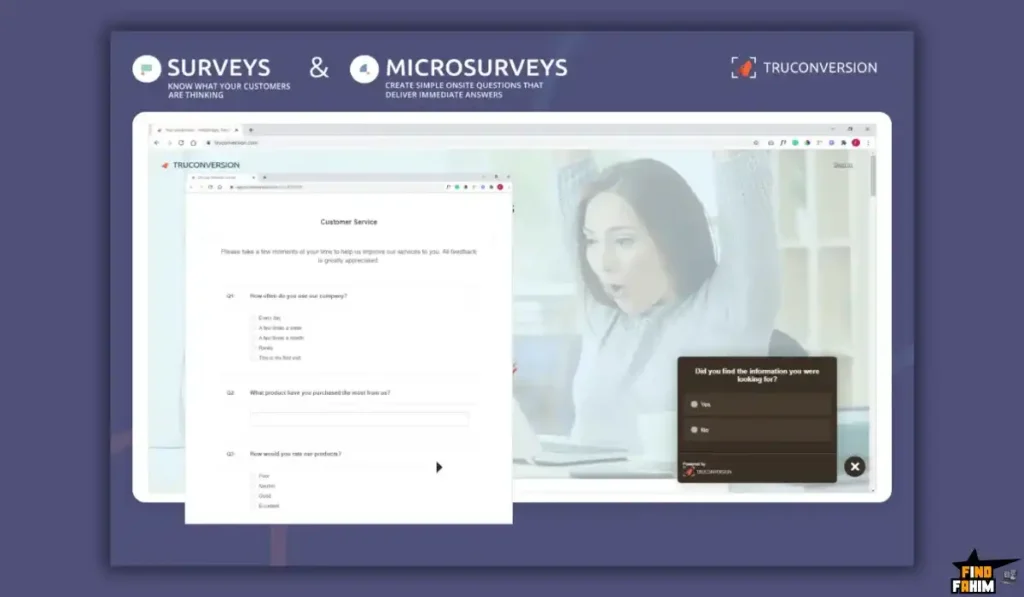
Sometimes, the best strategy is just asking. Trigger a small, non-intrusive poll right as a user moves to close the tab (Exit Intent). Ask, “What stopped you from buying today?” and collect answers directly in your dashboard.
The Standout Feature: SitePulse AI Reports
This is the brand new 2026 upgrade that changes the game for busy founders.
Reviewing 500 individual session recordings takes hours. Most founders simply do not have the time to sit and watch videos of people scrolling their website all day.
SitePulse AI does the heavy lifting for you. It acts as an automated data analyst. It watches the raw data, identifies patterns like “rage clicks” (when a user clicks the same broken element repeatedly in frustration) or navigation loops, and then hands you a plain-English, bulleted report of “Conversion Fixes.” You don’t have to be a UX expert to improve your ROI; the AI literally tells you what is broken and suggests how to fix it.
TruConversion Pricing & AppSumo Deal Details
This lifetime deal is massive. It is structured around six highly scalable tiers, ensuring there is a plan for everyone, from a solo blogger to a massive enterprise marketing agency. You pay once, and you own the software forever.
Important Reality Check: You must be an AppSumo Plus member to purchase this deal. If you are on a free AppSumo account, the buy button will be locked.
| Feature | Tier 1 | Tier 2 | Tier 3 | Tier 4 | Tier 5 | Tier 6 |
| One-Time Price | $79 | $139 | $299 | $449 | $649 | $1,049 |
| Monthly Pageviews | 110,000 | 275,000 | 750,000 | 1,500,000 | 2,500,000 | 7,500,000 |
| Domains Tracked | 3 | 5 | 15 | 30 | Unlimited | Unlimited |
| Users / Seats | 1 | 3 | 20 | Unlimited | Unlimited | Unlimited |
| SitePulse AI Reports | 5 / mo | 10 / mo | 25 / mo | 50 / mo | 100 / mo | 200 / mo |
| Smart Funnels | ✅ Yes | ✅ Yes | ✅ Yes | ✅ Yes | ✅ Yes | ✅ Yes |
| Heatmaps & Recs | ✅ Yes | ✅ Yes | ✅ Yes | ✅ Yes | ✅ Yes | ✅ Yes |
Understanding Pageview Limits
Size your purchase correctly. If you exceed your tier’s monthly pageview limit, TruConversion won’t charge overage fees—it simply pauses tracking until your next billing cycle. Because this is a lifetime deal, buy one tier higher than your current traffic to account for future growth and viral ad spikes.
My Stacking Recommendation
- For Solopreneurs: Tier 1 ($79) is perfect. 110,000 pageviews across 3 domains is plenty for a local business or affiliate blog.
- For E-commerce Brands: Grab Tier 2 ($139). The 275,000 pageview limit provides breathing room for heavy Facebook ad campaigns.
- For Marketing Agencies: Jump to Tier 3 ($299) or higher. It unlocks 15 client domains and 20 user seats for your entire web design team.
Secure Your TruConversion Lifetime Plan on AppSumo
Pros & Cons of This Lifetime Package
With an incredible 4.9-star rating from over 1,500 buyers, this is a legendary, battle-tested deal. But we must look at the technical realities of running JavaScript tracking scripts on your site.
The Pros
- ✅ Massive Consolidation: Getting funnels, screen recordings, heatmaps, and surveys in one unified dashboard prevents you from paying for Hotjar and Typeform separately, instantly cleaning up your tech stack.
- ✅ Zero-Code Installation: It takes exactly 60 seconds. Just paste a single snippet into your website’s header, or use their dedicated Shopify and WordPress plugins.
- ✅ Form Analytics: Many competitors don’t offer granular, field-by-field tracking. Knowing exactly which text box causes a user to abandon your site is worth the price alone.
The Cons
- ❌ Plus Exclusive Paywall: You cannot buy this on a free AppSumo account. You must pay the $99/year AppSumo Plus membership to access the checkout page.
- ❌ Iframe Limitations: For strict security reasons, TruConversion cannot track forms embedded inside iframes (like a Calendly widget) or hidden behind secure login portals.
How Does TruConversion Work?
If you have never set up a CRO tool, here is how fast you can start collecting data.
- Install: Copy the small snippet of JavaScript provided by the TruConversion dashboard and paste it into the <head> section of your website.
- Verify: Click the “Verify Installation” button in your dashboard to ensure the code is firing correctly.
- Build a Funnel: Navigate to Smart Funnels. Tell TruConversion your exact conversion steps (e.g., URL 1 is the landing page, URL 2 is the pricing page, URL 3 is the thank-you page).
- Trigger a Map: Start a Heatmap on your highest-traffic landing page.
- Analyze: Let it run for 48 hours. Then, check the SitePulse AI report for a generated list of exactly what you need to fix on the page.
Best Use Cases for TruConversion
Who extracts the highest ROI from this behavioral tool?
1. E-Commerce Store Owners
You run a Shopify store getting massive ad traffic, but your cart conversions are terrible. By watching mobile session recordings, you realize your image gallery is glitching on iPhones, completely hiding the “Buy” button. You fix the CSS bug, and sales instantly resume.
2. Digital Marketing Agencies
You build custom landing pages for clients. With Tier 3, you install TruConversion across 15 domains. Instead of sending boring traffic spreadsheets, you use interactive heatmaps to visually prove your design works, easily justifying your $2,000 monthly retainer.
3. SaaS Founders
You set up a “Smart Funnel” for your new software’s onboarding sequence and notice 50% of users drop off at step three. You trigger an exit-intent survey asking why. Users report confusing API instructions, allowing you to rewrite the copy and immediately save your churn rate.
Stop Guessing. Start Tracking with TruConversion Today.
TruConversion Alternatives
This is the critical evaluation phase. Is TruConversion the best tool for the job, or should you use an established heavyweight? Choosing a tracking script is a big decision because it impacts your site speed and data accuracy. Let’s compare TruConversion directly against the Top 5 players in the behavioral analytics space.
TruConversion vs Hotjar
Hotjar is the absolute undisputed giant of the heatmap and recording industry. If you work in corporate marketing, you have likely used Hotjar.
- Where Hotjar Wins: Brand Recognition and Enterprise Integrations. Hotjar integrates deeply with almost every enterprise tool on the planet (like Salesforce and HubSpot). It is the industry standard that every web developer and UX researcher already knows how to use without any training.
- Where TruConversion Wins: The Price and the Funnel Consolidation. Hotjar is incredibly expensive. They separate their “Observe” (heatmaps and recordings) and “Ask” (surveys and feedback) tools into two entirely different, expensive monthly subscriptions. TruConversion gives you heatmaps, recordings, funnels, and surveys all in one unified dashboard for a single $79 lifetime payment.
TruConversion vs Microsoft Clarity
Clarity is a completely free heatmap and session recording tool provided directly by Microsoft. It has taken the bootstrapper market by storm.
- Where Clarity Wins: It is 100% Free Forever. Clarity offers unlimited session recordings and heatmaps with absolutely zero pageview limits and no monthly fees. It integrates flawlessly with Google Analytics and is an incredible tool for startups with zero budget.
- Where TruConversion Wins: Funnels, Forms, and Surveys. Microsoft Clarity is very basic. It records screens and makes heatmaps, but it stops there. It does not allow you to map out conversion funnels, it cannot analyze specific form field drop-offs, and it cannot trigger user feedback surveys. TruConversion is a complete Conversion Rate Optimization (CRO) suite, whereas Clarity is just a recording camera.
TruConversion vs CrazyEgg
CrazyEgg is one of the original heatmap tools on the internet, famous for pioneering the space and heavily leaning into active A/B testing features.
- Where CrazyEgg Wins: Native A/B Testing. CrazyEgg actually allows you to tweak website elements directly inside their editor (like changing a button from red to green) and run active split tests to see which version performs better, without needing a developer to code the changes.
- Where TruConversion Wins: Qualitative Data Depth. CrazyEgg is heavily focused on clicks. TruConversion offers a much wider array of qualitative behavioral data, specifically its slide-up micro-survey pop-ups and its incredibly detailed form abandonment analytics, allowing you to understand the psychology of the user, not just where their mouse went.
TruConversion vs Mouseflow
Mouseflow is a highly premium enterprise tool favored by strict UX/UI researchers, famous for its automated friction scores.
- Where Mouseflow Wins: Automated Friction Tracking. Mouseflow automatically tags session recordings with specific “friction scores.” For example, if a user “rage clicks” a broken button or vigorously shakes their mouse in confusion, Mouseflow automatically flags that specific video as high priority so you don’t have to watch hours of normal footage.
- Where TruConversion Wins: Affordability for SMBs. Mouseflow is incredibly expensive, starting at over $30/month for a tiny, highly restricted amount of recordings. TruConversion provides similar enterprise insights (especially with the new SitePulse AI reports) without the recurring corporate price tag.
TruConversion vs Lucky Orange
Lucky Orange is a widely popular integration in the Shopify ecosystem that uniquely blends heatmaps with live customer support chat.
- Where Lucky Orange Wins: Live Chat Integration. You can actually watch a user’s screen in real-time as they navigate your store and trigger a live chat box to pop up, asking if they need help completing their purchase. It bridges the gap between analytics and active customer support.
- Where TruConversion Wins: Historical Funnel Data. TruConversion’s smart funnel mapping interface is much more intuitive for marketers trying to analyze the macroscopic flow of traffic over 30 days. Lucky Orange is better for active, real-time interventions, while TruConversion is better for long-term structural redesigns.
All 5 Competitors Matrix
Here is the bottom-line comparison of all six major players in the CRO software space.
| Platform | Pricing Model | Key Strength | Best For… |
| TruConversion | Lifetime ($79+) | Funnels + Surveys | Agencies & E-commerce |
| Hotjar | Sub ($39+/mo) | Enterprise Standard | Big Corporate Teams |
| MS Clarity | 100% Free | Unlimited Recordings | Zero-Budget Bootstrappers |
| CrazyEgg | Sub ($29+/mo) | Native A/B Testing | Web Designers |
| Mouseflow | Sub ($39+/mo) | Automated Friction Tags | UX/UI Researchers |
| Lucky Orange | Sub ($18+/mo) | Live Chat + Replays | Active Customer Support |
Ready to Optimize Your Site? Grab TruConversion Now
Who Should NOT Buy TruConversion?
To ensure a profitable investment, I must be completely transparent about where this tool is a bad fit:
- Do not buy it for a personal hobby blog. If you run a simple WordPress site just to track clicks, use Microsoft Clarity for free. TruConversion is a premium tool meant for businesses actively spending on ads.
- Do not buy it for secure web-apps. If you want to track users inside a secure SaaS dashboard behind a login wall, the script will likely be blocked by browser security. It is meant strictly for public marketing pages and e-commerce stores.
Is This Lifetime Deal a Smart Business Investment?
Let’s evaluate the exact financial math of choosing TruConversion (Tier 1) versus paying for the industry standard, Hotjar.
- Cost of Hotjar Observe & Ask (1 Year): ~$79/month combined = ~$948/year.
- Cost of TruConversion (Tier 1): $79 (One-time payment).
The ROI Math:
- You break even in less than one month.
- Over a standard 3-year business cycle, choosing TruConversion saves you over $2,700 in recurring software subscriptions.
- Furthermore, consider the value of the data. If your new form analytics show you exactly which field is causing 30% of your visitors to abandon your lead capture page, and you delete that field, the extra leads generated will pay for this software immediately. It actively protects your ad spend.
How to Redeem the TruConversion Deal
Because this is a Plus Exclusive deal, the redemption process requires one extra step.
- Join Plus: If you are not already an AppSumo Plus member, you must add the $99/year membership to your cart to access this exclusive deal. (The membership also gives you 10% off the software purchase!).
- Buy: Click the link below to purchase the TruConversion activation code securely on AppSumo.
- Redeem: You will instantly receive a unique activation code in your email.
- Activate: Follow the instructions to create your TruConversion account and apply the code within 60 days.
- Install: Copy the small snippet of JavaScript provided and paste it into the <head> section of your website. Set up your first heatmap on your checkout page and watch the data roll in.
Final Verdict: Is This AppSumo Deal Worth It?
After thoroughly analyzing the smart funnel visualization, the incredibly granular form tracking, and the massive time-savings provided by the new SitePulse AI analytics, my final verdict is an absolute 5-Star YES.
It is the ultimate “Blindspot Remover” for digital marketers and founders.
- It eliminates Emotional Guesswork in Web Design.
- It stops Leaky Checkout Funnels.
- It provides Undeniable Visual Proof of User Frustration.
While the AppSumo Plus requirement creates a slight financial barrier to entry, the software itself is a mature, stable, enterprise-grade powerhouse with over 1,500 positive reviews backing it up. If you spend money on Facebook or Google ads, you cannot afford to have a blind website. Grab the lifetime code and start optimizing your user experience today.
Secure Your TruConversion Lifetime License Before It Ends
About the Author
I spend my time researching and analyzing SaaS products, digital tools, and lifetime deals to help smart entrepreneurs stop overpaying for software.
We all know the extreme frustration of watching GA4 bounce rates climb while having absolutely no idea how to actually fix the website, which is exactly why I investigated the TruConversion lifetime deal today. I do the heavy lifting of evaluating these offers—digging into the specific pageview limits, the iframe restrictions, the Shopify integrations, and the competitor feature sets—so you know exactly what you are getting before you pull out your credit card. If you want to see what other software I am currently analyzing to cut business costs, check out my Full Guide to the Best Lifetime Software Deals.
FAQ: Your TruConversion Questions, Answered
What is TruConversion?
TruConversion is an AI-powered analytics and conversion optimization tool that provides heatmaps, session recordings, funnels, and insights to help improve website performance and user experience.
Why can't I buy this deal on AppSumo?
This deal is marked as Plus Exclusive, meaning you must have an AppSumo Plus membership to unlock the purchase option.
Does TruConversion work with Shopify and WooCommerce?
Yes, it integrates with Shopify via an app or script installation and works seamlessly with WooCommerce through a WordPress plugin.
Does TruConversion slow down website speed?
TruConversion uses an optimized asynchronous script that does not block page loading, but it is recommended to limit heavy tracking features like session recordings when not needed.
Can TruConversion track forms behind login pages?
No, for privacy and security reasons it cannot track forms behind login portals, inside iframes, or dynamically loaded via AJAX.
How many domains can I track with TruConversion?
Domain limits depend on the tier, ranging from 3 domains on Tier 1 up to unlimited domains on higher tiers, including support for subdomains and cross-domain tracking.
What happens if I exceed the monthly pageview limit?
Tracking will pause once you exceed your limit for that month, and it will automatically resume at the start of the next billing cycle without extra charges.
Does TruConversion support single-page applications?
Yes, it can track user behavior on modern SPAs built with React, Angular, or Vue when properly configured for virtual page views.
What is SitePulse AI in TruConversion?
SitePulse AI is an automated analytics feature that reviews your data and provides plain-English insights and recommendations to improve conversions.
Do I need coding skills to set up funnels?
No, TruConversion offers a visual funnel builder where you simply enter page URLs and track user flow without coding.
What is the refund policy for TruConversion?
AppSumo provides a 60-day money-back guarantee, allowing you to test all features risk-free and request a refund if it does not meet your needs.
What are heatmaps and how do they help?
Heatmaps visually show where users click, scroll, and interact on your website, helping identify areas that need optimization.
What is conversion rate optimization?
Conversion rate optimization is the process of improving your website to increase the percentage of visitors who take desired actions like purchases or signups.
Is TruConversion suitable for beginners?
Yes, its visual tools and AI insights make it accessible for beginners while still offering advanced analytics for experienced marketers.
Why are funnels important for websites?
Funnels help you understand user journeys step by step, allowing you to identify drop-off points and improve overall conversion performance.

Hi, I’m Fahim — a SaaS tools reviewer and digital marketing expert with hands-on experience helping businesses grow using the right software. I research, test, and personally use a wide range of AI, business, productivity, marketing, and email tools for my agency, clients, and projects. I create honest, in-depth reviews and guides to help entrepreneurs, freelancers, startups, and digital agencies choose the best tools to save time, boost results, and scale smarter. If I recommend it, I’ve used it — and I only share what truly works.