
Struggling to manage dozens of browser tabs just to send cold connection requests? Sendpilot is the automated LinkedIn prospecting workspace built to fix that exact sales bottleneck.
As B2B founders and agency owners in 2026, scaling LinkedIn campaigns manually is an absolute nightmare. You juggle multiple accounts for your clients, track replies in messy spreadsheets, and waste hours writing personalized messages. Eventually, leads slip through the cracks, and a high-ticket prospect goes entirely ignored in a cluttered LinkedIn inbox.
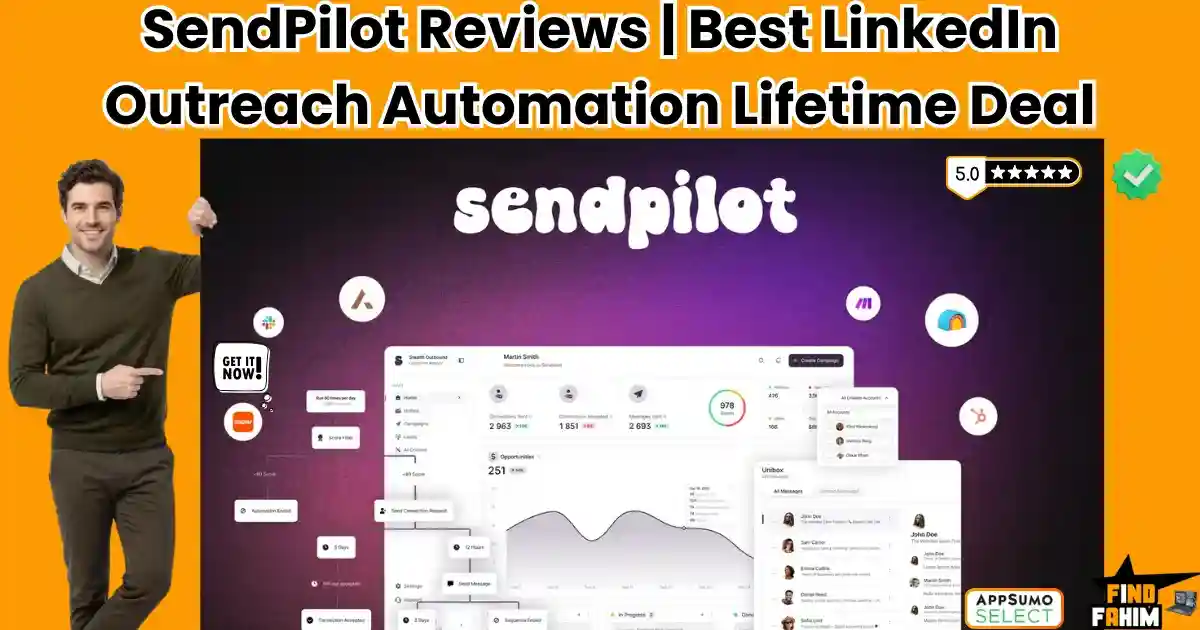
Created by co-founder Oskar Moen, Sendpilot promises to eliminate this chaos by unifying lead generation, a 300M+ contact database, AI messaging, and a universal inbox into one single dashboard.
But with strict limits on how many LinkedIn accounts you can connect per tier, is it actually better than established tools like Dripify or Lemlist? In this comprehensive Sendpilot review, I break down its agency white-labeling features, compare it to top competitors, and help you decide if it is the right tool to scale your sales pipeline.
Note: This article contains affiliate links. If you buy through them, I may earn a commission, but all opinions are based on my independent research.
My Quick Take (TL;DR)
If you are spending time executing manual LinkedIn outreach and losing track of conversations, here is the direct summary of this AppSumo offer.
- What is it? An all-in-one LinkedIn outreach platform that features a 300M+ B2B lead database, automated sequence builders, and a unified inbox for multiple accounts.
- Why is it Special? Unlimited Workspaces & AI Scoring. Every plan gives you unlimited workspaces and team members. The AI actively scores leads from 0 to 100 based on your Ideal Customer Profile (ICP) before it sends a message.
- Who is it for? B2B marketing agencies, sales teams, recruiters, and solopreneurs selling high-ticket services.
- The Deal: Lifetime Access starting at $69 on AppSumo.
- My Verdict: A phenomenal operational asset. Boasting a perfect 5.0-star rating, it replaces your expensive data provider (like Lusha) and your outreach tool (like Dripify) with one single lifetime payment.
Get the Sendpilot Lifetime Deal on AppSumo
What is Sendpilot? (Your B2B Growth Engine)
When you run outbound sales campaigns natively inside LinkedIn, the interface fights against you. The native inbox is clunky, you cannot schedule follow-ups, and managing a second account for a colleague requires constant logging in and out.
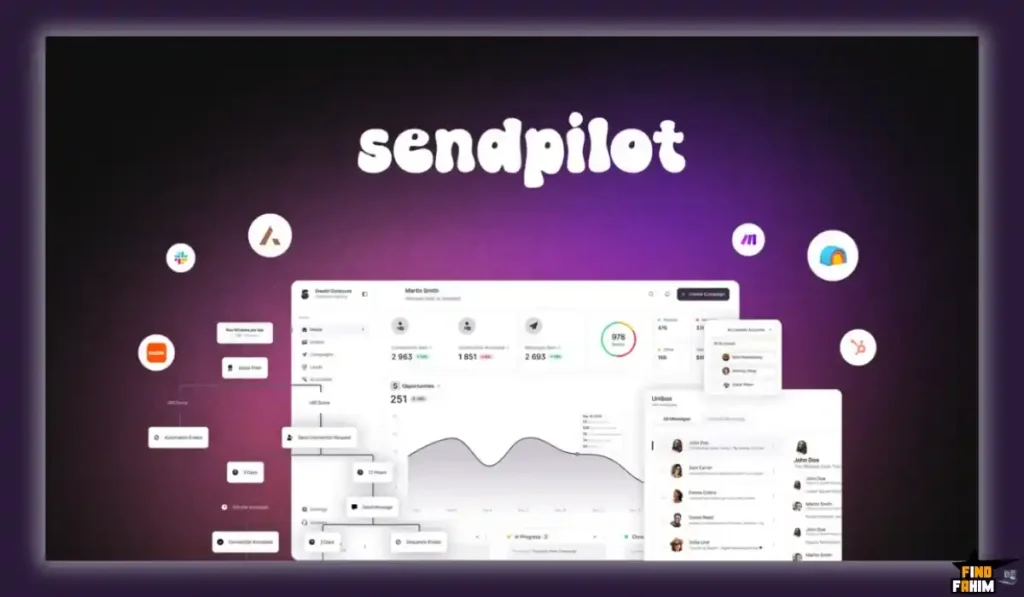
Sendpilot turns your scattered LinkedIn strategy into a streamlined, cloud-based sales machine. You connect your LinkedIn accounts (called “Senders”) to the dashboard. You then use the built-in search engine to pull highly targeted prospects from their 300M+ lead database, or you can scrape profiles directly from LinkedIn Sales Navigator.
Once your list is built, you drop them into a Sequence. Sendpilot takes over, automatically viewing their profile, sending a connection request, deploying personalized AI messages, and even sending voice notes on your behalf.
Quick Look: Sendpilot vs Manual Prospecting
If you are currently paying a Virtual Assistant to send LinkedIn messages, look at this operational breakdown of what this tool replaces.
| Feature | Replaces… | The Real Value | Normal Cost | Deal Status |
| B2B Database | Apollo / Lusha | Find leads without leaving the app | ~$49/mo | ✅ Included |
| Smart Sequences | Manual Follow-ups | Auto-send messages on day 3 | Time consuming | ✅ Included |
| Unified Inbox | Native LI Inbox | See all client DMs in one place | Workflow hassle | ✅ Included |
| AI Content | Ghostwriters | Auto-write engaging posts | ~$50+/post | ✅ Included |
| Total Value | Sales Team Time | Book Calls on Autopilot | ~$150+/mo | $69 (Lifetime) |
Why Manual LinkedIn Outreach is Failing Sales Teams
You might be thinking, “I just use a free Chrome extension to send mass connection requests. Why do I need a cloud platform?”
Because LinkedIn’s algorithm in 2026 is ruthless. If you use a cheap, automated Chrome extension, your computer’s IP address is flagged, and your LinkedIn account gets permanently banned for spam. Furthermore, Chrome extensions only work when your computer is open, and the browser tab is active.
Sendpilot uses dedicated cloud-based residential proxies to mimic human behavior. It spaces out requests randomly and runs in the background 24/7. You can close your laptop, go on vacation, and Sendpilot will continue to warm up leads, send follow-ups, and book sales meetings while you sleep.
Why “Unified Inboxes” are Trending in 2026
I noticed this specific AppSumo deal trending because it solves the biggest headache for B2B marketing agencies: Account Management.
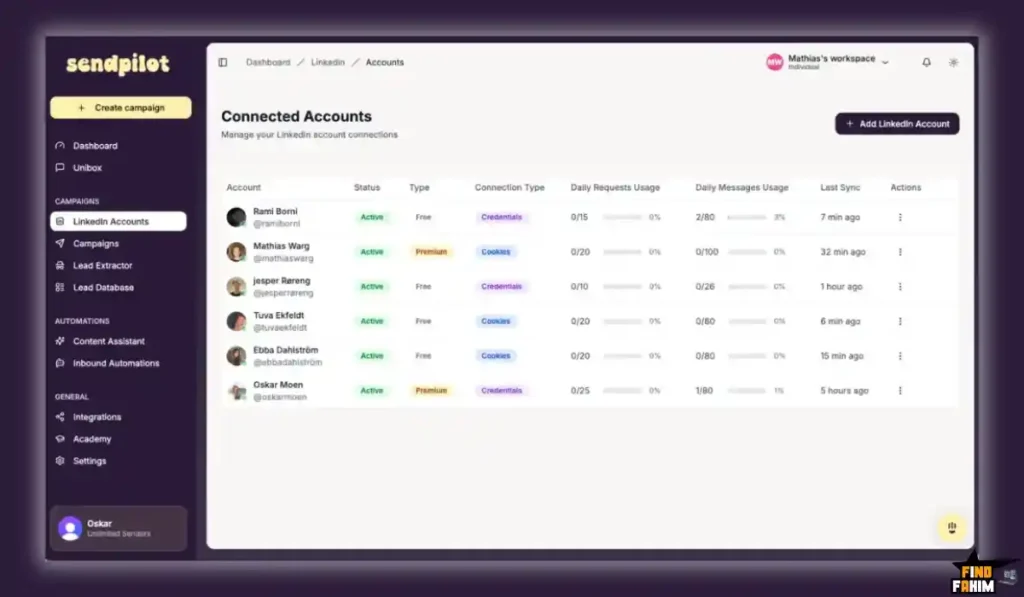
If your agency runs lead generation for five different clients, logging into five different LinkedIn accounts every morning to check for replies is an operational nightmare. Sendpilot features a Unibox. It pulls the direct messages from every single connected LinkedIn account into one central dashboard. You can read, filter, label, and reply to a CEO’s message without ever actually logging into their personal LinkedIn profile.
A Look Inside Sendpilot: Key Features
Here is exactly what you are getting when you move your outreach off spreadsheets and into this dedicated platform.
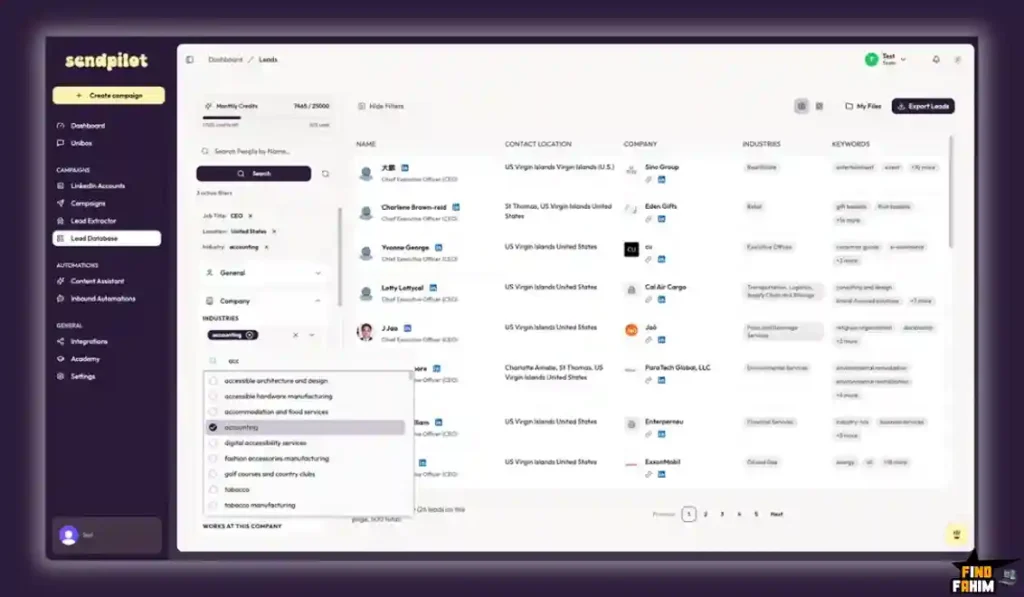
The 300M+ Lead Database
You do not need to buy external data. Sendpilot comes with a built-in search engine. You can filter by job title, industry, company size, and location. With one click, you can push 500 “Chief Marketing Officers in London” directly into an active outreach campaign.
Smart ICP Scoring
Before you waste your daily connection limits on bad leads, Sendpilot’s AI analyzes the prospect’s profile. It scores them from 0 to 100 based on how closely they match your Ideal Customer Profile (ICP), ensuring your campaigns only target highly qualified buyers.
Unlimited Workspaces & Team Members
Regardless of which tier you buy, you can create unlimited workspaces and invite unlimited team members. This is incredibly rare for an AppSumo deal. It means you can completely segment your data, keeping “Client A’s” campaigns totally isolated from “Client B’s” campaigns.
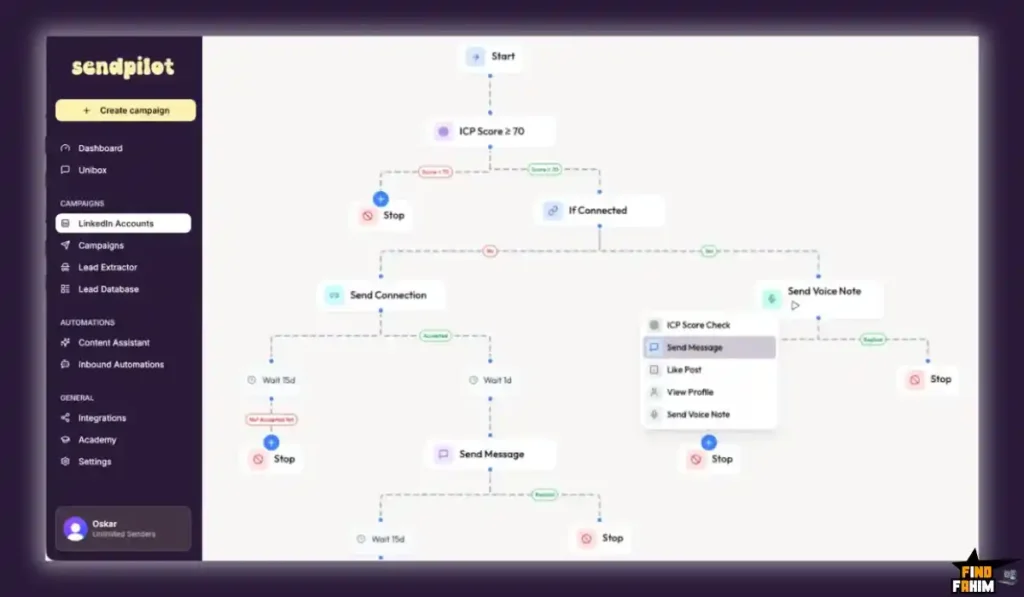
Interactive Sequence Builder
You can build highly complex outreach flows. For example: Day 1: View Profile. Day 2: Send Connection Request. Day 4: If accepted, send Message 1. Day 7: If no reply, send a Voice Note. It completely automates the traditional sales cadence.
The Standout Feature: Agency White-Labeling (Tier 3)
This specific feature deserves its own section because it allows marketing agencies to create a massive new revenue stream.
If you purchase License Tier 3, you unlock the Whitelabel feature. You can upload your own agency logo, change the brand colors, and present Sendpilot as your own proprietary internal software. When your clients log in to check their campaign stats or approve AI content, they will not see the “Sendpilot” brand; they will only see your agency’s branding.
Recent 2026 Platform Updates
The Sendpilot development team is moving incredibly fast. Based on recent feedback from the AppSumo community, co-founder Oskar Moen pushed several massive updates:
- “Wrong Person” Status: If a lead replies saying they are the wrong person to talk to, the system now automatically halts the sequence so you don’t send embarrassing automated follow-ups.
- Google Login Integration: Streamlined the onboarding process for team members.
- Public Roadmap: They just launched a public voting board where lifetime deal users can directly request and prioritize the next features being built.
Sendpilot Pricing & AppSumo Deal Details
This lifetime deal is structured around three specific license tiers. You pay once, and you own the software forever.
| Feature | Tier 1 | Tier 2 | Tier 3 |
| One-Time Price | $69 | $159 | $399 |
| LinkedIn Accounts (Senders) | 1 | 3 | 5 |
| Database Leads / Mo | 1,000 | 3,000 | 8,000 |
| Lead Extractions / Mo | 1,000 | 3,000 | 5,000 |
| Unlimited Workspaces | ✅ Yes | ✅ Yes | ✅ Yes |
| Agency Whitelabeling | ❌ No | ❌ No | ✅ Yes |
Understanding the “Sender” Limits
A “Sender” equals one connected LinkedIn account. If you buy Tier 1, you can run automated outreach for one person (e.g., yourself). If you buy Tier 2, you can connect your LinkedIn account, your co-founder’s account, and your sales rep’s account (3 total). There is no hard cap on the platform; you can always buy more sender slots later as your agency scales.
My Stacking Recommendation
- For Solopreneurs & Consultants: Tier 1 ($69) is an absolute steal. It gives you enough database leads and extraction credits to comfortably run your own personal B2B sales pipeline.
- For Marketing Agencies: You absolutely must jump straight to Tier 3 ($399). It unlocks 5 LinkedIn sender accounts, massive database limits, and the critical white-label branding feature needed to impress your clients.
Secure Your Sendpilot Lifetime Plan on AppSumo
Pros & Cons of This Lifetime Package
With a flawless 5.0-star rating from 49 early buyers, the B2B community is obsessed with this tool, but we must look at the honest operational realities.
The Pros
- ✅ The Unified Inbox: Managing replies for multiple clients without having to ask them for 2FA login codes every morning is a massive workflow upgrade.
- ✅ Built-In Data: Not having to pay $50/month for a tool like Apollo just to find lead lists makes the ROI of this deal incredibly high.
- ✅ Stellar Support: Reviewers consistently praise the founders for implementing requested features within hours of them being mentioned in the comments.
The Cons
- ❌ LinkedIn’s Strict Limits: Sendpilot is an amazing tool, but you still have to respect LinkedIn’s native limits. If you try to send 200 connection requests on day one using a brand-new account, LinkedIn will restrict you. You must warm up your campaigns slowly.
- ❌ AI Content Credits: Analyzing profiles and generating AI posts consumes ICP credits. On Tier 1 (200 credits), you will need to be strategic about which leads you use the deep AI scoring on so you don’t burn through your monthly allowance.
How Does Sendpilot Work?
If you have never used outreach automation, here is how fast you can launch a campaign.
- Connect Account: Securely connect your LinkedIn profile using Sendpilot’s browser extension or cookies.
- Find Leads: Open the Lead Database tab. Search for “VP of Sales” in “New York.” Click export to push them into a fresh campaign folder.
- Build the Sequence: Use the visual builder to drag and drop actions. Set a profile view for Day 1, a connection request for Day 2, and an automated text message for Day 4.
- Launch: Click start. Sendpilot will now execute those actions slowly in the background, mimicking human behavior.
- Reply: When a prospect answers, their message will pop up in your Sendpilot Unibox. You take over manually and book the sales call.
Best Use Cases for Sendpilot
Who actually extracts the highest ROI from this specific B2B tool?
1. The B2B Lead Gen Agency
You sell “Meeting Booking” services to local B2B companies. You buy Tier 3. You create a custom workspace for your new client, connect their LinkedIn account, and use the database to pull a targeted list of their ideal buyers. You automate the outreach, and when leads reply, your agency staff manages the conversations directly from the Sendpilot Unibox, acting as a ghostwriter for your client.
2. The SaaS Founder
You just launched a B2B software product and need early adopters. Instead of running expensive Facebook ads, you use Sendpilot to scrape the followers of your biggest competitor’s LinkedIn page. You drop them into a campaign that says, “Hey, saw you follow [Competitor]. We just built a faster alternative. Can I show you a 2-min demo?” ### 3. High-Ticket Coaches & Consultants
You sell a $5,000 coaching package to executives. You use the AI ICP Scoring feature to analyze hundreds of profiles, ensuring the software only sends connection requests to executives who explicitly match your buyer persona, keeping your network highly relevant and protecting your daily sending limits.
Stop Typing Cold DMs. Automate Your Outreach Today.
Sendpilot Alternatives
This is the critical evaluation phase. Choosing your outbound sales infrastructure is a massive commitment. If you pick the wrong tool, you don’t just lose money—you risk getting your primary LinkedIn account permanently restricted. Let’s compare Sendpilot directly against the top five heavyweights in the lead generation market so you can make an informed, highly confident choice for your tech stack.
Sendpilot vs Dripify
Dripify is widely considered the premium gold standard for LinkedIn automation. It has been around for years and is trusted by massive corporate sales teams.
- Where Dripify Wins: Advanced Safety Analytics and granular team controls. Dripify has incredibly deep team analytics and highly complex safety algorithms. It perfectly simulates human behavior by adding random delays between profile views and clicks to protect your account from LinkedIn jail. If you are managing a massive corporate sales floor where tracking individual rep performance to the exact decimal is required, Dripify is the industry standard.
- Where Sendpilot Wins: The Price and the Integrated Database. Dripify is strictly an automation engine; it does not give you any leads. You have to bring your own data. Plus, Dripify costs roughly $79 per month for a single user. If you have an agency with three sales reps, you are paying nearly $3,000 a year just to send messages. Sendpilot gives you a massive 300M+ B2B database, the AI outreach engine, and a lifetime deal for less than the cost of one month of Dripify.
Sendpilot vs Lemlist
Lemlist is a massive multi-channel outreach platform that became famous for its unparalleled cold email deliverability and email warm-up features.
- Where Lemlist Wins: Cold Email Infrastructure. Lemlist is built for cold email first, LinkedIn second. If your primary strategy is sending massive email blasts, bypassing strict corporate spam filters, and tracking email open rates, Lemlist is the undisputed king of the space. It ensures your emails actually land in the primary inbox.
- Where Sendpilot Wins: LinkedIn Native Focus. If your target buyers are strictly active on LinkedIn (such as recruiters, SaaS founders, or agency owners), paying for Lemlist’s expensive email deliverability infrastructure is a waste of capital. Sendpilot is laser-focused on the LinkedIn experience. It features deeper profile scraping, automated LinkedIn voice notes (which have a dramatically higher reply rate than standard text), and a unified LinkedIn direct message inbox that generalized email tools simply lack.
Sendpilot vs Waalaxy
Waalaxy is a highly popular French marketing tool that utilizes a simple Google Chrome extension to automate your LinkedIn connections.
- Where Waalaxy Wins: Freemium Entry and Ease of Use. Waalaxy offers a free tier (though it is highly limited) and is incredibly simple for beginners to set up. Because it lives entirely inside your web browser as an extension, you can install it and launch a basic campaign in under five minutes without understanding complex API integrations.
- Where Sendpilot Wins: Cloud Operations and IP Security. Because Waalaxy relies on a Chrome extension, your physical computer must be turned on, awake, and Google Chrome must be actively open for your campaigns to run. If your laptop goes to sleep, your sales pipeline halts. Furthermore, your IP address changes as you travel, which can trigger LinkedIn security warnings. Sendpilot operates in the cloud using dedicated residential proxies. It runs 24/7 on a secure, static connection, meaning it continues to book sales meetings even when your laptop is completely shut down.
Sendpilot vs Expandi
Expandi is the enterprise-grade choice built explicitly for massive marketing agencies handling dozens of high-paying client accounts simultaneously.
- Where Expandi Wins: Complex Campaign Logic. Expandi allows for hyper-complex “if/then” branching logic based on highly specific lead behaviors. If a lead clicks a specific link in an email but doesn’t reply on LinkedIn, Expandi can instantly pivot them into a highly targeted dynamic image sequence. It integrates deeply with massive enterprise CRMs and is built for heavy, complex logic.
- Where Sendpilot Wins: Affordability and Usability for SMBs. Expandi is notoriously difficult to learn and charges roughly $99 per seat, per month. It is complete overkill for small teams or solo consultants. Sendpilot provides the core 80% of agency features that actually generate revenue—like the Unified Inbox and White-label client branding—at a bootstrapper’s price point, completely removing the steep enterprise learning curve.
Sendpilot vs Lusha
Lusha is a massive, publicly traded data enrichment platform used by sales development representatives (SDRs) to find direct phone numbers and verified business emails.
- Where Lusha Wins: Direct Dials and Mobile Numbers. If your sales team spends eight hours a day cold calling mobile phone numbers, Lusha has one of the most accurate and frequently updated B2B contact databases in the world. It is the gold standard for traditional cold-calling floors.
- Where Sendpilot Wins: The Actual Outreach Workflow. Lusha just gives you the raw data. To use it, you have to export a CSV, clean the spreadsheet, upload it into an outreach tool like Dripify, map the data fields, and then hit send. It is a fragmented workflow that requires paying for two different software subscriptions. Sendpilot eliminates the CSV. You search the 300M+ database natively inside the Sendpilot platform, and with one click, you push those leads directly into an automated sequence.
All 5 Competitors Matrix
| Platform | Pricing Model | Key Strength | Best For… |
| Sendpilot | Lifetime ($69+) | Database + Cloud Sequences | B2B Agencies & Founders |
| Dripify | Sub ($79+/mo) | Account Safety Analytics | Premium Sales Teams |
| Lemlist | Sub ($59+/mo) | Cold Email Deliverability | Email-First Outreach |
| Waalaxy | Sub ($35+/mo) | Simple Chrome Extension | Casual Beginners |
| Expandi | Sub ($99/mo) | Enterprise Campaign Logic | Massive Call Centers |
| Lusha | Sub ($49+/mo) | Accurate Mobile Numbers | Cold Calling Teams |
Ready to Scale Your Pipeline? Grab Sendpilot Now
Who Should NOT Buy Sendpilot?
To ensure you make a highly profitable investment, I must be completely transparent about where this tool is a bad fit.
- Do not buy it if you run a B2B e-commerce brand. If you sell $20 t-shirts or coffee beans directly to consumers, LinkedIn automation is useless to you. Your buyers are on Instagram and TikTok. Sendpilot is strictly for B2B professionals selling high-ticket services or software to other businesses.
- Do not buy it to spam people. If your strategy is to send 500 generic “Buy my stuff” messages a day, LinkedIn will ban your account, regardless of the software you use. You must use the AI features to send personalized, highly targeted networking messages.
Is This Lifetime Deal a Smart Business Investment?
Let’s solve the exact financial math of choosing Sendpilot (Tier 2) versus piecing together a standard B2B sales stack.
- Cost of a B2B Database (e.g., Apollo Basic): ~$49/month.
- Cost of a LinkedIn Automator (e.g., Dripify): ~$79/month.
- Total Yearly Cost: $1,536/year.
- Cost of Sendpilot (Tier 2 – 3 Accounts): $159 (One-time payment).
The ROI Math:
- You break even in exactly one month.
- Over a standard 3-year business cycle, choosing Sendpilot saves you a staggering $4,449 in recurring software subscriptions.
- Furthermore, if the automated sequences secure just one single high-ticket client for your agency, the software has paid for itself a hundred times over.
How to Redeem the Sendpilot Deal
- Buy: Click the link below to purchase the activation code securely on AppSumo. (Evaluate your team size: grab Tier 1 for yourself, or Tier 3 if you need agency white-labeling).
- Redeem: You will instantly receive a unique activation code in your email.
- Activate: Follow the instructions to create your account and apply the code within 60 days.
- Configure: Securely connect your LinkedIn profile, create a workspace, and use the database to pull a list of 50 highly targeted prospects. Launch a test connection sequence to see the automation in action.
- Verify: Remember that AppSumo offers a risk-free 60-day money-back guarantee. You have two full months to test the AI messaging and the Unified Inbox entirely risk-free.
Final Verdict: Is This AppSumo Deal Worth It?
After analyzing the built-in 300M+ database, the unified inbox, and the agency white-labeling features, my final verdict is a flawless 5-Star YES.
It is the ultimate “Outbound Sales Consolidation” tool.
- It eliminates the need for Third-Party Data Scrapers.
- It stops Browser Tab Chaos.
- It provides an Agency-Ready Workflow.
While you still must respect LinkedIn’s daily connection limits, Sendpilot gives you enterprise-grade outreach infrastructure for the price of a dinner. Grab the lifetime code and start booking sales calls while you sleep.
Secure Your Sendpilot Lifetime License Before It Ends
About the Author
I spend my time researching and analyzing SaaS products, digital tools, and lifetime deals to help smart entrepreneurs stop overpaying for software. We all know the extreme frustration of burning hours manually pasting LinkedIn messages and tracking replies in Excel, which is exactly why I investigated the Sendpilot lifetime deal today. I do the heavy lifting of evaluating these offers—digging into the specific Sender limits, the white-label agency tools, and the AI scoring credits—so you know exactly what you are getting before you pull out your credit card. If you want to see what other software I am currently analyzing to cut business costs, check out my Full Guide to the Best Lifetime Software Deals.
FAQ: Your Sendpilot Questions, Answered
What is Sendpilot?
Sendpilot is a cloud-based LinkedIn outreach automation platform that helps businesses generate leads, send automated connection campaigns, and manage conversations from multiple LinkedIn accounts.
What does a Sender limit mean in Sendpilot?
A Sender represents one connected LinkedIn account. For example, Tier 2 allows three Senders, meaning you can run automated outreach campaigns from three different LinkedIn profiles simultaneously.
Do AppSumo buyers get a restricted version of Sendpilot?
No, AppSumo customers receive the same core product, improvements, and feature updates as regular subscription users.
Does Sendpilot include a lead database?
Yes, Sendpilot provides access to a B2B database with over 300 million leads, allowing users to export prospects into their outreach campaigns based on their monthly limits.
Can Sendpilot scrape leads directly from LinkedIn?
Yes, users can collect leads from LinkedIn engagement sources such as post likes, comments, followers, and competitor audiences to target highly engaged prospects.
Does Sendpilot integrate with Zapier or CRM tools?
Yes, Sendpilot supports integrations through API and webhooks, allowing connections with tools like Zapier, Make, n8n, HubSpot, Slack, and Notion.
What is the Unified LinkedIn Inbox in Sendpilot?
The Unified Inbox gathers messages from multiple LinkedIn accounts into a single dashboard so you can read and reply to conversations without logging into each profile individually.
Can Sendpilot be white-labeled for agencies?
Yes, white-label features are available in Tier 3, allowing agencies to add their own logo and brand colors for a customized client-facing platform.
Does Sendpilot run when my computer is turned off?
Yes, because Sendpilot is cloud-based. Your outreach campaigns continue running on secure servers even when your computer or browser is closed.
Can Sendpilot generate AI content for LinkedIn posts?
Yes, Sendpilot includes an AI content generator that helps users create and schedule LinkedIn posts directly from the platform.
What is the AppSumo refund policy for Sendpilot?
The deal includes AppSumo's 60-day money-back guarantee, allowing you to test the platform risk-free and request a refund if it does not meet your needs.
Is LinkedIn outreach automation safe to use?
When used responsibly with proper limits and targeting, LinkedIn outreach automation tools help professionals scale lead generation while maintaining account safety.
Can LinkedIn automation help generate B2B leads?
Yes, automation platforms streamline prospecting, connection requests, and follow-ups, helping businesses consistently generate new B2B leads.
What is the benefit of using a unified inbox for outreach?
A unified inbox allows teams to manage conversations from multiple accounts in one place, improving response speed and lead management efficiency.
Is LinkedIn outreach useful for agencies and freelancers?
Yes, agencies and freelancers use LinkedIn outreach tools to scale prospecting, nurture leads, and manage multiple client accounts efficiently.

Hi, I’m Fahim — a SaaS tools reviewer and digital marketing expert with hands-on experience helping businesses grow using the right software. I research, test, and personally use a wide range of AI, business, productivity, marketing, and email tools for my agency, clients, and projects. I create honest, in-depth reviews and guides to help entrepreneurs, freelancers, startups, and digital agencies choose the best tools to save time, boost results, and scale smarter. If I recommend it, I’ve used it — and I only share what truly works.