
Let’s face a hard truth about digital marketing in 2026: Nobody likes filling out forms.
Seeing a long list of input fields (Name, Email, Phone, Age, Favorite Color) feels like doing taxes. It causes “Survey Fatigue.” Your customers open the link, see 20 questions staring back at them, and immediately close the tab.
Traditional tools like SurveyMonkey and Google Forms are functional, but they are boring. Even the “beautiful” option, Typeform, has become incredibly expensive, charging $50 to $90 per month just to remove their branding and get decent response limits.
MetaSurvey is the “Fun” alternative designed specifically for the TikTok generation and the mobile-first economy.
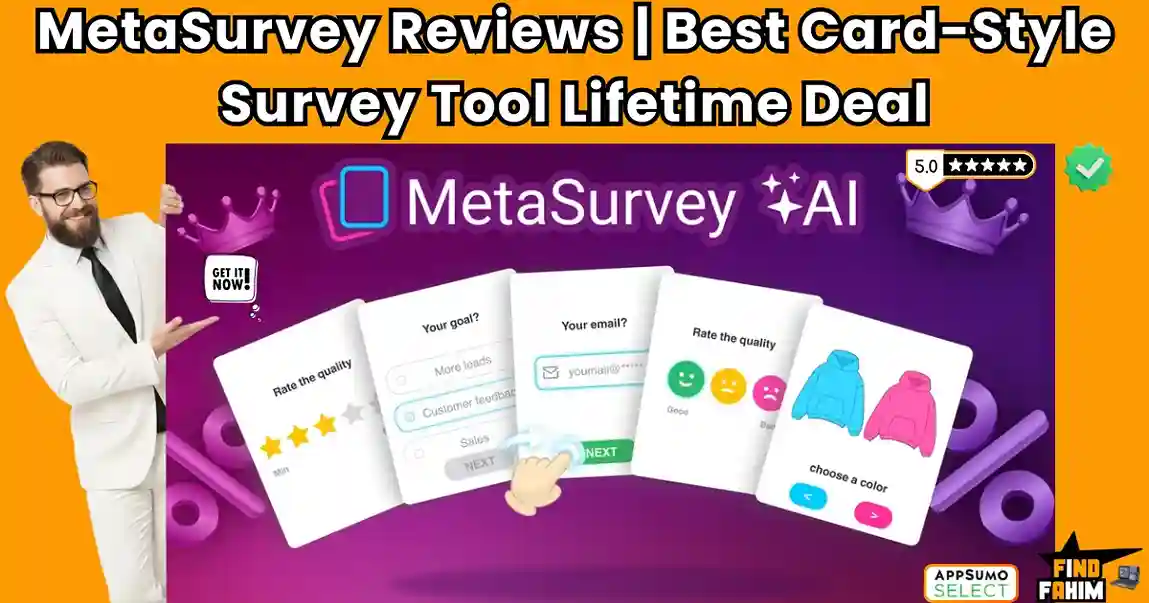
It turns boring questionnaires into “Tinder-Style” swipe cards.
Instead of clicking tiny radio buttons, your customers simply swipe right for “Yes” and swipe left for “No.” It feels like a game, not a chore. This simple change in User Experience (UX) drastically increases completion rates, often by 300% or more compared to static forms.
With a solid 4.6-star rating, a recent “v4” update that added AI Generation, and a unique AppSumo Plus Exclusive offer that doubles your limits, MetaSurvey is hitting its stride in 2026. But is this $78 lifetime deal just a gimmick, or is it a serious data collection tool that can replace Typeform? In this in-depth, no-fluff MetaSurvey review, I am testing if the “Swipe” logic actually works for business.
Note: This article contains affiliate links. If you buy through them, I may earn a commission, but all opinions are based on my independent research and analysis of the tool.
My Quick Take (TL;DR)
If you need to collect feedback without boring your audience to death, here is my honest summary.
- What is it? A mobile-first survey and quiz builder that uses card-swiping mechanics instead of lists.
- Why is it Special? Gamification. The “Swipe Left/Right” interaction is native to mobile users (thanks to Dating Apps and TikTok). It makes giving feedback feel effortless. Plus, the AppSumo Plus version doubles your limits for the same price.
- Who is it for? E-commerce Brands, Course Creators, UI/UX Designers, and Product Managers.
- The Deal: Lifetime Access starting at $78.
- My Verdict: It’s not as robust as Qualtrics for deep enterprise research, but for marketing surveys (Lead Gen, NPS, Product Feedback), it destroys standard forms. The Plus Exclusive deal is a no-brainer.
Click Here to Get the MetaSurvey Lifetime Deal
What is MetaSurvey?
The best way to describe this platform is as “Typeform meets Tinder.”
It is a survey tool built strictly for User Engagement.
Most survey tools show 10 questions on a page, forcing the user to scroll and think about how much work is left. MetaSurvey shows one card at a time.
- Swipe Right = Like / Yes / Agree.
- Swipe Left = Dislike / No / Disagree.
This focus forces a binary decision, which reduces cognitive load.
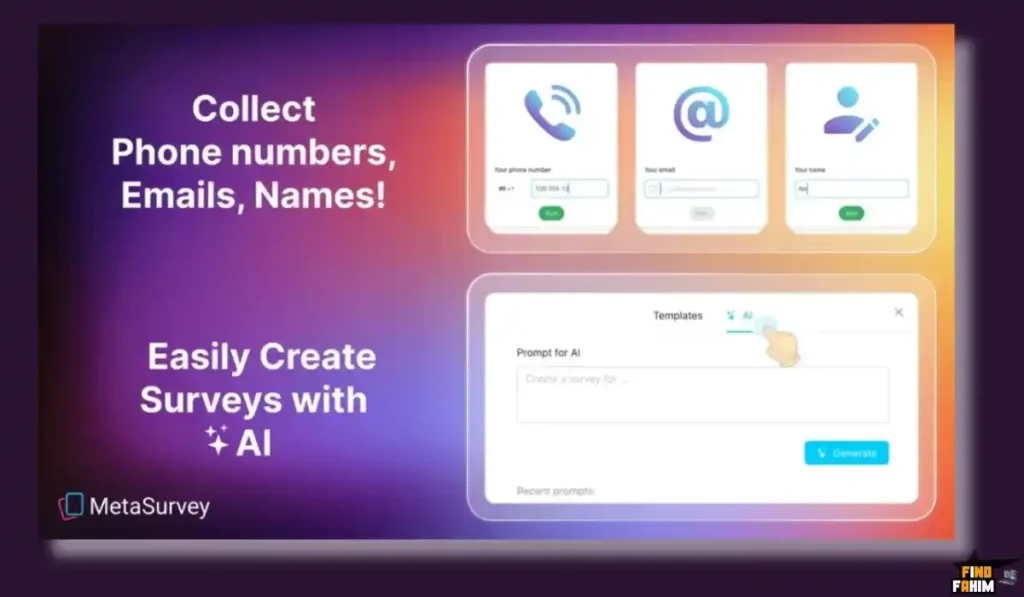
However, it isn’t limited to just swiping. It also supports standard questions like NPS Scores (0-10), Star Ratings, Email Capture, Phone Number, and Long Text Input.
Recently, they added AI Generation. You can type a prompt like “Create a feedback survey for a coffee shop,” and the AI generates the questions, images (from Unsplash), and logic flow for you in seconds.
Quick Look: What’s Inside the Deal?
If you are paying monthly for Typeform or VideoAsk, look at this math.
| Feature | Replaces… | The “Killer” Value | Normal Cost | Deal Status |
| Card Surveys | Typeform | “One Question at a Time” | ~$59/mo | ✅ Included |
| Swipe Logic | Custom App | Gamified Mobile UI | $$$ (Dev) | ✅ Included |
| No Branding | Typeform Pro | White Label Surveys | ~$99/mo | ✅ Included (Plan 2/Plus) |
| AI Builder | ChatGPT | Instant Survey Gen | N/A | ✅ Included |
| Custom Domain | Enterprise Tools | survey.yourbrand.com | ~$200/yr | ✅ Plan 3+ |
| Total Value | Your Engagement | High Completion Rates | ~$800/yr | $78 (Lifetime) |
Why You Need More Than Just “Google Forms”
You might be thinking, “Can’t I just use Google Forms? It’s free.”
Technically, yes. But if you are running a business, “Free” can be expensive in lost leads.
Google Forms looks cheap.
When you send a Google Form to a customer, it screams, “I have zero budget.” It degrades your brand.
MetaSurvey builds Brand Equity.
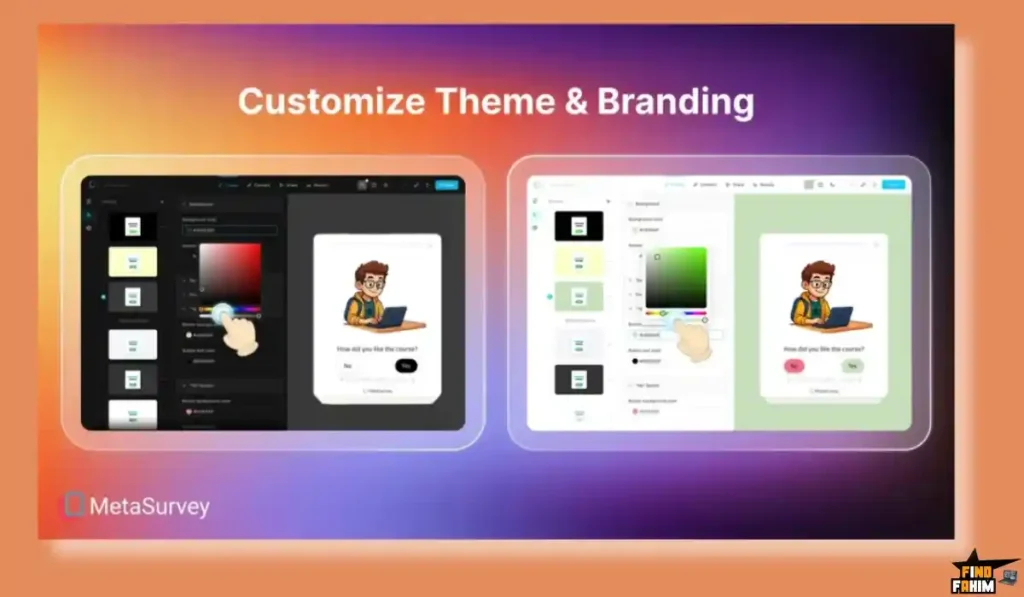
It allows you to use your own colors, logo, and domain. It looks like a custom-coded app.
Furthermore, Google Forms has zero “Swipe” logic. It is just a static page of checkboxes. On mobile, clicking those tiny boxes is frustrating (Fat Finger Syndrome). MetaSurvey’s big swipe cards align with how people actually use their phones.
Why “Gamified Surveys” are Trending in 2026
I noticed this tool trending because attention spans are shorter than ever, and “Zero-Party Data” is the new gold.
1. The “Thumb-Stopping” Effect
On mobile, people are used to swiping. We swipe on Instagram, TikTok, and Dating apps. MetaSurvey taps into this muscle memory. A user is 3x more likely to finish a survey that lets them “Swipe” than one that asks them to “Select an option from the dropdown menu.”
2. The Rise of Zero-Party Data
With cookies dying and privacy laws (GDPR) tightening, brands need to ask customers directly: “What color do you like?” or “What is your skin type?”
MetaSurvey makes asking these questions fun. A skincare brand can show a card with “Oily Skin?” and the user swipes. It’s fast, accurate, and voluntary data that you own forever.
A Look Inside MetaSurvey: Key Features & Benefits
This isn’t just a form; it’s an interaction engine.
1. The “Tinder-Like” Question Type
What it is: A question card with a large image and text.
Why it matters: It forces a binary decision instantly.
- Real-World Scenario: You are a fashion brand. You want to know which colors to manufacture next season. You upload photos of the 5 colors. Users swipe right on the ones they would buy. You get instant “Hot or Not” data without asking them to type a single word.
2. AI Survey Generator (v4 Update)
What it is: A prompt-based builder that uses OpenAI logic.
Why it matters: It kills “Writer’s Block” and speeds up deployment.
- How it works:
- Click “Create with AI.”
- Type: “I run a Yoga Studio. Create a survey to ask members about class times and teacher preferences.”
- MetaSurvey generates 7 questions: “Do you prefer Morning Classes?” (Swipe), “Rate your last instructor” (Star Rating), “What style do you want more of?” (Multiple Choice).
- It auto-fills relevant Unsplash images for each card.
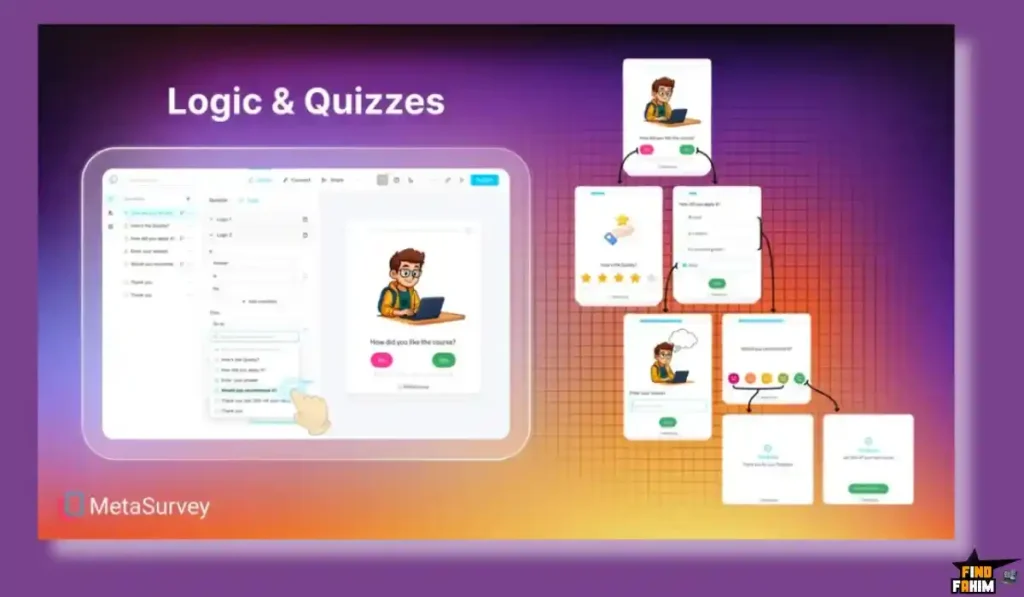
3. Conditional Logic (Branching)
What it is: Branching paths based on user answers.
Why it matters: You don’t ask irrelevant questions, keeping the survey short.
- Real-World Scenario:
- Question 1: “Do you own a dog?”
- If Yes: Go to “What brand of food do you buy?”
- If No: Skip to “Do you own a cat?”
- If No: Jump to “Thanks for visiting.”
- This ensures every user has a personalized path.
4. Custom Domains & Branding (Plan 3+)
What it is: The ability to host the survey on feedback.yourdomain.com instead of metasurvey.com.
Why it matters: Trust and Brand Consistency.
- Real-World Scenario: A customer clicks a link in your email. If it goes to metasurvey.com/xyz, they might hesitate. If it goes to survey.nike.com, they trust it instantly. This typically increases click-through rates by 15-20%.
The Standout Feature: “AppSumo Plus Exclusive”
This is the feature that makes this specific deal a “Must Buy.”
Most AppSumo deals are standard. This one has a Plus Exclusive tier.
- Standard Plan 1: 1,500 responses/mo. Branding ON.
- Plus Plan 1: 3,000 responses/mo. Branding OFF.
Why this is huge: Usually, removing “Powered by [Tool]” branding costs extra (Plan 2). Here, if you are a Plus member, you get it on Tier 1. It basically pays for your Plus membership.
MetaSurvey Pricing & AppSumo Deal Details
This deal is unique because of the Standard vs. Plus split. Pay attention here to maximize your value.
1. The Standard Deal (Regular Users)
| Feature | Plan 1 | Plan 2 | Plan 3 | Plan 4 |
| Price | $78 | $156 | $234 | $312 |
| Monthly Responses | 1,500 | 5,000 | 10,000 | 15,000 |
| Remove Branding | ❌ No | ✅ Yes | ✅ Yes | ✅ Yes |
| Custom Domain | ❌ No | ❌ No | ✅ Yes | ✅ Yes |
2. The Plus Exclusive Deal (BEST VALUE)
If you are an AppSumo Plus member ($99/yr), you get Double Limits and better features.
| Feature | Plus Plan 1 | Plus Plan 2 | Plus Plan 4 |
| Price | $78 | $156 | $312 |
| Monthly Responses | 3,000 (Double!) | 10,000 (Double!) | 30,000 (Double!) |
| Remove Branding | ✅ Yes (Huge Win) | ✅ Yes | ✅ Yes |
| Custom Domain | ❌ No | ❌ No | ✅ Yes |
ROI Anchor Logic: The “Plus” Math
- Typeform charges $59/month for just 1,000 responses.
- MetaSurvey Plus Plan 1 gives you 3,000 responses/month for $78 (One-time).
The Strategy:
If you buy Plus Plan 1, you get 3,000 responses and NO branding.
If you buy Standard Plan 1, you get 1,500 responses and WITH branding.
Verdict: If you are serious about this tool, join AppSumo Plus. The branding removal alone on Tier 1 saves you the cost of the Plus membership.
Check the MetaSurvey Price & Get Lifetime Access
Pros & Cons of This Lifetime Package
I promised you honesty. With a 4.6-star rating, it’s fun, but let’s look at the nuances.
The Pros
- ✅ High Completion Rates: The “Swipe” mechanic genuinely keeps people engaged longer than radio buttons. It feels like play.
- ✅ Mobile Perfection: It looks native on iPhone and Android. No pinching or zooming required.
- ✅ Unsplash Integration: You can pull high-quality stock photos directly inside the app for your question cards without leaving the tab.
- ✅ Plus Perks: The Plus Exclusive version offers insanely high limits (30k responses/mo on Tier 4), which is agency-level volume.
The Cons
- ❌ Custom Domain Paywall: You only get Custom Domains (CNAME) on Plan 3 (Regular) or Plan 4 (Plus). If branding the URL is critical to you, the entry price is higher ($234+).
- ❌ Reporting Depth: The analytics are good (pie charts, CSV export), but they aren’t “Scientific.” You won’t find advanced cross-tabulation or statistical significance tools like in Qualtrics. It’s for quick marketing insights, not academic research.
How Does MetaSurvey Work?
I tested the builder to see how fast it really is.
Step 1: Choose a Template
MetaSurvey has pre-made templates for “Product Feedback,” “NPS,” “Lead Gen,” and “Trivia.” I chose “Product Feedback.”
Step 2: Add Swipe Questions
I uploaded 5 product images. I set the “Swipe Right” label to “Love it” and “Swipe Left” to “Pass.”
Step 3: Add Lead Capture
I added a final card: “Want a 10% coupon? Enter your email.” This is crucial. Because they already invested time swiping, they are highly likely to give their email to get the reward.
Step 4: Publish
I got a QR code and a direct link. I also grabbed the “Embed Code” to put it on my landing page. The whole process took 4 minutes.
Best Use Cases for MetaSurvey
Who actually needs this platform?
Pro Tip: If you want to drive traffic to your new survey, check out my reviews of the best SEO Tools.
1. The “E-commerce Brand” (Product Validation)
You sell sneakers and want to launch a new line.
- The Scenario: You want to know what colors to drop next season.
- The Benefit: You create a Swipe Survey with 20 shoe designs. “Hot or Not?” You send it to your email list. 5,000 people swipe. You get clear data on which designs will sell out, preventing you from manufacturing “duds.”
2. The “Course Creator” (Segmentation Quiz)
You teach Yoga.
- The Scenario: You want to segment your students into “Beginner” vs “Advanced.”
- The Benefit: You create a quiz: “Can you touch your toes?” (Swipe) -> “Do you practice daily?” (Swipe). Based on the result (Logic), you redirect them to the specific course checkout page that matches their level. This increases conversion rates because the offer is personalized.
3. The “Product Manager” (Feature Voting)
You are building a SaaS app.
- The Scenario: You need feedback on a new feature roadmap.
- The Benefit: You embed MetaSurvey inside your app. Users swipe “Yes/No” on feature ideas like “Dark Mode” or “API Access.” It’s fast, fun, and gives you a prioritized roadmap based on real user desire.
Start Creating Swipe Surveys with MetaSurvey Today
MetaSurvey Alternatives
This is the most important part of the review. Is MetaSurvey really a “Typeform Killer,” or is it just a cheap toy?
To give you a fair answer, we must compare it against the Top 5 players in the Survey space.
MetaSurvey vs Typeform
Typeform is the gold standard for “Conversational Forms” (one question at a time).
Where Typeform Wins
Integrations & Polish.
Typeform connects to everything (Salesforce, HubSpot, Slack) natively. Its animations are smoother, and it feels more “Premium.” If you are a Fortune 500 company needing deep CRM data syncing, Typeform is the safer choice.
Where MetaSurvey Wins
Mobile UX & Cost.
Typeform costs $59/month for just 1,000 responses. MetaSurvey gives you lifetime access for $78. Also, Typeform doesn’t have the “Tinder Swipe” mechanic. It requires clicking buttons. On mobile, MetaSurvey’s swipe action is faster and more addictive for consumers.
Verdict
Typeform for corporate enterprise forms.
MetaSurvey for mobile-first consumer feedback.
MetaSurvey vs SurveyMonkey
SurveyMonkey is the old-school giant of data collection.
Where SurveyMonkey Wins
Statistical Analysis.
If you need to calculate “Standard Deviation,” “Regression Analysis,” or do complex cross-tabulation of data, SurveyMonkey is a scientific tool. It is built for academic researchers and university studies.
Where MetaSurvey Wins
Response Rates.
SurveyMonkey forms look like high school exams. They are boring and static. People abandon them halfway through. MetaSurvey looks like a game. The completion rate on a MetaSurvey is typically 2x higher because users enjoy the “Swipe” interaction.
Verdict
SurveyMonkey for academic research.
MetaSurvey for marketing engagement.
MetaSurvey vs VideoAsk
VideoAsk (by Typeform) uses video bubbles to ask questions.
Where VideoAsk Wins
Personal Connection.
Seeing a human face ask “What do you think?” builds massive trust. It is fantastic for high-ticket coaching applications or hiring interviews where you need to see the applicant’s personality.
Where MetaSurvey Wins
Low Friction.
VideoAsk asks users to record a video or audio reply. Most people are shy in a public place, or don’t want to turn on their camera. They will close the tab. MetaSurvey asks for a simple “Swipe.” It requires zero effort from the user, leading to a higher volume of responses.
Verdict
VideoAsk for high-ticket sales qualification.
MetaSurvey for mass volume feedback.
MetaSurvey vs Qualtrics
Qualtrics is an Experience Management (XM) platform for big brands.
Where Qualtrics Wins
Enterprise Power.
Qualtrics can map user sentiment over 5 years across 10 countries. It is a beast. It handles millions of responses securely and complies with every enterprise security standard (SOC2, ISO).
Where MetaSurvey Wins
Simplicity.
Qualtrics costs $1,500+ per year and requires a specialized certification to use properly. MetaSurvey takes 3 minutes to set up. If you just want to know “Do people like our new logo?”, Qualtrics is massive overkill.
Verdict
Qualtrics for Billion-dollar brands.
MetaSurvey for SMBs and Startups.
MetaSurvey vs Google Forms
Google Forms is the free default for everyone.
Where Google Forms Wins
Price.
It is 100% free forever. It exports directly to Google Sheets reliably, and everyone knows how to use it.
Where MetaSurvey Wins
Brand Perception.
Sending a Google Form looks “Cheap.” It screams, “I have zero budget.” Sending a custom-branded MetaSurvey looks professional and custom-coded. Also, Google Forms has zero “Swipe” logic; it is just a static page of checkboxes.
Verdict
Google Forms for internal team potlucks.
MetaSurvey for external customer-facing surveys.
All Competitors Matrix
| Feature | MetaSurvey | Typeform | SurveyMonkey | Qualtrics | VideoAsk | Google Forms |
| Pricing | Lifetime ($78) | $59/mo | $39/mo | $$$ Enterprise | $30/mo | Free |
| Interaction | Swipe Cards | One-at-a-Time | Static List | Static List | Video/Audio | Static List |
| Mobile UX | ✅ Excellent | ✅ Great | ⚠️ Okay | ⚠️ Okay | ✅ Good | ⚠️ Clunky |
| White Label | ✅ Plan 2 / Plus | ✅ $99/mo | ❌ No | ✅ Yes | ✅ $40/mo | ❌ No |
| AI Builder | ✅ Yes | ✅ Yes | ✅ Yes | ✅ Yes | ❌ No | ❌ No |
| Best For… | Engagement | Aesthetics | Research | Enterprise | Coaching | Internal |
Click Here to Get the MetaSurvey Lifetime Deal
Who Should NOT Buy MetaSurvey?
I want to be transparent. This tool is a blast, but it is not for everyone.
- Don’t buy it if you need “Complex Matrix Questions.” If your survey involves a grid where users have to rate 10 different items on a scale of 1-5 in a single table, MetaSurvey can’t do that. It is designed for a “One Card, One Question” focus.
- Don’t buy it if you are a “Data Scientist.” If you need to export SPSS files or do regression analysis inside the tool, stick to SurveyMonkey or Qualtrics. MetaSurvey is for Marketing Insights, not Academic Research.
Is This Lifetime Deal a Smart Business Investment?
Let’s do the financial math for Plan 1 ($78).
Scenario: You are a Shopify store owner running a post-purchase survey.
- Cost of Typeform (1 Year): $59 x 12 = $708.
- Cost of MetaSurvey: $78 (One-time).
The ROI Math:
- You save $630 in the first year alone.
- Over 5 years, you save $3,400+.
- The break-even point is just 1.5 months of a Typeform subscription.
Even if you only use it for one major campaign (e.g., “Black Friday Preference Survey”), it pays for itself by collecting leads that Typeform would have charged you $60 just to collect.
For AppSumo Plus Members:
The deal is even sweeter. By getting the “Plus Exclusive” Plan 1, you get 3,000 responses instead of 1,500. That lowers your “Cost Per Response” to fractions of a penny.
How to Redeem the MetaSurvey Deal
- Buy: Purchase the code on AppSumo. (Choose the “Plus Exclusive” tile if you are a member.
- Redeem: You will get a redemption code in your AppSumo library.
- Register: Create your account at getmetasurvey.com.
- Activate: Go to Settings -> Billing and paste your AppSumo code.
- Verify: Check your limits. If you bought the Plus version, ensure it says “3,000 responses/month.”
Final Verdict: Is This Cost-Friendly Deal Worth It?
After testing the AI generator and the mobile swipe speed on an iPhone, my final verdict is a solid 4.6-Star YES.
It is the best tool for Engagement.
- It kills the Boring Form.
- It kills the Monthly Subscription.
- It captures More Data because people actually finish the survey.
If you sell to consumers (B2C) on mobile devices, this tool is mandatory. It speaks their language (Swiping) and respects their time.
Secure Your MetaSurvey License Now
Note: The “Plus Exclusive” double limits are a rare perk. If you have Plus, do not miss this.
About the Author: Why I Care About This So Much
I used to get 2% completion rates on my email surveys. I switched to a “Swipe” format, and it jumped to 12%.
MetaSurvey is the cheapest way to get that result without coding a custom app. I write these reviews so you can stop shouting into the void and start hearing back from your customers.
If you want to see the other tools I use to save money, check out my Full AppSumo Deal Reviews Page.
FAQ: Your MetaSurvey Questions, Answered
MetaSurvey is a mobile-first swipe-style survey builder that helps businesses collect feedback, leads, and customer insights through interactive card-based questions.
Yes, although MetaSurvey is designed mobile-first, it works beautifully on desktop where users can answer using a mouse or keyboard arrows for a modern experience.
Branding removal is available on Plan 2 and above. Plan 1 includes a small Powered by MetaSurvey badge unless you purchase the AppSumo Plus exclusive version where branding removal is included.
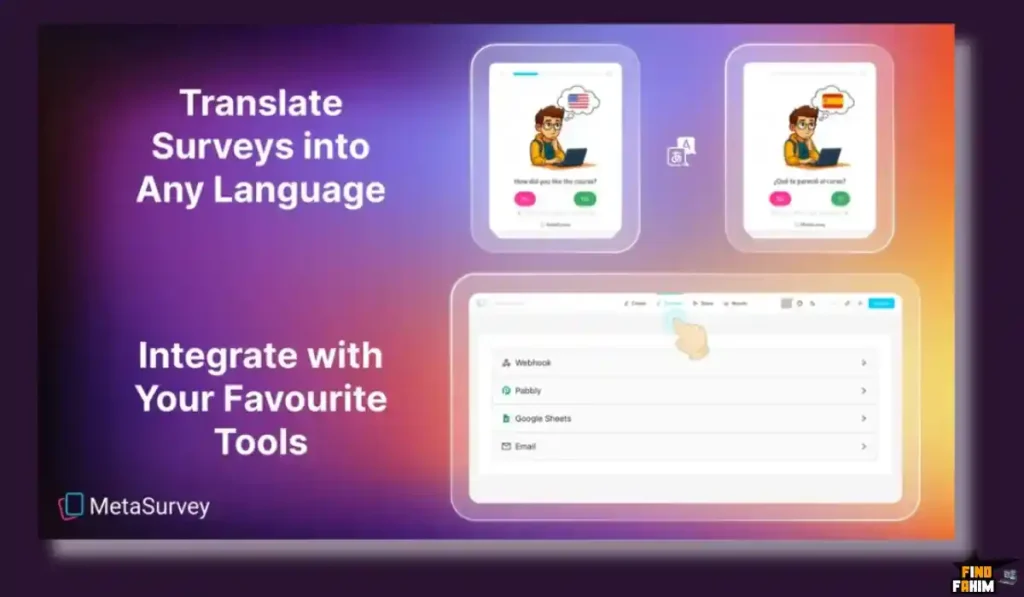
MetaSurvey supports Webhooks and Pabbly Connect, which allows integration with Zapier so you can send leads to Mailchimp, HubSpot, or Google Sheets automatically.
The AI Builder uses OpenAI logic to generate relevant survey questions based on your topic, helping you create professional surveys quickly without manual setup.
Yes, custom domain mapping is available on Plan 3 and above, allowing you to host surveys on a branded subdomain like feedback.yourdomain.com.
If you exceed your monthly response limit, the survey will pause new submissions until the next monthly reset, but most small businesses rarely hit the limit.
Yes, you can upload your own images or search Unsplash directly inside the editor without leaving the platform.
Yes, you can manually customize button text and survey content to create surveys in any language.
Yes, there is a dedicated Email Input card that validates email formats to help you capture accurate leads.
Yes, you can add a mandatory Terms and Privacy consent checkbox to ensure compliance with GDPR requirements.
Yes, surveys can be embedded as popups, widgets, or iframes on platforms like WordPress or Shopify.
Yes, you can create conditional rules so that certain answers automatically skip users to different questions.
Yes, all survey responses can be exported as CSV or Excel files for deeper reporting and analysis.
Yes, MetaSurvey is designed for interactive lead capture, product validation, and customer feedback collection with higher engagement than traditional forms. What is MetaSurvey?
Does MetaSurvey work on desktop devices?
Can I remove the MetaSurvey branding?
Does MetaSurvey integrate with Zapier?
How good is the AI Builder in MetaSurvey?
Can I use a custom domain with MetaSurvey?
What happens if I exceed the monthly response limit?
Can I upload images to survey cards?
Does MetaSurvey support multiple languages?
Can I collect emails with MetaSurvey?
Is MetaSurvey GDPR compliant?
Can I embed MetaSurvey on my website?
Does MetaSurvey support skip logic?
Can I export MetaSurvey response data?
Is MetaSurvey suitable for lead generation and customer feedback?

Hi, I’m Fahim — a SaaS tools reviewer and digital marketing expert with hands-on experience helping businesses grow using the right software. I research, test, and personally use a wide range of AI, business, productivity, marketing, and email tools for my agency, clients, and projects. I create honest, in-depth reviews and guides to help entrepreneurs, freelancers, startups, and digital agencies choose the best tools to save time, boost results, and scale smarter. If I recommend it, I’ve used it — and I only share what truly works.