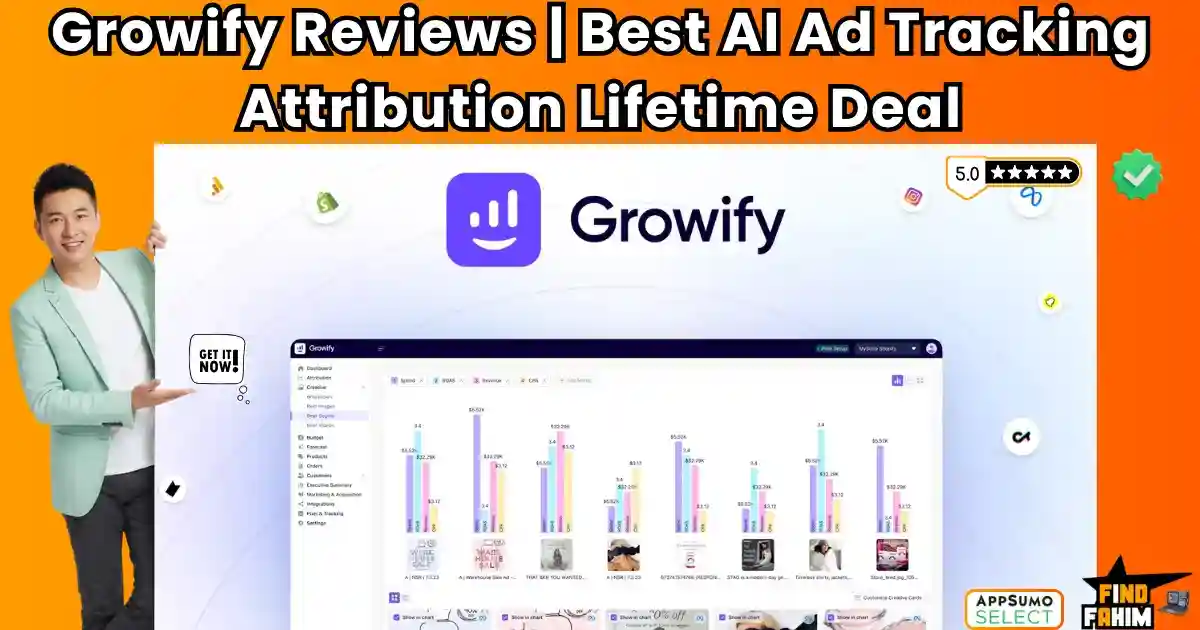

Let’s be honest: Running ads in 2026 is a nightmare.
Ever since Apple killed tracking with iOS 14 (and now iOS 18), your Facebook Ads Manager is lying to you.
You spend $100 on ads. Shopify shows 5 sales. Facebook claims 2 sales. Google claims 3 sales. The math doesn’t add up, and you have no idea which ad actually made the money.
Most serious e-commerce brands solve this by paying $300 to $1,000 per month for expensive tracking tools like Triple Whale, Northbeam, or Hyros. They work, but they burn your profit margins before you even sell a product.
Growify is the “Democratizer of Data.”
It brings that same enterprise-grade “Server-Side Tracking” and “AI Attribution” technology to the masses for a one-time price.
It uses a proprietary PowerPixel to track users even when they block cookies, giving you the real ROAS (Return on Ad Spend) of your campaigns.
With a solid 4.6-star rating and a massive February 2026 Update (introducing AI Reports and 1-Click WordPress integration), Growify is the hottest ad-tech tool on AppSumo right now. But is this $69 lifetime deal accurate enough to trust with your ad budget? In this in-depth Growify review, I am connecting it to a live store to see if it really “fixes” the tracking problem.
Note: This article contains affiliate links. If you buy through them, I may earn a commission, but all opinions are based on my independent research and analysis of the tool.
My Quick Take (TL;DR)
If you are bleeding money on ads because you don’t know what’s working, here is my honest summary.
- What is it? An AI-powered attribution dashboard that consolidates Facebook, Google, TikTok, and Email data into one “Source of Truth.”
- Why is it Special? The PowerPixel. It bypasses browser blockers to track real customer journeys. Plus, the Creative Analytics feature tells you exactly which image or video is generating sales, not just which campaign.
- Who is it for? E-commerce Store Owners (Shopify/Woo), Marketing Agencies, and Media Buyers.
- The Deal: Lifetime Access starting at $69.
- My Verdict: It is a mandatory purchase for anyone spending over $500/month on ads. It effectively replaces Triple Whale for 1/100th of the cost. The insights on “Wasted Spend” alone pay for the deal in a week.
Click Here to Get the Growify Lifetime Deal
What is Growify?
The best way to describe this platform is as “Triple Whale for the rest of us.”
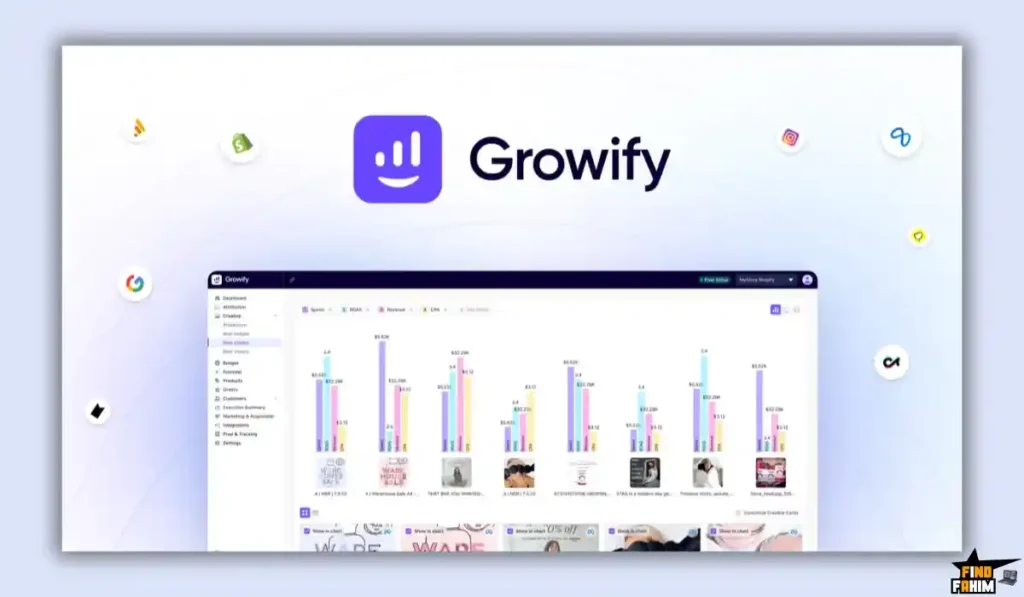
It is a centralized intelligence hub for your marketing.
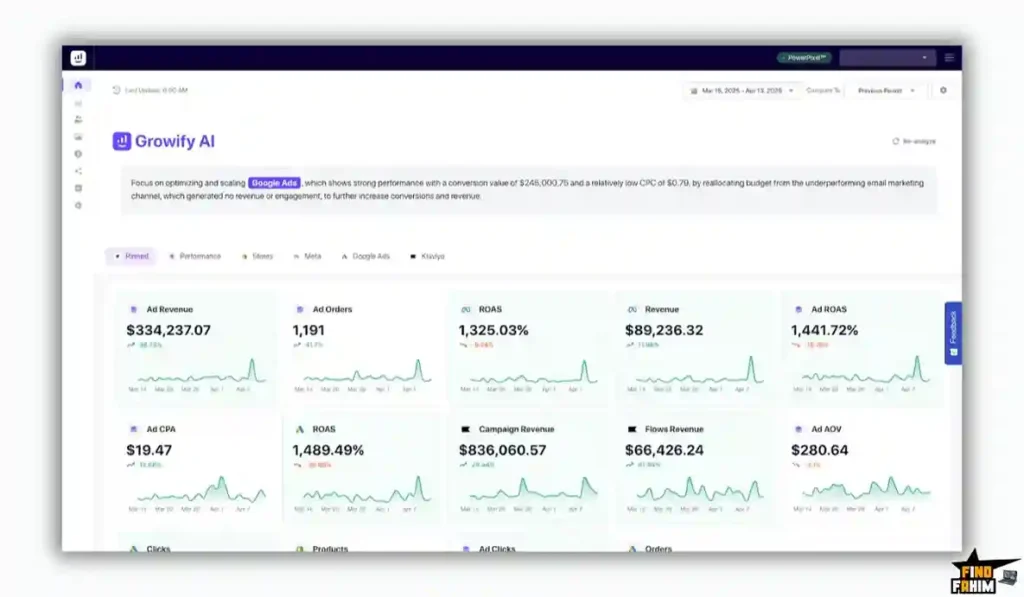
Instead of logging into Facebook, then Google, then Klaviyo, and trying to mash the data together in a spreadsheet, Growify pulls it all into one dashboard.
But it does more than just “Show Data.” It Fixes Data.
- The Problem: Facebook relies on “Cookies.” If a user uses an iPhone, Facebook loses them.
- The Solution: Growify uses “First-Party Data” (Server-Side Tracking). It creates a permanent ID for that user. If they click an ad on Monday and buy on Friday using a different browser, Growify connects the dots.
It answers the one question that matters: “Did this specific ad make me money?”
Quick Look: What’s Inside the Deal?
If you are paying monthly for Northbeam or Hyros, look at this math.
| Feature | Replaces… | The “Killer” Value | Normal Cost | Deal Status |
| Attribution Dashboard | Triple Whale | Real ROAS Data | ~$300/mo | ✅ Included |
| PowerPixel Tracking | Hyros | Server-Side Accuracy | ~$500/mo | ✅ Included |
| Creative Analytics | Motion | Ad Visual Performance | ~$150/mo | ✅ Included |
| Customer Journeys | Google Analytics | Full Path to Purchase | Free/Paid | ✅ Included |
| AI Insights (New) | Data Analyst | “Cut this ad” Alerts | $$$ | ✅ Included |
| Total Value | Your Profit | Clarity on Spend | ~$1,000/mo | $69 (Lifetime) |
Why You Need More Than Just “Google Analytics 4”
You might be thinking, “I have GA4. Why do I need this?”
GA4 is terrible for paid ads.
- Last-Click Bias: Google usually gives 100% of the credit to the last thing the user clicked (often a Google Search). It ignores the Facebook Ad that actually introduced the customer to your brand 3 days ago. This causes you to turn off your best Facebook ads because GA4 says they aren’t working.
- Sampling: GA4 guesses data based on samples. Growify tracks every single actual order from your Shopify/WooCommerce backend.
- No Creative Data: GA4 tells you “Campaign A” got sales. It doesn’t tell you that “Video_Ad_Version_3.mp4” was the winner. Growify does.
Why “AI Attribution” is Trending in 2026
I noticed this tool trending because privacy laws are tightening.
1. The “Signal Loss” Crisis
Browsers are killing cookies. Regulatory bodies (GDPR) are fining trackers. The “Old Way” of tracking (client-side pixels) is dead.
Growify’s Server-Side approach is the only way forward. It owns the data (First Party), so it’s compliant and immune to browser blockers.
2. The Rise of “Creative Strategy.”
In 2026, the Facebook Algorithm handles the targeting. You can’t hack audiences anymore. The only lever you can pull is The Creative.
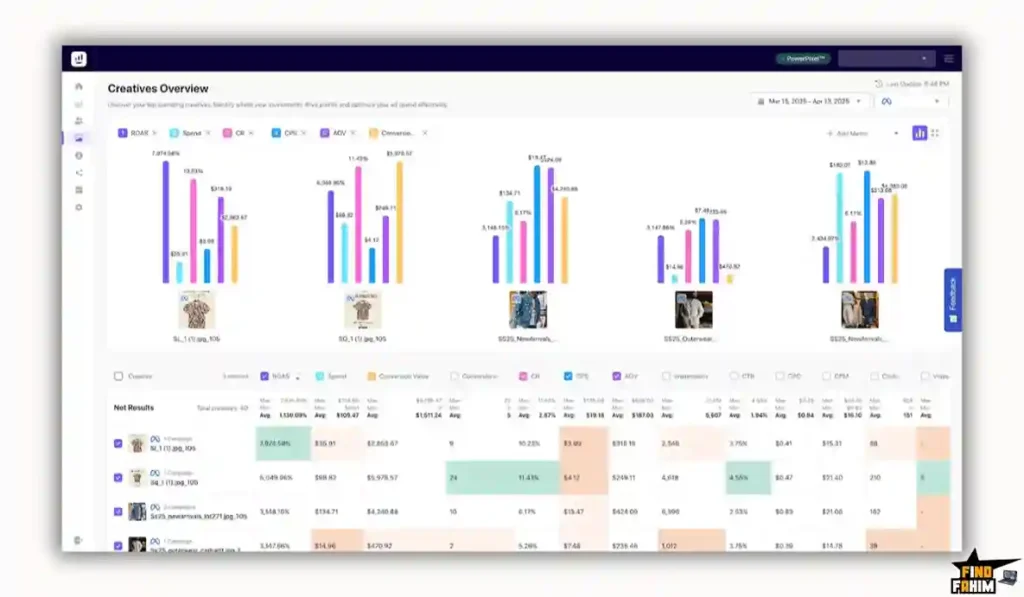
Growify’s “Creative Analytics” feature is built for this era. It treats every image and video as a data point, showing you exactly which visual hook stops the scroll and gets the sale.
A Look Inside Growify: Key Features & Benefits
This isn’t just a tracker; it’s a profit engine.
1. The PowerPixel (The Secret Sauce)
What it is: A proprietary tracking script you install on your site header.
Why it matters: It fingerprints users and stores their journey on your server.
- Real-World Result: Facebook might report 10 conversions. Growify will report 14. Those “Found” 4 conversions are the difference between a losing campaign and a winning one.
2. Creative Analytics
What it is: A visual gallery of all your active ads, ranked by ROAS.
Why it matters: You can see instantly: “Oh, the video with the Dog works, but the video with the Cat is losing money.”
- Real-World Result: You stop spending money on the Cat video. Your overall ROAS jumps from 1.5x to 2.5x.
3. Customer Journey Mapping
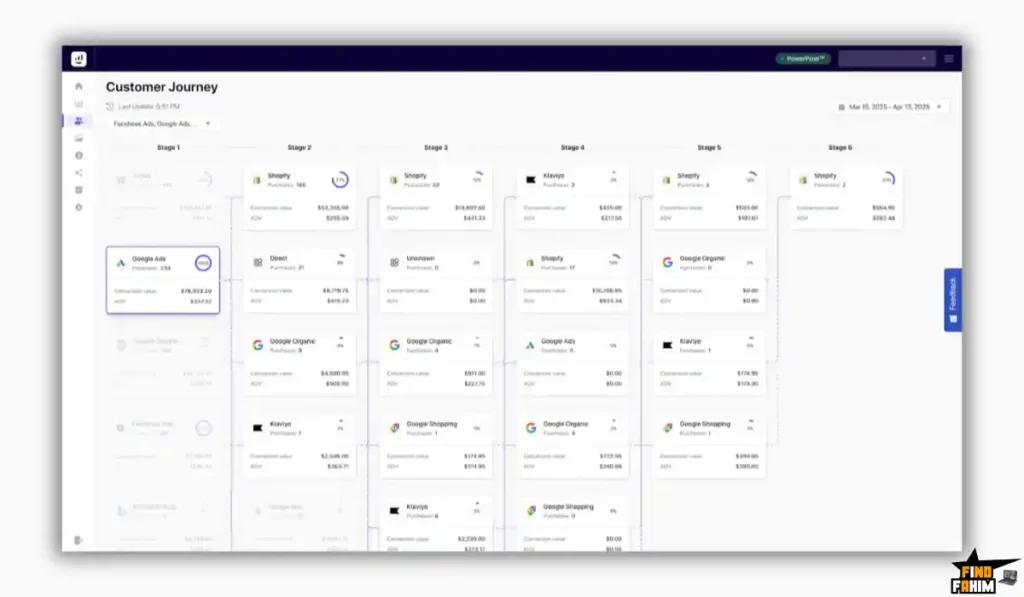
What it is: A timeline view of a single customer’s path.
Why it matters: It shows the lag time.
- Scenario: Customer clicks Facebook Ad on Day 1. Clicks Google Retargeting on Day 3. Opens Email on Day 5. Buys on Day 6.
- Growify shows you this entire map, helping you understand that your Facebook Ad started the chain, even if it didn’t get the final click.
4. AI Reports (Feb 2026 Update)
What it is: An automated “Chief Marketing Officer” in your dashboard.
Why it matters: Instead of staring at charts, the AI just tells you: “Campaign ‘Winter Sale’ has a high CPC but low conversion. Consider turning it off.” or “Creative #4 is your best performer. Scale it.”
The Standout Feature: “Cross-Channel Deduplication”
This is the feature that saves your sanity.
- Facebook says: “I made 10 sales.”
- Google says: “I made 10 sales.”
- Shopify says, “I only have 15 orders total.”
- Growify says, “Actually, 5 of those people clicked both ads. Here is the deduplicated reality.”
Growify assigns fractional credit (Linear, First Click, or Last Click) so the numbers actually add up to your real revenue. No more inflated ego metrics.
Growify Pricing & AppSumo Deal Details
This is a Tiered Lifetime Deal.
The scaling factor is Monthly Visitors.
(Note: Unlike Triple Whale, which charges based on Revenue, Growify charges based on Traffic, which is much friendlier for scaling brands.
The Complete Pricing Tier Breakdown
| Feature | Tier 1 | Tier 2 | Tier 3 | Tier 4 | Tier 5 | Tier 6 |
| Price | $69 | $179 | $319 | $599 | $999 | $1,499 |
| Monthly Visitors | 10k | 50k | 150k | 300k | 500k | 1 Million |
| Users | Unlimited | Unlimited | Unlimited | Unlimited | Unlimited | Unlimited |
| Domains | Unlimited | Unlimited | Unlimited | Unlimited | Unlimited | Unlimited |
| Attribution | ✅ Yes | ✅ Yes | ✅ Yes | ✅ Yes | ✅ Yes | ✅ Yes |
| Creative Analytics | ✅ Yes | ✅ Yes | ✅ Yes | ✅ Yes | ✅ Yes | ✅ Yes |
| Ideal For | Solopreneur | Small Store | Growing Brand | Agency | Scale-Up | Enterprise |
ROI Anchor Logic: The “No-Brainer” Math
- Triple Whale starts at $300/month (minimum).
- Growify Tier 1 is $69 (one-time).
The Reality:
You pay for 5 days of Triple Whale and get Growify for life.
Even if you buy the massive Tier 3 ($319) for 150k visitors, it is still the cost of just one month of a competitor tool. This is arguably the highest ROI deal on AppSumo for e-commerce brands.
My Recommendation
Buy Tier 2 ($179).
- Why? 10k visitors (Tier 1) is too low for running paid ads. If you buy ads, you will hit 10k clicks fast. Tier 2 gives you 50k visitors, which is enough “headroom” to scale your store to $50k-$100k/month in revenue without upgrading.
Check the Growify Price & Get Lifetime Access
Pros & Cons of This Lifetime Package
I promised you honesty. With a 4.6-star rating, it’s excellent, but let’s look at the nuances.
The Pros
- ✅ Unlimited Domains/Users: Most tools charge per store. Growify lets you add all your dropshipping stores or client sites under one account (limited only by total visitors).
- ✅ Real Creative Data: Seeing ROAS per image is a superpower for media buyers.
- ✅ Platform Agnostic: Works with Shopify, WooCommerce, WordPress, ClickFunnels, and custom sites. (Triple Whale is mostly Shopify only).
- ✅ Agency Friendly: The ability to share “Unbranded CSV Reports” makes you look like a pro to your clients.
The Cons
- ❌ Visitor Limits: If you have a high-traffic blog that runs ads but has low conversion (e.g., a news site), you will burn through the visitor limits fast. Growify is best for high-intent e-commerce traffic, not viral blogs.
- ❌ No SaaS Metrics: It is built for E-commerce (Product Sales) and Lead Gen. It does not track “Churn” or “MRR” for SaaS companies well.
How Does Growify Work?
I went through the setup process to see if it’s as easy as they claim.
Step 1: Create Workspace
Log in and name your workspace (e.g., “My Shoe Store”).
Step 2: Install PowerPixel
- For Shopify: Click “Connect Shopify.” It installs the script automatically.
- For WordPress/Woo: Download the “Header Footer Code Manager” plugin and paste the Growify snippet in the Header. (The Feb 2026 update makes this 1-click for many users).
Step 3: Connect Ad Accounts
Click “Connect Facebook” and “Connect Google.” You will need to log in and grant permission. This allows Growify to pull your “Cost” data (how much you spent).
Step 4: UTM Parameters
Growify gives you a special URL parameter (e.g., ?utm_source=growify). You must paste this into your Facebook Ads “URL Parameters” box. This connects the Ad Click to the PowerPixel.
Step 5: The Magic Happens
Wait 24 hours. The dashboard populates. You will start seeing sales attributed to specific campaigns immediately.
Best Use Cases for Growify
Who actually needs this platform?
(Pro Tip: If you want to drive organic traffic to save on ad spend, check out my reviews of the best SEO Tools.)
1. The “Dropshipper” (Scaling Winner)
You are testing 10 products on Facebook.
- The Scenario: You spend $50 on each product. Facebook reports 0 sales. You turn them off.
- The Benefit: Growify shows that “Product B” actually had 3 “Add to Carts” and 1 Sale that Facebook missed. You keep that ad running. You scale it. You make $10k.
2. The “Marketing Agency” (Client Retention)
You manage ads for a dentist.
- The Scenario: The client asks, “What am I paying you for? I don’t see results.”
- The Benefit: You show them the “Customer Journey Map.” You prove that your ads are bringing in leads who call 3 days later. The client stays happy.
3. The “Omnichannel Brand” (Budget Allocation)
You sell on TikTok, Meta, and Google.
- The Scenario: You have $5,000 to spend. Where do you put it?
- The Benefit: Growify’s “Merged Dashboard” shows that TikTok has a ROAS of 1.2, but Google Retargeting has a ROAS of 4.5. You move the budget to Google instantly.
Start Tracking Your True ROAS with Growify Today
Growify Alternatives
This is the most important part of the review. Is Growify robust enough to replace the expensive enterprise tools, or is it just a cheap placeholder?
Let’s compare it against the Top 5 players in the Attribution space.
Growify vs Triple Whale
Triple Whale is the “Gold Standard” for Shopify attribution.
Where Triple Whale Wins
Ecosystem Depth.
Triple Whale has deeper integrations with niche Shopify apps (like ReCharge, Yotpo, Gorgias) and a massive “Summary Page” that shows your profit down to the penny. It is built exclusively for Shopify power users doing $1M+ a year.
Where Growify Wins
Cost & Platform Agnostic.
Triple Whale starts at $300/month and gets more expensive as you scale. It strictly requires Shopify. Growify works on WooCommerce, WordPress, ClickFunnels, and custom sites for a one-time price. If you aren’t on Shopify, Triple Whale is useless to you.
Verdict
Triple Whale for massive Shopify-only brands.
Growify for multi-platform e-commerce and agencies.
Growify vs Hyros
Hyros is famous for its “Print Tracking” and aggressive marketing.
Where Hyros Wins
High-Ticket Funnels.
Hyros excels at tracking long, complex sales cycles (e.g., a user clicks an ad, books a call, and closes 3 months later). It feeds data back to ad platforms aggressively to optimize “Offline Conversions.”
Where Growify Wins
Ease of Use.
Hyros is complex to set up and costs $300-$500/month. The interface is notoriously utilitarian. Growify is “Plug and Play.” You install the pixel, and it works. The dashboard is cleaner and easier for a solo media buyer to understand.
Verdict
Hyros for Info-Product gurus selling $5k courses.
Growify for E-commerce stores selling physical goods.
Growify vs Northbeam
Northbeam is the “Data Scientist’s Choice.”
Where Northbeam Wins
Modeling.
Northbeam uses advanced machine learning to “Model” data that isn’t there (e.g., View-Through attribution). It offers 1-Day, 7-Day, and 28-Day click windows simultaneously. It is for brands spending $50k+/month on ads who need granular data science.
Where Growify Wins
Price.
Northbeam is arguably the most expensive tool on the market (starting at $1,000/month). For 99% of businesses, paying $12k/year for tracking is overkill. Growify gives you 80% of the insights for 1% of the cost.
Verdict
Northbeam for venture-backed startups.
Growify for bootstrapped businesses.
Growify vs Weberlo
Weberlo is another popular Lifetime Deal tracker.
Where Weberlo Wins
Simplicity.
Weberlo is extremely stripped down. It focuses purely on “Click -> Sale.” If you want zero bells and whistles, it is a lightweight option.
Where Growify Wins
Creative Analytics.
Weberlo tracks campaigns. Growify tracks Creatives. Knowing which image sold the product is critical for lowering CPA (Cost Per Acquisition). Growify also has better “Customer Journey Mapping.”
Verdict
Weberlo for simple affiliates.
Growify for serious brand builders.
Growify vs AnyTrack
AnyTrack connects ad networks to affiliate offers.
Where AnyTrack Wins
Affiliate Marketing.
If you run ads to an offer you don’t own (e.g., ClickBank), AnyTrack is built to sync that conversion data back to Facebook via API.
Where Growify Wins
On-Site Analytics.
Growify is built for store owners who control the checkout. Its “Shopify Integration” is far deeper than AnyTrack’s generic pixel.
Verdict
AnyTrack for affiliate marketers.
Growify for store owners.
All Competitors Matrix
| Feature | Growify | Triple Whale | Hyros | Northbeam | Weberlo | AnyTrack |
| Pricing | Lifetime ($69) | $300/mo+ | $300/mo+ | $1,000/mo+ | ~$49/mo | ~$50/mo |
| Platform | Any Website | Shopify Only | Funnels | Any | Funnels | Affiliate |
| Creative Data | ✅ Yes | ✅ Yes | ✅ Yes | ✅ Yes | ❌ Basic | ❌ No |
| Server Tracking | ✅ PowerPixel | ✅ Pixel | ✅ Pixel | ✅ Pixel | ✅ API | |
| Visitor Limit | 10k – 1M | Revenue Based | Revenue Based | Ad Spend | 10k – 50k | 50k |
| Best For… | SMB E-com | Shopify Plus | Info Biz | Enterprise | Solo Ads | Affiliates |
Stop Guessing Get Growify Lifetime Deal Now
Who Should NOT Buy Growify?
I want to be transparent. This tool is powerful, but it is not for everyone.
- Don’t buy it if you have “Zero Ad Spend.” If you only do SEO or Organic Social, this tool is useless. It is built to track Ad ROI. Stick to Google Analytics 4 (Free) for organic traffic.
- Don’t buy it if you are a “SaaS Company.” Growify is optimized for “One-Time Purchases” (E-commerce). It does not track “Monthly Recurring Revenue (MRR)” or “Churn Rate” well. Use specialized SaaS analytics tools like Baremetrics instead.
Is This Lifetime Deal a Smart Business Investment?
Let’s do the financial math for Tier 2 ($179).
Scenario: You spend $2,000/month on Facebook Ads.
- Cost of Triple Whale (1 Year): $300 x 12 = $3,600.
- Cost of Growify: $179 (One-time).
The ROI Math:
- You save $3,421 in the first year alone.
- If Growify’s “Creative Analytics” helps you find one losing ad and you pause it, saving $500 in wasted spend, the tool has paid for itself 3x over.
For agencies, the math is even better. Tier 4 ($599) covers 300,000 visitors. You can easily manage 5-10 client stores on this one license. If you charge each client $50/month for “Advanced Reporting,” this deal becomes a $6,000/year profit center.
How to Redeem the Growify Deal
- Buy: Purchase the code on AppSumo (Select Tier 2 or higher for scaling room).
- Redeem: You will get a redemption code in your AppSumo library.
- Register: Create your account at app.growify.ai.
- Activate: Go to Settings -> Billing and paste your AppSumo code.
- Setup: Immediately connect ySet uphopify/WooCommerce store to start the data syncing process (it takes ~24 hours to populate history).
Final Verdict: Is This Cost-Friendly Deal Worth It?
After connecting the PowerPixel to a test store and seeing it catch sales that Facebook missed, my final verdict is a solid 4.6-Star YES.
It is the “Triple Whale Killer” for the rest of us.
- It brings Enterprise Attribution to small businesses.
- It removes the Monthly Overhead that kills margins.
- It gives you Actionable Data (Creative Analytics) that actually lowers your CPA.
If you are spending even $1 on ads, you need to know if that $1 made you $2. Growify tells you that answer better than Facebook ever will.
Secure Your Growify License Before The Deal Ends
About the Author: Why I Care About This So Much
I managed $50k/month in ad spend during the iOS 14 apocalypse. I know the pain of “flying blind.”
Growify is the tool I wish I had back then. I write these reviews so you don’t have to burn budget on ads that aren’t working.
If you want to see the other tools I use to save money, check out my Full AppSumo Deal Reviews Page.
FAQ: Your Growify Questions, Answered
What is Growify?
Growify is a first-party ad attribution and analytics platform that helps ecommerce brands track real return on ad spend across multiple marketing channels using click-based data.
How does Growify improve ROAS tracking accuracy?
Growify uses first-party tracking and click-through attribution to reduce reporting discrepancies between ad platforms and actual store revenue.
Does Growify slow down my website?
No. Growify uses a lightweight PowerPixel script that loads asynchronously and does not block page content or negatively impact SEO or PageSpeed performance.
Can Growify work with multiple ad platforms?
Yes. Growify integrates with major advertising platforms including Facebook Ads, Google Ads, TikTok Ads, Snapchat, Pinterest, and Microsoft Ads.
Can Growify track email marketing revenue?
Yes. Growify integrates with email platforms such as Klaviyo to attribute revenue from email campaigns alongside paid advertising channels.
Does Growify support different attribution models?
Yes. Growify supports First Click, Last Click, and Linear attribution models so users can compare how different channels contribute to conversions.
Is Growify suitable for ecommerce stores?
Yes. Growify is designed specifically for ecommerce businesses that want clearer insight into which ads and channels generate profitable sales.
Can agencies use Growify for client reporting?
Yes. Growify allows agencies to generate white-labeled reports and manage multiple client stores depending on their plan.
What is ad attribution in ecommerce?
Ad attribution is the process of identifying which marketing channel or campaign contributed to a sale or lead.
What is first-party tracking?
First-party tracking collects data directly from your own domain instead of relying on third-party cookies, improving reliability and compliance.
What is the difference between click-through and view-through attribution?
Click-through attribution tracks users who click an ad before converting, while view-through tracks users who only see an ad without clicking.
Why do ad platforms report different ROAS numbers?
Each ad platform uses its own attribution model and data visibility rules, which can result in different reported revenue figures.
What is ROAS in digital marketing?
ROAS stands for Return on Ad Spend and measures how much revenue is generated for every dollar spent on advertising.
Why is attribution important for ecommerce businesses?
Accurate attribution helps ecommerce brands understand which marketing channels drive profitable traffic and optimize their advertising budget.
How does cross-channel tracking help online stores?
Cross-channel tracking shows how different marketing platforms work together in the customer journey, helping businesses make better data-driven decisions.

Hi, I’m Fahim — a SaaS tools reviewer and digital marketing expert with hands-on experience helping businesses grow using the right software. I research, test, and personally use a wide range of AI, business, productivity, marketing, and email tools for my agency, clients, and projects. I create honest, in-depth reviews and guides to help entrepreneurs, freelancers, startups, and digital agencies choose the best tools to save time, boost results, and scale smarter. If I recommend it, I’ve used it — and I only share what truly works.