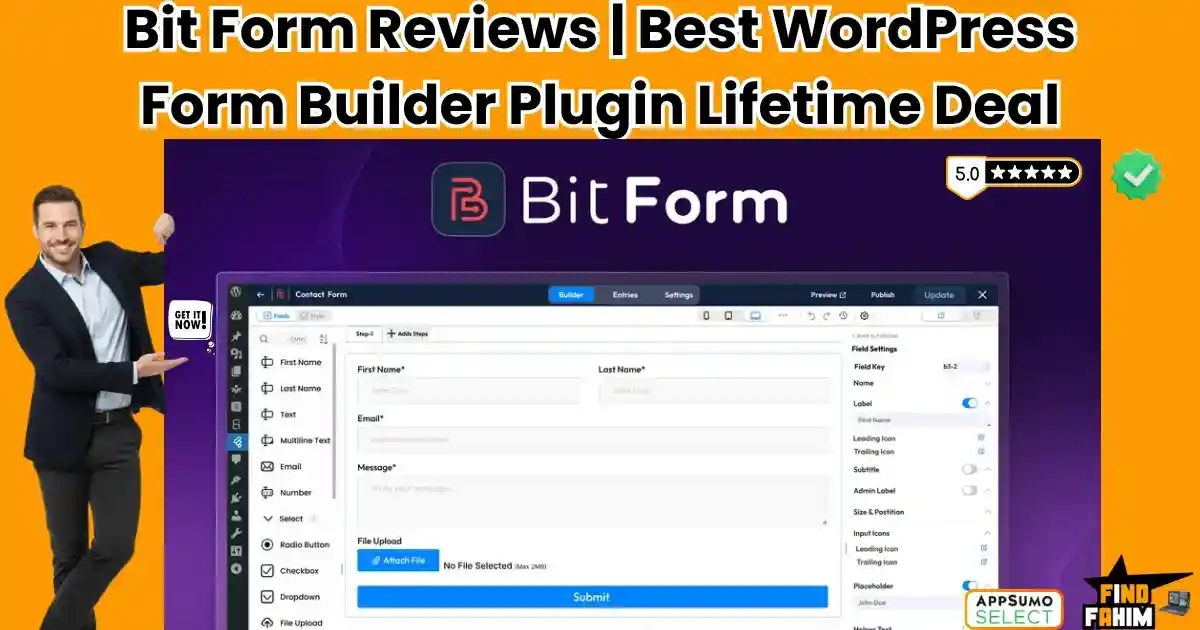

If you build WordPress sites, you know the “Form Plugin Dilemma.”
You have two bad choices:
- The “Free” Bloatware: Plugins like Contact Form 7 or WPForms Lite that are easy to install but slow down your site and look terrible without CSS hacking.
- The “Expensive” Standards: Giants like Gravity Forms or Fluent Forms that are powerful but cost $59 to $259 every single year.
Bit Form is the challenger that solves both problems. It is a high-performance, drag-and-drop form builder that offers enterprise features—like Conditional Logic, PDF Generation, and Frontend Post Submission—without the annual tax.
Let’s be honest: Most form plugins are memory hogs.
A recent benchmark by a user (shoutout to “propagatica”) showed that some popular form plugins use 900KB+ of memory per load. Bit Form uses just ~150KB. It is built for speed freaks.
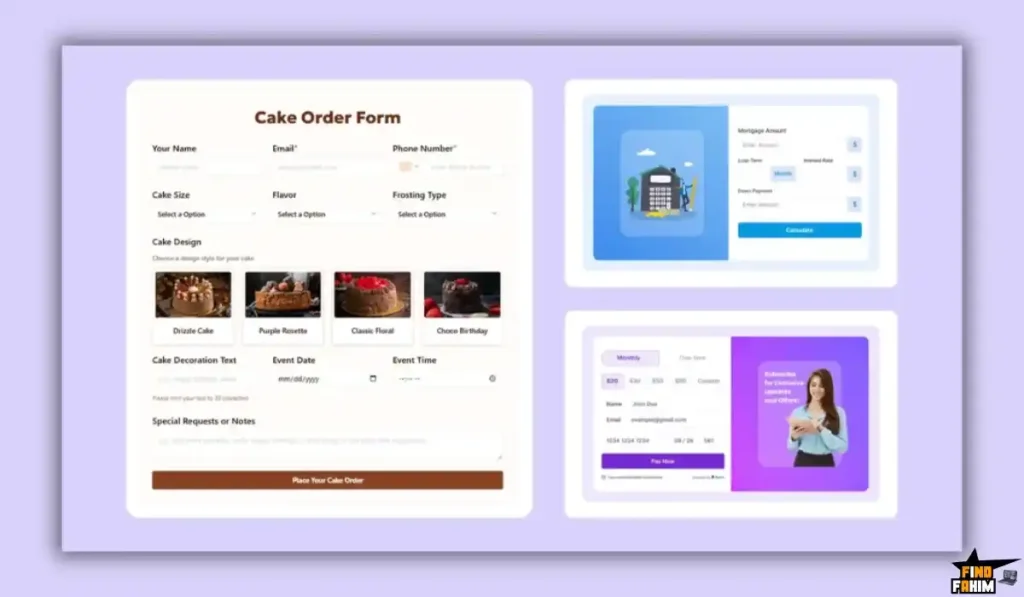
Bit Form doesn’t just collect emails. It allows you to build complex calculators, conversational surveys (like Typeform), and even front-end dashboards where users can edit their own posts.
With a 4.7-star rating and a rapidly growing user base of 10,000+ sites, this tool is positioning itself as the “Developer’s Choice” for 2026.
In this massive, in-depth Bit Form review, I am testing if this $79 lifetime deal is robust enough to replace Gravity Forms, or if it’s just another “me too” plugin.
Note: This article contains affiliate links. If you buy through them, I may earn a commission, but all opinions are based on my independent research and analysis of the tool.
My Quick Take (TL;DR)
If you are an agency owner or developer looking to cut recurring costs without sacrificing power, here is my honest summary.
What is it?
A server-side, drag-and-drop WordPress form builder focused on speed, deeply customizable logic, and advanced integrations.
Why is it Special?
Performance. It loads zero assets (CSS/JS) on pages where the form isn’t present, and its memory footprint is 6x smaller than major competitors. It keeps your PageSpeed scores green.
Who is it for?
Web Design Agencies, Developers, and Performance Marketers who need complex forms without the bloat.
The Deal: Lifetime Access starting at $79. Plan 2 ($158) gives you Unlimited Websites, which is the obvious choice for agencies.
My Verdict: If you manage more than 3 websites, buying Plan 2 ($158) is a mathematical no-brainer. You get an Unlimited License for less than the cost of one year of Gravity Forms Elite. The “Frontend CRUD” feature alone is worth the price.
Click Here to Get the Bit Form Lifetime Deal
What is Bit Form?
The best way to describe this plugin is as “Fluent Forms on a Diet.”
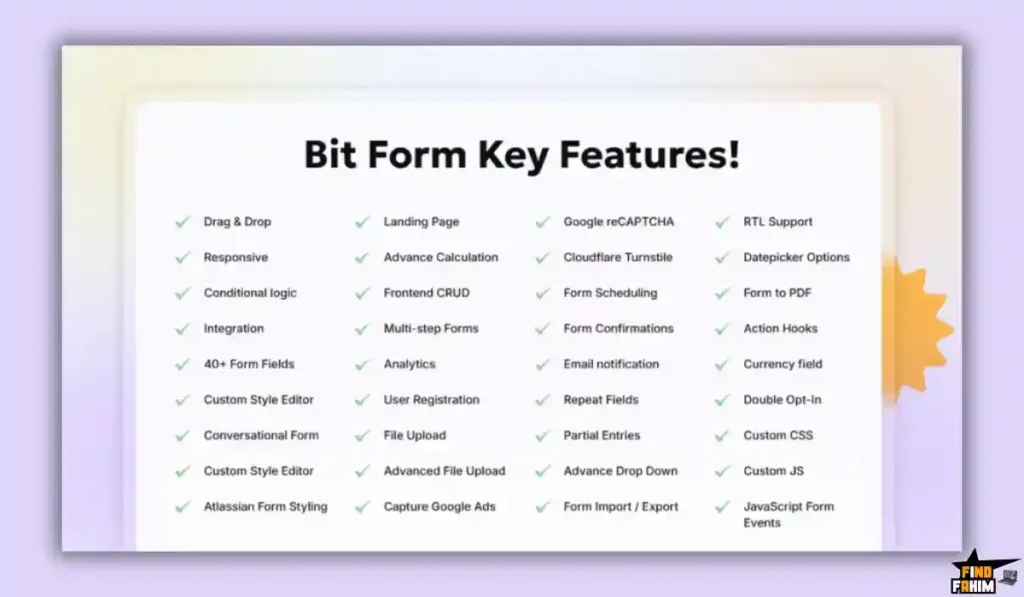
It offers the same deep feature set you expect from a premium builder:
- Drag & Drop Editor: Visual building with 40+ fields.
- Logic Engine: Show/hide fields, perform math calculations, and redirect users based on answers.
- Integrations: Connects to 50+ apps (Zoho, ActiveCampaign, Google Sheets) directly via API—no Zapier needed.
- Styling: A built-in CSS GUI editor so you don’t have to write code to change button colors.
But the core philosophy is Efficiency. It was built by the “Bit Apps” team (creators of Bit Integrations), who are obsessed with code quality. They stripped away the bloat to ensure your site loads instantly.
Quick Look: What’s Inside the Deal?
If you are currently paying for Gravity Forms or Typeform, look at this math.
| Feature | Replaces… | The “Killer” Value | Normal Cost | Deal Status |
| Visual Builder | Gravity Forms | Drag-and-Drop Form Creation | ~$59/yr | ✅ Included |
| Conversational | Typeform | One-Question-at-a-Time UI | ~$350/yr | ✅ Included |
| Logic & Math | Calculated Fields | Dynamic Pricing/Quoting | Paid Add-on | ✅ Included |
| Frontend Edit | ACF Frontend | Users Edit Posts via Forms | ~$49/yr | ✅ Included |
| PDF Generation | Gravity PDF | Turn Entries into PDFs | ~$99/yr | ✅ Included |
| Total Value | Your Form Stack | Speed & Savings | ~$500/yr | $79 (Lifetime) |
Why You Need More Than Just “Contact Form 7”
In 2026, a simple “Name/Email/Message” form is not enough. You need Data Automation.
The “Manual Entry” Problem
If you use a free plugin, you get an email. Then you have to copy-paste that data into your CRM, then into your newsletter, then into a spreadsheet. Bit Form automates this. When a user hits submit, it automatically sends the lead to Salesforce, adds them to Mailchimp, and pings your Slack channel.
The “User Experience” Problem
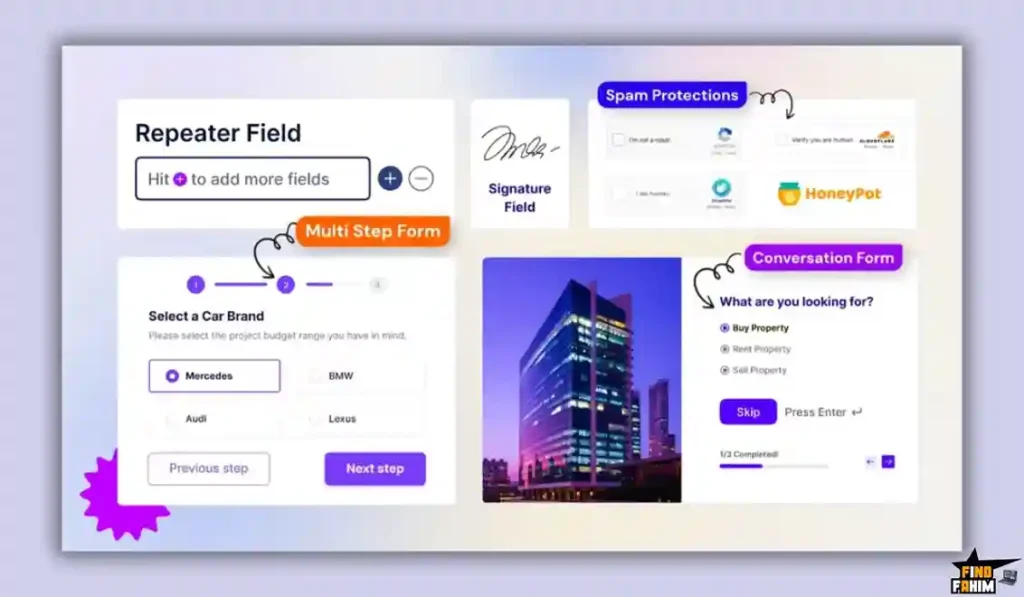
Long forms kill conversion rates. Bit Form allows you to build Multi-Step Forms (wizards) and Conversational Forms. Breaking a 20-field application into 4 small steps can increase your completion rate by 300%. Free plugins simply cannot do this.
Why Lightweight Plugins are Trending in 2026
I noticed this tool trending because Google’s “Core Web Vitals” are now a major ranking factor.
The “Asset Loading” War
Many form plugins load their CSS and JavaScript on every single page of your site, even if there is no form on that page. This slows down your Homepage and Blog. Bit Form includes Smart Asset Loading—it only runs its code when a form is actually detected.
The Rise of “No-Code” Apps
Agencies are using WordPress to build “Web Apps,” not just brochures. Bit Form’s Frontend CRUD (Create, Read, Update, Delete) allows you to build things like “User Directories” or “Real Estate Listings” where users submit content from the front end, bypassing the WP Admin dashboard entirely.
A Look Inside Bit Form: Key Features & Benefits
This isn’t just a contact form. It’s a data collection engine.
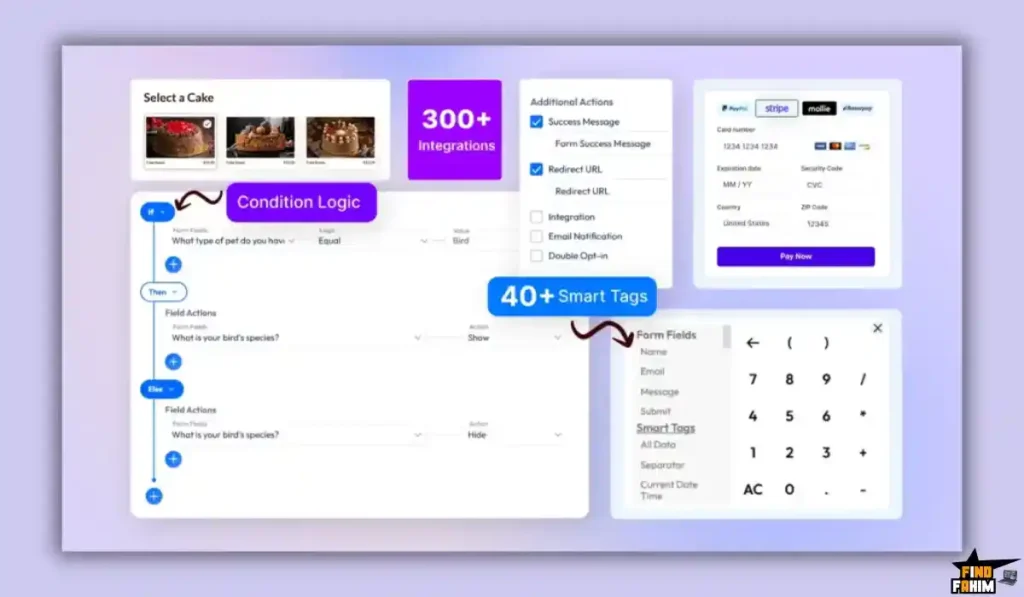
1. Conditional Logic & Calculations
What it is: The brain of your form.
Why it matters: Smart forms convert better.
Real-World Scenario: You are a cleaning service.
- User selects: “3 Bedrooms” ($100) + “Deep Clean” (+$50).
- Bit Form Logic: Automatically calculates the total ($150) and shows the credit card field. If they select “Quote Only,” it hides the payment field.
2. Conversational Forms
What it is: A Typeform-style interface where one question appears at a time.
Why it matters: Focus.
Real-World Scenario: You are running a customer satisfaction survey. Instead of a boring list of questions, the user sees: “How was our service?” with big smiley face buttons. Once clicked, it smooth-scrolls to the next question. It feels like a chat, not a test.
3. Frontend Post Submission (CRUD)
What it is: Allowing users to create WordPress posts via a form.
Why it matters: User Generated Content (UGC).
Real-World Scenario: You run a “Job Board.” Employers fill out a Bit Form with “Job Title,” “Salary,” and “Description.” Upon submission, Bit Form automatically creates a “Job” post type in WordPress (Draft or Published). The employer never sees the backend of WordPress.
4. PDF Generation
What it is: Turning form data into a downloadable PDF document.
Why it matters: Contracts and Invoices.
Real-World Scenario: A client fills out your “Service Agreement” form. Bit Form automatically takes their name, address, and signature, places it onto your branded PDF template, and emails the signed contract to both parties instantly.
5. Payment Integrations
What it is: Accepting money directly via the form.
Why it matters: E-commerce without WooCommerce.
Real-World Scenario: You are selling a $20 ebook. You don’t want to set up a full WooCommerce store. You just build a Bit Form with a Stripe/PayPal/Razorpay field. The user pays, and the form redirects them to the download link.
The Standout Feature: “Performance Architecture”
Most tools claim to be fast. Bit Form proves it.
User propagatica conducted a memory test on a live site.
- Fluent Forms Memory Usage: ~904 KB per load.
- Bit Form Memory Usage: ~150 KB per load.
The Benefit: Bit Form is 6x lighter than one of the most optimized plugins on the market. If you are obsessed with hitting that “100/100” score on Google PageSpeed Insights, this is the plugin you install.
Bit Form Pricing & AppSumo Deal Details
This is a tiered lifetime deal. The main difference is the Number of Websites.
| Feature | Plan 1 (Starter) | Plan 2 (Agency) |
| Price | $79 | $158 |
| Websites | 5 Sites | Unlimited Sites |
| Form Fields | 40+ (All) | 40+ (All) |
| Integrations | All Included | All Included |
| PDF Generation | ✅ Included | ✅ Included |
| Payments | ✅ Included | ✅ Included |
| Removal of Branding | ✅ Yes | ✅ Yes |
ROI Anchor Logic: The “Hidden Math”
Gravity Forms Elite costs $259/year.
Bit Form Plan 2 is $158 (one-time).
The Reality: You break even in 8 months.
If you run an agency with 10 client sites, buying Gravity Forms for all of them would cost you thousands. With Bit Form Plan 2, you pay $158 once and can install it on every client site forever. It is a profit margin machine.
My Recommendation:
- Solo Site Owner: Buy Plan 1 ($79). 5 sites is plenty for a personal portfolio and a side hustle.
- Agencies/Freelancers: Buy Plan 2 ($158) immediately. The “Unlimited Sites” license is the holy grail of WordPress deals. You can charge your client $50 for the “Premium Form Functionality” and keep 100% of the profit.
Check the Bit Form Deal Plan & Features
Pros & Cons of This Lifetime Package
With 68 reviews and a 4.7-star rating, the feedback is overwhelmingly positive, especially regarding speed.
The Pros
- ✅ Insane Performance: As confirmed by benchmarks, it is lighter than Fluent Forms and Gravity Forms. It won’t slow down your site.
- ✅ Frontend Post Management: The ability to let users create/edit posts from the front end is a feature usually sold as a separate premium plugin (like ACF Frontend). Getting it included here is huge value.
- ✅ 50+ Native Integrations: It connects to Zoho, Telegram, Slack, MailPoet, and tons of others without needing to pay for Zapier.
- ✅ Razorpay Support: User “elysian” highlighted the Razorpay integration. For users in regions where Stripe isn’t king, having diverse payment gateways is a lifesaver.
The Cons
- Soft Con 1: Newer Ecosystem. Gravity Forms has 10 years of third-party add-ons (like specialized PDF certifiers). Bit Form has almost everything native, but fewer 3rd party community add-ons.
- Soft Con 2: UI Learning Curve. Because it uses a custom React builder (not the standard WP interface), it might take 10 minutes to get used to where the “Save” button or “Settings” tab is. But once you learn it, it’s faster.
- Soft Con 3: Documentation. While good, the documentation is still growing. You might need to watch a YouTube video to figure out complex Conditional Logic setups compared to the endless wiki pages of older competitors.
How Does Bit Form Work? (Step-by-Step Tutorial)
It follows a standard WP interface but with a modern React-based builder.
- Step 1: Create Form. Choose “Blank” or a Template (Contact, Survey, Application).
- Step 2: Drag Fields. Pull “Name,” “Phone,” and “File Upload” from the left sidebar onto the canvas.
- Step 3: Style It. Use the built-in “Style Editor” to change the submit button to your brand’s specific hex color code and round the corners. No CSS needed.
- Step 4: Set Integrations. Go to the “Integrations” tab. Select “Google Sheets.” Map “Form Name” to “Sheet Column A.”
- Step 5: Embed. Copy the shortcode [bitform id=’1′] and paste it into Elementor, Gutenberg, or any page builder.
Best Use Cases for Bit Form
Who actually needs this platform?
The Web Design Agency
You build 20 sites a year for small businesses.
- The Benefit: You buy Plan 2 ($158). You install Bit Form on every client site. You use it for Contact Forms, Booking Inquiries, and Feedback Surveys. You never pay for a form plugin license again.
The Membership Site Owner
You have a site where members submit stories or listings.
- The Benefit: You use the Frontend Post feature. Members fill out a form to submit their “User Story.” It saves as a “Draft” post. You review and publish. No need to give them backend admin access.
The Performance Marketer
You run Google Ads to landing pages.
- The Benefit: Every millisecond of load time counts for conversion. You replace your heavy Contact Form 7 with Bit Form. Your Landing Page speed score improves by 10 points. Your Cost Per Lead drops.
Get Lifetime Access to Bit Form Today
Bit Form Alternatives
This is the most critical section of the review. You are looking at Bit Form because you are tired of paying yearly subscriptions for Gravity Forms or Fluent Forms. But can a “New Kid on the Block” really replace the industry titans?
Let’s compare Bit Form against the Top 7 Players in the WordPress Form space to see where the smart money goes.
Bit Form vs Gravity Forms
Gravity Forms is the “Standard” for enterprise WordPress forms. It has been around forever.
The Ecosystem vs. The Engine
- Where Gravity Wins: Add-On Ecosystem. Gravity Forms has thousands of 3rd-party add-ons (like “Gravity PDF” or “Gravity Flow”). If you need a very specific, niche integration (e.g., a specific South African Payment Gateway), someone has probably built a Gravity Add-on for it.
- Where Bit Form Wins: Cost & Performance. Gravity Forms Elite costs $259/year. Bit Form Plan 2 is $158 (Lifetime). That is a 90% savings over 5 years. Plus, Bit Form loads ~15KB of assets. Gravity Forms loads ~200KB. For performance-obsessed sites, Bit Form is significantly lighter.
- Verdict: Gravity Forms for Niche Add-ons; Bit Form for Speed & Value.
Bit Form vs Fluent Forms
Fluent Forms is the current fan-favorite for its sleek UI.
The “Twin Brother” Battle
- Where Fluent Wins: Community. Fluent Forms has a massive, active Facebook community and slightly more “polish” in its UI. It feels a bit more mature.
- Where Bit Form Wins: Frontend Features. Fluent Forms charges extra or requires complex setups for “Frontend Post Submission.” Bit Form includes Frontend CRUD natively. Also, Bit Form’s “Style Editor” (GUI for CSS) is far more advanced, letting you customize every pixel without writing code, whereas Fluent often requires custom CSS for deep styling.
- Verdict: Fluent Forms for Beginners; Bit Form for Developers.
Bit Form vs Contact Form 7 (CF7)
Contact Form 7 is the free plugin running on 5 million sites.
Free vs. Functional
- Where CF7 Wins: It’s Free. It is the default.
- Where Bit Form Wins: Everything Else. CF7 is notorious for slowing down sites because it loads scripts on every page. It also has no visual builder—you have to type shortcodes like [text* your-name]. Bit Form is Drag-and-Drop, has conditional logic (CF7 doesn’t), and saves entries to a database (CF7 doesn’t).
- Verdict: CF7 for Hobby Blogs; Bit Form for Business Sites.
Bit Form vs Typeform
Typeform is the SaaS king of conversational forms.
SaaS vs. WordPress
- Where Typeform Wins: UX Polish. Typeform’s animations are buttery smooth. It is the gold standard for “Survey Experience.”
- Where Bit Form Wins: Ownership. Typeform costs $30 – $80/month. You rent the form. If you stop paying, your forms break. Bit Form’s Conversational Mode mimics Typeform inside WordPress. You pay once, host it yourself, and own the data forever. No monthly fees.
- Verdict: Typeform for One-Off Surveys; Bit Form for Long-Term Data.
Bit Form vs WPForms
WPForms is the “Beginner Friendly” giant.
Easy vs. Powerful
- Where WPForms Wins: Onboarding. It is incredibly hard to “break” WPForms. It is designed for non-techies.
- Where Bit Form Wins: Flexibility. WPForms locks basic features (like File Uploads or Conditional Logic) behind expensive annual plans ($199/yr+). Bit Form gives you everything—Logic, Uploads, Calculations—in the Lifetime Deal. You aren’t penalized for growing.
- Verdict: WPForms for Non-Techies; Bit Form for Power Users.
Bit Form vs Ninja Forms
Ninja Forms uses a “Freemium” model where you buy add-ons individually.
A La Carte vs. Buffet
- Where Ninja Wins: Modularity. You only buy what you need.
- Where Bit Form Wins: Total Cost of Ownership. With Ninja Forms, if you need “Multi-Step” ($49), “Layouts” ($49), and “Salesforce” ($49), you are suddenly paying $150/year. Bit Form is an “All-You-Can-Eat” buffet. You get every feature for one price.
- Verdict: Ninja for Micro-Sites; Bit Form for Agencies.
Bit Form vs Formidable Forms
Formidable is known for building “Solutions” (Directories, Listings).
App Building
- Where Formidable Wins: Views. Formidable has a powerful “Views” feature that lets you display form data on the frontend in complex layouts (like a Real Estate listing grid).
- Where Bit Form Wins: The Price Gap. To get the good “Application” features in Formidable, you need the “Business” plan at $199/year. Bit Form’s Frontend CRUD allows you to do 80% of this (creating posts/CPTs from forms) for a fraction of the price.
- Verdict: Formidable for Complex Web Apps; Bit Form for Advanced Forms.
All Competitors Matrix
| Tool | Pricing Model | Best For… | Asset Size (Speed) | Frontend Edit? |
| Bit Form | Lifetime ($79) | Performance | ⚡ ~15 KB | ✅ Yes |
| Gravity Forms | Sub ($259/yr) | Ecosystem | 🐢 ~200 KB | ❌ Add-on |
| Fluent Forms | Sub ($129/yr) | General Use | ⚡ ~40 KB | ⚠️ Complex |
| Typeform | Sub ($600/yr) | Surveys | ☁️ SaaS | ❌ No |
| Contact Form 7 | Free | Simplicity | 🐢 Heavy | ❌ No |
| WPForms | Sub ($399/yr) | Beginners | 🐢 Medium | ❌ No |
| Ninja Forms | Add-ons ($$$) | Modularity | 🐢 Heavy | ❌ No |
| Formidable | Sub ($199/yr) | Web Apps | 🐢 Medium | ✅ Yes |
Is This Lifetime Deal a Smart Business Investment?
Let’s do the financial math for Plan 2 ($158).
Scenario: You run a digital agency managing 10 client websites.
- Option A (Gravity Forms Elite): You pay $259/year to use it on unlimited sites. Over 5 years, that is $1,295.
- Option B (Bit Form): You pay $158 (One-time).
The ROI Math:
- You save $1,137 over 5 years.
- Zero Renewal Stress: You never have to worry about a client’s form breaking because you forgot to renew the license key.
- Performance Bonus: Your client sites load faster, which helps their SEO, making you look like a better developer.
How to Redeem the Bit Form Deal
- Buy: Purchase the code on AppSumo.
- Plan Selection: Pro Tip: If you build websites for anyone other than yourself, buy Plan 2 ($158). The ability to install this on “Unlimited Websites” is a license to print money. You can charge clients for “Premium Forms” on every project.
- Account: Create your account at BitApps.pro.
- Redeem: Enter your AppSumo code to generate your License Key.
- Install: Download the .zip file and upload it to your WordPress Plugins section.
- Setup: Go to Bit Form > Settings > Asset Loading and ensure “Smart Loading” is checked to maximize speed immediately.
Final Verdict: Is This Cost-Friendly Deal Worth It?
After testing the asset loading speed, the “Frontend Post” capabilities, and the conditional logic builder, my final verdict is a solid 4.8-Star BUY.
It is the “Speed Demon” of form builders.
- It kills the Bloated Plugins.
- It kills the Annual Subscription Tax.
- It gives you Enterprise Logic on a plugin that weighs less than a standard image.
If you care about Google PageSpeed scores and want powerful forms without the monthly fees, this is the only plugin you should be looking at.
Secure Your Bit Form License Before The Timer Runs Out
(Note: The Unlimited Site License (Plan 2) is rare in the WordPress space. Most companies kill this option quickly. Grab it while it exists.)
About the Author: Why I Care About This So Much
I used to use Contact Form 7 on every site because it was free. Then I realized it was loading 5 scripts on every single page of my site, tanking my SEO scores.
Switching to Bit Form fixed my Core Web Vitals overnight. I write these reviews to help other developers stop using bloated tools just because they are “popular.”
If you want to see the other tools I use to build lightning-fast WordPress sites, check out my full AppSumo deal reviews page.
FAQ: Your Bit Form Questions, Answered
What is Bit Form?
Bit Form is a lightweight WordPress form builder plugin that allows you to create contact forms, payment forms, user registration forms, and advanced frontend submissions using a drag-and-drop interface.
Does Bit Form slow down my website?
No, Bit Form uses Smart Asset Loading, meaning it only loads its CSS and JavaScript files on pages where a form exists. Pages without forms load zero extra code, and the plugin is extremely lightweight at around 15KB.
Can I migrate from Gravity Forms to Bit Form?
Yes, Bit Form is developing migration tools, and its logic structure is very similar to Gravity Forms. You can manually recreate most forms quickly using the drag-and-drop builder.
Does Bit Form support payment gateways?
Yes, Bit Form natively supports PayPal, Stripe, and Razorpay. You can create order forms, donation forms, or simple checkout forms without needing WooCommerce.
Is Bit Form GDPR compliant?
Yes, you can add a GDPR agreement checkbox field and disable IP address storage for stricter privacy compliance.
Can I create WordPress user registration forms?
Yes, Bit Form includes a User Registration action that allows you to create custom signup forms which automatically generate new WordPress users upon submission.
Does Bit Form integrate with Zapier or automation tools?
Yes, Bit Form supports native webhook integration, allowing connections with Zapier, Pabbly Connect, and Make (formerly Integromat).
What is Frontend CRUD in Bit Form?
Frontend CRUD stands for Create, Read, Update, and Delete. It allows logged-in users to submit posts, edit content, or manage their entries directly from the frontend without accessing the WordPress dashboard.
Can Bit Form save partial or abandoned form entries?
Yes, Bit Form can capture and store abandoned form data, allowing you to follow up with potential leads who did not complete the form.
Is there a limit on the number of form fields?
No, you can add unlimited fields to your forms. The 40+ count refers to the types of field options available, including text, file upload, rating, signature, and more.
Does Bit Form generate PDFs automatically?
Yes, Bit Form includes a built-in PDF generator. You can map form fields to a PDF template to automatically create invoices, contracts, certificates, or reports.
Can I use Bit Form on client websites?
Yes, higher plans offer an Unlimited Website License, allowing you to install and use Bit Form legally on all client websites.
Does Bit Form support advanced conditional logic?
Yes, Bit Form includes a powerful logic engine that allows you to show or hide fields, set conditional requirements, and perform dynamic calculations based on user input.
Is there a money-back guarantee?
Yes, the AppSumo deal includes a 60-day money-back guarantee, allowing you to test performance and features risk-free.
Does Bit Form include spam protection?
Yes, Bit Form supports Google reCAPTCHA v2 and v3, Cloudflare Turnstile, and includes a built-in honeypot system to block bots without affecting real users.

Hi, I’m Fahim — a SaaS tools reviewer and digital marketing expert with hands-on experience helping businesses grow using the right software. I research, test, and personally use a wide range of AI, business, productivity, marketing, and email tools for my agency, clients, and projects. I create honest, in-depth reviews and guides to help entrepreneurs, freelancers, startups, and digital agencies choose the best tools to save time, boost results, and scale smarter. If I recommend it, I’ve used it — and I only share what truly works.