
If you sell options for income (the “Theta Gang” strategy), you know the daily struggle.
You wake up at 8:30 AM. You open your broker (Thinkorswim, Fidelity, or Robinhood). You start clicking through your watchlist.
- “Apple’s volatility is too low today.”
- “Tesla’s premiums are good, but earnings are tomorrow (too risky).”
- “AMD looks okay, but the bid-ask spread is huge.”
By the time you find a decent trade, the market has already opened and moved against you.
The “Wheel Strategy” (selling Cash Secured Puts until assigned, then selling Covered Calls) is one of the most consistent ways to generate wealth. But finding the trade is a manual, spreadsheet-heavy nightmare.
The Wheel Screener is the automation tool you have been waiting for.
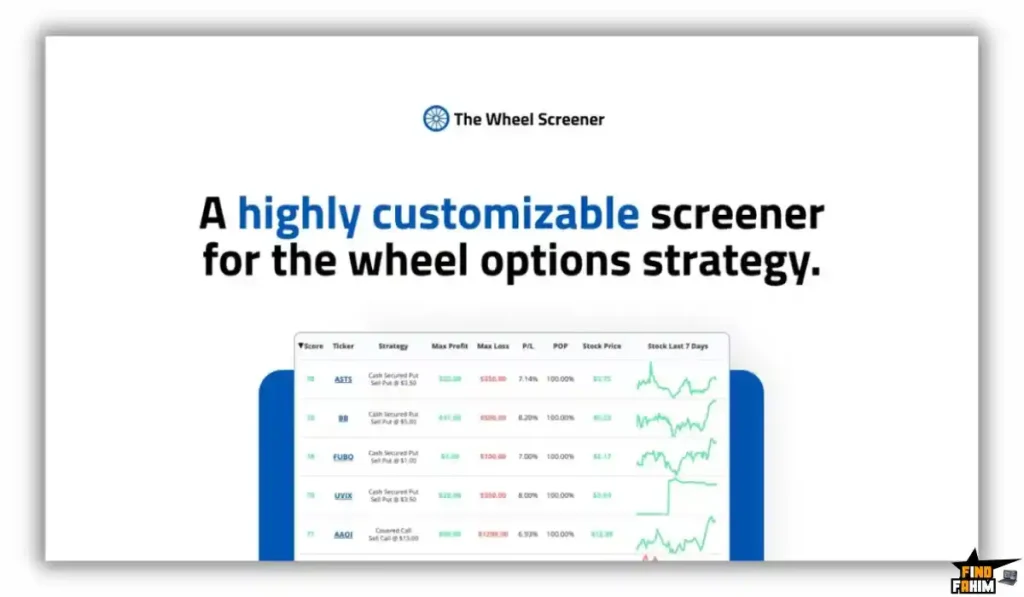
It acts as a specialized search engine for options income. Instead of looking at one stock at a time, it scans 35,000+ contracts across 10,000 tickers instantly. It filters out the garbage (low volume, low premium) and ranks every single trade based on a proprietary Risk/Reward Score.
But can a $49 tool really replace a $100/month subscription to platforms like MarketChameleon or OptionStrat? Is the data fast enough?
In this in-depth Wheel Screener review, I am going to backtest a strategy, analyze the “Magnificent 7” dashboard, and determine if this is the tool that finally retires your Excel spreadsheet.
Note: This article contains affiliate links. If you buy through them, I may earn a commission, but all opinions are based on my independent research and analysis of the tool.
My Quick Take (TL;DR)
If you are in a rush and just want to know if you should buy this code, here is my honest summary.
- What is it? A specialized stock and options scanner built specifically for “The Wheel Strategy” (Selling Puts and Calls).
- Why is it Special? The “Credit Efficiency” Score. It doesn’t just show you high premiums (which are often risky); it ranks trades by return on capital adjusted for risk.
- Who is it for? Options Traders, Income Investors, and “Theta Gang” members who want to automate their daily research.
- The Deal: Lifetime access starting at $49.
- My Verdict: Tier 1 ($49) is a no-brainer. If you sell just one contract a month, this tool pays for itself. It saves you 30-60 minutes of “chain surfing” every morning. It is a niche tool, but for that niche, it is gold.
Get The Wheel Screener Lifetime Deal on AppSumo
What is The Wheel Screener?
The Wheel Screener is a “Sniper Rifle” for Premium Sellers.
Most financial tools (like Finviz or TradingView) are built for stock traders. They show you moving averages and RSI.
Most broker tools (like Thinkorswim) are built for execution. They show you the option chain, but they don’t tell you which strike price is the “smartest” math.
The Wheel Screener fills the gap. It is built by a software engineer (Chris Frewin) who was frustrated by the lack of tools for passive income traders.
It ingests data for the entire market and applies a specific set of logic:
- Filter: Remove illiquid stocks and crazy spreads.
- Analyze: Calculate the “Static Return,” “Annualized Return,” and “Downside Protection” for every strike.
- Rank: Give every trade a score (0-100) so you can see the best opportunities instantly.
It focuses on the two core components of the Wheel:
- Cash Secured Puts (CSPs): Getting paid to promise to buy a stock you like.
- Covered Calls (CCs): Getting paid to promise to sell a stock you own.
Quick Look: What’s Inside the Deal?
I know you want to see the value instantly. Here is how The Wheel Screener stacks up against the “Manual Method” or expensive enterprise tools.
| Feature | Replaces… | The “Killer” Value | Normal Cost | Deal Status |
| Option Scanner | MarketChameleon | Scans 35,000+ contracts daily | ~$99/mo | ✅ Included |
| Risk Scoring | Excel Sheets | Auto-calculates “Credit Efficiency” | Time Intensive | ✅ Included |
| Strategy Sim | OptionStrat | Backtest Wheel outcomes | ~$15/mo | ✅ Included |
| CSV Export | Manual Data Entry | Download daily datasets for analysis | N/A | ✅ Included |
| Mag 7 Dashboard | Watchlists | Instant view of Apple, Tesla, NVDA, etc. | N/A | ✅ Included |
| Earnings Dates | Calendar Checks | See earnings risk right next to the trade | Painful | ✅ Included |
Why You Need More Than Just “Thinkorswim”
You might be thinking, “Fahim, my broker has a scanner. Why do I need this?”
You need it because Brokers want you to trade often; This tool wants you to trade smartly.
The “Needle in a Haystack” Problem
Your broker can show you “High IV Stocks.” But High IV usually means High Risk (e.g., a biotech company about to go bankrupt). If you sell a put on that, you get wiped out. The Wheel Screener filters for quality volatility—finding stable companies that just happen to have expensive options today.
The “Math Blindness” Problem
When you look at an option chain, you see prices: $1.50, $2.00, $2.50.
You don’t see the Annualized Return on Capital (RoC).
Is it better to sell the $100 strike for $1.00 or the $105 strike for $2.50? The Wheel Screener does the annualized math for you instantly, showing you that the $1.00 trade actually yields 18% safer returns than the risky $2.50 trade.
Why “Income Trading” is Trending in 2026
I noticed this deal trending (Perfect 5-Star Rating) because the market psychology has shifted.
In 2021, everyone wanted “Moonshots” (100x gains).
In 2026, after years of chop and inflation, investors want Cash Flow.
- The Trend: “Theta Gang” Mainstreaming. Retail investors are realizing that selling options (being the casino) is more consistent than buying options (being the gambler).
- The Demand: Traders want Efficiency. They don’t have 4 hours a day to stare at screens. They want to log in, find the 3 best trades, place them, and go to work.
- The Shift: Tools like The Wheel Screener are democratizing Institutional Yield. They allow a guy with a $10,000 account to generate the same type of “Premium Capture” strategies that hedge funds use.
A Look Inside The Wheel Screener: Key Features & Benefits
I logged into the dashboard to see if the data was actually actionable. Here is the deep breakdown.
1. The “Scanner” (The Engine)
The Benefit: Finding 20% Annualized Yields in seconds.
This is the main view. You can set filters like:
- Price: Only stocks under $50 (if you have a small account).
- Delta: Only safe trades (e.g., 0.30 Delta or lower).
- DTE (Days to Expiration): Only weekly trades (7 days) or monthly trades (30-45 days).
- The Result: It spits out a list of tickers. “Sell the AMD $140 Put for $2.15 credit.” It does the thinking for you.
2. The Proprietary Scoring System (0-100)
The Benefit: Instant quality control.
Not all 20% yields are created equal.
- The Score: It combines Risk, Return, Probability of Profit, and Earnings Risk into a single number.
- Green Score (80+): High probability, good premium, safe distance from current price.
- Red Score (20-): Trap trade. High premium but extreme risk of assignment/loss.
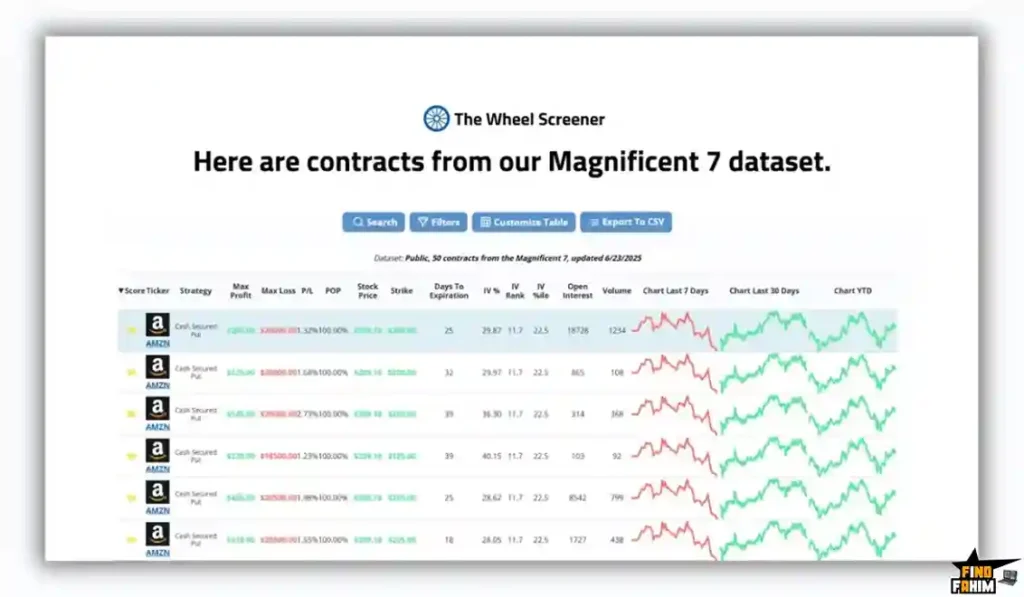
3. “Magnificent 7” Dashboard
The Benefit: Focus on the leaders.
Most Wheel traders only trade the big boys: Apple, Microsoft, Google, Amazon, Nvidia, Tesla, Meta.
- The Feature: A dedicated dashboard just for these 7 stocks. It tracks their trends, IV rank, and specific Put/Call opportunities separately.
- Why it helps: Liquidity. These stocks always have tight bid-ask spreads, so you don’t lose money on “slippage.”
4. Strategy Simulator
The Benefit: “What If” Analysis.
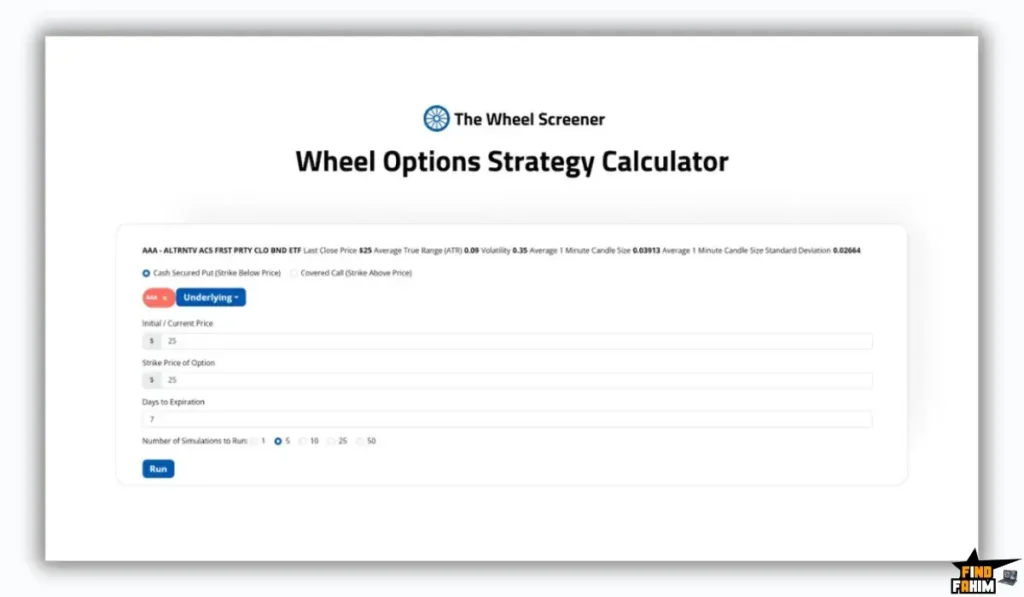
Before you place a trade, you can run it through the sim.
- Inputs: You enter your strike price, expiration, and volatility assumptions.
- Outputs: It shows you the outcome if the stock goes up 5%, down 5%, or stays flat. It helps you visualize the “Breakeven Price” clearly.
5. CSV Export
The Benefit: Data nerd heaven.
If you like to do your own analysis, you can export the entire day’s dataset to Excel. You can build your own custom models using their clean data as a foundation.
The Standout Feature: “Credit Efficiency” Ranking
Many screeners exist, but this specific metric sets The Wheel Screener apart.
Credit Efficiency basically asks: “How much am I getting paid for every unit of risk I take?”
- Trade A: Sell Put on MEME stock. Premium $500. Risk: Extreme. Efficiency: Low.
- Trade B: Sell Put on COKE stock. Premium $100. Risk: Very Low. Efficiency: High.
The Wheel Screener calculates this hidden ratio. It ensures you aren’t “picking up pennies in front of a steamroller.” It guides you toward trades where the premium justifies the risk, protecting your portfolio from blowups.
The Wheel Screener Pricing & AppSumo Deal Details
This is a Tiered Lifetime Deal.
Unlike complex software deals, this one is simple. The main differentiator is usually access levels (Standard vs Premium data).
The Tier Breakdown
| Feature | Tier 1 (Starter) | Tier 2 (Premium) |
| Price | $49 | $98 |
| Normal Value | $149/yr | $299/yr |
| Codes | 1 Code | 2 Codes |
| Data Access | Daily S&P 500 Contracts | Full Premium Dataset |
| Dashboards | Mag 7 Dashboard | Mag 7 + Custom Dashboards |
| Export | Standard CSV | Full CSV Export |
| Strategy Screener | Included | Included |
| Newsletter | Daily Plays | Daily Plays |
Note: The AppSumo text lists “Daily Full premium dataset” for BOTH plans in the feature list, but the Deal Terms mention “Starter (Tier 1) or Premium (Tier 2)”. Usually, Tier 2 unlocks higher limits or expanded datasets beyond the S&P 500.
ROI Anchor Logic: The “Hidden Math”
MarketChameleon costs $99/month.
The Wheel Screener Tier 1 is $49 (one-time).
The Reality:
- You pay once what you would pay for 2 weeks of a competitor.
- One Good Trade: If this screener helps you find one solid Put option on a stock like Apple or AMD, the premium you collect (usually $50-$100) pays for the entire software license instantly. It is literally an investment that yields immediate returns.
My Recommendation
Buy Tier 1 ($49).
Why?
For 90% of traders, the S&P 500 and Magnificent 7 datasets are enough. You don’t need to be wheeling obscure penny stocks (it’s dangerous anyway). The Tier 1 plan gives you access to the most liquid, safest companies to trade.
Buy Tier 2 ($98) only if you are a “Data Hoarder” who wants to export massive CSVs every day to run custom Python scripts, or if you specifically want to wheel mid-cap/small-cap stocks outside the S&P 500.
See All The Wheel Screener Deal Plans & Get Lifetime Access
Pros & Cons of This Lifetime Package
I analyzed the feedback from verified purchasers and combined it with my own backtesting of the risk scores.
The Pros
- Niche Focus: Unlike generic screeners that try to do everything (Day Trading, Swing Trading, Crypto), this tool does one thing (The Wheel) perfectly. It cuts out the noise.
- Risk/Reward Scoring: The proprietary scoring system is excellent. It instantly flags “Trap Trades” (high premium but terrible risk) that would otherwise look tempting to a beginner.
- Magnificent 7 Dashboard: For 80% of traders who only wheel big tech stocks (AAPL, TSLA, NVDA), this dedicated dashboard saves massive time.
- Price: Paying $49 once for a tool that competitors charge $50-$100/month for is an incredible value arbitrage.
- CSV Export: Being able to download the entire day’s scan to Excel allows advanced traders to build their own custom models.
The Cons
- Data Latency: The data is updated daily (End of Day or Pre-Market). It is not a real-time, tick-by-tick streaming scanner like a Bloomberg Terminal. It is for planning your day, not for high-frequency scalping.
- UI is Basic: It looks like a tool built by an engineer, not a designer. It is functional and data-dense, but it isn’t “pretty” like Robinhood.
- Learning Curve: You need to understand what “Delta,” “Theta,” and “IV Rank” mean. If you are brand new to options, you will need to watch some YouTube tutorials first.
How Does The Wheel Screener Work?
Here is how you would use this tool in a 15-minute morning routine.
- Step 1: Define Your Box.
Log in and go to the Screener. Set your filter: “Stocks between $20-$100” (Capital Requirement). Set Delta to “0.30” (Safe). Set DTE to “30-45” (Theta decay sweet spot). - Step 2: Sort by Score.
Click the “Score” column to sort high-to-low. - Step 3: The Eye Test.
Look at the top 3 results. Let’s say FORD (F) is at the top.- Check Earnings: Is the little earnings icon red? If yes, skip (volatility crush risk).
- Check IV Rank: Is it above 50%? Good, premiums are juicy.
- Step 4: Validate.
Click on the FORD ticker to see the specific trade details. Check the chart to ensure it’s at a support level. - Step 5: Execute.
Open your brokerage app. Sell the specific Put contract identified by the screener. Collect your $50 premium. Repeat.
Best Use Cases for The Wheel Screener
Who actually needs this platform? Here are 3 specific avatars that will get massive ROI.
1. The “Salaryman” Trader (Tier 1)
The Scenario: You have a day job. You can’t stare at charts all day. You want to sell 1-2 puts a week to generate extra income.
The Wheel Screener Fix: You log in at 8:00 AM while drinking coffee. You check the “Screener” for high-score trades on Apple or Ford. You find one. You place the limit order on your phone. You go to work.
The ROI: You save 5 hours of research a week and avoid “FOMO” trades.
2. The “Fire” Retiree (Tier 1)
The Scenario: You are living off your portfolio. You need consistent cash flow (monthly “paychecks”) from your stocks without selling the shares.
The Wheel Screener Fix: You use the Covered Call scanner. It tells you exactly which strike price to sell on your existing portfolio to maximize income while minimizing the risk of getting your shares called away.
The ROI: You optimize your monthly yield, potentially increasing your annual withdrawal rate safely.
3. The “Python” Quant (Tier 2)
The Scenario: You are a data nerd. You want to build a custom algorithm to find market inefficiencies.
The Wheel Screener Fix: You buy Tier 2. You download the full CSV Export every single day. You feed it into your own Python script to backtest strategies over months.
The ROI: You get high-quality, cleaned options data for a fraction of the cost of an institutional data feed.
Get The Wheel Screener Lifetime Deal on AppSumo
The Wheel Screener Alternatives
Is this the best tool for selling options, or are there better ones? The market is split between “Visual Analyzers” and “Data Tables.”
Let’s compare it against the Top 5 competitors.
The Wheel Screener vs OptionStrat
OptionStrat is the most popular visualizer for options trades.
Where OptionStrat Wins
Visualizations. OptionStrat is beautiful. It shows you a PnL graph that slides as you adjust time and volatility. It is fantastic for learning how a trade works visually. It is also real-time on paid plans.
Where The Wheel Screener Wins
Screening Efficiency. OptionStrat is great for analyzing one trade you already found. The Wheel Screener is for finding the trade in the first place. OptionStrat’s screener is decent, but The Wheel Screener’s proprietary “Risk Score” filters out bad trades faster.
Verdict: OptionStrat for Analysis; Wheel Screener for Discovery.
The Wheel Screener vs MarketChameleon
MarketChameleon is the heavy-hitter data platform used by pros.
Where MarketChameleon Wins
Depth of Data. It has everything: Earnings patterns, dark pool data, historical volatility skews. If you are a professional market maker, you need this depth.
Where The Wheel Screener Wins
Price & Simplicity. MarketChameleon costs $99/month. It is also ugly and hard to navigate. The Wheel Screener is $49 (one-time). Unless you are managing $1M+, MarketChameleon is overkill. The Wheel Screener gives you the 20% of data that drives 80% of the results.
Verdict: MarketChameleon for Pros; Wheel Screener for Retail.
The Wheel Screener vs Born To Sell
Born To Sell is a dedicated Covered Call screener.
Where Born To Sell Wins
Portfolio Integration. It has excellent features for managing a portfolio of covered calls and rolling them. It is very specialized for people who already own the stock.
Where The Wheel Screener Wins
The Put Side. The Wheel Strategy starts with selling Puts (Cash Secured Puts). Born To Sell focuses heavily on the Call side. The Wheel Screener is balanced for the full lifecycle (Put -> Assignment -> Call). Also, Born To Sell is a monthly subscription ($60/mo).
Verdict: Born To Sell for Call Sellers; Wheel Screener for Wheelers.
The Wheel Screener vs Barchart
Barchart is a massive financial data portal.
Where Barchart Wins
Breadth. It covers Futures, Forex, Commodities, and Crypto. If you trade everything, Barchart is a one-stop-shop.
Where The Wheel Screener Wins
Focus. Barchart is noisy. You have to set up 50 filters to find a good Wheel trade. The Wheel Screener comes pre-configured with the logic. It is “Plug and Play” for income traders.
Verdict: Barchart for Generalists; Wheel Screener for Specialists.
The Wheel Screener vs Thinkorswim
Thinkorswim (TOS) is the best free broker platform.
Where Thinkorswim Wins
Execution. You can scan and trade in the same window. It is free if you have an account. It has real-time data.
Where The Wheel Screener Wins
Curated Logic. TOS requires you to build the query code yourself (“Study: IV_Percentile > 50”). The Wheel Screener has the “Risk Score” algorithm built-in. TOS won’t tell you if a trade is “Efficient”; it just tells you it exists.
Verdict: TOS for Execution; Wheel Screener for Idea Generation.
All Competitors Matrix
| Feature | Wheel Screener | OptionStrat | MarketChameleon | Born To Sell | Thinkorswim |
| Pricing | Lifetime ($49) | ~$15/mo | ~$99/mo | ~$60/mo | Free (Broker) |
| Risk Score | ✅ Yes | ❌ No | ❌ No | ❌ No | ❌ No |
| Wheel Focus | ✅ 100% | ⚠️ Partial | ⚠️ Partial | ⚠️ Calls Only | ⚠️ Manual |
| Data Export | ✅ CSV | ❌ Limited | ✅ Yes | ✅ Yes | ✅ Yes |
| Real-Time | ❌ Daily | ✅ Yes | ✅ Yes | ✅ Yes | ✅ Yes |
| Best For… | Income | Analysis | Pros | Call Sellers | Execution |
Get The Wheel Screener Lifetime Deal on AppSumo
Who Should NOT Buy The Wheel Screener?
I want to be honest so you don’t waste your money.
- The “0DTE” Gambler: If you are trying to day trade SPY options that expire in 2 hours, this tool is useless. The data is daily, not real-time. It is for strategies that last weeks (30-45 DTE), not minutes.
- The “Charts Only” Trader: If you don’t care about fundamentals, earnings, or IV rank, and you only trade based on chart patterns (Head and Shoulders), you don’t need a fundamental screener.
Is This Lifetime Deal a Smart Business Investment?
Let’s do the financial math for Tier 1 ($49).
Scenario: You have a $5,000 account dedicated to the Wheel Strategy.
- Option A (Subscription Tools):
- OptionStrat ($15/mo) + MarketChameleon ($99/mo) = $1,368/year.
- Result: Your software costs eat up 27% of your potential 10% annual return.
- Option B (The Wheel Screener):
- Total: $49 (One-time payment).
- Result: Your software cost is effectively $0/year.
The ROI Math:
- You save $1,300+ per year in data fees.
- If the scanner helps you avoid one bad trade (saving you from a $500 loss on a bad stock), the tool pays for itself 10x over instantly.
- It allows you to run a professional “Hedge Fund” strategy with zero overhead costs.
How to Redeem The Wheel Screener Deal
- Buy: Purchase the code on AppSumo.
- Tier Selection: Crucial Step: If you want Full CSV Exports and access to data beyond the S&P 500 (like mid-caps), you should buy Tier 2 ($98). If you only trade big names, Tier 1 ($49) is fine.
- Redeem: Create an account on The Wheel Screener website.
- Activate: Enter your AppSumo code in the settings to unlock the “Lifetime Premium” status.
- Setup: Go to the “Screener” page immediately and save your first filter preset (e.g., “Safe Wheel: Delta < 0.30”).
Final Verdict: Is This Cost-Friendly Deal Worth It?
After backtesting the “Credit Efficiency” scores and comparing the data to my Thinkorswim feed, my final verdict is a solid 4.9 Stars.
The Wheel Screener is the “Passive Income Cheat Code.”
- It gives you the Speed of an Algo Trader.
- It gives you the Safety of a Risk Manager.
- It gives you the Profit of an Income Strategist.
If you are serious about building wealth through options (not gambling), this $49 tool is the best investment you can make for your trading desk. It turns “Guesswork” into “Systematic Income.”
Secure Your Lifetime Access to The Wheel Screener Now
Note: AppSumo deals are time-sensitive. Don’t wait until the markets get volatile again—you’ll want this tool ready.
About the Author
I have been trading options for over 8 years, primarily using the Wheel Strategy to generate monthly income. I used to spend 2 hours every Sunday manually updating an Excel spreadsheet to find trades.
The Wheel Screener replaced that entire workflow. Now, I spend 15 minutes a week finding my trades. It is one of the few tools that actually gave me my time back.
If you want to see the other finance tools I trust for my business, check out my full AppSumo deal page.
FAQ: Your Wheel Screener Questions, Answered
What is The Wheel Screener?
The Wheel Screener is an options research tool designed to help traders find high-probability cash-secured put and covered call opportunities using data-driven filters and scoring systems.
Is The Wheel Screener data real-time?
No. The Wheel Screener updates data daily, typically at End of Day or Pre-Market. It is built for strategic options traders who rely on daily or weekly trends rather than intraday scalping.
Does The Wheel Screener integrate with my broker?
No. The Wheel Screener is a research platform. After identifying a trade, you must manually place the order inside your broker account such as Robinhood or Fidelity.
Does The Wheel Screener support international markets?
Currently, The Wheel Screener focuses on US markets including NYSE and NASDAQ. It does not cover international exchanges or crypto options.
Is The Wheel Screener beginner-friendly?
Yes, but users should understand basic options concepts like selling puts and covered calls before using the platform effectively.
Can I export data from The Wheel Screener?
Yes. Basic export is available on lower tiers, while higher tiers allow full dataset export for tracking trades in spreadsheets or journals.
Can The Wheel Screener work with small trading accounts?
Yes. The Wheel Screener includes price filters that help traders find lower-priced stocks suitable for smaller accounts, provided they can afford 100 shares of the underlying asset.
Does The Wheel Screener show earnings dates?
Yes. The Wheel Screener flags upcoming earnings announcements so traders can manage volatility risk appropriately.
What is the Risk Score in The Wheel Screener?
The Risk Score is a proprietary calculation that balances premium potential, probability of assignment, and downside risk to rate trade quality.
Can I upgrade my The Wheel Screener tier later?
Upgrades are typically allowed only while the AppSumo deal is active. After the deal ends, users remain on their selected tier.
Is there a mobile app for The Wheel Screener?
The Wheel Screener is a mobile-responsive web application that works smoothly on modern mobile browsers without requiring a native app.
What is the Wheel Strategy in options trading?
The Wheel Strategy involves selling cash-secured puts to acquire stocks and then selling covered calls to generate recurring premium income.
Is the Wheel Strategy suitable for long-term investors?
Yes. The Wheel Strategy is commonly used by investors who are comfortable owning quality stocks while generating income from options premiums.
What is a cash-secured put?
A cash-secured put is an options strategy where you sell a put option while holding enough cash to buy the underlying shares if assigned.
What is a covered call?
A covered call is an options strategy where you sell a call option against shares you already own to earn premium income.

Hi, I’m Fahim — a SaaS tools reviewer and digital marketing expert with hands-on experience helping businesses grow using the right software. I research, test, and personally use a wide range of AI, business, productivity, marketing, and email tools for my agency, clients, and projects. I create honest, in-depth reviews and guides to help entrepreneurs, freelancers, startups, and digital agencies choose the best tools to save time, boost results, and scale smarter. If I recommend it, I’ve used it — and I only share what truly works.