
Let’s be honest: Bookkeeping is the worst part of running a business.
Unless you are an accountant, you probably hate it.
You start the month promising to “stay organized,” but by day 30, you have a shoebox full of crumpled receipts and a bank statement with 100 mystery charges.
Then, you log into QuickBooks, and it asks you 50 questions about “Chart of Accounts” and “Journal Entries” that make you want to cry.
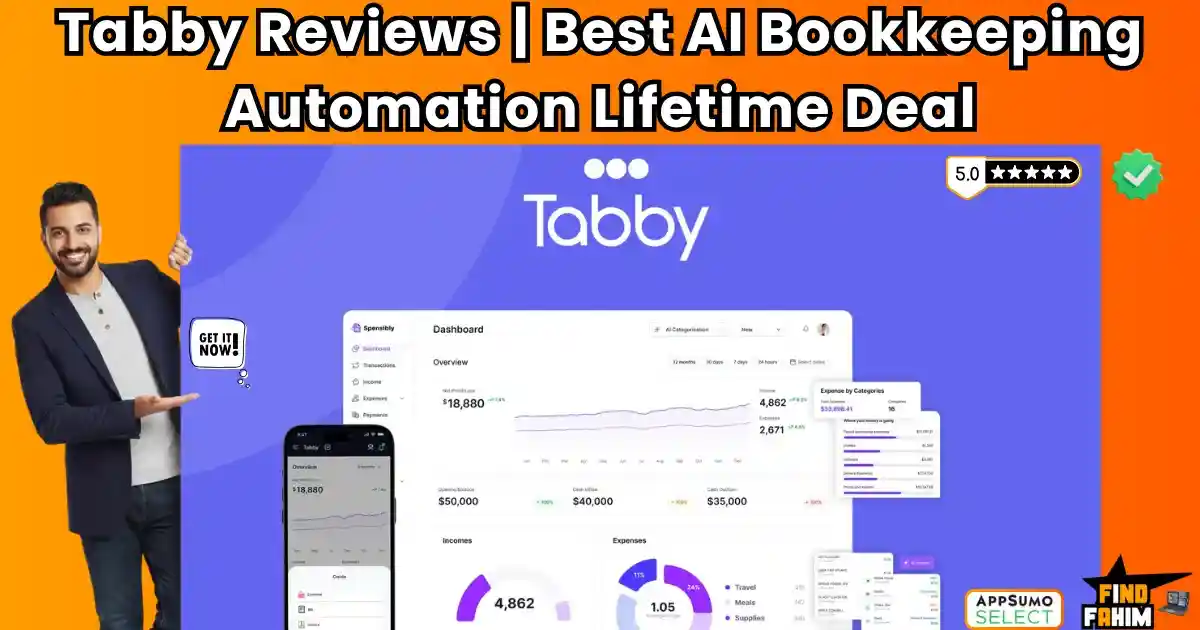
Tabby is the AI-powered antidote to this pain.
It is an automated bookkeeping platform built specifically for Solopreneurs and Freelancers who are tired of overpaying for complex software they don’t understand.
Designed by a CPA (Ahad Ali), Tabby acts like a 24/7 Virtual Accountant. It connects to your bank, uses AI to categorize every coffee and software subscription, and hunts for tax deductions you missed.
And unlike QuickBooks, which drains your bank account every month, Tabby is available for a one-time price of $59.
In this in-depth Tabby review, I am analyzing if this AI tool is smart enough to handle your taxes so you can fire your expensive bookkeeper.
Note: This article contains affiliate links. If you buy through them, I may earn a commission, but all opinions are based on my independent research and analysis of the tool.
My Quick Take (TL;DR)
If you are still using Excel or overpaying for QuickBooks Online, here is my honest summary.
What is it?
An AI-driven bookkeeping tool that automates expense tracking, income categorization, and tax reporting.
Why is it Special?
The “Set and Forget” AI. Most tools require you to manually tag every expense. Tabby learns. Once you tell it that “Starbucks” is “Meals & Entertainment,” it remembers forever. It turns hours of data entry into minutes of review.
Who is it for?
Freelancers, Real Estate Agents, Consultants, and Small Business Owners (US-based) who want tax-ready books without the headache.
The Deal: Lifetime Access starting at $59. Tier 1 covers $75k in annual expenses, which is perfect for most side hustlers.
My Verdict: This is the “QuickBooks Killer” for the gig economy. It strips away the bloat of enterprise software and gives you exactly what you need: Profit & Loss statements, Tax Deductions, and Peace of Mind. For $59 for life, it pays for itself in just two months of avoided software fees.
Click Here to Get the Tabby Lifetime Deal
What is Tabby?
The best way to describe this platform is as “Your AI CFO in a Box.”
It solves the three biggest problems of small business finance:
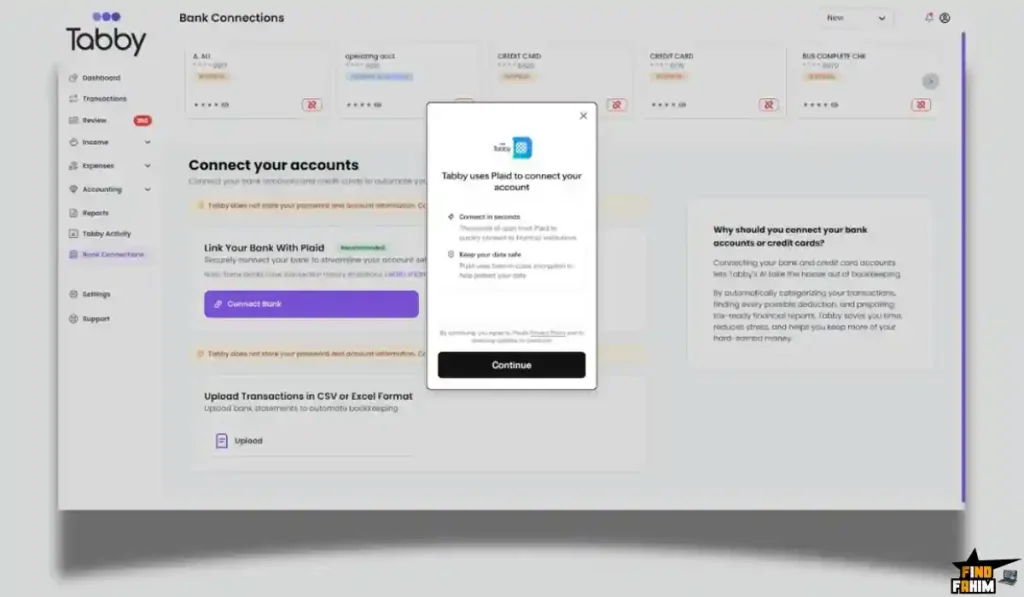
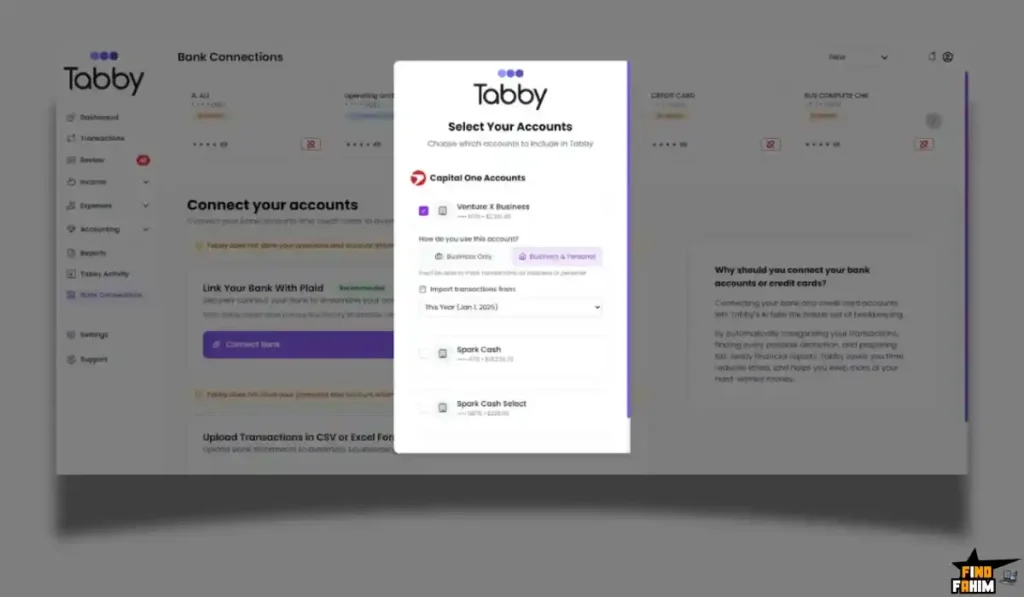
- Categorization: It uses the Plaid integration to pull transactions from 8,000+ banks (Chase, Wells Fargo, Amex, etc.). Its AI then labels them automatically (e.g., “Uber” -> “Travel”).
- Tax Anxiety: It scans your spending to find “Hidden Deductions”—legitimate business expenses you might have missed, like a portion of your home internet or that client dinner.
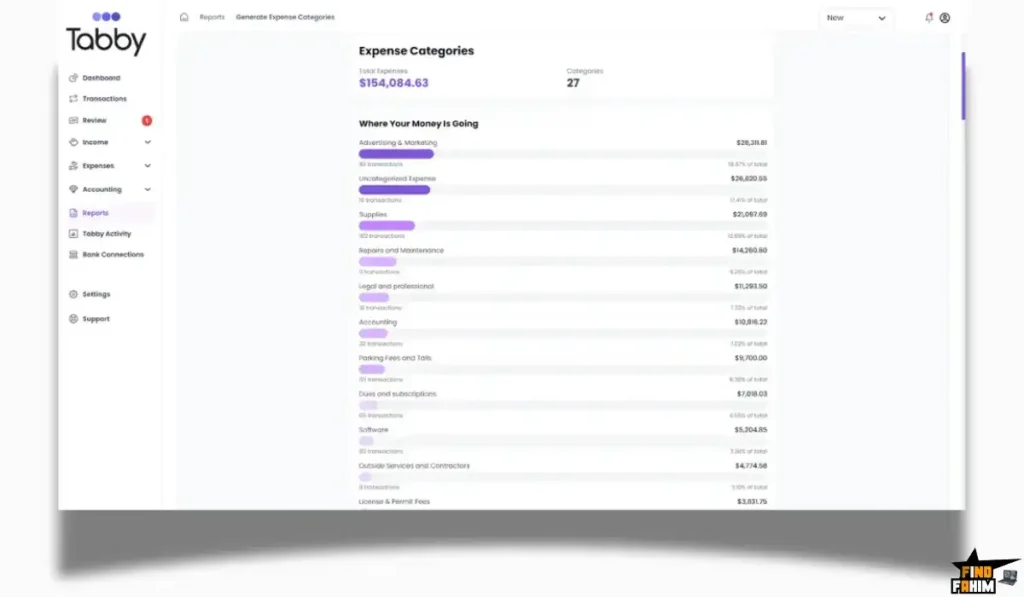
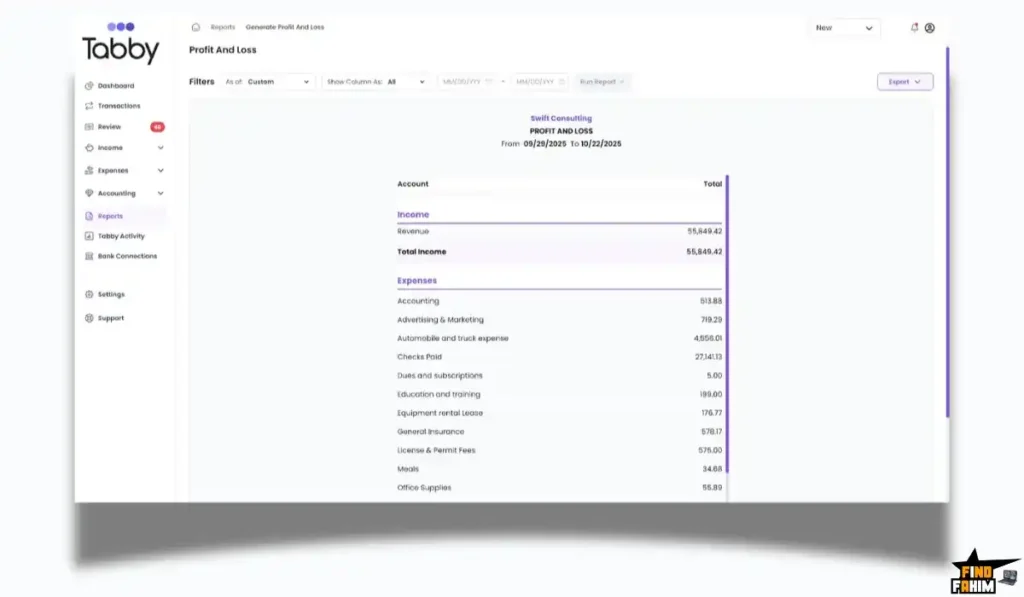
- Reporting: It generates instant Profit & Loss (P&L) statements and Balance Sheets so you can see if you are actually making money.
It is built for Non-Accountants. The interface is clean, simple, and jargon-free. You don’t need to know what a “General Ledger” is to use it.
Quick Look: What’s Inside the Deal?
If you are currently paying for QuickBooks, FreshBooks, or Xero, look at this math.
| Feature | Replaces… | The “Killer” Value | Normal Cost | Deal Status |
| AI Bookkeeping | QuickBooks Online | Auto-Categorization | ~$30/mo | ✅ Included |
| Receipt Capture | Dext / Expensify | Mobile Scanning App | ~$20/mo | ✅ Included |
| Tax Prep | CPA Consultation | Auto-Deduction Finder | ~$200/hr | ✅ Included |
| Bank Sync | Manual CSV Uploads | Plaid Integration (Live) | Essential | ✅ Included |
| Invoicing | FreshBooks | Get Paid Faster | ~$15/mo | ✅ Included |
| Total Value | Your Finance Stack | Tax Readiness | ~$600/yr | $59 (Lifetime) |
Why You Need More Than Just “Excel”
In 2026, using spreadsheets for taxes is a dangerous game.
The “Missed Deduction” Problem
If you track expenses manually, you will miss things. You’ll forget to log that $12 parking fee or that $29 software subscription. Over a year, these missed deductions can cost you thousands of dollars in overpaid taxes. Tabby catches them all because it reads the bank feed directly. It pays for itself by finding just one missed deduction.
The “Audit” Problem
If the IRS knocks on your door, an Excel sheet isn’t enough proof. Tabby allows you to snap photos of receipts and attach them to transactions. This creates a bulletproof Digital Audit Trail. You can sleep soundly knowing you have the proof locked away in the cloud.
Why AI Accounting is Trending in 2026
I noticed this tool trending because Solopreneurs are tired of “Enterprise Bloat.”
The QuickBooks Exodus
QuickBooks keeps raising prices and adding features regular people don’t need (like complex inventory management or payroll for 50 people). Users are fleeing to simpler, smarter tools like Tabby that focus purely on Core Bookkeeping.
The “Mobile-First” Finance
Business happens on the go. Tabby’s mobile app allows you to manage your books from your phone. You can categorize a lunch expense while you are still at the restaurant. This “Real-Time” bookkeeping ensures you are never playing catch-up at the end of the year.
A Look Inside Tabby: Key Features & Benefits
This isn’t just a calculator. It’s a financial automation suite.
1. Advanced AI Categorization
What it is: The brain of the system.
Why it matters: Speed.
Real-World Scenario: You buy a new laptop from Best Buy. Tabby imports the transaction. Its AI recognizes “Best Buy” and automatically tags it as “Office Equipment.” You don’t have to click anything. If it gets confused (e.g., Amazon), it asks you once, learns your preference, and automates it next time.
2. The “Tax Engine” (Deduction Finder)
What it is: A scanner for tax savings.
Why it matters: More money in your pocket.
Real-World Scenario: You work from home. Tabby identifies your Comcast bill and asks, “Is this for business?” You say “Yes,” and it helps you categorize it as a utility deduction. It proactively looks for ways to lower your taxable income.
3. Receipt Scanning (Mobile App)
What it is: A digital shoebox.
Why it matters: Compliance.
Real-World Scenario: You take a client to dinner. You snap a photo of the receipt with the Tabby app. The AI extracts the vendor, date, and amount, matches it to the credit card charge, and attaches the photo. You throw the paper receipt in the trash. Done.
4. Invoicing (New & Improved)
What it is: Creating professional bills for clients.
Why it matters: Cash flow.
Real-World Scenario: You finish a freelance project. You open Tabby, select the client, add line items, and send a branded invoice PDF in seconds. Tabby tracks who has paid and who is overdue, keeping your revenue organized.
5. Ask Tabby (AI Chat)
What it is: A chatbot that knows your finances.
Why it matters: Instant insights.
Real-World Scenario: You can ask, “How much did I spend on marketing last month?” or “What is my current profit?” Tabby answers instantly. It’s like texting your accountant, but without the hourly bill.
The Standout Feature: “Founder-Led Expertise”
Tabby wasn’t built by random developers; it was built by a CPA (Ahad Ali).
This is critical. The software follows Generally Accepted Accounting Principles (GAAP).
The Benefit: When you export your reports for tax season, they are actually correct. Your CPA won’t yell at you for messy books because the software enforces good accounting habits automatically.
Tabby Pricing & AppSumo Deal Details
This is a tiered lifetime deal based on Expense Volume and Users.
| Feature | Tier 1 (Solopreneur) | Tier 2 (Small Biz) | Tier 3 (Agency) |
| Price | $59 | $139 | $279 |
| Annual Expenses | Up to $75k | Up to $300k | Unlimited |
| Users | 1 User | 3 Users | 10 Users |
| Bank Accounts | 2 Linked | 5 Linked | Unlimited |
| Receipt Scanning | ✅ Included | ✅ Included | ✅ Included |
| Invoicing | ✅ Included | ✅ Included | ✅ Included |
ROI Anchor Logic: The “Hidden Math”
QuickBooks Online Simple Start costs $30/month.
Tabby Tier 1 is $59 (One-time).
The Reality: You break even in 2 months.
After Month 2, you are essentially making a profit by using Tabby. Over 5 years, you save $1,700+ compared to a QuickBooks subscription.
For a freelancer with under $75k in expenses, Tier 1 is an absolute steal.
My Recommendation:
- Freelancers: Buy Tier 1 ($59). If your expenses are under $75k/year, this is all you need.
- Growing Businesses: Buy Tier 2 ($139). The $300k limit gives you plenty of room to scale, and 5 bank connections cover your checking, savings, and credit cards.
Check the Tabby Deal Plan & Features
Pros & Cons of This Lifetime Package
The user reviews are buzzing with excitement about the value and simplicity.
The Pros
- ✅ Massive Savings: User adam9737 stated: “I quickly canceled QuickBooks… I’m saving at least $200 a month.” The financial benefit is undeniable.
- ✅ Support is Top-Tier: User edderkys noted: “I’ve had a genuinely great experience with the Tabby support team… they fix issues fast.” The founder is active and listens to feedback.
- ✅ Ease of Use: User dianagalas mentioned switching from Desktop QB to Tabby and being impressed by how easy it was to set up. It removes the “accounting fear.”
- ✅ Rapid Updates: The team recently launched a completely redesigned Invoicing feature based on user requests, proving they are actively developing the product.
The Focus Areas
- Focus Area 1: USD Only. Currently, Tabby is optimized for US-based businesses dealing in US Dollars. If you are in Europe or Canada, Plaid connectivity might be limited. Pivot: This makes it an incredibly specialized and powerful tool for the massive US freelancer market.
- Focus Area 2: No Payroll. Tabby focuses on Bookkeeping (tracking money), not Payroll (paying employees). Pivot: This keeps the interface clean and simple. Most solopreneurs use a separate tool like Gusto for payroll anyway, so Tabby avoids the bloat.
- Focus Area 3: Estimates. Some users requested “Estimates” (Quotes). The founder has confirmed this is on the roadmap. For now, the strong Invoicing feature covers the “getting paid” part perfectly.
How Does Tabby Work? (Step-by-Step Tutorial)
It is designed to be set up in under 5 minutes.
- Step 1: Connect Accounts. Use Plaid to securely log into your Chase, Amex, or PayPal accounts.
- Step 2: Sync. Tabby pulls in up to 18 months of transaction history.
- Step 3: Review. The AI takes a first pass at categorizing everything. You review the “Uncategorized” items.
- Step 4: Teach. You tell Tabby that “Adobe” is “Software.” It learns.
- Step 5: Report. Click “Generate P&L.” You now have a tax-ready document to send to your tax preparer.
Best Use Cases for Tabby
Who actually needs this platform?
The Freelance Designer/Developer
You have 5 clients and 20 monthly subscriptions.
- The Benefit: Tabby tracks your income from Stripe/PayPal and deducts your Adobe/Figma costs automatically. At the end of the year, you have a clean P&L for your Schedule C tax form.
The Real Estate Agent
You drive everywhere and buy tons of marketing materials.
- The Benefit: You use the mobile app to snap receipts for gas and client lunches. Tabby categorizes them instantly, ensuring you don’t miss a single write-off.
The Side Hustler
You have a full-time job but run an Etsy store on the side.
- The Benefit: You don’t want to pay $400/year for accounting software for a side gig. Tabby’s $59 lifetime deal is the perfect price point to keep your side business professional without eating your profits.
Get Lifetime Access to Tabby Today
Tabby Alternatives
This is the most critical comparison. You are likely trying to decide between Tabby and the big names. Can a $59 tool really replace a billion-dollar platform?
Let’s compare Tabby against the Top 5 Players in the Accounting space.
Tabby vs QuickBooks Online
QuickBooks is the 800lb gorilla. It does everything, but at a cost.
Bloat vs. Focus
- Where QuickBooks Wins: Complex Ecosystem. If you have 50 employees, need inventory management across 3 warehouses, and complex payroll, you need QBO.
- Where Tabby Wins: Simplicity & Price. QBO is famous for feature creep. You pay for things you never use. Tabby is laser-focused on Bookkeeping. It gives you the P&L and categorization you need without the confusing menus. And the price difference ($59 once vs $360/year) is astronomical.
- Verdict: QuickBooks for Corporations; Tabby for Freelancers.
Tabby vs Wave Accounting
Wave was the go-to free option, but they recently started charging for features.
Automation vs. Manual Work
- Where Wave Wins: Free Tier. Wave still has a free tier for very basic tracking.
- Where Tabby Wins: AI Automation. Wave requires a lot of manual categorization. Tabby’s AI is smarter at learning your habits. Plus, Wave’s receipt scanning and mobile app features are often gated or clunky. Tabby includes premium receipt scanning in the deal. Tabby’s interface is also faster and more modern.
- Verdict: Wave for $0 Budgets; Tabby for Time Savers.
Tabby vs FreshBooks
FreshBooks is great for invoicing-heavy businesses.
Client Mgmt vs. Expense Mgmt
- Where FreshBooks Wins: Invoicing & Time Tracking. FreshBooks started as an invoicing tool. Its proposals and time-tracking features are very robust for agencies billing by the hour.
- Where Tabby Wins: Tax Prep. FreshBooks is weaker on the “Expense Categorization” and “Tax Ready” side. Tabby, being built by a CPA, focuses heavily on getting your expenses right for tax season. Tabby is also significantly cheaper than FreshBooks’ monthly fees.
- Verdict: FreshBooks for Agencies; Tabby for Solopreneurs.
Tabby vs Xero
Xero is the international favorite.
Global vs. US-Centric
- Where Xero Wins: International Support. Xero is amazing for multi-currency and businesses outside the US (UK, NZ, AU).
- Where Tabby Wins: US Optimization. Tabby is built for the US market (USD). It handles US bank connections via Plaid extremely well. For a US-based business, Tabby feels more tailored and less complex than Xero’s enterprise interface.
- Verdict: Xero for International; Tabby for USA.
Tabby vs Excel / Google Sheets
Excel is the default “Free” option.
Static vs. Dynamic
- Where Excel Wins: Total Control. You can build any formula you want.
- Where Tabby Wins: Automation. Excel doesn’t connect to your bank. You have to download CSVs and upload them manually. You have to enter every receipt manually. Tabby automates the data entry. The time you save not typing data into Excel is worth way more than $59.
- Verdict: Excel for Modeling; Tabby for Bookkeeping.
All Competitors Matrix
| Tool | Pricing Model | Best For… | Bank Sync? | AI Categorization? |
| Tabby | Lifetime ($59) | Freelancers (US) | ✅ Yes (Plaid) | ✅ Yes |
| QuickBooks | Sub ($30/mo) | Big Biz | ✅ Yes | ⚠️ Basic |
| Wave | Freemium | Hobbyists | ✅ Yes | ❌ Manual |
| FreshBooks | Sub ($19/mo) | Agencies | ✅ Yes | ⚠️ Basic |
| Xero | Sub ($15/mo) | International | ✅ Yes | ⚠️ Basic |
| Excel | Free | DIY | ❌ No | ❌ No |
Click Here to Get the Tabby Lifetime Deal
Is This Lifetime Deal a Smart Business Investment?
Let’s do the financial math for Tier 1 ($59).
Scenario: You are a Graphic Designer with $40k in annual expenses.
- Option A (QuickBooks Online): You pay $30/month. Over 5 years, that is $1,800.
- Option B (Tabby): You pay $59 (One-time).
The ROI Math:
- You save $1,741 instantly.
- Tax Savings: If Tabby’s AI finds just one $100 deduction you would have missed in Excel (e.g., a software renewal), the tool has paid for itself twice over.
- Time Savings: If it saves you 2 hours of bookkeeping a month, that’s 24 hours a year. At a billable rate of $50/hr, that is $1,200 of time reclaimed.
How to Redeem the Tabby Deal
- Buy: Purchase the code on AppSumo.
- Tier Selection: Pro Tip: If you have multiple businesses or want to track your personal spending separately to find deductions, buy Tier 2 ($139). The ability to link 5 accounts (Checking, Savings, Business Credit Card, Personal Credit Card, PayPal) is crucial for a complete financial picture.
- Account: Create your account at UseTabby.com.
- Redeem: Apply the code in the billing section.
- Connect: Immediately connect your main business bank account via Plaid.
- Scan: Download the mobile app and scan your first receipt to see the magic happen.
Final Verdict: Is This Cost-Friendly Deal Worth It?
After analyzing the feature set, the founder’s CPA background, and the undeniable cost savings, my final verdict is a solid 4.8-Star BUY.
It is the “Financial Peace of Mind” package.
- It kills the Monthly Subscription.
- It kills the Data Entry Drudgery.
- It gives you CPA-Grade Books for the price of a video game.
If you earn money as a freelancer and want to keep more of it, you need Tabby.
Secure Your Tabby License Before The Timer Runs Out
(Note: The Tier 1 limit of $75k expenses is generous, but Tier 2 is the sweet spot for growing businesses who want to track everything without limits.)
About the Author: Why I Care About This So Much
I’ve spent years overpaying for accounting software that was too complicated for my needs. I hated logging in.
Tools like Tabby change the game. They make finance approachable. I write these reviews to help other solopreneurs find the tools that actually serve them, rather than draining their wallets.
If you want to see the other tools I recommend for running a lean business, check out my full AppSumo deal reviews post.
FAQ: Your Tabby Questions, Answered
What is Tabby?
Tabby is an AI-powered bookkeeping and expense tracking software designed for freelancers and small business owners. It connects to your bank account, automatically categorizes transactions, and generates tax-ready financial reports.
Is it safe to connect my bank account to Tabby?
Yes, Tabby uses Plaid for secure bank connections with bank-level encryption. It never sees your login credentials and only receives a read-only transaction feed.
Does Tabby work for multiple businesses?
Yes, higher tiers allow you to connect multiple bank accounts. You can manage different businesses separately or tag transactions by project or income source.
Can I upgrade my Tabby plan later?
Yes, upgrades are available within the AppSumo 60-day window. After that period, the lifetime deal limits are locked based on your purchased tier.
Does Tabby handle invoicing?
Yes, Tabby includes a built-in invoicing feature that allows you to send customizable PDF invoices to clients and track payment status.
Is Tabby only for US users?
Tabby is primarily built for US-based businesses using USD and US tax categories. While some international banks may connect through Plaid, the platform is optimized for the US system.
Does Tabby have a mobile app?
Yes, Tabby offers a mobile app that allows you to scan receipts, monitor transactions, and check your Profit and Loss statement from anywhere.
Can I invite my accountant to Tabby?
Yes, you can export financial reports for your accountant or provide user access on higher tiers so they can review your books directly.
How does Tabby handle personal expenses in a business account?
Tabby allows you to mark transactions as Personal Draw or Owner's Equity, helping keep your business financial records clean and tax-ready.
Is there a money-back guarantee?
Yes, Tabby is backed by AppSumo's 60-day money-back guarantee, allowing you to test the software risk-free.
Does Tabby track sales tax?
Tabby tracks collected sales tax amounts but does not automatically file tax returns. It prepares organized reports so you or your CPA can file easily.
How accurate is Tabby's AI categorization?
Tabby's AI improves over time by learning your transaction patterns. Once you categorize a merchant, it remembers future transactions, significantly reducing manual bookkeeping work.
Can I upload past transactions into Tabby?
Yes, Tabby imports recent bank history through Plaid and also allows CSV or PDF uploads to backfill older transaction data.
Does Tabby generate Schedule C-ready reports?
Yes, Tabby creates Profit and Loss reports aligned with IRS Schedule C categories, making tax filing simple for US freelancers and sole proprietors.
Does Tabby manage inventory for retail businesses?
No, Tabby is focused on service-based businesses and simple bookkeeping. It does not provide advanced inventory or cost of goods tracking for large retail operations.

Hi, I’m Fahim — a SaaS tools reviewer and digital marketing expert with hands-on experience helping businesses grow using the right software. I research, test, and personally use a wide range of AI, business, productivity, marketing, and email tools for my agency, clients, and projects. I create honest, in-depth reviews and guides to help entrepreneurs, freelancers, startups, and digital agencies choose the best tools to save time, boost results, and scale smarter. If I recommend it, I’ve used it — and I only share what truly works.