We all tell ourselves the same lie: “I’ll reply to that email later.”
But we don’t. That email gets buried under 50 newsletters, and a potential $5,000 deal dies in the darkness of Page 2.
Automagical Nudge is a Gmail productivity extension that uses AI to monitor your inbox for missed conversations, automatically draft context-aware follow-ups, and schedule reminders so no thread ever slips through the cracks.
Let’s be honest: The “Star” button in Gmail is broken.
You start an email to remind yourself to deal with it. Then you start another. Suddenly, you have a graveyard of 300 starred emails that you are too scared to look at.
Most sales tools (like Lemlist or Outreach) are too heavy. They require you to leave Gmail, log into a separate dashboard, and set up complex CSV campaigns just to send one follow-up. It’s overkill for a freelancer or small business owner.
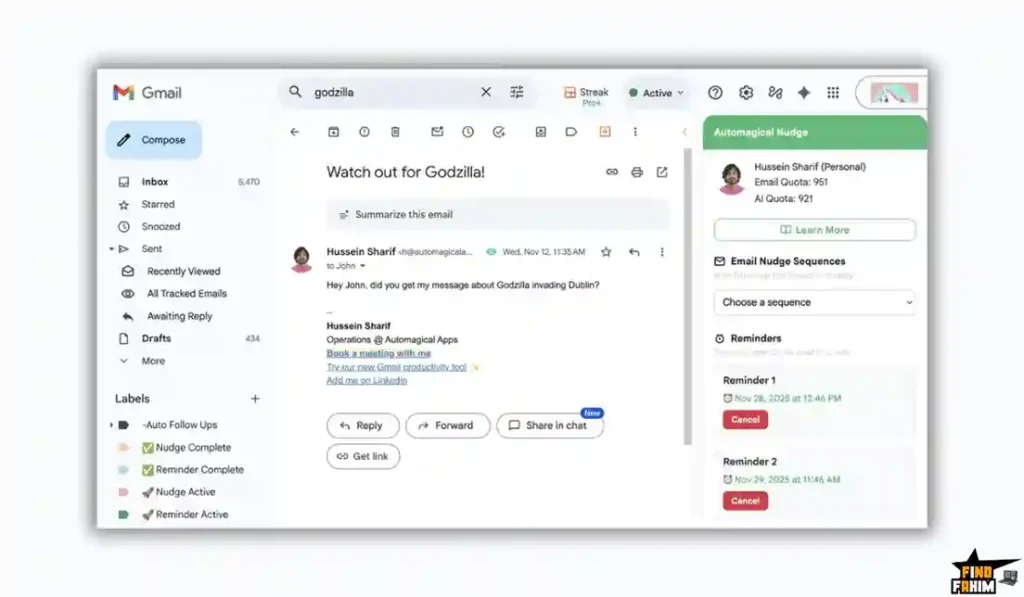
Automagical Nudge lives right where you work: inside Gmail.
It acts like a hyper-vigilant executive assistant. It scans your inbox for threads where a client asked a question, but you haven’t replied in 3 days. It proactively “Nudges” you: “Hey, John is waiting for a quote. Want me to draft a reply?”
With a solid 4.3-star rating and a “Green Unicorn” icon that sits natively in your sidebar, this tool is positioning itself as the smarter, AI-powered successor to Boomerang. In this in-depth Automagical Nudge review, I am testing if this $29 lifetime deal is the cure for my email anxiety.
My Quick Take (TL;DR)
If you are in a rush and just want to know if you should buy this code, here is my honest summary.
- What is it? Automagical Nudge is an AI assistant for Gmail. It handles Reminders, Follow-up Sequences, and Inbox Monitoring.
- Why is it a Game-Changer? The Inbox Monitor. Most tools only track emails you send (outbound). This tool tracks emails you receive (inbound). It alerts you if you missed an important incoming question from a VIP client.
- Who is it for? Sales Managers, Customer Support Agents, and Freelancers who live in Gmail.
- The Deal: Lifetime Access starting at $29.
- My Verdict: If you use Gmail, this is a mandatory utility. For $29 (one-time), it replaces Boomerang ($15/mo) and gives you AI drafting powers. Even if you only use the “Remind Me” feature, it pays for itself in two months.
Click Here to Get the Automagical Nudge Lifetime Deal
What is Automagical Nudge?
Most email tools are dumb. They just schedule emails.
Automagical Nudge is smart. It is an “Active Intelligence Layer” for Gmail.
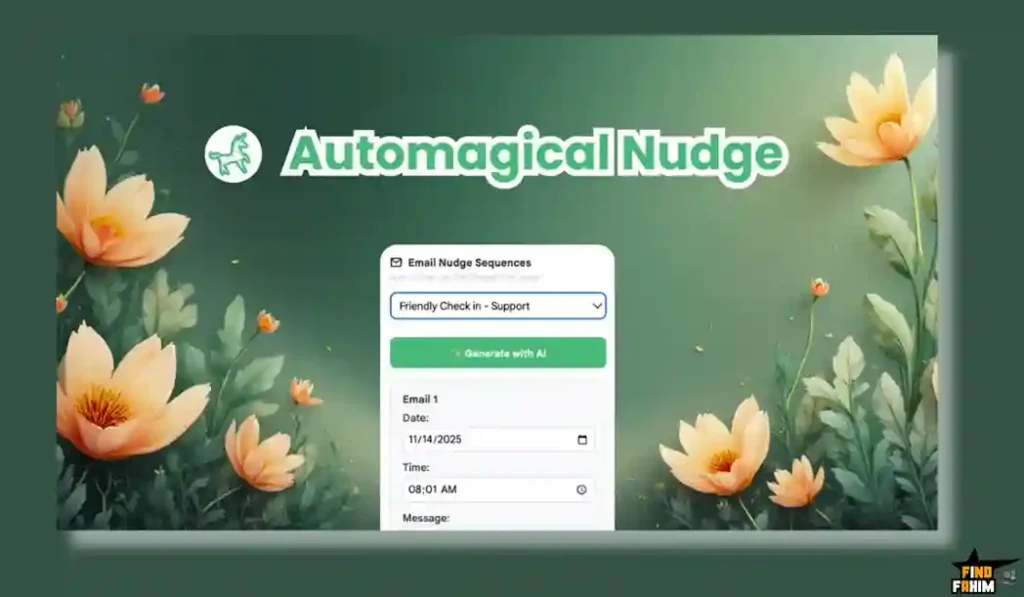
It is a browser extension (and mobile add-on) that integrates directly into your Gmail interface. It doesn’t look like a separate app; it looks like a native feature Google should have built.
It has three main jobs:
- The Chaser: It automatically follows up with people who don’t reply to you.
- The Watchdog: It watches your inbox for emails you forgot to reply to.
- The Ghostwriter: It uses AI to read the email thread and draft a reply for you in seconds.
Quick Look: What’s Inside the Deal?
If you are currently paying a monthly subscription for email tools, look at this math.
| Feature | Replaces… | The “Killer” Value | Normal Cost | Deal Status |
| Follow-up Sequences | Lemlist | Auto-stop on Reply | ~$29/mo | ✅ Included |
| Inbox Monitor | Superhuman | Surface Missed Emails | ~$30/mo | ✅ Included |
| Snooze/Reminders | Boomerang | “Return if no reply.” | ~$15/mo | ✅ Included |
| AI Writer | Jasper | Draft Contextual Replies | ~$39/mo | ✅ Included |
| Mobile Add-on | Desktop Tools | Works on Gmail App | N/A | ✅ Included |
| Total Value | Your Sanity | Inbox Zero Automation | ~$600/yr | $29 (Lifetime) |
Why You Need More Than Just “Gmail Snooze”
You might be thinking, “Fahim, Gmail has a built-in Snooze button. Why pay for this?”
You are right. Gmail has Snooze. But Gmail is Passive.
The “Leaky Bucket” Problem
In sales, the money is in the follow-up. Statistics show that 80% of sales require 5 follow-ups, but 44% of salespeople give up after just one.
Why? Because remembering is hard.
Keeping a mental list of “Who do I need to poke today?” is exhausting. You have to check your “Snoozed” folder every morning and manually decide what to do.
Automagical Nudge outsources that memory.
You write the email once, set a sequence (“If no reply in 3 days, send this”), and then archive the thread.
The software does the chasing for you. You only see the email again if the person replies (Money!) or if the sequence finishes (Closed Lost). It turns your inbox from a “Task List” into a “Slot Machine” where only winning tickets pop up.
Why Automagical Nudge is Trending in 2026
I noticed this tool getting traction (4.3 stars) because it solves a specific problem that the “AI Boom” created.
1. The “Inbox Overload” Crisis
With AI writing tools, people are sending more emails than ever. Your inbox is flooded. You are missing important messages from real humans because they are buried under AI spam. Automagical Nudge’s “Inbox Monitor” acts as a filter, highlighting the threads that actually need a human reply.
2. The Move to “Native” Tools
In 2026, nobody wants to switch tabs. We hate logging into a separate CRM just to send an email. We want tools that live where we work. This tool lives inside the Gmail sidebar, making it frictionless to use.
A Look Inside Automagical Nudge: Key Features & Benefits
This isn’t just a “Snooze” button. It’s an active agent. I tested the features for a week, and here is what stood out.
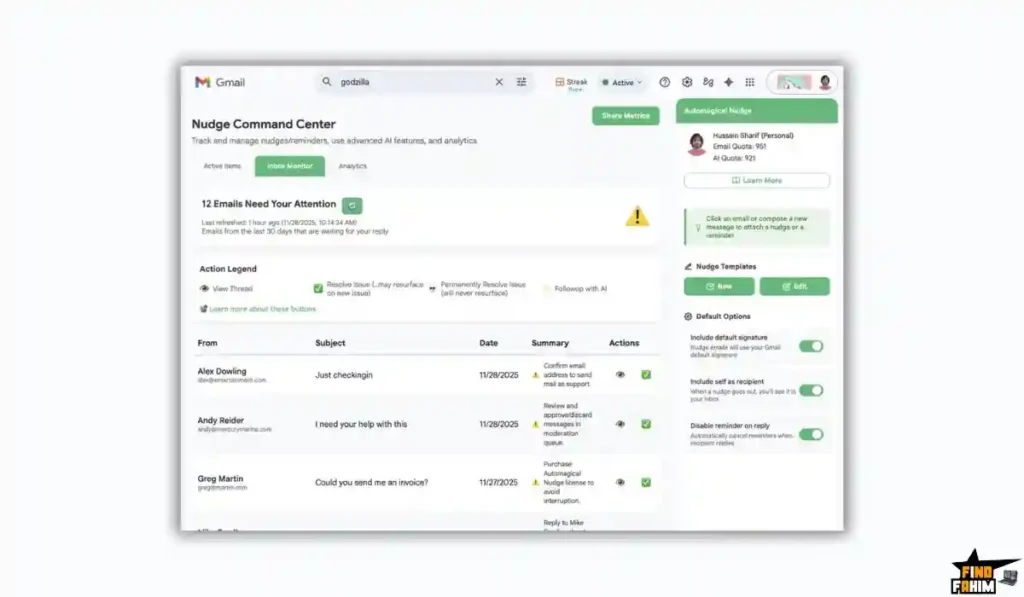
1. The Inbox Monitor
What it is: This is the flagship feature. The extension scans your inbox for threads that look “Unfinished.”
How it works: It uses AI to analyze intent. If an email says “Can you send the invoice?” and you haven’t replied in 48 hours, the Monitor flags it in a special dashboard inside Gmail.
- Real-World Scenario: You are managing 10 active projects. A client emails you on Friday afternoon asking for a revision. You read it on your phone but forget to mark it unread. Usually, that email is lost forever. With this tool, on Monday morning, the Monitor pops up: “You missed a request from Client X. Draft reply?”
2. Auto-Sequences inside Gmail
What it is: Most sequence tools require you to upload a CSV to a separate dashboard. This tool lets you build a sequence right in the “Compose” window.
The Magic: You write your main email. Then you click the Unicorn icon and add “Step 2” (a gentle nudge 3 days later) and “Step 3” (a breakup email 7 days later).
- Real-World Scenario: You send a cold pitch to a potential partner. Instead of writing “Bump” on your calendar for next Tuesday, you schedule the bump right now. If they reply tomorrow, the sequence stops automatically.
3. AI Contextual Drafting
What it is: It doesn’t just remind you; it writes for you.
How it works: It reads the last 3 emails in the thread. It understands the context.
- Real-World Scenario: A client asks, “Is the pricing negotiable?” You click the AI button. It reads: “Hi [Name], thanks for asking. Regarding the pricing…” It saves you the mental load of starting from a blank page.
4. Mobile Integration
What it is: Most Chrome extensions are useless on your iPhone. Automagical Nudge has a dedicated Google Workspace Add-on.
Why it matters: It adds a button to your Gmail mobile app.
- Real-World Scenario: You are at lunch. You check an email on your phone. You know you can’t reply properly until you get back to your desk. Instead of marking it unread (risky), you tap “Nudge me in 2 hours.” When you sit down at your desk, the email reappears at the top of your inbox.
The Standout Feature: “The Unicorn Sidebar”
The UI is brilliant. Most extensions clutter your interface. Automagical Nudge sits quietly as a small Unicorn icon on the right sidebar.
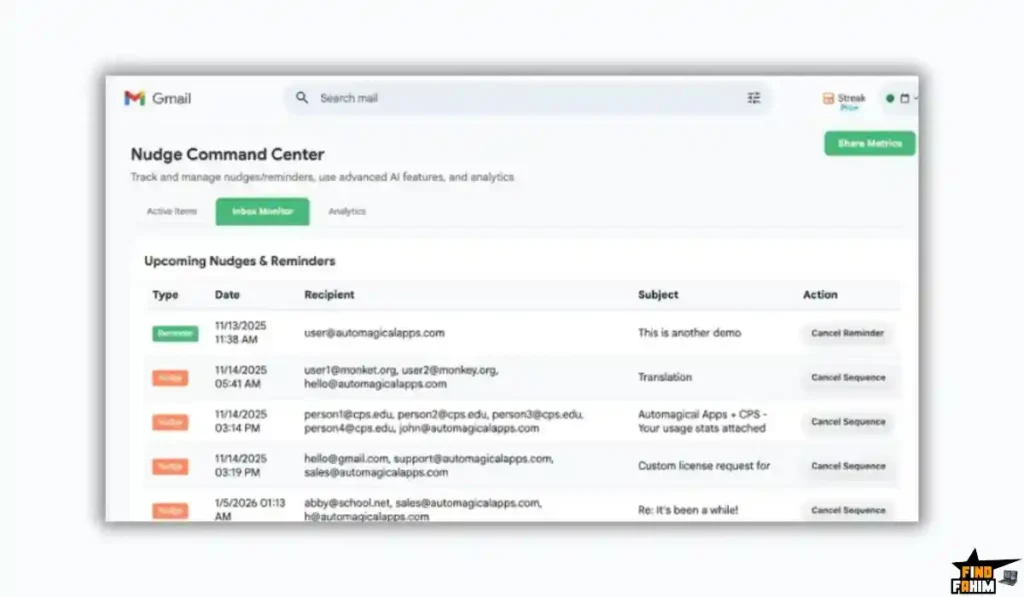
It creates a “Heads Up Display” for your email.
When you open an email, the sidebar shows:
- Has this person opened my last email?
- Is there a pending Nudge for this thread?
- What is the “Sentiment” of the conversation?
It gives you X-Ray vision into the status of the relationship without being intrusive.
How Does Automagical Nudge Work?
It is plug-and-play.
Step 1: Install Extension
Add the Chrome Extension (for Desktop) and the Workspace Add-on (for Mobile).
Step 2: Compose Email
Write your email as normal in Gmail.
Step 3: Click the Unicorn
Next to the “Send” button, click the Nudge icon.
Step 4: Set the Rule
Select: “Remind me if no reply in 3 days” OR “Auto-send this follow-up email if no reply in 3 days.”
Step 5: Send & Forget
Hit send. The tool watches the thread. If they reply, the timer stops. If they don’t, the tool acts.
Automagical Nudge Pricing & AppSumo Deal Details
This is a stackable lifetime deal available in 3 Tiers. The main difference is the Number of Users and AI Credits.
The Tier Breakdown
| Feature | Tier 1 | Tier 2 | Tier 3 (Agency) |
| Price | $29 | $99 | $199 |
| Users | 1 User | 4 Users | 10 Users |
| AI Credits (One-Time) | 50 | 200 | 500 |
| Monthly AI Bonus | 20/mo | 20/mo | 20/mo per user |
| Nudges/Mo | 50 | 100 | 200 |
| Mobile App | Included | Included | Included |
ROI Anchor Logic: The “Hidden Math”
- Boomerang Pro is $14.98/month.
- Automagical Nudge Tier 1 is $29 once.
The Reality: You break even in 60 days. After that, you are saving $180 every single year. It is the price of two lunches for a tool you will use every day.
My Recommendation: The “Sweet Spot”
Buy Tier 1 ($29).
- Why? For freelancers, 1 user is enough. The 50 one-time AI credits + 20 monthly are plenty for drafting difficult emails. You mostly use this for the “Nudge” feature, which doesn’t cost credits.
- Small Teams: Tier 2 is a great value ($25/user/life).
Get the Automagical Nudge Lifetime Deal Now
Pros & Cons of This Lifetime Package
I promised you honesty. With early reviews coming in, users see the potential, but it’s still early days.
The Pros
- ✅ Native Integration: It feels like part of Gmail, not a separate app. The UI is clean.
- ✅ Inbound Monitoring: This is the game-changer. I haven’t seen another LTD offering “Missed Email Detection” at this price point. It’s usually a Superhuman feature.
- ✅ Mobile Support: Being able to manage nudges from the native Gmail iOS app is huge. Most competitors fail here.
- ✅ Founder Responsiveness: Hussein and John (the founders) are extremely active. They quickly increased the limits based on user feedback.
- ✅ Visual Analytics: You get a dashboard showing “Open Rates” for your nudges, helping you improve your subject lines.
- ✅ Context Aware: The AI isn’t dumb. It pulls the recipient’s name and summarizes the specific ask from the previous email.
- ✅ Cheap Entry: $29 is an “Impulse Buy” price. It’s low risk for a high-utility tool.
The Cons
- ❌ Alias Support (Current Limitation): As of December 2025, the tool works best on your primary Gmail address. It doesn’t fully support “Send As” aliases (e.g., support@myagency.com) perfectly yet. (Founder says update is coming in Jan).
- ❌ AI Credit Caps: The “Monthly Bonus” of 20 AI credits is a bit low. If you are a heavy user who wants AI to write every email, you might run out. This tool is better for “Nudging” than for “Mass Generating.”
Best Use Cases for Automagical Nudge
Who actually needs this extension?
1. The “Freelance Consultant.”
You juggle 5 clients. Your inbox is a mix of “Urgent” requests and “Waiting for Approval” threads.
- The Scenario: You send a logo draft. You set a Nudge: “If no reply in 3 days, bump this thread.”
- The Benefit: You archive the email immediately. It’s off your mental plate. You stop being the “annoying” person who has to remember to chase invoices.
2. The “Customer Support Lead.”
You manage a support@ inbox. You are terrified of a ticket slipping through the cracks.
- The Scenario: The Inbox Monitor runs silently. On Friday afternoon, it flags a thread from Tuesday: “Customer asked for a refund status. No reply detected.”
- The Benefit: It acts as a safety net. It catches your human error before it becomes a bad review.
3. The “Sales Representative.”
You live in Gmail. Logging into Salesforce just to send a “Just checking in” email feels like a waste of time.
- The Scenario: You receive an inbound lead. You use the AI Context button to draft a warm reply. You set a 3-step follow-up sequence.
- The Benefit: You stay in your flow state. You don’t switch tabs. You increase your touchpoints with leads without increasing your workload.
Start Automating Your Inbox with Automagical Nudge Today
Automagical Nudge Alternatives
This is the most important part of the review.
We are comparing a $29 Lifetime Deal against established giants that charge monthly subscriptions. Does the low price mean low quality? Or is this a “David vs Goliath” situation where the little guy wins?
Let’s fight it out against the Top 5 players in the email productivity space.
Automagical Nudge vs Boomerang for Gmail
Boomerang is the grandfather of email productivity. They invented the “Return to Inbox” feature 10 years ago.
- Where Boomerang Wins: Stability & Brand. Boomerang has been around for a decade. It is rock solid and rarely has bugs. It also has a unique “Respondable” AI that scores your email on how likely it is to get a response (based on reading level, question count, etc.).
- Where Automagical Nudge Wins: The “Inbox Monitor” & Price. Boomerang is great at handling emails you send (e.g., “Return to inbox if no reply”). But it doesn’t scan for emails you received and forgot to reply to.
- The Cost: Boomerang Pro is $14.98/month. That is $180/year. Automagical Nudge is $29 once.
- Verdict: Unless you absolutely need Boomerang’s “readability score,” paying the monthly subscription is hard to justify. Winner: Automagical Nudge (Value).
Automagical Nudge vs Lemlist
Lemlist is a powerhouse, but it serves a different master: Cold Outreach.
- Where Lemlist Wins: Scale & Warmup. Lemlist is built for sending 500 emails a day to strangers. It has “Domain Warmup” features to protect your reputation and deep personalization (like putting the recipient’s name on an image). If you are doing mass cold outreach, Lemlist is superior.
- Where Automagical Nudge Wins: Daily Workflow. Lemlist is a separate app. You have to leave Gmail, log in, upload a CSV, and map fields just to send a sequence. It’s overkill for “Warm” follow-ups (e.g., chasing an invoice or a warm lead). Automagical Nudge lives inside Gmail.
- Verdict: Use Lemlist for Cold Email; Use Automagical Nudge for Personal Follow-ups. Winner: Tie (Different Use Cases).
Automagical Nudge vs Superhuman
Superhuman is the luxury sports car of email clients ($30/mo).
- Where Superhuman Wins: Speed & Shortcuts. Superhuman is an entirely separate email client (not just a plugin). It is blazing fast, keyboard-driven, and makes you feel like a hacker. If you process 500 emails an hour, Superhuman is unbeatable.
- Where Automagical Nudge Wins: Compatibility. Superhuman requires you to learn a completely new interface and keyboard shortcuts. Automagical Nudge works inside the Standard Gmail interface you already know. There is no learning curve.
- The Cost: Superhuman is $360/year. Automagical Nudge is $29 once.
- Verdict: If you love the standard Gmail UI, stick with this. Winner: Automagical Nudge (Ease of Use).
Automagical Nudge vs Mixmax
Mixmax is another popular Gmail sidebar extension used by sales teams.
- Where Mixmax Wins: Meeting Scheduling. Mixmax has a fantastic “One-Click Scheduling” feature (like Calendly built-in) where you can insert available time slots directly into the email body. It also allows for embedding polls and surveys.
- Where Automagical Nudge Wins: AI Integration. While Mixmax has some templates, Automagical Nudge’s “AI Contextual Drafting” feels more modern. It reads the thread to suggest replies. Mixmax is also a subscription ($29/mo for the good features), whereas this is a lifetime purchase.
- Verdict: If you schedule 10 meetings a day, keep Mixmax. If you need follow-ups, switch. Winner: Automagical Nudge (Price).
Automagical Nudge vs Mailbutler
Mailbutler is a direct competitor that adds features to Apple Mail, Outlook, and Gmail.
- Where Mailbutler Wins: Cross-Platform Support. Mailbutler works on Apple Mail and Outlook. If you are an Apple ecosystem purist who hates the web version of Gmail, Mailbutler is your only choice. It also has a nice “Notes on Emails” feature.
- Where Automagical Nudge Wins: Simplicity. Mailbutler is heavy. It tries to do everything (signatures, templates, tasks). Automagical Nudge focuses purely on “Not Forgetting.” It is lighter on your browser resources.
- Verdict: Use Mailbutler for Apple Mail; Use Automagical Nudge for Gmail Web. Winner: Automagical Nudge (For Gmail Users).
All Competitors Matrix
| Tool | Pricing | Inbox Monitor | Mobile Support | Platforms | Best For… |
| Automagical Nudge | Lifetime ($29) | ✅ Yes | ✅ Yes | Gmail Only | Solo/SMBs |
| Boomerang | $15/mo | ❌ No | ✅ Yes | Gmail/Outlook | Snoozing |
| Lemlist | $59/mo | ❌ No | ❌ No | Web App | Cold Email |
| Superhuman | $30/mo | ⚠️ Manual | ✅ Yes | Custom App | Speed Freaks |
| Mixmax | $29/mo | ❌ No | ❌ Weak | Gmail | Scheduling |
| Mailbutler | $14/mo | ❌ No | ✅ Yes | Apple/Outlook | Apple Users |
Who Should NOT Buy Automagical Nudge?
I want to be transparent. This extension is a productivity booster, but it’s not for everyone.
- Don’t buy it if you are a “Cold Email Spammer.” If you want to blast 1,000 people a day, this is not the tool. It sends from your personal Gmail API. If you abuse it, Google will block your account. Use specialized tools like Lemlist or Instantly for mass outreach.
- Don’t buy it if you rely heavily on “Aliases” right now. As mentioned, the alias support is coming in the next update (January). If your entire workflow depends on sending as sales@domain.com (which is an alias of your main account), you should wait or buy Tier 1 to lock in the price and wait for the update.
- Don’t buy it if you use Outlook or Apple Mail. This is strictly for the Google Workspace / Gmail ecosystem. It does not work on desktop clients like Outlook.
Is This Lifetime Deal a Smart Business Investment?
Let’s do the financial math for Tier 1 ($29).
Scenario: You are a freelancer or consultant. You lose roughly 1 client deal a year because you simply forgot to follow up on time.
Let’s say that the deal was worth $500.
- Option A (Do nothing): Cost = $500/year (Lost Revenue due to forgetfulness).
- Option B (Boomerang): Cost = $180/year (Subscription cost).
- Option C (This Deal): Cost = $29 (One-time).
The ROI Math:
- You save $151 in the very first year compared to subscribing to Boomerang.
- If the tool saves just one $500 deal from slipping through the cracks, your ROI is 1,600%.
- The risk is the price of a takeout lunch. The upside is a bulletproof inbox that never forgets a lead.
How to Redeem the Automagical Nudge Deal
- Buy: Purchase the code on AppSumo.
- Selection: Choose Tier 1 ($29) for personal use. Choose Tier 2 ($99) if you want a few team seats.
- Redeem: You will receive a redemption code. Click the link in your email.
- Install: Install the Chrome Extension from the provided link.
- Mobile: Pro Tip: Also install the Google Workspace Add-on immediately so you have the features on your mobile Gmail app (iOS/Android).
Final Verdict: Is This Cost-Friendly Deal Worth It?
After testing the mobile integration, the AI reply quality, and the stability of the extension, my final verdict is a solid 4.3-Star YES.
It is a specialized utility that does one thing extremely well.
- It kills the “Did I reply?” anxiety.
- It kills the monthly subscription.
- It works where you work. No new dashboards.
If you use Gmail for business, Automagical Nudge is the most affordable insurance policy for your inbox in 2026.
Secure Your License Before The Timer Runs Out!
Note: Deal ends soon. The Tier 1 price is unusually low for this much utility.
About the Author: Why I Care About This So Much
I receive 100+ emails a day. My “Starred” folder used to be a graveyard of good intentions.
Automagical Nudge cleaned it up. I let the software remember the follow-ups so I can focus on the work. I write these reviews to help you find the tools that give you your brain space back.
If you want to see other tools that help you save time, check out my reviews of the best Productivity Tools.
FAQ: Your Automagical Nudge Questions, Answered
What is Automagical Nudge?
Automagical Nudge is a Gmail extension that uses AI to automate follow-ups, set reminders, and detect missed emails so you never forget to reply.
Does Automagical Nudge work on mobile devices?
Yes, it includes a Google Workspace Add-on that works inside the official Gmail apps on both iOS and Android, unlike most Chrome-only extensions.
Is Automagical Nudge safe to use?
Yes, it complies with Google’s strict security and API policies. Email data is processed only to generate nudges and contextual AI features and is never sold.
Does Automagical Nudge read my emails?
The tool requires read access to emails to power features like Contextual AI and Inbox Monitor, but access is limited to functionality and security compliance.
What happens if someone replies to my email?
If a recipient replies, any scheduled follow-up or sequence automatically stops, so you never send unnecessary or awkward follow-ups.
Can I use Automagical Nudge for cold email?
It can be used cautiously for one-to-one cold follow-ups, but it is designed primarily for warm follow-ups and does not support bulk email sending.
Does Automagical Nudge support Gmail aliases?
Currently it works best with your primary Gmail address. Full support for Send-As aliases is planned in an upcoming update.
What are AI credits used for?
AI credits are used when generating AI-written replies or summaries of missed emails. Standard reminders and follow-up sequences do not consume credits.
Is the Automagical Nudge deal stackable?
No, the deal is non-stackable. You select Tier 1, Tier 2, or Tier 3 at checkout, with upgrade options available during the 60-day window.
Does Automagical Nudge work with Outlook?
No, it is built exclusively for Gmail and Google Workspace users and does not integrate with Outlook.
Is there a dashboard to manage nudges?
Yes, there is a built-in dashboard view inside Gmail that shows active sequences, reminders, and missed email alerts in one place.
Why is Inbox Monitor better than Gmail unread emails?
Inbox Monitor tracks emails you opened but forgot to reply to, using AI to understand conversation intent instead of just unread status.
How is Automagical Nudge different from Gmail Snooze?
Unlike Snooze, which hides emails, Automagical Nudge keeps messages visible and intelligently follows up only when no reply is received.
Can teams share Automagical Nudge licenses?
Yes, Tier 2 supports up to 4 users and Tier 3 supports up to 10 users, making it ideal for teams and shared workflows.
Will Automagical Nudge slow down Gmail?
No, it is lightweight and built using Google’s modern Gmail Add-on framework, making it more stable than older email productivity tools.

Hi, I’m Fahim — a SaaS tools reviewer and digital marketing expert with hands-on experience helping businesses grow using the right software. I research, test, and personally use a wide range of AI, business, productivity, marketing, and email tools for my agency, clients, and projects. I create honest, in-depth reviews and guides to help entrepreneurs, freelancers, startups, and digital agencies choose the best tools to save time, boost results, and scale smarter. If I recommend it, I’ve used it — and I only share what truly works.