

Relying on legacy desktop editing software burns cash and destroys your creative profit margins. When your marketing team wastes hours opening heavy files just to erase a simple background, it represents a massive operational failure for your pipeline.
The PhotoKit AppSumo deal, which has now officially migrated to Dealify, fixes this production bottleneck instantly. It centralizes artificial intelligence editing directly into your internet browser, permanently replacing expensive legacy subscriptions and protecting your agency’s finances.
Disclaimer: This article contains affiliate links. If you purchase through these links, I may earn a small commission at no extra cost to you. All opinions and market analysis are entirely my own.
My Quick Take (TL;DR)
- What is it: A unified, browser-based digital photo editor utilizing artificial intelligence to process high-resolution images instantly.
- Special Feature: Incredible cloud-based rendering speed that bypasses local computer hardware limits completely.
- For Who: Marketing agencies, SEO bloggers, digital freelancers, and high-volume e-commerce store owners.
- The Deal: This specific lifetime access offer begins at exactly $69 for the Basic Plan, granting unlimited image downloads permanently.
- Verdict: A highly mandatory workflow acquisition. It completely replaces heavy recurring fees for expensive desktop applications like Adobe Photoshop or Lightroom.
Click Here to Get the PhotoKit Lifetime Deal on Dealify
What is PhotoKit?
PhotoKit is an enterprise-grade web application designed to handle high-volume image editing and automated visual processing directly online. It solves the primary problem facing modern digital marketers: the rapidly rising operational cost of producing clean, professional graphics for standard blogs and social media channels daily.
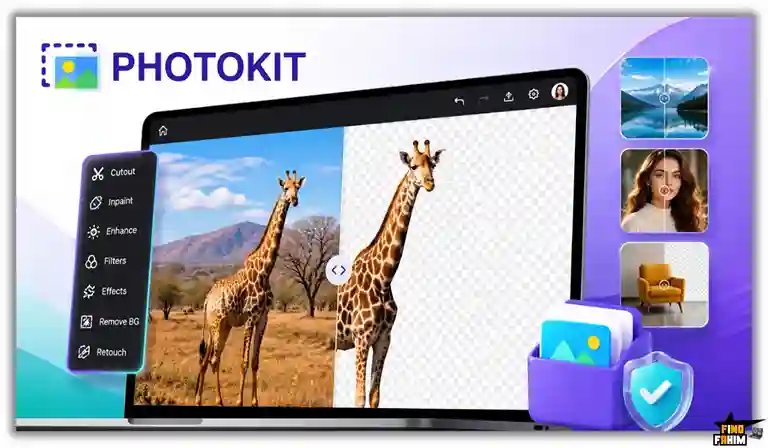
Instead of paying a massive premium for heavy desktop programs, the dashboard centralizes your editing operations completely in your internet browser. You can remove backgrounds, erase unwanted objects, enhance poor-quality photos, and apply professional filters directly from a single secure interface, regardless of your local computer’s processing speed.
Agency Editing: What Inside the Deal
Securing this specific PhotoKit lifetime deal stops your agency from burning cash on fragmented marketing applications.
It unifies expensive editing and retouching tools, permanently protecting your operational profit margins from heavy subscription models completely.
| Feature | Replaces… | The Real Value | Normal Cost | Deal Status |
| Backgrounds | Canva Pro | 1-click isolation | ~$120/year | ✅ Included |
| AI Enhancer | Topaz Labs | Image sharpening | ~$199/year | ✅ Included |
| Object Eraser | Photoshop | Fast retouching | ~$250/year | ✅ Included |
| Batch Editor | Lightroom | Bulk processing | ~$120/year | ✅ Included |
| Total Value | Legacy Apps | Massive cash savings | ~$689/year | $69 Lifetime |
A Look Inside PhotoKit: Key Features
This platform operates as a centralized production hub for your entire visual strategy. Here is exactly how these core processing tools eliminate manual workflows and protect your daily profit margins.
One-Click Background Removal
You never need to spend ten minutes manually tracing borders to isolate subjects. The system uses neural networks to instantly identify commercial products upon upload. Simply drop your media file into the active workspace, click one button, and the software permanently removes the background in under five seconds.
AI Image Enhancer
The integrated quality tool lets you fix blurry photos instantly, without scheduling a new photoshoot. You input a low-resolution graphic directly into the interface, and the artificial intelligence automatically fills in missing color data. It sharpens soft edges and produces a high-definition result immediately, rescuing unusable marketing assets.
Magic Object Eraser
This specific feature turns the software into a highly capable commercial retouching hub. The eraser tool allows your designers to highlight unwanted background people or aggressive company watermarks quickly. The artificial intelligence deletes the object and fills in the empty pixels to match the surrounding visual environment perfectly.
Bulk Image Processing
Uploading messy batches of product photography usually requires hours of repetitive formatting. This tool features smart bulk detection that reads your raw image folders automatically. You upload a batch containing dozens of files, and the system kicks off a removal process, returning fully formatted graphics ready for your store.
Standout Feature: Browser-Based Rendering Speed
The absolute standout element of PhotoKit is the massive financial and hardware protection it provides your business. Every major market competitor requires a heavy desktop installation that aggressively slows down older agency laptops and consumes massive internal storage space.

This platform completely ignores that restrictive operational model. Because all the heavy artificial intelligence processing happens entirely on their secure cloud servers, your team can run complex graphic edits on a basic Chromebook, avoiding expensive computer upgrades to execute daily tasks.
PhotoKit Updates: What is New in 2026
The development team pushed a major structural update on June 21, 2026, directly addressing user requests to expand their artificial intelligence precision capabilities significantly.
- Refined the edge detection algorithms to perfectly isolate complex hair patterns within exactly five seconds.
- Upgraded the clone stamping artificial intelligence to erase unwanted objects without leaving blurred pixel artifacts.
- Added new batch processing capabilities to apply direct color corrections across fifty separate images simultaneously.
PhotoKit Pricing & Dealify Deal Details
| Deal Feature | Basic Plan ($69) | Starter Plan ($117) | Growth Plan ($165) | Growth Plus ($265) |
| Devices Allowed | 1 Device | 5 Devices | 10 Devices | 25 Devices |
| Image Downloads | Unlimited | Unlimited | Unlimited | Unlimited |
| AI Generation | ✅ Yes | ✅ Yes | ✅ Yes | ✅ Yes |
| Background Removal | Unlimited | Unlimited | Unlimited | Unlimited |
| Premium Support | 24/7 | 24/7 | 24/7 | 24/7 |
Which Plan Should You Buy?
Independent bloggers can start with the Basic Plan for one device. However, digital marketing agencies must purchase the Starter Plan or Growth Plan immediately. Expanding your access to five or ten devices ensures your entire design team can process heavy client workloads simultaneously without hitting strict internal hardware limits.
Important Note on the Refund Policy
This lifetime software package is fully backed by Dealify’s standard 30-day money-back guarantee. You have an entire month to test the background removal accuracy completely risk-free before committing.
Lock In Your PhotoKit Lifetime Price
Pros & Cons of This Lifetime Package
Analyzing real agency feedback reveals specific operational advantages to using this consolidated browser dashboard. Here is the direct truth regarding how the software currently handles heavy image workloads.
The Pros
✅ Extreme Speed: The background removal tool isolates complex subjects accurately in under five seconds.
✅ Zero Installation: Running completely in your browser saves massive amounts of computer hard drive space.
✅ Massive Savings: Replaces hundreds of dollars in recurring monthly legacy software fees instantly.
✅ AppSumo Proven: Securing over 350 five-star reviews proves the developers maintain the software properly.
✅ Unlimited Downloads: You process thousands of marketing photos without ever hitting a restrictive paywall.
The Cons
❌ Internet Reliance: Because it is entirely cloud-based, you cannot execute edits offline without Wi-Fi.
❌ Extreme Files: Extremely massive, raw photography assets may occasionally require compression before uploading properly.
Who Should NOT Buy PhotoKit?
Skip this deal entirely if you operate as a high-end Hollywood concept artist requiring massive, two-hundred-layer workspace files with complex vector masking paths.
This specific environment is engineered strictly for B2B marketers and e-commerce managers who need rapid image execution, not heavy offline print-quality color grading.
Why Traditional Photo Editing Is Failing
Forcing your marketing agency to rely on manual image-editing workflows is an operational failure. Tracing pixel borders by hand is slow and creates immediate delivery backlogs, destroying internal worker efficiency.
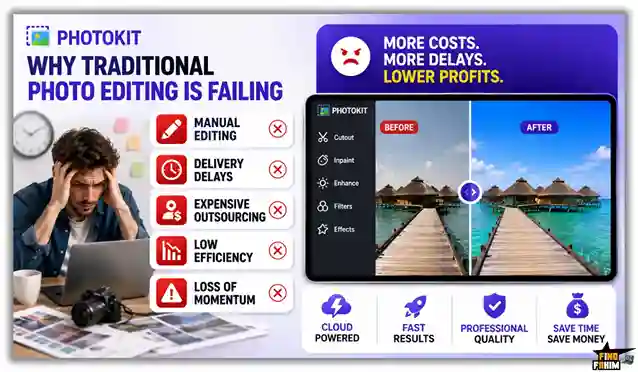
Furthermore, outsourcing complex visual tasks to expensive freelance designers burns through your cash reserves rapidly. Waiting days for external vendors to return formatted photos ruins production momentum and damages your daily operating margins.
Why Automated Visual Tools Are Trending in 2026
The daily business demand for rapid visual execution has peaked across modern consumer platforms. Audiences expect highly polished product photography before trusting an online brand, requiring agencies to deploy systems without adding payroll.
Automated platforms fix these heavy production bottlenecks completely by turning raw photographs into commercial assets instantly. These tools maintain your aggressive publishing calendar without exhausting your team or draining expensive software budgets.
Fast Image Processing: How Does It Work
- Register: Click the Dealify link to secure your lifetime license and log in to your primary web dashboard.
- Upload: Drag your raw image files from your computer directly into your active internet browser window.
- Select Edit: Click the specific background removal, magic eraser, or quality enhancement button located on the top toolbar.
- Process: Wait exactly five seconds while the artificial intelligence engine reads the pixels and executes your command.
- Export: Download the finalized, high-resolution graphic directly to your local hard drive for immediate commercial publication.
Best Use Cases for PhotoKit
- E-Commerce Owners: Stop burning cash on expensive commercial photographers. Strip the background off fifty raw product photos instantly to create a clean, highly converting online catalog that increases your profit margins.
- SEO Bloggers: Enhance blurry stock photos and compress their final file size instantly to guarantee faster WordPress loading times, directly protecting your technical search engine rankings.
- Digital Agencies: Erase harsh watermarks and unwanted text from client-provided images rapidly without opening heavy desktop software, allowing your team to deploy social media campaigns immediately.
Start Managing Your Visual Assets Today
PhotoKit Alternatives
The digital design market contains several tools built for specific visual tasks. Let us look at how this PhotoKit lifetime deal stacks up against competing software on the market.
PhotoKit vs Canva Pro
Where Canva Wins: Massive pre-built templates. It focuses heavily on arranging text and graphics onto specific digital canvases for quick flyer and presentation layouts.
Where PhotoKit Wins: Pure photo manipulation. Canva severely limits your direct editing control. This platform provides highly capable exposure correction and deep object removal tools that physically alter your core image.
PhotoKit vs Adobe Photoshop
Where Photoshop Wins: Extreme pixel manipulation. It remains an absolute giant for massive print campaigns needing complex layer masking and offline CMYK color profiling.
Where PhotoKit Wins: Immediate financial value. Photoshop forces you into heavy recurring monthly contracts. This software requires zero training and executes professional edits for a single, highly predictable lifetime payment.
PhotoKit vs Remove.bg
Where Remove.bg Wins: Direct API deployment. It excels at plugging strictly into external third-party software code to automate background deletion silently.
Where PhotoKit Wins: Complete studio functionality. Remove.bg charges you aggressively per single image. This platform includes background removal alongside dozens of other enhancement features for unlimited daily downloads.
PhotoKit vs Lightroom
Where Lightroom Wins: Professional photography workflows. It handles massive folders of uncompressed RAW files and deep metadata tagging for professional wedding and studio photographers.
Where PhotoKit Wins: Universal accessibility. Lightroom requires a synchronized local desktop environment. You can log into this browser platform from any computer in the world and start fixing photos instantly.
PhotoKit vs Pixlr
Where Pixlr Wins: Casual free access. It provides an entirely ad-supported basic tier for users who do not mind slow processing speeds and intrusive banner advertisements.
Where PhotoKit Wins: Commercial-grade output. Pixlr produces soft, low-quality exports. This system utilizes highly advanced artificial intelligence algorithms to guarantee crisp, commercial-ready results that protect your agency’s brand reputation.
Top 5 Competitors Matrix
| Platform | Pricing Model | Core Strength | Browser Based | Best For… |
| PhotoKit | Lifetime Deal | Fast AI Editing | ✅ Yes | Agencies & SMBs |
| Canva Pro | Monthly Sub | Template Design | ✅ Yes | Content Marketers |
| Photoshop | Monthly Sub | Deep Pixel Control | ❌ No | Professional Artists |
| Remove.bg | Pay Per Image | Backgrounds Only | ✅ Yes | Automated Code |
| Lightroom | Monthly Sub | RAW Processing | ❌ No | Studio Photographers |
| Pixlr | Ad-Supported | Casual Editing | ✅ Yes | Free Casual Users |
Switch to PhotoKit and Stop Paying Subscriptions
Is This Deal a Smart Business Investment?
Analyzing the exact financial investment reveals immediate cash benefits for growing creative teams. A standard subscription to a premium desktop suite like Adobe Photoshop costs roughly $250 annually, while a dedicated template manager like Canva Pro burns an additional $120. Add specialized background removal credits, and your operational overhead easily pushes past $500 per year.
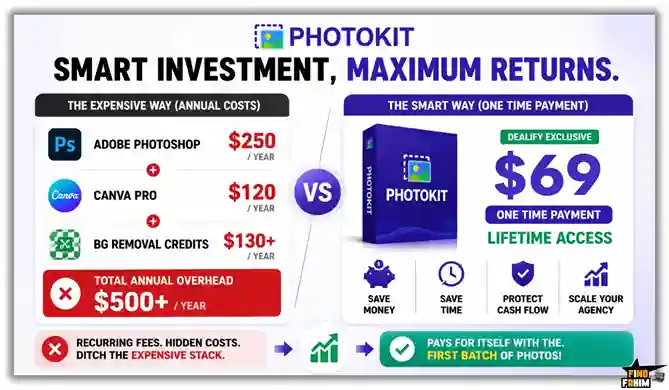
Securing the PhotoKit AppSumo deal package via Dealify for exactly $69 means you completely eliminate those recurring financial drains instantly. The platform pays for itself the very first time you process a batch of e-commerce photos without paying freelance editors. By consolidating your visual technology stack, you protect your cash flow and scale your digital agency efficiently.
How to Redeem the PhotoKit Deal
- Buy: Purchase your preferred access tier directly on the Dealify marketplace platform to secure your permanent software license.
- Redeem: Check your email inbox to retrieve your unique activation code from the transaction receipt.
- Register: Go to the official PhotoKit registration website and establish your brand new administrator account profile.
- Activate: Submit your unique purchase code within the account billing dashboard to permanently unlock your tier limits and begin editing immediately.
Final Verdict: Is This Deal Worth It?
After actively evaluating the background removal mechanics, testing the image enhancement tools, and reviewing the massive 2026 artificial intelligence updates, my final verdict is a definitive 4.8-Star BUY. The PhotoKit lifetime deal solves a massive, expensive problem: paying for heavy desktop software that slows down your daily production workflow.
It acts as an incredibly efficient visual operations hub that protects agency margins by unifying retouching, isolation, and processing into one secure browser dashboard. Investing in the Starter Plan is absolutely mandatory for marketing teams that require multiple device logins. Secure your lifetime access today to streamline your digital graphics operations completely.
Secure Your PhotoKit Deal Before It Closes
About the Author
The dedicated development team founded PhotoKit because they recognized that running a modern digital business required dodging far too many heavy, disconnected legacy design applications. They built this unified browser architecture to eliminate the sheer inefficiency of switching between heavy desktop editing platforms.
Here at FindFahim, my absolute focus is on evaluating these specific lifetime packages to help your business eliminate inefficient data workflows. I personally checked this visual manager because relying on slow software directly stalls your organic publishing pipeline. To continue upgrading your business systems, read my complete breakdown on the Castmagic AppSumo deal.
FAQ: Your PhotoKit Questions, Answered
PhotoKit is a browser-based AI photo editing platform that helps users edit, enhance, retouch, and optimize images without installing desktop software.
No. PhotoKit runs entirely inside your web browser, allowing you to edit photos without downloading or installing any software.
Yes. PhotoKit works through modern web browsers and supports Windows, Mac, Linux, and many tablet devices.
No. The lifetime plans include unlimited image downloads, allowing users to edit and export as many images as needed.
PhotoKit uses AI-powered background removal technology that can automatically separate subjects from backgrounds in just a few seconds.
Yes. PhotoKit includes an AI object remover that can erase unwanted elements such as text, logos, people, or distractions from images.
AI photo enhancement uses machine learning algorithms to improve image quality by sharpening details, reducing blur, and increasing overall clarity.
Online photo editors help businesses save time, avoid software installations, and enable image editing from any device with internet access.
Yes. AI image enhancement tools can analyze blurry areas and improve sharpness, detail, and visual quality.
Yes. Modern browser-based editors offer advanced editing features that are suitable for ecommerce, marketing, content creation, and professional design tasks. What is PhotoKit?
Do I need to install software to use PhotoKit?
Does PhotoKit work on Windows and Mac?
Does PhotoKit have download limits?
How fast is the PhotoKit background remover?
Can PhotoKit remove unwanted objects from photos?
What is AI photo enhancement?
Why do businesses use online photo editors?
Can AI improve blurry images?
Are browser-based photo editors suitable for professional work?

Hi, I’m Fahim — a SaaS tools reviewer and digital marketing expert with hands-on experience helping businesses grow using the right software. I research, test, and personally use a wide range of AI, business, productivity, marketing, and email tools for my agency, clients, and projects. I create honest, in-depth reviews and guides to help entrepreneurs, freelancers, startups, and digital agencies choose the best tools to save time, boost results, and scale smarter. If I recommend it, I’ve used it — and I only share what truly works.