

Running a high-volume WordPress blog means manually hitting publish on every article. Tracking multiple authors across scattered spreadsheets creates severe bottlenecks and kills your deadlines.
WP Scheduled Posts is an editorial calendar plugin built to fix this issue. It automates your content pipeline, visualizes your drafting process, and ensures WordPress publishes exactly on time.
Disclaimer: This article contains affiliate links. If you purchase through these links, I may earn a small commission at no extra cost to you. All opinions, market analysis, and research are entirely my own.
My Quick Take (TL;DR)
Tired of jumping between messy spreadsheets and your WordPress backend? Here is the executive summary.
- What is it? A plugin featuring a visual drag-and-drop calendar for scheduling articles.
- Special Feature: A missed-schedule handler that forces posts to go live, bypassing native server errors.
- For Who: Content creators and agencies managing high-volume websites.
- The Deal: Lifetime access starting at $39. Stack three codes to secure unlimited websites.
- Verdict: A mandatory WordPress upgrade that replaces confusing editorial spreadsheets and expensive social media schedulers instantly.
Get the WP Scheduled Posts Lifetime Deal on AppSumo
What is WP Scheduled Posts?
Most website owners hate planning editorial calendars because WordPress lacks a native visual organizer. This plugin transforms your default dashboard into a highly organized planning hub.
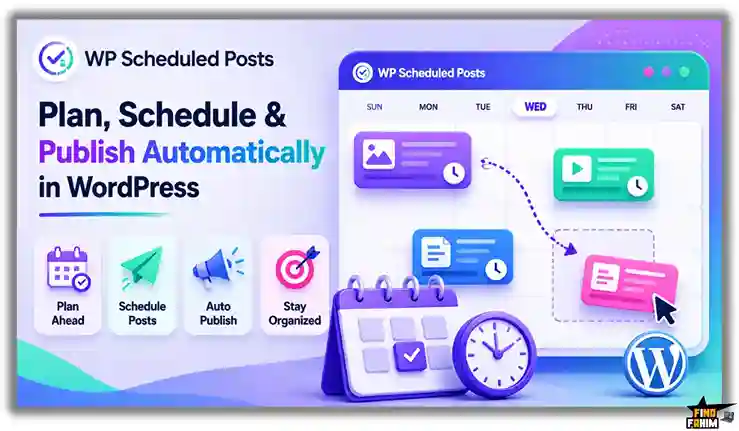
You can drag draft articles onto specific dates, schedule them weeks ahead, and let the software push them live to your blog and social networks automatically.
Quick Look: What’s Inside the Deal
If your business relies on manual publishing or paying for separate social media schedulers, your operations are bleeding cash.
Transitioning to this unified WordPress plugin instantly saves you time and money. Here is the financial value.
| Feature | Replaces… | The Real Value | Normal Cost | Deal Status |
| Content Planning | Excel Sheets | Visual drag-and-drop calendar | Tedious Labor | ✅ Included |
| Auto-Publishing | Manual Clicks | Posts go live while you sleep | ~$15/hour | ✅ Included |
| Social Sharing | Buffer | Auto-posts to Twitter & FB | ~$216/yr | ✅ Included |
| Error Handling | Constant Checking | Fixes WP cron job failures | ~$300/yr | ✅ Included |
| Total Value | Fragmented Tools | Unified Editorial Plugin | ~$516+/yr | $39 (Lifetime) |
Why Traditional Content Planning Is Failing
Forcing your team to track blog articles in massive spreadsheets is an operational failure. Traditional planning creates severe disconnects between writing content and publishing it, leading to missed deadlines and extreme frustration across your editorial team.
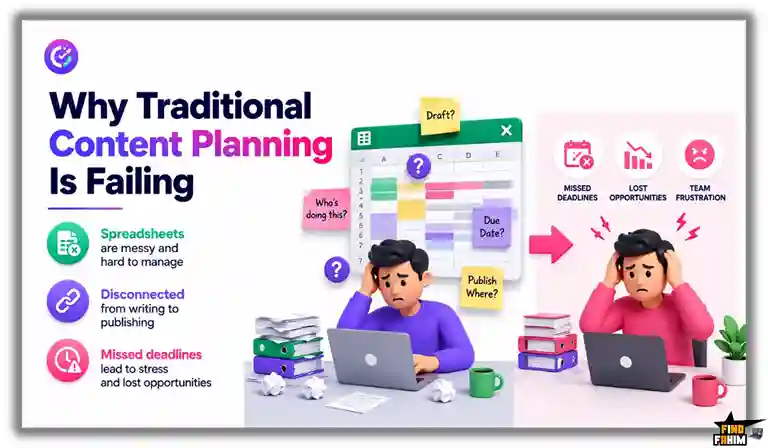
Furthermore, managing multiple freelance writers through messy email chains guarantees publishing errors. When editors cannot visually see what is scheduled directly inside the CMS, your website’s content strategy collapses entirely.
Why Editorial Calendars Are On Top in 2026
The demand for consistent publishing has peaked. Search engines expect daily, high-quality content to rank websites effectively. Modern agencies require tools that bypass manual intervention and push articles live automatically.
Editorial plugins eliminate workflow friction. By visualizing your entire content pipeline natively inside WordPress, these tools allow editors to spot gaps instantly. You can finally execute aggressive organic marketing strategies without hesitation.
A Look Inside WP Scheduled Posts: Key Features
This plugin is highly powerful but intentionally straightforward. There is no confusing setup process or bloated developer menus.
Here is exactly what the dashboard offers to streamline your workflow.
Visual Calendar Interface
You no longer need to click through basic text lists of draft posts. The plugin provides a clean, month-to-month calendar directly inside your WordPress admin panel. You can easily drag and drop articles to change their publishing dates instantly without ever opening the individual post editor.
Multi-Author Management
Controlling a team of writers is incredibly simple. The dashboard allows administrators to view exactly who is assigned to each article and what their current progress is, ensuring your entire editorial team stays completely organized and accountable.
Automatic Social Sharing
Getting traffic requires active social promotion. Once your blog post goes live, the software automatically pushes the link directly to your connected Twitter and Facebook accounts. You eliminate the need to manually copy and paste URLs into separate social media applications.
Standout Feature: Missed Schedule Handler
This is the primary reason professional bloggers buy this software. Natively, WordPress relies on “WP-Cron” to publish scheduled articles. This system requires active website visitors to trigger the publishing event. If your site has low traffic at the exact minute your post is scheduled, WordPress will miss the deadline entirely.
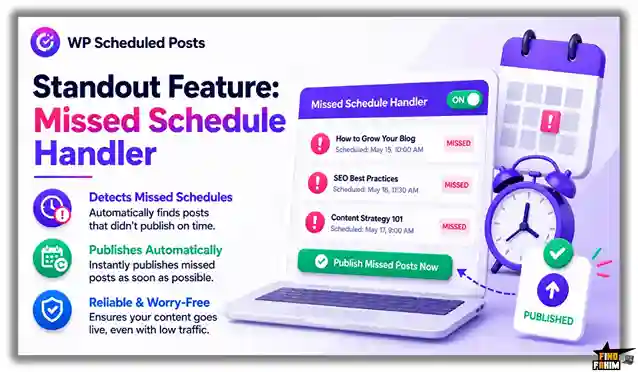
This plugin includes a dedicated handler that bypasses this native flaw. It actively monitors your scheduled drafts and forces the system to publish them exactly on time, guaranteeing you never lose valuable search traffic to a technical server failure again.
Recent 2026 Platform Updates
The development team actively shapes this software based directly on user feedback, deploying massive backend improvements to your dashboard.
- Refined Handler Technology: Upgrading the missed schedule handler to ensure absolute publishing success on low-traffic servers.
- Social Stability Patches: Launching dedicated API updates to keep your Facebook and Twitter connections permanently locked in without re-authentication.
- Custom Post Support: Adding complex controls allowing agencies to drag-and-drop WooCommerce products directly onto the visual calendar.
WP Scheduled Posts Pricing & Lifetime Deal Details
Unlike heavy recurring subscriptions, this AppSumo deal is highly affordable and fully stackable. The pricing matrix below compares the exact limits across three clear tiers so you can find your perfect fit instantly.
| Feature | 1 Code | 2 Codes | 3 Codes |
| One-Time Price | $39 | $78 | $117 |
| Website Limit | 5 Sites | 10 Sites | Unlimited Sites |
| Visual Calendar | ✅ Yes | ✅ Yes | ✅ Yes |
| Auto-Sharing | ✅ Yes | ✅ Yes | ✅ Yes |
| Missed Handler | ✅ Yes | ✅ Yes | ✅ Yes |
Lock In Your Exact Lifetime Tier on AppSumo
Understanding the Stacking Strategy
Independent bloggers can safely start with a single $39 code for five websites. However, marketing agencies and freelance developers must stack three codes ($117) immediately. This maximum tier secures unlimited website installations, allowing you to deploy the editorial calendar across every single client site you manage without ever paying extra fees.
Lifetime Deal Refund Policy
This deal includes AppSumo’s standard 60-day money-back guarantee. You get two full months to test the drag-and-drop calendar, evaluate the social media auto-sharing, and review the missed schedule handler completely risk-free.
Pros & Cons of This Lifetime Package
Before changing your workflow, you need absolute clarity. After testing the dashboard and reviewing user feedback, here is the truth about this plugin.
The Pros
- ✅ Incredible Value: Replaces expensive scheduling tools with a single $39 payment.
- ✅ Error Prevention: The missed schedule handler fixes a known WordPress publishing flaw.
- ✅ Agency Scaling: Stacking three codes for unlimited websites is highly profitable.
- ✅ Time Saver: Auto-sharing to Facebook and Twitter eliminates manual promotion.
- ✅ Highly Visual: The drag-and-drop calendar makes organizing drafts incredibly fast.
The Cons
- ❌ Limited Networks: Focuses on Facebook and Twitter, lacking native Instagram or LinkedIn posting.
- ❌ Basic Analytics: It schedules posts but provides no deep traffic metrics inside the calendar.
Who Should NOT Buy WP Scheduled Posts?
Skip this deal entirely if you run a static brochure website that rarely publishes articles. This platform is built strictly for highly active blogs and content agencies.
Also, avoid this if your workflow relies on Shopify or Wix. Buying a dedicated WordPress plugin is a total waste of your budget here.
How Does WP Scheduled Posts Plugin Work?
The setup workflow is extremely fast and requires absolutely no coding background to execute properly.
Here is exactly how we use the WordPress plugin to turn a messy content strategy into a seamless publishing engine.
- Install: Upload the plugin directly to your WordPress backend and activate your AppSumo license key.
- Configure: Run the setup wizard to securely connect your Facebook and Twitter accounts for auto-sharing.
- Draft: Create your own articles exactly as you normally would inside the standard WordPress Gutenberg or Classic editor.
- Organize: Open the visual calendar interface to drag and drop your pending drafts onto specific dates.
- Publish: Walk away and let the plugin’s missed schedule handler push your content live automatically.
Best Use Cases for WP Scheduled Posts
Because it handles complex publishing pipelines securely, this plugin adapts perfectly to professionals managing high-volume digital operations.
Here are three professionals who will get the highest return on investment from dedicating their time to this specific software.
- Marketing Agencies: Stack three codes for unlimited sites and install the calendar on all client websites to manage their content pipelines visually from a single location.
- Niche Bloggers: Write a month’s worth of articles in one weekend, drop them onto the calendar, and let the software drip them out while you travel.
- News Publishers: Manage massive teams of freelance writers, assign specific dates, and ensure breaking news goes live exactly on time without server errors.
Secure Your WP Scheduled Posts Lifetime License Here
WP Scheduled Posts Alternatives
The content management market is highly competitive. Let us look at how this highly cost-effective AppSumo deal stacks up against established industry heavyweights.
Understanding their specific strengths prevents us from buying redundant tools. Here is how it compares to five of the current market leaders.
WP Scheduled Posts vs CoSchedule
CoSchedule is the undisputed giant in the content planning space.
Where CoSchedule Wins: It offers deep enterprise features and massive collaboration tools for external platforms.
Where WP Scheduled Posts Wins: Pure value. CoSchedule demands heavy monthly subscriptions. This plugin delivers the essential visual calendar features you actually need for a single, flat payment, saving you hundreds annually.
WP Scheduled Posts vs Buffer
Buffer is a highly popular, standalone social media scheduler.
Where Buffer Wins: Network variety. It supports visually heavy platforms like Instagram and TikTok perfectly.
Where WP Scheduled Posts Wins: Native WordPress speed. Buffer forces you to log in to a separate external dashboard. This plugin pushes your content to Facebook and Twitter the exact second your blog post goes live.
WP Scheduled Posts vs PublishPress
PublishPress targets massive editorial teams that require strict supervision.
Where PublishPress Wins: It features incredibly strict custom user roles and granular pre-publishing checklists.
Where WP Scheduled Posts Wins: Agency growth. Stacking three AppSumo codes secures unlimited websites. PublishPress forces agencies into expensive annual renewals just to manage multiple client sites effectively.
WP Scheduled Posts vs WP Editorial Calendar (Free)
This is the most common free plugin currently available.
Where WP Editorial Calendar Wins: The price tag is exactly zero. It provides a very basic visual layout for casual hobby bloggers.
Where WP Scheduled Posts Wins: Technical reliability. The free tool completely lacks a missed schedule handler and automated social sharing, making it highly dangerous for serious content pipelines.
WP Scheduled Posts vs Hootsuite
Hootsuite dominates the enterprise social media management market.
Where Hootsuite Wins: Advanced social listening and complex audience reporting metrics.
Where WP Scheduled Posts Wins: Budget control. Hootsuite charges massive recurring premiums. This tool manages your basic social pushes natively from WordPress for a one-time fee.
The Competitor Matrix Table
| Platform | Pricing Model | Core Focus | Unlimited Sites |
| WP Scheduled Posts | Lifetime ($39+) | Visual WordPress Calendar | ✅ Yes (Tier 3) |
| CoSchedule | Monthly Sub | Enterprise Editorial | ❌ No |
| Buffer | Monthly Sub | Social Scheduling | ❌ No |
| PublishPress | Yearly Sub | Editorial Permissions | ❌ No |
| Hootsuite | Monthly Sub | Social Management | ❌ No |
Skip the Expensive Subscriptions – Get LTD Here
The Financial Math: Is This a Smart Investment?
Let us look at the exact financial math of standard content marketing over a single year to see how fast this plugin pays for itself.
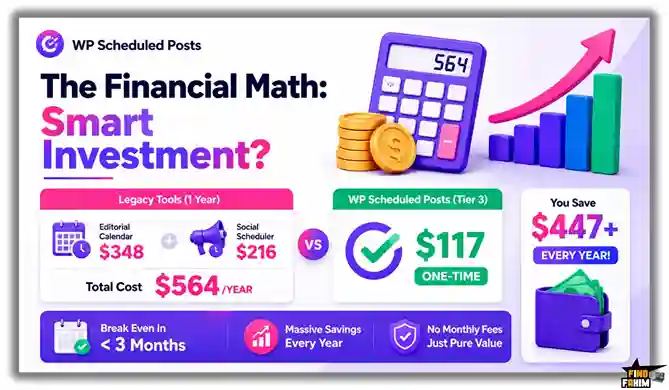
Here is the exact cost of choosing fragmented monthly tools versus paying for this unified lifetime deal.
- Cost of Legacy Software (1 Year): A premium editorial calendar (~$348/yr) plus a basic social scheduler (~$216/yr) totals over $564/yr.
- Cost of WP Scheduled Posts (Tier 3): $117 paid exactly once for unlimited websites.
The return on investment is undeniable; we break even in less than three months. By using this plugin to replace expensive recurring subscriptions, you save massive amounts of cash while rapidly increasing your publishing speed and reliability.
How to Redeem the WP Scheduled Posts Lifetime Deal
Ready to stop relying on messy spreadsheets and speed up your workflow? Follow these steps safely.
This immediate execution guarantees you can lock in your exact tier limit before the current AppSumo deal expires permanently.
- Buy: Click the AppSumo link to secure your redemption codes under the 60-day money-back guarantee.
- Download: Grab the plugin ZIP file directly from your AppSumo account dashboard.
- Install: Upload the plugin to your WordPress site and activate the software.
- Activate: Enter your unique AppSumo code in the plugin settings to lock in your lifetime access.
- Execute: Drag your first draft onto the calendar and let it auto-publish completely risk-free.
Final Verdict: Is This Lifetime Deal Worth It?
After evaluating the drag-and-drop calendar, testing the social media auto-sharing, and reviewing the flawless missed schedule handler, my final verdict is a definitive BUY.
WP Scheduled Posts solves a massive, expensive problem: disorganized content pipelines. It is a highly effective plugin that combines visual planning and technical error prevention into one affordable package. Stacking three codes for unlimited sites is a mandatory investment for marketing agencies.
Secure Your Appsumo Lifetime License Before It Ends
About the Author
Asif and his development team in Bangladesh built WP Scheduled Posts to fix a massive WordPress scheduling flaw. They designed this visual drag-and-drop editorial calendar to completely eliminate messy spreadsheets and prevent technical server errors from destroying organic content campaigns.
I am the founder of FindFahim, where my absolute focus is testing these specific SaaS software deals to help marketing agencies cut recurring costs. If you want to maximize your output, check out my breakdown of the Top 20 AppSumo Deals.
FAQ: Your WP Scheduled Posts Questions, Answered
WP Scheduled Posts is a lightweight WordPress plugin that provides a drag-and-drop editorial calendar for planning, scheduling, and automatically publishing blog content.
The Missed Schedule Handler ensures scheduled WordPress posts publish on time by bypassing common cron-related publishing failures.
Yes. WP Scheduled Posts can automatically share newly published articles to connected Facebook and Twitter accounts.
Yes. Higher-tier plans support unlimited website installations, making the plugin suitable for agencies and freelancers managing multiple client sites.
Yes. WP Scheduled Posts supports standard blog posts, WooCommerce products, and custom post types directly from the visual calendar.
No. WP Scheduled Posts is optimized to remain lightweight and loads most functionality only within the WordPress admin dashboard.
A WordPress editorial calendar is a visual scheduling system that helps website owners organize, plan, and manage upcoming content publishing.
Scheduled posts may fail because WordPress relies on website traffic to trigger publishing events through its internal cron system.
Yes. Auto-posting tools help bloggers and marketers share content instantly across social platforms without manual posting.
Yes. Editorial calendar plugins help teams track assignments, monitor publishing schedules, and improve content workflow organization. What is WP Scheduled Posts?
What is the Missed Schedule Handler in WP Scheduled Posts?
Does WP Scheduled Posts automatically share content to social media?
Can WP Scheduled Posts be used on client websites?
Does WP Scheduled Posts support custom post types?
Will WP Scheduled Posts slow down my website?
What is a WordPress editorial calendar?
Why do scheduled WordPress posts sometimes fail?
Can social media auto-posting save time for bloggers?
Are editorial calendar plugins useful for content teams?

Hi, I’m Fahim — a SaaS tools reviewer and digital marketing expert with hands-on experience helping businesses grow using the right software. I research, test, and personally use a wide range of AI, business, productivity, marketing, and email tools for my agency, clients, and projects. I create honest, in-depth reviews and guides to help entrepreneurs, freelancers, startups, and digital agencies choose the best tools to save time, boost results, and scale smarter. If I recommend it, I’ve used it — and I only share what truly works.