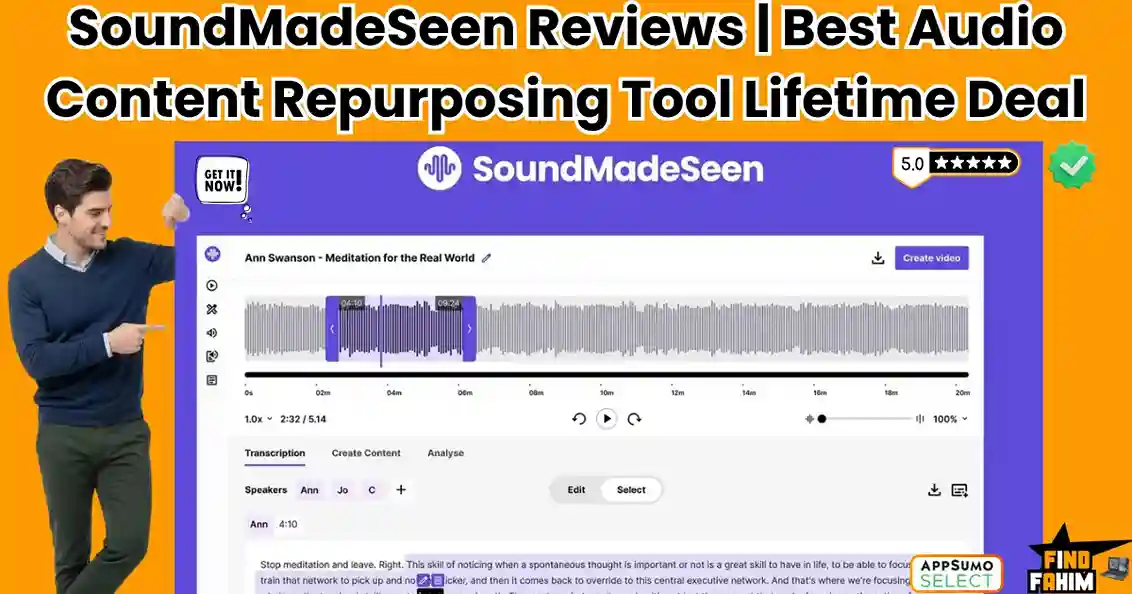

If you run a podcast or create audio content, you know the frustration of promoting invisible content on highly visual social platforms. SoundMadeSeen is an AI multimedia tool designed to instantly transform raw audio files into engaging videos.
For years, algorithms have buried static podcast links. This software automates the tedious workflow of video conversion in minutes.
Note: This article contains affiliate links. Opinions are my own independent research.
My Quick Take (TL;DR)
Tired of your podcast episodes getting zero social media traction? Here is the executive summary.
- What is it? A web-based design and transcription platform that converts audio into engaging video clips featuring waveforms, progress bars, and dynamic subtitles.
- Why is it Special? The all-in-one ecosystem. It handles text extraction, AI image generation, and video rendering inside a single dashboard.
- Who is it for? Podcasters, authors, musicians, and influencers repurposing long-form audio.
- The Deal: A $39 Lifetime Deal on AppSumo. Stack up to 4 codes for higher monthly limits.
- My Verdict: For $39, this is an absolute steal, offering a mature visual alternative to expensive monthly subscriptions.
Click Here to Get the SoundMadeSeen Lifetime Deal on AppSumo
What is SoundMadeSeen?
We are currently living in a video-first internet. If you are an audio creator posting static links, you are speaking a language that social media algorithms refuse to translate. SoundMadeSeen acts as your visual translation layer.
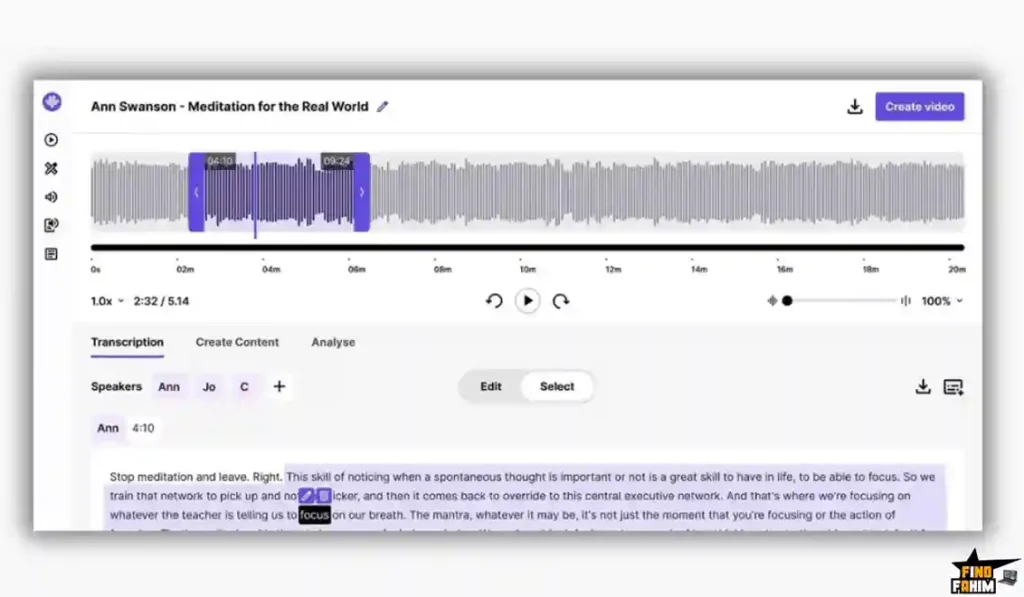
It takes your standard MP3 or WAV file and wraps it in a stimulating visual package. It generates an accurate text transcript and maps it to on-screen animations, adding moving waveforms that react perfectly to your voice.
Ultimately, this software turns a passive listening experience into an active viewing experience. Adding kinetic movement to your audio, it forces users to stop scrolling and actually pay attention to your core message.
Quick Look: SoundMadeSeen vs Manual Video Editing
If you are currently building audiograms manually across multiple programs, you are wasting valuable hours. Look at what this tool actually replaces in your production workflow.
| Feature | Replaces… | The Real Value | Normal Cost | Deal Status |
| Audiogram Generator | Headliner | Creates moving visualizers instantly | ~$20/mo | ✅ Included |
| Auto-Transcription | Otter.ai / Rev | Highly accurate text extraction | ~$15/mo | ✅ Included |
| AI Image & Video Gen | Midjourney | Generates background art via text | ~$30/mo | ✅ Included |
| Content Analyzer | ChatGPT Plus | Auto-writes show notes & blog posts | $20/mo | ✅ Included |
Why Native Audio Promotion is Failing Creators
If you promote your podcast by laying audio over a static square cover image, you are creating invisible content. Modern viewers have incredibly short attention spans.
If the screen is not moving, users assume the video is broken. They swipe away in two seconds, destroying your engagement metrics. Static images simply cannot trigger algorithmic growth.
Why Audio-to-Video is Trending in 2026
The shift to short-form vertical video is the defining media trend of the decade. Audiences no longer organically search for two-hour podcast interviews.
They discover new creators through fast-paced feeds that prioritize bite-sized visual clips. If you do not turn your audio into video, you voluntarily shrink your audience. Packaging high-value audio into vertical reels is mandatory.
A Look Inside SoundMadeSeen: Key Features
Founder Rane Bowen built this platform to eliminate the tedious steps of syncing audio with visuals. Here is a close look at the core mechanics.
The Timeline Design Editor
Recently overhauled, the editor functions like a proper non-linear video editing suite. You no longer have to settle for rigid templates. You can drag and drop audio layers, add background music, and adjust visual timings on a horizontal timeline for precise control.
Automated Transcription & Subtitles
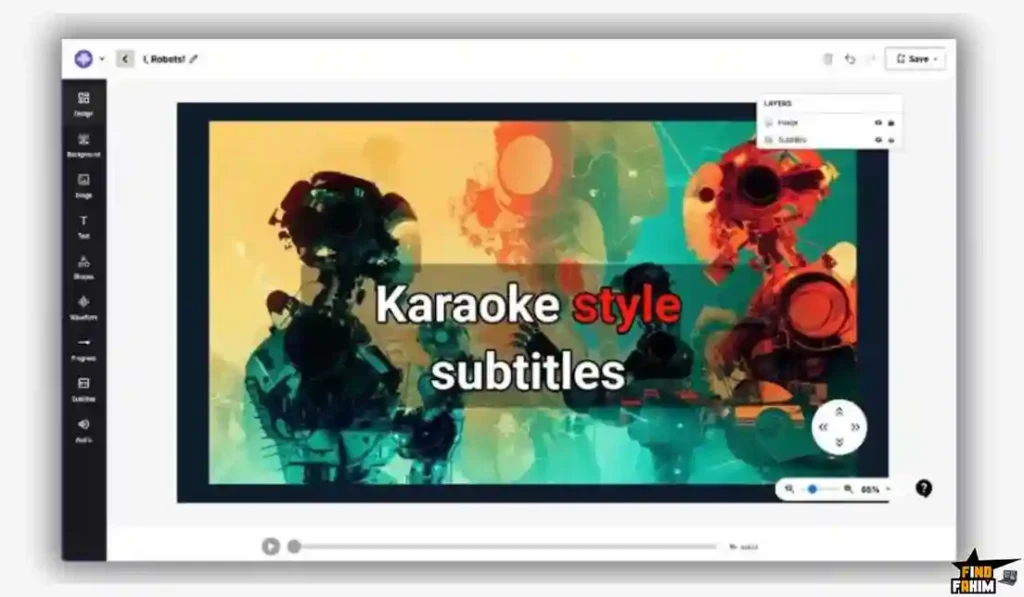
The platform transcribes uploaded audio files in minutes. It also features karaoke-style subtitles that keep viewers hooked. You can add thick outlines and vibrant backgrounds to your text. Words highlight dynamically exactly as spoken, increasing viewer retention on fast-paced platforms.
AI Image and Video Generation
Skip hunting for generic stock photos. SoundMadeSeen integrates the advanced Flux-Schnell image model right into the editor. Type a prompt, and the AI generates custom background art. You can also generate short AI video clips to serve as moving backgrounds.
The Content Analyzer
This platform acts as your dedicated marketing assistant. Once your audio is transcribed, a single click runs the AI Content Analyzer. It automatically writes your podcast show notes, blog posts, and social media captions, saving you hours of manual copywriting.
The Standout Feature: Beat Mode
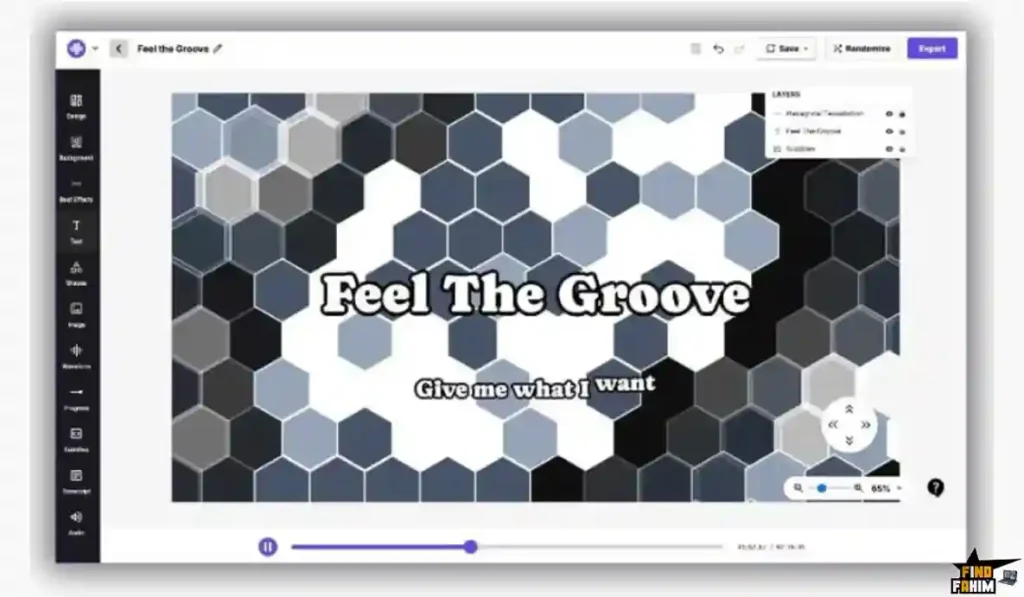
Beat Mode actively analyzes the frequency and rhythm of your uploaded music track. It synchronizes visual effects directly to the tempo of your song. You can quickly generate a kinetic music visualizer that reacts dynamically to bass drops, replacing boring static videos.
Recent 2026 Platform Updates
The development team actively listens to AppSumo feedback. Recent major updates include:
- AI Video Clips: Generate moving backgrounds from text.
- Custom SRT Uploads: Import pre-made subtitle files.
- Karaoke Subtitles: Advanced text animations with deep styling.
- Flux-Schnell Integration: A highly accurate AI image model.
SoundMadeSeen Pricing & AppSumo Deal
This lifetime deal lets you stack up to four separate codes to drastically increase your monthly generation limits. You pay exactly once, owning the software forever without facing recurring monthly subscription fees. This lowers your operating expenses compared to industry-standard tools.
| Feature | Plan 1 ($39) | Plan 2 ($78) | Plan 3 ($117) | Plan 4 ($156) |
| Video Minutes / Month | 100 | 250 | 500 | 800 |
| Transcription Minutes | 100 | 250 | 500 | 800 |
| Text-to-Speech Chars | 10,000 | 20,000 | 30,000 | 40,000 |
| AI Image Credits | 500 | 1,000 | 1,500 | 2,000 |
| File Storage Limit | 90 Days | 9 Months | 12 Months | 12 Months |
Understanding the Video Minute Limits
If you are worried about the 100-minute limit on Plan 1, calculate your actual workflow. This limit does not mean you can only upload 100 minutes of raw audio.
It means you can render 100 minutes of the final video. Extracting five 60-second clips uses only five minutes of your allowance.
My Stacking Recommendation
For Solo Podcasters: Plan 1 ($39) is the perfect entry point. It gives you more than enough rendering time to create daily promotional clips for Instagram and YouTube Shorts.
For Agencies: Stack up to Plan 4 ($156). Unlocking 800 video minutes and 2,000 AI image credits allows you to run a content repurposing agency for multiple clients comfortably.
Secure Your SoundMadeSeen Lifetime License Here
Pros & Cons of This Lifetime Package
Based on deep software testing and verified user feedback from the AppSumo community, here is the truth about the platform’s current state. We prioritize genuine usability over marketing hype.
The Pros
- ✅ Massive Feature Consolidation: Combining transcription, audiograms, and AI image generation saves massive amounts of daily tab-switching and file transferring.
- ✅ Aggressive Development: The founder rapidly pushes major software updates based directly on user feature requests, showing a strong commitment to the product.
- ✅ Clean Embeds: You can easily embed the generated content directly onto your own website using their iframe integration, keeping traffic on your domain.
- ✅ No Branding: Every single AppSumo tier completely removes the SoundMadeSeen watermark from your exported videos, ensuring a highly professional aesthetic.
- ✅ Cost Efficiency: The entry price of $39 is exceptionally low for the sheer volume of audio formatting tools included.
The Cons
- ❌ Storage Expiration: The system deletes raw files after a set period of inactivity. This starts at 90 days on Plan 1, requiring you to actively download your finished work to a local hard drive.
Who Should NOT Buy SoundMadeSeen?
Skip this if you edit native video podcasts using high-end 4K cameras. If you are already editing multi-cam video footage in Premiere Pro, you do not need an audiogram generator.
Furthermore, avoid this if you only write text. If you are a traditional blogger who does not record audio or produce music, these visualizer features provide absolutely zero value to your workflow.
How Does SoundMadeSeen Work?
The workflow is highly optimized for production speed. Here is exactly how fast you can create a highly engaging promotional clip.
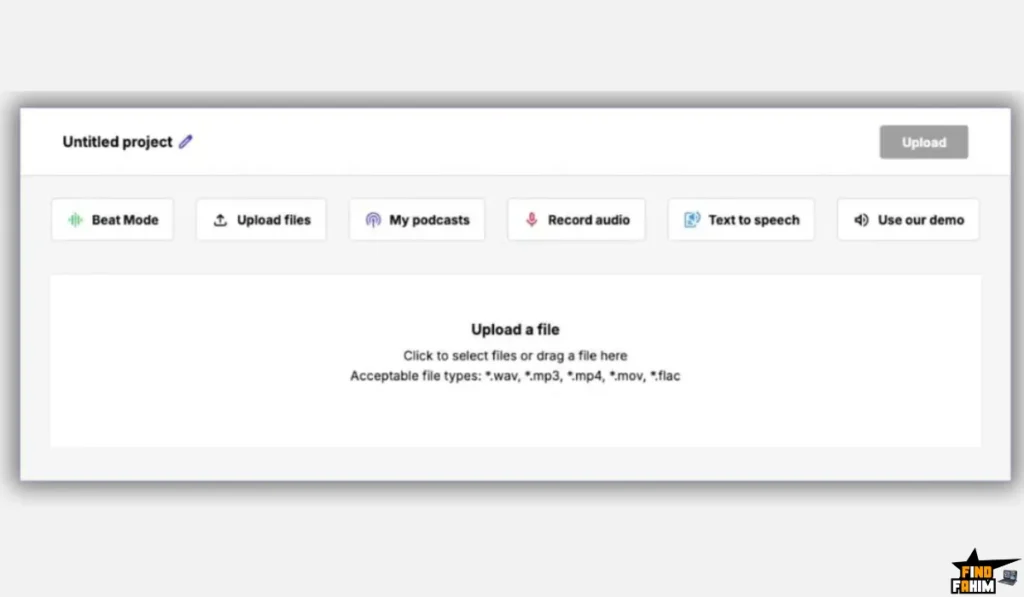
- Upload: Drag your raw audio file directly into the dashboard.
- Transcribe: Click the button to process the audio into an accurate text document.
- Analyze: Run the Content Analyzer to automatically draft your show notes.
- Design: Open the Timeline Editor, choose a vertical canvas, and add your visualizer.
- Enhance: Generate a custom AI background image matching your episode.
- Export: Render the final MP4 file and upload it to your social channels.
Best Use Cases for SoundMadeSeen
Who extracts the highest return on investment from this specific multimedia platform? Here are three perfect workflow examples showing the tool in action.
The Solo Podcaster: You edit your show entirely by yourself and have zero budget for a social media manager. Time is your most valuable asset. You upload your episode, use the Content Analyzer for YouTube descriptions, and quickly generate highlight clips with bold subtitles.
The Independent Musician: You just mixed a brand new track and need engaging visuals for Spotify Canvas and YouTube. You upload the track, turn on Beat Mode, select a neon color palette, and let the software generate a stunning, rhythm-synced visualizer that looks completely professional.
The Audiobook Author: You are trying to aggressively sell your self-published audiobook. You take a thrilling 2-minute chapter excerpt, add a pulsing waveform over custom AI background art, and post the snippet with a direct purchase link to dramatically boost your conversions.
Start Turning Your Audio into Videos Today
SoundMadeSeen Alternatives
The market for podcast repurposing and content creation tools is highly competitive. You will find hundreds of software options promising to make your content go viral.
To understand where this specific AppSumo lifetime deal fits into your workflow, we need to compare it against the established industry leaders.
SoundMadeSeen vs Descript
Descript is widely considered the current powerhouse in the podcasting space for text-based audio editing.
Where Descript Wins: Advanced timeline correction. If you delete a sentence from the transcript, it automatically cuts that specific audio from the track entirely.
Where SoundMadeSeen Wins: System resources. Descript is a massive desktop app requiring significant computer RAM. SoundMadeSeen is a lightweight web platform, making it much faster for rendering quick social media visualizers on basic laptops.
SoundMadeSeen vs Headliner
Headliner is the original, most famous audiogram generator on the market, operating heavily via RSS feeds.
Where Headliner Wins: Complete RSS automation. When a new episode drops on your feed, it automatically selects a clip, generates a template video, and emails it directly to your inbox.
Where SoundMadeSeen Wins: Generative AI capabilities. Headliner relies heavily on boring, static templates. SoundMadeSeen includes built-in AI image and video generation, ensuring highly customized and visually distinct backgrounds for every post.
SoundMadeSeen vs Otter.ai
Otter is a massive transcription platform used heavily by journalists and corporate enterprise teams.
Where Otter Wins: Real-time meeting transcription. Otter sits in your Zoom calls and excels at transcribing multiple speakers in real-time for fast corporate summaries.
Where SoundMadeSeen Wins: Multimedia output. Otter only gives you a plain text document. SoundMadeSeen handles the text extraction and the video building simultaneously in one single dashboard, saving you an extra editing step.
SoundMadeSeen vs Veed.io
Veed is an incredibly popular web-based video editor among professional YouTube creators and marketing teams.
Where Veed Wins: Full video editing capabilities. If you are cutting together multiple camera angles or doing heavy color grading, Veed operates like a cloud-based version of Final Cut Pro.
Where SoundMadeSeen Wins: The audio-first workflow. Veed is built for visual video files. SoundMadeSeen is explicitly designed to build visual elements around an audio track effortlessly without complex, overwhelming interfaces.
SoundMadeSeen vs Canva
Canva is the ultimate graphic design tool for modern creators, small businesses, and social media agencies.
Where Canva Wins: Static graphic design. If you need to design podcast cover art or a YouTube thumbnail, Canva is completely unmatched in the digital design industry.
Where SoundMadeSeen Wins: Audio reactivity. Canva cannot generate dynamic waveforms that actually react to an audio track’s pitch and volume. SoundMadeSeen physically analyzes your audio to sync visual pulses perfectly.
All 5 Competitors Matrix
| Platform | Pricing Model | Core Focus | Audio Visualizers | Best For… |
| SoundMadeSeen | Lifetime ($39+) | Audio to Video | ✅ Yes (Dynamic) | Audio Creators & Podcasters |
| Descript | Monthly Sub | Text-Based Editing | ✅ Yes | Heavy Audio/Video Editing |
| Headliner | Monthly Sub | Audiograms | ✅ Yes | Automated RSS Clips |
| Otter.ai | Monthly Sub | Transcription | ❌ No | Meeting Notes |
| Veed.io | Monthly Sub | Web Video Editor | ✅ Yes | General Video Creators |
| Canva | Freemium / Sub | Graphic Design | ❌ No | Static Thumbnails & Art |
Skip the Expensive Subscriptions – Get SoundMadeSeen Here
Is This Lifetime Deal a Smart Business Investment?
Let’s look at the exact financial math of choosing SoundMadeSeen Plan 4 versus paying for a premium subscription stack.
Over a standard business year, your typical creator stack costs add up fast: Headliner Pro for visualizers ($240), ChatGPT Plus for show notes ($240), and Midjourney for background art ($120). That is $600 in recurring fees every single year.
SoundMadeSeen Plan 4 costs $156 exactly once.
The ROI math is simple: you break even in just three months. By the end of your first year, you have saved $444.
More importantly, you consolidate three completely different workflows into a single dashboard. You stop wasting hours switching between tabs, allowing you to focus purely on creating great content instead of fighting with multiple software interfaces.
How to Redeem the SoundMadeSeen Lifetime Deal
Ready to turn your invisible audio into a highly engaging video? Follow these quick steps to lock in your lifetime license.
- Buy: Click the AppSumo link below to secure your preferred code tier before the timer expires.
- Register: Go to the SoundMadeSeen website and create a brand new user account.
- Activate: Navigate to the billing section and paste your AppSumo code to instantly unlock your lifetime limits.
- Test: Upload a short MP3 file, add karaoke subtitles, and render the final video to verify the output quality yourself.
Final Verdict: Is This AppSumo Deal Worth It?
After testing the timeline editor, analyzing the transcription accuracy, and evaluating the aggressive feature update schedule from the founder, my final verdict is a flawless 5-Star YES.
SoundMadeSeen solves the fundamental problem of podcast marketing. It makes invisible audio totally visible. It prevents you from wasting hours inside complex video editing software just to create a thirty-second social media clip.
The recent addition of the Flux-Schnell AI image generator and the automatic Content Analyzer elevates this from a simple audiogram maker to a complete marketing suite. At $39 for the entry tier, the financial risk is practically zero. Grab it before the deal expires.
Secure Your SoundMadeSeen Lifetime Deal Before The Timer Runs Out
About the Author
Welcome to FindFahim, the #1 SaaS Lifetime Deals Review Platform where I spend my time analyzing SaaS products to help smart entrepreneurs save big and stop overpaying for monthly software. We all know the extreme frustration of spending hours editing promotional videos, which is exactly why I investigated the SoundMadeSeen lifetime deal today.
I do the heavy lifting of evaluating these offers—digging into specific word limits and feature roadmaps—so you know exactly what you are buying. To see what else I am currently reviewing to cut your business costs, check out my Full Guide to the Best Lifetime Software Deals.
FAQ: Your SoundMadeSeen Questions, Answered
SoundMadeSeen is a web-based platform that converts audio files into engaging videos with animated waveforms, subtitles, and AI-generated backgrounds for social media sharing.
SoundMadeSeen transforms audio into video by generating waveforms, auto-transcribing speech into subtitles, and adding AI visuals to create shareable content.
Yes. SoundMadeSeen supports multiple global languages with accurate auto-transcription that can be edited before final video export.
Beat Mode is a feature that analyzes music rhythm, bass, and tempo, then syncs visual effects like pulses and color changes with the track.
Yes. SoundMadeSeen allows you to upload SRT or VTT files so you can use your own subtitles and maintain full control.
Yes. SoundMadeSeen can create dynamic AI-generated background visuals based on text prompts to match your content.
Video content performs better on social media platforms, helping creators reach larger audiences compared to audio-only posts.
Subtitles increase engagement by making content accessible and keeping viewers focused, especially when watching without sound.
The best approach is to convert long-form audio into short video clips, blog posts, and social media content to maximize reach.
Lifetime deals can reduce long-term costs by removing recurring subscriptions, making them useful for creators testing new tools. What is SoundMadeSeen?
How does SoundMadeSeen convert audio into video?
Does SoundMadeSeen support multiple languages for transcription?
What is Beat Mode in SoundMadeSeen?
Can SoundMadeSeen use custom subtitle files?
Does SoundMadeSeen generate AI background videos?
Why is video marketing important for audio content?
How do subtitles improve video engagement?
What is the best way to repurpose audio content?
Are lifetime software deals worth it for creators?

Hi, I’m Fahim — a SaaS tools reviewer and digital marketing expert with hands-on experience helping businesses grow using the right software. I research, test, and personally use a wide range of AI, business, productivity, marketing, and email tools for my agency, clients, and projects. I create honest, in-depth reviews and guides to help entrepreneurs, freelancers, startups, and digital agencies choose the best tools to save time, boost results, and scale smarter. If I recommend it, I’ve used it — and I only share what truly works.