
What is the actual financial cost of a simple typo in a proposal to a $10,000 client? It is not merely a grammatical error. It is an immediate loss of trust. It is a direct hit to your professionalism. It is often the exact reason you lose the contract to a competitor who presented a flawless document.
Grammarly is the most widely adopted AI writing assistant on the market, relied upon by over 40 million people to catch those exact mistakes before anyone else sees them. But if you are an entrepreneur, a freelance copywriter, or a software deal-hunter, you probably have one major question occupying your mind: Is the highly sought-after Grammarly lifetime deal actually real?
In this extensive breakdown, I analyze exactly what you receive with a Grammarly Pro subscription, investigate the “lifetime deal” rumors circulating on forums, and compare this software directly to high-value, one-time-payment alternatives available on AppSumo right now.
Note: This article contains affiliate links. If you buy through them, I may earn a commission, but all opinions are based on my independent research and analysis of the software.
My Quick Take (TL;DR)
If you are a professional trying to decide if Grammarly Pro justifies the high monthly price, or a software deal-hunter looking to escape subscriptions entirely, here is the unfiltered truth.
- What is it? An AI-driven writing coach that corrects grammar, rewrites entire paragraphs for clarity, adjusts your tone, and checks for plagiarism.
- Is Grammarly Pro Worth It? Yes. For students, professional writers, and corporate teams, the $12/month annual plan is an excellent operational investment. The plagiarism checker alone protects your reputation.
- The “Lifetime Deal” Truth: It does NOT exist. Grammarly operates strictly as a subscription service. Anyone selling a “lifetime account” online is peddling a stolen or temporary credential.
- The Smart Alternative: If you refuse to pay recurring monthly fees, your best option is an AppSumo lifetime alternative like Pismo, which gives you highly capable editing power for a single, flat fee.
Start Your Free Trial of Grammarly Pro Here
What is Grammarly? (Your AI Writing Coach)
The easiest way to understand this platform is to stop thinking of it as a basic spell-checker.
Microsoft Word has had standard spell-check functionality since 1995. If you only need to know that “receive” is spelled with “e” before “i,” you do not need to pay for premium software.
Grammarly functions as a comprehensive, AI-powered writing assistant that actively analyzes your text for multiple complex linguistic factors simultaneously:
- Correctness: It handles standard grammar, spelling, and advanced punctuation rules that native speakers frequently forget.
- Clarity: It identifies confusing, overly wordy, or passive sentences and rewrites them to be crisp, direct, and easy to read.
- Tone: It analyzes your specific vocabulary choices to tell you if your email sounds “confident,” “angry,” “formal,” or “friendly,” offering instant adjustments to match your intended emotion.
- Plagiarism: It scans billions of web pages and academic databases to verify your text is completely original, protecting you from copyright issues.
- Generation: Using generative AI, it can draft emails, brainstorm ideas, and write paragraphs from scratch based on a short prompt you provide.
It acts as an omnipresent safety net that functions exactly where you type. It works as a desktop app for Mac and Windows, a browser extension for Chrome and Safari, a mobile keyboard for iOS and Android, and integrates directly inside Google Docs.
Quick Look: Subscription vs Lifetime Alternatives
If you are trying to decide between paying for Grammarly Pro or buying a lifetime alternative on AppSumo, look at this mathematical breakdown of the core features.
| Feature | The Real Value | Grammarly Pro (Sub) | Pismo (Lifetime Alt) |
| Pricing Structure | Cash flow reality | $144/year (Recurring) | $59 (One-Time) |
| Plagiarism Checker | Reputation protection | ✅ Best-in-Class | ❌ Not Included |
| Sentence Rewrites | Cures writer’s block | ✅ Yes (Browser/App) | ✅ Yes (System-Wide) |
| Tone Adjustments | Professional communication | ✅ Yes | ✅ Yes |
| Workflow Format | How you use it | Browser / Keyboard | Native Desktop Hotkey |
| Best For… | The final verdict | Students & Agencies | Bootstrapped Founders |
Why You Need More Than a Basic Spell-Checker
You might be thinking, “My email client already puts a red line under misspelled words. Why do I need to pay for advanced editing?”
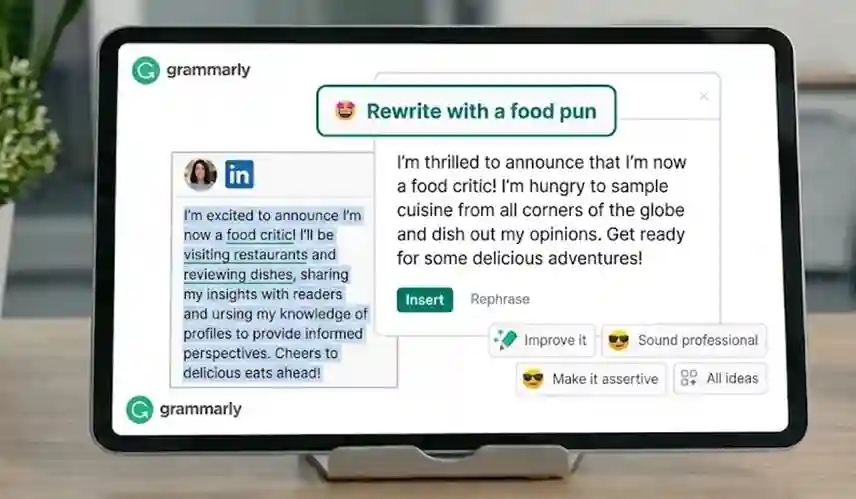
The problem with basic spell-checkers is that they lack context. You can write a sentence that is grammatically perfect but completely incomprehensible to the reader. You can write an email to your boss that has zero spelling errors but sounds highly aggressive and unprofessional.
Basic tools are reactive; they only fix what is broken. Advanced writing assistants are proactive; they improve what is already there. When you are writing a landing page designed to convert visitors into paying customers, “good enough” grammar will not win the sale. You need persuasive, clear, and confident copy. An AI writing coach ensures your sentences flow logically and maintain the reader’s attention, which directly impacts your business revenue.
Why Advanced AI Editing is Trending in 2026
I noticed this specific category of software gaining massive traction because the internet is currently flooding with low-quality, AI-generated content.
In 2026, search engines and human readers are highly sensitive to robotic, repetitive text. If you use basic generative AI to write your blog posts or emails, people can tell instantly. The trend has shifted away from “letting AI write everything” toward “using AI to perfect human writing.”
Professionals are realizing that authenticity wins. You write the raw, human thoughts, and you use an advanced editor to polish the grammar, tighten the phrasing, and ensure the tone sounds natural. This hybrid approach is exactly what search algorithms demand, making high-end editing tools more valuable than standard text generators.
A Look Inside Grammarly Pro: Key Features
If you decide the subscription route aligns with your business goals, here is a highly detailed look at the specific features you are actually paying for.
1. Full-Sentence Rewrites (Clarity)
The free version of this software will highlight a long sentence and tell you it is “wordy,” but it leaves you to fix the mess manually. The Pro version highlights the sentence, analyzes the core meaning, and gives you a perfectly rewritten, concise alternative that you can accept with a single click. It is the ultimate cure for writer’s block when you know what you want to say but cannot find the right phrasing.
2. Advanced Tone Adjustments
The AI reads your phrasing and punctuation to detect the emotional weight of your writing. This is an incredibly brilliant tool for client communication. You can draft a fast, frustrated email to a difficult vendor, and then use the “Tone Adjuster” to instantly translate your frustration into “professional and diplomatic” corporate phrasing before hitting send. It prevents emotional mistakes.
3. Generative AI Prompts
This feature brings text generation directly into your native workflow. You receive an allocation of 2,000 AI prompt generations per month. You do not have to open a new browser tab to use a separate chatbot. You can sit inside your Gmail compose window, type “Write a polite follow-up to this marketing agency,” and the AI will draft it on the spot, ready for your final edits.
The Standout Feature: The Professional Plagiarism Checker
This specific tool deserves its own dedicated section because it is the primary reason millions of users justify the annual subscription cost.
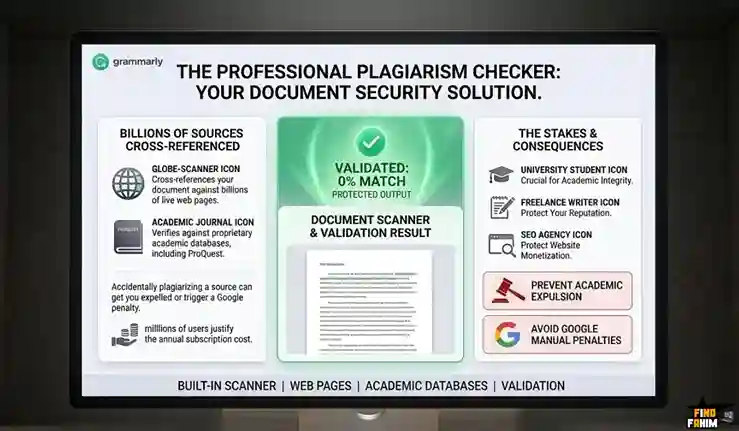
The Grammarly Pro Plagiarism Checker is a built-in scanner that cross-references your document against billions of live web pages and proprietary academic databases, including ProQuest.
This is a non-negotiable feature for university students, freelance writers, and SEO agencies. Accidentally plagiarizing a source can get you expelled from an academic institution or trigger a manual Google penalty that completely demonetizes your website. Unlike free plagiarism checkers that only scan the first page of search results, this engine digs deep into academic journals and archived articles. It is your digital insurance policy against copyright infringement.
The Honest Truth About the “Grammarly Lifetime Deal”
This is the most critical section for software deal-hunters, so I will address the rumors directly.
There is no official Grammarly lifetime deal.
If you see a third-party website, a Reddit thread, or a random seller on a forum offering a “Grammarly lifetime account” for a one-time price of $30 or $50, it is an absolute scam. These sellers are peddling cracked, stolen, or shared enterprise accounts. The company’s security team audits these accounts constantly. Within a few weeks, the account will be deactivated, you will lose access, and the seller will vanish with your money.
The reason they do not offer a lifetime deal comes down to operational costs. Running a live plagiarism database against billions of global web pages is a massive daily expense. Furthermore, the continuous training of their complex language models requires heavy server processing power. A one-time payment simply cannot sustain a live, cloud-heavy service of this magnitude indefinitely.
Hate Subscriptions? Check Out the Best Lifetime AI Writing Deals on AppSumo
Grammarly Pro Pricing (The Subscription Reality)
Because it operates entirely on a premium subscription model, you need to understand the pricing structure to avoid overpaying. Here is the official breakdown.
| Feature | Free Plan | Pro Plan (Best Value) | Enterprise Plan |
| Annual Price | $0 | $12 / month ($144 billed yearly) | Contact Sales |
| Monthly Price | $0 | $30 / month | Contact Sales |
| Grammar/Spelling | ✅ Yes | ✅ Yes | ✅ Yes |
| AI Prompts | 100 / month | 2,000 / month | Unlimited |
| Tone Adjustments | ❌ No | ✅ Yes | ✅ Yes |
| Sentence Rewrites | ❌ No | ✅ Yes | ✅ Yes |
| Plagiarism Check | ❌ No | ✅ Yes | ✅ Yes |
Never select the $30 month-to-month option. It is wildly overpriced and makes very little financial sense. If you are going to use the Pro tier, you must commit to the Annual Plan at $144/year. This drops the effective monthly cost to just $12, making it a highly reasonable operational expense for a tool you will likely use for every email, document, and text message you send.
Try All These Pro Features with a Grammarly Free Trial
Pros & Cons of Grammarly Pro
This is a highly mature, polished platform, but it is not perfect for everyone’s workflow.
The Pros
- ✅ The Gold Standard Accuracy: It is undeniably the most accurate grammar and spelling engine on the market right now. It catches nuanced context errors that other tools miss completely.
- ✅ Omnipresent Workflow: The true value is that it follows you everywhere. It works inside your browser, your desktop email client, and your mobile phone keyboard automatically.
- ✅ The Plagiarism Checker: Built-in originality scanning is a massive advantage that most standalone AI writers completely lack, saving you from buying a separate tool like Copyscape.
- ✅ Educational Value: By actively explaining why a comma is in the wrong place or why a sentence is passive, it actually teaches you to become a better writer over time.
The Cons
- ❌ No Lifetime Option: As discussed, the $144/year recurring fee is a permanent business expense that bootstrapped entrepreneurs try to avoid.
- ❌ Not a Content Creator: It is an editor, not a long-form content generation suite. If you want a tool to write a 3,000-word SEO blog post from scratch based on a single keyword, you need a different platform.
- ❌ Aggressive Free Version Pop-ups: If you stay on the Free plan, the software is notorious for constantly reminding you of the Pro features you are missing out on, which can feel intrusive.
How Does Grammarly Work?
Getting started with this software is famously simple. Here is exactly how you integrate it into your daily workflow.
Step 1: Create an Account
Navigate to the main website and sign up for either the Free or Pro plan using your email address.
Step 2: Install the Extensions
This is the most important step. Download the browser extension for Chrome or Safari. This ensures the tool works inside Gmail, Google Docs, and web forms. Next, download the desktop application for Mac or Windows to cover your native applications like Microsoft Word or Slack.
Step 3: Just Start Writing
Open any application and begin typing. As you type, the software operates quietly in the background. It will automatically underline your mistakes in red for spelling errors, and blue for grammar or clarity issues.
Step 4: Accept and Improve
You do not need to open a separate dashboard. Just hover your mouse over the underlined word or sentence. A small box pops up with an explanation and a one-click suggestion. You click the suggestion, and your writing is instantly fixed.
Best Use Cases for Grammarly Pro
Here are the specific real-world scenarios where this subscription proves to be a highly profitable investment.
1. For University Students
This is a mandatory tool for academics. The Plagiarism Checker is essential for writing term papers and a total lifesaver for ensuring your academic work is completely original before submission to strict grading software.
2. For Professional Marketers
When you are writing copy for your website, your paid advertisements, and your client emails, a single typo ruins your credibility. The Pro version ensures every single word is professional, clear, and perfectly aligned with your brand’s specific tone.
3. For Non-Native English Speakers
This is the number one tool I recommend for ESL professionals working in international business. It is exactly like having a native-speaking editor looking over your shoulder, helping you write fluently and confidently in high-pressure corporate environments.
Grammarly Alternatives
This is the most critical comparison for software buyers. You essentially have two distinct philosophies to choose between:
- Pay a high recurring subscription for Grammarly’s highly polished, best-in-class editing engine.
- Pay a small, one-time lifetime fee for an AppSumo deal that gives you the vast majority of the utility forever without the recurring bill.
Let’s evaluate the top contenders in the market.
Grammarly vs. Pismo (The Lifetime Champion)
Pismo is an AppSumo original tool and the closest direct alternative for productivity-focused users who want to avoid monthly fees.
Where Grammarly Wins: Passive editing and plagiarism checking. Grammarly automatically underlines errors as you type, acting as a passive safety net. It also includes the originality scanner, which Pismo lacks entirely.
Where Pismo Wins: Speed and pricing. Pismo operates via a system-wide hotkey rather than passive underlining. You highlight text anywhere on your computer, hit a hotkey, and tell it to “expand,” “condense,” or “translate.” For a $59 lifetime payment, it is the smartest financial choice for bootstrappers who want active text manipulation without a subscription.
Grammarly vs. Jasper
Jasper is an enterprise-grade AI content generation platform built for large teams.
Where Jasper Wins: High-volume content creation. Jasper allows you to upload your company’s style guides and product knowledge, generating perfectly on-brand marketing campaigns, blog posts, and ad copy from a blank page.
Where Grammarly Wins: Perfecting human content. You do not buy Grammarly to write a blog post for you; you buy it to ensure the blog post you just wrote yourself is flawless before publishing. Jasper is the creator; Grammarly is the final editor.
Grammarly vs. Writesonic
Writesonic is a top-tier AI writer that has evolved into a highly complex SEO powerhouse.
Where Writesonic Wins: Search engine optimization. Its higher-tier plans include features to track your brand’s presence in AI Overviews and optimize content specifically for AI search algorithms. It is built for SEO agencies trying to rank pages.
Where Grammarly Wins: The “Everywhere” utility. Writesonic is a destination platform you must log into. Grammarly follows you everywhere—into your Gmail, your Slack messages, your social media posts, and your Word documents. It edits your thoughts wherever you happen to be typing them.
Grammarly vs. FlyMSG
FlyMSG is a highly popular text expansion utility frequently featured on AppSumo.
Where FlyMSG Wins: Repetitive typing and templates. If you type the same 200-word sales pitch 15 times a day, FlyMSG lets you type a quick shortcode (like /pitch), and the entire template appears instantly on the screen.
The Synergy: Smart professionals use both tools in tandem. You use FlyMSG to instantly drop your standardized template into an email, and then use Grammarly to proofread the personalized additions you make to that template before sending it to the client.
Grammarly vs. Dorin AI
Dorin AI is a new, specialized AI writer on AppSumo built specifically for educators and course creators.
Where Dorin AI Wins: Long-form educational templates. It is built to help with complex, structural tasks like drafting entire ebooks, course curricula, or training modules.
Where Grammarly Wins: Quality control. The content you generate with any AI writer is rarely perfect on the first try. It often sounds robotic or contains repetitive phrasing. You take the article you drafted with Dorin AI and run it through Grammarly to fix the robotic tone and ensure it reads naturally.
All Competitors Matrix
| Tool | Key Strength | Pricing Model | Best For… |
| Grammarly | Pro-Editing & Plagiarism | Subscription ($144/yr) | Professionals & Students |
| Pismo | System-Wide Hotkeys | Lifetime (Starts $59) | Bootstrappers & Freelancers |
| Jasper | Enterprise AI Generation | Expensive Monthly | Large Marketing Teams |
| Writesonic | AI + SEO Content Suite | High Monthly | SEO Agencies |
| FlyMSG | Text Expansion Templates | Lifetime (Starts $69) | Sales & Support Teams |
| Dorin AI | Long-Form AI Generation | Lifetime (Starts $59) | Educators & Creators |
Ditch Subscriptions: Browse Lifetime AI Writing Deals on AppSumo
Who Should NOT Buy Grammarly Pro?
To ensure you make a smart investment, I must be completely honest about where this tool falls short for specific users.
- Do not buy it if you are looking for a full automation tool. If you want software that you can click once and have it write a 5,000-word ebook automatically, this is the wrong product. This tool requires human input; it polishes your ideas, but it does not invent them for you.
- Do not buy it if you only type casual messages. If your primary writing consists of texting friends, updating your personal Facebook status, or writing brief internal Slack messages, the free version is more than enough. The Pro version is strictly for external, professional communication where money or grades are on the line.
Is This a Smart Business Investment?
We have established that a Grammarly lifetime deal is a myth, so you must pick a distinct financial path for your business tools.
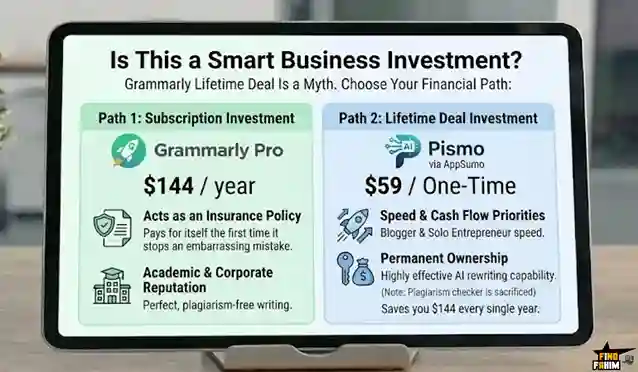
Path 1: The Subscription Investment (Grammarly Pro)
If your job, academic standing, or corporate reputation depends on perfect, plagiarism-free writing, paying $144 a year for the Pro version is a highly intelligent operational expense. It acts as an insurance policy. It pays for itself the very first time it stops you from sending an embarrassing proposal to a high-ticket client.
Path 2: The Lifetime Deal Investment (Pismo/AppSumo)
If you are a solo entrepreneur, a fast-moving blogger, or a marketer where speed and cash flow are your top priorities, an AppSumo lifetime deal is the better financial play. Buying a tool like Pismo for $59 gives you highly effective AI rewriting capabilities while keeping that $144 in your bank account every single year. You sacrifice the plagiarism checker, but you gain permanent ownership of the tool.
How to Get Started (Risk-Free)
I want to help you succeed, whichever path you choose. Here are the precise mechanical steps to start improving your writing today.
For the Grammarly Pro Path:
- Click the link below to access the official website.
- Sign up for the Free trial using your primary email.
- Install the browser extension.
- If you love the interface, upgrade to the Annual Pro plan ($144) to unlock the plagiarism checker and sentence rewrites.
For the AppSumo Lifetime Path:
- Click the AppSumo link below to browse the current marketplace.
- Search for active writing deals like Pismo or FlyMSG.
- Purchase the lifetime code securely.
- Remember that AppSumo offers a 60-day money-back guarantee, so you can test the alternative entirely risk-free.
Final Verdict: Is Grammarly Pro Worth It in 2026?
After thoroughly investigating the software market and analyzing the alternatives, my final verdict is that there are two correct answers. The only wrong answer is getting scammed by searching forums for a fake lifetime account.
You should choose the Grammarly Pro Subscription if:
- You are a student or academic who strictly requires a world-class plagiarism checker.
- You are a corporate executive who needs the absolute highest standard of tone-checking and grammar correction.
- You have a stable monthly budget and view the cost as necessary business protection.
Grab Your Free Trial of Grammarly Here
You should choose an AppSumo Lifetime Alternative if:
- You are a freelancer or marketer who values workflow speed over absolute perfection.
- You refuse to pay monthly software subscriptions and want to own your tools permanently.
- You want to reduce your software stack overhead immediately.
Secure a Lifetime AI Writing Deal on AppSumo Today
About the Author
I spend my time researching and analyzing SaaS products, digital tools, and lifetime deals to help smart entrepreneurs stop overpaying for software. We all know the frustration of drowning in monthly subscriptions and hunting for lifetime deals that simply do not exist, which is exactly why I investigated the Grammarly Pro platform and its top alternatives today. I do the heavy lifting of evaluating these offers—comparing the pricing structures, the plagiarism checkers, and the AI features—so you know exactly what you are getting before you pull out your credit card. If you want to see what other software I am currently analyzing to cut business costs, check out my Full Guide to the Best Lifetime Software Deals.
FAQ: Your Grammarly Questions, Answered
Is there a real Grammarly lifetime deal?
No. There is no official Grammarly lifetime deal. Grammarly is offered only as a subscription service, and any site claiming to sell a lifetime license is usually offering unauthorized or unsafe access.
Is Grammarly Pro worth the money in 2026?
Yes. Grammarly Pro provides advanced writing suggestions, plagiarism detection, and AI-powered rewriting tools that are valuable for students, writers, and professionals.
What is the price of Grammarly Pro?
The annual Grammarly Pro plan costs around $144 per year, which averages about $12 per month, while the monthly plan is typically priced higher.
Does Grammarly Pro include a plagiarism checker?
Yes. Grammarly Pro includes a plagiarism checker that scans billions of web pages and academic sources to help detect duplicate content.
What is the difference between Grammarly Free and Grammarly Pro?
Grammarly Free focuses on grammar, spelling, and basic clarity suggestions, while Grammarly Pro adds advanced rewriting, tone adjustments, and plagiarism detection features.
Can Grammarly work inside Google Docs?
Yes. The Grammarly browser extension integrates with Google Docs and provides real-time writing suggestions directly inside the document editor.
Is Grammarly secure to use?
Yes. Grammarly uses encryption and secure data practices to protect user content, and enterprise plans include additional compliance and security features.
Does Grammarly work on mobile devices?
Yes. Grammarly provides a mobile keyboard application for both iOS and Android that helps correct grammar and spelling while typing on phones.
What is an AI writing assistant?
An AI writing assistant is a tool that analyzes text and provides suggestions for grammar, clarity, tone, and structure to improve written communication.
Why do writers use grammar checking tools?
Writers use grammar tools to reduce mistakes, improve readability, and maintain a professional writing style across emails, documents, and online content.
What is plagiarism detection in writing tools?
Plagiarism detection compares written text against large databases of web pages and publications to identify potential duplicate or copied content.
What is a text expander tool?
A text expander allows users to type short shortcuts that automatically expand into full sentences, templates, or commonly used responses.
Why are AI writing tools popular for content creators?
AI writing tools help creators write faster, improve clarity, and maintain consistent tone across blog posts, marketing copy, and professional documents.

Hi, I’m Fahim — a SaaS tools reviewer and digital marketing expert with hands-on experience helping businesses grow using the right software. I research, test, and personally use a wide range of AI, business, productivity, marketing, and email tools for my agency, clients, and projects. I create honest, in-depth reviews and guides to help entrepreneurs, freelancers, startups, and digital agencies choose the best tools to save time, boost results, and scale smarter. If I recommend it, I’ve used it — and I only share what truly works.