
Static banners that blend into the feed waste your creative efforts. You spend hours designing graphics, only for users to scroll right past them.
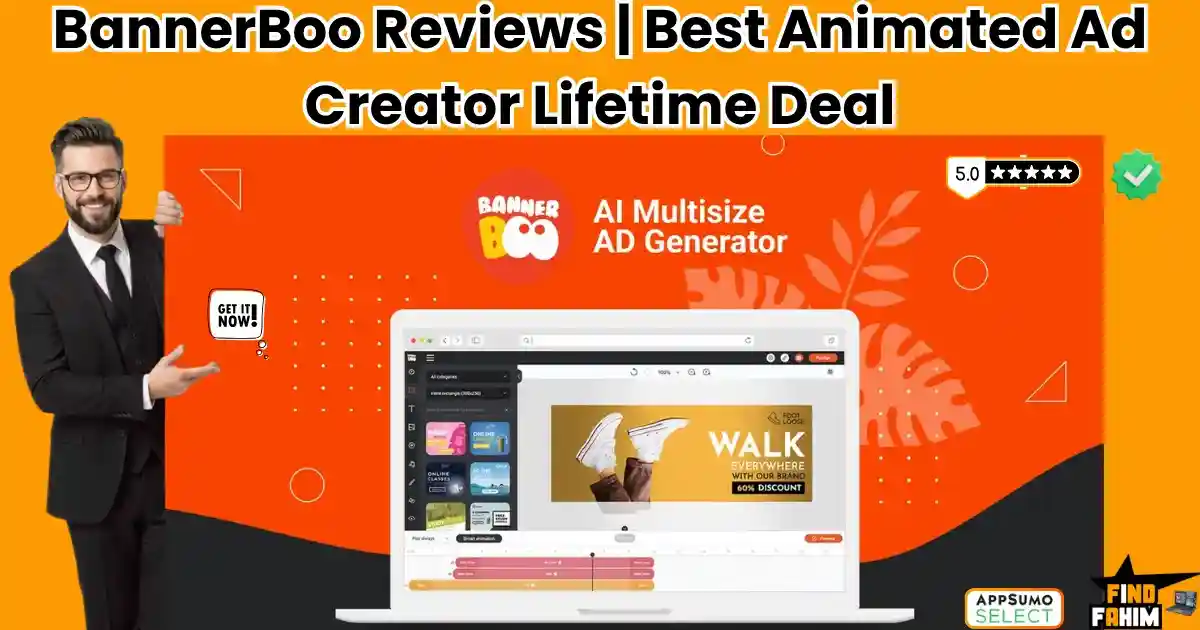
BannerBoo changes this. It is a drag-and-drop platform that lets you create animated HTML5, GIF, and MP4 ads in minutes without writing a single line of code.
Is it actually better than Canva or Adobe Animate? In this BannerBoo review, I compare the top competitors to help you decide.
(Note: This article contains affiliate links. Opinions are my own research and analysis).
My Quick Take (TL;DR)
If you are bleeding time wrestling with complex animation software or waiting for developers to code your display ads, here is the direct summary of this AppSumo offer.
- What is it? A cloud-based design platform used to build, animate, and publish HTML5 and MP4 advertisements.
- Why is it Special? The Magic Resizer and CNAME sharing. It turns one design into dozens of platform-ready sizes instantly, and lets clients review ads on your own branded domain.
- Who is it for? Digital marketers, advertising agencies, and freelance designers are running paid traffic.
- The Deal: Lifetime Access starting at $59 on AppSumo. (Note: Price increases in less than 7 days.
My Verdict: This is an absolute no-brainer productivity hack. Reclaiming the hours spent resizing graphics manually will pay for this tool on your very first client campaign.
Click Here to Get the BannerBoo Lifetime Deal on AppSumo
What is BannerBoo? (Your Hands-Free Ad Builder)
BannerBoo is a dedicated online banner-making platform designed specifically for paid advertising campaigns.
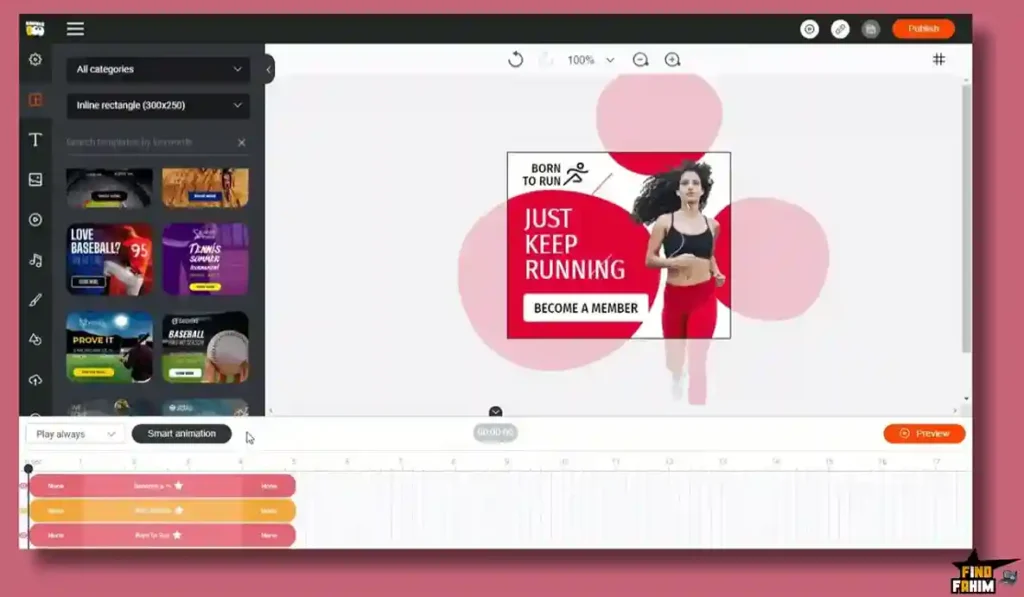
Instead of using general design tools that export heavy, static images, BannerBoo focuses entirely on high-converting animations. It allows you to build complex, multi-layered HTML5 and AMP HTML ads that load instantly and look incredible on any device.
You get access to a full visual timeline editor. This allows you to control entry animations, exit transitions, and graphic pulsations to draw the viewer’s eye exactly where you want it.
Because it requires zero coding knowledge, marketers can bypass the development team entirely. You design the ad visually, and BannerBoo writes the clean HTML5 code in the background, ready to be uploaded directly to Google Ads.
Quick Look: BannerBoo vs Manual Ad Design
If you spend hours resizing ads for Facebook, Google, and Instagram, look at what this tool actually replaces in your daily operations.
| Feature | Replaces… | The Real Value | Normal Cost | Deal Status |
| HTML5 Export | Adobe Animate | High-converting animated ads | ~$22/mo | ✅ Included |
| Magic Resizer | Manual cropping | Generates 15+ sizes instantly | Workflow hassle | ✅ Included |
| CNAME Sharing | Emailing zip files | Professional client approvals | Custom built | ✅ Included |
| Stock Libraries | Envato Elements | 7,000+ templates & photos | ~$16/mo | ✅ Included |
Why Traditional Ad Design is Failing Creators
Using standard design software to build ad campaigns is completely inefficient. If you build an ad in Photoshop, you are stuck with a static image that modern consumers ignore.
If you try to use professional animation software, the learning curve takes months. Furthermore, manually coding HTML5 banners requires a developer, creating a massive bottleneck in your launch schedule.
Why Animated HTML5 Workflows Are Trending in 2026
Paid advertising costs are currently at an all-time high. Getting a strong Return on Ad Spend (ROAS) requires stopping the scroll immediately. Static images suffer from massive “banner blindness.”
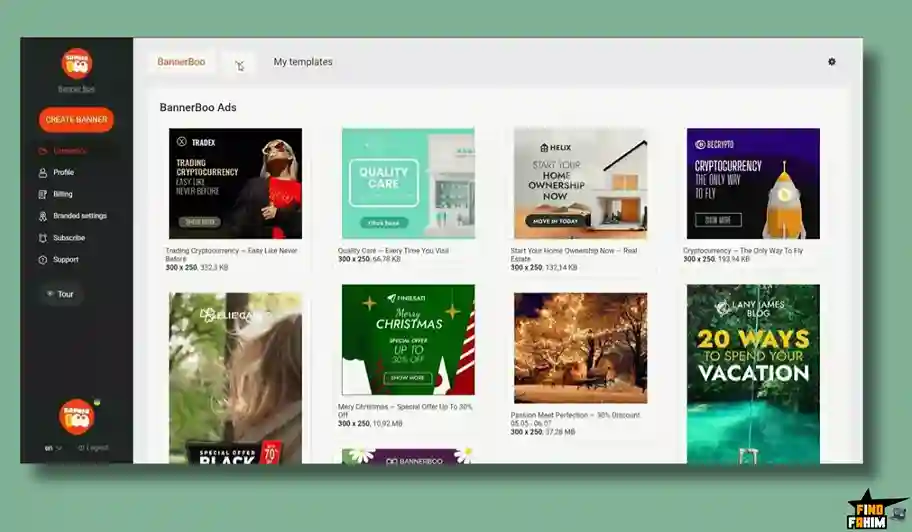
Animated HTML5 ads are trending because they capture attention through motion, yet they have incredibly small file sizes. This means they load instantly on mobile devices, ensuring your audience sees your offer.
A Look Inside BannerBoo: Key Features
Here is exactly what you are installing in your digital toolkit when you purchase this lifetime code.
Let’s break down why these specific features matter to your advertising operations and overall productivity.
The Drag-and-Drop Animation Engine
This is the core engine of the software. BannerBoo does not require any coding to create complex animations.
You use a visual timeline to control exactly when text drops in, when product images fade out, and when your call-to-action button pulses.
It automatically aligns your layers and offers pre-built transition effects. You simply click an object, choose how you want it to behave, and the software handles the complex keyframing in the background.
The Magic Resizer Tool
If you run multi-channel campaigns, you know the absolute nightmare of resizing one ad into twenty different aspect ratios. You need a square for Instagram, a vertical for TikTok, and rectangles for Google Display.
BannerBoo completely automates this. You design one master banner, and the Magic Resizer instantly generates every other necessary size. You just make minor drag-and-drop adjustments to the text layout, saving hours of tedious formatting.
One-Click Background Removal
Product photography is rarely perfect. You often need to isolate an e-commerce product from a messy background to place it on a clean, branded canvas.
BannerBoo includes an integrated, AI-powered background removal tool. With literally one click, the software isolates your subject perfectly. You no longer have to open external photo editing software just to get a clean product shot.
Integrated Stock & Template Libraries
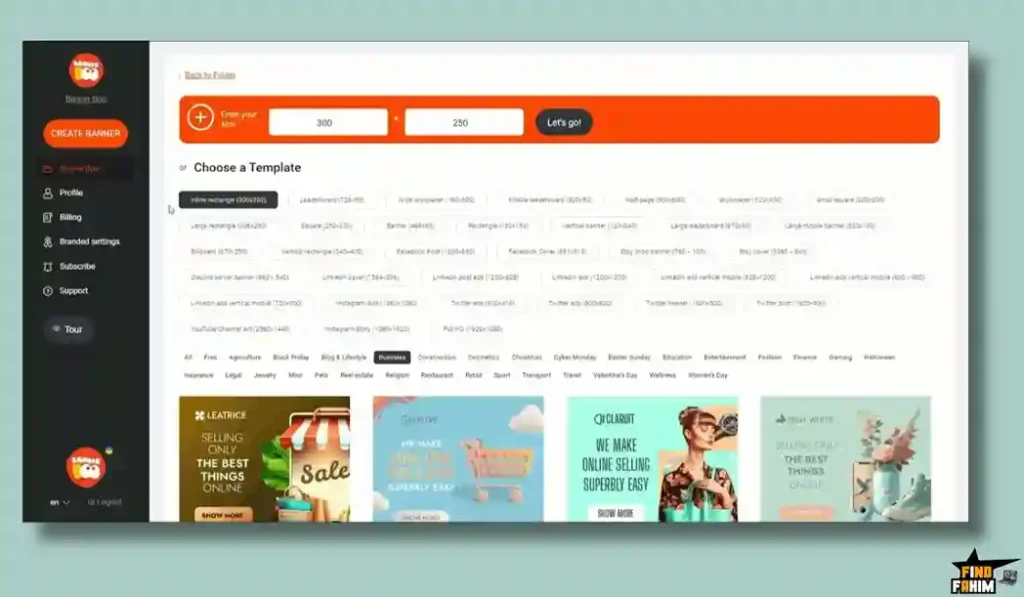
Staring at a blank canvas kills productivity. BannerBoo eliminates this by providing direct access to over 7,000 professionally designed templates. These are broken down by industry, allowing you to start with a proven layout.
Additionally, you get direct integration with Unsplash, Pexels, and Pixabay. You can pull millions of high-quality photos, videos, and vector icons directly onto your canvas without leaving the application.
The Standout Feature: Branded Share URLs (CNAME)
This specific tool transforms BannerBoo from a simple design app into a powerful agency weapon.
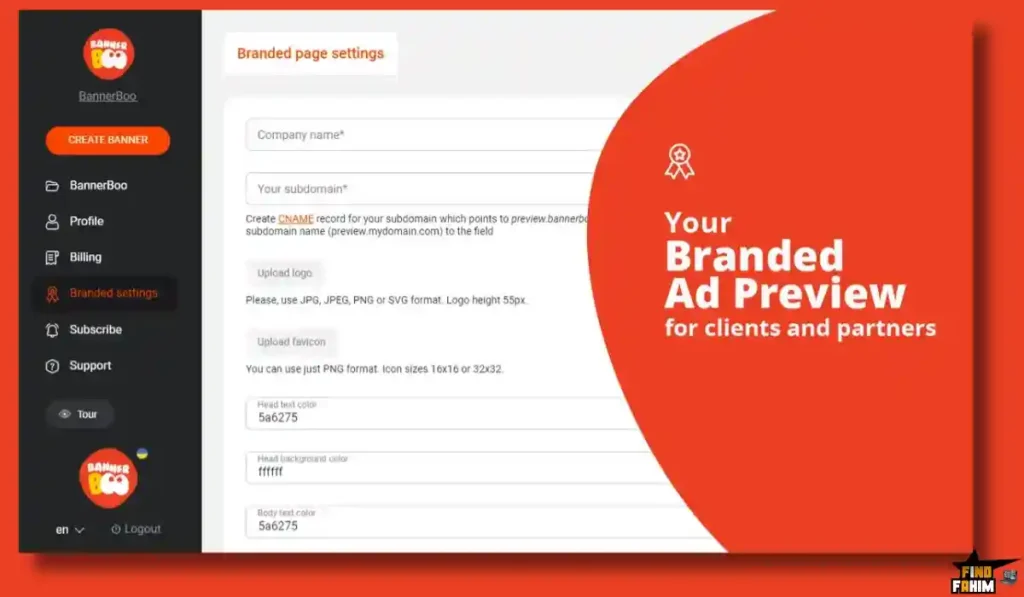
Getting client approval on animated ads is usually a nightmare of sending heavy zip files or Google Drive links. BannerBoo allows you to set up a custom CNAME (like https://www.google.com/search?q=ads.youragency.com).
You generate a simple link that displays the animated ads in a clean, professional gallery branded with your own logo. Clients can view the animations exactly as they will appear live and leave comments directly on the preview.
Recent 2026 Platform Updates
The BannerBoo development team moves incredibly fast and listens heavily to AppSumo user feedback. In just the last few weeks, they released major updates to the platform:
- Multisize Banner Generator: Create multiple ad sizes at once automatically from a single prompt.
- AI Banner Generator: Type keywords describing your campaign, and the AI generates complete, editable banner layouts using AI-generated or stock images.
- Expanded Workspaces: Better organizational tools for managing multiple brand assets within a single account.
BannerBoo Pricing & AppSumo Deal Details
This lifetime deal is structured around five scalable license tiers. You pay once, and you own the software forever without recurring monthly subscription fees.
Be aware: the price is scheduled to increase in less than 7 days.
| Feature | Tier 1 ($59) | Tier 2 ($149) | Tier 3 ($249) | Tier 4 ($399) | Tier 5 ($599) |
| Workspaces | 10 | 20 | Unlimited | Unlimited | Unlimited |
| Video Exports / Mo | 100 | 250 | Unlimited | Unlimited | Unlimited |
| Storage | 5 GB | 20 GB | 75 GB | 200 GB | 400 GB |
| BG Removals / Mo | 15 | 50 | 150 | 300 | 600 |
| Editors | 3 | 10 | 25 | Unlimited | Unlimited |
Note: Tier 5 is also available for $599 with massive limits.
Understanding the Embedded Ad Views Limit
BannerBoo allows you to host HTML5 banners directly on their servers and embed them on your website using a simple snippet of code. Tier 1 gives you 30,000 embedded views per month.
If you are just exporting the MP4s or HTML5 files to upload directly into Google Ads or Facebook, this limit does not matter. Exporting completely bypasses the embedded view count.
My Stacking Recommendation
For Freelance Marketers: Tier 1 ($59) is the absolute sweet spot. The 10 workspaces and 100 video exports are more than enough for an independent consultant.
For Growing Agencies: Buy Tier 3 ($249). It gives you unlimited workspaces, unlimited video exports, and 25 editor seats. This allows you to manage dozens of clients in completely isolated, organized folders.
For Massive Enterprise Teams: Tier 5 ($599) is the ultimate agency unlock. With 400 GB of storage and 1.5 million embedded views, you will never have to pay for another ad design subscription again.
Claim Your BannerBoo Lifetime Deal Plans
Pros & Cons of This Lifetime Package
With an excellent 4.8-star rating from nearly 300 buyers, the community loves the export flexibility.
However, to ensure you make a smart investment, we must evaluate the technical realities of running browser-based design software.
The Pros
- ✅ Code-Free HTML5: Building interactive, lightweight ads without needing a developer saves massive amounts of time and payroll.
- ✅ White-Label Approvals: The CNAME preview links make your agency look highly professional to enterprise clients.
- ✅ Magic Resizing: Generating 15 different ad sizes with one click eliminates the most tedious part of campaign management.
- ✅ Incredible Financial Value: Paying $59 once replaces expensive, recurring design software subscriptions.
The Cons
- ❌ Browser Heavy: Complex animations with dozens of layers can cause the browser editor to lag on older computers.
- ❌ Learning Curve: While easier than professional animation software, the timeline editor requires a few hours to master truly.
Who Should NOT Buy BannerBoo?
Do not buy this tool if you primarily design print materials, static social media posts, or long-form video content. BannerBoo is highly specialized in creating short, animated digital advertisements.
If you need a general graphic design tool for brochures and YouTube thumbnails, you are better off sticking with a standard static editor.
How Does BannerBoo Work? (Step-by-Step Tutorial)
If you have never built an HTML5 ad before, here is exactly how fast you can launch a campaign.
- Select a Size: Open the dashboard and choose your required ad network format (like a Google Display rectangle).
- Pick a Template: Browse the 7,000+ templates and select a layout that fits your brand.
- Customize: Drag and drop your own product images onto the canvas and easily remove the backgrounds.
- Animate: Click your text and buttons, applying simple entry and exit animations on the timeline.
- Export & Publish: Download the file as an HTML5 zip, GIF, or MP4 and upload it directly to your ad manager.
Best Use Cases for BannerBoo
Who actually extracts the highest financial return from this specific tool?
Here are the three main workflows that benefit immediately from this technology.
- The Paid Traffic Agency
You manage Google Display and Facebook ads for twenty different clients. Use the Workspace feature to keep every client’s assets isolated. The Magic Resizer builds out massive, multi-format campaigns in a fraction of the time, and the CNAME link gets your work approved instantly.
- The Freelance Web Designer
Your clients constantly ask you to build website banner ads, but you do not know how to code HTML5. Use BannerBoo’s drag-and-drop editor to build professional, interactive animations. You can export the clean code and hand it over to the client, looking like a high-end coding expert.
- The E-commerce Store Owner
You need to launch a flash sale this weekend, but you cannot afford to hire a graphic designer. Open a pre-built retail template, drop in your product photos, click the background removal tool, and export an animated MP4 ready for Instagram Stories in under ten minutes.
Stop Wasting Time on Static Ads—Claim Your BannerBoo Lifetime Deal
BannerBoo Alternatives
Is BannerBoo the absolute best tool for the job, or should you use an established heavyweight?
Let’s compare it directly against the top players in the market to see exactly where it fits in your software stack. Because your ad creatives determine your return on investment, choosing the right builder is a major decision.
BannerBoo vs Canva
Canva is currently the most popular general design tool in the world.
- Where Canva Wins: General versatility. Canva is incredible for presentations, static social posts, and print documents.
- Where BannerBoo Wins: Specialized Ad Formats. Canva cannot export true, interactive HTML5 files. BannerBoo is built specifically for ad networks, offering precise timeline controls and proper HTML5 exporting that Canva completely lacks.
BannerBoo vs Adobe Animate
Adobe Animate is the traditional industry standard for professional web animation.
- Where Adobe Wins: Total Customization. If you are a professional animator building highly complex, custom vector animations from scratch, Adobe is unmatched.
- Where BannerBoo Wins: Speed and Accessibility. Adobe Animate has a brutal learning curve that takes months to master. BannerBoo allows complete beginners to build professional-looking animations in minutes using templates and simple drag-and-drop mechanics.
BannerBoo vs Creatopy (formerly Bannersnack)
Creatopy is BannerBoo’s most direct competitor in the online ad building space.
- Where Creatopy Wins: Enterprise Workflows. Creatopy offers deep team collaboration tools and high-end automation features specifically tailored for massive global marketing teams.
- Where BannerBoo Wins: The Lifetime Price. Creatopy charges a very expensive recurring monthly subscription. BannerBoo gives you the same core HTML5 building and resizing capabilities for a single $59 lifetime payment.
BannerBoo vs Google Web Designer
This is Google’s free desktop software for building HTML5 ads.
- Where Google Wins: It is completely free and deeply integrated with the Google Ads ecosystem.
- Where BannerBoo Wins: The User Interface. Google Web Designer is incredibly clunky, feels like outdated software, and requires a solid understanding of code structure to use effectively. BannerBoo is visually intuitive and completely code-free.
BannerBoo vs Snappa
Snappa is a popular, lightweight online graphic editor for bloggers and marketers.
- Where Snappa Wins: Simplicity for Bloggers. If you just need to quickly throw text over a stock photo for a blog header, Snappa is fast and lightweight.
- Where BannerBoo Wins: Animation and Ads. Snappa is strictly for static graphics. It offers zero animation capabilities. BannerBoo allows you to create high-converting video and HTML5 assets that modern ad networks demand.
All 5 Competitors Matrix
| Platform | Pricing Model | Key Strength | Best For… |
| BannerBoo | Lifetime ($59+) | HTML5 & CNAME Sharing | Agencies & Marketers |
| Canva | Subscription | General Design | Casual Creators |
| Adobe Animate | Subscription | Total Customization | Pro Animators |
| Creatopy | High Subscription | Enterprise Tools | Global Brands |
| Google Web Designer | Free | Google Integration | Technical Designers |
| Snappa | Subscription | Static Blog Graphics | Content Writers |
Upgrade Your Ad Designs—Get BannerBoo on AppSumo Today
Is This Lifetime Deal a Smart Business Investment?
Let’s look at the exact financial math of choosing BannerBoo (Tier 1) versus paying for a premium ad builder competitor like Creatopy.
- Cost of Creatopy (1 Year): ~$40/month = $480/year.
- Cost of BannerBoo (Tier 1): $59 (One-time payment).
The ROI Math:
You break even in less than two months. Over a standard 3-year business cycle, choosing BannerBoo saves you a staggering $1,381 in recurring software subscriptions.
More importantly, calculate the value of your actual time. If your hourly rate is $50, and the Magic Resizer saves you just two hours of tedious manual formatting per campaign. You are saving $100 of billable time on every single client project. The software pays for itself entirely on your very first ad launch.
How to Redeem the BannerBoo Deal
Ready to secure your license? Follow these quick steps.
- Buy: Click the AppSumo link below to secure your activation code before the price increases.
- Redeem: You will instantly receive a unique code in your email inbox.
- Activate: Follow the instructions to create your account and apply the code within 60 days.
- Verify: Start building ads. AppSumo offers a risk-free 60-day money-back guarantee, so you can test the platform entirely risk-free.
Final Verdict: Is This AppSumo Deal Worth It?
After analyzing the HTML5 export capabilities, testing the magic resizer, and looking at the massive time savings, my final verdict is a flawless 5-Star YES.
It is the ultimate friction remover for digital advertisers. It eliminates complex coding, stops manual resizing headaches, and provides instant professional previews for your clients.
While complex layers might cause slight browser lag on older machines, the core functionality easily rivals enterprise tools that cost hundreds of dollars a year. If you want to launch high-converting campaigns at lightning speed, grab Tier 1 before the price increases next week.
Reclaim Hours of Design Time—Grab the BannerBoo Lifetime Deal Now
About the Author
I spend my time analyzing SaaS products and lifetime deals to help smart entrepreneurs stop overpaying for software. We all know the extreme frustration of burning hours doing repetitive design tasks, which is exactly why I investigated the BannerBoo lifetime deal today.
I do the heavy lifting of evaluating these offers—digging into specific workspace limits and export capabilities—so you know exactly what you are getting. To see what else I am currently reviewing to cut your business costs, check out my Full Guide to the Best Lifetime Software Deals.
FAQ: Your BannerBoo Questions, Answered
BannerBoo is a drag-and-drop banner design tool that helps users create animated HTML5, MP4, and GIF ads without coding, making it ideal for digital advertising campaigns.
Yes, BannerBoo allows you to upload custom fonts so you can follow brand guidelines and maintain consistent typography across all banner designs.
The Magic Resizer automatically adjusts your banner design into multiple ad sizes, saving time by eliminating the need to recreate designs for different platforms.
Yes, BannerBoo provides shareable preview links where clients can view animated banners and leave feedback directly on the design.
Yes, BannerBoo includes an AI-powered background removal tool that lets you quickly isolate subjects and place them into your banner designs.
Yes, BannerBoo supports PSD file imports, allowing designers to bring in Photoshop layouts and add animations easily.
Yes, all templates are fully editable, including images, text, colors, and animations, so you can match any campaign or brand style.
HTML5 banner ads are lightweight, interactive, and load faster than MP4 video ads, making them more effective for display advertising and user engagement.
No, tools like BannerBoo eliminate the need for coding by generating HTML5 ad code automatically through a visual editor.
BannerBoo includes AppSumo’s 60-day money-back guarantee, allowing you to test the platform risk-free before making a long-term commitment. What is BannerBoo?
Does BannerBoo support custom font uploads?
What does the BannerBoo Magic Resizer do?
Can I share BannerBoo designs with clients?
Does BannerBoo include background removal?
Can I import PSD files into BannerBoo?
Are BannerBoo templates fully customizable?
Why are HTML5 banner ads better than MP4 ads?
Do I need coding skills for display advertising?
What is the AppSumo refund policy for BannerBoo?

Hi, I’m Fahim — a SaaS tools reviewer and digital marketing expert with hands-on experience helping businesses grow using the right software. I research, test, and personally use a wide range of AI, business, productivity, marketing, and email tools for my agency, clients, and projects. I create honest, in-depth reviews and guides to help entrepreneurs, freelancers, startups, and digital agencies choose the best tools to save time, boost results, and scale smarter. If I recommend it, I’ve used it — and I only share what truly works.