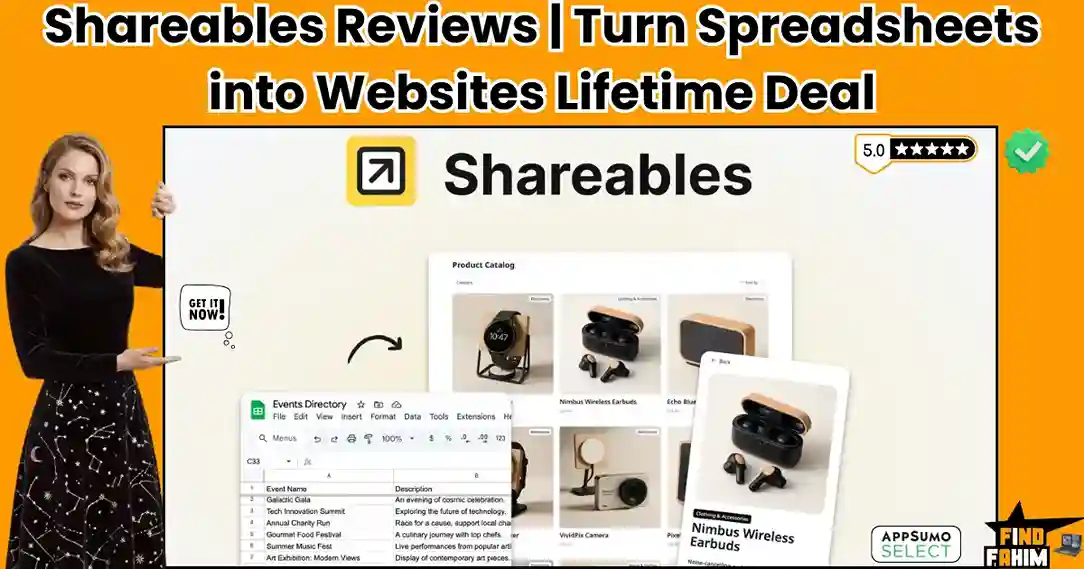

Duct-taping a raw Google Spreadsheet onto your homepage instantly destroys credibility. Nothing kills attention faster than forcing users to scroll horizontally through hundreds of messy rows just to find a simple price or event date.
Shareables fixes this mess instantly. Instead of showing an ugly iFrame, it turns your spreadsheet into something clean, readable, and actually enjoyable to browse.
No coding, no complexity—just a simple way to turn raw data into beautiful directories, product catalogs, and widgets that make your site look clean, professional, and easy to trust.
Disclaimer: This article contains affiliate links. If you purchase through these links, I may earn a small commission at no extra cost to you. All opinions, market analysis, and research are entirely my own.
My Quick Take (TL;DR)
Tired of manually updating your website when a spreadsheet changes? Here is the executive summary.
- What is it? A no-code builder converting Google Sheets, Airtable, and Notion data into clean, embeddable widgets.
- Why is it Special? It syncs live. Update your spreadsheet, and your website updates instantly.
- Who is it for? Marketers and directory builders are displaying data beautifully.
- The Deal: A 5-tier AppSumo lifetime offer starting at $59.
- My Verdict: Backed by a phenomenal 4.9-star rating, this is an absolute must-buy.
Get the Shareables Lifetime Deal Now
What is Shareables?
Shareables is a data-to-design conversion tool. It operates as the visual bridge between your raw backend databases and your public-facing audience.
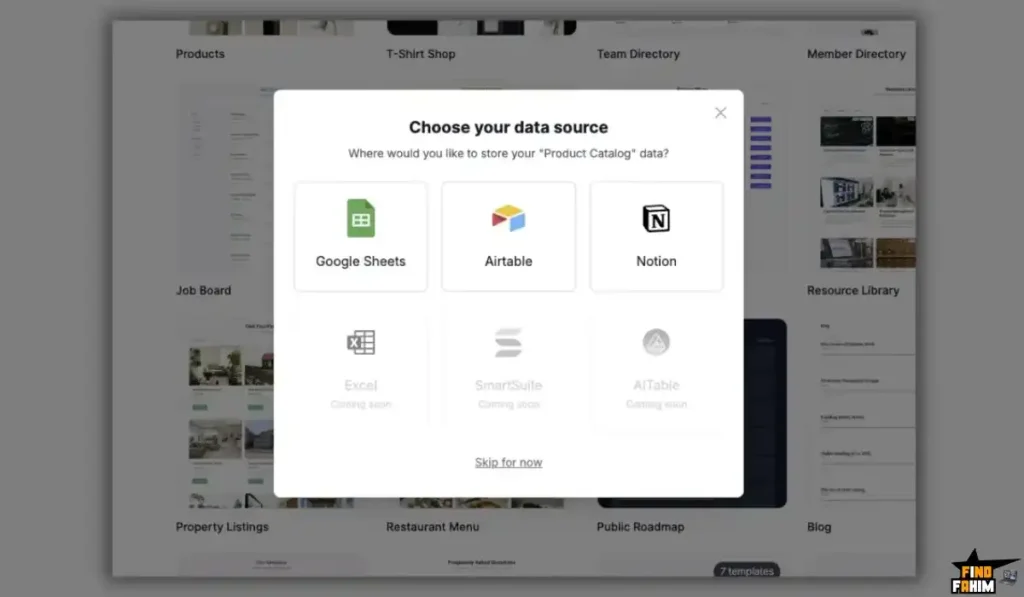
Instead of manually designing a new webpage for every single product in your inventory, you simply connect your Notion workspace or Airtable base to the platform. The software reads your rows and columns and instantly maps them into clean, pre-designed visual cards, lists, and event calendars. You can publish these views on a custom domain or embed them directly into your existing WordPress or Webflow site.
Quick Look: Shareables vs Traditional Coding
If you manage a business directory or a client portal, your choice of development dictates your operating speed. Look at exactly how this tool replaces slow, manual web design.
| Feature / Process | Traditional Coding | The Shareables Approach |
| Updating Content | Requires opening the site editor to type. | Updates instantly when you edit your spreadsheet. |
| Search & Filters | Requires heavy custom JavaScript. | Built directly into the widget by default. |
| Design Time | Takes weeks to format data tables. | Takes five minutes using pre-made visual cards. |
| Maintenance | High risk of breaking during updates. | Zero maintenance. It reads the data automatically. |
| Hosting Costs | Expensive monthly server fees. | Included directly in your lifetime purchase. |
Why Messy Spreadsheets Fail
Forcing your audience to read raw spreadsheets guarantees a terrible user experience. They are built exclusively for internal storage, not public consumption. They break on mobile phones and force visitors to hunt for keywords blindly.
Embedding a clunky table immediately spikes your bounce rate, costing you sales simply because your catalog was too frustrating to browse.
Why the No-Code Data Widgets Trend in 2026
Modern web design has abandoned static pages. Businesses realize that manually re-typing information into a website builder is a massive waste of energy.
No-code widgets trend heavily because they establish a single source of truth. By keeping data inside Airtable and using Shareables to display it, your public site guarantees 100% accuracy. You never show outdated prices because everything updates live.
A Look Inside Shareables: Key Features
This lifetime package is engineered strictly for speed and visual clarity. Here are the core pillars that provide the highest value for independent creators.
Broad Database Integrations
This platform does not force you to migrate your current workflow. It connects natively to Google Sheets, Airtable, Notion, Stackby, Smartsuite, Excel, Trello, Teable, and NoCodeBackend. You simply link your account, and the platform instantly pulls your live records into the design editor.
Pre-Made Visual Layouts
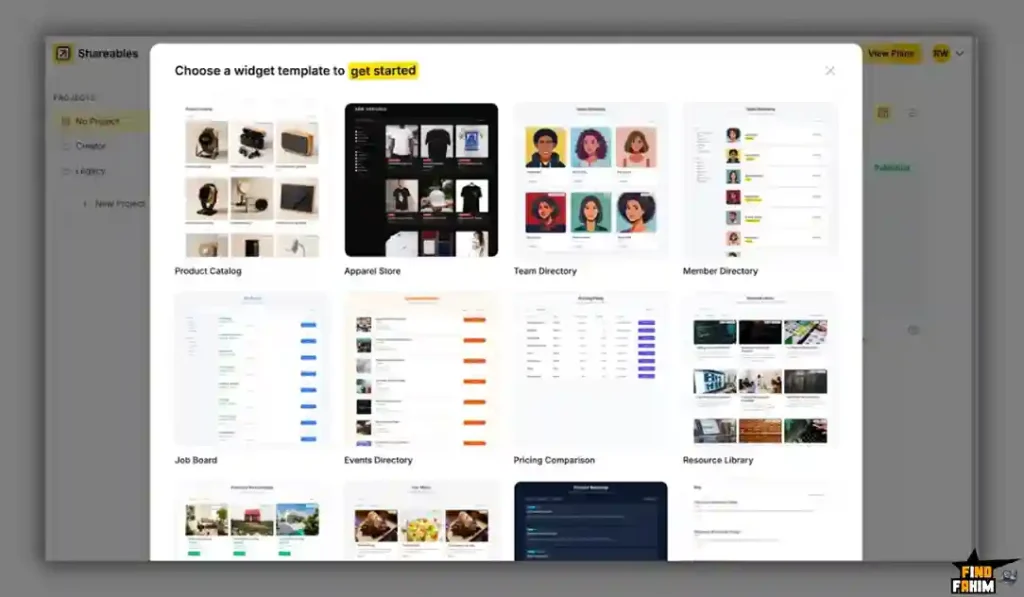
You do not need an art degree to make your data look good. The dashboard includes multiple ready-to-use templates designed specifically for lists, image cards, team directories, and calendars. You map your spreadsheet columns to the layout—for example, mapping the “Image URL” column to the “Card Header”—and the system automatically builds the visuals for you.
Global Brand Colors
Keeping your embeds on-brand is incredibly easy. You can set your exact hex codes at the project level. The system applies your specific brand colors to every single button, search bar, and highlight across all your widgets, ensuring they blend perfectly into your existing website design.
Fast Embeds and Custom Domains
Once your design is finished, you have two distinct deployment options. You can copy a lightweight snippet and embed the widget directly into your Webflow, Carrd, or WordPress site. Alternatively, you can host the entire directory as a standalone website directly on Shareables using your own custom domain with full SSL protection.
The Standout Feature: Conditional Filtering
Visual layout matters, but advanced filtering separates this software from basic iFrames. When connecting massive datasets, forcing users to scroll manually ruins their experience. Shareables fixes this by building custom dropdown filters, live search bars, and date ranges directly above your data cards.
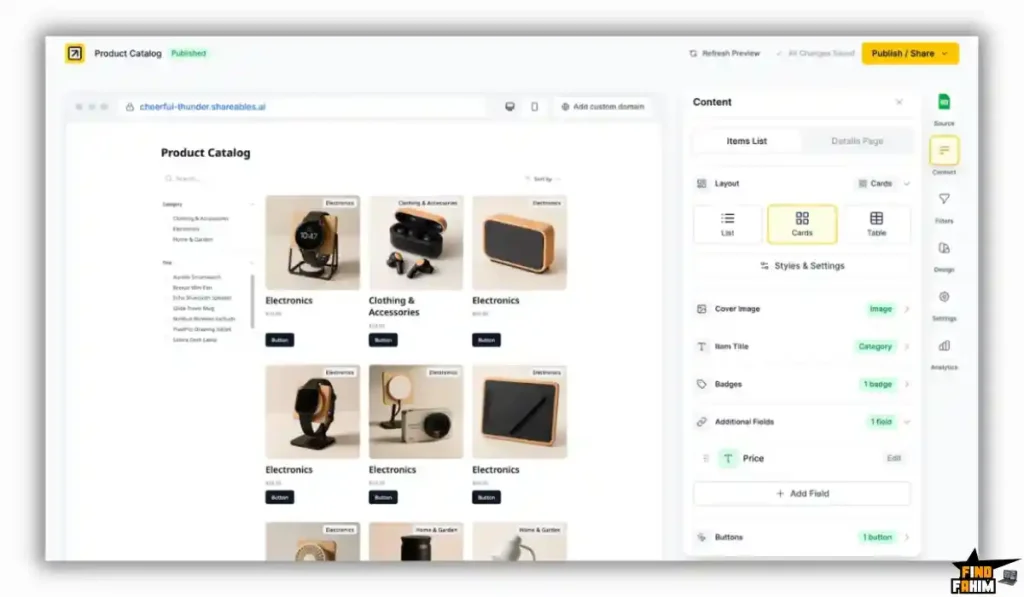
Conditional visibility tools give you total control over what the audience actually sees. You can hide the main list entirely until a user specifically types a query, keeping the interface incredibly clean. Combine strict rules to create highly targeted viewing experiences without writing any JavaScript.
Shareables Updates: What is New in 2026
AppSumo buyers demand software with a highly active founder. Ryan Walker has proven to be incredibly responsive, shipping heavy feature requests rapidly based directly on community feedback.
The most impactful recent updates include:
- Notion Block Support: You can now display actual Notion page blocks directly inside your widget detail pages, perfectly retaining your original formatting.
- Events Calendar Layouts: A massive new widget type that displays data in Month, Week, Day, and Schedule views, complete with “Add to Calendar” buttons.
- Data Source Expansion: Immediate rollouts for Trello, AiTable, Teable, and NoCodeBackend integrations, drastically expanding where you can pull your data from.
Pricing & AppSumo Deal Details
This lifetime deal utilizes a massive 5-tier structure. This allows small freelancers and heavy directory builders to secure the exact limits they require for their data output.
| Deal Feature | Tier 1 ($59) | Tier 2 ($129) | Tier 3 ($249) | Tier 5 ($589) |
| Total Websites | 1 Website | 5 Websites | 10 Websites | 50 Websites |
| Active Widgets | 10 Widgets | 50 Widgets | 100 Widgets | 500 Widgets |
| Data Refresh | Instant | Instant | Instant | Instant |
| Whitelabeling | Included | Included | Included | Included |
| Accept Payments | Not Included | Not Included | Not Included | Included |
Which Plan Should You Get?
- Micro Creators: Tier 1 ($59) secures your foundation for a single core project.
- Growing Marketers: Tier 3 ($249) offers the perfect sweet spot for managing multiple client directories.
- Heavy Commercial: Tier 5 ($589) is strictly for users who require Custom CSS/JS and the ability to accept payments directly through the widgets.
Lock In Your Shareables Lifetime Price
Pros & Cons of This Lifetime Package
With an incredible 4.9-star rating from highly critical users, this is a fiercely loved platform. Here is the truth about its current state.
The Pros
- Instant Sync: Erases manual website updates forever.
- Massive Integrations: Pulls from every major spreadsheet.
- Responsive Support: The founder actively modifies user templates.
- No-Code Interface: Build professional catalogs in five minutes.
- Clean Formatting: Looks like an expensive, custom-coded app.
The Cons
- Payment Gateways Locked: Tier 5 is required to accept payments.
- Initial Mapping: Connecting columns to cards requires brief trial and error.
Who Should NOT Buy Shareables?
Skip this if building a complex SaaS with secure user portals and relational databases. Shareables strictly display public data visually. If you need a heavy portal for employees to log in and safely edit records, this is the wrong tool.
How Does Shareables Work?
Transitioning your raw data into a visual website is incredibly fast. Here is how you can launch a public catalog today.
- Connect Data: Log in to the dashboard and authorize your Airtable base or Google Sheet.
- Select Layout: Choose whether your data should display as a grid of cards, a list, or a calendar.
- Map Fields: Tell the system which column represents the title, which is the image, and which is the description.
- Style: Apply your specific brand colors and adjust the spacing to match your main website.
- Publish: Copy the generated embed code and paste it directly into your web builder, or connect your custom domain to host it instantly.
Best Use Cases for Shareables
Who extracts the absolute highest return from this no-code builder?
- Job Board Curators Managing posts takes hours. Collect submissions via Airtable, review them, and watch them appear on your styled directory the exact second you approve.
- Digital Marketing Agencies: Stop sending messy spreadsheets. Turn your weekly content calendars into branded, filterable client portals. Your clients will perceive this high visual quality as a premium service.
- Niche Affiliate Marketers Tracking affiliate links in WordPress is frustrating. Keep your products, links, and pricing in Google Sheets. Shareables turns that sheet into a searchable catalog. Just as you rely on the [SiteGuru lifetime appsumo tool] to monitor traffic health, you need Shareables to monitor your data presentation.
Start Building Your Data Widgets Today
Shareables Alternatives
The no-code space is more crowded than ever, with new tools launching all the time. So instead of hype, let’s take a real look at how this AppSumo deal compares to the tools people already use daily—and where it actually stands.
Shareables vs Softr
Softr is a massive platform built specifically for turning Airtable into heavy web applications.
- Where Softr Wins: Client portals. Softr includes advanced user authentication, allowing specific users to log in and see only their specific data.
- Where Shareables Wins: Speed and embedding. Softr wants to host your entire website. Shareables is vastly superior if you just want to drop a fast, beautiful widget into an existing Webflow or WordPress page without rebuilding your whole site.
Shareables vs Glide
Glide is incredibly popular for converting spreadsheets into mobile applications.
- Where Glide Wins: Mobile-first design and internal employee apps (like inventory scanners).
- Where Shareables Wins: Web directories. Glide outputs look like phone apps on a desktop computer, which is awful for standard website visitors. Shareables builds proper, responsive web layouts.
Shareables vs Awesome Table
Awesome Table is one of the oldest tools for displaying Google Sheets data.
- Where Awesome Table Wins: Deep legacy integration specifically within the Google Workspace ecosystem.
- Where Shareables Wins: Cost and modern design. Awesome Table charges an expensive recurring subscription and looks incredibly dated. Shareables offers a clean, modern interface for a single lifetime payment.
Top Competitors Matrix
| Platform | Pricing Model | Core Focus | User Logins | Best For… |
| Shareables | Lifetime Deal | Web Embeds | No | Marketers & Bloggers |
| Softr | Monthly Sub | Full Web Apps | Yes | SaaS Builders |
| Glide | Monthly Sub | Mobile Apps | Yes | Internal Teams |
| Awesome Table | Monthly Sub | Basic Tables | No | Corporate Users |
Switch to Shareables and Save Big
Is This Lifetime Deal a Smart Business Investment?
If you are debating whether to purchase this platform, look at the exact financial cost of paying for standard no-code software over a single year.
The recurring costs of a standard Airtable-to-website builder are incredibly frustrating for an independent creator:
- Softr Professional Plan: ~$1,600+ every single year
- Shareables Tier 3 (10 Websites): $249 exactly once
The financial math is undeniable. You break even financially in roughly two months. By abandoning expensive monthly subscriptions, you permanently decrease your web hosting overhead. More importantly, it saves you dozens of hours every month by completely erasing the need to manually update your website text.
How to Redeem the Deal
Ready to permanently delete your ugly spreadsheets and launch a proper visual directory? Follow these simple steps.
- Buy: Click the AppSumo link below to secure your specific license tier. This purchase is fully protected by a 60-day money-back guarantee.
- Redeem: You will receive a unique activation code via email directly from the AppSumo dashboard.
- Register: Go to the official Shareables website and create your new administrator account.
- Activate: Apply your code in the billing section within 60 days to permanently lock in your lifetime limits.
- Execute: Connect your Google Sheet, choose a layout template, and publish your first live directory completely risk-free.
Final Verdict: Is This AppSumo Deal Worth It?
After analyzing the advanced filtering tools, reviewing the massive list of data integrations, and seeing exactly how fast the templates deploy, my final verdict is a highly confident 4.9-Star BUY.
Shareables is exactly what independent creators need: a tool that stops the endless cycle of manual website updates. For serious marketers, securing Tier 3 ($249) is a highly strategic financial move. You get a fully functional, highly responsive publishing engine that turns ugly spreadsheets into professional assets instantly. Backed by a flawless early rating and an incredibly active founder, this is a highly proven platform you must secure immediately.
Secure Your AppSumo Deal Before It Ends
About the Author
Welcome to FindFahim. I spend my time heavily analyzing digital tools to help smart entrepreneurs save big and stop overpaying for monthly SaaS subscriptions. I know the extreme frustration of bloated software draining your business budget and slowing down your daily momentum.
My mission is to help level the playing field. I investigate these multi-tier AppSumo offers, digging into exact feature limits and technical architectures, so you know exactly what you are buying. To see what else I am currently reviewing to scale your operations aggressively, check out my breakdown here: Best AppSumo Lifetime Deals 2026.
FAQ: Your Shareables Questions, Answered
Shareables is a no-code platform that converts databases like Google Sheets and Airtable into interactive websites and embeddable widgets automatically.
Shareables syncs instantly with your connected database, so any changes made in your spreadsheet are reflected live on your website immediately.
No. Shareables is designed as a no-code platform where you map your data fields to visual layouts without writing HTML or CSS.
Yes. Shareables provides an embed code that works with WordPress, Webflow, Carrd, and other content management systems.
Yes. Shareables allows you to host your project on a custom domain with SSL support for a fully branded experience.
Shareables supports multiple sources including Google Sheets, Airtable, Notion, Stackby, Smartsuite, Excel, Trello, Teable, and NoCodeBackend.
A no-code website builder allows users to create websites and applications without writing code by using visual tools and pre-built components.
Yes. Modern tools allow spreadsheet data to be transformed into dynamic websites that update automatically when the data changes.
Database-driven websites make it easier to manage large amounts of content, update information quickly, and keep everything organized in one place.
Yes. Embeddable widgets allow you to display dynamic content like directories, listings, or tables inside existing websites without rebuilding pages. What is Shareables?
How does Shareables update data in real time?
Do I need coding skills to use Shareables?
Can Shareables widgets be embedded on other websites?
Can I use a custom domain with Shareables?
What data sources does Shareables support?
What is a no-code website builder?
Can spreadsheet data be turned into a website?
Why use database-driven websites?
Are embeddable widgets useful for websites?

Hi, I’m Fahim — a SaaS tools reviewer and digital marketing expert with hands-on experience helping businesses grow using the right software. I research, test, and personally use a wide range of AI, business, productivity, marketing, and email tools for my agency, clients, and projects. I create honest, in-depth reviews and guides to help entrepreneurs, freelancers, startups, and digital agencies choose the best tools to save time, boost results, and scale smarter. If I recommend it, I’ve used it — and I only share what truly works.