
Building a backend is traditionally the most painful part of software development.
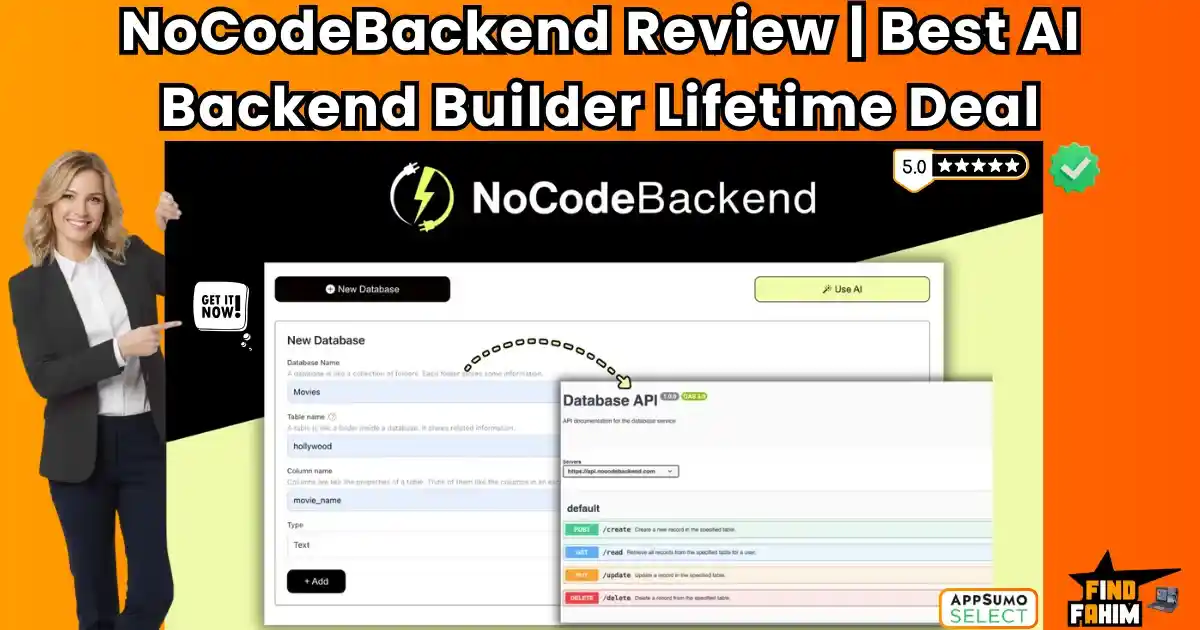
NoCodeBackend is an AI-powered development platform that allows you to generate secure, production-ready REST APIs and relational database schemas instantly without writing a single line of server-side code.
If you have ever tried to launch a SaaS or a mobile app, you know the struggle.
It starts with a simple idea. You design a beautiful frontend in FlutterFlow or React. You are excited.
Then you hit the “Backend Wall.”
You realize you need to set up a server. You need to configure a PostgreSQL database. You need to write secure API endpoints, handle authentication, manage documentation, and worry about scaling.
Suddenly, your “weekend project” turns into a 3-month engineering nightmare. You either hire a backend developer for $100/hour, or you spend weeks learning Node.js and SQL.
NoCodeBackend eliminates this friction.
It acts as your “AI Backend Engineer.” You simply tell the AI what you are building (e.g., “A marketplace for vintage shoes”), and it instantly generates the database schema, creates the relationships, and deploys secure API endpoints for you.
With a growing user base and a solid 4.8-star rating on AppSumo, this tool promises to be the missing link for frontend developers and no-code builders. In this in-depth NoCodeBackend review, we are testing if this $79 lifetime deal is robust enough to run a real business, or if it’s just a prototyping toy.
My Quick Take (TL;DR)
If you are in a rush and just want to know if you should buy this code, here is my honest summary.
- What is it? NoCodeBackend is a visual backend builder. It generates Databases, APIs, and Documentation automatically using AI.
- Why is it a Game-Changer? The “Agentic AI.” Unlike Airtable (which is just a spreadsheet), this tool uses AI agents to understand your business logic and build complex relational databases (SQL) for you in seconds. It bridges the gap between “Toy App” and “Production App.”
- Who is it for? FlutterFlow/Bubble users, Frontend Devs (React/Vue), and Freelancers who need to deliver client projects yesterday.
- The Deal: Lifetime Access starting at $79.
- My Verdict: If you are building a mobile app or a SaaS, this is a no-brainer. It gives you the power of a tool like Xano, but at a fraction of the price and learning curve. Tier 2 ($159) is the minimum I recommend to unlock the AI features.
Click Here to Get the NoCodeBackend Lifetime Deal
What is NoCodeBackend?
Most people try to use Airtable as a backend. Do not do this.
Airtable has strict record limits (50k rows), slow API response times, and isn’t designed for secure user authentication. It is a spreadsheet, not a database.
NoCodeBackend is a Real Relational Database (PostgreSQL-based).
It handles millions of records, offers sub-second latency, and provides true security.
It replaces the “Invisible Stack”:
- Database Hosting: (Replaces Supabase).
- API Logic: (Replaces Node.js/Express).
- Documentation: (Replaces SwaggerHub).
You don’t drag and drop boxes manually. You treat the AI like a Senior CTO. You describe the app, and it builds the infrastructure.
Quick Look: What’s Inside the Deal?
If you are wondering if this replaces your current stack, look at this value breakdown.
| Feature | Replaces… | The “Killer” Value | Normal Cost | Deal Status |
| Relational DB | Supabase | Full SQL Database Hosting | ~$25/mo | ✅ Included |
| API Builder | Xano | Auto-Generated REST Endpoints | ~$85/mo | ✅ Included |
| AI Agent | Hiring a Dev | Text-to-Database Generation | $100/hr | ✅ Included |
| Documentation | SwaggerHub | Auto-Generated API Docs | ~$15/mo | ✅ Included |
| Webhooks | Zapier | Trigger Automations Instantly | ~$30/mo | ✅ Included |
| Total Value | Your Backend | A Complete Server Stack | ~$1,860/yr | $79 (Lifetime) |
Why You Need More Than Just “Firebase”
Here is the dirty secret of the “No-Code” movement: Frontend is easy; Backend is hard.
Tools like Webflow and Framer made building beautiful websites accessible to everyone. But as soon as you need to store data—like user profiles, order history, or chat logs—things get complicated.
Most people default to Firebase, but Firebase is a “NoSQL” database. It is notoriously hard to query for complex reports (e.g., “Show me all users who bought a Red Shirt in July”).
NoCodeBackend gives you a Relational Structure. It creates the links between tables (Users <-> Orders <-> Products) automatically, making your data clean, organized, and easy to query.
Why NoCodeBackend is Trending in 2026
I noticed this tool is blowing up because it hits the “Sweet Spot” of current dev trends.
1. The “Full-Stack” Freelancer Boom
In 2026, clients don’t want to hire a frontend guy AND a backend guy. They want one person to build the app. NoCodeBackend allows a specialized Frontend Developer (who knows React) to suddenly offer “Full Stack” services without learning SQL. It doubles your earning potential.
2. The Rise of “Agentic Coding.”
We are moving past “Copilots” that just suggest code. We are entering the era of Agents that do the work. NoCodeBackend doesn’t just indicate a schema; it builds and deploys it. This shift from “Assistant” to “Worker” is why this tool is trending.
A Look Inside NoCodeBackend: Key Features & Benefits
This isn’t just a database; it is a full-stack development accelerator. Let’s break down the core engines.
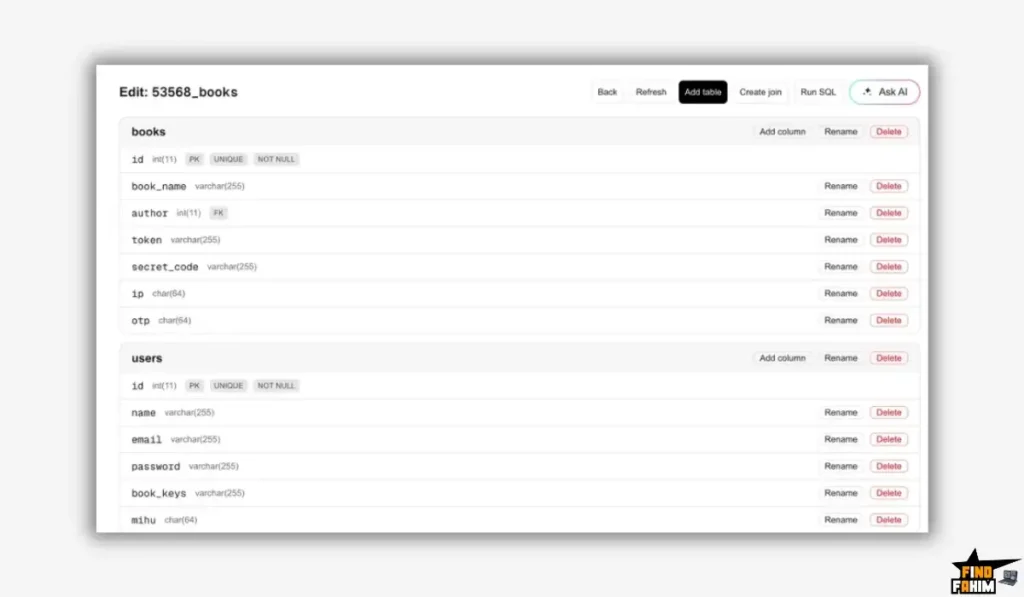
1. AI Schema Generator (The “Instant Architect”)
What it is: A text-to-database engine. You describe your project, and it builds the entire infrastructure.
Why it matters: It removes the “Analysis Paralysis” of starting from scratch.
- Real-World Scenario: You are a freelancer building a CRM for a real estate client. Usually, planning the data structure takes 2 days. With NoCodeBackend, you type “Real Estate CRM with properties, agents, and leads,” and the system builds the 12 tables you need instantly. You save 16 hours of billing time immediately.
2. Auto-Generated REST APIs (The “Code Killer”)
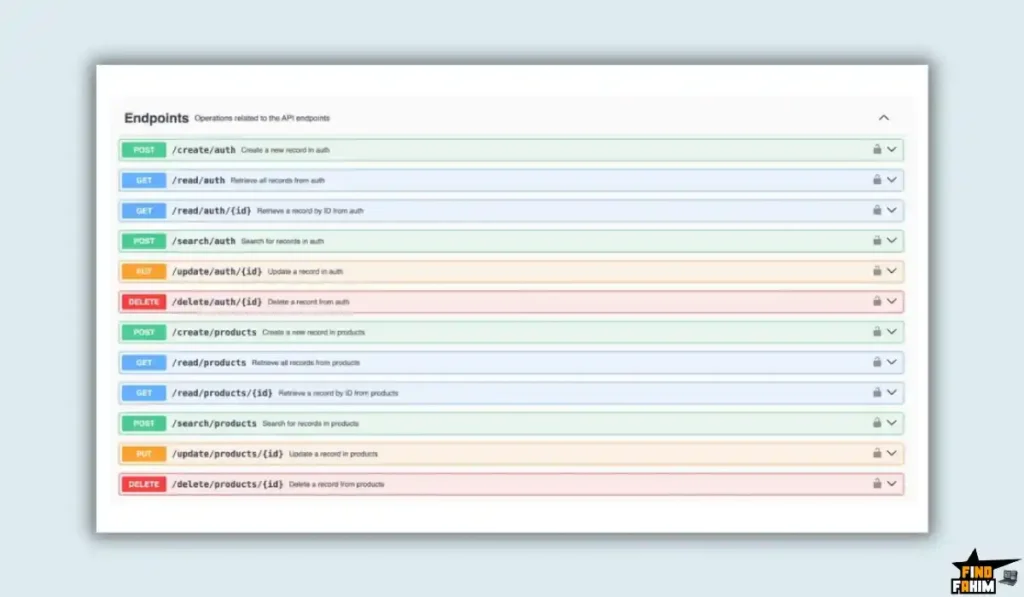
What it is: The moment you create a table (e.g., “Products”), the system automatically generates secure API endpoints for it: GET, POST, PUT, and DELETE.
Why it matters: You never have to write an API route again.
- Real-World Scenario: You are building a frontend in React. You need to display a list of products. Instead of writing a Node.js server to query the database, you just copy the API URL from NoCodeBackend (https://api.nocodebackend.com/products) and paste it into your React code. It works instantly.
3. Swagger Documentation (The “Team Player”)
What it is: Industry-standard documentation for your API. It displays every endpoint, including the required parameters and the expected response.
Why it matters: If you are working with a team or handing the project off to a client, they need to know how to use your backend.
- Real-World Scenario: You deliver the project to your client’s in-house developer. Instead of spending 3 days writing a PDF manual explaining how your backend works, you just send them the Swagger Link. They can test the API endpoints directly in the browser. It makes you look incredibly professional.
4. Webhooks & Logic (The “Automation Engine”)
What it is: The ability to trigger external actions when data changes.
Why it matters: A database shouldn’t be a silo. It needs to talk to the world.
- Real-World Scenario: A new user signs up for your app. NoCodeBackend detects this new record in the Users table and fires a Webhook. This webhook triggers an automation in Pabbly Connect to send a welcome email via Gmail. The entire workflow is automated without code.
The Standout Feature of NoCodeBackend: “Iterative AI Refinement”
This is the USP (Unique Selling Proposition) that separates it from competitors.
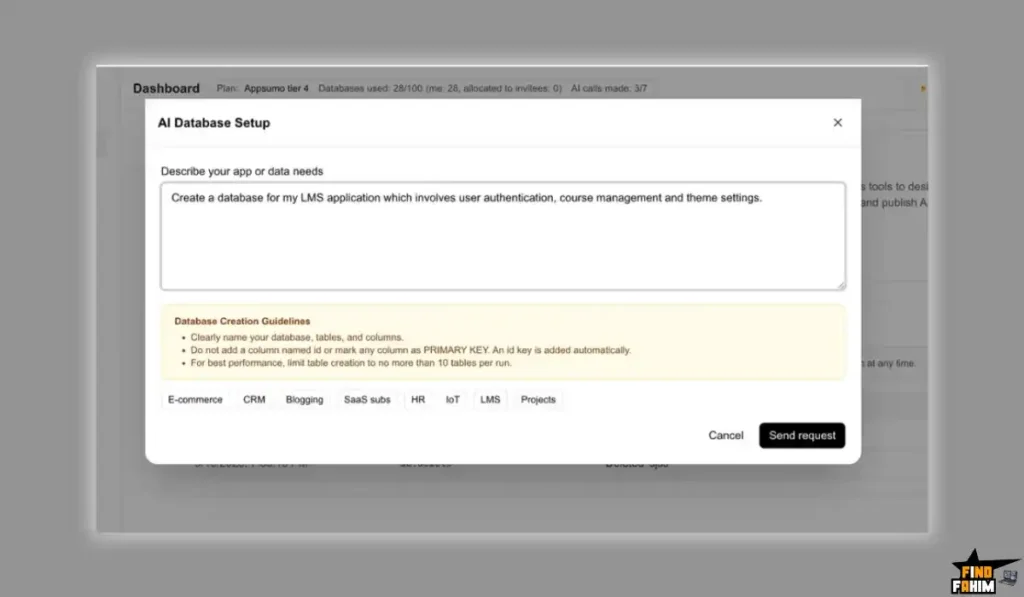
Most AI tools generate a result and then abandon you. NoCodeBackend allows for Iterative Refinement.
The Feature: You can chat with your database after it is built.
How it works: You realize you forgot something. You type: “Add a ‘Phone Number’ field to the Users table and make it unique.”
The Result: The AI intelligently modifies your existing live database without breaking the data that is already there. It creates the column and updates the API documentation in real-time. It feels like having a Senior Developer sitting next to you.
How Does NoCodeBackend Work?
Building a backend usually takes weeks. Here is the 4-step workflow that takes minutes.
Step 1: The Prompt
Log in and type your idea into the AI Agent box: “Build a backend for a Ride-Sharing app like Uber.”
Step 2: The Generation
The AI thinks for about 30 seconds. It generates the tables (Drivers, Passengers, Trips, Payments) and defines the relationships (e.g., “One Driver has Many Trips”).
Step 3: The API
Click “Deploy.” The system instantly creates the REST API endpoints. You get a list of URLs you can use immediately.
Step 4: The Connection
Copy the API endpoint URL. Paste it into your frontend tool (FlutterFlow, Bubble, or VS Code). Your app is now live and connected to a real database.
NoCodeBackend Pricing & AppSumo Deal Details
This is a stackable lifetime deal, available in 5 Tiers. The tiers scale primarily based on the Number of Databases.
The Tier Breakdown
| Feature | Tier 1 | Tier 2 (Sweet Spot) | Tier 3 (Agency) | Tier 4 |
| One-Time Price | $79 | $159 | $349 | $519 |
| Databases | 3 DBs | 15 DBs | 50 DBs | 100 DBs |
| AI Generator | ❌ No | ✅ Yes | ✅ Yes | ✅ Yes |
| Tables/Cols | Unlimited | Unlimited | Unlimited | Unlimited |
| API Calls | Unlimited | Unlimited | Unlimited | Unlimited |
| Best For… | Hobbyist | Freelancer | Agency | Enterprise |
ROI Anchor Logic: The “Hidden Math”
- Xano (the leading competitor) starts at $85/month.
- NoCodeBackend Tier 2 is $159 once.
The Reality: If you use this tool for just two months, you have broken even compared to Xano. If you use it for a year, you have saved over $850.
Plus, getting 50 Databases for $349 (Tier 3) brings the cost-per-project down to $7. That is an insane value for agencies churning out MVPs.
My Recommendation: The “Sweet Spot”
Buy Tier 2 ($159).
- Why? Tier 1 ($79) does NOT include the AI Generator. You have to build tables manually. The whole point of this tool is the AI speed. Do not buy Tier 1 if you want the magic. Tier 2 gives you the AI + 15 databases, which is plenty for any freelancer.
Click Here to Get the NoCodeBackend Appsumo Deal
Pros & Cons of This Lifetime Package
I promised you honesty. With 112 reviews and a 4.8-star rating, the community is buzzing, but there are nuances.
The Pros (Why You Will Love This)
- ✅ True Relational Data: Unlike Airtable, this supports complex SQL relationships (One-to-Many), which are essential for real apps.
- ✅ Unlimited Scalability: All plans include Unlimited Tables and Unlimited Columns. You aren’t punished for building a complex app.
- ✅ Zero-Code Security: Features like “Domain Whitelisting” and “Password Hashing” are built in. You don’t need to know encryption.
- ✅ Webhooks Integration: The recently added Webhooks feature makes this a powerhouse for automation with Zapier/Make.
- ✅ Export Data: You are not locked in. You can export your data as CSV/JSON at any time if you decide to leave.
The Cons (The Honest Truth)
- ❌ AI Locked Behind Tier 2: This is the biggest “Gotcha.” The $79 plan is manual only. You have to spend $159 to get the flagship AI feature.
- ❌ Deal Ends Soon: Like all best-sellers on AppSumo, this won’t last forever. Once it’s gone, you’ll be stuck paying monthly fees for Xano.
Best Use Cases for NoCodeBackend
Who actually needs this tool? After testing the API generation, I found it fits three specific avatars perfectly.
1. The “Frontend-First” Developer
You are a React or Vue.js wizard. You can build beautiful UIs, but setting up a Node.js server makes you want to quit.
- The Scenario: You land a client who wants a “Job Board.” Instead of hiring a backend dev, you use NoCodeBackend to generate the Jobs, Companies, and Applicants tables.
- The Benefit: You get the API endpoints instantly and connect them to your React frontend. You keep 100% of the project budget instead of splitting it with a backend contractor.
2. The “FlutterFlow Builder.”
You use visual builders like FlutterFlow. You love the speed, but the built-in database (Firebase) is unstructured and hard to query.
- The Scenario: You treat NoCodeBackend as your “External Brain.” You store your structured user data here and use the generated APIs to pull clean, relational data into your app.
- The Benefit: You get the speed of No-Code with the power of SQL.
3. The “MVP” Startup Founder
You have an idea for “Uber for Dog Walkers.” You need to validate it fast.
- The Scenario: You describe the business logic to the Agentic AI. It builds the complex relationships (Users <-> Dogs <-> Walkers). You launch the MVP in a weekend.
- The Benefit: You save months of development time. If the idea fails, you onlyloset a weekend, not $15,000.
NoCodeBackend Alternatives
This is the most important part of the review.
NoCodeBackend is fighting in a crowded ring. It competes with “No-Code Databases” (like Airtable) and “Pro-Code Backends” (like Supabase). Can a $79 tool really beat the giants?
Let’s fight it out against the Top 5 players in the backend space.
NoCodeBackend vs Xano
Xano is the heavyweight champion of No-Code Backends. It is incredibly powerful but expensive.
- Where Xano Wins: Complex Logic Functions. Xano has a visual “Function Stack” builder that lets you create insane logic (e.g., “If user is Gold Tier AND it’s Tuesday, give 10% discount”). NoCodeBackend handles logic via Webhooks, but Xano handles it natively on the server.
- Where NoCodeBackend Wins: Price & AI. Xano starts at $85/month for the paid plan. That is over $1,000/year. NoCodeBackend is $159 (Tier 2) for a Lifetime License.
- Ease of Use: Xano has a steep learning curve. NoCodeBackend’s AI Agent builds the database for you. If you are just starting, Xano feels like flying a spaceship; NoCodeBackend feels like riding in a self-driving car.
- Verdict: Use Xano for Enterprise Logic; Use NoCodeBackend for Speed and Value.
NoCodeBackend vs Supabase
Supabase is the open-source “Firebase Alternative.” It is loved by real developers.
- Where Supabase Wins: Raw SQL Power. Supabase is pure PostgreSQL. You can write raw SQL queries, use real-time subscriptions, and manage millions of rows with enterprise-grade stability. If you are a hard-core coder, Supabase gives you more granular control.
- Where NoCodeBackend Wins: Ease of Use. Supabase assumes you know what a “Foreign Key Constraint” is. If you mess up the setup, your app breaks. NoCodeBackend handles the architecture for you. It prevents you from making rookie mistakes.
- Verdict: It is the bridge for people who want Supabase power but don’t have the SQL skills.
NoCodeBackend vs Airtable
Airtable is the most popular “Database” for non-technical people.
- Where Airtable Wins: The UI. Airtable looks like a friendly spreadsheet. It is colorful, easy to edit, and has great “Views” (Kanban, Calendar). It is perfect for project management.
- Where NoCodeBackend Wins: Scalability & API. Airtable is terrible as a real backend. It has low record limits (50k), slow API rate limits (5 requests/sec), and exposes your data if you aren’t careful. NoCodeBackend is a Real Database. It can handle high traffic and secure connections without slowing down.
- Verdict: Do not build a production app on Airtable; use NoCodeBackend.
NoCodeBackend vs Bubble
Bubble allows you to build the frontend and backend together.
- Where Bubble Wins: Integrated Workflow. Everything is in one tab. You don’t need to connect APIs; the data is just “there” inside the editor.
- Where NoCodeBackend Wins: Vendor Lock-in. If you build your backend in Bubble, you are trapped in Bubble forever. You can’t export your code. NoCodeBackend decouples your data. You can connect it to Bubble today and switch to FlutterFlow tomorrow without losing your users. It gives you ownership of your data architecture.
- Verdict: Use NoCodeBackend if you want to own your data.
NoCodeBackend vs Strapi
Strapi is a Headless CMS (Content Management System).
- Where Strapi Wins: Content Management. Strapi is built for content (Blogs, Articles, Products). It has a beautiful admin panel for writers to edit text.
- Where NoCodeBackend Wins: Application Logic. Strapi isn’t designed for “User Data” (like a ride-sharing app or a CRM). NoCodeBackend is built for Applications, not just Content.
- Verdict: Use Strapi for Blogs; Use NoCodeBackend for Apps.
All Competitors Matrix
| Tool | Pricing | AI Generation | Learning Curve | Best For… |
| NoCodeBackend | Lifetime ($79+) | ✅ Yes (Agentic) | 🟢 Low | Frontend Devs |
| Xano | $85/mo | ❌ No | 🔴 High | Complex Logic |
| Supabase | Usage Based | ⚠️ Helper | 🟠 Medium | Pro Developers |
| Airtable | $20/mo | ❌ No | 🟢 Low | Internal Tools |
| Bubble | $32/mo | ❌ No | 🔴 High | Full Stack Web |
| Strapi | Self-Host | ❌ No | 🟠 Medium | Content Sites |
Who Should NOT Buy NoCodeBackend?
I want to be transparent. This tool is a powerhouse, but it is not for everyone.
- Don’t buy it if you need “Real-Time” features (Websockets) right now. If you are building a live chat app (like WhatsApp) that needs instant message delivery without refreshing, Supabase is currently better for that specific feature.
- Don’t buy Tier 1 if you hate “Manual Work.” As mentioned, the $79 plan does not include the AI Generator. If you buy Tier 1 expecting the AI to build your database, you will be disappointed. You must buy Tier 2.
- Don’t buy it if you are building a simple “Blog.” Use WordPress or Strapi. This tool is for Applications with user accounts and complex data, not for simple static content.
Is This Lifetime Deal a Smart Business Investment?
Let’s do the financial math for the Tier 2 ($159) option (The AI-Enabled Plan).
Scenario: You are a freelancer building a Directory App for a client.
- Option A (Xano): You pay $85/month. Over 2 years, that is $2,040.
- Option B (Hire a Dev): You pay a backend freelancer $1,500 to set up the database.
- Option C (NoCodeBackend): You pay $159 once.
The ROI Math:
- You save $1,800+ compared to Xano in just two years.
- You save 90% compared to hiring a developer.
- You can resell this setup to your client as a “Maintenance Free” backend.
- The risk is minimal, and the upside is massive.
How to Redeem the NoCodeBackend Appsumo Deal
- Buy: Purchase the code on AppSumo.
- Tier Selection: Crucial Step: Select Tier 2 ($159) or Tier 3. (Do NOT buy Tier 1 if you want the Smart AI generation—it is locked behind Tier 2).
- Redeem: You will receive a redemption code.
- Account: Create your account at NoCodeBackend.com.
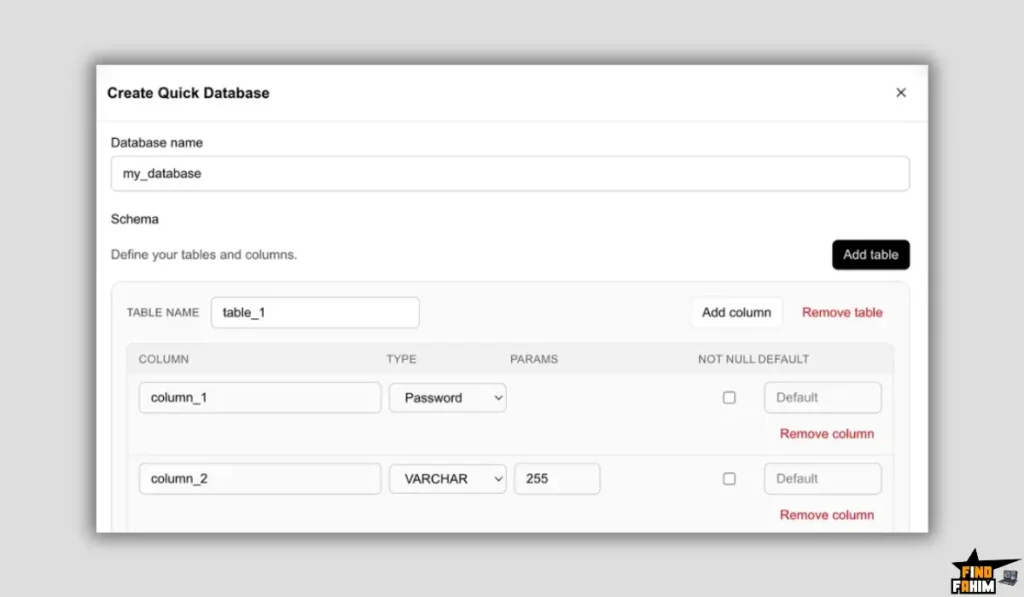
- Test: Pro Tip: Immediately go to the “Create Database” section and try the “AI Prompt” feature (e.g., “Create a Pizza Delivery DB”) to see how fast it builds a schema.
Final Verdict: Is This Cost-Friendly Deal Worth It?
After testing the Swagger docs, the API response speed, and the AI agent, my final verdict is a solid 4.8-Star YES.
It democratizes backend engineering.
- It kills the “Imposter Syndrome.” You don’t need to be a “full-stack” dev to build full-stack apps.
- It kills the Monthly Bill. Stop paying Xano rent.
- It kills the Setup Time. From idea to API in 60 seconds.
If you are building apps in 2026, you need speed. NoCodeBackend gives you speed without sacrificing security.
Secure Your NoCodeBackend License Before The Timer Runs Out!]
(Note: Deal ends soon. Ensure you grab Tier 2 for the AI features.)
About the Author: Why I Care About This So Much
I am a frontend builder at heart. I love design, but I hate servers. For years, I let great app ideas die because I didn’t want to deal with SQL or AWS.
NoCodeBackend unlocked those ideas for me. It let me build the logic instantly so I could focus on the user experience. I write these reviews to help other creators break through the technical wall.
If you want to see the other tools I use to save money, check out my Full AppSumo Deal Reviews Page.
FAQ: Your NoCodeBackend Questions, Answered
What is NoCodeBackend?
NoCodeBackend is a no-code platform that lets you create relational databases and secure REST APIs visually or using AI commands, without writing any backend code.
Can I export my data from NoCodeBackend?
Yes, you are not locked in. You can export your database data anytime in CSV or JSON format.
Is NoCodeBackend API secure?
Yes, NoCodeBackend generates secure APIs by default and supports API keys, authentication, and domain whitelisting (CORS) to protect your data.
Does the NoCodeBackend Tier 1 plan include AI?
No. Tier 1 includes the visual database and API builder only. The Smart AI text-to-database feature is available starting from Tier 2.
How fast are NoCodeBackend APIs?
The APIs are built on high-performance infrastructure with typical response times under 100ms, making them suitable for real-time web and mobile apps.
Can I add custom backend code in NoCodeBackend?
Currently, NoCodeBackend is fully no-code. However, Edge Functions (serverless JavaScript logic) are on the roadmap for future updates.
Does NoCodeBackend generate API documentation?
Yes, it automatically generates Swagger (OpenAPI) documentation for all endpoints, making frontend integration fast and developer-friendly.
What happens if I reach the database limit?
If you hit your database limit, you can upgrade your AppSumo license to a higher tier during the deal period to unlock more databases.
Can NoCodeBackend connect with FlutterFlow or Bubble?
Yes, NoCodeBackend outputs standard REST APIs that work seamlessly with FlutterFlow, Bubble, Draftbit, WeWeb, and custom React or Vue apps.
Is there a limit on API calls or storage?
No, all plans include unlimited API calls and unlimited storage, which makes NoCodeBackend one of the most generous backend platforms available.
Why use NoCodeBackend instead of Firebase?
Firebase uses a NoSQL structure, which can be difficult for complex relationships. NoCodeBackend uses relational databases, which are better suited for most business and SaaS use cases.
Is NoCodeBackend safe for production applications?
Yes, it is designed for production use with features like automated backups, secure authentication, and scalable infrastructure.
Can I build a SaaS product with NoCodeBackend?
Absolutely. You can manage users, subscriptions, and multi-tenant data using relational tables and APIs, making it ideal for SaaS applications.
What does Agentic AI mean in NoCodeBackend?
Agentic AI means the AI takes real actions, such as creating database tables and relationships, instead of only generating text responses.
Does NoCodeBackend support webhooks?
Yes, NoCodeBackend supports webhooks that trigger external automations whenever data is created or updated in your database.

Hi, I’m Fahim — a SaaS tools reviewer and digital marketing expert with hands-on experience helping businesses grow using the right software. I research, test, and personally use a wide range of AI, business, productivity, marketing, and email tools for my agency, clients, and projects. I create honest, in-depth reviews and guides to help entrepreneurs, freelancers, startups, and digital agencies choose the best tools to save time, boost results, and scale smarter. If I recommend it, I’ve used it — and I only share what truly works.