
You’re in the middle of writing a crucial project update in Slack, or drafting a sensitive client email in Gmail — then you notice the draft sounds too casual, or a little clunky. That’s exactly the gap the KeyShift AI lifetime deal is built to close.
The normal fix: copy the text, open a new tab, log into ChatGPT, paste it, type “make this sound professional,” wait, copy the output, then paste it back. That’s 30 to 45 seconds of pure context switching.
KeyShift AI removes that step entirely. It’s a native desktop app that puts AI directly into your cursor, so SaaS founders, copywriters, and remote professionals can rewrite, translate, summarize, or dictate text inside any app they’re already using — no tab-switching required.
Disclaimer: This article contains affiliate links. If you purchase through these links, I may earn a small commission at no extra cost to you. All opinions are entirely my own.
My Quick Take (TL;DR)
- What is it? A native Windows and Mac desktop app that brings AI text transformations directly into any text field across any application.
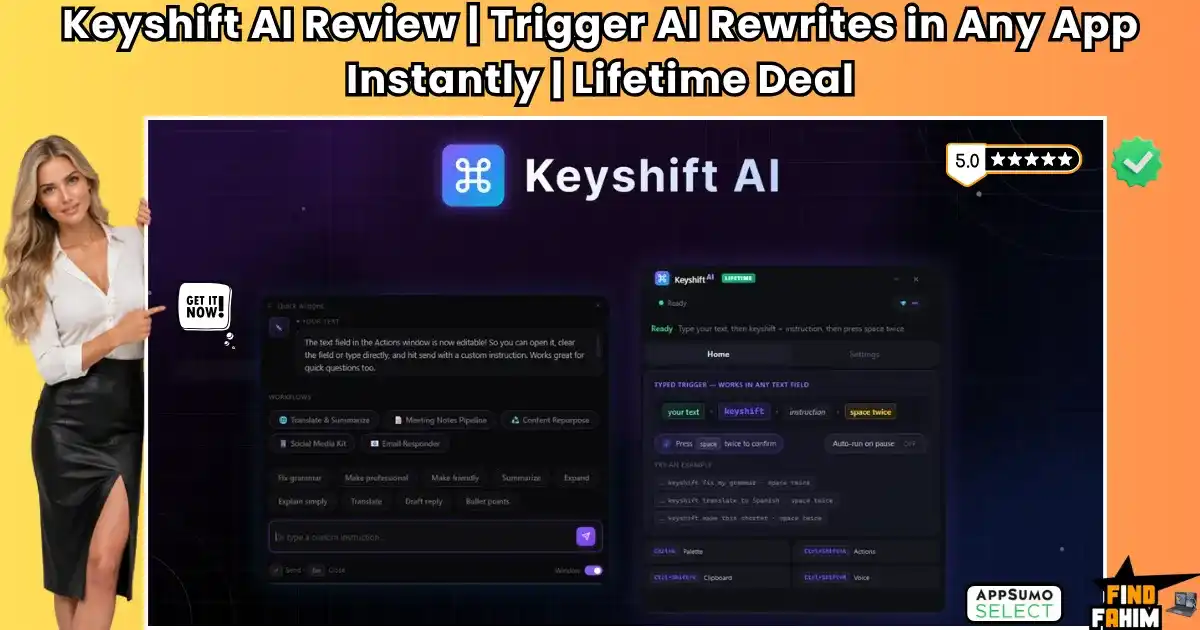
- Special Feature: The Inline Trigger. By simply typing the word keyshift followed by a command and pressing space twice, the software instantly replaces your text in place.
- For Who: Content creators, busy executives, copywriters, and solopreneurs dealing with high volumes of daily communication.
- The Deal: A flexible 5-tier lifetime deal starting at just $19, with the ability to use your own API key (BYOK) for unlimited zero-credit usage on any tier.
- Verdict: If you are tired of paying expensive monthly subscriptions for grammar tools or hate the workflow disruption of constantly opening ChatGPT, this frictionless utility is an absolute no-brainer.
Secure Your KeyShift AI Lifetime Deal Here
What is KeyShift AI?
KeyShift AI is a lightweight desktop productivity tool designed specifically to bridge the gap between large language models and your daily workflow. Instead of acting as a standalone website where you must go to generate content, it lives quietly in the background of your operating system.
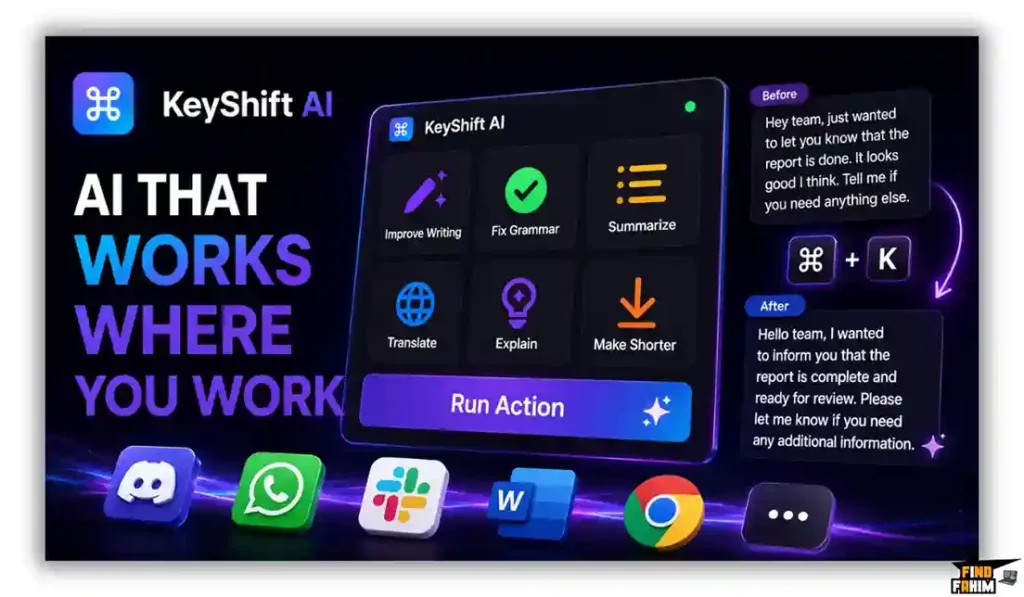
Because the tool operates globally across your entire machine, it works perfectly inside Discord, WhatsApp Desktop, Slack, Microsoft Word, and your web browser. You highlight a block of text, trigger a shortcut, and the AI actively manipulates the text exactly where your cursor is resting, ensuring your communication remains rapid and highly polished securely.
The Real Cost of Context Switching
Renting premium cloud-based AI writing assistants or massive grammar overlays continuously drains your operational budget. Here is exactly how a one-time $19 payment replaces expensive, fragmented desktop subscriptions.
| Feature | Replaces… | The Real Value | Standard Cost | Deal Status |
| Inline Rewriting | Grammarly Premium | Fixes tone and grammar | ~$144/year | ✅ Included |
| Cloud Generation | Copy.ai | Generates marketing copy | ~$432/year | ✅ Included |
| Voice Dictation | WisprFlow | Converts speech to text | ~$120/year | ✅ Included |
| App Integrations | Notion AI | AI inside specific tools | ~$120/year | ✅ Included |
| Total Cost | Fragmented Stack | Centralized AI Hub | ~$816/year | $19 (Lifetime) |
Key Features: A Look Inside KeyShift AI
Evaluating these core components reveals exactly how this desktop application helps you untangle complex writing issues without requiring you to constantly manipulate multiple browser windows.
The “Keyshift” Inline Trigger
This is the absolute core of the software. You do not even need to memorize a keyboard shortcut. If you are typing an email and need to summarize a paragraph, you simply type keyshift summarize this in one sentence directly below it, and hit the spacebar twice. The app intercepts the command, processes it via the AI, and replaces the text directly on your screen instantly.
Voice Dictation and Transcription
Typing out long strategy documents is exhausting. KeyShift AI features a native voice input engine (triggered by Ctrl+Shift+M). You can dictate your rough thoughts out loud, and the AI will transcribe them. More impressively, you can apply an AI action during the dictation, commanding it to turn your spoken, rambling thoughts into a polished, bulleted email without typing a single word securely.
Custom AI Modes & Command Palette
Every professional has a specific brand voice. The platform allows you to build custom, reusable AI prompts tailored specifically to your daily workflow natively.
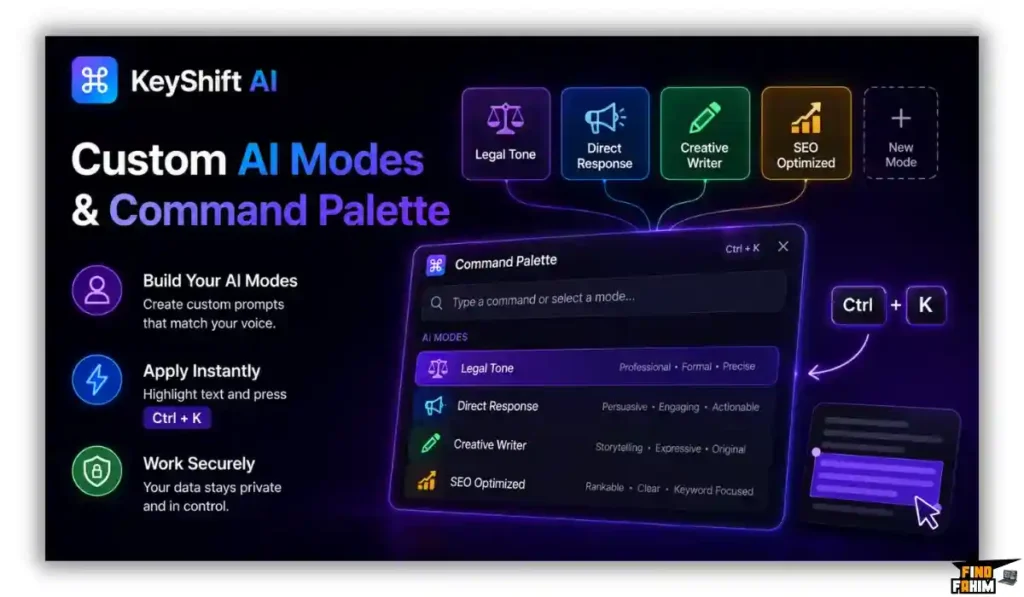
If you are an attorney, you can create a “Legal Tone” mode. If you are a marketer, you can create a “Direct Response” mode. By hitting Ctrl+K, the Command Palette opens, allowing you to instantly apply these custom filters to any highlighted text securely.
The BYOK and Credit Economy Explained
Understanding how credits work is critical before purchasing this deal. KeyShift calculates costs based on the length of the text. A short message fix costs roughly 1 credit. A massive email summary costs 2 to 3 credits. Voice dictation costs 2 to 3 credits per minute of audio.
The Bring Your Own Key (BYOK) Advantage: This is the most valuable part of the deal. If you connect your own OpenAI or Anthropic API key to the software, every single action you take costs 0 KeyShift credits. You can buy the cheapest $19 Tier 1 deal, plug in your API key, and use the software infinitely for pennies, bypassing the higher AppSumo limits natively.
Community Feedback
KeyShift AI launched to massive praise, but navigating the community reviews reveals exactly what the platform does well and where early adopters have requested changes.
- The Workflow Praise: Users consistently highlight the sheer speed of the tool. The ability to use Ctrl+Shift+V to copy text, have the AI translate it in the background, and instantly paste the French version is saving users hours a week natively.
- The Windows/Mac Requirement: Some users bought the tool assuming it was a browser extension, only to realize they cannot install it on their heavily locked-down corporate laptops without IT permission. It is true desktop software.
- Mobile App Demand: The founder, Endri Demiraj, has explicitly confirmed that while it is currently Windows/Mac only, a mobile version is actively planned on the public roadmap safely.
Pricing & AppSumo Deal Terms
| Deal Parameter | Tier 1 ($19) | Tier 2 ($69) | Tier 3 ($129) | Tier 4 & 5 |
| One-Time Price | $19 (73% off) | $69 (50% off) | $129 (53% off) | $239 / $499 |
| Monthly Credits | Entry Volume | 1,000 Credits | 2,000 Credits | Up to 8,000 |
| BYOK Feature | ✅ Yes (0 Credits) | ✅ Yes (0 Credits) | ✅ Yes (0 Credits) | ✅ Yes |
| OS Support | Windows & Mac | Windows & Mac | Windows & Mac | Windows & Mac |
| Money-Back Guarantee | 60 Days | 60 Days | 60 Days | 60 Days |
Which Plan Should You Buy?
Because of the incredible BYOK feature, the purchasing decision is simple. If you are willing to spend five minutes setting up an OpenAI API developer account, you only need to buy Tier 1 ($19). Your own API key will cost you virtually nothing per month for basic text tasks. If you absolutely refuse to manage API keys and want the software to run purely out of the box for heavy daily dictation and writing, you should purchase Tier 2 ($69) or Tier 3 ($129) to secure a comfortable buffer of native credits safely.
Pros & Cons KeyShift AI
Here are some important points I highlight easily to help u take easy decision
The Pros
- Absolute Frictionless UI: Writing the command directly in the text field eliminates context switching.
- Insane BYOK Value: Getting a lifetime desktop wrapper for your API keys for a flat $19 payment is highly profitable.
- Global Application Support: Works inside native desktop apps, web browsers, and chat clients flawlessly.
- Advanced Voice Features: Combines raw speech-to-text with active AI polishing simultaneously.
The Cons
- No Mobile App (Yet): You cannot use these shortcuts on your iPhone or Android keyboard natively.
- Corporate Installation Blocks: Because it runs at the OS level to read keystrokes, strict corporate IT departments may block the installation securely.
How KeyShift AI Works (Quick Setup)
- Install the App: Download the native client for your Mac or Windows machine and authenticate your AppSumo license.
- Connect Your Key (Optional): Paste your personal OpenAI API key into the settings to reduce your internal credit usage to zero natively.
- Create Custom Modes: Define your specific brand voice or common workflows (e.g., “Summarize into 3 bullet points”).
- Type the Trigger: Open any app (like Slack), type your messy draft, follow it with keyshift make this polite, and double-tap the spacebar.
- Watch the Magic: The text instantly vanishes and is replaced by the perfectly polished AI output directly inside your text box safely.
KeyShift AI Alternatives
The digital AI writing assistant market is highly saturated. Let us look at how this highly focused processor stacks up against established software platforms efficiently to prevent you from buying redundant tools.
KeyShift AI vs. Grammarly
Where Grammarly Wins: Absolute passive grammar checking. Grammarly automatically underlines errors in red as you type and fixes basic spelling without requiring a specific prompt natively.
Where KeyShift AI Wins: Prompt-driven flexibility. Grammarly forces you into its rigid overlays and charges expensive monthly fees. KeyShift allows you to fully rewrite, translate, or dictate entire paragraphs based on custom instructions for a single lifetime payment securely.
KeyShift AI vs. Copy.ai
Where Copy.ai Wins: Massive marketing campaigns. It offers incredibly deep, multi-step cloud workflows specifically designed for generating massive SEO blogs and ad variations globally.
Where KeyShift AI Wins: Daily micro-tasks. Copy.ai forces you to open a browser tab, log in, and copy-paste content back and forth. KeyShift operates instantly right where your cursor lives natively.
KeyShift AI vs. WisprFlow
Where WisprFlow Wins: Pure, hyper-optimized dictation. It is built explicitly for rapid voice-to-text with massive global language support for Mac and Windows natively.
Where KeyShift AI Wins: Text-based triggers. While WisprFlow relies on your microphone, KeyShift allows you to trigger massive text expansions using just your keyboard seamlessly, making it viable in quiet office environments.
KeyShift AI vs. Notion AI
Where Notion Wins: Deep document intelligence. Notion AI natively understands the context of your entire team workspace and wiki documents securely.
Where KeyShift AI Wins: Global availability. Notion AI is completely trapped inside the Notion app. If you switch to Gmail or WhatsApp, Notion AI disappears. KeyShift follows you across your entire operating system flawlessly.
Quick Comparison Matrix
| Platform | Pricing Model | Core Focus | Global App Usage | Best For… |
| KeyShift AI | $19+ Lifetime | Inline Text AI | ✅ Yes | Founders & Creators |
| Grammarly | Monthly Sub | Grammar Correction | ✅ Yes | Basic Proofreading |
| Copy.ai | Monthly Sub | Cloud Copywriting | ❌ Browser Only | Marketing Teams |
| WisprFlow | Monthly Sub | Voice Dictation | ✅ Yes | Verbal Thinkers |
| Notion AI | Monthly Sub | Wiki Intelligence | ❌ Notion Only | Project Managers |
Switch to KeyShift AI and Stop Paying Subscriptions
Is This Deal a Smart Business Investment?
Let us look at the exact financial math of this AppSumo offer to see how fast this utility pays for itself in real-world value. The cost of holding premium writing subscriptions like Grammarly Pro runs roughly $140 annually just for basic text polishing securely.
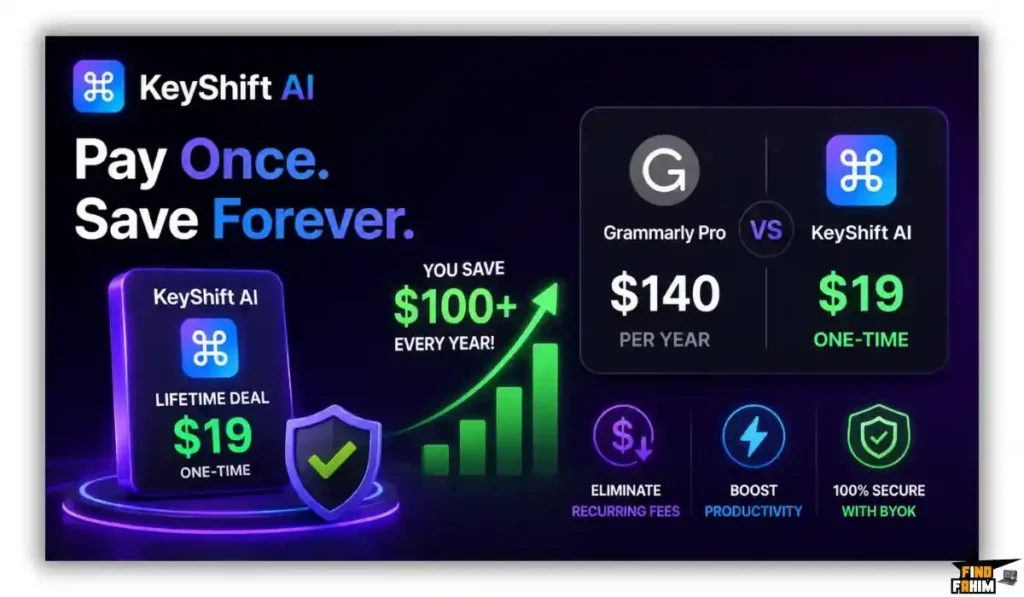
The KeyShift AI Lifetime deal starts at exactly $19 paid once. You save over a hundred dollars immediately on your first year. By utilizing the BYOK feature, this structural shift saves your agency massive recurring software fees while drastically accelerating your daily communication speed natively.
Final Verdict: Should You Buy It?
If your primary job is formatting complex Excel spreadsheets or editing 4K video, and you rarely send emails or Slack messages, this tool is unnecessary for your daily workflow.
However, if you are an SEO specialist, an affiliate marketer, a SaaS founder, or an agency owner who spends hours a day writing emails, drafting Slack updates, and building content outlines, KeyShift AI is a brilliant utility. It trades massive cloud bloat for absolute keyboard speed, giving you a powerful, customizable AI assistant for a single, highly affordable payment.
Secure Your KeyShift AI Lifetime Plan Before It Ends
About the Author
Endri Demiraj, a seasoned software engineer, got completely fed up with wasting time switching between different writing apps and AI tools. He built KeyShift AI to fix this massive problem. He wanted smart text edits to appear right where you type, completely killing the annoying friction of copying and pasting.
Here at FindFahim, helping you find real SaaS solutions is my absolute priority. I review specific utility tools like KeyShift AI, so you know exactly what delivers real workflow speed before you spend a single dollar.
If you want another tool that completely upgrades your writing speed, I highly recommend checking out my Writecream Lifetime Deal Review. Using these two platforms together is a seriously smart move to speed up your content creation permanently!
FAQ: Your KeyShift AI Lifetime Deal
KeyShift AI is a desktop AI writing assistant for Windows and macOS that lets users rewrite, summarize, translate, and dictate text directly inside the apps they use.
Yes. Because KeyShift AI operates at the desktop level, it can work inside applications and text fields such as Gmail, WordPress, Slack, Discord, and Chrome.
Yes. KeyShift AI supports Bring Your Own Key, allowing users to connect OpenAI or Anthropic API keys and use their own API credits instead of KeyShift credits.
Yes. KeyShift AI lets users create reusable custom prompts for tasks such as translation, rewriting, and adjusting the tone of text.
Not currently. KeyShift AI is available for Windows and macOS desktops, while a mobile version is planned for the future.
KeyShift AI uses keyboard shortcuts and trigger sequences to activate AI actions, helping users perform text transformations without switching to another application.
An AI writing assistant helps users rewrite, summarize, translate, improve, and generate text using artificial intelligence directly within their normal workflow.
Yes. Desktop AI writing tools can work across multiple applications by interacting with the currently focused text field instead of being limited to a single website or editor. What is KeyShift AI?
Does KeyShift AI work inside Google Chrome and other apps?
Does KeyShift AI support BYOK?
Can I create custom prompts in KeyShift AI?
Is there a KeyShift AI mobile app?
How does KeyShift AI activate AI actions?
What is an AI writing assistant?
Can AI writing tools work across different desktop applications?

Hi, I’m Fahim — a SaaS tools reviewer and digital marketing expert with hands-on experience helping businesses grow using the right software. I research, test, and personally use a wide range of AI, business, productivity, marketing, and email tools for my agency, clients, and projects. I create honest, in-depth reviews and guides to help entrepreneurs, freelancers, startups, and digital agencies choose the best tools to save time, boost results, and scale smarter. If I recommend it, I’ve used it — and I only share what truly works.