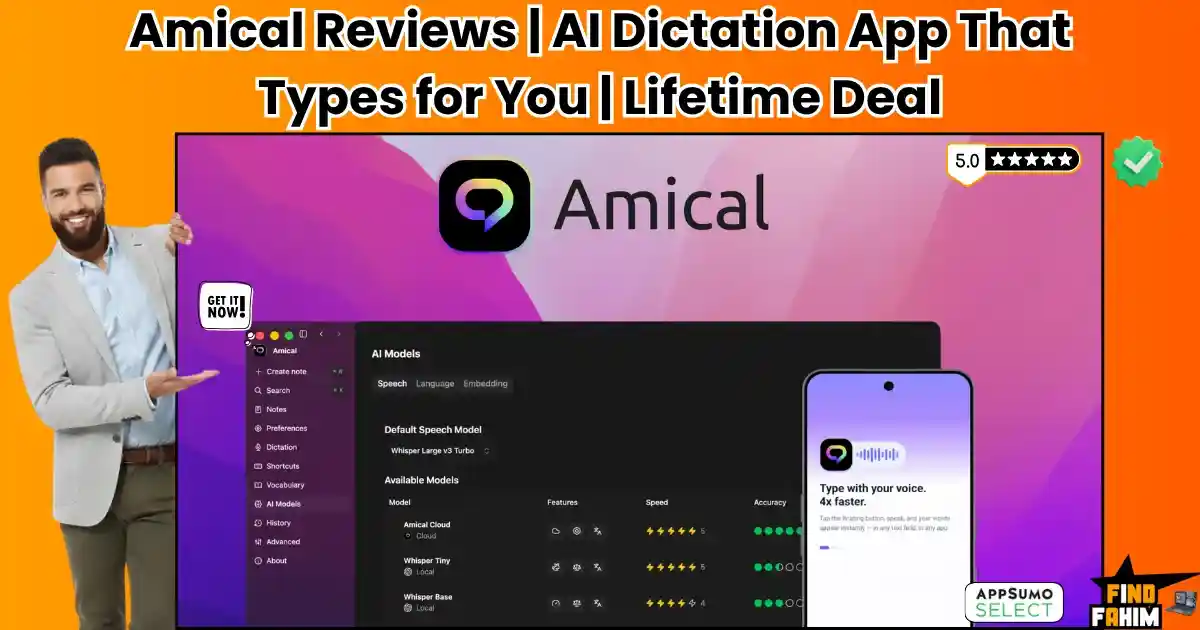

Typing is the most frustrating bottleneck between your ideas and a finished draft. When you spend your days grinding out 3,000 to 4,000-word SaaS reviews or handling endless client emails, your fingers simply cannot match the speed of your brain.
Amical is an extremely fast AI dictation tool that turns your spoken words into perfectly formatted text inside any application. By combining accurate cloud transcription with private local models, it lets you dictate directly into Slack, Gmail, or Google Docs without touching your keyboard.
Disclaimer: This article contains affiliate links. If you purchase through these links, I may earn a small commission at no extra cost. All opinions and market research are entirely my own.
My Quick Take (TL;DR)
Tired of typing fatigue? Here is my summary.
- What is it? A smart AI dictation app for Mac, Windows, iOS, and Android.
- Special Feature: Runs entirely on local AI models, keeping your voice data strictly on your hard drive for total privacy.
- For Who: Content writers, agency owners, and professionals dealing with heavy typing.
- The Deal: Lifetime access starts at $49 on AppSumo. Buy Tier 3 to secure unlimited local models for your entire team.
- Verdict: A mandatory productivity tool that replaces terrible default operating system dictation.
Click Here to Get the Amical Lifetime Deal on AppSumo
What is Amical?
Amical is an accurate voice-to-text application for all major devices. It eliminates manual typing by letting you speak directly into any active text field, securely capturing your voice and turning it into polished sentences instantly.
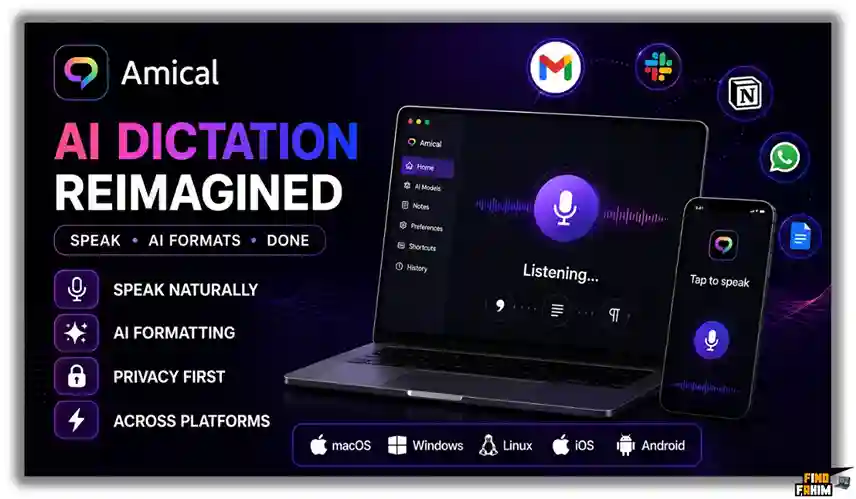
Unlike standard dictation tools that spit out messy text, this software understands context. It uses artificial intelligence to format your spoken sentences perfectly, actively adding correct punctuation and paragraph breaks, whether you are sending casual messages or formal emails.
Quick Look: What’s Inside the Deal
If your business relies on rapid communication or high-volume content creation, manual typing is actively slowing you down. Transitioning to this unified dictation engine instantly reclaims your time and protects your hands from physical fatigue.
Replacing your fragmented writing tools with a one-time purchase secures massive recurring savings. Here is the exact financial value you unlock when you switch to this platform.
| Feature | Replaces… | The Real Value | Normal Cost | Deal Status |
| Universal Dictation | Native voice typing | Type directly into any app | ~$120/yr | ✅ Included |
| Local AI Models | Cloud-only apps | Maximum privacy air-gap | ~$240/yr | ✅ Included |
| Contextual Formatting | Manual editing | AI matches the app’s tone | ~$150/yr | ✅ Included |
| Custom Vocabulary | Autocorrect fails | Learns your industry terms | ~$99/yr | ✅ Included |
| Total Value | Fragmented Tools | Complete Dictation OS | ~$609+/yr | $49 (Lifetime) |
Why Traditional Voice Typing Is Failing
Forcing your team to rely on basic voice typing is an absolute operational failure. These traditional applications lack deep AI understanding, transcribing exactly what they hear without fixing grammar, removing pauses, or formatting the final text.
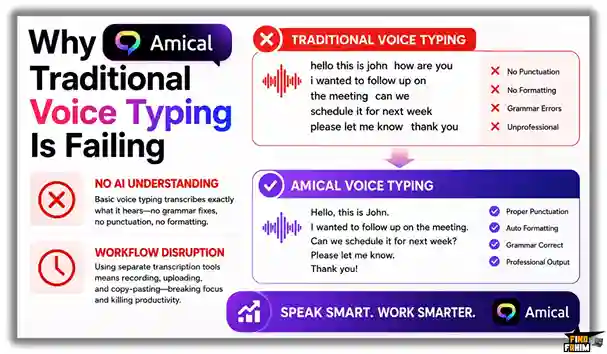
Furthermore, relying on standalone transcription websites introduces massive workflow friction. Recording audio elsewhere and copying and pasting it into your email actively disrupts your focus and completely collapses your daily productivity.
Why AI Dictation Is On the Rise in 2026
Modern creators and remote teams demand extreme speed alongside absolute data privacy. AI-powered dictation is exploding in 2026 because we must immediately accelerate our writing output without ever compromising the security of our internal business communications.
Pairing an incredibly accurate speech engine with local processing changes our execution strategy. When you eliminate typing bottlenecks, your team can draft content significantly faster, creating massive operational efficiency.
A Look Inside Amical: Key Features
This desktop application completely removes the frustrating interfaces found in standard transcription tools. It operates quietly in the background of your operating system to kill distractions. By eliminating manual typing, the software increases your daily drafting speed and output. Here is exactly what the system offers.
Universal Application Integration
You never have to switch tabs to record your thoughts. This tool works directly wherever your cursor is active. It injects your transcribed text straight into Slack messages, Gmail threads, Jira tickets, and Google Docs, eliminating the need to copy and paste from external dashboards.
Context-Aware Auto-Formatting
Stop wasting time fixing messy grammar. The system recognizes exactly which application you are using and structures the final output accordingly. It formats a professional client email entirely differently from a quick team update, handling all the capitalization, proper punctuation, and paragraph breaks automatically.
Custom Vocabulary Engine
Generic voice tools constantly ruin technical language. You can permanently feed your industry jargon, unique client brand names, and complex acronyms into the memory bank. The software guarantees it will accurately spell your core marketing terminology without forcing you to make frustrating manual corrections later.
Standout Feature: Dual-Processing Models
This is the exact reason professionals choose this application over invasive competitors. The platform gives you absolute control over your private data. You can run the entire transcription process locally on your own hardware, guaranteeing maximum security for confidential client meetings and financial reporting.
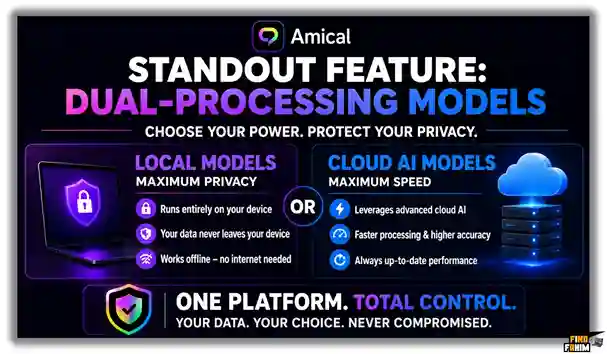
When raw speed is more critical than absolute privacy, you simply flip a toggle to activate the cloud models. This dual approach ensures you get the fastest possible processing times for standard tasks while maintaining a strict local wall for your sensitive business information.
Amical Updates: What is New in 2026
The development team directly applied AppSumo buyer feedback to heavily upgrade the language recognition engines.
- Offline Mode: Optimized local Whisper models now allow flawless offline dictation, filtering out heavy background noise completely.
- Mobile Parity: The iOS and Android applications now match the exact processing speed and transcription accuracy of the desktop software.
- Smart Commands: Users can program custom voice shortcuts to instantly generate specific text blocks or trigger actions hands-free.
Amical Pricing & AppSumo Deal Details
Stop paying expensive monthly SaaS fees. Amical offers five stackable tiers built for solo creators and massive agencies. Review the matrix below to match your exact team limits.
| Feature | Tier 1 | Tier 2 | Tier 3 | Tier 4 | Tier 5 |
| One-Time Price | $49 | $129 | $249 | $449 | $649 |
| Team Members | 1 User | 3 Users | 7 Users | 15 Users | 25 Users |
| Cloud Words/Mo | 200,000 | 600,000 | 1.4 Million | 3.5 Million | 6 Million |
| Local Models | Unlimited | Unlimited | Unlimited | Unlimited | Unlimited |
Lock In Your Exact Amical Lifetime Tier on AppSumo
Which Plan Should You Buy?
Solopreneurs should buy Tier 1 ($49) for 200,000 cloud words and unlimited local drafting. Marketing agencies must grab Tier 3 ($249) immediately. It supports seven staff members and 1.4 million words, letting you scale your dictation needs without recurring costs.
Important Note on the Refund Policy
This deal includes AppSumo’s 60-day money-back guarantee. You have two full months to test the dictation models and cloud words completely risk-free.
Pros & Cons of This Lifetime Package
Moving to voice dictation requires a clear understanding of its daily performance. Based on verified AppSumo feedback, here is exactly what works and what fails.
The Pros
✅ Absolute Privacy: Local models keep your sensitive data completely off third-party servers.
✅ Fast Workflow: Direct text injection kills tedious manual copying entirely.
✅ Cost Savings: A single $49 payment replaces expensive monthly subscription fees.
✅ Device Syncing: The engine works identically across desktop and mobile systems.
✅ Zero Data Mining: They refuse to use your audio to train algorithms.
The Cons
❌ Hardware Heavy: Running local processing fast demands a relatively modern computer.
❌ Language Switching: The auto-detect stutters if you mix two languages instantly.
Who Should NOT Buy Amical?
Skip this if you sit in a dead-silent office where talking annoys coworkers, or if you barely write. This software is built strictly for high-volume creators and busy sales teams.
How Does Amical Work?
The setup workflow is extremely fast and requires absolutely no technical background to execute properly. You can transition from manual typing to voice dictation in under three minutes.
Here is exactly how we use the platform to turn our voice into a highly profitable execution engine.
- Install: Download the native application for your specific operating system (Mac, Windows, iOS, or Android).
- Configure: Choose your preferred processing method (ultra-secure Local AI or lightning-fast Cloud AI).
- Activate: Click into any text field in any application on your device where you want to write.
- Dictate: Trigger the hotkey and speak your thoughts naturally without worrying about punctuation.
- Inject: Release the hotkey and watch the AI instantly format your speech and drop the polished text directly onto the page.
Best Use Cases for Amical
Because it handles complex voice processing securely, this platform adapts perfectly to professionals managing high-volume digital workflows.
Here are the specific professionals who extract the highest financial return from this automated plugin.
- Content Creators: Draft massive 3,000-word articles in a fraction of the time by walking around the room and speaking ideas directly into WordPress.
- Remote Sales Teams: Rapidly dictate highly personalized follow-up emails in Gmail between back-to-back Zoom calls without straining your hands.
- Busy Founders: Use the mobile apps to dictate complex Slack messages or Jira updates while commuting, ensuring nothing falls through the cracks.
Secure Your Amical Lifetime License Here
Amical Alternatives
The voice-to-text market is highly competitive and rapidly evolving. Let us look at how this highly cost-effective AppSumo deal stacks up against established industry heavyweights.
Understanding their specific strengths prevents us from buying redundant tools to manage our output. Here is how it compares directly to five massive competitors.
Amical vs Otter.ai
Where Otter Wins: Deep Zoom and Google Meet integrations specifically designed for recording, transcribing, and summarizing long, multi-speaker video meetings.
Where Amical Wins: Direct text input and seamless execution. Otter requires you to record inside their app and export the text manually. Amical drops your spoken words directly into whatever application you are currently using, instantly bypassing the copy-paste process.
Amical vs WisprFlow
Where WisprFlow Wins: Deep integration with specific Mac workflows and an incredibly aggressive focus on acting as an overarching AI command center.
Where Amical Wins: Multi-platform consistency and privacy. WisprFlow is largely restricted by its operating system requirements, whereas Amical delivers the exact same dictation experience across Windows, Mac, iOS, and Android while providing absolute security via local processing.
Amical vs Grammarly
Where Grammarly Wins: In-depth, structural grammar editing, plagiarism checking, and stylistic tone adjustments for existing blocks of written text.
Where Amical Wins: High-speed voice execution. Grammarly is built to fix and polish what you have already typed manually on your keyboard. Amical completely prevents you from having to type it in the first place, saving you hours of physical labor.
Amical vs Nuance Dragon
Where Nuance Dragon Wins: Decades of highly specialized medical and legal vocabulary training for enterprise professionals in strictly regulated industries.
Where Amical Wins: Modern flexibility and pricing. Dragon charges massive premium subscriptions that drain your budget annually. Amical offers lightning-fast, highly accurate AI transcription for a single, affordable lifetime payment, making it vastly superior for standard business and marketing operations.
All Competitors Matrix
| Platform | Pricing Model | Core Strength | Local Privacy Mode |
| Amical | Lifetime ($49+) | Direct App Dictation | ✅ Yes |
| Otter.ai | Monthly Sub | Meeting Notes | ❌ No |
| Grammarly | Monthly Sub | Text Editing | ❌ No |
| WisprFlow | Monthly Sub | Voice Typing | ❌ No |
| Dragon | Yearly Sub | Medical/Legal | ❌ No |
Switch to Amical and Stop Paying Subscriptions
Is This AppSumo Deal a Smart Business Investment?
Let us look at the exact financial math of modern productivity tools over a single year to see how fast this lifetime deal pays for itself.

If you rely on premium cloud transcription tools or specialized writing assistants, the monthly fees accumulate rapidly. A standard premium dictation and editing suite easily costs over $240+ per year. By purchasing Amical’s Tier 1 plan, your total cost is exactly $49, paid once.
The return on investment is undeniable; you break even in less than three months. By using this software to replace expensive recurring subscriptions, you save massive amounts of cash while physically protecting your hands from repetitive strain injuries.
How to Redeem the Amical Deal
Ready to stop typing manually and speed up your writing workflow? Follow these quick steps to secure your access before the deal closes.
This immediate execution guarantees you can lock in your exact redemption codes securely under the AppSumo guarantee.
- Buy: Click the AppSumo link below to secure your redemption codes. This purchase is backed by a 60-day guarantee.
- Download: Grab the installation file for your specific OS (Mac/Windows) from your new dashboard.
- Install: Run the quick setup wizard and grant the necessary microphone permissions to your computer.
- Activate: Enter your unique AppSumo code in the settings to activate lifetime access.
Final Verdict: Is This AppSumo Deal Worth It?
After evaluating the local privacy models, testing the cross-platform mobile applications, and reviewing the context-aware AI formatting, my final verdict is a definitive BUY.
Amical solves a massive, expensive problem: the physical bottleneck of manual typing. It is a highly effective execution engine that combines incredible transcription speed with absolute data security in one affordable package. Stacking Tier 3 for your team is a mandatory investment for agencies looking to rapidly scale their daily output.
Secure Your Amical Lifetime Deal Before It Ends
About the Author
Naomi Chopra co-founded Amical to fix the massive bottleneck between thinking and typing. Her team built this open-source dictation engine to process speech-to-text directly on your device. Running entirely on your own hardware without internet delays, it guarantees absolute privacy for sensitive notes across thirty languages.
At FindFahim, my focus is on testing software deals to help you cut recurring costs and eliminate slow workflows. I investigated Amical because manual typing directly limits your daily output. I do the heavy lifting of evaluating these tools so you know exactly what you are buying. To upgrade your tech stack, read my guide on sending and tracking file transfers globally.
FAQ: Your Amical Questions, Answered
Amical is an AI-powered dictation application that converts spoken words into properly formatted text, allowing users to write, edit, and communicate using their voice.
Yes. Amical includes native mobile applications for both iOS and Android, allowing users to dictate and create content on the go.
Local models run directly on your device for maximum privacy, while Cloud models use external servers for faster processing and more advanced AI capabilities.
No. Amical states that user audio recordings and transcripts are not retained or used for AI training purposes.
Yes. Amical works across most applications including web browsers, productivity tools, messaging apps, document editors, and coding environments.
Yes. Users can create custom vocabulary lists so Amical can accurately recognize brand names, technical terms, and specialized jargon.
AI dictation software converts spoken language into written text while automatically improving formatting, punctuation, and readability.
Yes. Modern AI dictation tools can automatically insert commas, periods, question marks, and paragraph breaks based on speech context.
Professionals use voice dictation tools to write faster, reduce typing time, and capture ideas more naturally during work.
Yes. AI voice typing can significantly improve productivity by allowing users to create content, notes, and messages hands-free. What is Amical?
Does Amical work on mobile devices?
What is the difference between Amical Local and Cloud AI models?
Does Amical use my recordings to train AI models?
Can Amical work inside any application?
Can Amical recognize custom words and industry-specific terminology?
What is AI dictation software?
Can voice-to-text software add punctuation automatically?
Why do professionals use voice dictation tools?
Is AI voice typing useful for productivity?

Hi, I’m Fahim — a SaaS tools reviewer and digital marketing expert with hands-on experience helping businesses grow using the right software. I research, test, and personally use a wide range of AI, business, productivity, marketing, and email tools for my agency, clients, and projects. I create honest, in-depth reviews and guides to help entrepreneurs, freelancers, startups, and digital agencies choose the best tools to save time, boost results, and scale smarter. If I recommend it, I’ve used it — and I only share what truly works.