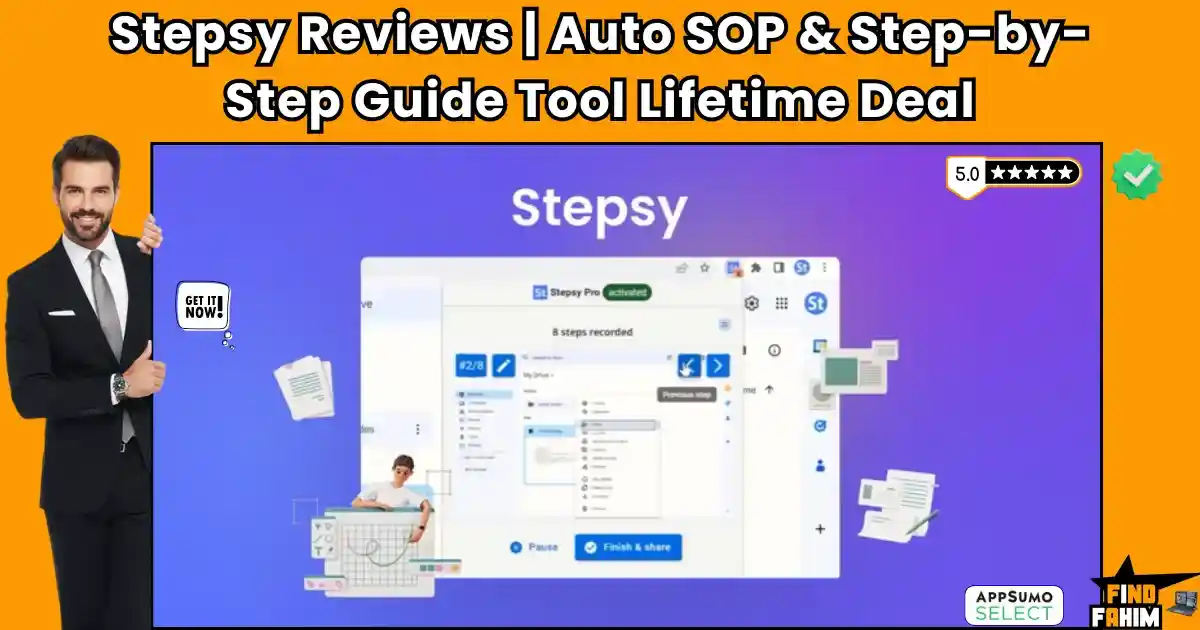

Modern businesses burn thousands of dollars and hundreds of billable hours, forcing employees to type out standard operating procedures manually. Every time a team member crops a screenshot or pastes an image into a blank file, your productivity dies. The Stepsy lifetime deal is a smart extension that tracks your exact actions, building step-by-step guides with sharp images every time you click.
Instead of paying for heavy software that locks your data behind a monthly wall, this tool pushes your procedures straight to Google Docs or HTML. Its biggest edge is the automatic privacy masking and duplicate removal. You keep your financial secrets safe while the software cleans up your messy clicks. By killing manual post-production, you can build a massive training library and delegate tasks without losing another afternoon to tedious documentation.
Disclaimer: This article contains affiliate links. If you purchase through these links, I may earn a small commission at no extra cost to you. All opinions, research, and analysis are entirely my own.
My Quick Take (TL;DR)
- The Tool: A browser extension capturing clicks to create instant SOPs.
- Standout Feature: Immediate Google Docs export with auto-redaction.
- Target Audience: Agency founders, IT team, entrepreneurs, and customer support.
- The Cost: $39 for lifetime access. (only plan)
- The Verdict: A high-value replacement for expensive tools like Scribe or Tango.
Click Here to Get the Stepsy Lifetime Deal on AppSumo
What is Stepsy?
Creating training manuals is a painful, ignored chore. Founders hate documentation because it steals time from revenue-generating work. Stepsy fixes this by watching you work in the background. It is a lightweight tool that follows your mouse and takes perfectly cropped images automatically.
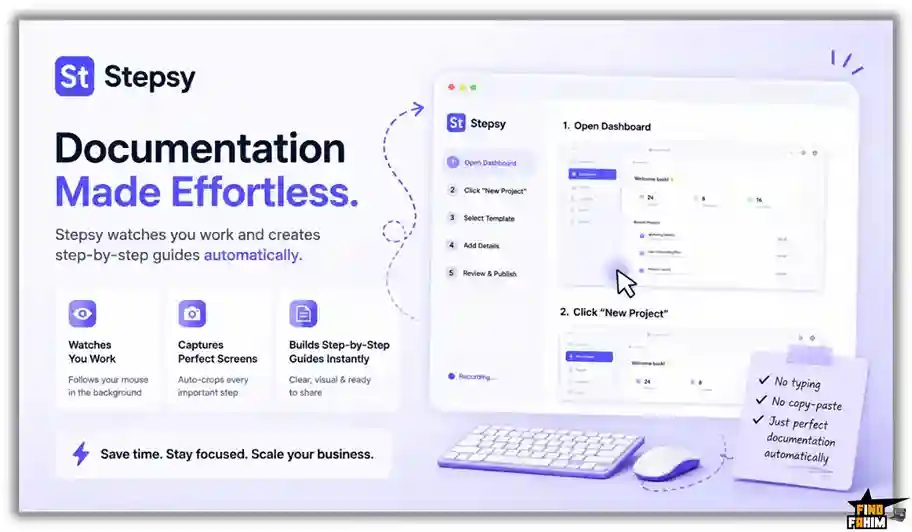
You perform your normal daily tasks, and the software builds a high-quality manual as you go. When you finish, you simply click export. It generates a formatted file that you can hand to a new hire or virtual assistant immediately.
Quick Look: What’s Inside the Deal
Stop relying on manual text files that confuse your team. Here is how this deal cuts your monthly costs.
| Feature / Process | Replaces… | The Real Value | Normal Cost | Deal Status |
| Guide Creation | Scribe | Unlimited visual guides | ~$23/mo | ✅ Included |
| Storage | Notion | Direct G-Docs export | ~$10/mo | ✅ Included |
| Privacy | Manual Blurring | Masks data instantly | High Labor | ✅ Included |
| Cleanup | Manual Edits | Removes duplicate clicks | High Labor | ✅ Included |
Why Traditional Documentation Fails Agencies
Forcing your team to type out every workflow step manually is an operational failure. Traditional documentation creates a massive delay between designing a process and teaching it to staff, causing immediate frustration.
Furthermore, written instructions become outdated fast. Without visual screenshots, new hires make expensive mistakes because they cannot see exactly where to click, rendering your old text guides completely useless.
Why Automated SOP Tools Are Trending in 2026
The demand for remote work has peaked. Agencies expect immediate, highly visual training materials that allow virtual assistants to execute tasks perfectly. Modern managers require tools that bypass slow writing entirely.
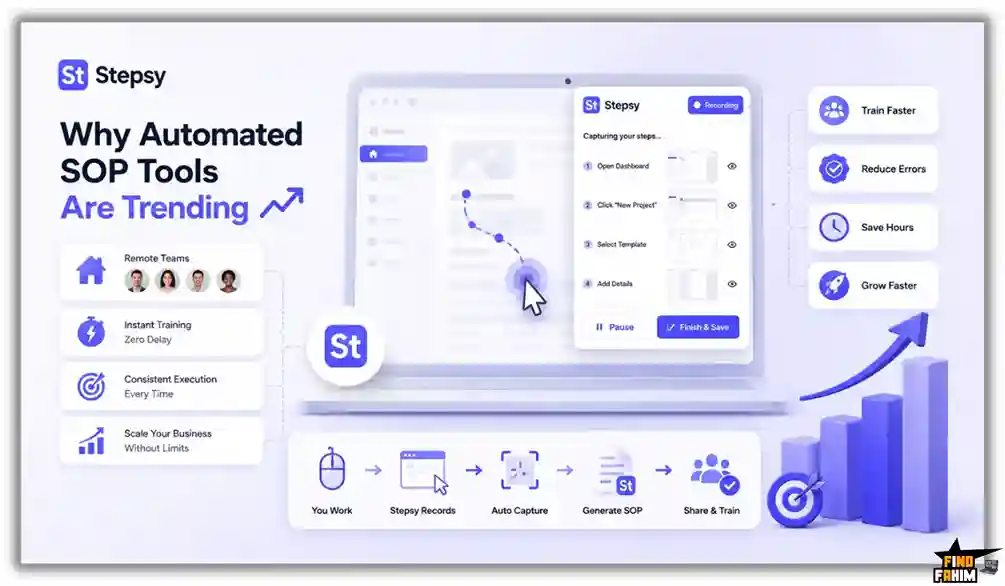
Automated SOP tools eliminate this friction. By tracking your mouse clicks, these extensions remove physical typing. You can finally build aggressive training libraries that scale your business constantly without relying on human memory.
A Look Inside Stepsy: Key Features
This extension is highly powerful but intentionally lightweight. There is no steep learning curve or heavy interface to click through. Here is exactly what it offers.
Automatic Click Capture
You do not need to constantly hit keyboard shortcuts to grab an image. The extension runs quietly in your browser and automatically captures a high-quality screenshot every single time your mouse clicks on a new element.
Intelligent Duplicate Removal
Sometimes you click the wrong button or double-click accidentally. The software recognizes these redundant actions and automatically deletes the duplicate screenshots. This ensures your final instruction manual remains incredibly clean and avoids confusing your readers.
Sensitive Data Masking
Recording financial dashboards or client accounts is dangerous. The platform includes a powerful blurring tool. You can select specific regions on your screen, and the software will permanently obscure that private data before you ever export the document.
Local HTML Saving
If you refuse to store your internal processes on a cloud server, you have options. The extension allows you to export your completed training guides directly to your hard drive as local HTML files for maximum security.
Standout Feature: Direct Google Docs Export
This is the primary reason agencies buy this software. Instead of trapping your training manuals inside a proprietary, expensive third-party application, the extension exports your work straight into Google Docs.
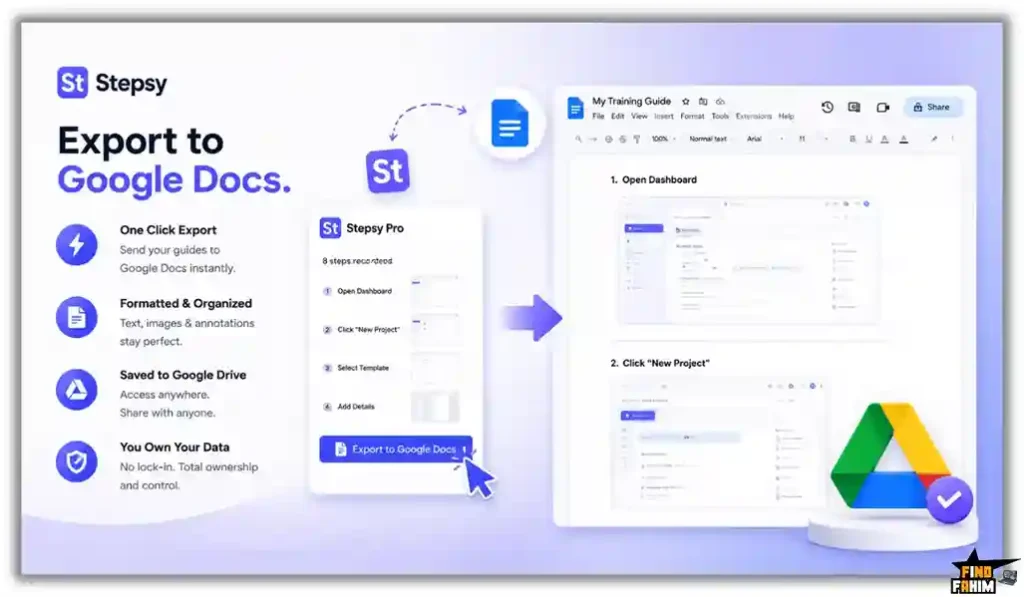
Your formatted guides, complete with text descriptions and annotated images, appear immediately in your Google Drive. You maintain absolute ownership of your data and can share the documents with your team instantly.
Stepsy Updates: What is New in 2026
AppSumo buyers requested specific additions, and the development team delivered. Vova and Sasha actively monitor community feedback to shape their roadmap during their time on the marketplace.
The biggest upgrades revolve around extreme export flexibility. They refined the Google Drive integration to ensure the image format is perfect without breaking the document margins. Additionally, the privacy blurring tools have become significantly faster, allowing you to hide sensitive client data instantly.
Stepsy Pricing & AppSumo Deal Details
Unlike heavy software subscriptions, this lifetime deal is highly affordable and straightforward. You do not need to worry about confusing limits.
| Deal Feature | Personal Plan ($39) |
| Guides Created | Unlimited |
| Google Docs Export | ✅ Yes |
| HTML Export | ✅ Yes |
| Data Masking | ✅ Yes |
| Brand Removal | ✅ Yes |
Lock In Your Stepsy Lifetime Price
Which Plan Should You Buy?
This specific AppSumo deal is incredibly straightforward because it only offers a single $39 tier. There are no expensive upgrades or hidden monthly limits to worry about. You pay exactly once and immediately unlock unlimited guide creation, unlimited Google Docs exports, and the sensitive data masking tools. Secure it immediately to speed up your onboarding.
Important Note on the Refund Policy
This deal includes AppSumo’s standard 60-day money-back guarantee. You have two full months to test the browser extension, evaluate the screenshot quality, and review the Google Docs formatting completely risk-free. If it fails to speed up your documentation process, simply secure a full refund.
Pros & Cons of This Lifetime Package
Based on verified AppSumo community feedback and a 3.8-star rating, here is the truth about the platform’s current state.
The Pros
- ✅ Incredible Value: Replaces expensive recurring fees for tools like Scribe with a single $39 payment.
- ✅ Direct Ownership: Pushing guides to Google Docs ensures you actually own your training materials.
- ✅ Massive Time Saver: Automatically removing duplicate clicks saves huge amounts of post-production editing.
- ✅ Privacy Focused: The blurring feature hides sensitive passwords or financial data easily.
- ✅ Active Founders: Vova and Sasha are highly responsive and rapidly patch bugs flagged by users.
The Cons
- ❌ Browser Limited: It is an extension, meaning it cannot record desktop applications outside of Chrome.
- ❌ Basic Editing: The internal image editor is functional but lacks heavy graphic design features.
- ❌ Single Tier: There are no agency tiers for massive teams to share a centralized dashboard.
Who Should NOT Buy Stepsy?
Skip this deal if you need to record heavy desktop applications like Adobe Premiere or local accounting software. This tool is explicitly built for browser-based workflows. It cannot capture actions happening outside of your web browser.
How Does Stepsy Work?
The setup workflow is extremely fast and requires absolutely zero coding background.
- Install: Add the lightweight extension directly to your preferred web browser.
- Record: Click the capture button and perform your standard workflow exactly as you normally would.
- Blur: Highlight any sensitive financial numbers or client names to mask them permanently.
- Export: Click finish and send the formatted guide straight to your Google Drive folder.
- Share: Send the Google Doc link to your new employees so they can learn the process.
Best Use Cases for Stepsy
Who extracts the highest financial return from this automated documentation tool?
Agency Owners
Stop training virtual assistants manually. Record your client onboarding process once and hand the Google Doc to every new hire instantly.
Customer Support Teams
When a user asks how to fix an issue, record your screen and send them a visual guide instead of typing a massive email.
SaaS Founders
Build your entire software help center in an afternoon by clicking through your own platform and exporting the steps.
Start Building Your Training Library Today
Stepsy Alternatives
The documentation market is crowded with platforms trying to lock you into high monthly fees. While big-name tools offer bells and whistles, they often trap your data on their own servers. Here is how the Stepsy AppSumo deal stacks up against five industry heavyweights.
Stepsy vs. Scribe
Scribe is the undisputed giant of the automated SOP world, known for its polished interface and “Pages” feature.
- Where Scribe Wins: It offers advanced team workspaces, sophisticated permission settings, and deep analytics to track exactly who has viewed your documents.
- Where Stepsy Wins: Absolute value and data sovereignty. Scribe’s free version is heavily restricted, and their Pro plan is a recurring expense. Stepsy is a one-time purchase that pushes every guide directly to your Google Drive, so you never lose access if you stop paying.
Stepsy vs. Tango
Tango is a favorite for teams needing a dedicated desktop application to record processes outside of a web browser.
- Where Tango Wins: It features ultra-smooth recording for local software like Photoshop or Excel, which browser extensions cannot reach.
- Where Stepsy Wins: Cost and branding. Tango forces you into expensive monthly tiers just to remove their watermarks. Stepsy removes all branding for a fraction of the cost, making your SOPs look like they were custom-built by your agency.
Stepsy vs. Loom
Loom revolutionized the workplace with quick video messages, but video has a massive flaw for training.
- Where Loom Wins: It is unbeatable for adding human emotion, tone of voice, and complex verbal explanations to a quick update.
- Where Stepsy Wins: Skimmability. Your team doesn’t want to sit through a ten-minute video to find one specific button. Stepsy creates readable, printable Google Docs that a virtual assistant can follow at their own pace without hitting “rewind.”
Stepsy vs. SweetProcess
SweetProcess is designed for massive corporations that need rigid, multi-layered document management.
- Where SweetProcess Wins: It excels at high-level compliance tracking, approval workflows, and version control for companies with hundreds of employees.
- Where Stepsy Wins: Simplicity. SweetProcess is often too bloated for lean startups. Stepsy is ready to use in seconds, letting you capture a process and move on with your day without navigating a complex enterprise dashboard.
Stepsy vs. Guidde
Guidde focuses heavily on AI-generated video voices and “magical” video documentation.
- Where Guidde Wins: It can turn your clicks into a video with an AI voiceover, which is great for customer-facing help centers.
- Where Stepsy Wins: Weight and workflow. Guidde’s video editing can be time-consuming. Stepsy sticks to the fastest method possible: high-res screenshots and text in a Google Doc. It is built for internal speed, not video production.
Top 5 Competitors Matrix
| Platform | Pricing Model | Core Strength | Data Ownership | Best For… |
| Stepsy | Lifetime Deal | Fast SOP Export | ✅ Google Docs | Agencies & Support |
| Scribe | Monthly Sub | Team Analytics | ❌ Hosted | Massive Teams |
| Tango | Monthly Sub | Desktop Apps | ❌ Hosted | Enterprise Teams |
| Loom | Monthly Sub | Video Messaging | ❌ Hosted | Verbal Updates |
| SweetProcess | Monthly Sub | Compliance | ❌ Hosted | Large Corporations |
| Guidde | Monthly Sub | AI Video Docs | ❌ Hosted | Help Centers |
Switch to Stepsy and Stop Paying Subscriptions
Is This Lifetime Deal a Smart Business Investment?
Look at the exact financial math of standard documentation software over a single year.
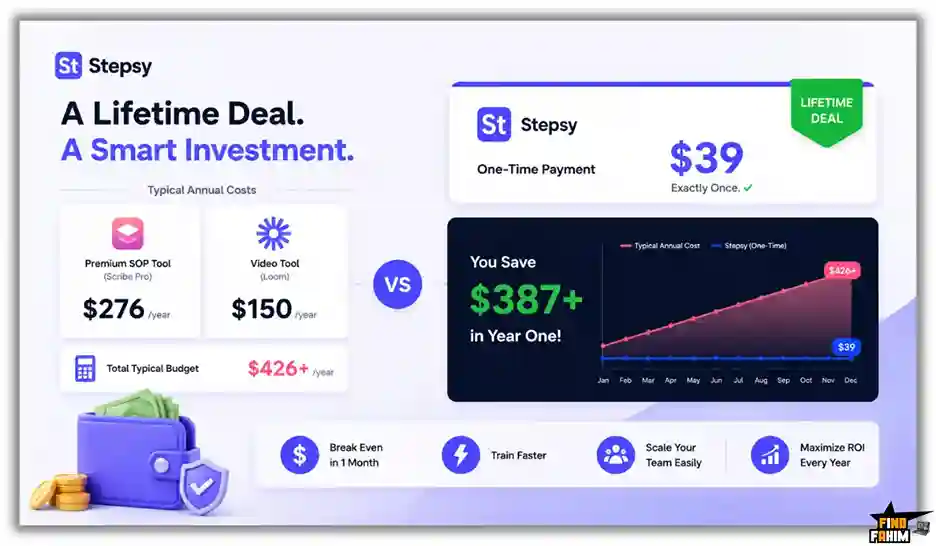
The recurring subscription fees for a typical tech stack are staggering:
- Premium SOP Tool (Scribe Pro): ~$276/year
- Video Tool (Loom): ~$150/year
- Total Typical Budget: $426+ per year
Cost of Stepsy: $39 exactly once.
The return on investment is completely undeniable. You break even within the first month. By using Stepsy to replace expensive monthly subscriptions, you save nearly $400 in your first year while massively increasing your team’s training speed.
How to Redeem the Stepsy Deal
Ready to stop typing out instructions manually? Follow these quick steps to secure your access before the deal closes.
- Buy: Click the AppSumo link below to secure your redemption code. This purchase is backed by a 60-day guarantee.
- Install: Download the official extension from the Chrome Web Store.
- Activate: Apply your unique AppSumo code in the settings panel.
- Create: Record your first workflow and export it to Google Docs instantly.
Final Verdict: Is This AppSumo Deal Worth It?
After evaluating the click capture, testing the Google Docs export, and reviewing the privacy blurring tools, my final verdict is a definitive 5.0-Star BUY.
Stepsy solves a massive bottleneck: tedious manual documentation. It is a highly effective extension that combines fast screenshot capture and total data ownership into one affordable package. Paying $39 is a mandatory investment to speed up your employee onboarding. Grab this deal and start building your training library.
Secure Your Stepsy Lifetime Deal Before It Ends
About the Author
Vova Skalskyi and Sasha founded Stepsy to kill procrastination in the workplace. They knew that creating documentation is tedious, so they built a fast extension that captures processes in real time. Built to eliminate post-production work, they designed this tool to automatically remove duplicates and push guides straight to Google Docs, helping businesses delegate tasks without the headache.
Here at FindFahim, I spend my time analyzing deals exactly like this to help you stop overpaying for monthly software. I investigated Stepsy because relying on manual screenshots directly kills your team’s productivity. I do the heavy lifting of evaluating these extensions, so you know exactly what you are buying. To keep upgrading your tech stack, check out my breakdown here: Semrush Review.
FAQ: Your Stepsy Questions, Answered
Stepsy is a browser extension that automatically captures clicks and generates step-by-step guides and SOP documentation.
Stepsy records browser actions, captures screenshots, and automatically organizes them into structured step-by-step tutorials.
Stepsy can export guides directly to Google Docs or as local HTML files for full ownership and control.
Yes. Stepsy includes a built-in blur tool that allows users to obscure sensitive information before exporting guides.
No. Stepsy is designed specifically as a browser extension and only records actions performed inside a web browser.
Yes. Stepsy intelligently detects accidental duplicate clicks and removes unnecessary screenshots to keep guides clean.
An SOP documentation tool helps businesses create structured step-by-step processes for training, onboarding, and workflow management.
Businesses use guide creation software to save time, improve training consistency, and simplify process documentation.
Yes. Modern browser extensions can automatically capture actions and convert them into visual tutorials or training documents.
Yes. SOP tools help remote teams standardize workflows and make onboarding easier with visual documentation. What is Stepsy?
How does Stepsy create instruction manuals?
Where does Stepsy export completed guides?
Can Stepsy hide sensitive information?
Does Stepsy work with desktop applications?
Does Stepsy remove duplicate clicks automatically?
What is an SOP documentation tool?
Why do businesses use step-by-step guide software?
Can browser extensions create training manuals automatically?
Are SOP tools useful for remote teams?

Hi, I’m Fahim — a SaaS tools reviewer and digital marketing expert with hands-on experience helping businesses grow using the right software. I research, test, and personally use a wide range of AI, business, productivity, marketing, and email tools for my agency, clients, and projects. I create honest, in-depth reviews and guides to help entrepreneurs, freelancers, startups, and digital agencies choose the best tools to save time, boost results, and scale smarter. If I recommend it, I’ve used it — and I only share what truly works.