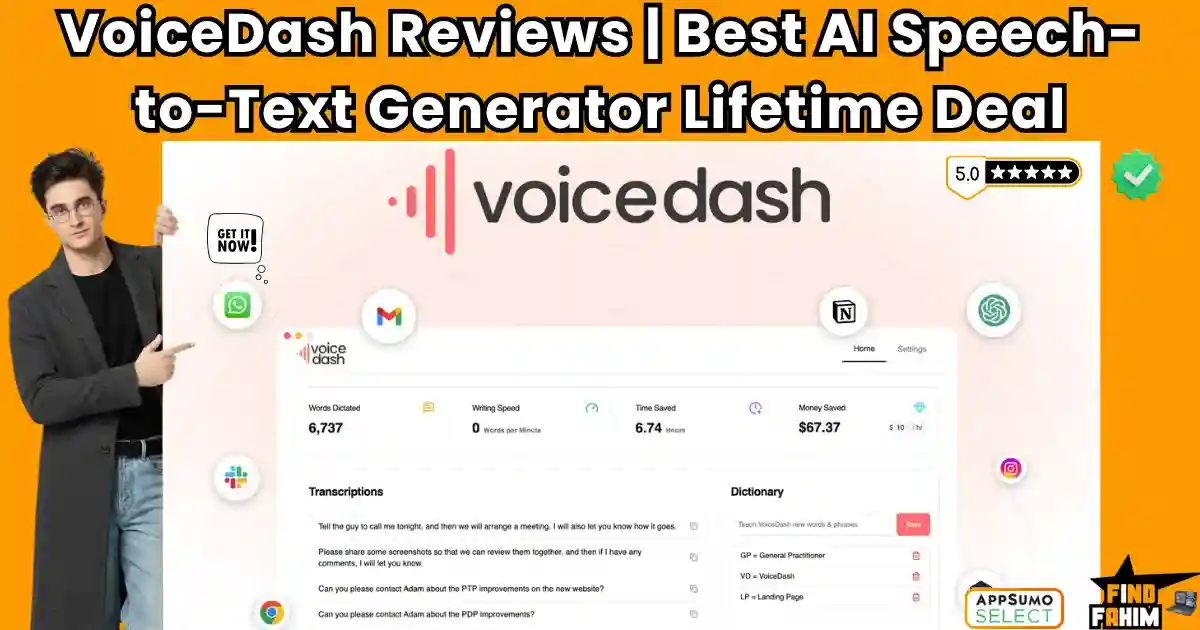

Are you tired of your fingers lagging behind your brain? VoiceDash is a system-wide AI dictation tool that instantly turns your spoken thoughts into polished text.
Standard built-in voice typing captures every “um” and grammatical mistake, forcing you to edit manually. VoiceDash solves this by sitting quietly on your Mac, Windows, or Android device.
Just hold a hotkey, speak naturally, and the AI automatically removes filler words. It drops perfectly structured sentences directly into any app you use.
Is it actually better than Wispr Flow or AudioPen? In this VoiceDash review, I compare the top competitors to help you decide.
Note: This article contains affiliate links. Opinions are my own research and analysis.
My Quick Take (TL;DR)
If you are spending time typing long client emails or updating endless project management boards, you need a faster workflow.
If you are suffering from a creative block staring at a blank page, here is the direct summary of this AppSumo offer.
- What is it? A desktop and mobile application that uses advanced AI models. It transcribes, actively edits, and formats your speech in real time.
- Why is it Special? System-wide integration. It removes filler words and structures sentences before pasting them directly into Slack, Gmail, or your code editor.
- Who is it for? Slow typists, copywriters, software developers, and high-volume executives.
- The Deal: Lifetime Access starting at $59 on AppSumo. (Note: Price increases in less than 7 days)
My Verdict: This is an absolute no-brainer productivity hack. Reclaiming just 20 minutes of typing a day will pay for this software in less than a week.
Click Here to Get the VoiceDash Lifetime Deal on AppSumo
What is VoiceDash? (Your Hands-Free Writer)
Think of VoiceDash as a smart, highly educated executive assistant. It listens to your messy ramblings and instantly types them as polished, professional text.
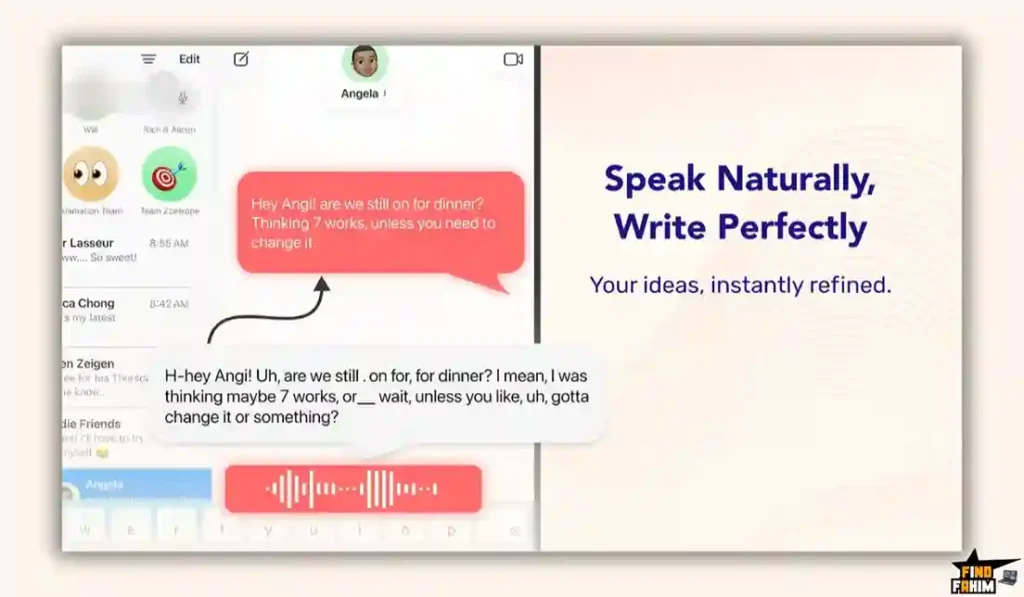
Traditional tools require you to open a transcription website, record an audio file, and wait for it to process. Then, you have to manually copy and paste the result into your actual workspace.
VoiceDash skips all of that. It lives directly on your computer level in a tiny “Voice Bar.” You simply press a global hotkey and talk normally into your microphone.
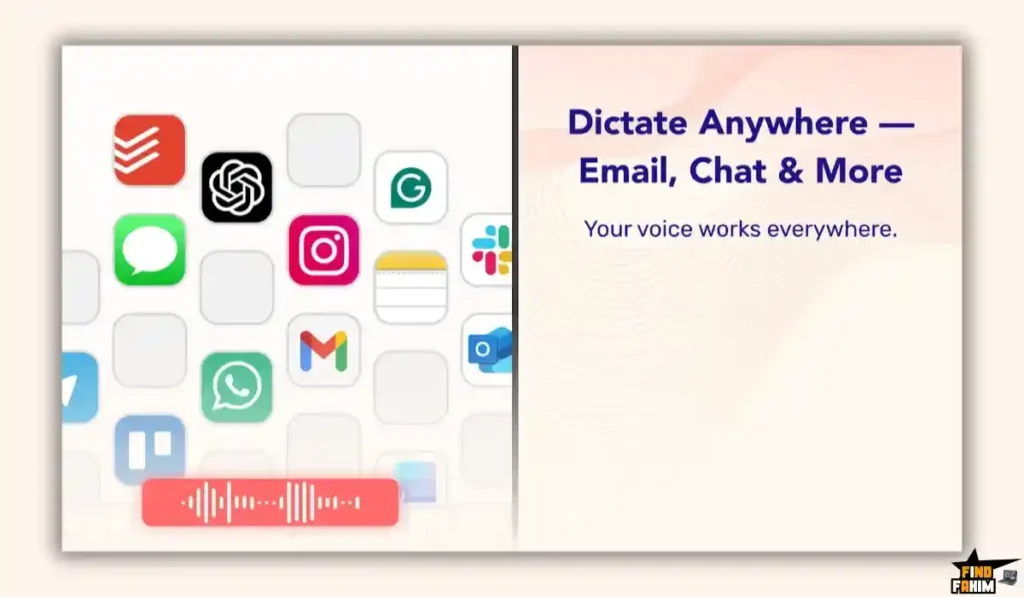
The software types perfectly punctuated sentences directly where your cursor is currently blinking. You never have to switch tabs, open a new window, or break your concentration.
Quick Look: VoiceDash vs Manual Typing
If you spend three hours a day typing out client responses and project briefs, you are losing valuable time.
Look at what this tool actually replaces in your daily operations.
| Feature | Replaces… | The Real Value | Normal Cost | Deal Status |
| AI Transcription | Built-in Dictation | No more embarrassing typos | Free | ✅ Included |
| Grammar Fixes | Grammarly Premium | Edits your speech instantly | ~$12/mo | ✅ Included |
| System-Wide Text | Copy/Pasting Apps | Talk directly into Slack/Gmail | Workflow hassle | ✅ Included |
| Custom Snippets | TextExpander | Auto-fill common links | ~$40/yr | ✅ Included |
Why Native Dictation is Failing Creators
You already have a microphone key on your computer, so why pay for software? Because built-in dictation is completely literal.
If you say: “Hey John, um, my dog is barking.” Apple types exactly that chaotic sentence.
VoiceDash understands context. It actively filters out the mess and types: “Hi John, I apologize.” It translates human speech into professional writing.
Why “AI Voice Typing” is Trending in 2026
Professionals are officially hitting peak screen fatigue. We communicate across dozens of micro-channels daily, from Slack to Microsoft Teams.
Typing thoughtful responses all day leads to physical wrist strain and massive cognitive drain.
“Voice-first” workflows let you stand up, pace your office, and dictate complex thoughts without breaking your flow state or staring at a screen.
A Look Inside VoiceDash: Key Features
Here is exactly what you are installing on your machine when you purchase this lifetime code, and why these features matter to your productivity.
The Real-Time Cleanup Engine
This core engine doesn’t just turn audio into raw text; it acts as an active, intelligent editor. It automatically strips out stutters, long pauses, and repeated words.
Even better, it applies correct capitalization and punctuation contextually. You never have to awkwardly say “comma” or “period” out loud like older dictation software requires.
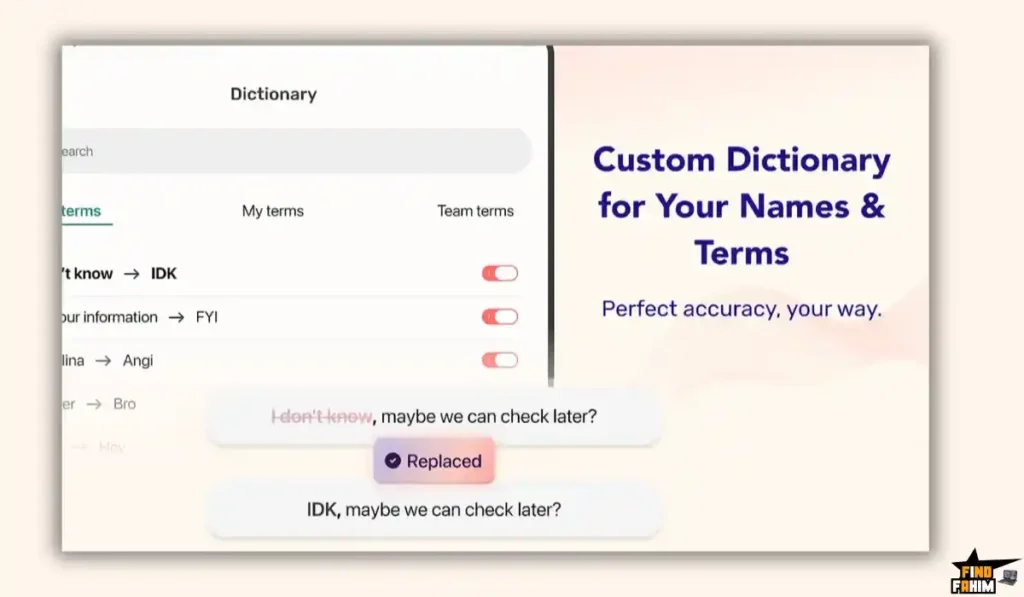
Personal Dictionary
Standard AI models often butcher complex industry acronyms. Dictating “Ahrefs” usually prints out as “A reps,” while medical terms get entirely ruined.
VoiceDash solves this with a built-in Personal Dictionary. Train the software once to understand your specific client names or internal jargon, ensuring it spells them perfectly every single time.
Multilingual Support (50+ Languages)
If you manage international clients, this feature is incredibly powerful. The AI natively detects and transcribes over 50 different languages without needing manual adjustments.
You can dictate in German, Spanish, or French, and the software perfectly punctuates the output. You never have to manually switch your keyboard language settings; it just adapts.
Privacy-First Processing
For professionals handling sensitive data, privacy is critical. VoiceDash operates with a strict zero data retention policy.
Your audio is processed via secure APIs to generate text and is instantly discarded. Your voice data is never stored on servers, reviewed by humans, or used to train future public AI models.
The Standout Feature: The Snippet Library
This tool transforms VoiceDash into a powerful sales weapon. Inside the dashboard, you can create custom voice-triggered “Snippets.”
Create a snippet for the exact phrase “Insert my calendar link.” Say that out loud while dictating, and VoiceDash instantly pastes your actual Calendly URL. Use this to quickly inject long boilerplate responses or pricing tables.
Recent 2026 Platform Updates
The development team moves incredibly fast and listens to AppSumo feedback. Recent major updates include:
- The Android App: Released in March 2026, take VoiceDash on the go to dictate clean mobile emails.
- iOS Progress: The iPhone version is actively in development and expected soon.
- Auto-Hide Voicebar: The floating desktop widget now auto-hides so it never blocks your workspace view.
VoiceDash Pricing & AppSumo Deal Details
This lifetime deal is structured around four scalable license tiers.
You pay once, and you own the software forever without recurring monthly subscription fees.
Be aware: the price is scheduled to increase in less than 7 days.
| Feature | Tier 1 ($59) | Tier 2 ($149) | Tier 3 ($299) | Tier 4 ($499) |
| Team Members | 1 | 3 | 7 | 15 |
| Words Per Month | 200,000 | 200k / user | 200k / user | 200k / user |
| All Platforms | ✅ Yes | ✅ Yes | ✅ Yes | ✅ Yes |
| Advanced Editing | ✅ Yes | ✅ Yes | ✅ Yes | ✅ Yes |
| Shared Snippets | ❌ No | ✅ Yes | ✅ Yes | ✅ Yes |
Understanding the 200,000 Word Limit
Terrified of monthly limits? Let’s do the math. The average adult speaks 150 words per minute.
To hit 200,000 words, you would have to talk non-stop for over 22 solid hours every month. For 99% of professionals writing daily emails, this limit is practically impossible to hit.
My Stacking Recommendation
- For Solopreneurs: Tier 1 ($59) is the absolute sweet spot. This massive allowance easily covers an independent creator’s entire workflow.
- For Small Agencies: Buy Tier 2 ($149). It gives you 3 seats and unlocks the Shared Snippet Library. Your entire team can now trigger the same unified, branded responses.
Secure Your VoiceDash Lifetime License Before the Price Increases
Pros & Cons of This Lifetime Package
With an excellent 4.6-star rating, early buyers love the transcription accuracy. But let’s evaluate the technical realities of this desktop software.
The Pros
- ✅ Context Switching Eliminated: Skip opening separate AI tabs. It saves massive mental energy.
- ✅ Types Anywhere: Drops text right where your cursor is resting.
- ✅ Accuracy for Accents: Reviewers with heavy accents praised the AI’s flawless understanding.
- ✅ Incredible Value: Replaces $15 monthly dictation subscriptions with a single lifetime payment.
The Cons
- ❌ Mac Sleep Bug: The hotkey occasionally stalls after your computer sleeps, requiring an app restart.
- ❌ Platform Limits: There is no Linux support, and the iOS app is still in development.
Who Should NOT Buy VoiceDash?
Skip this if you work in a noisy, open-plan office. Dictation tools struggle to isolate your voice when surrounded by talking coworkers.
Furthermore, avoid it if you have strict offline requirements. VoiceDash uses cloud AI models and requires an active internet connection to process the grammatical cleanup.
How Does VoiceDash Work?
Never used system-wide dictation? Here is exactly how fast you can write an email.
- Install: Download the lightweight app to your Mac or Windows PC and log in.
- Set a Hotkey: Choose a rare keyboard shortcut, like the Alt key.
- Open Any App: Click into Gmail or Slack, so your text cursor is blinking.
- Talk: Hold the hotkey and speak naturally: “I’ll have the report finished by 10 AM.” Release it.
- Watch the Magic: Instantly, VoiceDash cleans your grammar and types the perfect sentence directly into your active window.
Best Use Cases for VoiceDash
Who extracts the highest ROI from this tool? Here are the three workflows that benefit immediately.
- The Slow Typist & Dyslexic Creator Typing a 2,000-word post takes exhausting hours. Use VoiceDash to speak your thoughts aloud while pacing your room. The AI handles spelling and grammar, letting you “write” a full draft in 15 minutes.
- The High-Volume Executive Receiving 150 emails daily drains your energy. Blast through your inbox in 20 minutes by dictating polished, professional replies without ever touching your keyboard.
- The Software Developer Developers hate writing documentation and Jira tickets. Run VoiceDash directly inside VS Code. Hold the hotkey, explain your code in plain English, and instantly drop perfectly formatted comments into your IDE.
Stop Typing and Start Talking—Claim Your VoiceDash Lifetime Deal
VoiceDash Alternatives
Is VoiceDash the absolute best tool for the job, or should you use an established heavyweight?
Let’s compare it directly against the top players in the market to see exactly where it fits in your software stack.
VoiceDash vs Wispr Flow
Wispr Flow is currently the premium gold standard and VoiceDash’s most direct competitor in the system-wide dictation market.
Where Wispr Wins: Command Mode & Enterprise Compliance. Wispr allows you to use your voice to actively edit text on your screen.
It also features strict SOC 2 and HIPAA compliance for massive healthcare teams that handle sensitive records.
Where VoiceDash Wins: The Lifetime Price. Wispr Flow charges roughly $144 per year for unlimited usage.
VoiceDash gives you the same core functionality—holding a hotkey to drop polished text anywhere—for a single $59 lifetime payment.
VoiceDash vs AudioPen
AudioPen is an incredibly popular web app for capturing messy thoughts and rewriting them entirely.
Where AudioPen Wins: Deep Rewriting. AudioPen allows you to capture a 3-minute voice note and tell the AI to completely rewrite it.
It can be written in the style of a specific author (like Shakespeare or a professional copywriter). It is a phenomenal journaling tool.
Where VoiceDash Wins: System-Wide Utility. AudioPen is a web app. You dictate into their website, wait, copy the text, and paste it elsewhere.
VoiceDash lives on your computer level. You dictate directly into your own active apps, saving you multiple steps.
VoiceDash vs Apple/Windows Built-in Dictation
This is the free tool that already exists on your computer keyboard.
Where Native Wins: It is completely free and requires zero installation or account creation.
Where VoiceDash Wins: The AI Cleanup. As mentioned earlier, native dictation types exactly what you say, including all your stutters, mistakes, and “ums.”
VoiceDash actively edits and structures your thoughts, completely removing the need for manual proofreading.
VoiceDash vs ChatGPT Voice
The official OpenAI mobile app has a phenomenal conversational voice mode.
Where ChatGPT Wins: Back-and-Forth Dialogue. If you want to brainstorm ideas, ask questions, and have a fluid conversation with an AI, ChatGPT Voice is unmatched.
Where VoiceDash Wins: Direct Input. ChatGPT operates in a silo. You cannot use ChatGPT Voice to directly type a message into your Slack channel.
VoiceDash is built specifically for text input across your entire operating system.
VoiceDash vs Dragon NaturallySpeaking
Dragon is the 20-year-old dinosaur of the transcription industry, heavily used by lawyers and doctors.
Where Dragon Wins: Pure Offline Processing. Dragon installs massive local models on your hard drive, meaning it can operate with zero internet connection.
Where VoiceDash Wins: Modern AI Formatting and Cost. Dragon is incredibly expensive (often $500+) and requires tedious manual voice training.
VoiceDash uses modern models to instantly understand context right out of the box for a fraction of the cost.
All 5 Competitors Matrix
| Platform | Pricing Model | Key Strength | Best For… |
| VoiceDash | Lifetime ($59+) | System-Wide Cleanup | Founders & Creators |
| Wispr Flow | Subscription ($12+/mo) | Command Mode & HIPAA | Enterprise Teams |
| AudioPen | Subscription ($39+/yr) | Stylized Rewriting | Journaling |
| Built-in Dictation | Free | Instant Access | Perfect Speakers |
| ChatGPT Voice | Subscription ($20/mo) | Conversational AI | Brainstorming |
| Dragon | High One-Time | Strict Offline Mode | Medical & Legal |
End Wrist Strain & Editing Hassles—Get VoiceDash on AppSumo Today
Is This Lifetime Deal a Smart Business Investment?
Let’s look at the exact financial math of choosing VoiceDash (Tier 1) versus paying for a premium dictation competitor like Wispr Flow.
Cost of Wispr Flow Pro (1 Year): $12/month = $144/year.
Cost of VoiceDash (Tier 1 – 200k words): $59 (One-time payment).
The ROI Math: You break even in exactly four months.
Over a standard 3-year business cycle, choosing VoiceDash saves you a staggering $383 in recurring software subscriptions.
More importantly, calculate the value of your actual time. If your hourly rate is $50, and VoiceDash saves you just 30 minutes of typing a day.
You are saving $25 of billable time daily. The software pays for itself entirely on Day 2 of using it.
How to Redeem the VoiceDash Deal
Ready to secure your license? Follow these quick steps.
- Buy: Click the AppSumo link below to secure your activation code before the price increases.
- Redeem: You will instantly receive a unique code in your email inbox.
- Activate: Follow the instructions to create your account and apply the code within 60 days.
- Verify: Download the desktop app and test it. AppSumo offers a risk-free 60-day money-back guarantee.
Final Verdict: Is This AppSumo Deal Worth It?
After analyzing the system-wide integration, testing the custom snippet library, and looking at the massive time savings, my final verdict is a flawless 5-Star YES.
It is the ultimate friction remover for digital workers. It eliminates grammar errors, stops physical wrist strain, and provides instant professional text.
While Mac users might experience a minor bug after putting their computer to sleep, the core functionality easily rivals tools that cost three times as much per year.
If you want to type at the speed of thought, grab Tier 1 before the price increases next week.
Secure Your VoiceDash Lifetime License Before It Ends
About the Author
I spend my time analyzing SaaS products and lifetime deals to help smart entrepreneurs stop overpaying for software. We all know the frustration of typing repetitive emails, which is exactly why I investigated the VoiceDash lifetime deal today.
I do the heavy lifting of evaluating these offers—digging into specific word limits and privacy policies—so you know exactly what you are getting. To see what else I am currently reviewing to cut your business costs, check out my Full Guide to the Best Lifetime Software Deals.
FAQ: Your VoiceDash Questions, Answered
What is VoiceDash?
VoiceDash is an AI-powered dictation tool that works at the system level, allowing users to speak and automatically convert speech into clean, formatted text inside any app.
Does VoiceDash work inside all desktop apps?
Yes. VoiceDash works system-wide, meaning it can type into any application where a text cursor is available.
What languages does VoiceDash support?
VoiceDash supports over 50 languages and can automatically detect the language you are speaking without manual switching.
Does VoiceDash remove filler words and mistakes?
Yes. VoiceDash automatically removes filler words like ums and stutters while correcting grammar to produce clean and professional text.
Is VoiceDash safe and private to use?
Yes. VoiceDash follows a zero data retention policy, meaning your audio is processed for transcription and then immediately discarded.
What is a VoiceDash snippet?
A VoiceDash snippet is a custom voice shortcut that allows you to insert pre-written text instantly by speaking a trigger phrase.
Do AI dictation tools require an internet connection?
Yes. Most AI dictation tools rely on cloud-based models, so an active internet connection is required for real-time transcription.
Can dictation software help with writing faster?
Yes. Dictation tools allow users to speak faster than they type, helping create content quickly and reduce writer's block.
Is dictation useful for SEO content writing?
Yes. Many writers use dictation to draft blog content quickly, then edit and optimize it for SEO afterward.
What is the AppSumo refund policy for software deals?
AppSumo offers a 60-day money-back guarantee, allowing users to test software and request a refund if it does not meet expectations.

Hi, I’m Fahim — a SaaS tools reviewer and digital marketing expert with hands-on experience helping businesses grow using the right software. I research, test, and personally use a wide range of AI, business, productivity, marketing, and email tools for my agency, clients, and projects. I create honest, in-depth reviews and guides to help entrepreneurs, freelancers, startups, and digital agencies choose the best tools to save time, boost results, and scale smarter. If I recommend it, I’ve used it — and I only share what truly works.