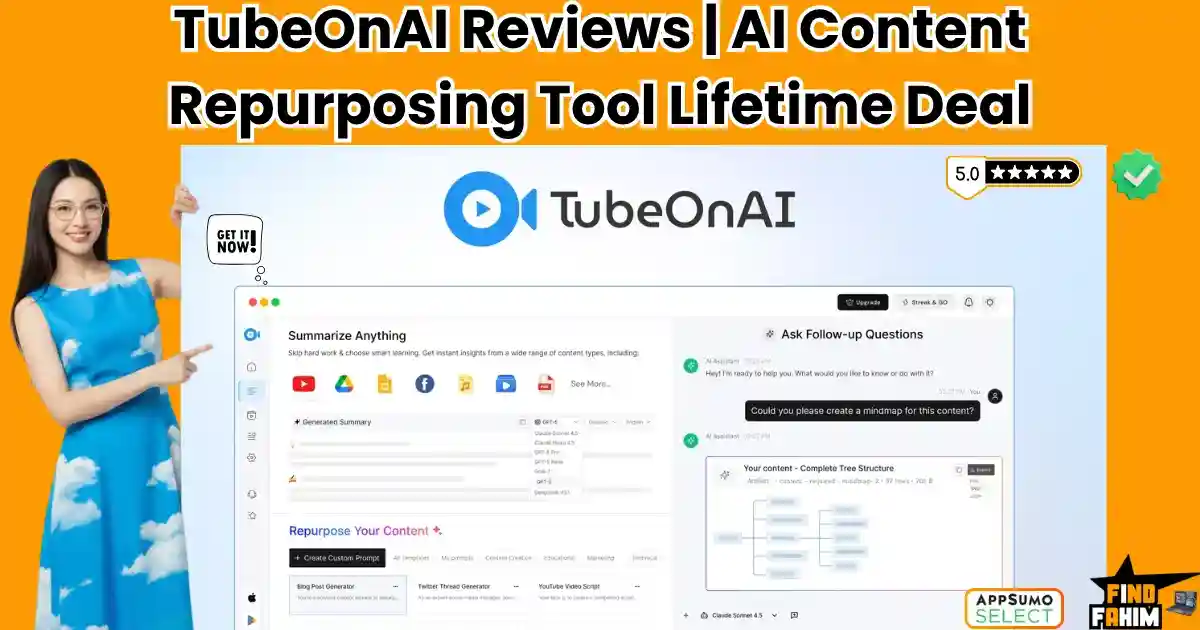

Drowning in hours of video research? TubeOnAI is the ultimate content repurposing engine built to eliminate that exact bottleneck.
As content creators, marketers, and agency owners in 2026, the demand for daily publishing is exhausting. Before you can even write a blog post or a Twitter thread, you have to spend two hours watching a YouTube tutorial or listening to a podcast just to extract the key insights. It is a massive drain on your operational time.
Created by founder Saleh Ahmed, TubeOnAI promises to condense that workflow into seconds. By pasting a link or uploading a file, the platform uses advanced AI to summarize the media and instantly repurpose it into newsletters, scripts, and social threads.
But with heavy credit usage and a steep price jump on its higher tiers, is it actually better than just using ChatGPT? In this comprehensive review, I break down its multi-model AI routing, analyze the brand-new 2026 features, and help you decide if it is worth the investment.
Note: This article contains affiliate links. If you buy through them, I may earn a commission, but all opinions are based on my independent research.
My Quick Take (TL;DR)
If you are tired of pausing YouTube videos every 30 seconds to type out manual notes, here is the direct summary of this AppSumo offer.
- What is it? An AI-powered workspace that ingests long-form content (videos, podcasts, PDFs, articles) and repurposes it into structured summaries, blogs, and social posts.
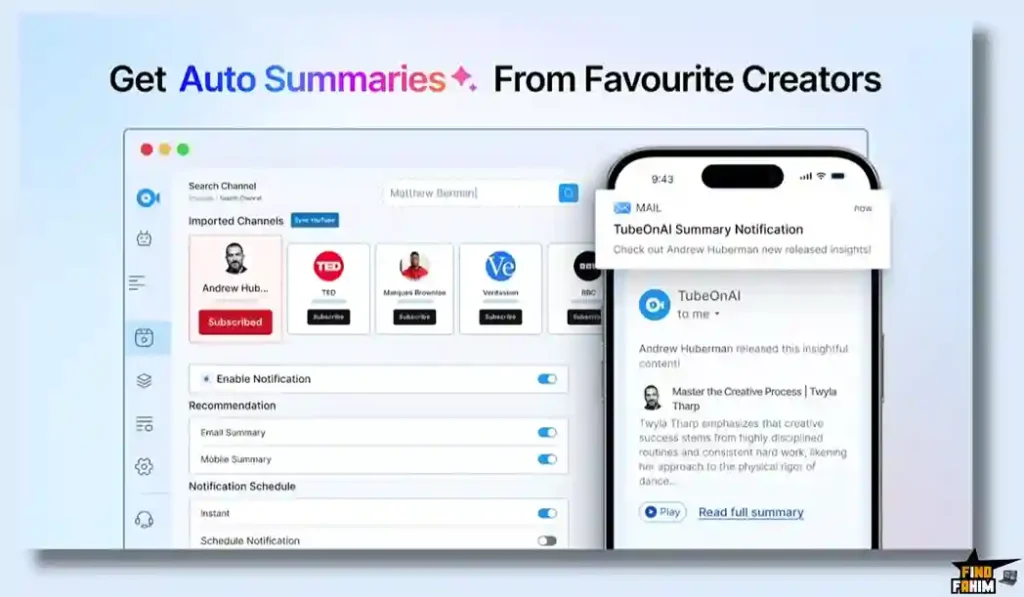
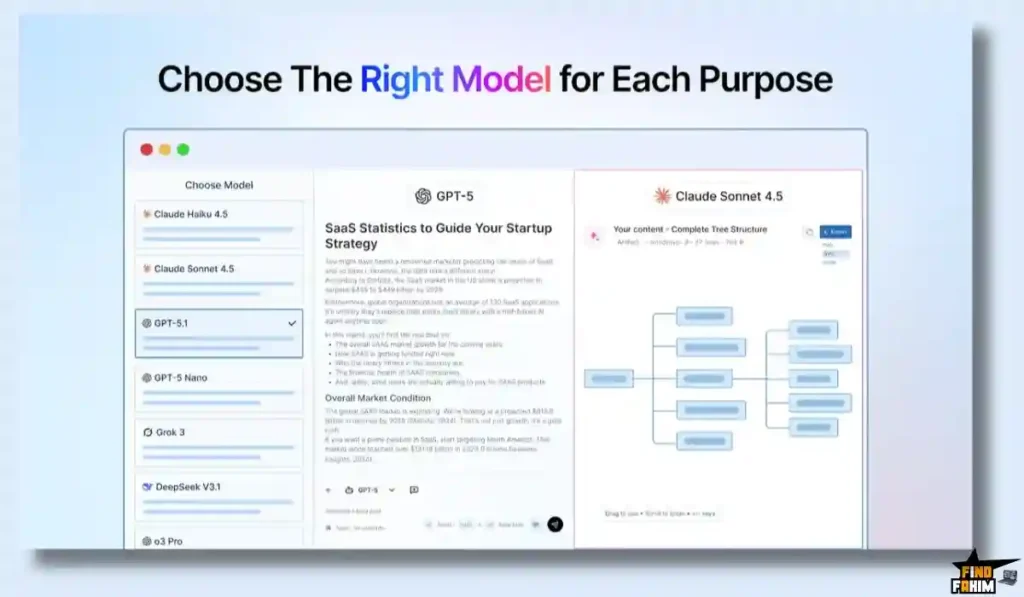
- Why is it Special? Multi-Model Routing & Auto-Capture. You can switch between GPT, Claude, Gemini, DeepSeek, and Grok. Plus, you can subscribe to YouTube channels inside the app, and it will automatically generate a summary the second a creator uploads a new video.
- Who is it for? Content creators, course builders, bloggers, and marketing agencies.
- The Deal: Lifetime Access starting at $59 on AppSumo.
- My Verdict: A highly efficient operational asset. If you spend more than two hours a week researching competitor content or studying podcasts, this tool pays for itself immediately in recovered time.
Click Here to Get the TubeOnAI Lifetime Deal on AppSumo
What is TubeOnAI?
The best way to understand this platform is to think of it as a digital research assistant that never sleeps.
When you use standard AI chatbots, you have to manually find a transcript, copy it, paste it into the prompt box, and hope you don’t hit a character limit. TubeOnAI removes all that friction. You simply drop a YouTube URL, an Apple Podcast link, or a local MP4 file into the dashboard.
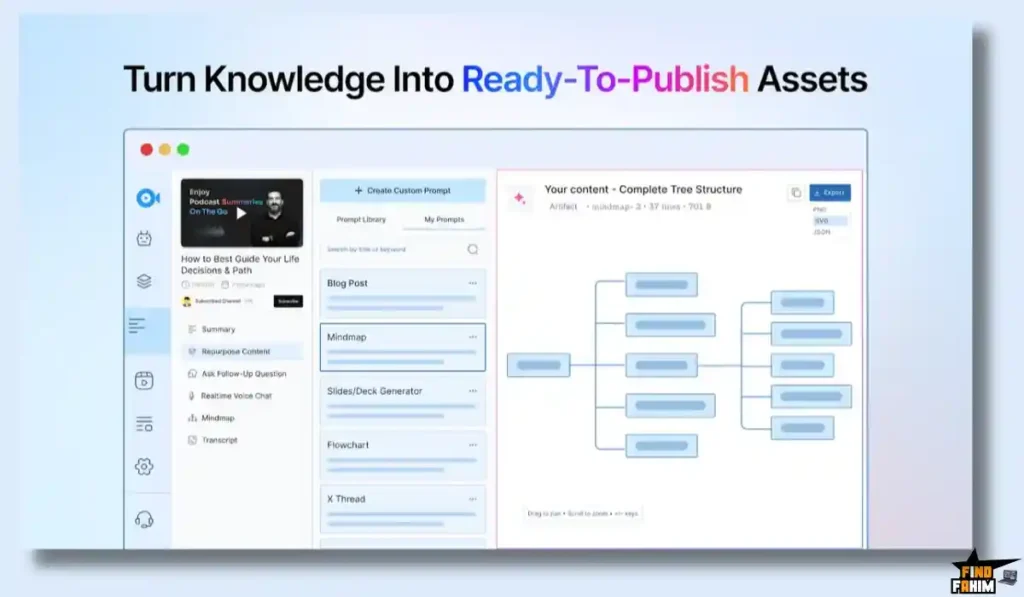
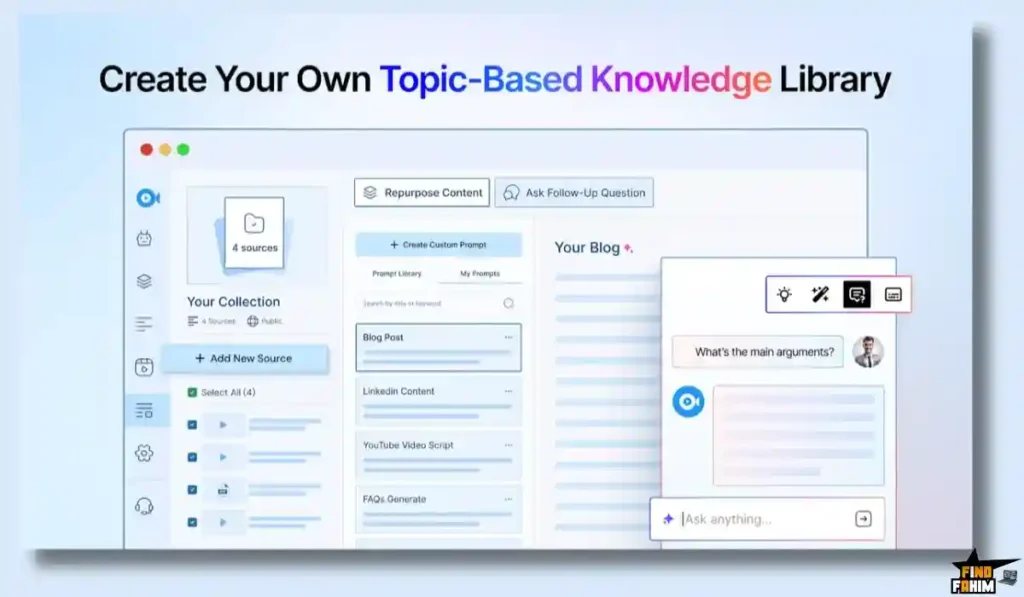
The system transcribes the media, extracts the core arguments, and stores them in a “Knowledge Library.” From there, you can interrogate the document. You can chat with the video using real-time voice chat, ask follow-up questions, or use one of the 150+ templates to instantly spin that video’s transcript into a 1,000-word SEO blog post or a LinkedIn carousel.
Quick Look: TubeOnAI vs Traditional Creation
If you are currently researching and writing content manually, look at this operational breakdown of what this tool replaces.
| Feature | Replaces… | The Real Value | Normal Cost | Deal Status |
| Video Summaries | Watching 2hr Videos | Get takeaways in 30 seconds | Time consuming | ✅ Included |
| Audio Transcripts | Paid Transcription Services | Turn podcasts into text | ~$15/mo | ✅ Included |
| Repurposing AI | Ghostwriters | Spin videos into newsletters | ~$50+/post | ✅ Included |
| Auto-Syncing | Manual RSS Checking | Auto-summarize new uploads | Workflow hassle | ✅ Included |
| Total Value | Your Time | Publish Faster | ~$65+/mo | $59 (Lifetime) |
Why Manual Research is Failing Creators
You might be thinking, “I like watching videos to do my research. Why do I need an AI to summarize it?”
Because content consumption does not equal content production. Watching a fascinating two-hour Andrew Huberman podcast feels productive, but until you actually extract those health tips, format them into an actionable list, and publish them to your audience, you haven’t created any business value.
Manual research creates a massive gap between consuming information and publishing it. By the time you finish taking notes, you are too exhausted to actually write the blog post. TubeOnAI closes that gap entirely.
Why Multi-Model AI is Trending in 2026
I noticed this specific AppSumo deal trending because it solves a major problem with modern AI tools: Model Lock-in.
If you buy a standard AI writing tool, you are usually forced to use whatever model the developer chose (typically OpenAI’s GPT). But in 2026, the AI landscape is fragmented. Claude is widely considered better for creative writing, while Gemini is excellent for reasoning, and DeepSeek is highly efficient.
TubeOnAI allows you to dynamically switch between GPT, Claude, Gemini, DeepSeek, and Grok directly inside the dashboard. You can use Claude to write the blog post, and then switch to DeepSeek to generate the flashcards.
A Look Inside TubeOnAI: Key Features
Here is exactly what you are getting when you move your content workflow into this dedicated workspace.
The Content Repurposer
This is the core engine. Once a video or PDF is summarized, you click “Repurpose.” You can choose from over 150 built-in templates (like “Twitter Thread,” “Email Newsletter,” or “SEO Article”). The AI reads the exact context of the video and rewrites it into the new format, maintaining the original creator’s tone and facts.
Knowledge Management Library
As you summarize dozens of videos and articles, TubeOnAI automatically organizes them into topic-based collections. If you are building a course on “Digital Marketing,” you can summarize 10 different YouTube videos, drop them all into one collection, and have the AI analyze the entire bulk folder to find common patterns.
Real-Time Voice Chat & Q&A
If a 40-page PDF summary isn’t detailed enough, you don’t have to read the raw file. You can literally talk to the document using the voice chat feature. You can ask, “What were the three specific marketing strategies mentioned in chapter four?” and the AI will pull the exact answer from the transcript.
40+ Language Translation
If you find a highly valuable tutorial video in Spanish, but your audience speaks English, TubeOnAI bridges the gap. It can ingest the Spanish video, summarize it, and translate the repurposed blog post into over 40 different languages.
The Standout Feature: Automated YouTube Syncing
This specific engineering detail deserves its own section because it completely automates your competitive research.
Inside TubeOnAI, you can search for a YouTube creator and click “Subscribe.”
Every single time that the creator uploads a new video, TubeOnAI automatically fetches it in the background, generates a summary, and drops it into your dashboard. You don’t even have to paste a link. You can wake up, log in, and instantly read the key takeaways of every competitor’s new video that was published overnight.
Recent 2026 Platform Updates
The TubeOnAI team is moving incredibly fast. Since their launch, they have recently pushed several massive updates that make this deal significantly more valuable:
- 6 New Content Sources: You can now paste links directly from TikTok, X (Twitter), Instagram Reels, Snapchat, Pinterest, and Threads to extract the text and insights.
- YouTube Playlists: You no longer have to paste videos one by one. Drop a playlist link, and it will summarize the entire collection.
- Team Collaboration (Tier 3): Higher-tier users can now invite up to 4 team members into a shared workspace with a unified credit wallet.
- Chrome Extension: You can now click a button right inside your browser to summarize an article while you are actively reading it.
TubeOnAI Pricing & AppSumo Deal Details
This lifetime deal is structured around three specific license tiers. You pay once, and you own the software forever.
| Feature | Tier 1 | Tier 2 | Tier 3 |
| One-Time Price | $59 | $149 | $379 |
| Credits per Month | 3,000 | 10,000 | 60,000 |
| Auto-Sync Channels | 3 | 10 | Unlimited |
| AI Models | 3 Models | 8 Models | All Models |
| Team Members | 1 (Just You) | 1 | 5 (You + 4) |
| API Access | ❌ No | ❌ No | ✅ Yes |
Secure Your TubeOnAI Lifetime Plan on AppSumo
Understanding the Credit Limits
You absolutely must understand how the credits work before you buy.
In TubeOnAI, 1 Credit generally equals 1 word generated or processed. A standard 10-minute YouTube video transcript might consume a few hundred credits to summarize and repurpose.
If you buy Tier 1 (3,000 credits), you are going to hit a wall very fast if you process 2-hour podcast episodes. Tier 1 is strictly for casual users summarizing short articles.
Pros & Cons of This Lifetime Package
With a stellar 4.7-star rating from early buyers, the community loves the workflow, but we must consider the operational realities.
The Pros
- ✅ Massive Time Savings: The ability to bypass a 45-minute video and get the exact actionable steps in 10 seconds is invaluable.
- ✅ The Chrome Extension: Reading an article and instantly clicking the extension to draft a LinkedIn post about it creates a highly frictionless publishing habit.
- ✅ Model Flexibility: Not being locked into OpenAI is a massive safeguard against future AI market changes.
The Cons
- ❌ The Price Jump: Reviewers have loudly noted the massive financial gap between Tier 2 ($149) and Tier 3 ($379). It forces heavy users to make a very steep financial commitment.
- ❌ Interactive Export Glitches: Some users noted that interactive features (like generating flashcards for a course) currently download as static PDFs rather than embeddable web formats.
- ❌ Occasional Proxy Errors: Because the platform routes through multiple LLMs (DeepSeek, Claude, etc.), a few users reported rare “timeout” errors when a specific AI model’s servers were congested.
How Does TubeOnAI Work?
If you have never used an AI repurposer, here is how fast you can build a blog post.
- Find Content: Copy the URL of a highly popular YouTube tutorial in your niche.
- Import: Paste the link into the TubeOnAI dashboard.
- Summarize: Click the summarize button. Within seconds, the platform reads the transcript and provides a bulleted list of the core concepts.
- Repurpose: Click the “Content Editor” tab. Select the “SEO Blog Post” template.
- Publish: The AI rewrites the summary into a fully formatted article. You copy the text, add your own personal flair, and publish it to WordPress.
Best Use Cases for TubeOnAI
Who actually extracts the highest ROI from this specific tool?
1. The Solo YouTuber / Podcaster
You record a 30-minute podcast episode. Instead of spending two hours manually writing the show notes and promotional tweets, you upload the audio file to TubeOnAI. It instantly generates your YouTube description, your SEO blog post, and five different tweets to schedule for the week.
2. The Course Creator
You are building an educational cohort. You use the “Collections” feature to ingest 20 different PDF research papers and long-form lectures. You then use the AI to bulk-analyze the collection and generate client-ready worksheets, summaries, and quizzes for your students.
3. The Digital Marketing Agency
You manage content for five different clients. You subscribe to their top industry competitors using the Auto-Sync feature. Every morning, you get a summary of what the competitors published, allowing you to instantly draft counter-narrative LinkedIn posts for your clients.
Stop Typing Notes. Automate Your Research Today.
TubeOnAI Alternatives
Is TubeOnAI the absolute best tool for the job, or should you stick with an established heavyweight? Choosing an AI summarization tool is a big commitment because it completely dictates how your content pipeline flows. If you pick the wrong one, you end up doing more manual copy-pasting than before. Let’s look at the actual numbers and compare TubeOnAI directly against the top five market leaders to see where it fits into your daily workflow.
TubeOnAI vs Descript
Descript is an absolute powerhouse if you are primarily focused on video editing and audio manipulation.
- Where Descript Wins: Actual Media Editing. Descript flipped the video editing world upside down. It allows you to literally cut out filler words like “ums,” “uhs,” and dead air from the actual video file simply by highlighting and deleting text in the transcript. If you are a video editor producing final MP4s for YouTube or TikTok, Descript is mandatory.
- Where TubeOnAI Wins: Written Content Generation. Descript is a video editor; TubeOnAI is a dedicated writer. If your ultimate goal is to watch a video and turn it into a 1,000-word newsletter, a LinkedIn thread, and five viral tweets, TubeOnAI is the clear winner. It has far superior written templates and uses multi-model AI routing to give you better-written outputs. With Descript, you just get the raw transcript. With TubeOnAI, you get finished marketing assets ready to publish.
TubeOnAI vs Jasper
Jasper is the massive, heavily funded enterprise giant of the AI copywriting space.
- Where Jasper Wins: Brand Voice and Corporate Campaigns. Jasper is incredibly smart when it comes to adopting your brand’s style guide. You can feed it your company’s tone of voice, and it will generate massive, multi-channel marketing campaigns that sound exactly like your internal writing team. It is built for large marketing agencies starting from a blank page.
- Where TubeOnAI Wins: Ingesting Long Media. Jasper struggles hard to clean and process a raw, 2-hour YouTube video link. If you try to feed it a massive podcast transcript, it will often choke on the token limits or miss the core context. TubeOnAI is built specifically to handle massive, messy, disorganized transcripts from external audio sources seamlessly. It extracts the meat of the video without getting confused, saving you hours of manual formatting.
TubeOnAI vs Copy.ai
Copy.ai is a highly popular, user-friendly AI tool focused heavily on sales copywriting and short-form social media.
- Where Copy.ai Wins: Short-Form Prompts. It has an incredibly intuitive interface for generating quick Facebook ad copy, e-commerce product descriptions, and cold email sequences. If you just need to type a quick prompt and get ten variations of a catchy headline, Copy.ai is incredibly fast and effective.
- Where TubeOnAI Wins: Audio & Video Focus. Copy.ai is primarily a “text-in, text-out” system. You give it a written prompt, and it gives you written words. TubeOnAI specializes in “media-in, text-out.” This makes it the vastly superior choice if your source material already exists as a YouTube video, a webinar recording, or an Apple Podcast episode. You don’t have to explain the video to the AI; you just hand TubeOnAI the link, and it does the heavy lifting.
TubeOnAI vs Castmagic
Castmagic is TubeOnAI’s most direct and aggressive competitor within the AppSumo ecosystem, famously known as the absolute gold standard for podcast repurposing.
- Where Castmagic Wins: The Magic Chat. Castmagic has an incredibly deep, highly customized prompt system designed specifically around audio files. It is unmatched at identifying multiple speakers and breaking down exactly who said what during a long interview. If your only job is managing a dedicated audio podcast, Castmagic is arguably the best tool on the internet for that specific task.
- Where TubeOnAI Wins: Source Variety and Auto-Syncing. Castmagic is heavily biased toward audio files and RSS feeds. TubeOnAI is much more versatile. It easily handles text PDFs, TikTok videos, and Pinterest links. But the real operational edge is TubeOnAI’s auto-syncing feature. You can command TubeOnAI to automatically subscribe to specific YouTube channels. The moment your favorite creator uploads a new video, TubeOnAI passively grabs it, summarizes it, and sends you the notes before you even wake up. It completely automates your competitive research.
TubeOnAI vs ChatGPT Plus
This is the standard $20/month subscription that almost every digital marketer already pays for. So why buy another tool?
- Where ChatGPT Wins: General Reasoning. It is the ultimate blank canvas. You can use it for writing Python code, analyzing Excel spreadsheets, creating complex logic puzzles, and brainstorming high-level business strategy. It is the baseline AI for everything in your business.
- Where TubeOnAI Wins: The Workflow Interface. Yes, you can technically paste a YouTube link into ChatGPT. But if you do this often, you know it frequently hallucinates, gives you a generic summary, or simply spits out an error saying, “I cannot access this link.” TubeOnAI has built dedicated API pipelines to guarantee the transcript is captured correctly every single time. It completely removes the frustration of prompt engineering. Instead of arguing with ChatGPT for 20 minutes to get a decent blog post out of a video, you just click one button in TubeOnAI and get exactly what you need.
All 5 Competitors Matrix
| Platform | Pricing Model | Key Strength | Best For… |
| TubeOnAI | Lifetime ($59+) | Auto-Sync & Media Sources | Creators & Researchers |
| Descript | Sub ($12+/mo) | Text-Based Video Editing | Video Editors & Podcasters |
| Jasper | Sub ($39+/mo) | Brand Voice Enforcement | Enterprise Marketing Teams |
| Copy.ai | Sub ($36+/mo) | Cold Email & Ads | Sales & Social Teams |
| Castmagic | Sub ($23+/mo) | Deep Podcast Repurposing | Professional Podcasters |
| ChatGPT Plus | Sub ($20/mo) | General Blank Canvas | Tech-Savvy Prompt Writers |
Ready to Upgrade Your Workflow? Grab TubeOnAI Now
Who Should NOT Buy TubeOnAI?
To ensure you make a highly profitable investment, I must be completely transparent about where this tool is overkill.
Do not buy it if you only write from scratch. If you run a fiction blog or you sit down and type thought-leadership articles directly from your own brain without referencing external sources, this tool is useless to you. TubeOnAI is an ingestion engine. If you don’t consume long-form content to inspire your writing, stick to a basic text editor.
Is This Lifetime Deal a Smart Business Investment?
If you want to know exactly how fast this tool pays for itself, let’s break down the real-world math.
Let’s evaluate the exact financial cost of choosing TubeOnAI (Tier 2) versus paying monthly for standard AI and transcription tools:
- Cost of ChatGPT Plus & an RSS tool (1 Year): ~$240/year.
- Cost of a Podcast Transcription Tool (1 Year): ~$150/year.
- Cost of TubeOnAI (Tier 2 – 10,000 Credits): $149 (One-time payment).
The ROI Math:
- You break even in less than 4 months.
- Over a standard 3-year business cycle, choosing TubeOnAI saves you over $1,000 in recurring software subscriptions.
- Furthermore, by eliminating the two hours you spend manually watching long videos every week, you reclaim 100 hours of your life every year. The time-saving ROI drastically outweighs the one-time software cost.
How to Redeem the TubeOnAI Deal
- Buy: Click the link below to purchase the activation code securely on AppSumo. (I highly recommend skipping Tier 1 and grabbing Tier 2 to ensure you don’t hit the credit wall immediately).
- Redeem: You will instantly receive a unique activation code in your email.
- Activate: Follow the instructions to create your account and apply the code within 60 days.
- Configure: Paste your favorite YouTube channel into the Auto-Sync tab, and upload a long PDF to test the multi-model AI responses.
- Verify: Remember that AppSumo offers a risk-free 60-day money-back guarantee. You have two full months to test the Chrome extension entirely risk-free.
Final Verdict: Is This AppSumo Deal Worth It?
After analyzing the new 2026 features, the multi-model routing, and the automated YouTube syncing, my final verdict is a highly confident 4.7-Star YES.
It is the ultimate “Content Bottleneck Breaker.”
- It eliminates Manual Transcribing.
- It stops AI Model Lock-in.
- It provides an Automated Research Feed.
While the jump to Tier 3 is financially aggressive, Tier 2 provides the perfect sweet spot for modern creators. If you need to consume massive amounts of information and turn it into publishable assets instantly, grab the lifetime code before it leaves the store.
Secure Your TubeOnAI Lifetime License Before It Ends
About the Author
I spend my time researching and analyzing SaaS products, digital tools, and lifetime deals to help smart entrepreneurs stop overpaying for software. We all know the extreme frustration of staring at a blank page after spending three hours researching a topic on YouTube, which is exactly why I investigated the TubeOnAI lifetime deal today. I do the heavy lifting of evaluating these offers—digging into the specific credit limits, the AI model routing, and the auto-sync capabilities—so you know exactly what you are getting before you pull out your credit card. If you want to see what other software I am currently analyzing to cut business costs, check out my Full Guide to the Best Lifetime Software Deals.
FAQ: Your TubeOnAI Questions, Answered
TubeOnAI is an AI-powered content summarization tool that converts videos, audio, and documents into structured summaries, blog posts, and social media content using multiple AI models.
AppSumo offers a 60-day money-back guarantee for TubeOnAI. You can test video summaries, templates, and AI outputs risk-free and request a refund if it does not fit your workflow.
Yes, TubeOnAI uses advanced audio processing to generate transcripts even if a video does not have built-in captions, allowing accurate summarization from raw audio.
Yes, TubeOnAI supports TikTok, X (Twitter), Instagram Reels, Snapchat, Pinterest, and Threads links, enabling insights extraction from short-form video platforms.
You can subscribe to a creator inside the dashboard, and TubeOnAI will automatically detect new uploads, generate summaries, and store them in your content library.
TubeOnAI supports summarization and translation in over 40 languages, allowing you to convert content from one language into another easily.
Yes, TubeOnAI supports multiple AI models including OpenAI GPT, Anthropic Claude, Google Gemini, DeepSeek, and Grok, depending on your selected plan.
Yes, you can upload local files such as MP3, MP4, PDF, DOCX, PPTX, and TXT files, as long as they are within the file size limit.
The credits included in TubeOnAI plans are monthly. They reset at the beginning of each billing cycle, providing continuous usage over time.
Yes, TubeOnAI offers a browser extension that allows you to summarize videos or articles directly from the webpage without switching tabs.
No, TubeOnAI is offered as a lifetime deal on AppSumo. You pay once and receive ongoing access with monthly credits and future updates.
Yes, TubeOnAI helps creators quickly turn videos into blog posts, summaries, and social content, saving time and improving content production speed.
Yes, it can extract key insights from videos and generate captions, summaries, and ideas for platforms like TikTok, Instagram, and X.
Yes, it allows users to summarize long videos, lectures, and documents into easy-to-understand insights for faster learning and research.
Yes, TubeOnAI automates the process of extracting key points, saving hours of manual note-taking and improving productivity. What is TubeOnAI?
What is the AppSumo refund policy for TubeOnAI?
Does TubeOnAI work on videos without captions?
Can TubeOnAI track TikTok and Instagram content?
How does the Auto-Sync feature work in TubeOnAI?
What languages does TubeOnAI support?
Does TubeOnAI provide access to multiple AI models?
Can I upload files from my computer to TubeOnAI?
Are TubeOnAI credits monthly or lifetime?
Does TubeOnAI have a Chrome extension?
Do I need to renew TubeOnAI every year?
Is TubeOnAI useful for content creators and bloggers?
Can TubeOnAI help with social media content creation?
Is TubeOnAI good for research and learning?
Can TubeOnAI replace manual video summarization?

Hi, I’m Fahim — a SaaS tools reviewer and digital marketing expert with hands-on experience helping businesses grow using the right software. I research, test, and personally use a wide range of AI, business, productivity, marketing, and email tools for my agency, clients, and projects. I create honest, in-depth reviews and guides to help entrepreneurs, freelancers, startups, and digital agencies choose the best tools to save time, boost results, and scale smarter. If I recommend it, I’ve used it — and I only share what truly works.