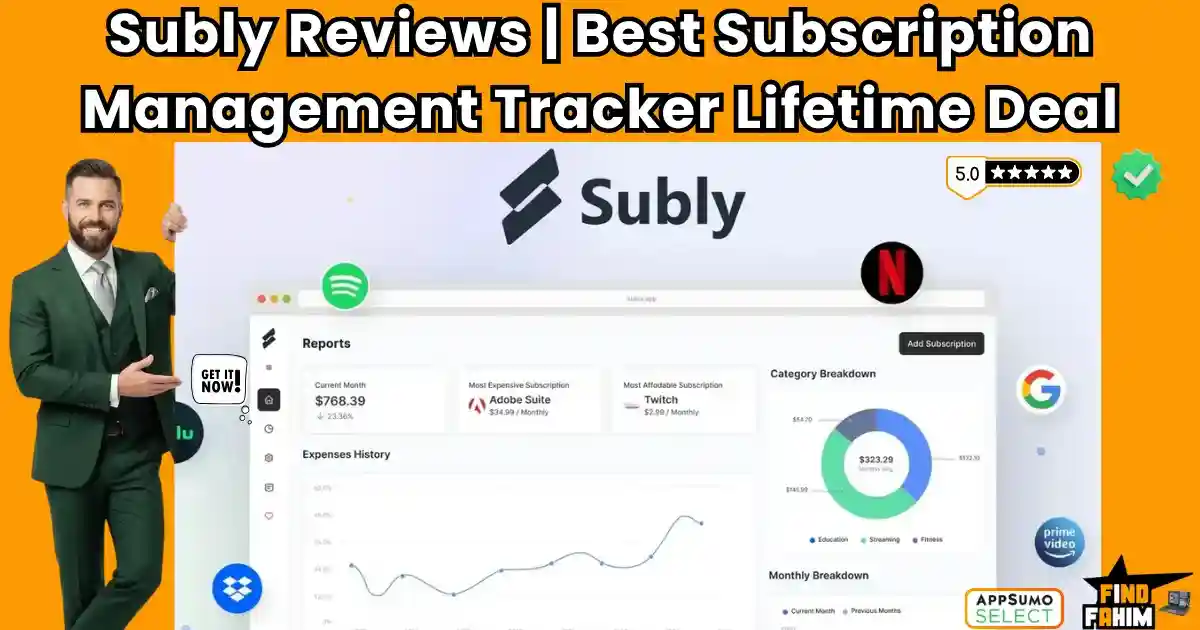

Losing track of your monthly software payments? Subly is the centralized subscription management dashboard built to fix that exact financial bleed.
As entrepreneurs and agency owners in 2026, our tech stacks are bloated. We juggle dozens of monthly SaaS subscriptions, 14-day free trials, and lifetime deals. Eventually, basic spreadsheets fail you, and a forgotten $99 yearly renewal hits your bank account exactly when you didn’t expect it.
Created by UX designer Emilio Sanchez, Subly promises to bring total financial clarity to your chaotic tech stack with automated renewal alerts. But because it requires manual data entry to get started, is it actually better than a free Google Sheet?
In this comprehensive Subly review, I break down its automated webhooks, compare it to top competitors, and help you decide if it is the right tool to lock down your expenses.
Note: This article contains affiliate links. If you buy through them, I may earn a commission, but all opinions are based on my independent research.
My Quick Take (TL;DR)
If you are bleeding money from forgotten software renewals and messy spreadsheets, here is the direct summary of this AppSumo offer.
- What is it? A beautifully designed subscription management platform that tracks recurring costs, one-time LTDs, and alerts you before you get billed.
- Why is it Special? The UI and Custom Reminders. Because it was built by a UX designer, it feels incredibly polished. You can set up to three custom reminders per subscription and use Webhooks to pipe alerts directly into Slack or Telegram.
- Who is it for? AppSumo addicts, freelancers, agency owners, and small businesses are managing multiple client tech stacks.
- The Deal: Lifetime Access starting at an incredibly low $29 on AppSumo.
- My Verdict: It is a no-brainer investment. For $29, if Subly reminds you to cancel just one forgotten $30/month SaaS subscription, the software has literally paid for itself on day one.
Click Here to Get the Subly Lifetime Deal on AppSumo
What is Subly? (Your Financial Command Center)
When you manage business expenses in a standard Excel sheet, the data is entirely static. A spreadsheet cannot text you three days before a Canva Pro trial expires.
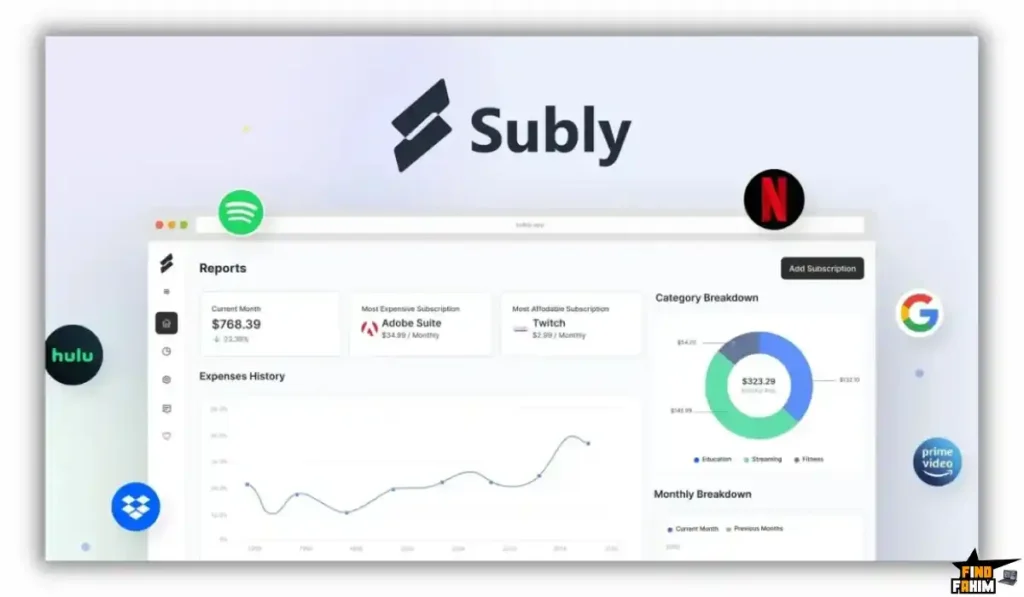
Subly turns your static expense list into an active financial dashboard. You input your subscriptions, tell the system how often you are billed (monthly, yearly, or one-time), and Subly takes over the mental load. It visualizes your cash flow, showing you exactly how much you are spending per month and per year, categorized by project.
A quick clarification point: Because “Subly” is a popular brand name, you might see confusing information online blending this tool with a video transcription app. To be totally clear, the AppSumo deal we are reviewing here is strictly subly.app, the financial subscription tracker built by Emilio Sanchez.
Quick Look: Subly vs Traditional Tracking
If you are currently managing your tech stack costs manually, look at this breakdown of what Subly replaces in your workflow.
| Feature | Replaces… | The Real Value | Normal Cost | Deal Status |
| Active Reminders | Phone Alarms | Never miss a cancellation | Free but risky | ✅ Included |
| Visual Dashboards | Messy Excel Sheets | Instant cash flow clarity | Time consuming | ✅ Included |
| Multi-Project Sorting | Multiple Spreadsheets | Bill specific clients accurately | Workflow hassle | ✅ Included |
| Webhook Alerts | Zapier Delays | Get renewal pings in Slack | ~$20/mo | ✅ Included |
| Total Value | Your Sanity | Zero Renewal Surprises | Lost SaaS $ | $29 (Lifetime) |
Why Standard Spreadsheets Are Failing Creators
You might be thinking, “I already track my expenses in Google Sheets for free. Why pay for a dedicated dashboard?”
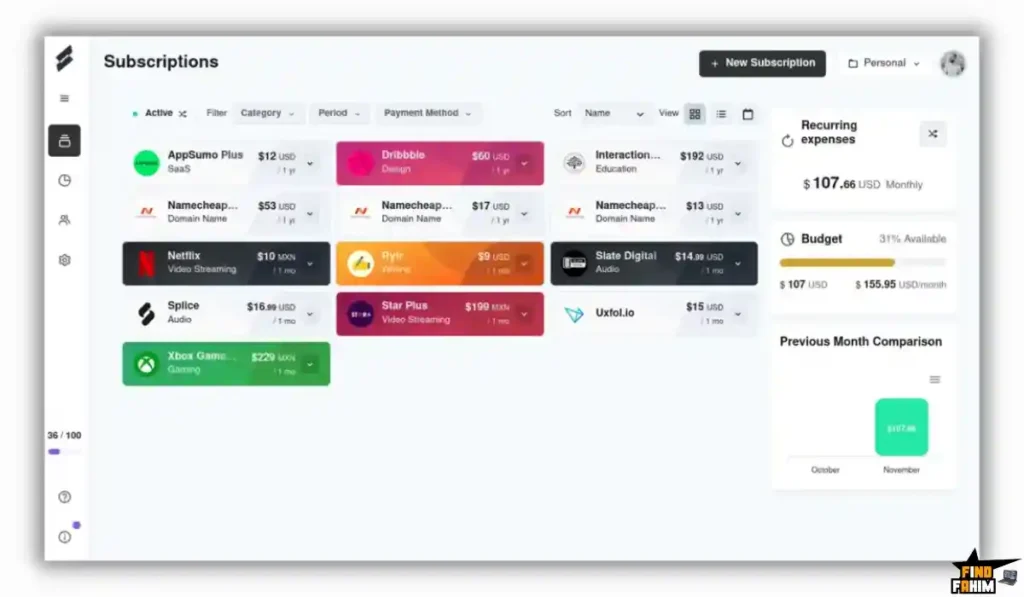
Because spreadsheets rely on human memory. If you use a free spreadsheet to track your SaaS expenses, you are forcing yourself to proactively check that document every single week.
If you get busy and forget to open the spreadsheet, a $150 annual software renewal will slide right past you. Spreadsheets are reactive. You only update them after you have been charged. Subly is proactive. It actively pushes notifications to you before the charge happens, shifting you from a defensive financial posture to an offensive one.
Why “SaaS Stack Management” is Trending in 2026
I noticed this specific AppSumo deal trending because the software industry has reached peak subscription fatigue.
In 2026, almost every single tool on the internet requires a monthly subscription. Small businesses are now utilizing an average of 40 to 50 different micro-SaaS applications to run their operations—from email marketing to social media scheduling. As the tech stack grows, the financial leakage grows with it.
Founders are actively seeking “Stack Management” tools to rein in this decentralized spending, aggregate their costs into a single dashboard, and aggressively audit what software they actually use versus what they are just passively paying for.
A Look Inside Subly: Key Features
Here is exactly what you are getting when you move your expenses off a spreadsheet and into this dedicated tool.
Unlimited LTD (Lifetime Deal) Tracking
This is a massive perk for the AppSumo community. Subly doesn’t just track recurring monthly costs. You can add “One-time” expenses. This allows you to log every single lifetime deal you have ever purchased, creating a master digital inventory of your software assets.
Multi-Project & Team Organization
If you run an agency, you likely pay for software on behalf of different clients. Subly allows you to create specific “Projects.” You can group all the marketing tools you use for “Client A” into one bucket, and all the tools for “Client B” into another, giving you crystal-clear visibility into your overhead for specific accounts.
Multi-Currency Support
If you buy lifetime deals in USD, pay offshore contractors in Euros, and run your local business in GBP, Subly handles the conversions. It allows you to input the exact currency you are billed in, giving you a highly accurate global report of your spending without manual math.
Spaced Reminders
This is where the software pays for itself. You can configure up to three specific alerts for every single subscription. For example, you can tell the app to email you 7 days before, 3 days before, and 1 day before a major annual renewal hits your credit card.
The Standout Feature: Webhooks & Automation
This specific engineering detail deserves its own section because it takes Subly from a simple tracker to a powerful operational tool.
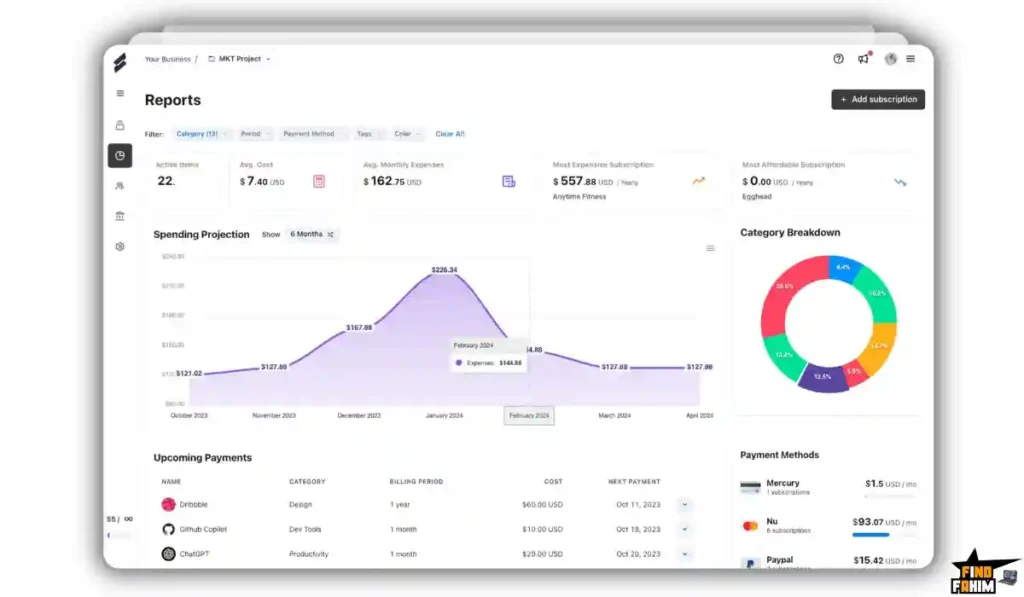
Subly supports native Webhooks. This means you can connect it directly to automation platforms like Zapier, Make, or IFTTT.
Instead of relying on an email reminder that might get buried in your spam folder, you can set up a Webhook to push a notification directly into your agency’s Slack workspace or a dedicated Telegram chat. If you have a billing team, you can automate a message that says: “Hey team, the Adobe Creative Cloud $55/mo renewal is hitting in 3 days. Do we still need this?” It brings expense auditing directly into the channels where you actually work.
Subly Pricing & AppSumo Deal Details
This lifetime deal is incredibly budget-friendly and structured around 5 stackable plans. You pay once, and you own the dashboard forever.
Every single tier includes all the core features (Projects, LTD tracking, Multi-currency, Webhooks). The only things that change as you upgrade are the number of subscriptions you can track and the number of team members you can invite.
| Feature | Plan 1 | Plan 2 | Plan 3 | Plan 4 | Plan 5 |
| One-Time Price | $29 | $58 | $87 | $116 | $145 |
| Subscriptions Tracked | 100 | 225 | 350 | 475 | 600 |
| Team Members | 5 | 5 | 5 | 5 | 10 |
| Unlimited LTDs | ✅ Yes | ✅ Yes | ✅ Yes | ✅ Yes | ✅ Yes |
| Projects Support | ✅ Yes | ✅ Yes | ✅ Yes | ✅ Yes | ✅ Yes |
| Webhooks | ✅ Yes | ✅ Yes | ✅ Yes | ✅ Yes | ✅ Yes |
My Stacking Recommendation
- For Freelancers & Solopreneurs: Plan 1 ($29) is more than enough. Tracking 100 active subscriptions covers almost every solo tech stack on the planet.
- For Agencies & AppSumo Power Users: If you are a digital hoarder who buys dozens of lifetime deals and runs a complex agency with multiple client tools, grab Plan 2 ($58) or Plan 3 ($87) to ensure you never hit the active subscription cap.
Secure Your Subly Lifetime Plan on AppSumo
Pros & Cons of This Lifetime Package
With an impressive 4.7-star rating, users clearly love the UI, but let’s look at the honest realities of using it daily.
The Pros
- ✅ The ROI is Instant: The pricing is so low ($29) that preventing a single unwanted $30 SaaS renewal makes the software instantly profitable.
- ✅ Gorgeous User Interface: Users repeatedly praise the design. Built by a UX designer, it is clean, modern, and genuinely enjoyable to use, which encourages you to actually maintain your financial records.
- ✅ One-Time Expense Tracking: Unlike many corporate trackers that only care about MRR (Monthly Recurring Revenue), Subly explicitly supports tracking your AppSumo lifetime deals.
The Cons
- ❌ Manual Data Entry: Subly does not magically scan your bank account to find subscriptions via Plaid or Open Banking. You have to sit down and manually type in your software names, prices, and renewal dates to get started.
- ❌ Occasional Email Hiccups: A few early reviewers noted minor inconsistencies with email delivery for reminders, making the Webhook integration (pushing alerts to Slack/Telegram) a much safer bet for mission-critical renewals.
How Does Subly Work? (Step-by-Step Tutorial)
If you have never used a dedicated subscription tracker, here is how fast you can organize your stack.
Step 1: Create Your Account
Purchase the AppSumo deal, redeem your code, and log in to the clean Subly dashboard.
Step 2: Set Up Projects
Create buckets for your expenses. You might create one project called “Personal” (for Netflix, Spotify), one called “Internal Agency Tools,” and others for specific client stacks.
Step 3: Add Your Expenses
Click “Add Subscription.” Enter the tool name (e.g., Canva), the cost, the billing cycle (monthly, yearly, or one-time), and assign it to a project.
Step 4: Configure Reminders
Set exactly when you want to be warned. Choose 3 days before the billing date to give yourself time to cancel if needed.
Step 5: Review the Analytics
Navigate to the reporting tab. Subly automatically generates charts showing exactly what your monthly cash burn is, helping you spot heavy expenses instantly.
Best Use Cases for Subly
Who actually benefits the most from this highly specific financial dashboard?
1. The AppSumo Hoarder
You buy almost every lifetime deal that hits the market. You have dozens of software licenses sitting in a messy bookmark folder, and you forget what you actually own. You use Subly to catalog every “One-Time” LTD purchase, giving yourself a searchable inventory of your digital assets.
2. The Digital Agency Owner
You run a marketing agency, and you subscribe to different SEO tools, hosting plans, and CRM seats for different clients. You use Subly’s “Projects” feature to group these expenses by client. When you invoice Client A at the end of the month, you can instantly see exactly how much their specific software stack is costing your agency.
3. The Smart Freelancer
You sign up for 14-day free trials to test out new design software or writing tools, but you frequently forget to cancel them. You log the free trial into Subly the second you sign up and set a 2-day reminder. Subly pings your Slack channel before the trial ends, saving your credit card from unwanted charges.
Stop Losing Money! Organize Your Subscriptions Today.
Subly Alternatives
Is Subly the best tool for the job, or should you use an alternative method? Let’s compare it directly against the Top 5 players in the expense tracking space so you can make the right choice for your tech stack.
Subly vs Rocket Money (Formerly Truebill)
Rocket Money is a massive B2C app that connects directly to your personal bank account.
- Where Rocket Money Wins: Automatic Syncing. It uses Plaid to scan your bank statements and automatically finds your recurring subscriptions without manual data entry.
- Where Subly Wins: Privacy and B2B Organization. Rocket Money is built for personal finance (Netflix, gym memberships). It lacks the “Projects” feature to group agency expenses, and many business owners do not want a third-party app scraping their business bank accounts. Subly is private and manual.
Subly vs Google Sheets / Excel
The default free method used by bootstrappers.
- Where Sheets Wins: Infinite Customization. It is completely free, and you can build any formula you want.
- Where Subly Wins: Active Alerts. A spreadsheet cannot text you when a bill is due. Subly actively pushes Webhook notifications to your team, preventing forgotten renewals.
Subly vs Notion
Notion is a powerful database tool where many creators build their own subscription trackers.
- Where Notion Wins: Consolidation. If you already run your entire company wiki and task management inside Notion, building a tracker there keeps everything in one app.
- Where Subly Wins: Out-of-the-Box Functionality. To get Notion to send you an email reminder about a billing date, you have to build complex database formulas and wire up third-party Zapier connections. Subly handles the math, the UI, and the reminders natively in seconds.
Subly vs TrackMySubs
TrackMySubs is Subly’s most direct B2B competitor in the SaaS space.
- Where TrackMySubs Wins: Advanced Folders. TrackMySubs has been around longer and has highly detailed folder hierarchies and deep reporting tools.
- Where Subly Wins: The User Interface and Pricing. TrackMySubs looks a bit dated and charges a monthly recurring fee for heavier users. Subly feels like a modern, gorgeous Mac app and is currently offering a lifetime deal on AppSumo.
Subly vs Cledara / NachoNacho
These are enterprise-grade SaaS management platforms.
- Where Cledara Wins: Virtual Credit Cards. These platforms actually issue unique virtual credit cards for every single software tool you buy. If you want to cancel a tool, you just turn off the virtual card.
- Where Subly Wins: Barrier to Entry. Cledara requires massive onboarding, corporate banking approval, and expensive monthly fees. Subly is a lightweight, instantly accessible dashboard for freelancers and small teams.
All 5 Competitors Matrix
| Platform | Pricing Model | Key Strength | Best For… |
| Subly | Lifetime ($29+) | UI & Webhook Alerts | Agencies & Freelancers |
| Rocket Money | Sub ($4+/mo) | Auto Bank Scanning | Personal B2C Consumers |
| Google Sheets | Free | Complete Customization | Zero-Budget Bootstrappers |
| Notion | Sub ($10/mo) | Deep Database Linking | Notion Power Users |
| TrackMySubs | Sub ($5+/mo) | Advanced Reporting | Standard Businesses |
| Cledara | Enterprise | Virtual Credit Cards | Mid-Market Corporations |
Ready to Upgrade Your Expense Tracking? Grab Subly Now
Who Should NOT Buy Subly?
To ensure you make a profitable investment, I must be completely transparent about where this tool is a bad fit.
- Do not buy it if you want automatic bank syncing. If you expect this software to connect to your Chase or Bank of America account and magically find all your hidden subscriptions, you will be disappointed. Subly requires manual data entry. If you want automatic bank scraping, you need a B2C tool like Rocket Money.
Is This Lifetime Deal a Smart Business Investment?
Let’s do the exact financial math of choosing the Subly Plan 1 deal versus sticking with your messy spreadsheet.
- Cost of a forgotten SaaS renewal (e.g., Canva or a basic CRM): ~$30 to $50.
- Cost of Subly (Plan 1 – 100 Subscriptions): $29 (One-time payment).
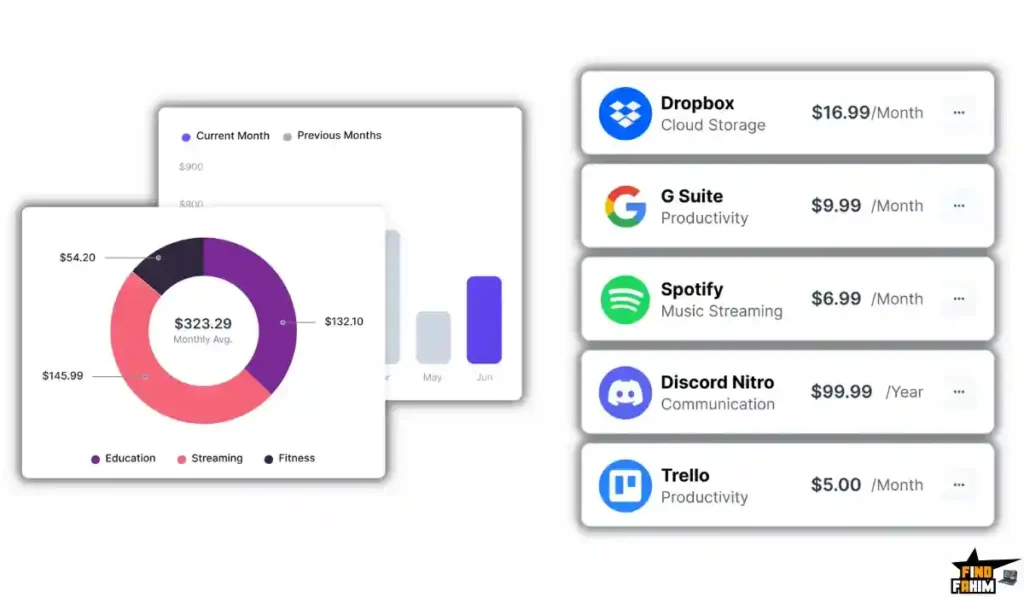
The ROI Math:
- The math here is almost impossible to argue with. If Subly’s Webhook reminder pings your Slack channel and saves you from paying for just one single month of a software tool you forgot to cancel, the software has paid for itself entirely.
- From that point forward, the dashboard is pure profit, actively protecting your bottom line from sneaky annual renewals and forgotten free trials for the rest of your career.
How to Redeem the Subly Deal
- Buy: Click the link below to purchase the activation code securely on AppSumo. (Evaluate your tech stack to decide between Plan 1 for personal use or Plan 2 for agency client grouping).
- Redeem: You will instantly receive a unique activation code in your email inbox or AppSumo account.
- Activate: Follow the link to the Subly website, create your account, and apply the code within 60 days to lock in your lifetime status.
- Configure: Take 20 minutes to manually input your top 10 most expensive software subscriptions and configure a test reminder to ensure it hits your email or Slack channel.
- Verify: Remember that AppSumo offers a risk-free 60-day money-back guarantee. You have two full months to test the reporting dashboard completely risk-free.
Final Verdict: Is This AppSumo Deal Worth It?
After analyzing the multi-project organization, the custom webhook automation, and the gorgeous user interface, my final verdict is a highly confident 5-Star YES.
Managing overhead is the least glamorous part of running a digital business, but it is critical for survival.
- It kills the Spreadsheet Chaos.
- It stops Unwanted Auto-Renewals permanently.
- It provides an Inventory System for your AppSumo lifetime deals.
While it does require a few minutes of manual data entry to set up, Subly takes a frustrating, messy process and turns it into a streamlined workflow. Grab Plan 1 for $29 and get your tech stack under control today.
Secure Your Subly Lifetime License Before It Ends
About the Author
I spend my time researching and analyzing SaaS products, digital tools, and lifetime deals to help smart entrepreneurs stop overpaying for software. We all know the extreme frustration of bleeding cash because of forgotten free trials and messy Excel sheets, which is exactly why I investigated the Subly lifetime deal today. I do the heavy lifting of evaluating these offers—digging into the specific Webhook capabilities, the multi-currency conversions, and the LTD tracking features—so you know exactly what you are getting before you pull out your credit card. If you want to see what other software I am currently analyzing to cut business costs, check out my Full Guide to the Best Lifetime Software Deals.
FAQ: Your Subly Questions, Answered
Subly is a subscription and software expense tracking tool that helps entrepreneurs monitor recurring bills, renewal dates, and one-time software purchases from a single dashboard.
No. Subly focuses on privacy and simplicity, so users manually enter subscriptions, prices, and billing cycles instead of connecting bank accounts or scanning credit card statements.
Yes. When adding an expense you can select the 'One time' option, allowing you to track lifetime software purchases alongside your recurring subscriptions.
Yes. You can enable two-factor authentication in the Authentication settings by connecting your preferred authenticator app for additional account security.
Webhooks send automated event data when something happens in your account, such as a subscription renewal approaching. You can connect them to Zapier, Make, or other automation tools to trigger alerts in apps like Slack or Telegram.
Yes. The Projects feature allows you to create separate expense dashboards for personal finances, different businesses, or individual client accounts.
Yes. Subly supports several currencies including USD, EUR, and GBP, making it suitable for freelancers and businesses working internationally.
You can configure up to three reminders for each subscription, such as seven days, three days, and one day before the billing date.
Subly currently operates as a responsive web application that works smoothly on mobile browsers, tablets, and desktop devices.
You can delete your account from the Settings section by selecting Delete user account. If deleted accidentally, support can recover it within 24 hours before permanent removal.
The AppSumo deal includes a 60-day money-back guarantee, allowing users to test Subly risk-free and request a refund if it does not meet their needs.
Tracking subscriptions helps businesses control SaaS spending, avoid forgotten renewals, and identify tools that are no longer providing value.
Yes. By monitoring billing cycles and renewal alerts, subscription tracking tools help users cancel unused services before they are charged again.
Yes. Freelancers often use multiple SaaS tools, and tracking them in one dashboard makes budgeting and expense management much easier.
Key features include renewal reminders, multi-currency support, project organization, and clear dashboards that help monitor total software spending. What is Subly?
Does Subly connect directly to my bank account via Plaid?
Can I track AppSumo lifetime deals in Subly?
Does Subly support two-factor authentication?
How do Subly webhooks work?
Can I manage multiple businesses or clients in Subly?
Does Subly support multiple currencies?
How many renewal reminders can I set per subscription?
Is there a Subly mobile app?
How do I delete my Subly account?
What is the AppSumo refund policy for Subly?
Why is tracking software subscriptions important?
Can subscription tracking tools reduce software costs?
Are subscription management tools useful for freelancers?
What should I look for in a subscription tracker?

Hi, I’m Fahim — a SaaS tools reviewer and digital marketing expert with hands-on experience helping businesses grow using the right software. I research, test, and personally use a wide range of AI, business, productivity, marketing, and email tools for my agency, clients, and projects. I create honest, in-depth reviews and guides to help entrepreneurs, freelancers, startups, and digital agencies choose the best tools to save time, boost results, and scale smarter. If I recommend it, I’ve used it — and I only share what truly works.