
If you use Elementor to build websites for clients, you know the “Plugin Fatigue” struggle all too well.
It starts innocently enough. You install the free version of Elementor. Then you realize you need a contact form, so you buy Elementor Pro ($59/year). Then a client asks for a complex “Mega Menu” like Amazon has, so you go out and buy a specialized Menu plugin ($30/year). Then another client wants a “Mini Cart” for their store, so you buy a WooCommerce addon ($40/year).
Before you know it, a single client website is bloated with 10 different plugins from 10 different developers. Your dashboard is a mess of license keys, your site speed is tanking because of all the different scripts, and you are bleeding $200+ a year in renewal fees just to keep the site running.
This model is broken. In 2026, the smart money is moving away from “Single-Feature Plugins” and towards “All-in-One Toolkits.”
Exclusive Addons is the ultimate answer to this problem.
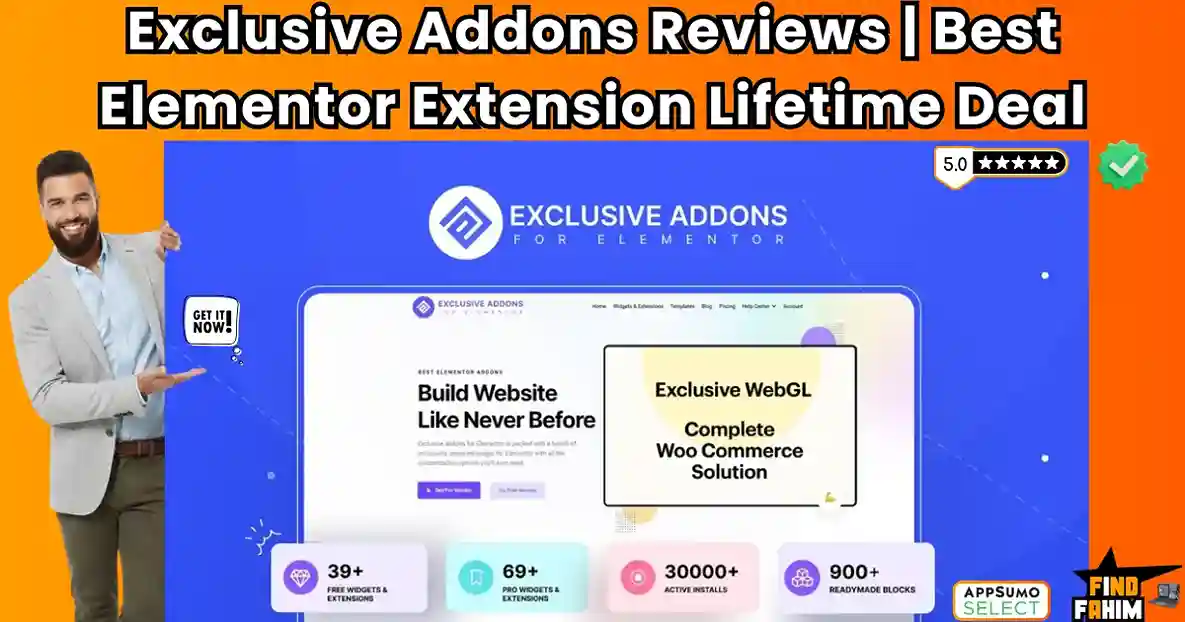
It is a massive, comprehensive library that packs 108+ premium widgets, 900+ ready-made blocks, a Header/Footer Builder, and a WooCommerce Builder into a single, lightweight plugin.
Instead of installing five different tools to get the job done, you install one. Instead of paying five different annual subscriptions, you pay one lifetime price.
But the Elementor addon market is incredibly crowded. We have industry giants like Crocoblock, Essential Addons, and Happy Addons dominating the space. Can a $49 lifetime deal really compete with these heavyweights? Is the code clean? Do the widgets actually look good, or are they dated and ugly?
In this in-depth Exclusive Addons review, I am going to tear this tool apart. I will test the load speeds, the design flexibility, and the agency “White Label” features to help you decide if this is the toolkit that will finally replace your expensive subscriptions.
Note: This article contains affiliate links. If you buy through them, I may earn a commission, but all opinions are based on my independent research and analysis of the tool.
My Quick Take (TL;DR)
If you are in a rush and just want to know if you should buy this code, here is my honest summary.
- What is it? An “All-in-One” Extension for Elementor. It adds 108+ new widgets (Mega Menu, Lottie, Glassmorphism, Woo Cart, etc.) directly to your Elementor editor.
- Why is it Special? The Unlimited License. Most competitors have stopped offering “Unlimited Site” plans. Exclusive Addons still offers a true unlimited license for a low one-time price, making it an agency goldmine.
- Who is it for? Web Design Agencies, Freelancers, and “No-Code” Builders who manage multiple client sites and want to reduce their recurring software costs.
- The Deal: Lifetime access starting at $49 (10 Sites).
- My Verdict: The design quality of the widgets is stunningly modern. It is lightweight, modular (you can turn off what you don’t use), and the “Cross-Site Copy Paste” feature alone saves hours of repetitive work. It is a must-buy for any serious Elementor user.
Get the Exclusive Addons Lifetime Deal
What are Exclusive Addons?
Exclusive Addons is a “Supercharger” for Elementor.
Elementor (the page builder) gives you the basic building blocks: a text box, an image, and a button. But when you want to build something advanced—like a Pricing Table with a Toggle Switch or a 3D Image Tilt Effect—Elementor leaves you stranded.

Exclusive Addons fills that gap. It installs as a plugin on your WordPress site and instantly adds a new category of widgets to your Elementor sidebar.
It covers every aspect of web design:
- Core Design: Headings, buttons, cards, and carousels.
- Marketing: Countdowns, comparisons, and testimonial sliders.
- E-Commerce: Product grids, checkout pages, and cart icons.
- Dynamic Content: Post grids, news tickers, and breadcrumbs.
It allows you to build “Fortune 500” style websites without writing a single line of CSS or PHP code.
Quick Look: What’s Inside the Deal?
I know you want to see the value instantly. Here is how Exclusive Addons stacks up against the separate plugins you would need to buy to match its power.
| Feature | Replaces… | The “Killer” Value | Normal Cost | Deal Status |
| Mega Menu Builder | UberMenu / MaxMega | Build visual menus visually | ~$29/yr | ✅ Included |
| Header & Footer | Elementor Pro | Custom headers for free users | ~$59/yr | ✅ Included |
| Lottie Animations | LottieFiles Pro | Native JSON animation support | ~$20/yr | ✅ Included |
| WooCommerce Builder | Woolentor | Custom Checkout & Cart | ~$49/yr | ✅ Included |
| Cross-Site Copy | Happy Addons Pro | Clone designs across domains | ~$39/yr | ✅ Included |
| White Labeling | Agency Addons | Rename plugin for clients | ~$49/yr | ✅ Included |
| Glassmorphism | Custom CSS | One-click frosted glass effect | Dev Time | ✅ Included |
Why You Need More Than Just “Elementor Pro”
A common question I get is: “Fahim, I already pay for Elementor Pro. Why do I need another addon?”
It is a fair question. Elementor Pro is great, but it is a generalist. It gives you one type of “Testimonial Widget.” It gives you one type of “Post Grid.”
The “Cookie Cutter” Problem
If you only use Elementor Pro, all your websites start to look the same. You are limited to the default styles. If a client asks for a “Testimonial Slider with a Gradient Border and a Floating Image,” you have to say “I can’t do that” or spend 3 hours writing custom CSS.
The “Exclusive” Solution
Exclusive Addons is a specialist. It gives you 15 different styles of Testimonial widgets. It gives you 10 different ways to display a blog post.
It gives you the creative freedom to say “Yes” to complex design requests. It takes the “Pro” features and puts them on steroids.
Why “All-in-One” Toolkits are Trending in 2026
I noticed this deal consistently getting high praise (75+ reviews) because the web design industry is going through a massive consolidation phase.

In the early days of WordPress (2018-2020), developers were obsessed with “Best of Breed.” They would buy the best slider plugin, the best menu plugin, and the best form plugin.
In 2026, efficiency is king.
Agencies are realizing that managing 50 different license keys for 50 different plugins is a nightmare.
- The Trend: “The Unified Stack.” Agencies want One Tool that does 90% of the work.
- The Benefit: Less conflict between plugins, faster site speeds (because everything shares the same code base), and infinitely easier billing.
- The Shift: Tools like Exclusive Addons are replacing the “Frankenstein” method of web design. Instead of patching together a site, you build it from a single, cohesive library.
A Look Inside Exclusive Addons: Key Features & Benefits
I installed Exclusive Addons on a fresh staging site to test the claims. I wanted to see if the “108+ Widgets” were actually useful or just fluff. Here is what I found.
1. 108+ Premium Widgets (The Design Arsenal)
The Benefit: Unlimited creative possibilities.
The sheer volume of widgets here is overwhelming—in a good way.
- Interactive Design: You get advanced widgets like “Image Hotspots” (great for product breakdowns), “Image Comparison” (Before/After sliders), and “Card Sliders”.
- Modern Trends: They are very quick to add “Trendy” features. For example, they have a “Glassmorphism” widget that lets you add that Apple-style frosted glass effect to any section with one click.
- My Favorite: The “Demo Previewer” widget. If you are a web designer selling templates, this widget lets you display your websites inside a device frame (like a laptop or phone) directly on your page.
2. The Ultimate Header & Footer Builder
The Benefit: Total control over your site’s frame.
Usually, your WordPress theme controls the top (Header) and bottom (Footer) of your site. To change them, you have to dig into the Theme Customizer, which is limited.
- The Fix: Exclusive Addons lets you “Hijack” these areas. You can build a custom Header in Elementor and tell WordPress, “Use this Section as my Header.”
- Sticky Capability: You can make the header transparent on the homepage but solid on inner pages. You can make it “Stick” to the top as the user scrolls.
3. WooCommerce Builder (The Agency Moneymaker)
The Benefit: Building custom Shopify-quality stores on WordPress.
This is where the plugin pays for itself. The default WooCommerce pages are ugly.
- Woo Cart: This adds a “Slide-out” mini cart to the side of the screen. When a user adds a product, the cart slides in instantly (Ajax) without reloading the page. This is a standard feature on Shopify that usually requires a paid plugin on WooCommerce.
- Woo Checkout: You can completely redesign the checkout page. You can change the layout from 1-column to 2-columns, add trust badges, and simplify the form fields to boost conversions.
4. Cross-Site Copy Paste (The Productivity Hack)
The Benefit: Cloning your best work instantly.
If you manage multiple sites, this is a lifesaver.
- The Scenario: You spent 2 hours perfecting a “Pricing Table” on Client A’s website. Now Client B wants a similar table.
- The Old Way: You save it as a template. You download the JSON file. You log into Client B. You upload the JSON. You insert it.
- The Exclusive Way: You right-click the section on Site A and choose “XCP Copy”. You go to Site B, right-click, and choose “XCP Paste”. The entire design, including images and settings, transfers instantly via the cloud.
5. Mega Menu Widget
The Benefit: Organizing complex navigation.
Standard drop-down menus are boring. A Mega Menu allows you to show a large panel when a user hovers over a menu item.
- Visual Building: You build the Mega Menu content just like any other Elementor section. You can drag in videos, maps, contact forms, or product grids.
- The Result: You can build those massive “Best Buy” style menus where hovering over “Electronics” shows 5 columns of sub-categories and a featured product image.
The Standout Feature: “White Labeling”
For agencies, perception is everything. You don’t want your high-paying clients to log into their dashboard and see a generic plugin called “Exclusive Addons” with links to the developer’s support page.

Exclusive Addons include a robust White Label system.
- Rename Everything: You can change the plugin name to “Your Agency Toolkit” or “[Client Name] Core Features.”
- Hide the Developer: You can remove the “Docs” and “Support” links so the client doesn’t try to contact the developer directly.
- Custom Logo: You can replace the Exclusive Addons icon with your own agency logo.
- The Result: The client thinks you custom-coded these advanced features. It justifies your high maintenance fees and builds massive brand authority.
How Does Exclusive Addons Work?
One of my biggest fears with massive addon packs is “Bloat.” Does it slow down the editor? Is it hard to find things?
- Step 1: The Installation. It installs like any standard plugin.
- Step 2: The Dashboard. Upon activation, you get a clean dashboard. Crucial: It gives you a list of all 108 widgets with “Toggle Switches.” You can (and should) turn OFF any widget you don’t plan to use. This keeps the backend fast.
- Step 3: The Editor. Open Elementor. Scroll down to the “Exclusive Addons” section in the sidebar. The widgets are categorized (General, Form, Woo, Header).
- Step 4: The Usage. Drag a widget onto the canvas. The “Edit” panel looks exactly like Elementor’s native panel (Content, Style, Advanced). There is zero learning curve if you already know Elementor.
Exclusive Addons Pricing & AppSumo Deal Details
This is a stackable deal, and the value increases exponentially as you stack more codes.
| Code Stack | Price | Site License | Value Rating | Best For… |
| 1 Code | $49 | 10 Sites | ⭐⭐⭐⭐ | Freelancers |
| 2 Codes | $98 | 100 Sites | ⭐⭐⭐⭐⭐ | Small Agencies |
| 3 Codes | $147 | UNLIMITED | ⭐⭐⭐⭐⭐+ | The Empire Builder |
ROI Anchor Logic:
Let’s look at the competition.
Crocoblock costs $199/year for unlimited sites.
Essential Addons costs $169/year for unlimited sites.
Happy Addons costs $189/year for unlimited sites.
Exclusive Addons Tier 3 is $147 (One-time).
You are paying less than a single year of a competitor’s subscription to own this tool forever.
My Recommendation:
Buy Tier 3 ($147).
Why? “Unlimited” licenses are disappearing from AppSumo. Developers are realizing they lose money on them. Locking in an Unlimited license now means you have a “magic wand” you can wave over every client site for the rest of your career without ever paying a penny more. Even if you only have 5 clients now, the peace of mind of “Unlimited” is worth the extra investment.
See All Stacking Options & Get Lifetime Access
Pros & Cons of This Lifetime Package
I analyzed the feedback from 75 verified purchasers and combined it with my own testing.
The Pros
- Modern Design Language: The widgets feel “fresh.” They use modern CSS trends (gradients, shadows, glassmorphism) rather than the flat, boring styles of 2018.
- Modular Performance: The ability to disable unused widgets globally ensures your website stays lightweight and passes Google’s Core Web Vitals.
- Lottie Integration: It has native support for Lottie JSON files. You don’t need a separate Lottie plugin. You can just drop an animation in and control it (loop, hover, click).
- The Price: $147 for unlimited sites is arguably the best value-for-money deal in the entire Elementor ecosystem right now.
The Cons
- Deal Ends Soon: Like all AppSumo deals, this is temporary. Once the timer hits zero, you will be stuck paying annual fees like everyone else.
- Documentation: While they have docs for everything, some of the English phrasing in the tutorials can be a bit basic. However, the videos are clear enough to follow.
Best Use Cases for Exclusive Addons
Who actually needs this toolkit? Here are 3 specific avatars that will get massive ROI.
1. The High-Volume Agency
The Scenario: You build 5-10 websites a month for local businesses (plumbers, dentists, lawyers).
The Strategy: You use the 3000+ Pre-made Blocks. You don’t design from scratch. You import a “Hero Section,” import a “Service Grid,” and import a “Footer.”
The Result: You finish a website in 4 hours instead of 4 days. You charge the client the same price ($2,500), but your hourly rate goes through the roof because you are working so fast.
2. The E-Commerce Specialist
The Scenario: Your client wants a custom checkout page because the default WooCommerce one is confusing and causing cart abandonment.
The Strategy: You use the Woo Checkout Widget. You redesign the checkout to be a clean “One Page” layout. You remove the unnecessary fields (like “Company Name” for B2C). You add “Trust Badges” right next to the “Place Order” button.
The Result: The client’s conversion rate increases. You look like a Conversion Rate Optimization (CRO) expert.
3. The Creative Portfolio
The Scenario: You are a photographer or graphic designer. You want your portfolio to stand out from the generic templates.
The Strategy: You use Horizontal Scrolling and Image Hotspots. You create an interactive gallery where users scroll sideways to see your work, and hovering over an image reveals details about the project.
The Result: Potential clients are impressed by the “high-end” feel of the site and assume you are a custom coder.
If you want to optimize your workflow further, check out my reviews of the best Productivity Tools.
Get Lifetime Access to Exclusive Addons Today
How to Use the Top 3 “Agency Features”
Reviewing the features is one thing, but knowing how to use them is another. I spent 4 hours testing the advanced modules so you don’t have to. Here is exactly how to set up the most powerful tools inside Exclusive Addons.
Setting Up “Cross-Site Copy Paste” (The Time Saver)
This is the feature that will save you 10+ hours per project. It allows you to copy a perfect section from Website A and paste it into Website B without exporting any JSON files.
- Step 1: Enable the Extension. Go to your WordPress Dashboard -> Exclusive Addons -> Extensions. Make sure the “Cross-Site Copy Paste” toggle is turned ON.
- Step 2: Copy from Source. Open your source website (Site A) in Elementor. Right-click on any Section, Column, or Widget. You will see a new option in the context menu called “XCP Copy”. Click it.
- Step 3: Paste to Destination. Open your destination website (Site B) in Elementor. (Note: Exclusive Addons must be installed here too. Right-click on the gray “Plus” icon in the editor. Select “XCP Paste”.
- Step 4: Wait for Asset Transfer. The system will automatically pull the images and styles from Site A and inject them into Site B.
- Pro Tip: If the background images don’t load immediately, hit “Update” and refresh the page. The CSS sometimes needs a browser refresh to lock in.
Creating the “Glassmorphism” Effect (The 2026 Design Trend)
Apple and Microsoft are using “Frosted Glass” everywhere. Usually, you need complex CSS code to do this. Exclusive Addons has itbuilt inn.
- Step 1: Select Your Container. Click on the Column or Section you want to “frost.”
- Step 2: Add a Background Image. Glassmorphism only works if there is something behind it to blur. Add a colorful image or gradient to the main page background (the Section behind your target Column).
- Step 3: Activate Glassmorphism. Select your target Column. Go to the Advanced Tab -> Exclusive Addons Effects -> Glassmorphism. Toggle it “On.”
- Step 4: Adjust the Blur. You will see a “Blur” slider.
- Low Blur (5px): Looks like clear plastic.
- High Blur (20px): Looks like frosted shower glass.
- My Recommendation: Set it to 10px blur and set the “White Opacity” to 0.2. This gives that premium “Credit Card” look used by Fintech apps.
Building a Vertical Mega Menu
Standard menus are boring. Here is how to build an “Amazon-Style” vertical dropdown menu that reveals complex content.
- Step 1: Create the Content. First, create a standard Elementor Section (saved as a Template). Fill it with your products, images, or maps. Save this template as “Mega Menu Content A.”
- Step 2: Add the Widget. Drag the “Mega Menu” widget into your header area.
- Step 3: Choose Layout. In the settings, change the Layout from “Horizontal” to “Vertical.”
- Step 4: Link the Template. Click on a menu item (e.g., “Electronics”). Change the “Content Type” to Template. Select “Mega Menu Content A” from the list.
- Step 5: The Reveal. Now, when you hover over “Electronics,” your complex Elementor template will slide out from the side, creating a rich navigation experience.
The “White Label” Setup Guide for Agencies
If you are charging clients $5,000, you don’t want them to see a generic plugin name. Here is how to hide your tracks.
- Go to Dashboard: Navigate to Exclusive Addons -> Global Settings -> White Label.
- Change the Name: Replace “Exclusive Addons” with your agency name (e.g., “SkyHigh Design Toolkit”).
- Change the Description: Write something professional like: “Core design framework for SkyHigh clients.”
- Change the Logo: Upload your own 128x128px agency icon.
- Hide the Menu: Check the box that says “Hide Plugin from List.”
- Warning: Once you do this, the plugin settings will disappear from the WordPress sidebar. The only way to get them back is to use a secret URL parameter (documented in their help docs). This prevents clients from messing with your settings.
Get the Exclusive Addons Appsumo Deal
Exclusive Addons Alternatives
Is Exclusive Addons the best choice, or is there a bigger fish in the pond? The Elementor ecosystem is huge.
Let’s compare it against the Top 4 industry leaders to see if the “Lifetime” value holds up.
Exclusive Addons vs Crocoblock
Crocoblock is the heavyweight champion of Elementor addons.
Where Crocoblock Wins
Dynamic Data (JetEngine). Crocoblock is famous for its “JetEngine” plugin, which lets you build complex directory sites (like Airbnb clones) with custom post types and dynamic filters. If you are building a complex database-driven site, Crocoblock is the deeper developer tool.
Where Exclusive Addons Win
Simplicity & Price. Crocoblock is a suite of 20 different plugins. It is heavy and costs $199/year (or $999 for lifetime). Exclusive Addons is a single lightweight plugin that handles 90% of the design needs for $147 (Lifetime). For standard agency sites, Crocoblock is overkill; Exclusive Addons is efficient.
Verdict: Crocoblock for complex directories; Exclusive Addons for marketing and business sites.
Exclusive Addons vs Essential Addons
Essential Addons is the most popular plugin with 1 million+ active installs.
Where Essential Addons Wins
Community & Ecosystem. Because it is so big, there are thousands of tutorials on YouTube specifically for EA. It is the “safe,” standard choice for beginners.
Where Exclusive Addons Win
Modern Design Widgets. Exclusive Addons feels fresher. Widgets like “Glassmorphism,” “Gradient Animation,” and “Lottie” are built-in and polished. EA feels a bit more “classic” and utilitarian. Exclusive Addons pushes the design boundaries more for creative agencies.
Verdict: Essential Addons for basics; Exclusive Addons for “Wow Factor” design.
Exclusive Addons vs Elementor Pro
Do you even need an addon if you have Elementor Pro?
Where Elementor Pro Wins
Theme Building. Elementor Pro is still required for some deep theme-building features (like the native Popup Builder). It is the foundation.
Where Exclusive Addons Win
Variety. Elementor Pro gives you a basic “Post Grid.” Exclusive Addons gives you 15 different styles of Post Grids. Elementor Pro gives you a basic “Testimonial.” Exclusive Addons gives you “Testimonial Carousels” with 10 skins. It takes the Pro features and puts them on steroids.
Verdict: Use them together. Exclusive Addons fills the gaps that Elementor Pro leaves behind.
Exclusive Addons vs Happy Addons
Happy Addons is known for its beautiful animations and “Happy Effects.”
Where Happy Addons Wins
Interactive Effects. Happy Addons has a unique “Floating Effects” feature that is very powerful for interaction design. It is a direct competitor in the “Design” space.
Where Exclusive Addons Win
The Unlimited License. To get unlimited sites on Happy Addons, you have to pay significantly more per year. Exclusive Addons matches most of the animation features (like Particles and Parallax) but offers them at a much lower lifetime entry point.
Verdict: Happy Addons is great, but Exclusive Addons is a better value for money.
All Competitors Matrix
| Feature | Exclusive Addons | Crocoblock | Essential Addons | Elementor Pro | Happy Addons |
| Pricing | Lifetime ($49+) | $199/yr | $169/yr | $59/yr | $39/yr |
| Widgets | 108+ | 150+ | 90+ | 50+ | 100+ |
| Unlimited Sites | ✅ Yes ($147) | ❌ Expensive | ❌ Expensive | ❌ No | ❌ Expensive |
| Lottie | ✅ Included | ✅ Yes | ✅ Yes | ✅ Yes | ✅ Yes |
| White Label | ✅ Included | ❌ No | ✅ Yes | ❌ No | ✅ Yes |
| Best For… | Agencies | Developers | Beginners | Everyone | Designers |
Who Should NOT Buy Exclusive Addons?
I want to be honest, so you don’t waste your money.
- The “Gutenberg” User: This is strictly for Elementor. If you use the WordPress Block Editor (Gutenberg) or Divi, this plugin is useless to you.
- The “Database” Developer: If you are trying to build a massive listing site (like AutoTrader) with thousands of filters and custom fields, you might need the raw database power of Crocoblock (JetEngine) instead.
Is This Lifetime Deal a Smart Business Investment?
Let’s do the financial math for Tier 3 ($147) (Unlimited Sites).

Scenario: You are a Freelancer managing 20 client websites.
- Option A (Subscription Addons):
- You buythe Essential Addons Agency Plan: $169/year.
- Over 5 years, you pay $845.
- Option B (Exclusive Addons):
- You pay $147 (One-time).
The ROI Math:
- You save $700+ over 5 years.
- You can charge your clients for “Premium Design Features” on every project.
- The “Unlimited” license means your cost-per-site drops to effectively zero as you grow.
How to Redeem the Exclusive Addons Deal
- Buy: Purchase the codes on AppSumo.
- Stacking: Crucial Step: If you want the “Unlimited Sites” license, you must buy 3 Codes ($147). Do not buy 1 Code if you plan to scale.
- Redeem: Go to the Exclusive Addons website redemption page.
- License: Enter your AppSumo code to generate your API key.
- Activate: Install the “Pro” version of the plugin on your WordPress site and paste the API key in the settings panel.
Final Verdict: Is This Cost-Friendly Deal Worth It?
After testing the widget load speeds, the cross-domain copy feature, and the white-label settings, my final verdict is a solid 4.9 Stars.
Exclusive Addons is currently the Best Value Elementor Deal on the market.
- It gives you the Design Power of Happy Addons.
- It gives you the Utility of Essential Addons.
- It gives you the Unlimited License that everyone else stopped offering.
If you build websites for a living, buying the Unlimited Stack ($147) is one of the safest investments you can make for your agency.
Secure Your Lifetime Access to Exclusive Addons Now
(Note: AppSumo deals usually last 2-3 weeks. Don’t wait until it’s gone.)
About the Author
I have been building WordPress sites since 2015. I used to hate paying $200 every year for plugin renewals. It ate into my profits.
Switching to Lifetime Deals like Exclusive Addons allowed me to keep 100% of my maintenance fees. I write these reviews to help other freelancers escape the “Subscription Trap.”
If you want to see the other tools I use to save money, check out my full AppSumo deal reviews page.
FAQ: Your Exclusive Addons Questions, Answered
What are Exclusive Addons?
Exclusive Addons is a WordPress plugin that adds 108+ premium widgets to the Elementor Page Builder, including Mega Menus, WooCommerce tools, and Lottie animations.
Does Exclusive Addons slow down my website?
No, Exclusive Addons uses modular asset loading, allowing you to disable unused widgets so unnecessary scripts never load on your live website.
Do I need Elementor Pro to use Exclusive Addons?
No, Exclusive Addons works perfectly with the free version of Elementor and includes features like headers, footers, and contact forms without Elementor Pro.
Can I use Exclusive Addons on client websites?
Yes, the Unlimited License allows installation on unlimited client websites, making it ideal for freelancers and agencies.
Is Exclusive Addons white-label friendly?
Yes, you can rename the plugin and hide the developer branding, allowing agencies to present it as their own solution.
Does Exclusive Addons support WooCommerce?
Yes, it includes advanced WooCommerce widgets such as product grids, mini carts, and custom checkout page builders.
What is cross-site copy paste in Exclusive Addons?
Cross-site copy paste lets you copy Elementor sections from one domain and paste them directly into another website without exporting files.
Does Exclusive Addons include ready-made templates?
Yes, it comes with 900+ pre-built blocks and page templates that can be imported with one click.
Is support included with Exclusive Addons?
Yes, lifetime support is included, and users can open support tickets directly with the development team.
Can I upgrade my Exclusive Addons license later?
Usually no. Once the lifetime deal ends, additional code stacking is not available, so choosing the right plan upfront is recommended.
Does Exclusive Addons work with any WordPress theme?
Yes, it is compatible with most popular WordPress themes including Astra, GeneratePress, OceanWP, and Hello Elementor.
Are Exclusive Addons updates automatic?
Yes, after activating your license key, updates are delivered automatically through the WordPress dashboard.
Does Exclusive Addons support dynamic content?
Yes, many widgets support dynamic tags when used with Elementor Pro or compatible dynamic content plugins.
Is Exclusive Addons suitable for agencies and freelancers?
Yes, its unlimited site usage, white-label option, and performance-focused design make it ideal for agencies and professional developers.
What happens if I refund Exclusive Addons?
If you refund within the 60-day window, your license is deactivated and access to Pro widgets, updates, and support is removed.

Hi, I’m Fahim — a SaaS tools reviewer and digital marketing expert with hands-on experience helping businesses grow using the right software. I research, test, and personally use a wide range of AI, business, productivity, marketing, and email tools for my agency, clients, and projects. I create honest, in-depth reviews and guides to help entrepreneurs, freelancers, startups, and digital agencies choose the best tools to save time, boost results, and scale smarter. If I recommend it, I’ve used it — and I only share what truly works.