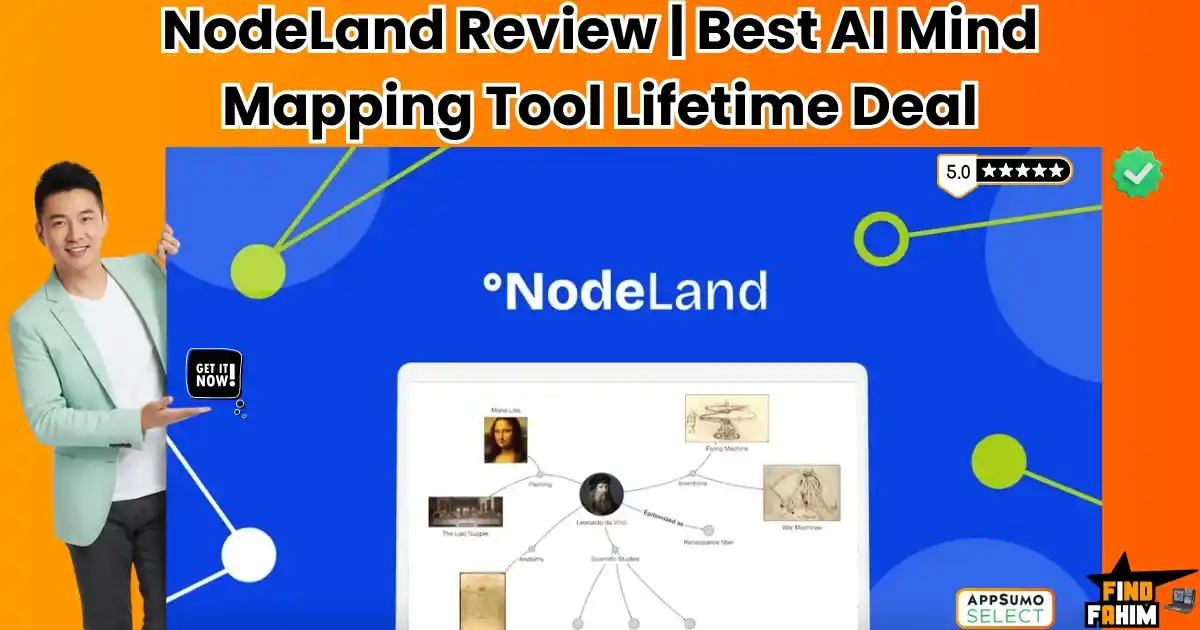

Most note-taking apps force you to think in straight lines, but your brain doesn’t work that way.
NodeLand (formerly Cmaps) is an AI-powered visual workspace that combines infinite mind maps, document summarization, and networked note-taking into a single platform for organizing complex ideas.
Let’s be honest: Knowledge Management is expensive.
If you want a tool that lets you connect ideas visually (like a detective board), you are usually stuck paying:
- Miro: $16/month (great for teams, bad for notes).
- Heptabase: $12/month (amazing for research, but pricey).
- Scrintal: $5/month.
You are easily spending $100+ a year just to organize your thoughts.
NodeLand disrupts this market by offering a “Speed of Thought” canvas for the price of a takeout lunch. It bridges the gap between a whiteboard and a text editor. You can drop a YouTube video onto the board, and its AI will instantly summarize it into a mind map. You can connect sticky notes to long-form documents seamlessly.
With a solid 4.5-star rating and a passionate founder (Gabriel Xara) who is building features based on user requests, this platform is positioning itself as the budget-friendly alternative to the heavyweights. In this in-depth NodeLand review, I am testing if this $19 lifetime deal is a hidden gem or just a basic whiteboard.
Note: This article contains affiliate links. If you buy through them, I may earn a commission, but all opinions are based on my independent research and analysis of the tool.
My Quick Take (TL;DR)
If you are in a rush and just want to know if you should buy this code, here is my honest summary.
- What is it? It is a visual knowledge base. It’s part Mind Map, part Note App, part AI Summarizer.
- Why does it matter? The AI Video Summarizer. You paste a YouTube link, and it generates a structured mind map of the video’s key points. It saves hours of watching time.
- Who is it for? Content Creators, Students/Researchers, and “Visual Thinkers” (ADHD friendly).
- The Deal: Lifetime Access for $19. (Yes, really.
- My Verdict: For $19, this is an instant buy. Even if you only use it to summarize YouTube videos, it pays for itself in one week. It’s not as polished as Heptabase yet, but the value proposition is significant.
Click Here to Get the NodeLand Lifetime Deal
What is NodeLand?
The best way to describe this platform is as a “Visual Operating System” for your ideas.
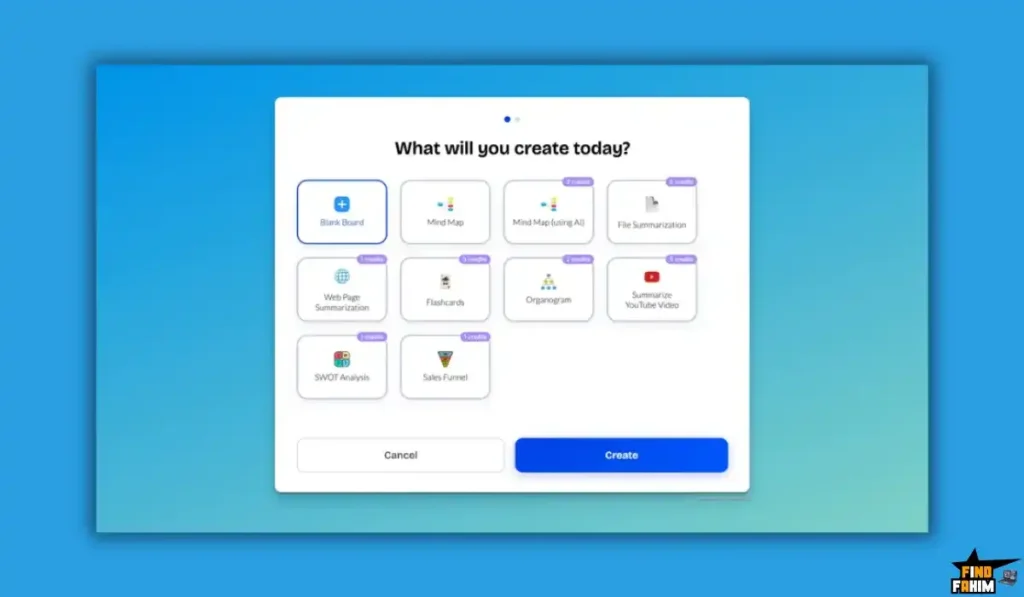
It puts everything on One Infinite Canvas.
Instead of having your video notes in one app, your PDF highlights in another, and your brainstorms in a third, this tool brings them all together. You can see the YouTube video next to your PDF summary and your sticky notes.
It mirrors how your brain actually works: associative and connected. It’s designed to help you break out of the “Linear Trap” of standard documents like Google Docs or Notion.
Quick Look: What’s Inside the Deal?
If you are wondering if this $19 tool can compete with the giants, look at this breakdown.
| Feature | Replaces… | The “Killer” Value | Normal Cost | Deal Status |
| Visual Notes | Heptabase | Connect Notes Visually | ~$144/yr | ✅ Included |
| Mind Mapping | Miro | Infinite Canvas | ~$192/yr | ✅ Included |
| AI Summarizer | NoteGPT | Summarize YouTube/PDFs | ~$10/mo | ✅ Included |
| Knowledge Base | Obsidian | Networked Thoughts | Free/Paid | ✅ Included |
| Presentations | PowerPoint | Present from the Map | N/A | ✅ Included |
| Total Value | Your Brain | A Visual OS | ~$450/yr | $19 (Lifetime) |
Why You Need More Than Just “Notion”
We’ve all been there. You are researching a topic. You have 15 tabs open. You have a Google Doc full of links. You have a notebook with scribbles.
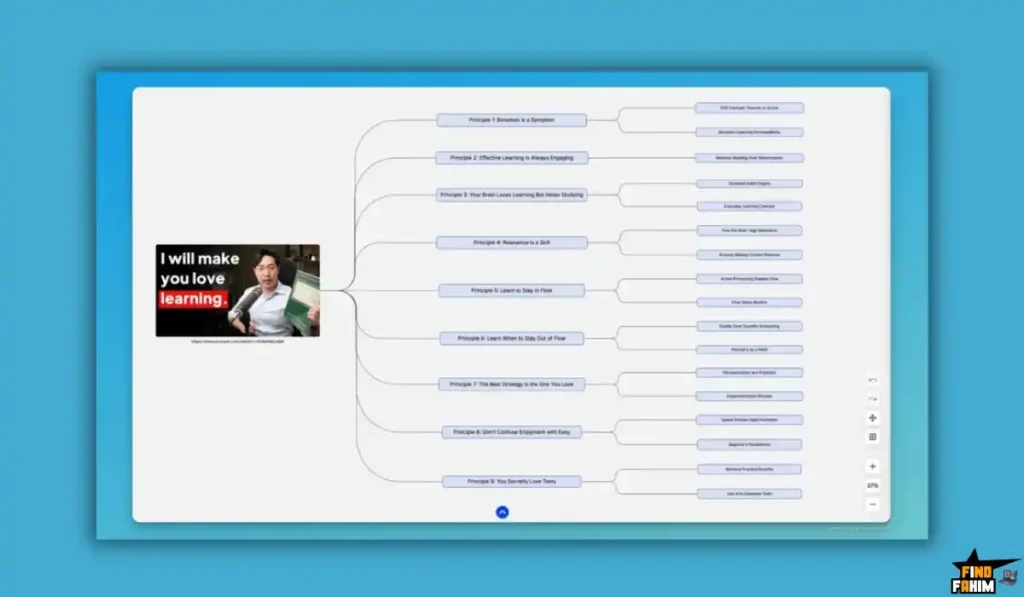
The problem is separation.
Linear apps like Notion force you to structure ideas before you fully understand them. Visual tools let you sprawl out. You can dump ideas on the canvas first, and structure them later using arrows and groups. It is a more natural way to learn complex topics.
Why Visual Workspaces are Trending in 2026
I noticed this tool climbing the charts because it hits two major productivity trends.
1. The “Spatial Computing” Shift
With the rise of spatial interfaces, people are realizing that folders are outdated. We want to navigate our knowledge spatially (top-left for ideas, bottom-right for archive). Tools that offer an “Infinite Canvas” are becoming the standard for modern creative work.
2. The AI Synthesis Boom
We consume too much content. We don’t have time to watch 2-hour podcasts. Tools that can AI Summarize media into visual maps are trending because they compress “Consumption Time” into “Understanding Time.”
A Look Inside the Workspace: Key Features & Benefits
This isn’t just a drawing tool. It’s a thinking engine.
1. AI Video & Document Summarizer (The “Study Hack”)
What it is: You paste a URL (YouTube, Webpage) or upload a PDF/Doc. The AI analyzes it.
The Result: It doesn’t just give you a text summary. It builds a Visual Mind Map. It breaks the content into “Main Topic” -> “Sub-points” -> “Details.”
- Real-World Scenario: You need to learn about “SEO Strategies” from a 2-hour podcast. You feed it to the workspace. In 30 seconds, you have a map of the entire episode. You can see the structure of the argument without listening to the whole thing.
2. Hybrid Note-Taking (The “Best of Both Worlds”)
What it is: Most mind maps (like MindMeister) only allow short phrases in bubbles. This tool allows Rich Documents.
How it works: You can double-click any “Node” (bubble), and it opens a full text editor. You can write a 2,000-word essay inside a single bubble on your map.
- Why it matters: It allows you to move from “Big Picture” (the map) to “Deep Details” (the document) instantly.
3. The Infinite Canvas & Templates
What it is: A whiteboard that never ends.
The Templates: It comes with pre-made frameworks like SWOT Analysis, Sales Funnels, and Flashcards.
- Real-World Scenario: You are planning a product launch. You use the “Kanban” template to track tasks, but you also draw arrows connecting tasks to your “Marketing Strategy” mind map on the same board. Everything is visible at once.
4. Public Sharing & Embedding (The “Showcase”)
What it is: You can publish any map as a public link.
Why it matters: It’s great for sharing knowledge.
- Real-World Scenario: You are a consultant. Instead of sending a client a boring 50-page PDF report, you send them a link to a Map. They can interactively click through your strategy, expanding nodes to read details. It looks impressive and modern.
The Standout Feature: “Video-to-Map Generation”
The one feature that makes this deal unique is the Visual AI Generation.
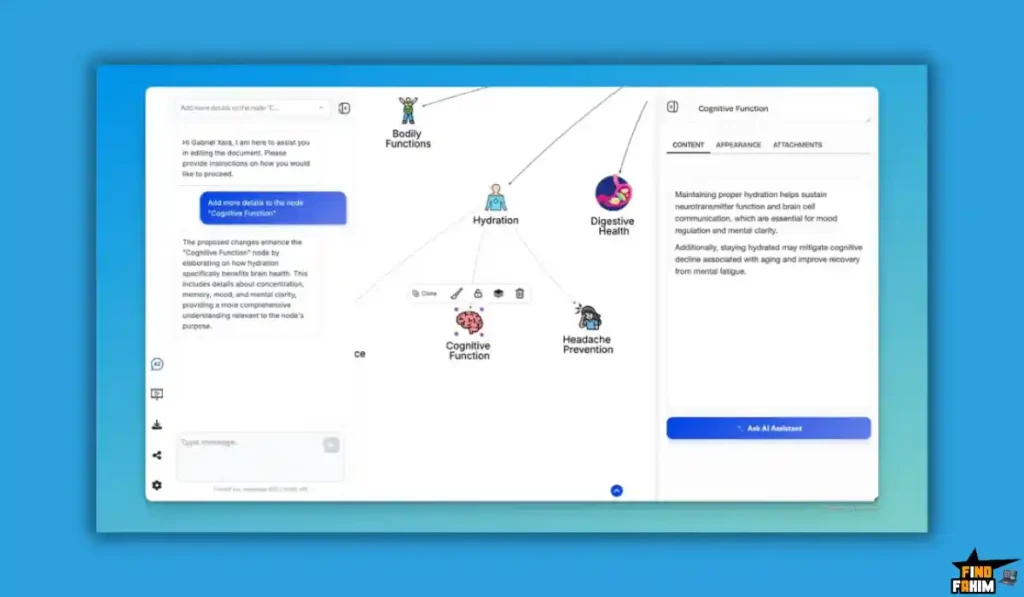
Most AI tools output text blocks. This tool outputs Structure.
Seeing a YouTube video decomposed into a branching tree diagram helps you understand the relationship between points, not just the points themselves. For visual learners, this is a massive advantage over standard summarizers.
How Does It Work? (A Quick Look)
It works at the “speed of thought.”
Step 1: Create a Board
Open the dashboard and click “New Map.”
Step 2: Add Content
- Option A: Double-click anywhere to create a text node.
- Option B: Paste a YouTube link and click the “AI Sparkle” icon to generate a map.
Step 3: Connect
Drag a line from one node to another to create a relationship.
Step 4: Expand
Click into a node to write detailed notes, add images, or upload files.
NodeLand Pricing & AppSumo Deal Details
This is a Single-Tier Lifetime Deal.
It is refreshingly simple with no complex upsells.
The Tier Breakdown
| Feature | Lifetime License |
| Price | $19 (One-Time) |
| Documents/Maps | Unlimited |
| AI Assistant | Included |
| Video Summaries | Included |
| File Storage | Included |
| Export Options | Markdown, PDF, Image |
ROI Anchor Logic: The “Hidden Math”
- Miro’s cheapest paid plan is $8/month ($96/year).
- Heptabase is $12/month ($144/year).
- This Deal is $19 once.
The Reality: If you use this tool for just two months, you have beaten the competition on price. It is arguably one of the best value-for-money deals on the market right now.
My Recommendation
Buy It.
- Why? At $19, the risk is negligible. Even if you only use it occasionally to summarize a video, it is worth the cost of admission.
Click Here to See the Deal & Get Lifetime Access
Pros & Cons of This Lifetime Package
I promised you honesty. With 58 reviews and a 4.5-star rating, the community is excited, but it’s still young software.
The Pros
- ✅ The Price: $19 is “Starbucks money.” For a tool that offers unlimited AI summarization, it is incredibly cheap.
- ✅ Speed: I noticed it works at the “speed of thought.” It feels faster and lighter than Miro, which can get laggy with big boards.
- ✅ Video-to-Map: This is a killer feature. Seeing a visual breakdown of a video is superior for learning.
- ✅ Rich Text Nodes: Being able to store images, videos, and long text inside a node makes it a true Knowledge Management System (PKM).
- ✅ Export Options: You can export your data. You aren’t locked in. This is crucial for notes.
- ✅ Responsive Dev: The founder is very active. He fixed user issues immediately and is transparent about the roadmap.
The Cons
- ❌ UX Polish: I found some navigation features (like panning/zooming on a trackpad) feel a bit “basic” compared to the silky smoothness of Figma or Miro. It takes a little getting used to.
- ❌ No Mobile App: Currently, there is no dedicated iOS/Android app. You have to use it in the mobile browser, which is functional but not perfect for capturing ideas on the go.
Best Use Cases for NodeLand
Who actually needs this software? After testing the “AI Summarizer” and the infinite canvas, I found that it fits three specific avatars perfectly.
(Pro Tip: If you want to optimize your workflow further, check out my reviews of the best Productivity Tools.)
1. The “Lifelong Learner / Student.”
You are taking an online course or researching a thesis. You have 20 PDF papers and 5 YouTube lectures to consume.
- The Scenario: You drag your PDFs into the workspace and paste the YouTube links. The AI summarizes the key concepts into visual nodes. You connect related ideas with arrows.
- The Benefit: You build a “Knowledge Graph” instead of a flat list of notes. It makes reviewing for exams or writing your paper significantly faster.
2. The “Content Creator.”
You are planning a video essay. You have random ideas, a few articles for reference, and a rough script structure.
- The Scenario: You use the Kanban Template to organize your workflow (Research -> Scripting -> Filming). You use the infinite canvas to brainstorm the script visually, moving “scenes” around as sticky notes until the flow feels right.
- The Benefit: It stops “Writer’s Block.” Seeing your content visually helps you spot gaps in your narrative.
3. The “Freelance Consultant.”
You are solving a complex problem for a client (e.g., “Why are sales dropping?”).
- The Scenario: You create a “Root Cause Analysis” map. You start with the problem in the center and branch out into Marketing, Product, and Sales issues. You double-click the “Sales” node to write a detailed report inside it.
- The Benefit: You can share this map with the client via a public link. They get a “Wow” moment seeing their business problems mapped out so clearly.
Start Mapping Your Ideas with NodeLand Today
NodeLand Alternatives
This is the most important part of the review. This tool is entering a space dominated by giants like Miro and trendy tools like Heptabase. Can a $19 tool really compete?
Let’s compare it against the Top 5 players in the visual workspace market.
NodeLand vs Miro
Miro is the corporate standard for whiteboards.
- Where Miro Wins: Team Collaboration. Miro allows 50 people to edit a board simultaneously, with cursors flying everywhere. It has enterprise-grade integrations (Jira, Slack) and robust permissions. If you are a Fortune 500 team, you need Miro.
- Where NodeLand Wins: Note-Taking & Price. Miro is a drawing tool, not a writing tool. Writing a long essay inside a sticky note in Miro is painful. This tool is built for text; you can write full documents inside nodes. Plus, Miro costs $16/month (Business). This deal is $19 once.
- Verdict: Use Miro for Workshops; Use this tool for Personal Knowledge Management.
NodeLand vs Heptabase
Heptabase is the darling of the “Visual Note-Taking” community.
- Where Heptabase Wins: Obsidian Integration. Heptabase can read your local Markdown files perfectly. It feels incredibly premium and polished. The “Card Library” feature is very advanced for researchers managing thousands of notes.
- Where NodeLand Wins: The AI Assistant. Heptabase focuses on manual organization. This tool proactively helps you by summarizing videos and suggesting connections via AI. And again, the price: Heptabase is $12/month ($144/year). This deal is roughly 13% of the annual cost of Heptabase.
- Verdict: Heptabase is the premium choice; this is the value choice.
NodeLand vs Obsidian (Canvas)
Obsidian is free and stores files locally on your computer.
- Where Obsidian Wins: Privacy & Plugins. Your data lives on your hard drive, not the cloud. It has thousands of community plugins. It is the ultimate tool for “Data Sovereignty.”
- Where NodeLand Wins: Ease of Use. Obsidian has a steep learning curve. You need to understand Markdown, Vaults, and Plugins. This tool works out of the box. You log in and start mapping. It is also web-based, so you can access it from any computer without syncing files.
- Verdict: Obsidian for Techies; NodeLand for everyone else.
NodeLand vs Notion
Notion is the “All-in-One” workspace.
- Where Notion Wins: Databases. Notion’s ability to create tables, filters, and relational databases is unmatched. If you need a strict project tracker with due dates and tags, Notion wins.
- Where NodeLand Wins: Visual Freedom. Notion is linear. It is blocks on top of blocks. You cannot draw an arrow connecting Paragraph A to Paragraph B. This tool breaks the grid. If you are a “messy thinker,” Notion feels restrictive, whereas this feels liberating.
- Verdict: Keep Notion for Projects; use this for Brainstorming.
NodeLand vs Scrintal
Scrintal is very similar to NodeLand (Visual Zettelkasten).
- Where Scrintal Wins: Onboarding. Scrintal has excellent tutorials and a slightly more mature interface for linking notes (backlinking).
- Where NodeLand Wins: Video Summaries. Scrintal is great for text, but this tool’s ability to digest a YouTube video and map it out gives it a unique edge for learners. Also, Scrintal is a monthly subscription ($5/mo), while this is a lifetime deal.
- Verdict: This tool offers better value for students.
All Competitors Matrix
| Tool | Pricing | AI Summarizer | Text Editing | Best For… |
| NodeLand | Lifetime ($19) | ✅ Video/Doc | ✅ Rich Text | Visual Thinkers |
| Miro | $16/mo | ⚠️ Add-on | ❌ Basic | Corporate Teams |
| Heptabase | $12/mo | ❌ No | ✅ Best | Deep Research |
| Obsidian | Free (Local) | ⚠️ Plugin | ✅ Markdown | Privacy Nerds |
| Notion | Freemium | ✅ Add-on | ✅ Blocks | Project Mgmt |
| Scrintal | $5/mo | ❌ No | ✅ Good | Zettelkasten |
Who Should NOT Buy NodeLand?
I want to be transparent. This tool is a productivity hack, but it is not for everyone.
- Don’t buy it if you need a mobile app today. As of late 2026, it is primarily a web-based tool. If you do your best thinking on an iPad with an Apple Pencil, you might find the web interface clunky compared to a native app like GoodNotes.
- Don’t buy it if you need real-time sync for a team of 20. While it supports collaboration, I found it is not as battle-tested as Miro for large-scale enterprise workshops.
- Don’t buy it if you prefer spreadsheets. If your brain works in rows and columns (Excel style), this visual “spiderweb” style might annoy you.
Is This Lifetime Deal a Smart Business Investment?
Let’s do the financial math.
Scenario: You want to organize your research for a new project.
- Option A (Miro Starter): You pay $8/month. Cost over 2 years: $192.
- Option B (Heptabase): You pay $12/month. Cost over 2 years: $288.
- Option C (This Deal): You pay $19 (One-time).
The ROI Math:
- You save $170+ compared to Miro.
- You save $260+ compared to Heptabase.
- You get the AI Video Summarizer essentially for free (which usually costs $10/mo in other tools like NoteGPT).
- The break-even point is literally two months of a competitor’s subscription. It is the price of a pizza.
Click Here to See All Deal Plans & Get Lifetime Access
How to Redeem the NodeLand Deal
- Buy: Purchase the code on AppSumo.
- Redeem: Click “Buy Now” (It’s a single code, super simple).
- Account: Create your account at NodeLand.io.
- First Step: Pro Tip: Immediately try the “AI Assistant” feature. Paste a link to a YouTube TED Talk and watch it build the map. It’s the best way to learn the tool’s power.
Final Verdict: Is This Cost-Friendly Deal Worth It?
After testing the infinite canvas, the rich text editor, and the AI features, my final verdict is a solid 4.8-Star YES.
It is the hidden gem of productivity tools.
- It kills the Monthly Sub. Stop renting your workspace.
- It saves Time. The AI summarizer is a superpower for learning.
- It frees your Brain. Connect ideas the way you actually think.
For $19, there is almost zero risk. Even if you only use it for one project, it has paid for itself.
Secure Your NodeLand License Before The Timer Runs Out!
About the Author: Why I Care About This So Much
I have ADHD. Linear documents bore me, and I lose track of connections.
NodeLand lets me see everything at once. It calmed the chaos in my brain. I write these reviews to help other “messy thinkers” find the tools that work for them, not against them.
If you want to see the other tools I use to save money, check out my Full AppSumo Deal Reviews Page.
FAQ: Your NodeLand Questions, Answered
What is NodeLand?
NodeLand is a visual workspace that combines mind mapping, whiteboarding, and note-taking into infinite maps where each node can hold full documents, images, or videos.
Does NodeLand use AI?
Yes, NodeLand includes an AI Assistant that can summarize long documents, YouTube videos, and web pages and automatically turn them into structured visual maps.
Is NodeLand only for mind mapping?
No, NodeLand is a hybrid tool. Each node can be used for long-form writing, embedded media, or even Kanban-style task management.
Can I export my data from NodeLand?
Yes, you can export your maps and documents as Markdown, PDF, or image files, ensuring full data ownership and no platform lock-in.
Is there a limit on the number of maps I can create?
No, the NodeLand lifetime deal includes unlimited documents and maps, allowing you to create as many workspaces as needed.
Does NodeLand support team collaboration?
Yes, NodeLand allows real-time multiplayer collaboration so teams can brainstorm, plan, and build ideas together.
Does NodeLand work offline?
No, NodeLand is a cloud-based web application and currently requires an internet connection to access maps and AI features.
Can I embed NodeLand maps on my website?
Yes, NodeLand provides public embed codes so you can display interactive visual maps directly on your website or blog.
Who is the founder of NodeLand?
NodeLand was founded by Gabriel Xara, who is highly active in the community and transparent about the product roadmap.
Is the NodeLand AppSumo deal stackable?
No, the NodeLand AppSumo deal is a single-code lifetime offer priced at $19 with no stacking required.
Why are visual notes better than linear notes?
Visual notes leverage spatial memory, helping your brain remember information by location and making it easier to see relationships between ideas.
Is NodeLand good for the Zettelkasten method?
Yes, NodeLand’s linked-node structure works well for Zettelkasten-style knowledge systems, especially for users who prefer visual thinking.
Can NodeLand be used for project management?
Yes, using Kanban or timeline templates, nodes can function as tasks, though complex enterprise projects may need dedicated PM tools.
Does NodeLand support Markdown?
Yes, the built-in editor supports Markdown formatting, making it easy to migrate content from tools like Obsidian or Notion.
Is NodeLand better than a traditional whiteboard?
Yes, unlike physical whiteboards, NodeLand is permanent, searchable, infinite, and enhanced with AI that can summarize long content instantly.

Hi, I’m Fahim — a SaaS tools reviewer and digital marketing expert with hands-on experience helping businesses grow using the right software. I research, test, and personally use a wide range of AI, business, productivity, marketing, and email tools for my agency, clients, and projects. I create honest, in-depth reviews and guides to help entrepreneurs, freelancers, startups, and digital agencies choose the best tools to save time, boost results, and scale smarter. If I recommend it, I’ve used it — and I only share what truly works.